

X Quotes & Reposts Scraper 💰 From $0.10/1K | Retweeters
Pricing
from $0.14 / 1,000 quotes
X Quotes & Reposts Scraper 💰 From $0.10/1K | Retweeters
Scrape every quote tweet and reposting account for any X post: author profile, follower counts, engagement, text and media. Runs over plain HTTP with no browser, using your own burner-account session.
Pricing
from $0.14 / 1,000 quotes
Rating
0.0
(0)
Developer

Ahmed Jasarevic
Maintained by CommunityActor stats
0
Bookmarked
1
Total users
1
Monthly active users
3 days ago
Last modified
Categories
Share
X (Twitter) Quotes & Reposts Scraper — Retweeter & Quote-Tweet Data
For any X post, collect every quote tweet (with author profile, engagement counts, text and media) and every account that reposted it (handle, display name, bio, avatar, follower counts). Runs over plain HTTP against X's GraphQL endpoints — no browser, no proxy.
Main Use Cases
- Engagement & amplification analysis — see exactly who quoted and who reposted a post, with follower counts and verification status.
- Influencer & lead discovery — turn a viral post into a list of engaged accounts with bios and profile URLs.
- PR / crisis monitoring — capture quote tweets (with full text) as they appear around a launch or announcement.
- Competitive intelligence — measure how far a competitor's post actually spread, beyond the vanity counter.
- Sentiment research — export quote-tweet text and author data for NLP on how a post was received.
How It Works
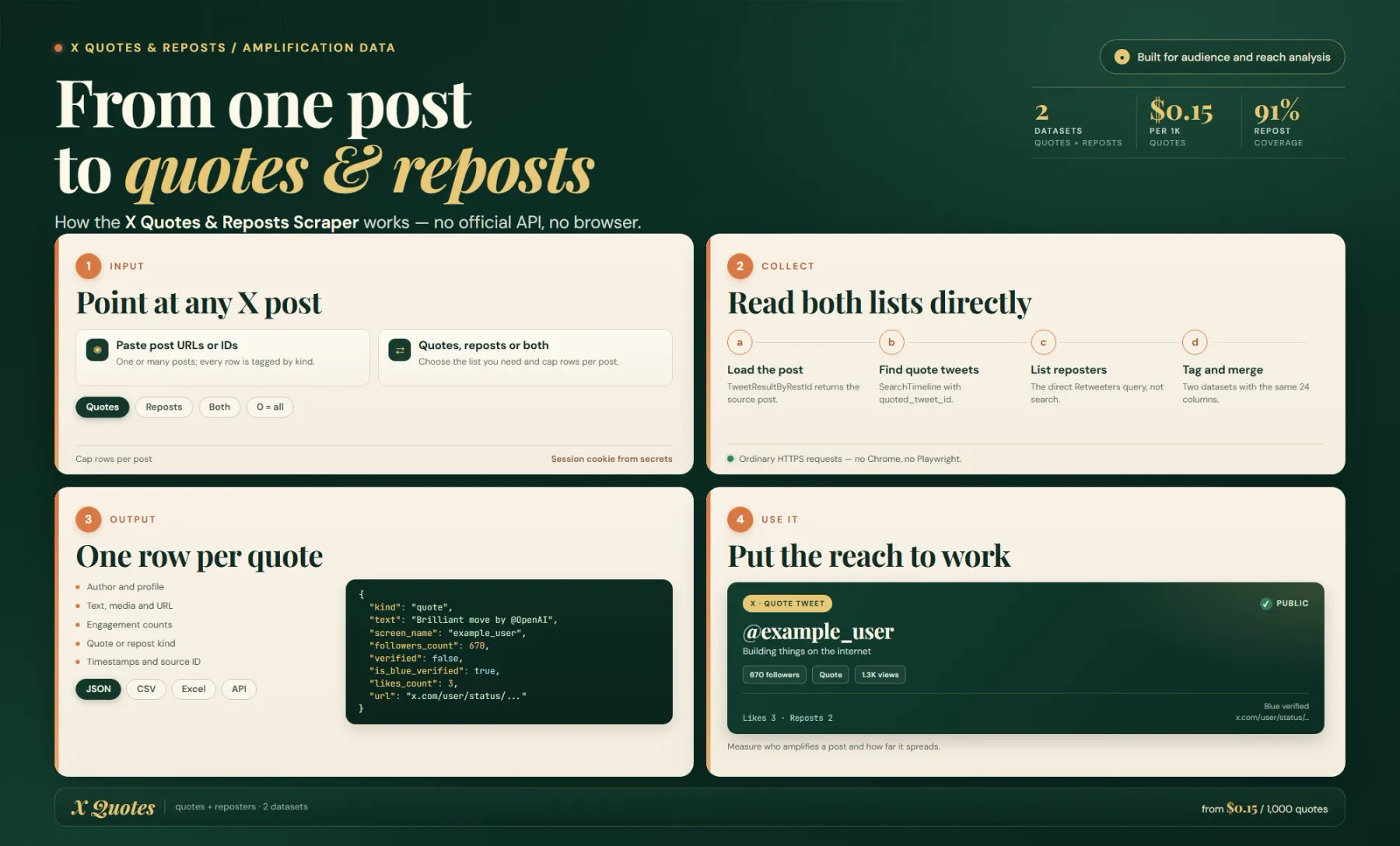
Both lists are login-only on X, so a session cookie is required — the actor reads it from Apify secrets (X_AUTH_TOKEN / X_CT0), so it never appears in the input or run record. It mints X's public x-client-transaction-id header from the app shell (deterministic, not a secret), then calls TweetResultByRestId for the source post, SearchTimeline with quoted_tweet_id:<id> for quote tweets, and Retweeters for the accounts that reposted. Everything is ordinary HTTPS requests — no Chrome, no Playwright.
Give it one or more post URLs or IDs, choose quotes, reposts or both, and the actor returns structured rows with author profiles, engagement counts and source timestamps.
Collect Quote Tweets And Reposts Without The Official X API
X's official API does not expose the account list for reposts, and gates quote tweets behind expensive tiers. This actor returns both as structured JSON with author profiles and engagement counts, and does it over plain HTTP.
Input
| Field | Type | Required | Default | Notes |
|---|---|---|---|---|
tweetUrls | array | yes | — | X post URLs (https://x.com/user/status/123…) or bare numeric post IDs. Multiple posts are fine. |
collect | select | no | quotes | quotes, reposts or both. Every row is tagged kind. |
maxQuotesPerPost | integer | no | 0 | Quote tweets per post. 0 = keep going until X stops serving new ones. |
maxRepostsPerPost | integer | no | 0 | Reposting accounts per post. 0 = keep going until X stops serving new ones. |
There is no proxy field — the actor makes ordinary HTTPS requests and does not need one. There is no cookie field either; the session is read from secrets. You state rows, and the actor derives pagination depth from that.
Output
Rows are split across two datasets, each with its own schema; both expose the same 24 columns so a merged export still parses (kind tells them apart). Views: overview and all.
collect | default dataset | reposts dataset |
|---|---|---|
quotes | quote rows | (not created) |
reposts | (empty) | repost rows |
both | quote rows | repost rows |
Both datasets share these fields: source_tweet_id, kind, quote_tweet_id, quoted_tweet_id, url, created_at, text, screen_name, user_id, user_name, avatar_url, bio, followers_count, following_count, verified, is_blue_verified, replies_count, retweets_count, likes_count, views_count, media_count, media_urls, source, collected_at.
Notes: for repost rows the post-specific columns (created_at, text, engagement counts) are null — a native repost has no post of its own — and url points at the retweeter's profile. A run summary (collected counts vs X's reported counts, coverage %, stop condition, billed events, errors) is stored as the key-value store item OUTPUT.
Coverage
Coverage is not 100%, and the reason is on X's side: X hides quote tweets and reposts from deleted, suspended and protected accounts. The /quotes tab is backed by X's search index, which only exposes a slice of very large threads (a post reporting 1,582 quotes typically yields a few hundred rows, ~15–40%). The repost list is a direct query, not routed through search, so it lands much closer to the reported count — the reference run collected 1,584 of 1,744 reposts (~91%), ending on X's own last page rather than on a cap. OUTPUT.coverage_pct and OUTPUT.reposts_coverage_pct always report the real ratio; both go to null when a configured limit or a spending limit ended the list, and stopped_by / reposts_stopped_by say which case occurred.
Example Input
Quote tweets only, capped:
Example Output
kind: "quote" (default dataset):
kind: "repost" (reposts dataset):
Setup
Store the session once with the Apify CLI, using a throwaway ("burner") account:
.actor/actor.json maps these secrets to the X_AUTH_TOKEN / X_CT0 env vars, and the actor reads only those env vars — there is no cookie field in the input, so a run's INPUT never stores the session. Rotate by re-running the two commands and apify push. The run log prints the logged-in handle (Session OK: posting as @…). Use a burner account: this actor automates a logged-in session, and if an account ever gets a challenge, log in once manually in a normal browser to clear it.
Integrations & Automation
- Apify API — trigger runs and read both datasets programmatically.
- Webhooks — act when a run finishes (e.g. push new quote tweets into a CRM or Slack).
- Zapier / Make — pipe engaged accounts into Google Sheets, Airtable or an outreach tool.
Recommended schedule: run hourly/daily for launch, PR or crisis monitoring (new quotes appear fast); weekly for competitive amplification reports.
Related Actors
- Tweet Scraper — the largest X scraper in the cluster; the broad actor to link to from this narrower one.
- X Quote Tweets Scraper — sibling actor focused on quote tweets only.
- X Tweet Engagement Scraper — sibling actor for engagement metrics.
- X Tweet Scraper Lite — lightweight X scraper for quick tweet lookups.
- X Tweet Scraper — another broad X scraper for the same topic cluster.
FAQ
Does this use the official X / Twitter API?
No. It calls X's own GraphQL endpoints over plain HTTPS — the same ones the x.com website uses — so there is no API key, no official tier limits and no per-call API fee.
Why is a session cookie required?
Both quote tweets and the repost list are login-only on X. The actor reads auth_token / ct0 from Apify secrets, so the session never appears in the input or the run record.
Do I need a browser or a residential proxy?
No. It runs as pure HTTPS requests (no Chrome, no Playwright) and does not need a proxy.
Why is coverage below 100%?
X hides quote tweets and reposts from deleted, suspended and protected accounts, and its search index (which backs the quotes tab) only exposes a slice of very large threads. Quote tweets typically land ~15–40% of the reported count; the repost list is a direct query and reached ~91% in the reference run. OUTPUT always reports the real coverage.
What are alternatives to this actor or to X data?
The official X API is the main alternative for tweets themselves, but it does not expose the reposting-account list. Within the Apify Store, Tweet Scraper is the broadest X scraper for general tweet and profile data.
How much does a run cost?
Pay-per-event: $0.15 per 1,000 quote tweets, $0.10 per 1,000 reposts, plus a one-off ~$0.00005 start charge. The reference run (331 quotes + 1,584 reposts) cost about $0.21.
Is there a free trial?
Yes — a minimalMaxTotalChargeUsd of $0.01 makes a trial run possible without allowing a run to be capped below one result.
For AI Agents & LLM Apps
Purpose: return the quote tweets and/or the reposting accounts for one or more X posts as flat JSON records with author profile, engagement counts and media.
Minimal working input:
Variant inputs:
Output fields (both datasets, 24 columns): source_tweet_id, kind, quote_tweet_id, quoted_tweet_id, url, created_at, text, screen_name, user_id, user_name, avatar_url, bio, followers_count, following_count, verified, is_blue_verified, replies_count, retweets_count, likes_count, views_count, media_count, media_urls, source, collected_at. Run summary is in the key-value store item OUTPUT.
Behaviors an agent should know:
tweetUrlsis the only required field and accepts full URLs or bare numeric post IDs, including multiple posts per run.- There is no cookie field: the session must already exist as Apify secrets
X_AUTH_TOKENandX_CT0, or the run will fail at the session step. collectchooses which dataset fills —quotes→ default dataset,reposts→ therepostsdataset alias,both→ both. Every row is taggedkind.0onmaxQuotesPerPost/maxRepostsPerPostmeans "until X stops serving new ones" — the default and the deepest collect; a non-zero value caps rows and nullscoverage_pct.- On repost rows, the post-specific columns (
created_at,text, engagement counts) arenullandurlis the retweeter's profile, not a post permalink. - Billing model: pay-per-event —
quote_tweet$0.00015 per row ($0.15/1K) andrepost$0.0001 per row ($0.10/1K), plus oneapify-actor-startcharge per run. Pages are billed before they are stored, so a run stopped by a spending limit keeps every row it already paid for.
Legal & Compliance Disclaimer
This actor is an independent tool and is not affiliated with, endorsed by, or sponsored by X Corp. It reads publicly visible post data plus login-only lists through your own X session (the auth_token / ct0 cookies you supply) — it is not a login bypass and holds no credentials of its own. It does not scrape data behind a login the user does not already hold, and does not solve CAPTCHAs. Use a throwaway account, and note X's Terms of Service and automation rules apply to your session. The output includes personal data (handles, display names, bios, avatars, follower counts); users are responsible for their own compliance with applicable data-protection law (including GDPR/CCPA where the data concerns EU or California individuals) and should not use it for unsolicited commercial outreach in violation of applicable law.
SEO Keywords
x quotes scraper, twitter retweeters scraper, quote tweet scraper, retweeter list, who retweeted my tweet, twitter engagement data, x api alternative, twitter quote tweets data, repost scraper, x retweeter data, twitter influencer discovery, x post amplification, quote tweet export, twitter sentiment analysis data, x scraper no browser, retweeter dataset, twitter lead generation, x quote tweets scraper, twitter competitor analysis, x engagement scraper, twitter scraper without api


![Tumblr Scraper [💰$2.5/1K] | Posts | Images | Tags avatar](https://images.apifyusercontent.com/AqYkwxiNr-uxsXkGH9dqw-804YbLMOB9V2ekrKXZzgI/rs:fill:76:76/cb:1/aHR0cHM6Ly9hcGlmeS1pbWFnZS11cGxvYWRzLXByb2QuczMudXMtZWFzdC0xLmFtYXpvbmF3cy5jb20vZHRSN3FuVGJRck5pU0NtajctYWN0b3ItdndNTXFaMFZ2SWN2S1BPWmEtbEJNTmwzZzBsTi0zNjYxNTEucG5n.webp)

![Zalando Scraper [💰$1.5/1K] | Fashion | Products | Prices avatar](https://images.apifyusercontent.com/B8T0r_GVcXSqZJV6XdYmuIQCbexB6MfweEnzuMf6yRM/rs:fill:76:76/cb:1/aHR0cHM6Ly9hcGlmeS1pbWFnZS11cGxvYWRzLXByb2QuczMudXMtZWFzdC0xLmFtYXpvbmF3cy5jb20vZHRSN3FuVGJRck5pU0NtajctYWN0b3ItcHJCWXNoT2h4SXNhYWhVUTgtaGJNMUpYUjFoRy16YWxhbmRvLWxvZ28ucG5n.webp)