

Businesses Without Website: Google Maps No-Website Leads
Pricing
from $3.00 / 1,000 business without a websites
Businesses Without Website: Google Maps No-Website Leads
No-website leads from Google Maps: local business leads with no website, or only a dead, parked or Facebook-only one. Phone, address and rating included. Pay per business found.
Pricing
from $3.00 / 1,000 business without a websites
Rating
0.0
(0)
Developer

Aiden Boudreau
Maintained by CommunityActor stats
0
Bookmarked
1
Total users
0
Monthly active users
6 days ago
Last modified
Categories
Share
Google Maps No-Website Leads: Businesses Without Website
Find local businesses on Google Maps that have no website, or only a dead, parked, expired or Facebook-only one. Every row has the business name, phone, address, rating, review count and a Google Maps link, so you can call or visit them with an offer for a website.
No-website leads at about $8 per 1,000, all-in (Google Maps + this Actor, default mode), with no monthly fee.
Typical buyers: web designers, freelancers, local SEO and marketing agencies, website-builder and hosting sales teams, and anyone selling to small local businesses.
How to get no-website leads (businesses without a website)
- Enter one or more business types ("plumber", "dentist", "hair salon") and a location ("Boise, ID", "Leeds, UK").
- Click Start. A 20-business test finishes in under a minute.
- Open the Businesses without a website table, or export CSV, Excel or JSON.
You can also pass the dataset of an earlier Google Maps Scraper run (mapsDatasetId) so you don't pay to scrape Google Maps twice.
Example output (real run, default input)
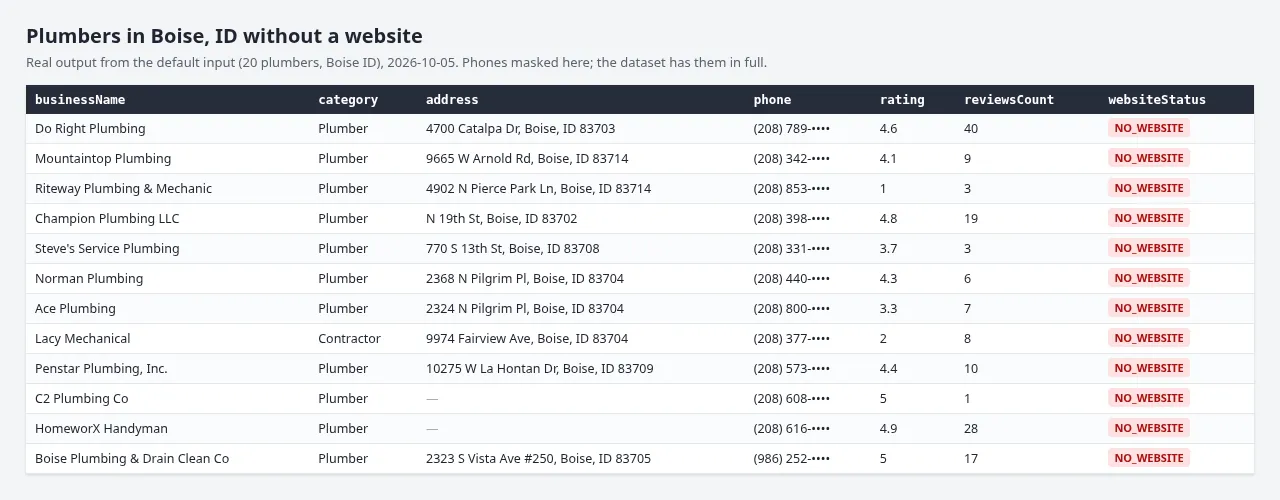
20 plumbers in Boise, ID with no website, from a real run of the default input (phones masked in this image only).
What you get
| Field | Meaning |
|---|---|
businessName, category, address, city, state, postalCode | Who and where |
phone | Phone number from Google Maps |
rating, reviewsCount | Google rating and review count (more reviews = a more established business) |
websiteStatus | NO_WEBSITE, DEAD, PARKED, EXPIRED, PLACEHOLDER or SOCIAL_ONLY |
reason | Plain-English explanation |
listedWebsite | The website Google Maps lists, if any |
googleMapsUrl | Link to the listing |
Which businesses are returned
- No website listed on Google Maps.
- With "Also include dead, parked or social-only websites" switched on (off by default, because it needs every place scraped and costs more): the listed website is down, a parked domain, an expired hosting page, a placeholder, or only a Facebook/Instagram/Linktree-style page or a booking page (Vagaro, Schedulicity, GlossGenius and similar). These businesses effectively have no website either.
- Businesses with a working website are not returned and not charged.
- Permanently or temporarily closed places are skipped.
Pricing and cost per 100 leads
Pay per event: $0.003 per business returned. Google Maps data comes from Apify's Google Maps Scraper, which runs in your account at its own price.
- Default mode (no website listed): Google's own filter means you only pay Google Maps for businesses that are leads, about $0.005 each. 100 leads cost about $0.80 all-in ($0.50 Google Maps + $0.30 this Actor). Measured: 20 of 20 places scraped were leads.
- With dead/parked/social-only sites included: every place has to be scraped to be checked, about $0.005 per place, and roughly 10-15% are leads. 100 leads then cost about $4 to $5 all-in. Use "Min reviews" to keep only established businesses, and "Max Google Maps cost" to cap the scan.
FAQ
Does it scrape emails? No. It returns the phone number and address Google Maps shows publicly. Sites that exist are not crawled for contacts, only checked.
How is this different from the Google Maps Scraper's "without website" filter? In default mode it uses that filter for cheap discovery and adds clean lead fields. Switch on the dead-website option and it also catches listed websites that are dead, parked or just a social page, which are often the best leads.
Is it legal? It reads public business listings. Business phone numbers and addresses are public listing data; follow your local rules for cold calling and email.
Something broke? Open the Issues tab with your run link and we'll look at it.
Looking to pitch redesigns to businesses whose existing site is outdated? See Web Design Leads: Bad & No-Website Business Finder, which scores sites on mobile-friendliness, HTTPS, age and speed.
Related Actors
Same author, built for local SEO and web design agencies:
- Web Design Leads: scores existing websites (mobile, HTTPS, age, speed) and finds businesses with dead or no sites.
- Google Business Profile Audit Leads: unclaimed or incomplete Google Business Profiles.
- Local SEO Keyword Finder: service + city keywords from Google search suggestions, tagged by intent.
- Slow Website Leads: PageSpeed & Lighthouse Audit: mobile Lighthouse score, load time, top 3 fixes and a pitch line per business website, no Google key needed.


