

Web Design Leads: Bad & No-Website Business Finder
Pricing
from $10.00 / 1,000 website auditeds
Web Design Leads: Bad & No-Website Business Finder
Web design leads from Google Maps: local businesses with a bad website (dead or parked domain, expired plan, no HTTPS, not mobile-friendly, outdated tech) or none. Returns a 0-100 score, a ready-to-paste pitch and contacts for web designers.
Pricing
from $10.00 / 1,000 website auditeds
Rating
0.0
(0)
Developer

Aiden Boudreau
Maintained by CommunityActor stats
0
Bookmarked
9
Total users
5
Monthly active users
12 days ago
Last modified
Categories
Share
Web design leads, audited: find local businesses with a bad website (or none) and get a ready-to-send pitch for each. Built for web designers, freelancers, agencies and local SEO consultants.
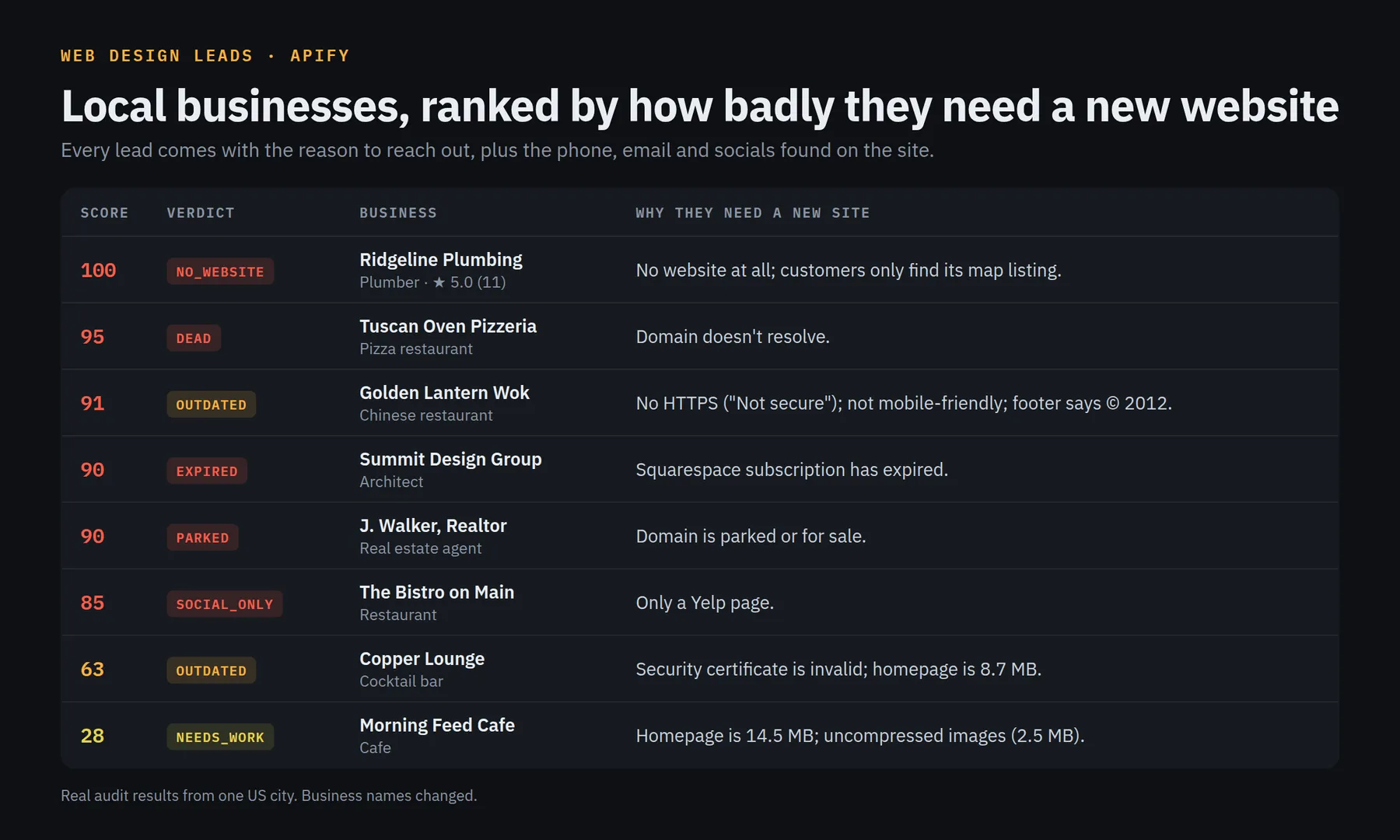
Give it a business type and a city ("dentist", "Boise, ID"). It finds the businesses on Google Maps, keeps the businesses without a website, then audits every website of the rest and returns a ranked lead list:
- No website at all: only a Google Maps listing.
- Dead, parked or expired: domain doesn't resolve, server errors, "domain for sale" pages, an expired Squarespace or Wix plan, a dead Google
business.sitepage. - Not a real website: only a Facebook, Instagram or Yelp page, or a free builder subdomain.
- Outdated or broken: no HTTPS ("Not secure"), not mobile-friendly, a © 2015 footer, Flash or HTML frames, discontinued site builders (FrontPage, iWeb, Muse), old WordPress or jQuery, 10 MB homepages, uncompressed images, slow servers.
Each business gets a 0–100 opportunity score, a one-line pitch written in plain English ("Not mobile-friendly; footer says © 2016; homepage is 9.4 MB."), and the emails, phones and social links found on its site.
Only need businesses with no website at all, without the audit? Google Maps Businesses Without Website is the cheaper, faster tool for that.
How to use it
Pick one or more sources:
| Source | Input | When to use it |
|---|---|---|
| Google Maps search | searchTerms + location | Start from zero: "plumber" + "Tulsa, OK" |
| Earlier Google Maps run | mapsDatasetId | You already ran Google Maps Scraper; audit those places without paying to scrape Maps again |
| Your own list | websites | Audit any list of URLs (from a CRM, a directory, a spreadsheet) |
Then filter:
minScore: only return (and pay for) leads at or above a score. 45+ is "outdated", 85+ is dead, parked, expired or no real website.includeNoWebsite: keep or drop businesses with no website.
What you get
One row per business (Leads view shown first, full audit in the Audit details view):
(A real audit result, with the business name and contact details replaced.)
Verdicts
| Verdict | Score | Meaning |
|---|---|---|
NO_WEBSITE | 100 | On Google Maps with no website |
DEAD | 90–95 | Doesn't resolve, doesn't load, server error, or dead business.site page |
PARKED / EXPIRED / PLACEHOLDER | 85–90 | Parked or for-sale domain, expired builder subscription, "coming soon" or default server page |
SOCIAL_ONLY | 85 | The "website" is a Facebook, Instagram, Yelp or link-in-bio page, or a booking/ordering page (Vagaro, Schedulicity, GlossGenius, Toast...) |
OUTDATED | 45+ | Several serious problems; a redesign pitch |
NEEDS_WORK | 25–44 | Fixable problems; a maintenance, speed or SEO pitch |
OK | under 25 | A decent site; usually not a lead |
Domain & email check (optional)
Turn on checkDomainHealth and every audited website also gets its domain's registrar, age and expiry date, the business's email provider (Google Workspace, Microsoft 365, GoDaddy...) and whether its SPF and DMARC records exist, in a separate "Domain & email" view. It uses public RDAP and DNS data, adds a second or two per domain, and costs nothing extra.
Useful pitches it finds: a domain about to lapse, a business with no you@business email address, or email missing SPF/DMARC (Google and Yahoo now expect DMARC from senders). In a test on 43 real plumber, salon and contractor sites in Boise and Bozeman, 28 had no DMARC record, 10 had no email on their domain and 3 domains expired within 45 days. Many domains auto-renew, so treat "expires soon" as a reason to ask, not as proof.
Pricing
Pay per result, with no subscription and no rental:
- $10 per 1,000 websites audited ($0.01 each)
- $3 per 1,000 no-website leads ($0.003 each)
- Free: chain and franchise location pages (skipped: a national brand's store page, a franchise's city page like rotorooter.com/boiseid/, or one website shared by 3+ listings), sites that block automated checks (skipped), and anything below your
minScore.
Google Maps discovery runs Apify's Google Maps Scraper in your account at its own price (about $4 per 1,000 places). Use maxMapsCostUsd to cap it.
Example: 100 roofers in Denver works out to about $0.40 of Google Maps plus at most $1 of audits.
Tips
- Run one trade per city for a focused list; schedule it monthly to catch sites that break or expire.
- Use
minScore: 45when you only want strong redesign leads, or85for "no working website" leads. - Already have Google Maps data? Pass its dataset ID instead of searching again.
- IT, email or domain services? Turn on
checkDomainHealthand filter onemailProviderordmarcPolicy. - Lead with one concrete problem from the
pitch, not a list. Owners respond to "your site shows 'Not secure' in Chrome" far more than to a score.
How the audit works
Each website gets a small number of ordinary page requests: the homepage, optionally the contact page, and a size check of the homepage's images, scripts and styles. It is fast (about 200 websites a minute) and cheap. It does not run a full browser, so:
- Sites that build their whole page with JavaScript are audited on what the server sends (head tags, HTTPS, speed, platform), and aren't marked "blank".
- Sites behind bot challenges (e.g. Cloudflare "Just a moment...") can't be checked. They're skipped and never charged.
- Scores are heuristics. Open the site before you pitch.
Use responsibly
The data is what each business publishes on its own website and Google Maps listing. When you contact businesses, follow the rules that apply to you (for example CAN-SPAM in the US: a real postal address, an honest subject line, and an opt-out in every email; GDPR and PECR in the EU and UK). Don't send bulk unsolicited email.
FAQ
How do I find businesses without a website?
Enter a business type (e.g. "roofer") and a city, and leave includeNoWebsite on. Every Google Maps business with no website comes back as a NO_WEBSITE lead with its phone number, address and rating. Set minScore: 85 to get only no-website, dead, parked and expired leads.
How much do 100 leads cost, all in?
At most about $1.40 per 100 businesses: roughly $0.40 of Google Maps Scraper usage per 100 places, plus $0.01 per audited website (up to $1.00) or $0.003 per no-website lead. A typical mix costs $0.80 to $1.20 per 100. Chains, sites that block checks and anything below minScore are free. Set maxMapsCostUsd to cap the Google Maps part.
What counts as a bad website?
Dead or parked domains, expired Squarespace/Wix plans, no HTTPS, not mobile-friendly, outdated copyright years, discontinued site builders, old WordPress or jQuery, very heavy pages and missing basics like a meta description. See the Verdicts table.
Does it work outside the US?
Yes. Any location Google Maps knows, e.g. "Leeds, UK" or "Toronto, Canada". Audit text is English.
Can I audit businesses I already have?
Yes: pass websites (a list of URLs) or mapsDatasetId (an earlier Google Maps Scraper dataset).
Can an AI agent use it?
Yes, through the Apify MCP server. Every input has a plain-English description, and the output schema lists all fields.
Integrations
Run it from the Apify API, schedule it, send results to Google Sheets, Zapier, Make or n8n, or call it from AI agents through the Apify MCP server.
Related Actors
Same author, built for local SEO and web design agencies:
- Google Maps Businesses Without Website: Google Maps businesses with no website, with phone and address.
- Google Business Profile Audit Leads: unclaimed or incomplete Google Business Profiles.
- Local SEO Keyword Finder: service + city keywords from Google search suggestions, tagged by intent.
- Slow Website Leads: PageSpeed & Lighthouse Audit: mobile Lighthouse score, load time, top 3 fixes and a pitch line per business website, no Google key needed. Paste this Actor's dataset ID into it to speed-check the sites you found.
Changelog
- 0.5: optional domain & email check (
checkDomainHealth, off by default, no extra charge): domain expiry, registrar, age, email provider, SPF and DMARC, in a new "Domain & email" view. - 0.4: smarter chain detection (~130 franchise brands, per-city pages of multi-location companies, one site shared by 3+ listings), so fewer corporate sites are billed as leads. Booking or ordering pages (Vagaro, Schedulicity, GlossGenius, Avocado POS...) now count as "no website of its own" (
SOCIAL_ONLY), and two businesses on the same platform are no longer merged into one row. - 0.3: new title for "web design leads" searches (an audit of every site, not just a no-website list). No pricing or behavior changes.
- 0.2: new title and README for "businesses without website" searches; clearer input descriptions. No pricing or behavior changes.
- 0.1: first release. Google Maps search, dataset and URL-list sources; dead, parked, expired, social-only, mobile, HTTPS, legacy tech, freshness, weight and SEO-basics checks; contact extraction.


