

Slow Website Leads: PageSpeed & Lighthouse Audit, No API Key
Pricing
from $20.00 / 1,000 website speed-audited (no key needed)s
Slow Website Leads: PageSpeed & Lighthouse Audit, No API Key
Find local businesses with slow websites: bulk website speed test & performance audit with Lighthouse / PageSpeed Insights, no API key. Mobile score, Core Web Vitals (LCP, CLS, TBT), top 3 fixes and a pitch line per site. Input: a Google Maps dataset or a list of URLs.
Pricing
from $20.00 / 1,000 website speed-audited (no key needed)s
Rating
0.0
(0)
Developer

Aiden Boudreau
Maintained by CommunityActor stats
0
Bookmarked
2
Total users
1
Monthly active users
11 days ago
Last modified
Categories
Share
Find local businesses whose websites are slow on a phone, and get a sales-ready reason to call them. For each business website it runs Google Lighthouse (the engine behind PageSpeed Insights, mobile) and returns the score, how long the main content takes to appear (LCP), the top 3 fixes in plain English and a pitch line you can paste into an email.
No API key needed: Lighthouse runs in the Actor's own Chrome. Have a free Google API key? Add it and the audit runs on Google's PageSpeed Insights API instead, which is faster and 10x cheaper per site.
Built for web designers, local SEO agencies and freelancers who sell speed and redesign work:
- Feed it the dataset from a Google Maps scraper run (or our Web Design Leads Actor): business name, phone, address and Maps link are carried over, so every row is a lead.
- Or paste a list of websites.
- One row per site: duplicates (same domain, with or without www) are checked once.
- Sites that fail to load are listed with the error and not charged.
- Flags listed websites that now redirect to a different site (often an expired or sold domain: a strong lead).
Example output
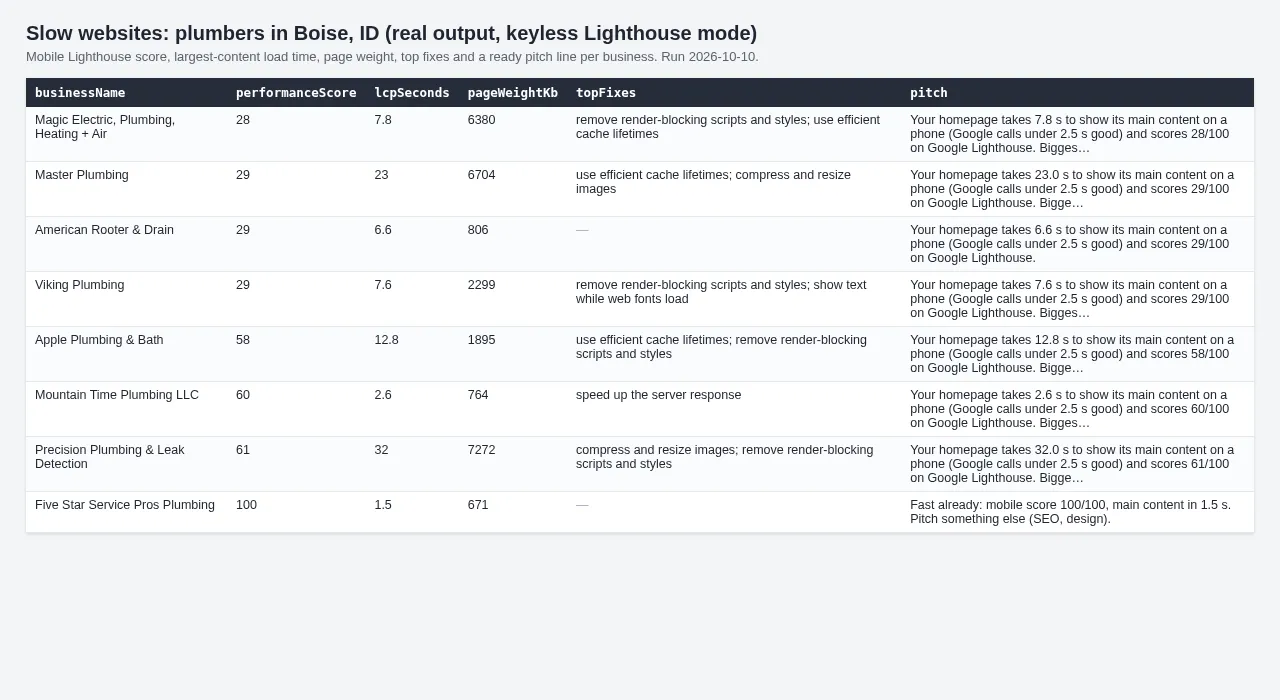
| Business | Mobile score | LCP | Pitch line |
|---|---|---|---|
| Plumber, Boise ID | 29 | 13.5 s | Your homepage takes 13.5 s to show its main content on a phone (Google calls under 2.5 s good) and scores 29/100 on Google Lighthouse. Biggest fix: remove render-blocking scripts and styles. |
| Coffee shop, Bozeman MT | 76 | 4.8 s | Your homepage takes 4.8 s to show its main content on a phone (Google calls under 2.5 s good) and scores 76/100 on Google PageSpeed. Biggest fix: remove render-blocking scripts and styles (~1.7 s faster). |
| Cocktail lounge, Bozeman MT | 65 | 7.6 s | The website listed for this business now sends visitors to another site (bigbrother247.com). Your homepage takes 7.6 s ... Biggest fix: cut the redirects before the page loads (~1.6 s faster). |
(Real results, October 2026. A no-key run on 10 Boise plumbers: 6 slow, 1 needs work, 1 fast, 2 did not load.)
Two ways to run it
- No key (default): Lighthouse runs in our own Chrome with Google's standard simulated mobile network, about 30-50 s per site, one site per CPU core (Apify gives 1 core per 4 GB of memory: run with 8 GB to audit 2 at once). Sites behind a bot check (captcha page) are reported and not charged.
- Your own Google API key (optional): the audit runs on the PageSpeed Insights API, 4 sites at a time, 10-40 s
each, and adds Chrome UX Report field data (
realUserSpeed) when Google has it.
Get a key in 3 minutes (free, no billing account)
The PageSpeed Insights API is free: 25,000 checks a day per key.
- Open https://console.cloud.google.com/projectcreate and create a project (any name).
- Enable the API: https://console.cloud.google.com/apis/library/pagespeedonline.googleapis.com > Enable.
- Create the key: https://console.cloud.google.com/apis/credentials > Create credentials > API key. Under "API restrictions", restrict it to PageSpeed Insights API.
- Paste it into Your Google API key. It is stored as a secret input.
Input
- Your Google API key (optional): see above.
- Websites, or Dataset from a Google Maps / lead Actor run (items with a
websitefield). - Device: mobile (default; what Google ranks on) or desktop.
- Output only slow sites: drop fast sites (score 90+, LCP under 2.5 s) from the output. They are not charged.
- Max sites, Parallel checks.
Output
One row per unique website: businessName, website, finalUrl, verdict (slow / needs work / fast / error),
engine (lighthouse / pagespeed), performanceScore (0-100), lcpSeconds, fcpSeconds, speedIndexSeconds, totalBlockingTimeMs,
cumulativeLayoutShift, pageWeightKb, topFixes (fix, estimated savings in ms), realUserSpeed (Chrome UX Report
category when Google has field data), redirectsToOtherSite, pitch, plus phone, address, city, category,
rating, reviewsCount, googleMapsUrl when they came from a dataset. A SUMMARY record counts the verdicts.
Verdicts: slow = score under 50 or LCP over 4 s; needs work = score under 90 or LCP over 2.5 s (Google's Core Web Vitals thresholds); fast = everything else.
Pricing
- No key: $0.02 per website audited (we run the browser), so 100 sites cost $2.
- With your Google key: $0.002 per website audited, so 1,000 sites cost $2. Google charges nothing for PageSpeed checks.
No start fee. Sites that don't load or show a bot check, and fast sites you filter out, are free.
FAQ
Why is my score different from pagespeed.web.dev? Lighthouse scores vary a few points from run to run (network, server load). Re-check a borderline site before you pitch.
How long does it take? No key: 30-50 s per site per 4 GB of memory, so 100 sites take about 1 hour at 4 GB or 15 minutes at 16 GB. With a key: 100 sites take about 10-15 minutes.
Is this allowed? It only loads public home pages, once each, like a visitor would. With a key it uses Google's official PageSpeed Insights API.
Related Actors
- Web Design Leads: Bad & No-Website Business Finder: audits local business websites for dead, outdated or broken sites.
- Google Maps No-Website Leads: Businesses Without Website
- GBP Audit Leads: Unclaimed & Incomplete Google Business Profile
- Local SEO Keyword Finder


