

Salla Store Scraper — Products, Prices & Stock
Pricing
Pay per usage
Salla Store Scraper — Products, Prices & Stock
Read any Salla (سلة) store and get every public product as clean structured data — Arabic names intact, prices in SAR, live availability. تصدير منتجات سلة.
Pricing
Pay per usage
Rating
0.0
(0)
Developer

Hussein Al-Mansori
Maintained by CommunityActor stats
0
Bookmarked
4
Total users
1
Monthly active users
2 months ago
Last modified
Categories
Share
Salla Store Scraper — Products, Prices & Stock (سلة)
Paste any Salla store address and get its public catalogue back as clean, structured data — product names exactly as the store wrote them, prices in the store's own currency, and live availability.
متجر سلة → بيانات منتجات نظيفة. Salla (سلة) powers tens of thousands of Saudi online stores. This Actor reads them properly, in Arabic, without mangling a single character.
Who this is for
| You are | What you get |
|---|---|
| A merchant on Salla | An export or backup of your own catalogue, in a file you can actually reopen |
| A competing merchant or agency | Competitor assortment and pricing across the Saudi market |
| A market researcher | Structured MENA e-commerce data, one row per product |
Exporting your own store is the case this was built for first. It is your catalogue, and Salla gives you no easy button for it.
What you paste in
A store home page, a category page, or a single product page — and you can mix them in one run. Both kinds of Salla address work:
- a store on Salla's own domain, like
https://salla.sa/your-store - a store on its own domain, like
https://yourbrand.com
If an address is not a Salla store, the result says exactly that instead of returning nothing.
Input
| Field | Type | Default | What it does |
|---|---|---|---|
startUrls | list of URLs | — | The stores, categories, or products to read. Required. |
maxItems | integer | 200 | Stop after this many products from each store. |
includeOutOfStock | boolean | true | Keep sold-out products. Turn off for buyable stock only. |
includeVariants | boolean | true | List options as variants when the store publishes them. |
language | auto / ar / en | auto | Preferred storefront language when a store has more than one. |
respectRobots | boolean | true | Skip any address the store's robots.txt asks crawlers not to read. Checked on every page read, not just the first. |
proxyConfiguration | object | off | Leave off unless a store refuses the connection — see below. |
A run needs nothing but startUrls.
On proxies, and on currency. Two things worth knowing, both measured rather than assumed.
Salla sits behind a CDN that challenges data-centre addresses, so a data-centre proxy reaches fewer stores than no proxy at all — the same store read cleanly on a direct connection and came back as an unreadable challenge page through the data-centre proxy. Proxies are therefore off by default, and a residential proxy is the escalation if a store refuses the connection.
Some stores also localise by where the request comes from. One store returned 290 SAR read
from Saudi Arabia and 105 USD read from a US data centre — a different currency and a
different number, for the same product. Every row carries its own currency, so nothing is
mislabelled, but if you need Saudi pricing specifically, run through a residential proxy pinned to
Saudi Arabia:
What you get back
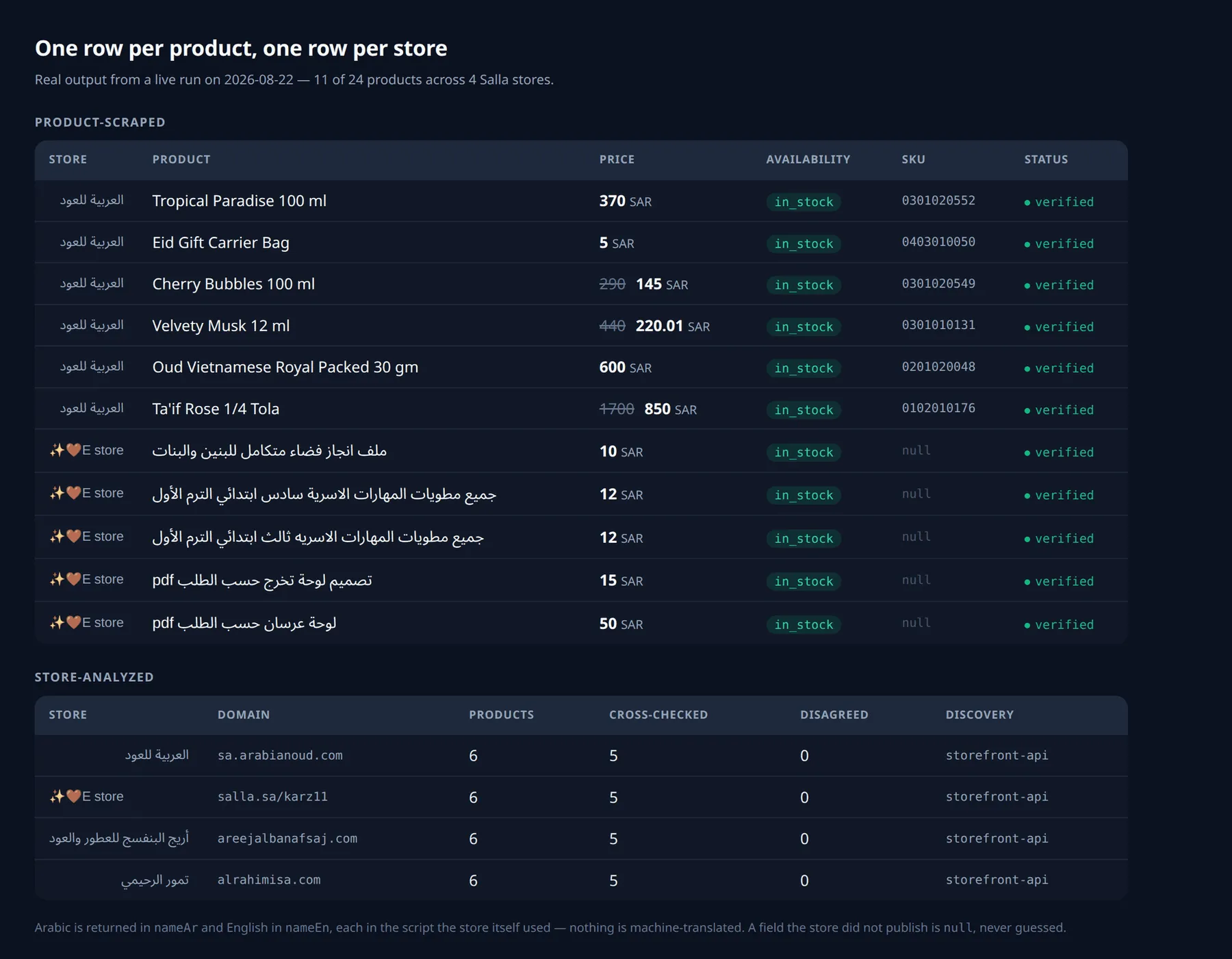
Two kinds of row, told apart by event. Everything above is real output from a live run — no
sample data was written by hand.
One product-scraped row per product:
One store-analyzed row per store, summarising what happened:
Every row stands on its own — a product row repeats the store it came from, so one row is enough to act on without joining it to anything.
Arabic, handled properly
Names come back in the script the store wrote them in. An Arabic name lands in nameAr and
nameEn stays null; an English name does the reverse. Nothing is machine-translated, and no
name is ever transliterated or stripped.
Downloading as CSV opens in Excel with Arabic intact — Apify prefixes CSV exports with a UTF-8 byte order mark, which is the thing Excel needs and the thing most exports forget.
How honest the row is
status | Meaning |
|---|---|
verified | Read cleanly. Nothing was uncertain. |
warning | Delivered, but something was uncertain — the reason is on the row. |
failed | Nothing could be delivered. Never charged. |
Three rules this Actor does not bend:
- A field that could not be read is
null. It is never guessed, never zero, and never a placeholder. If a store publishes no SKU,skuisnull— even when the page offers something SKU-shaped that is really just part of the address. - Stock is only ever what the store said. A store that says nothing gets
availability: "unknown", not"in_stock". - Some products are checked against the store's own product page. A sample from each store is
read twice, from the store's catalogue and from the product's own page. When the two disagree
about price or stock, the row keeps the catalogue value and stops calling itself verified —
it carries
PRICE_MISMATCHorAVAILABILITY_MISMATCHso you know that number is contested. It happens on real stores: one live catalogue lists a perfume as in stock that its own product page marks sold out. The store row publishespricesCrossCheckedandpricesDisagreed, so you can see the size of the check and not just its verdict.
Tested on 31 live Salla stores
Nobody else on the Store publishes numbers. These come from
scripts/run_store_scorecard.py, run on 2026-08-22 against 31 live Salla storefronts and 855
products — sizes from 3 products to 600+, across perfume and oud, abayas, gifts, toys, dates and
coffee, electronics, sportswear, supplements, pet supplies, stationery and collectibles. Eleven
were read on the merchant's own domain and twenty on a salla.sa address.
Every figure below is a count from that run, not an estimate. Ask on the Actor's issues page if you want the store list to reproduce it.
| Field | Extracted |
|---|---|
| Product name | 100% |
| Price | 100% |
| Availability | 100% |
| Images | 99.4% |
| Categories | 89.8% |
| SKU | 13.7% |
| Variants | 0% |
Cross-check: 153 products were also read from their own product page. 11 disagreed — 92.8% agreement. Those 11 are the reason the check exists; each is flagged on its row rather than shipped as clean data.
Two of these numbers deserve their honest explanation rather than a flattering one:
- SKU 13.7% is not a failure to extract. Most Salla merchants never set a SKU. When they haven't, Salla's product page fills the field with the product's own URL slug — and this Actor refuses to publish that as a SKU. A scraper that passed the slug through would show a far prettier number and hand you a column you cannot match against your own catalogue.
- Variants 0%, and 26% of products have them. 220 of the 855 products told us they have
options like colour or size. Salla does not publish the option values anywhere reachable
without running the store's JavaScript, so this Actor does not invent them. Those products carry
hasOptions: trueso you know the variants exist and that we could not read them. Fixing this properly means adding a browser, which is a cost decision and not yet made.
Error codes
| Code | Meaning | Retry? |
|---|---|---|
NOT_A_SALLA_STORE | Reachable, but not a Salla store | No |
ROBOTS_DISALLOWED | The store's robots.txt asks crawlers not to read it | No |
STORE_UNREACHABLE | The store could not be reached | Yes |
STORE_TIMEOUT | The store did not respond in time | Yes |
PRODUCT_PARSE_FAILED | A product address you submitted publishes no readable details | No |
INVALID_URL | The address is not a usable http/https URL | No |
BLOCKED_DESTINATION | The address resolves somewhere requests are not sent | No |
DNS_FAILURE | The hostname does not resolve | No |
STORAGE_FAILURE | The result could not be saved. Never charged. | Yes |
BUDGET_EXHAUSTED | The run's charge limit is spent | No |
INTERNAL_ERROR | Something unexpected. Nothing internal is ever shown to you. | Yes |
A closed store is not an error. Salla stores can be switched off by their owner, and that is a
real answer: the row comes back with stoppedBy: "storeClosed" and a STORE_CLOSED warning,
naming the store, rather than pretending its catalogue is empty.
One unreadable product inside a catalogue is not an error either — it is left out, the rest are
still returned, and the store row carries a PRODUCT_PARSE_FAILED warning saying so.
ROBOTS_DISALLOWED above stops a whole store. When robots.txt closes only some addresses, the
run continues without them and the store row carries a ROBOTS_LIMITED_DISCOVERY warning saying
how many were skipped — so a catalogue shortened by the store's own instruction never looks
complete.
Limits
| Limit | Value |
|---|---|
| Stores per run | 50 |
| Products per store | 5,000 (maxItems, default 200) |
| Time per store | 300 seconds |
| Stores read at once | 2 |
| Images kept per product | 20 |
| Variants kept per product | 50 |
| Products cross-checked per store | 5 |
What this deliberately does not do
- No reviews, no customer data, no store-owner contact details. Product data only.
- No logged-in areas, carts, checkouts, or coupon probing. Public catalogue only.
- No image downloading — URLs only.
- No "search all of Salla": it reads the stores you name.
Pricing
Free. Only Apify's platform usage applies. Two events are defined — product-scraped (one per
product) and store-analyzed (one per store per run) — and neither is charged today.
They exist so that adding a price later would be a price change and not a redesign. Nothing is planned.
Works well with
Website Change Monitor with Smart Diff — take a product address from this Actor and hand it to the monitor to be told when that price moves.
Zid Store Scraper — the same job for Zid (زد), Salla's main rival. Identical field names and
identical values inside them, so the two datasets concatenate into one sheet with no renaming, and
every row's platform says which shop it came from.
FAQ
Does it work on a store with its own domain? Yes. Eleven of the 31 stores in the scorecard were read on the merchant's own domain.
Does it need my store login? No. Public catalogue pages only. This Actor never touches logins, carts, checkout, or coupons.
Does it get reviews or customer data? No. Product data only.
Why is sku empty on so many rows?
Because most Salla merchants never set one — 13.7% of the scorecard's products had a SKU at all.
That is the store's choice, not a failed read, and an invented value would be worse than null.
Why are variants empty?
Salla builds its option pickers in the browser, and this Actor reads the storefront API instead of
running one. Rather than guess, it reports nothing and says so. See the scorecard.
Does language: ar translate the store?
No. It says which language you expected; if the store does not publish it, the row carries a
LANGUAGE_UNAVAILABLE warning and you get the store's own language. Nothing is machine-translated.
Does it download the images? No — you get URLs.
Does it scrape Zid stores? No. That is the separate Zid Store Scraper.
Can it find every Salla store for me? No. It reads the store URLs you give it.
Support
Open an issue on the Actor's Apify page. Include the run ID and the store URL — the
store-analyzed row tells us most of what we need.
Not affiliated with, endorsed by, or sponsored by Salla (سلة).


