
Zid Store Scraper — Products, Prices & Stock
Pricing
Pay per usage
Zid Store Scraper — Products, Prices & Stock
Paste any Zid store URL and get every public product as clean structured data — Arabic names, prices in the store's own currency, list price and sale price, live stock, and variants. Stores on their own domain are detected too. متجر زد | تصدير منتجات زد
Pricing
Pay per usage
Rating
0.0
(0)
Developer

Hussein Al-Mansori
Maintained by CommunityActor stats
0
Bookmarked
2
Total users
1
Monthly active users
a month ago
Last modified
Categories
Share
Paste any Zid store URL, get every public product as clean structured data. Arabic handled right, prices in the store's own currency, availability live. Free.
متجر زد | استخراج المنتجات والأسعار والمخزون
Note that price and salePrice are both there. A Zid product page publishes its list price
only in the storefront's own data — its structured data carries just the number a shopper pays. A
scraper that reads the easy source reports a discounted product as though 279 were its normal
price. This one doesn't.
Contents
Quick start · Why the data is trustworthy · Use cases · Input · Output · Arabic and CSV · Pricing · Limits · Errors · FAQ
Quick start
- Paste one or more Zid store URLs into Store URLs — homepage, category, or product page. Mixed is fine.
- Run it.
- Download JSON or CSV. The CSV opens in Excel with Arabic intact.
Nothing else is required. Every other field is a refinement.
Why the data is trustworthy
Custom domains are detected. About 59% of Saudi Zid stores run on the merchant's own .com
domain, where nothing in the URL says "zid". Detection reads the page, not the hostname, and
requires several independent platform markers — so a store on yourbrand.com works exactly like
one on yourbrand.zid.store, and a blog post about Zid is correctly refused with
NOT_A_ZID_STORE.
Stock is never guessed. Zid storefronts can leave availability genuinely ambiguous — we
measured a sold-out product whose stock flag was empty. This Actor reads both the storefront's own
state and its structured data. When they agree, you get the answer. When they disagree, you get
unknown and a warning — never a confident wrong answer. A stock field you cannot believe is
worse than one that admits doubt.
Unreadable means null. No field is ever filled with a guess. Anything uncertain raises a
warning and degrades status from verified, so you can filter on it.
Every row is self-contained, so an agent can act on one row without fetching anything else.
The scorecard
Measured on 38 live Zid stores, 152 products — not a demo store, and not a list picked for being easy to parse:
| Field | Success |
|---|---|
| Product name | 100% (152/152) |
| Price | 100% (152/152) |
| Currency | 100% (152/152) |
| Availability | 100% (152/152) |
| SKU | 100% (152/152) |
| Images | 100% (152/152) |
| Variants | 100% (30/30 products that have options) |
| Categories | 96.7% (147/152) |
28 of the 38 stores run on their own domain, where nothing in the URL says "zid" — and every one was detected. No store was misidentified in either direction. Their combined catalogs come to over 56,000 products.
One store of the 39 listed could not be read at all, and it is kept in the list rather than
dropped because it marks the real edge of what this Actor can do. It answers
sitemap_products.xml with an HTTP 400 and a 220 KB HTML error page, so the category-crawl
fallback takes over — and finds nothing, because that storefront builds its product grid in
JavaScript. Its category pages contain one link, /products/, and no individual products.
So the fallback rescues a store whose sitemap is missing but whose pages are ordinary HTML. It
cannot rescue one that renders its catalogue client-side; reading that store means running a
browser, which this Actor deliberately does not do. The run says so rather than returning an
empty catalogue as though the shop were bare: discoveryMethod reads category-crawl, the row
carries a SITEMAP_UNAVAILABLE warning, and no products are claimed.
The five products missing categories are counted as misses even though a merchant filing a product in no category is perfectly normal — we did not verify which it was, and a scorecard should round against itself.
On currency. Every product row carries its own currency, and that is the number this Actor
stands behind. What it deliberately does not promise is that the currency will be SAR. The sibling
Salla Actor measured a storefront returning 290 SAR read from Saudi Arabia and 105 USD read from
a US data centre — a different currency and a different number for the same product, because the
storefront localises on the caller's address, and no query parameter or header would override it.
Whether Zid storefronts do the same has not been measured here, and where a platform runs from is
not something a scraper controls, so the listing claims what is true either way. If you need prices
as a Saudi shopper sees them, point proxyConfiguration at a residential proxy in SA
(apifyProxyCountry) and the store will localise to that instead.
Every figure above is a count from that run, not an estimate, and the measuring tool is kept in the source tree beside the Actor rather than written up after the fact. Ask on the Actor's issues page if you want the store list and the probe script to reproduce it.
Use cases
| You are | You get |
|---|---|
| A merchant on Zid | A backup or export of your own catalog — for migration, an audit, or a feed |
| A competing merchant or agency | Competitor prices and assortment across KSA |
| A market researcher | Structured MENA e-commerce data |
| Moving between platforms | Your catalog out of one storefront and into another |
Price-drop watching: feed the url column into the
Website Change Monitor and get told when a competitor moves a price.
Input
| Field | Type | Default | Meaning |
|---|---|---|---|
startUrls | list of URLs | — | Zid store home, category, or product URLs |
maxItems | integer | 200 | Stop after this many products per run |
includeOutOfStock | boolean | true | Keep sold-out products |
includeVariants | boolean | true | Expand publicly visible options |
language | auto / ar / en | auto | Storefront language to expect — checked, not switched (see below) |
respectRobots | boolean | true | Skip what robots.txt disallows |
proxyConfiguration | object | — | For stores behind aggressive CDNs |
On language. This Actor reads whatever the storefront serves; it does not translate and it
does not switch the shop into another language. Setting ar or en states what you expect, and
the store row carries a LANGUAGE_UNAVAILABLE warning when the shop does not publish it — so a
catalogue that came back in the other language says so rather than looking like the one you asked
for. Stores that declare no language at all are left alone: silence is not a denial.
Output
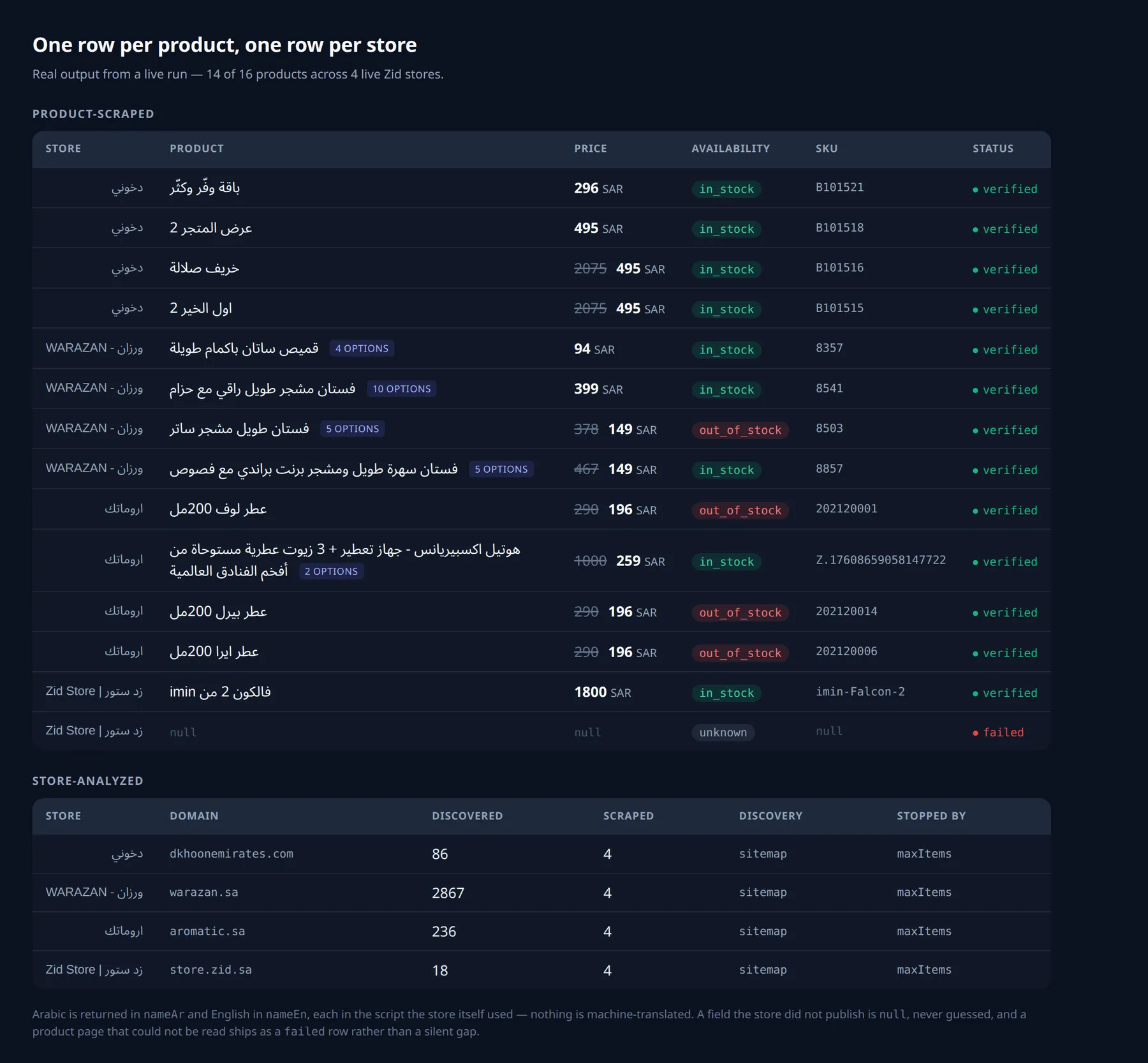
Two record types share one dataset, told apart by event. Everything above is real output from a
live run against four Zid stores — no sample data was written by hand, and the one product page
that timed out is shown exactly as the dataset carries it.
product-scraped
One row per product. Fields: platform, store, url, nameAr, nameEn, price, salePrice,
currency, availability, sku, brand, categories, images, variants, scrapedAt,
status.
availability is in_stock, out_of_stock, or unknown. images are URLs — this Actor never
downloads images.
store-analyzed
One row per store per run, carrying the summary:
stoppedBy is completed, maxItems, timeLimit, or error. When productsDiscovered exceeds
productsScraped, the catalog is bigger than your maxItems — raise it and run again.
discoveryMethod is sitemap, category-crawl, or direct-url.
platform and the sister Actor
Every row carries platform. The Salla Store Scraper uses identical field names and the
same values inside them, so a Zid dataset and a Salla dataset concatenate into one sheet with no
renaming, and platform still tells you where each row came from. The values matter as much as the
names: a filter on stoppedBy = maxItems has to catch both Actors' rows or it quietly returns half
an answer.
Concretely: every column a Zid row publishes, a Salla row publishes under the same name. The
reverse is not quite true, and deliberately so — a Salla row carries five extra columns for
measurements only that platform needs (hasOptions, finalUrl, productsWithOptions,
pricesCrossChecked, pricesDisagreed). Merging the two leaves those blank on Zid rows rather
than requiring you to rename anything. Inventing Zid equivalents would mean publishing columns
that are always zero, which reads as a measurement rather than an absence.
That is what makes the migration case work: export a catalogue from one platform, export from the
other, stack them, and sort by platform.
Arabic and CSV
Product names, categories, and variant options come back in Arabic exactly as the merchant wrote them. CSV exports carry a UTF-8 BOM so Excel opens them with Arabic intact rather than as mojibake.
An Arabic product name containing a Latin model number — سماعة رأس هايبر أكس 727A9AA — stays in
nameAr whole. It is not split. Stores publish one name, so the other field stays null rather
than holding a transliteration nobody wrote.
Pricing
Free. Only Apify's platform usage applies. Two events are defined — product-scraped (one per
product) and store-analyzed (one per store per run) — and neither is charged today.
They exist so that adding a price later would be a price change and not a redesign. Nothing is planned.
Limits
| Limit | Value |
|---|---|
| Store URLs per run | 50 |
Products per run (maxItems) | 200 default, 10,000 maximum |
| Products discovered per store | 50,000 |
| Images per product | 25 |
| Categories per product | 25 |
| Variants per product | 200 |
| Per-page timeout | 15 seconds |
| Per-store timeout | 600 seconds |
| Stores in parallel | 2 |
The discovery ceiling is far above maxItems on purpose: we want to report that a catalog is
bigger than your run rather than let a truncated list look like a small shop.
Errors
| Code | Meaning |
|---|---|
NOT_A_ZID_STORE | Reachable, but not a Zid storefront |
ROBOTS_DISALLOWED | robots.txt asks us not to crawl this; respected by default |
STORE_UNREACHABLE | The store could not be reached — retryable |
STORE_TIMEOUT | The store did not respond in time — retryable |
PRODUCT_PARSE_FAILED | One product was unreadable; the run continues |
INVALID_URL / INVALID_INPUT | The input could not be used |
BLOCKED_DESTINATION / DNS_FAILURE | The address is not a public website |
BUDGET_EXHAUSTED | The run's item budget ran out |
STORAGE_FAILURE / INTERNAL_ERROR | Something on our side |
A single unreadable product never ends the run. It comes back as a row with status: failed, so
you can see which URL did not work instead of finding a silent hole in your data.
FAQ
Does it work on a store with its own domain? Yes — that is the majority of Zid stores, and detection is built for it.
Does it need my store login? No. Public catalog pages only. This Actor never touches logins, carts, checkout, or coupons.
Does it get reviews or customer data? No. Product data only. Zid's own robots.txt asks crawlers to leave review pages alone, and we do.
Does it download the images? No — you get URLs.
Does it scrape Salla stores? No. That is the separate Salla Store Scraper, with identical field names.
Can it find every Zid store for me? No. It takes the store URLs you give it.
Support
Open an issue on the Actor's Apify page. Include the run ID and the store URL — the store-analyzed
row tells us most of what we need.
Not affiliated with, endorsed by, or sponsored by Zid.


