
Ecwid Store E-Commerce Scraper avatar
Ecwid Store E-Commerce Scraper

Pricing

from $0.01 / 1,000 results

Go to Apify Store
Ecwid Store E-Commerce Scraper

Ecwid Store E-Commerce Scraper

Ecwid Store Scraper. Products, prices, inventory status, variants & categories from any Ecwid online store. Perfect for competitor monitoring, price intelligence, market research & e-com data collection. Automatic Store Detection, provide the URL, we'll find the store ID. Multiple Scraping Methods

Pricing

from $0.01 / 1,000 results

Rating

0.0

(0)

Developer

John Rippy

John Rippy

Maintained by Community

Actor stats

0

Bookmarked

2

Total users

1

Monthly active users

11 hours ago

Last modified

Share

Ecwid Store Scraper

Scrape products, prices, inventory status, variants, and categories from any Ecwid-powered online store. Perfect for competitor monitoring, price intelligence, market research, and e-commerce data collection.

Features

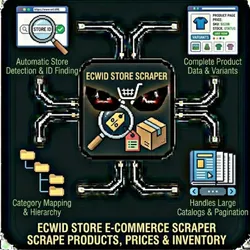
  • Automatic Store Detection: Just provide the store URL - we'll find the store ID
  • Complete Product Data: Name, price, SKU, stock status, images, descriptions
  • Variant Support: Extract all product variants (sizes, colors, options)
  • Category Mapping: Get full category hierarchy
  • Multiple Scraping Methods: API-first with HTML fallback for maximum coverage
  • Handles Large Catalogs: Pagination support for stores with thousands of products

What is Ecwid?

Ecwid (now part of Lightspeed) powers over 4 million online stores worldwide. It's an embeddable e-commerce platform that merchants add to their existing websites. This scraper works with any Ecwid-powered storefront.

Quick Start

By default, this actor runs in Demo Mode with sample data so you can see how it works instantly.

To scrape a real Ecwid store:

  1. Set demoMode to false
  2. Provide either a storeUrl or storeId
  3. Run the actor

Input

ParameterTypeRequiredDefaultDescription
demoModebooleanNotrueRun with sample data. Set to false to scrape real stores!
storeUrlstringNo*-URL of the Ecwid store to scrape
storeIdstringNo*-Ecwid store ID (if known)
maxProductsintegerNo1000Maximum products to scrape
includeVariantsbooleanNotrueInclude product variants
includeCategoriesbooleanNotrueInclude category data

*Either storeUrl or storeId is required when demoMode is false

Example Input - Scraping a Real Store

{
"demoMode": false,
"storeUrl": "https://example-store.com/shop",
"maxProducts": 500,
"includeVariants": true,
"includeCategories": true
}

Or with a known store ID:

{
"demoMode": false,
"storeId": "12345678",
"maxProducts": 100
}

Example Input - Demo Mode (Default)

{
"demoMode": true
}

This returns sample product data immediately - perfect for testing your integration.

Output

Each product is saved as a separate item in the dataset:

{
"id": 123456789,
"sku": "PROD-001",
"name": "Example Product",
"price": 29.99,
"compareToPrice": 39.99,
"url": "https://store.ecwid.com/#!/~/product/id=123456789",
"thumbnailUrl": "https://...",
"imageUrl": "https://...",
"description": "Product description here...",
"inStock": true,
"quantity": 50,
"unlimited": false,
"categoryIds": [1001, 1002],
"categories": ["Electronics", "Accessories"],
"options": [
{
"name": "Size",
"choices": ["Small", "Medium", "Large"],
"type": "SELECT"
}
],
"variants": [
{
"id": 987654,
"sku": "PROD-001-S",
"price": 29.99,
"quantity": 20,
"options": { "Size": "Small" }
}
],
"weight": 0.5,
"enabled": true,
"created": "2024-01-15T10:30:00Z",
"updated": "2024-06-20T14:45:00Z"
}

Additional Outputs

  • STORE_INFO: Summary of the scraped store
  • CATEGORIES: Full category list (if includeCategories is true)
  • OUTPUT: Run summary with status and counts

Use Cases

Competitor Price Monitoring

Track competitor pricing across Ecwid stores to stay competitive.

Market Research

Analyze product offerings, pricing strategies, and inventory across a market segment.

Catalog Backup

Export your own Ecwid store data for backup or migration purposes.

Inventory Tracking

Monitor stock levels across multiple stores.

How to Find Store ID

If you need to provide the store ID directly:

  1. Open the Ecwid store in your browser
  2. Open Developer Tools (F12)
  3. Go to Console tab
  4. Type: Ecwid.getOwnerId()
  5. Press Enter - the store ID will be displayed

Pricing

This actor uses pay-per-result pricing:

  • $0.001 per product scraped

Limitations

  • Only scrapes publicly visible products
  • Private/hidden products are not accessible
  • Some stores may have anti-bot protection
  • Rate limited to respect Ecwid's API limits

Support

Built by John Rippy | Actor Arsenal

For issues or feature requests, contact support@apify.com


Common Problems & Solutions

"Invalid API key" error

Cause: Your API key is wrong, expired, or doesn't have the right permissions. Fix: Double-check your API key. Make sure you copied it exactly without extra spaces.

"Rate limit exceeded" error

Cause: You've hit the API's rate limits. Fix: Wait a few minutes, then try again. Consider reducing the number of concurrent requests.

Empty or incomplete results

Cause: The target may have anti-scraping protection or the data doesn't exist. Fix:

  • Check if the URL/search query is correct
  • Try with different parameters
  • Some sites may block automated access

Demo data showing instead of real results

Cause: demoMode is still set to true. Fix: Set demoMode: false and provide your API key(s).


Built by John Rippy | Actor Arsenal