
Google Ads Transparency Scraper & Ads Library
Pricing
from $1.20 / 1,000 ads
Google Ads Transparency Scraper & Ads Library
Scrape the Google Ads Transparency Center (Google Ads Library) by brand or domain. Get competitor ads from Search, YouTube, Shopping and Maps: ad copy as text, videos, images, days shown and countries. Monitor new ads. API, no login.
Pricing
from $1.20 / 1,000 ads
Rating
0.0
(0)
Developer
Andracore
Maintained by CommunityActor stats
0
Bookmarked
2
Total users
1
Monthly active users
9 days ago
Last modified
Categories
Share
Get every ad a brand runs on Google Search, YouTube, Shopping, Maps and Play from the public Google Ads Transparency Center, often called the Google Ads Library, with the ad copy of Search ads as real text, not just screenshots.
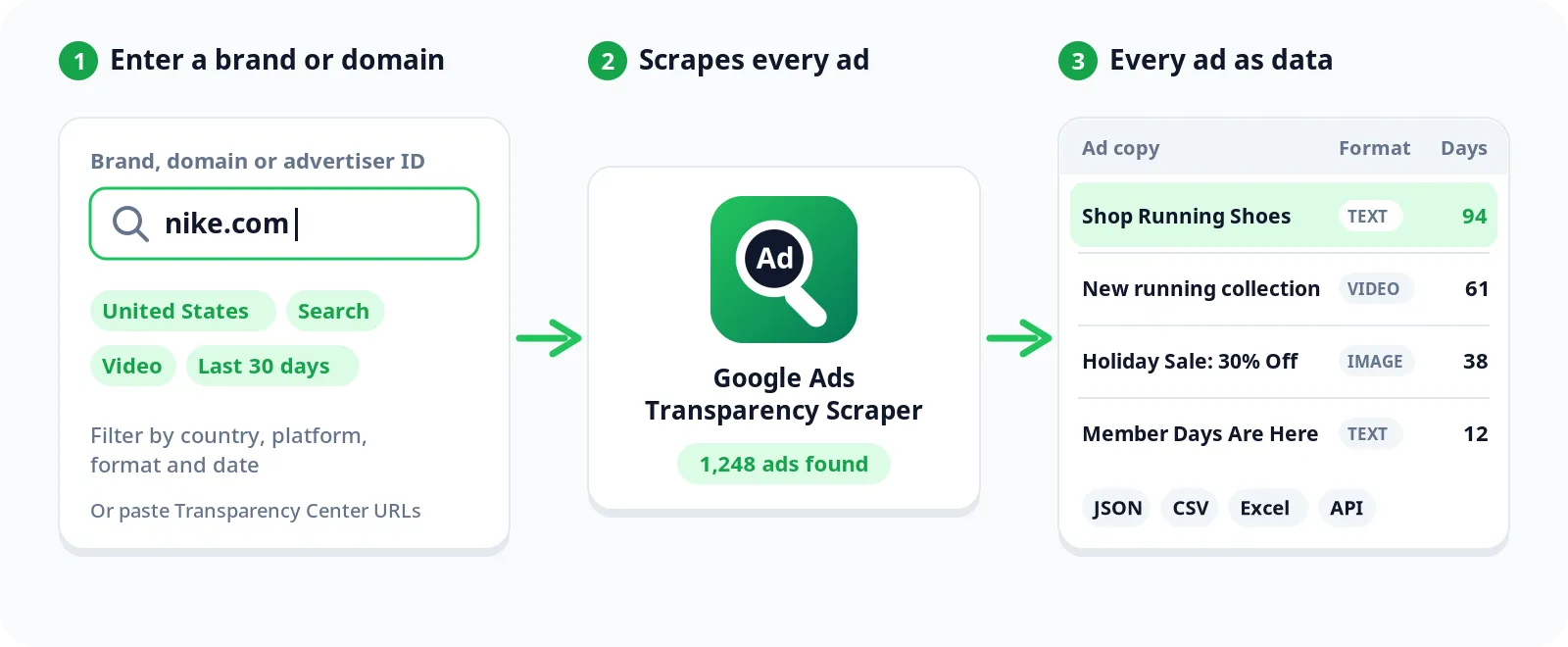
Search by brand name, domain, advertiser ID or Transparency Center URL. Filter by country, platform, format and date. Schedule it to get only the ads that are new since the last run.
No login, no browser, no API key.
Why use this Google Ads scraper
- Ad copy as text. Most Search ads come back with their headline, description, display URL and business name as text you can sort, search and analyze. Store addresses attached to the ad (location extensions) are included too.
- Everything included in one price. Ad copy, YouTube video, all image variations, countries and dates cost the same flat price per ad. There is no extra "details" fee.
- Long-running ads at a glance.
daysShowntells you how many days Google has served each ad, the fastest way to spot the creatives a competitor keeps paying for. - Monitoring built in. Turn on Only new ads and schedule a daily or weekly run. Ads already returned are skipped and not charged.
- Fast. It talks to the same JSON endpoints the Transparency Center website uses. A few hundred ads take seconds. If Google rate-limits the run, it switches to Apify Proxy on its own.
Google Ads data you get for each ad
| Field | What it is |
|---|---|
advertiserName, advertiserId, advertiserCountry | Who runs the ad and where they are based |
format | TEXT, IMAGE or VIDEO |
headline, description, displayUrl, businessName | The ad copy of Search ads |
isDynamicSearchAd | True when Google writes the headline from the landing page |
locations | Store addresses attached to the ad |
targetDomain | Domain the ad points to, when Google reports it |
firstShown, lastShown, daysShown | When the ad ran and for how many days |
videoId, videoUrl, videoThumbnailUrl | The YouTube video behind video ads |
imageUrls | Every image variation of the ad |
regions | Countries where the ad ran and the last date it was shown in each |
adUrl, advertiserUrl | Links to the ad and advertiser pages on the Transparency Center |
Use cases for competitor ad research
- Competitor research. Read every Search ad a competitor runs, sorted by how long each one has been live.
- Copywriting swipe file. Collect headlines and descriptions from a whole niche in a spreadsheet.
- YouTube creative library. Pull every video ad a brand runs, with direct YouTube links.
- Agency prospecting. See who advertises on a domain or in a country, how many ads they run and where they are based.
- New-ad alerts. Monitor competitors and get only their new creatives every morning.
- Brand protection. Watch for ads that use your brand name or domain.
How to scrape the Google Ads Transparency Center
- Type brands or domains in Advertiser names or domains (for example
Nikeorshopify.com). - Optional: pick a Region, Platforms, Ad format and a date range.
- Set Max ads per advertiser, domain or URL and click Start.
- Download the results as JSON, CSV, Excel or HTML, or read them through the Apify API.
A brand name is matched to the advertiser with the most ads among Google's suggestions. Big brands often have several legal entities ("Nike, Inc.", "Nike Retail BV"). Raise Advertisers per search term to get more than one, or paste exact advertiser IDs. You can also paste a Transparency Center URL: the platform and format filters in the URL are respected.
Input examples
Competitor Search ads in the US, with ad copy:
YouTube creatives of a brand:
Weekly monitoring of three competitors (schedule it in the Schedules tab):
Monitoring new ads
With Only new ads on, the first run saves every ad currently running as a baseline (only the ads it returns are charged) and later runs return only ads it has not seen before. The history is kept in your account in a key-value store named google-ads-monitor-<monitor name>. Use a different Monitor name for each client or project so their histories stay separate. Connect the run to Slack, email, Google Sheets, Make or Zapier through Apify integrations to get the new ads where you work.
Google Ads Library API
Run the scraper from your own code and get the ads back as JSON. Python:
Or with one HTTP request that waits for the run and returns the ads:
Your token is in Apify Console under Settings > API & Integrations. The same input works from JavaScript, Make, Zapier, n8n and the Apify MCP server for AI agents.
Output example
A video ad comes with its YouTube link:
Pricing
$1.50 per 1,000 ads, everything included. Platform usage is on us.
| Ads | Cost |
|---|---|
| 100 | $0.15 |
| 1,000 | $1.50 |
| 10,000 | $15.00 |
Paid Apify plans pay less: $1.40 on Bronze, $1.30 on Silver and $1.20 on Gold and above, per 1,000 ads.
In monitoring mode you pay only for new ads. Set a maximum cost per run in the run options and the scraper stops exactly there.
Good to know
- Ad copy coverage. In our tests about 3 out of 4 Search ads came back with their copy as text. The rest are published by Google only as images; their image URLs are always returned.
- Platform filter. Google applies it only to ads shown since September 4, 2023.
- Landing pages. The Transparency Center does not publish full landing page URLs. You get the domain when Google reports it and the display URL of Search ads.
- Counts. Google gives ad totals as ranges ("7,000–8,000"). The log shows that range for every search.
- Speed vs. detail. Turn off Extract ad copy, videos and countries when you only need a quick list of ads.
Other Actors by Andracore
- YouTube Transcript Scraper: turn the video ads you find here, or whole channels, into text, SRT or VTT.
- Shopify Store Analyzer: apps, ad pixel IDs, contacts and best sellers of any Shopify store.
- Shopify Store Finder: find Shopify stores by keyword or niche.
FAQ
Is it legal to scrape the Google Ads Transparency Center? The Transparency Center is a public library Google publishes so anyone can see who advertises and what they show. This scraper reads only that public data and collects no personal information. Check the rules that apply to your use case.
Do I need a proxy? No. If Google rate-limits a large run, the scraper moves to Apify Proxy automatically.
Can I get ads from several countries? Leave Region on Anywhere and every ad comes with the list of countries where it ran.
Can I use it from my code or AI agent? Yes. See the Google Ads Library API section above, or connect it to your AI agent through the Apify MCP server.
Found a bug or need a field that is missing? Open an issue in the Issues tab and it will be looked at quickly.


