
YouTube Transcript Scraper API: Subtitles, Captions, Channels
Pricing
from $3.25 / 1,000 transcripts
YouTube Transcript Scraper API: Subtitles, Captions, Channels
Get YouTube transcripts, subtitles and captions from videos, Shorts, playlists and whole channels as text, timestamped JSON, SRT or VTT. Any language, auto-generated captions and translation. YouTube to text for AI. Pay only for transcripts.
Pricing
from $3.25 / 1,000 transcripts
Rating
0.0
(0)
Developer

Andracore
Maintained by CommunityActor stats
0
Bookmarked
2
Total users
1
Monthly active users
14 days ago
Last modified
Categories
Share
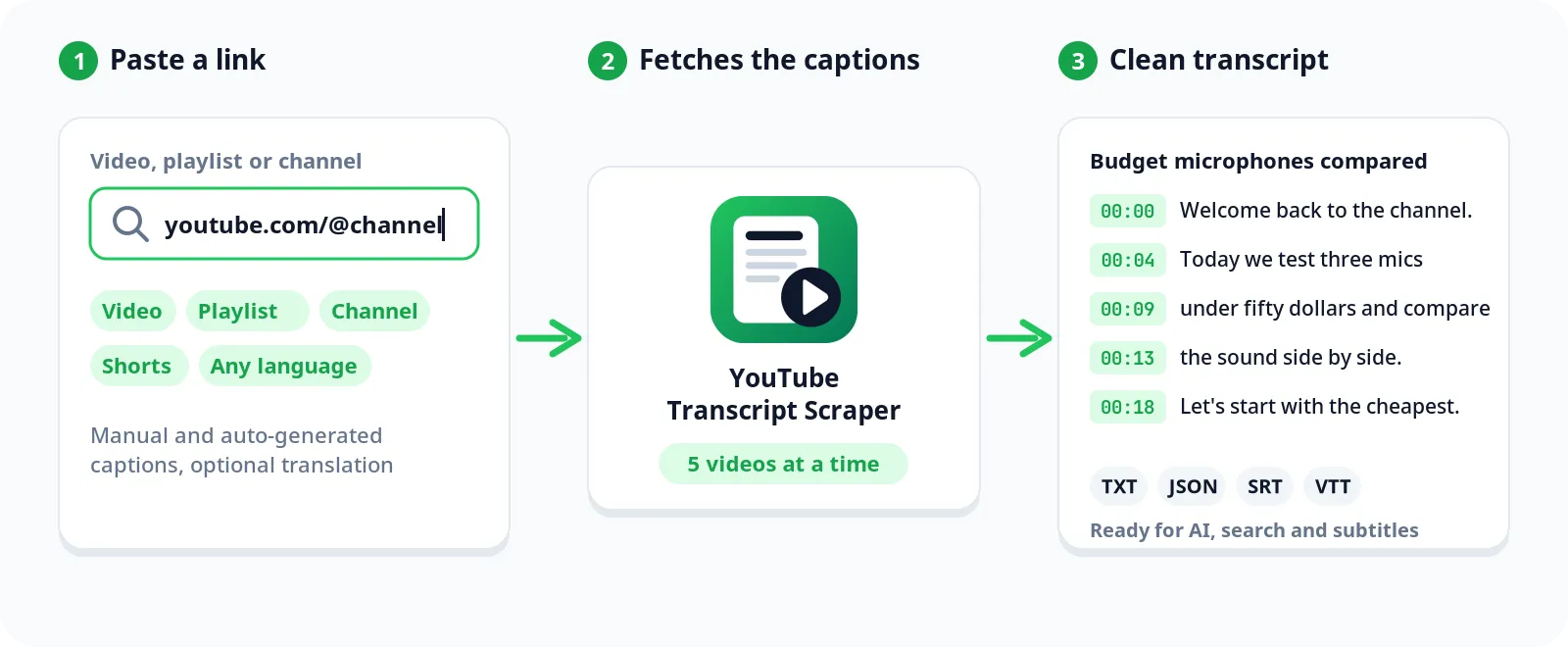
Get the transcript, subtitles and captions of YouTube videos, whole channels and playlists as plain text, timestamped JSON, SRT or VTT. Works with manual and auto-generated captions in any language. No API key, no browser, no login.
Turn YouTube to text in a few clicks, or call it as a YouTube transcript API from your code or AI agent.
Why use this YouTube transcript scraper
- Channels and full playlists. Paste a channel link to get the transcripts of its newest videos, or a playlist link to get every video in it, not just the first 100.
- You only pay for transcripts. Videos without captions, music without speech, unavailable videos and failed requests are listed with the reason and are not charged.
- Fast. Five videos at a time. In our tests, 100 videos from one channel took about a minute.
- Four output formats. Plain text for LLMs and search, timestamped JSON for analysis, SRT and VTT for subtitle workflows, or all at once.
- Any language. You get captions in your preferred language when the video has them, and the original captions otherwise. YouTube machine translation is available too.
- No API key or quota. Uses YouTube's internal mobile API. No Data API key, no daily limits.
YouTube transcript data you get for each video
| Field | What it is |
|---|---|
title, author, channelId | Video and channel metadata |
lengthSeconds, viewCount | Duration and views when the transcript was fetched |
language | Language of the returned transcript |
isAutoGenerated | True when the captions were auto-generated by YouTube |
preferredLanguageFound | False when the video has no captions in your preferred language and the original ones were returned |
isTranslated | True when the transcript was machine-translated |
translationError | Only when you ask for a translation: why YouTube did not translate this video |
transcript | Full text as one string (text and all formats) |
segments | Timestamped segments with startMs, durationMs, text (timestamped and all formats) |
srt | Standard SRT subtitle file |
vtt | Standard WebVTT subtitle file |
availableLanguages | Every caption track the video has |
error | Why the video has no transcript. These rows are not charged |
Use cases for YouTube transcripts
- LLM context. Feed video transcripts to GPT, Claude or any language model for summaries, Q&A or extraction.
- Channel research. Pull every transcript from a creator or competitor channel and analyze topics, keywords and claims.
- SEO research. Get the text of YouTube videos that rank for your keywords.
- Content repurposing. Turn videos into blog posts, newsletters or social media threads.
- Subtitle download. Get SRT or VTT files for any video.
- Dataset building. Batch-process channels and playlists for research or training data.
How to get YouTube transcripts
- Paste links in YouTube links or video IDs: videos, playlists or channels.
- Pick a Preferred language (default: English).
- Choose an Output format (default: plain text).
- Set Max videos (default: 50).
- Click Start, then download the results as JSON, CSV, Excel or HTML, or read them through the Apify API.
Links you can use
| Link | What you get |
|---|---|
youtube.com/watch?v=..., youtu.be/..., youtube.com/shorts/... or the 11-character video ID | That video |
youtube.com/playlist?list=... | Every video in the playlist, in playlist order |
youtube.com/@channel or youtube.com/@channel/videos | The channel's newest long videos |
youtube.com/@channel/shorts | The channel's newest Shorts |
youtube.com/@channel/streams | The channel's past live streams |
Channel links can also be youtube.com/channel/UC..., youtube.com/c/name or just @channel.
Input examples
Single video:
The 100 newest videos of a channel:
A playlist in Portuguese, as SRT subtitles:
Videos translated to Spanish, all formats:
YouTube subtitles as SRT or VTT
Set Output format to SRT or VTT to get standard subtitle files that video editors and players open directly. Each video's file comes in the srt or vtt field, ready to save as a .srt or .vtt file. Choose All formats at once to get text, timestamped segments, SRT and VTT in one run.
YouTube transcript API
Run the scraper from your own code and get the transcripts back as JSON. Python:
Or with one HTTP request that waits for the run and returns the transcripts:
Your token is in Apify Console under Settings > API & Integrations. The same input works from JavaScript, Make, Zapier, n8n and the Apify MCP server for AI agents.
Output example
Timestamped format:
A video without a transcript (not charged):
Pricing
$4.00 per 1,000 transcripts. Videos that fail, have no captions or have no speech are not charged. Paid Apify plans pay less: $3.75 on Bronze, $3.50 on Silver and $3.25 on Gold and above, per 1,000 transcripts.
| Transcripts | Cost |
|---|---|
| 10 | $0.04 |
| 100 | $0.40 |
| 1,000 | $4.00 |
Set a maximum cost per run in the run options and the scraper stops exactly there.
Good to know
- Caption coverage. Most YouTube videos have auto-generated captions in their original language. Manual captions are less common, and preferred when available.
- Language. When a video has no captions in your preferred language, you get the original captions and
preferredLanguageFoundis false. - Translation is best effort. YouTube refuses some machine-translation requests. The scraper retries from other IPs, and when YouTube still refuses, you get the original captions with
translationErrorexplaining why. In our tests about 3 in 4 translations went through. Machine translation quality varies, so verify it for critical use. - Private, age-restricted and members-only videos. YouTube only shows these to signed-in users, so they are listed with the reason and not charged.
- Music videos. When the captions only contain tags like [Music], the video is reported as having no speech and is not charged.
- Residential proxy required. YouTube blocks datacenter IPs. On Apify the scraper uses Apify residential proxies by default. You can also supply your own residential proxy URLs in the input.
- Live streams. Live streams in progress do not have complete captions and may return partial or empty results.
Other Actors by Andracore
- Google Ads Transparency Scraper: every ad a brand runs on Google, including the YouTube video ads you can transcribe here.
- Shopify Store Analyzer: apps, ad pixel IDs, contacts and best sellers of any Shopify store.
- Shopify Store Finder: find Shopify stores by keyword or niche.
FAQ
Do I need a YouTube API key? No. The scraper uses YouTube's internal mobile API, which does not require a key or quota.
Can I get the transcripts of a whole channel?
Yes. Paste the channel link, like youtube.com/@channel, and set Max videos. You get its newest long videos. Add /shorts or /streams to the link for Shorts or past live streams.
What languages are supported?
Any language YouTube has captions for. Set the preferred language to a two-letter code (en, es, pt, fr, de, ja...). A code like pt also matches regional tracks like pt-BR.
Why did I get a different language than I asked for?
The video has no captions in that language, so you got the original ones (preferredLanguageFound is false). Set Translate to for a machine translation.
Why is there no transcript for some videos?
The uploader turned captions off, the video has no speech, or it is private, age-restricted or unavailable. The error field says which, and these videos are not charged.
Can I use it from my code or AI agent? Yes. See the YouTube transcript API section above, or connect it to your AI agent through the Apify MCP server.
Found a bug or need a feature? Open an issue in the Issues tab.


