
Google Ads Library Scraper — Google Ads Transparency Center
Pricing
from $0.96 / 1,000 ads
Google Ads Library Scraper — Google Ads Transparency Center
Scrape the Google Ads Transparency Center (Google Ads library) by brand, website or advertiser ID: ad text with OCR for text ads kept as pictures, variations, countries, EU reach and targeting, political spend. Check which websites run Google Ads; get only new ads. No login.
Pricing
from $0.96 / 1,000 ads
Rating
0.0
(0)
Developer

Anuar Bakty
Maintained by CommunityActor stats
0
Bookmarked
3
Total users
2
Monthly active users
2 days ago
Last modified
Categories
Security
Limited permissionsShare
Google Ads Library Scraper reads the Google Ads Transparency Center (the Google Ads library) without a login and gives every ad as a clean row: the words of the ad, every A/B variation, every country it ran in with its dates, EU reach and targeting, political spend, the YouTube video of video ads. Search by brand name, website, advertiser ID or a pasted Transparency Center link, check which websites run Google Ads, and get only the new ads of your competitors on a schedule.
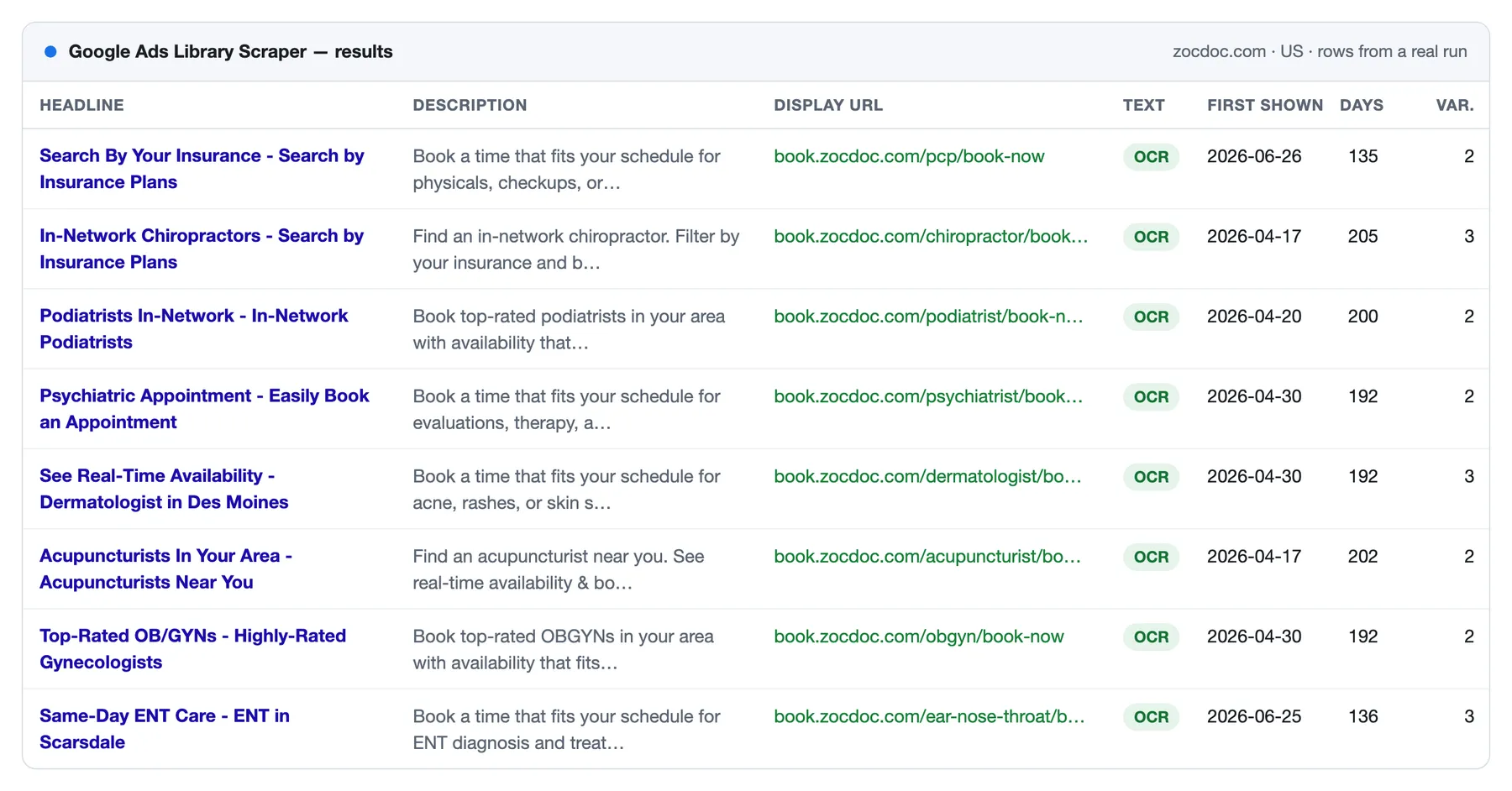
Google keeps many Search text ads only as a picture. The Actor reads the words in it with OCR, inside the run, with no AI and no outside service, and splits them into headline, description and display URL. In a run of 300 ZocDoc ads it read the headline of 279 of the 296 text ads; 16 of the other 17 were pictures of Google's own error page, with no ad in them.
What does Google Ads Library Scraper do?
- Finds the ads of any advertiser by brand name ("Zocdoc"), website ("zocdoc.com"), advertiser ID (AR…), or a Transparency Center link with its filters. Mix them in one run.
- Gives the words of each ad: headline, description, display and landing address, business name, sitelinks, button, phone, category. From Google's preview data when it has them, from the ad picture with OCR when it does not.
- Reads every A/B variation of an ad, each with its own words and picture.
- Lists every country the ad ran in, with the first and last day shown there.
- Adds EU reach and targeting: Google's impression ranges per country and per platform, and the demographics, locations and topics the advertiser targeted.
- Adds political ad data: impression and spend ranges, and the places targeted.
- Gives the YouTube video ID and link of video ads.
- Checks websites in bulk: does this website run Google Ads, who the advertiser is, Google's count of its ads, its latest ad. A website without ads gives a free row.
- Monitors competitors: with Only new ads on, a scheduled run delivers only the ads that appeared since the last run, with a message to Slack, Discord, Telegram or any webhook.
Why use this Google Ads Transparency Center scraper?
| What goes wrong elsewhere | What happens here |
|---|---|
| Text ads come back as a picture link, "OCR on, still no text" | The words are read and split into headline, description and display URL. Every row says where its text came from and, when there is none, why |
| "Returns 0 and no error" | Every input that gives nothing produces a free row with the reason: no ads, advertiser not found, Google refused |
| Fewer ads than Google shows | Each advertiser or website gets a free summary row: how many ads were delivered and why the list ended, and for an advertiser Google's count of its ads. One run read 1,000 ads of one website |
| "Limit 5, got 95 rows" | The Actor stops exactly at your limit and at the maximum cost you set for the run |
| An automation built for another scraper has to be rebuilt | Inputs of other Google Ads Transparency scrapers run unchanged: 121 of their example and public task inputs were tested |
| Every request answered with 429 | Requests change address as they go and move to residential proxies when Google keeps refusing datacenter ones |
What Google Ads data can you extract?
| Data | Fields |
|---|---|
| The ad | Creative ID, ad link, format (text, image, video), first and last shown, days shown, active now, preview picture |
| Words | Headline, description, display URL, landing URL, business name, button, phone, sitelinks, local category, text source and status |
| Variations | Every A/B variation with its picture and its own words |
| Countries | Every country with its first and last day; for the EU, impression ranges per country and per Google platform |
| Targeting (EU) | Demographics, locations and contextual topics, included and excluded |
| Political ads | Impression range, spend range and currency, targeted places |
| Video ads | YouTube video ID and link |
| Advertiser | Name, ID, country, verified badge, Google's count of its ads |
| Landing page (optional) | Final address, HTTP status, title, description, first heading, main button |
The full list is in Output.
What can you use it for?
- Competitor ad research: every Google ad a competitor runs, with its copy, the countries it targets and how long each ad has been running.
- A swipe file of Search ads: headlines and descriptions of a whole niche, ready for a spreadsheet.
- Lead generation for agencies: which of 1,000 websites run Google Ads, who the advertiser is and how many ads Google counts.
- Monitoring: the new ads of each competitor every morning, in Slack or Telegram.
- EU transparency research: reach and targeting of ads shown in the European Union.
- Political ad research: spend and impression ranges of election ads.
- AI agents and automation: clean rows for n8n, Make, Zapier, Clay or an MCP agent.
How to scrape the Google Ads Transparency Center
- Type brand names, websites, advertiser IDs or Transparency Center links into Brands, websites, advertiser IDs or links, one per line.
- Set the Region, and if you need them the Google platforms (Search, YouTube, Shopping, Maps, Play), format and dates.
- Click Start. 50 ads with their words take about two minutes.
- Open the Output tab and export the rows to Excel, CSV or JSON, or read them through the API.
| You give | You get |
|---|---|
zocdoc.com, region US | Every ad that leads to zocdoc.com, from any advertiser, with its words and countries |
Zocdoc | The ads of the advertiser accounts whose names start with it; for one exact company give its website or advertiser ID |
AR14488231321538658305 | The ads of that advertiser |
| A Transparency Center link | The ads the link shows, with the region, platform, format and dates set in it |
| 500 websites, What to return = Advertiser check | One row per website: does it run Google Ads, the advertiser, its ad count and latest ad |
How much does it cost to scrape Google ads?
You pay per result, not for time or memory. Ad text, variations, countries, EU reach and targeting are included in the price of the ad.
| What | Price on the Free plan |
|---|---|
| An ad with all its data | $1.50 per 1,000 ads |
| A row of the advertiser check | $1.50 per 1,000 websites or advertisers |
| A landing page (optional) | $0.50 per 1,000 pages |
| Run start, Apify's standard start fee | $0.0001 with the default 2 GB of memory |
| Summary rows, rows that explain an empty input, websites without ads, an ad that two inputs share | free |
Paid Apify plans pay less per ad: $1.20 on Bronze, $1.08 on Silver, $0.96 on Gold per 1,000.
| Example | Cost on the Free plan |
|---|---|
| 1,000 ads of one competitor | $1.50 |
| The last 100 ads of 20 advertisers | $3.00 |
| Which of 1,000 websites run Google Ads | $1.50 |
| A daily check of 10 competitors that finds 30 new ads | $0.05 |
Apify's free plan includes $5 of credit every month, enough for about 3,300 ads.
Input
Brands, websites, advertiser IDs and links can go into one field, Brands, websites, advertiser IDs or links; the Actor tells them apart. A list can also be pasted, or loaded from a .txt or .csv file, a Google Sheet or a Google Drive file.
Filters: Region (a code, a name, several, or anywhere), Google platforms, Ad format, Shown on or after and Shown on or before (a date or a number of days back), Political ads. A filter written in a Transparency Center link wins for that link.
Limits: Max ads per advertiser or website, Max paid rows in the run, and the maximum cost of the run that you set in Apify.
Coming from another Google Ads Transparency scraper?
Paste your input as it is. These field names are read too: domains, advertiserIds, startUrls, urls, searchQuery, resultType, searchMode, regionCode, country, platforms, adFormat, format, startDate, endDate, dateFrom, dateTo, resultsLimit, maxResults, maxAds, maxItems, includeDetails, includeAdText, ocrImageOnlyText, onlyNew, onlyNewAds, webhookUrl, slackWebhookUrl and more. A field that does not apply here is named in the log with the reason.
Output
Every row has a type: ad (paid), advertiser (Advertiser check, paid), summary (free, one per advertiser or website) or notice (free, an input that gave nothing, with a code: NO_ADS, NOT_FOUND, FETCH_FAILED, INVALID_INPUT).
One row per ad:
textSource says where the words come from: preview or script (Google's preview data) or ocr (read from the picture). textStatus says what happened: read, low_confidence (OCR words kept, ocrConfidence under 50 of 100), no_text_found, google_error_picture (Google archived a picture of its error page instead of the ad) or ocr_off.
Video ads carry youtubeVideoId and videoUrl. One video often runs as several ads, so the same video can appear in several rows.
EU ads also carry regionStats (every country with its dates and impression range), euImpressionsMin / euImpressionsMax, euImpressionsByPlatform and targeting. Political ads carry politicalImpressionsMin / Max, politicalSpendMin / Max, politicalSpendCurrency and politicalGeoTargetIds.
Summary rows
Each advertiser or website also gets a free summary row: how many ads were delivered and how many are active now, for an advertiser Google's count of its ads, the number of text, image and video ads, the median and longest days shown, the 5 longest-running ads, and why the list stopped.
Advertiser check rows
With What to return set to Advertiser check, each website or advertiser gives one row: runsGoogleAds, the advertiser (for a website, the advertiser of its latest ad) with its name, ID, country and verified badge, Google's ad count range for that advertiser's whole account, and the latest ad with its dates and format.
Monitor competitors' new Google ads on a schedule
- Put your competitors into the input and turn on Only new ads.
- Give the watch list a Memory name, one per list.
- Paste a Slack or Discord webhook, a Telegram bot link or any webhook into Send a message when the run ends.
- Save the input as a task and schedule it daily or weekly.
The first run delivers what it finds and remembers it. Every later run delivers only the ads that were not delivered before; ads it skips are free.
Is it legal to scrape the Google Ads Transparency Center?
The Transparency Center is a public tool: Google publishes it so that anyone can see who advertises on its platforms and what they show, and the Actor reads only what any visitor sees without logging in. It does not log in and reads nothing behind a login.
Rows can still contain personal data, for example the name of a person who advertises under their own name or who pays for a political ad. Collect and use it only for a purpose you can justify under the rules that apply to you, such as the GDPR. If you are not sure, ask a lawyer.
Integrations and API
Results export to JSON, CSV, Excel and HTML. Runs can be scheduled, called through the Apify API and connected to Make, Zapier, n8n, Clay, Google Sheets or your own webhook.
Each run also writes a SUMMARY record to its key-value store: rows per target, requests, refusals and the reason the run stopped.
Use it from AI agents (MCP)
The Actor works as a tool through the Apify MCP server: https://mcp.apify.com/?tools=anuarbakty/google-ads-library-scraper. A typical request:
Show me the Google Search ads Zocdoc runs in the US right now.
The agent calls the Actor with {"queries": ["zocdoc.com"], "region": "US", "adPlatforms": ["SEARCH"], "fastMode": true}. Fast mode answers within about 30 seconds with up to 10 ads and their words; it took 28 seconds in our test through MCP. A mistyped input comes back as a free row that says what to fix.
Apify's video shows how to set up the MCP server:
More from this developer
- Facebook Ads Library Scraper: Facebook and Instagram ads from the Meta Ad Library by keyword, brand, page or Instagram account, with copy, creatives, EU reach and advertiser contacts, no login.
- App Store Reviews & Google Play Reviews Scraper: reviews, app details, ratings histogram, search, top charts and keyword rankings from both stores in one run.
- YouTube Transcript Scraper: transcripts and subtitles of YouTube videos, Shorts, channels, playlists and search, as text, timestamps, SRT or VTT.
- Instagram Transcript Generator: Instagram reels to text with timestamps, SRT and VTT subtitles and the opening hook.
- Threads Scraper: posts, all replies and profiles from Threads without login, keyword search and only-new monitoring.
- 2GIS Places Scraper: businesses from 2GIS with phones, WhatsApp, Telegram, emails and websites.
- 2GIS Reviews Scraper: 2GIS reviews with star, topic and date filters and only-new monitoring.
- Pinterest Search Scraper: Pinterest pins, boards and profiles without login, with real pin links, saves, repins and comments, plus Pinterest Trends and search suggestions.
FAQ
Do I need a Google account, cookies or an API key? No. The Actor reads what the Transparency Center shows any visitor.
Is there a Google Ads Transparency Center API? Google has no official API for it. It publishes a BigQuery public dataset of ad statistics for the European Economic Area and Turkey, updated with a delay, which you query with SQL in your own Google Cloud project. The Actor reads every region from the Transparency Center itself and gives the words of each ad, in one run, through the Apify API or MCP.
How do I see a competitor's Google ads?
Type the competitor's website, for example zocdoc.com: you get every ad that leads to it, from any advertiser account. A brand name finds the advertiser accounts whose names start with it, the biggest first.
Can I get the text of Google Search ads? Yes. The headline, description and display URL of each text ad come from Google's preview data or, when Google keeps the ad only as a picture, from OCR of the picture. Read every variation reads the words of all A/B variations.
How many ads can I get per advertiser? As many as Google lists. One test run read 1,000 ads of one website; set Max ads per advertiser or website to the number you need.
How far back does the Google Ads library go? Google shows ads from several years back with their first and last shown dates; our tests found ads first shown in 2022. The date filter covers the last 12 months, the way Google's own filter does.
Which websites run Google Ads?
Put the websites into Websites (exact) and set What to return to Advertiser check. Each website gives one row with runsGoogleAds, the advertiser and its latest ad; a website without ads gives a free row.
Can I download the images and videos? Every row carries the link of the ad picture and of each variation, and video ads carry the YouTube video ID and link.
How do I export Google Ads Transparency data to Excel or Google Sheets? When the run ends, open the Output tab and export to Excel or CSV, or connect the Actor to Google Sheets to get the rows after every run.
A run finished as "succeeded" but there are no ads. There is a free row that says why: no ads for these filters, an advertiser that was not found, or Google refusing the requests. Inputs that Google refuses are read once more at the end of the run, after a pause; if Google still refuses, the run's message says so, and running again a few minutes later works. The run succeeds so that an automation that sends one advertiser per run keeps going. Turn on Fail the run when nothing is delivered if you want a failed status.
Something does not work or a field is missing. Open an issue on the Issues tab with the run ID. Every input that gave less than asked already explains why in its summary or notice row.


