

Facebook Ads Library Scraper — Meta Ad Library, No Login
Pricing
from $0.60 / 1,000 ads
Facebook Ads Library Scraper — Meta Ad Library, No Login
Scrape Facebook & Instagram ads from the Meta Ad Library by keyword, brand name, page, Instagram account or Ad Library link. Get ad copy, creatives, CTA, landing page, days running, EU reach and advertiser contacts. No login. Limits that hold, empty results are free. $0.60 per 1,000 ads.
Pricing
from $0.60 / 1,000 ads
Rating
0.0
(0)
Developer

Anuar Bakty
Maintained by CommunityActor stats
0
Bookmarked
2
Total users
1
Monthly active users
21 hours ago
Last modified
Categories
Share
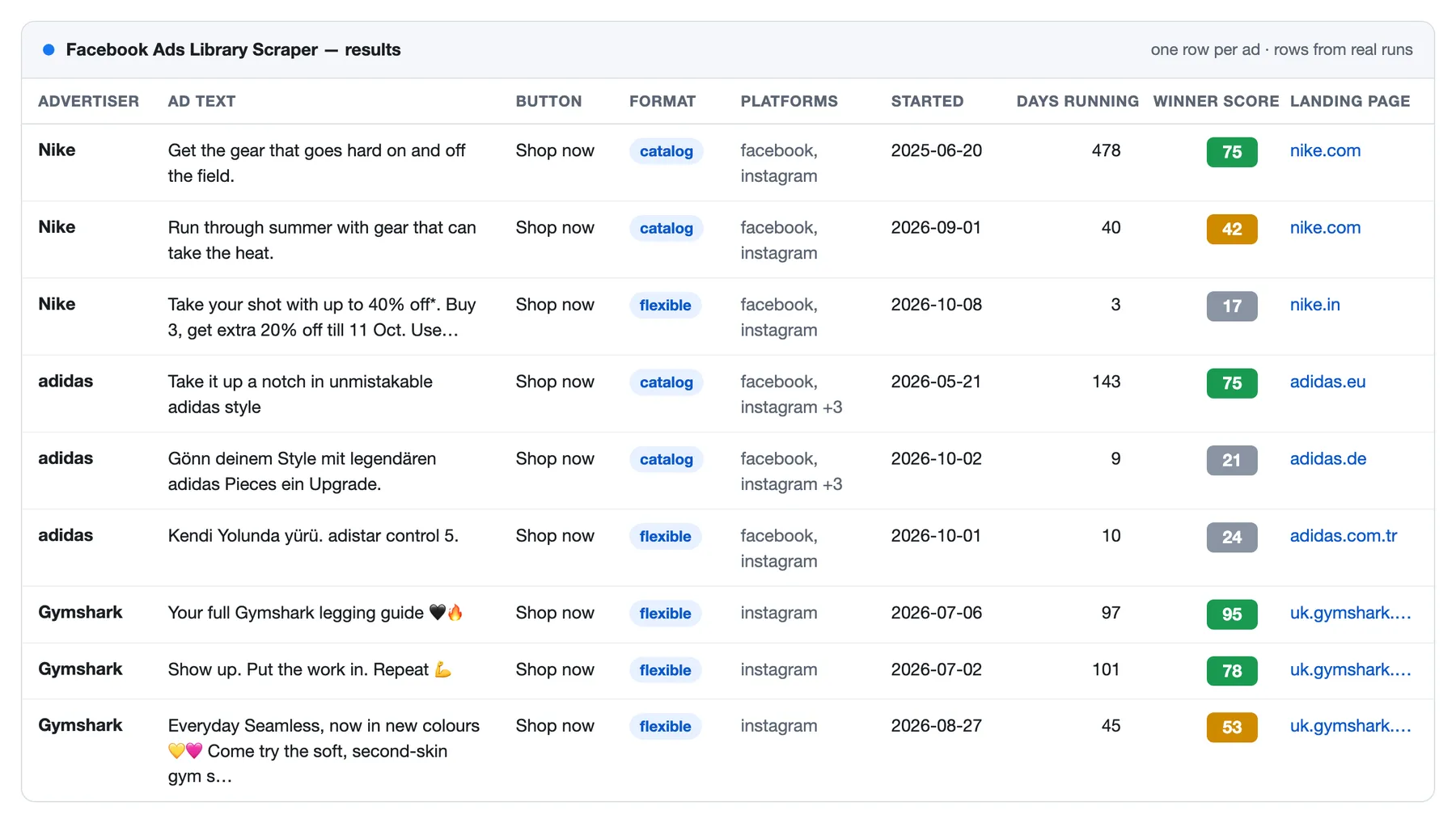
Facebook Ads Library Scraper extracts ads from the Meta Ad Library: Facebook, Instagram, Messenger, Audience Network, Threads and WhatsApp. Search by keyword, brand name, Facebook page, Instagram account or a pasted Ad Library link and get every ad as a clean row: copy, creatives, button, landing page, start date and days running. No login, no cookies, no Meta API token, no proxy to set up.
It was built after reading 385 public reviews and support threads of Ad Library scrapers. The three complaints that come up most are about money and trust: a limit that was ignored, an empty run that was charged, and half of the ads missing without a word. This Actor is designed around those three.
What does Facebook Ads Library Scraper do?
- Finds ads every way you can name an advertiser: keywords, brand names, Instagram accounts, Facebook page links, Page IDs, Ad Library links with any filters, single ads by Library ID. Mix them in one run, in several countries at once.
- Returns flat, readable rows: texts, button, landing page, images, HD videos, carousel cards, start date and days running. Catalog and dynamic ads come with their real creatives instead of a
{{product.name}}template. - Adds EU and UK reach, payer and the advertiser's Instagram with one switch, at no extra price.
- Adds advertiser contacts: website, phone, email, address with coordinates, rating.
- Points at winners: a
winnerScoreon every row, a long-running flag, a filter for ads running at least N days. - Saves creatives to your storage, so the images and videos outlive Meta's expiring links.
- Monitors on a schedule: only new ads, or new, changed and stopped ones, with a message to Slack, Discord or your webhook.
Why use this Facebook Ad Library scraper?
| What goes wrong elsewhere | What happens here |
|---|---|
| "Asked for 40 ads, got 5,505 items and a $27 charge" | The Actor stops exactly at your limit. A limit typed under a name it does not know stops the run before the first request |
| "Succeeded, no results, money gone" | A source with no ads gives a free row that says why. Counts, notices and duplicates are never charged |
| "Missed half of the active ads" | For every source you see how many ads the library holds and how many were collected, and the reason when the two differ |
| An automation built for another scraper has to be rebuilt | Inputs made for the two most used Ad Library Actors run here unchanged |
| The same ads again on every scheduled run | Monitoring delivers only what is new or changed; the rest is skipped for free |
| A start fee on every run | No start fee |
What Facebook and Instagram ad data can you extract?
| Data | Fields |
|---|---|
| The ad | Library ID and link, active status, start and end date, days running, platforms, format |
| Copy | Body text, title, link description, button text and type, landing page |
| Creatives | Images, HD and SD videos, video previews, every carousel or catalog card, when the links expire |
| Advertiser | Page name, ID, link, categories, likes; with Advertiser page: website, phone, email, address, rating, Instagram |
| Transparency | With Ad details: who paid, EU and UK reach by country, age and gender, the audience the advertiser chose |
| Political ads | Spend, impressions, reach estimate, "paid for by" |
| Signals | Winner score, long-running flag, number of ads sharing the creative, what changed since the last run |
The full field list is in Output.
What can you use it for?
- Competitor ad monitoring: every ad a brand runs right now, on a schedule, only what is new or changed.
- Creative research and ad spying: what advertisers in a niche say, which buttons and landing pages they use, which creatives they keep running for months.
- Lead generation for agencies: businesses that advertise on a topic in a country, with their website, phone, email and address.
- Market checks before a launch: how many advertisers and ads a keyword has in each country, free in count-only mode.
- Transparency and research: who paid for an ad and how many people it reached in the EU.
- AI and automation: clean rows for n8n, Make, Zapier, Clay or an MCP agent.
How to scrape Facebook ads
- Open the Actor and type a keyword, or paste a Facebook page link, a brand name, an Instagram account or an Ad Library link.
- Pick the country and how many ads per source you want. The default is 100.
- Click Start. A hundred ads take well under a minute.
- Open the Output tab and export to JSON, CSV, Excel or HTML, or read the results through the API.
| You give | You get |
|---|---|
Keyword dental clinic, country US | Ads that mention it, newest first after the first 30 |
https://www.facebook.com/nike | Every ad of that page; the Actor finds the Page ID itself |
Page ID 15087023444 | The same, without the lookup |
Brand name Aspen Dental | The ads of the page with exactly that name |
Instagram account @aspendental or its link | The ads of the page that advertises for the account |
| An Ad Library link copied from the address bar | The ads of that search, with the filters set in the link |
https://www.facebook.com/ads/library/?id=1870984290951787 or the Library ID | That one ad, or a free notice if the library no longer shows it |
| Any of the above with Only count the ads | One free row per source: how many ads the library holds |
Minimal input:
Several brands in several countries, with reach and payer:
Local clinics that advertise in a city, with contacts, only ads that survived a month:
A competitor watch on a schedule, with a Slack message when something changes:
How much does it cost to scrape Facebook ads?
You pay per result, not for time or memory.
| What | Price |
|---|---|
| An ad row, with or without ad details | $0.60 per 1,000 ads |
| Advertiser page (optional) | $2 per 1,000 advertisers, once per advertiser in a run |
| Saved creative (optional) | $1 per 1,000 files |
| Run start, count rows, notice rows, duplicates, ads skipped by monitoring or by a filter | free |
| Example | Cost |
|---|---|
| 1,000 ads of a keyword | $0.60 |
| 5,000 ads with EU reach and payer | $3.00 |
| 1,000 ads of 200 local businesses, with their contacts | $1.00 |
| How many ads 50 keywords have in 10 countries (count only) | $0 |
Apify's free plan includes $5 of credit every month, enough for about 8,000 ads.
Two guards keep a bill from surprising you: the limits stop the Actor exactly at the number, and the maximum cost you set for a run in Apify is respected, so the Actor stops before the ad that would go over it.
Input
Country, active status, media type, ad category, platforms, languages, exact phrase and order are separate fields. They apply to keywords, brand names, pages and Page IDs, and to links that do not set the filter themselves; a filter written in a link always wins.
Several countries collects every keyword and page once per country, each with its own limit and its own count. Ads per source (default 100) and Ads per run are the limits. An ad found by two sources of one run is delivered and charged once; turn One row per ad in a run off if every source should deliver all of its ads.
Two questions about dates
The Ad Library's own date filter answers "was the ad still running at that time", not "when did it start". The Actor keeps the two apart:
- Started on or after and Started before filter by the start date of the ad.
- Still running on or after is the library's own filter: it keeps ads that were shown on that day or later, whenever they started.
- Running for at least this many days keeps the ads that survived.
Dates are YYYY-MM-DD, or a span back from today: 7 days, 2 weeks, 3 months.
Coming from another Ad Library scraper?
An input or an automation built for the two most used Ad Library Actors runs here unchanged. These fields are read under their own names:
| Their field | Read here as |
|---|---|
startUrls, urls, adLibraryUrls, pageUrls | links |
searchQueries, queries, keywords, query | keywords |
pageId, pageIds, advertiserPageIds | Page IDs |
pageName, advertiserNames, brand, brands, competitors | brand or page names |
instagramUsername, instagramUrl, igUsername | Instagram accounts |
advertisers | anything that names an advertiser: a link, a Page ID, an @account or a brand name, each read as what it is |
includeAboutPage, includeAdvertiserInfo | advertiser page |
minDaysRunning, minDaysActive | running for at least N days |
downloadMedia, downloadCreatives | save creatives |
webhookUrl, slackWebhookUrl, discordWebhookUrl | webhook address |
resultsLimit, limitPerSource, maxAdsPerQuery | ads per source |
count, maxAds, maxItems, maxResults, limit | ads per run |
onlyTotal, onlyTotalCount | only count the ads |
isDetailsPerAd, scrapeAdDetails, includeAdReach, fetchDetails | ad details |
activeStatus, adActiveStatus, scrapePageAds.activeStatus | active status |
countryCode, scrapePageAds.countryCode, searchCountries | country |
sorting, scrapePageAds.sortBy | order |
onlyAdsNewerThan, scrapePageAds.period | still running on or after |
onlyAdsOlderThan, startDateMax, dateTo | started before |
startDateMin, dateFrom, minDate | started on or after |
runTag, proxy | run tag, proxy |
A field no name matches stops the run before the first request, with a free row that names the field. That is on purpose: a mistyped limit that is silently ignored is how a run meant for 40 ads collects 5,000. Turn Stop on unknown input fields off if you prefer a warning.
Finding an advertiser by brand name or Instagram account
The Ad Library suggests pages by name only to logged-in users. The Actor searches the name as a keyword and looks at the advertisers of the ads it finds:
- Brand name: the page whose name is exactly the name you gave, ignoring case, spaces and punctuation. When several pages carry it, the most liked one is read and the others are listed in the SUMMARY record; Read every page with this name reads them all. Each page then gets the limit of a source.
- Instagram account: the advertisers found are asked for their Instagram account, and the one that names yours is read.
- Nothing matched: a free notice row lists the closest advertisers with their Page IDs, so that you can pick the right one.
A page that has no ads in the library cannot be found this way; give its Facebook link or Page ID.
Output
Ad rows
| Field | What it is |
|---|---|
adArchiveId, adLibraryUrl | The Library ID and the link to the ad in the library |
pageName, pageId, pageUrl, pageCategories, pageLikeCount | The advertiser |
isActive, startDate, endDate, lastSeenDate, daysRunning | Dates as YYYY-MM-DD. endDate is empty while the ad is running |
winnerScore, isLongRunning | A 0–100 ranking aid and a flag for ads running 30 days or more (the threshold is yours); see below |
platforms | Where it is delivered: facebook, instagram, messenger, audience_network, threads, whatsapp |
displayFormat | image, video, carousel, dco (flexible), dpa (catalog), and others |
bodyText, title, linkDescription, linkCaption | The texts of the ad |
ctaText, ctaType, linkUrl | The button and the landing page |
imageUrls, videoUrls, videoPreviewUrls | Creatives; videos in HD when the library has it |
cards, cardCount | Every carousel or catalog card with its own title, text, link, button, image and video |
isDynamicCreative | The ad's own texts are templates such as {{product.name}}; the row shows the first card instead |
mediaExpiresAt | When Meta's media links stop working (they are signed for a few days) |
versionCount, collationId | How many ads share this creative |
adCategories, currency, spend, impressions, reachEstimate, paidForBy | Published by Meta only for ads about social issues, elections or politics |
partnerPageName, partnerPageUrl | The creator, when the ad is a partnership ad run from a creator's page |
containsAiMedia, containsSensitiveContent, visibility, hasEuTransparency | Meta's labels |
pageInfo | The advertiser's page card, with Advertiser page |
mediaFiles | Saved copies of the creatives, with Save creatives to storage: type, lasting url, key, sourceUrl |
change, changedFields | With change tracking: new, changed, stopped or removed, and what changed |
source, sourceValue, inputLabel, runTag, scrapedAt | Which input found the ad, and when |
raw | Meta's original object, with Add Meta's original object |
Ad details (optional)
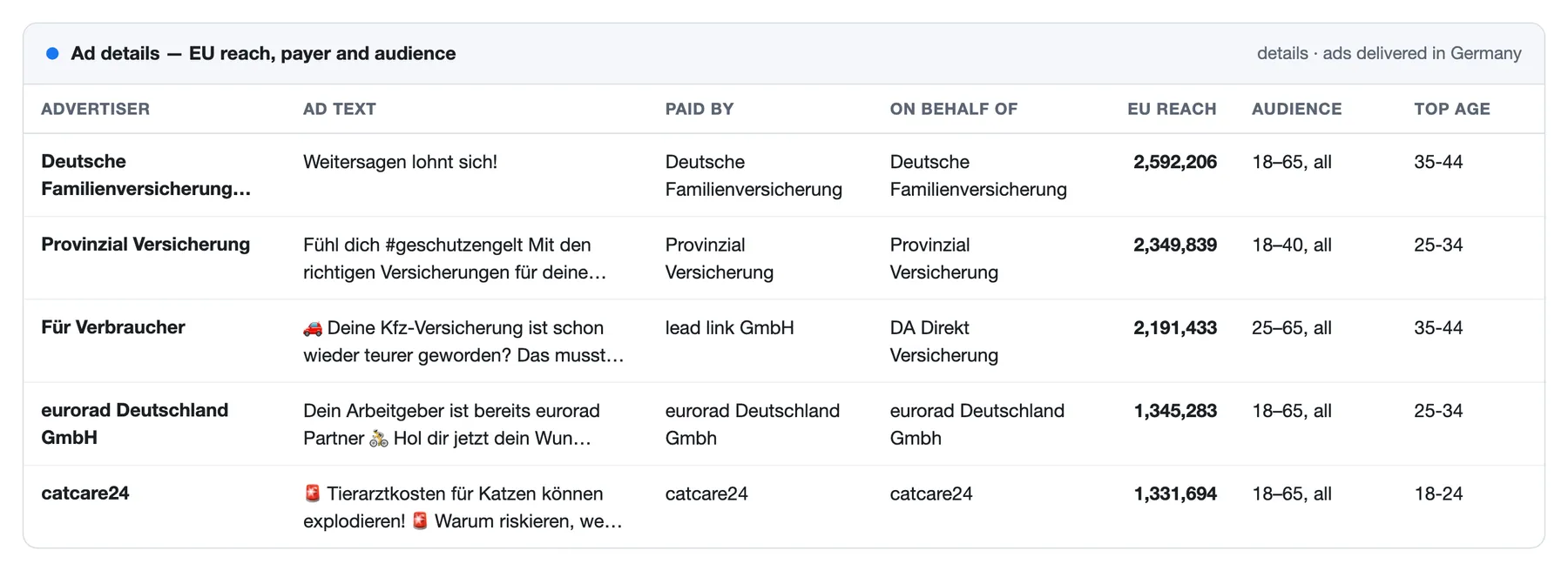
With Ad details every ad row gets a details object:
| Field | What it is |
|---|---|
details.payer, details.beneficiary | Who paid for the ad and on whose behalf |
details.eu.totalReach, details.uk.totalReach | Accounts reached in the EU and in the UK |
details.eu.reachBreakdown | Reach by country, age range and gender |
details.eu.targetLocations, targetGender, targetAgeMin, targetAgeMax | The audience the advertiser chose |
details.page.instagramUsername, instagramFollowers, instagramVerified | The advertiser's Instagram account |
details.page.category, likes, verification, alias, about | The advertiser's page |
details.page.isPoliticalAdvertiser, politicalSpendByDisclaimer | For registered political advertisers |
Reach and targeting exist only for ads delivered in the EU or the UK; for other ads details.eu and details.uk are empty, which is how the library itself shows them.
Advertiser page (optional)
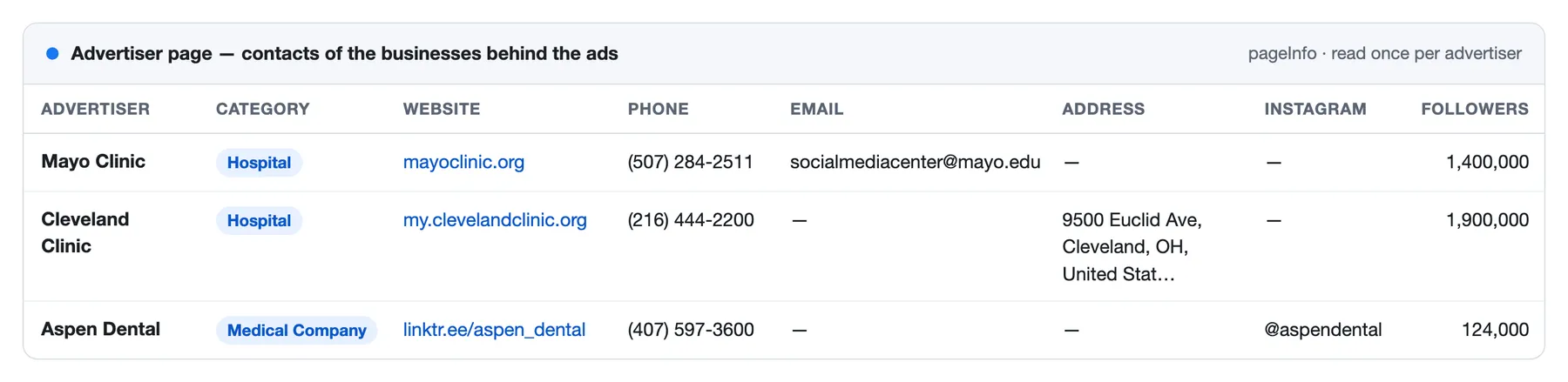
With Advertiser page the Actor opens the Facebook page of every advertiser once per run and adds what its card shows a visitor:
| Field | What it is |
|---|---|
pageInfo.website, phone, email | Contacts as the page gives them; the website without Facebook's redirect |
pageInfo.address, latitude, longitude | The address of a local business |
pageInfo.categories, bio, priceRange | What the page says it is |
pageInfo.rating, recommendPercent, reviewCount | "94% recommend (51 reviews)" as text and as numbers |
pageInfo.instagramUsername, instagramUrl, otherAccounts | Accounts the page links to |
pageInfo.confirmedOwner | The business Meta confirmed as the owner |
pageInfo.followers, followersText | As Facebook rounds it: "1.4M followers" is 1,400,000 |
pageInfo.other | Any other line of the card, as Facebook words it |
In a check of 12 pages of local businesses, 10 showed a card. A page that shows none to visitors comes with available: false and the reason. A page gives only what its owner filled in: a national brand usually has a website and a phone, a local business also an address and a rating.
Winner score
Meta publishes no results for ordinary ads. What the library does show is how long an advertiser keeps paying for an ad and how many ads reuse its creative, and advertisers stop what does not work. winnerScore adds that up: up to 60 points for days running (full at 90 days), up to 25 for the number of ads sharing the creative (full at 11), and 15 for still being active. It is a way to sort a list, not a measurement of sales.
Count rows and notice rows
type: "count": in count-only mode,totalCountfor each source. A count of 50,001 means "more than 50,000": Meta stops counting there, andtotalCountIsMinimumis true.type: "notice": a source that gave nothing or less than asked, withnoticeCodeand a sentence innoticeMessage. Codes:NO_ADS,PAGE_NOT_FOUND,AD_NOT_FOUND,ADS_NOT_SHOWN,PARTIAL,INVALID_INPUT,UNKNOWN_INPUT_FIELD,EMPTY_INPUT,BLOCKED.
Both are free. Filter by type to keep only ads. The same numbers for every source are in the Summary by source output.
Monitoring: new, changed and stopped ads on a schedule
Turn on Only ads not delivered before and run the Actor on a schedule. It remembers the ads of the input and delivers only the ones it has not delivered yet; the rest are skipped for free. The first runs work through the ads a source already has, up to the limit each time; after that only newly started ads come.
A memory name lets several schedules share one memory or start a fresh one. Forget what was delivered clears it.
Also deliver changed and stopped ads turns the same schedule into a change log. Every run delivers what is different from the run before, and each row says what in change:
new: an ad the Actor has not delivered before;changed: the text, the button, the landing page or the number of versions is different;changedFieldsnames which;stopped: an ad that ran last time and is inactive now, with its end date;removed: an ad the library no longer has; this row is free.
Ads that did not change are skipped for free. Stopped ads are looked for only when the source was read to its end, so set Ads per source above the number of ads the advertiser runs.
A webhook address gets a message when the run is over: a Slack or Discord incoming webhook gets a short text with the first ads, any other address a JSON body with the counts per source, the first ten ads and the dataset link. By default it is sent only when the run delivered something.
Limitations, stated plainly
- The library shows a logged-out visitor 30 ads per screen. The Actor does not log in. It reads a source screen by screen, by start date, from the newest ads down, and checks every step against Meta's own count.
- What that covers. A source with up to a few hundred ads is collected whole. From a larger one you get the newest ads up to your limit: 5,000 ads of a search with 27,000 took under three minutes.
- Deep search. A screen shows only the top ads of a day, so on a busy day most ads never reach one. For a keyword the Actor therefore also reads every advertiser it finds, each on its own; a page in all countries it reads again country by country. Measured on 2026-10-10 without a limit: 1,831 of the 1,906 ads of one search (96%, 4 minutes), 19,036 of the 27,673 of another (69%, 26 minutes), 1,780 of the 2,958 ads of a global brand's page (60%, 8 minutes). You pay per ad, not per request. Deep search on keywords turns it off.
- What it does not. Ads of advertisers that never reach the top of any screen, and the busiest days of one page, stay out of reach. The notice row says how many of how many were collected. Narrow the source (one country, one media type, a date range) to get more of it.
- Order. The first 30 ads of a source come in the order you choose. Beyond that the Actor reads from the newest ads down, whichever order is chosen.
- Ads the library counts but does not show. Meta's count can include ads it shows only after login. The Actor reports them as "not shown to logged-out visitors" in the summary instead of counting them as missing.
- Meta limits how much one address may ask. Past the limit a listing comes with its count and without its ads. The Actor asks at an even pace, tells such an answer from a listing with nothing more to show, pauses and goes on; if the limit holds, the source ends with what was collected and a notice that says so. How far a run gets depends on how many proxy addresses your Apify plan gives: on 30 addresses an export of 19,000 ads met no limit; in a test squeezed onto 3 addresses the limit came after about 5,600 ads, and the run ended with 6,716 and the notice. Run such a source again an hour or two later with Only ads not delivered before on, and it adds what is missing.
- Spend, impressions and reach are published by Meta only for political ads (spend, impressions) and for ads delivered in the EU or UK (reach). For all other ads these fields are empty in the library itself.
- Media links expire. Image and video links are signed by Meta for a few days.
mediaExpiresAtsays until when. Save creatives to storage copies the files while the links work: into the run's own storage, which lives as long as run data does on your plan, or into a named one that stays. A file over 150 MB is not saved. - The winner score is a guess. It ranks ads by how long they run and how often their creative is reused; it knows nothing about sales.
- Inactive ads are kept by the library for a limited time, depending on the country and the category of the ad.
- The count stops at 50,000. For broader searches Meta shows 50,001 and the true number is unknown.
Is it legal to scrape the Facebook Ad Library?
The Ad Library is a public transparency tool: Meta publishes it so that anyone can see which ads run on its platforms, and advertisers place their ads there knowingly. The Actor reads only what the library shows to any visitor who is not logged in. It does not log in, and it does not collect private profiles or anything behind a login.
Rows can still contain personal data, for example the name of a person who advertises from a personal page, who is named as a payer, or whose phone or email stands on a business page. Collect and use it only for a purpose you can justify under the rules that apply to you, such as the GDPR. If you are not sure, ask a lawyer.
Integrations and API
Results export to JSON, CSV, Excel and HTML. Runs can be scheduled, called through the Apify API and connected to Make, Zapier, n8n, Google Sheets or your own webhook.
The run also writes a SUMMARY record to its key-value store: for every source the number of ads in the library, collected, delivered, skipped as duplicates or as known from earlier runs, and the reason it stopped.
Use it from AI agents (MCP)
The Actor works as a tool through the Apify MCP server. A typical request:
Find the 20 newest ads Nike runs in Germany and tell me which products they push.
The agent calls the Actor with {"startUrls": [{"url": "https://www.facebook.com/nike"}], "country": "DE", "maxAdsPerSource": 20, "sortBy": "newest"}. Because unknown input fields stop the run and limits are exact, an agent that guesses a field name gets a clear message back instead of a large bill.
More from this developer
- YouTube Transcript Scraper: transcripts and subtitles of YouTube videos, Shorts, channels, playlists and search in any language, as text, timestamps, SRT, VTT or chunks for AI; no captions, no charge.
- Threads Scraper: posts, all replies and profiles from Threads without login, keyword search and only-new monitoring.
- 2GIS Places Scraper: businesses from 2GIS (Russia, Kazakhstan, Central Asia, UAE) with phones, WhatsApp, Telegram, emails and websites, the whole result instead of 60.
- 2GIS Reviews Scraper: 2GIS reviews with star, topic and date filters, unanswered reviews across a chain, and only-new monitoring.
FAQ
Do I need a Facebook account, cookies or a Meta API key? No. The Actor reads what the Ad Library shows any visitor.
Can I scrape Instagram ads?
Yes. The Meta Ad Library covers Instagram, and every row says on which platforms the ad runs. To see only Instagram, choose it in Platforms. You can also start from an Instagram account: @name or its link.
How do I get all ads of one advertiser? Paste the Facebook page link, or type the brand name or the Page ID. Set Ads per source to 0 for as many as the library gives.
How do I get all ads of a brand in all countries?
Use country ALL, or list the countries you care about in Several countries to get each market separately and more completely.
Why did I get fewer ads than the library shows? Look at the notice row or the summary of that source. Either your limit was reached, or the source has more ads on single days than a logged-out visitor can reach, or the library counts ads it shows only after login. See Limitations.
Why are spend and reachEstimate empty?
Meta publishes them only for ads about social issues, elections or politics. For EU and UK reach of ordinary ads turn on Ad details.
A run finished as "succeeded" but there are no ads. There is a notice row instead: no ads for these filters, a page that does not exist, a link the Actor cannot read, or an input field it does not know. The run succeeds so that an automation sending one page per run is not stopped by one empty page. Turn on Fail the run when every source gives a notice if you want a failed status.
Can I get only the number of ads? Yes, Only count the ads gives one free row per source.
The image links stopped working.
They are signed by Meta for a few days; see mediaExpiresAt. Turn on Save creatives to storage to keep the files, or run the Actor again for fresh links.
Something does not work or a field is missing. Open an issue on the Issues tab with the run ID. Every source that gave less than asked already says why in its notice row, and that sentence is the fastest way to an answer.


