

YouTube Search Scraper ($0.5/1000 results)
Pricing
from $0.50 / 1,000 results
YouTube Search Scraper ($0.5/1000 results)
Extract structured YouTube search results with advanced filtering. Search videos, channels, playlists, shorts, movies, and shows using YouTube API. Fastest YouTube scraper on the market
Pricing
from $0.50 / 1,000 results
Rating
4.9
(38)
Developer

API ninja
Maintained by CommunityActor stats
82
Bookmarked
3.9K
Total users
851
Monthly active users
4 days ago
Last modified
Categories
Share
YouTube Search Scraper turns a YouTube keyword search into a structured dataset of videos, Shorts, channels, playlists, and movies. Use it for content research, creator discovery, trend monitoring, competitor analysis, lead generation, or building a YouTube search API—without running a browser or supplying your own YouTube API key.
Enter a search query, choose any filters, and click Start. Results are available in the Apify Dataset as JSON, CSV, Excel, XML, or through the API.
What can YouTube Search Scraper do?
- 🔎 Search YouTube by keyword and collect public result metadata.
- 🎬 Find videos, Shorts, movies, channels, or playlists.
- 🧰 Filter by upload date, duration, country, language, popularity, and video features such as HD, 4K, live, subtitles, Creative Commons, HDR, or VR180.
- 📚 Choose between fast basic results and three deeper video-detail modes.
- ♾️ Set a result limit or continue through all available result pages.
- ⚡ Get results quickly without browser automation or proxy configuration.
- 🔁 Run searches on a schedule, monitor runs, trigger webhooks, and connect the dataset to other apps with Apify integrations.
- 🔌 Use the Actor as a YouTube search API from JavaScript, Python, the Apify CLI, HTTP, OpenAPI, or MCP.
How to scrape YouTube search results
- Open YouTube Search Scraper and click Try for free.
- In Input, enter the YouTube keywords you want to search for.
- Optionally select a result type, detail depth, result limit, sort order, location, language, or video filters.
- Click Start and wait for the run to finish.
- Open Dataset to review the results or export them as JSON, CSV, Excel, or XML.
Input
Only query is required. The smallest valid maxResults value is 20.
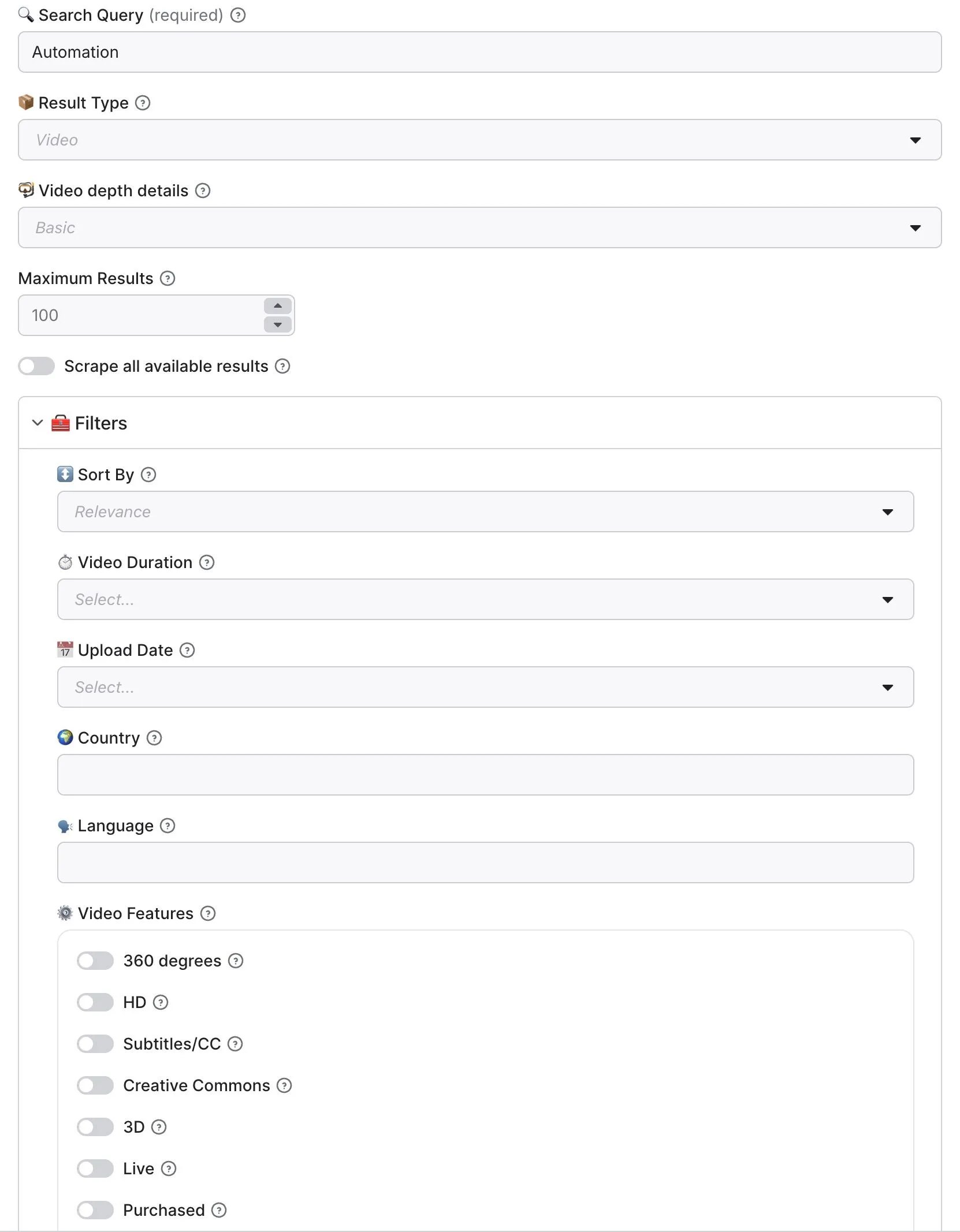
| Field | Type | Description |
|---|---|---|
query | string | Required. Keywords to search for on YouTube. |
type | string | video, channel, playlist, movie, or shorts. Defaults to video. |
videoDepthDetails | string | basic, standard, detailed, or complete. Defaults to basic. See the depth table below. |
maxResults | integer | Maximum number of results to save. Defaults to 100; ignored when scrapeAllResults is enabled. |
scrapeAllResults | boolean | Continue until YouTube returns no continuation token. Use carefully for broad searches. |
sortBy | string | relevance or popularity. Sorting is not available for Shorts. |
duration | string | under3min, 3to20min, or over20min. Applies to video searches. |
uploadDate | string | today, week, month, or year. |
geo | string | Two-letter uppercase country code, for example US, GB, or IN. |
lang | string | Two-letter lowercase language code, for example en, es, or fr. |
features | object | Video filters. Enabled filters are combined, so a result must match all selected features. |
local | boolean | Request localized YouTube data. |
Which video detail depth should you use?
| Depth | Best for | Typical data |
|---|---|---|
basic | Fast search and discovery | Result type, video ID, title, channel, description snippet, views, publication time, duration, and thumbnails. |
standard | Analytics and richer exports | Expanded video and channel information requested in batches, which can include engagement metrics and additional metadata. |
detailed | Technical or compliance research | Per-video extended metadata, such as captions, restrictions, privacy, or availability when YouTube provides it. |
complete | Maximum available context | The broadest per-video response, including any additional metadata returned by the upstream service. |
Deeper modes make extra requests and therefore take longer. They enrich video and Short results; channel and playlist searches generally use basic. YouTube does not expose every field for every item, so treat enriched fields as optional.
Output example
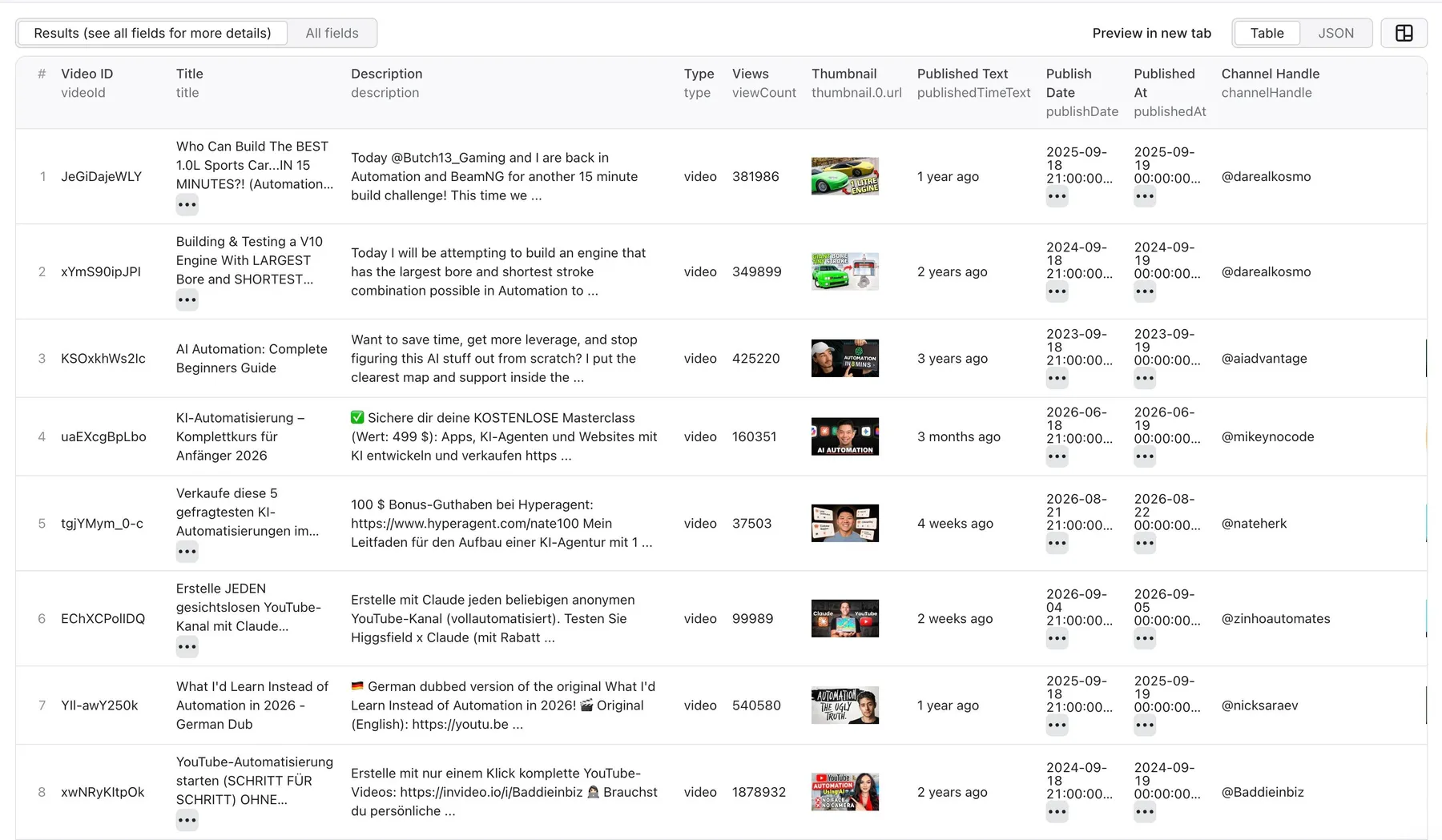
Each dataset row represents one search result. The exact fields depend on the result type and selected detail depth.
How much does it cost to scrape YouTube search results?
YouTube Search Scraper uses pay-per-event pricing. A result event is one item saved to the default dataset.
| Charge | Free plan | Bronze-Diamond plans |
|---|---|---|
| Actor start | $0.01 | $0.01 |
| Result saved to the default dataset | $0.0025 per result | $0.00025 per result |
The Actor start event is charged according to memory, at one event per GB with at least one event per run. For example, 1,000 results cost about $2.51 on the Free plan or $0.26 on a paid tier, including one default Actor start.
Apify requires a maximum-charge limit of at least $0.10 per run. This limit caps potential spending; it is not a minimum fee. Available Apify credits can be applied to actual charges. Check the Actor's current Pricing tab before a large run.
maxResults controls your upper bound. Avoid scrapeAllResults until you have tested a limited run, because broad queries can return a large dataset.
Use YouTube Search Scraper through the API
Every run can be started programmatically with your Apify API token. This example runs the Actor synchronously and returns its dataset items:
See the ready-made Python, JavaScript, CLI, OpenAPI, HTTP, and MCP examples. You can also schedule recurring searches in Apify Console and send completed datasets to Google Sheets, Make, Zapier, webhooks, or your own application.
Popular use cases
- Content research: find high-performing videos and gaps around a topic.
- Creator discovery: identify relevant channels and Shorts creators for partnerships.
- Trend monitoring: schedule the same query and compare newly published results.
- SEO and keyword research: study titles, descriptions, publication dates, and engagement signals.
- Competitive intelligence: monitor how competitors and categories appear in YouTube search.
- Dataset creation: supply structured public YouTube metadata to dashboards, agents, or data pipelines.
FAQ
Do I need a YouTube API key?
No. When you run the published Actor on Apify, you only need an Apify account. The service credentials are managed by the Actor.
Why did I receive fewer results than maxResults?
maxResults is a ceiling, not a guarantee. YouTube may have fewer matching results, and the Actor skips ads and non-result listing containers. Try a broader query or remove some filters.
Why are some output fields missing?
Fields vary by result type, detail depth, and what YouTube makes public for a particular item. Deeper detail modes can return more data, but no individual field is guaranteed for every result.
Can I scrape every result?
Enable scrapeAllResults to follow continuation tokens until none remain. YouTube decides what is available, and broad searches may run for a long time or produce many billable rows. Test with maxResults first.
Can I download results as CSV or Excel?
Yes. Open the run's Dataset tab and choose JSON, CSV, Excel, XML, or another supported export format. You can also retrieve the dataset through the Apify API.
Is it legal to scrape YouTube search results?
The Actor collects publicly available search metadata. Web-scraping laws and platform terms vary by country and use case. You are responsible for using the data lawfully, respecting applicable rights and YouTube's terms, and avoiding the collection or misuse of personal data.
Where can I get help or request a custom solution?
Open the Actor's Issues tab with the run ID, a sanitized input, and a description of the expected result. You can also use the Issues tab to discuss custom YouTube data requirements.
More YouTube scraping tools
| Actor | What it does |
|---|---|
| YouTube Video Downloader | Downloads video or audio and returns direct media links. |
| YouTube Channel Scraper | Extracts channel videos, Shorts, playlists, livestreams, and posts. |
| YouTube Comments Scraper | Collects comments and replies for audience and sentiment analysis. |
| YouTube Transcript Scraper | Converts video URLs or IDs into structured transcript data. |


