E-commerce Scraping Tool
Pricing
Pay per event
E-commerce Scraping Tool
Scrape data from e-commerce websites with E-commerce Scraping Tool. Scrape almost any retail site in minutes, extract e-commerce data and use it to monitor price details over time or compare different e-commerce sites’ offerings.
Pricing
Pay per event
Rating
4.6
(46)
Developer

Apify
Maintained by ApifyActor stats
236
Bookmarked
12K
Total users
512
Monthly active users
24 days
Issues response
a day ago
Last modified
Categories
Share
What does E-commerce Scraping Tool do?
E-commerce Scraping Tool is an all-in-one solution that extracts product and price data, category details, reviews, and seller information from online retail platforms and marketplaces - including Amazon, Walmart, and eBay - using only a product or category URL.
It supports global marketplaces as well as regional and local e-shops, making it suitable for competitor price monitoring, market research, and building product comparison engines.
Core capabilities:
- Stay undetected - Built-in proxy rotation helps you avoid getting blocked, even on heavily-protected sites
- Scrape any e-commerce site - Works with multinational platforms like Amazon or Alibaba, regional players such as Target, Flipkart, Mercado Livre, Lidl, Alza, Decathlon, Rakuten, and even local e-shops
- Scrape multiple sites simultaneously - Compare products and prices across different platforms in a single run
- Comprehensive data extraction - Get product name, price, unique identifiers, brand, image, reviews, and more
- Track price changes - Schedule runs to monitor stock status and dynamic pricing over time
- Flexible input options - Extract data from individual product URLs, category page URLs, or search by keyword
- Multiple export formats - Download structured data in JSON, CSV, Excel, XML, or HTML
- Integrate anywhere - Export via API endpoints, webhooks, or connect with apps and AI workflows
- Search across sites - Use Search Engines to find and compare products across hundreds of retailers simultaneously
What e-commerce data can you extract with E-commerce Scraping Tool?
The E-commerce Scraping Tool extracts comprehensive product information from online retail websites:
| Product data | Commercial info | Additional details |
|---|---|---|
| 📝 Product name | 💰 Price and currency | 📊 Stock status |
| 🔗 Product description | 🏷️ Product ID (SKU, MPN, GTIN, EAN, UPC, ISBN) | ⭐ Average rating |
| 🏢 Brand | 🚚 Shipping information | 💬 Review count |
| 🖼️ Image URL | 📂 Category | 🏪 Seller information |
| 🔗 Product URL | 📺 Product variants |
Can I use E-commerce Scraping Tool to scrape Amazon, Walmart, eBay, Alibaba, Etsy, etc.?
Yes, you can use the E-commerce Scraping Tool to scrape Amazon, Walmart, eBay, Alibaba, Etsy, and many other online stores using just the product URL. It works with global, regional, and local e-shops, which makes it great for price monitoring and competitor analysis. You'll get data like product name, price, brand, and image, and can export it in JSON, CSV, Excel, or via API.
How does E-commerce Scraping Tool work?
It works exactly as if you were browsing an e-commerce site and copying product information. The scraper opens the online store, navigates to product or category pages, scrolls through listings, and extracts all visible data into an organized dataset.
The Process
- Opens the e-commerce website
- Navigates to the specified product or category URL
- Scrolls through product listings (if scraping categories)
- Extracts all visible product data from each page
- Organizes everything into a structured dataset
The scraper can handle product detail pages, category listings, review sections, and seller profiles, allowing you to complete in minutes what would take hours to do manually. To understand the process fully, just try browsing an e-commerce site yourself - the scraper does exactly the same thing, only much faster and at scale.
Why use the E-commerce Scraping Tool?
| Feature | Competitors | E-commerce Scraping Tool |
|---|---|---|
| Platform coverage | Single platform only | Works on any e-commerce site |
| Setup complexity | API keys, authentication, technical documentation | Just add URL and start |
| Data availability | Often restricted fields and data types | All publicly visible data |
| Rate limits | Strict quotas | Flexible, based on your needs |
| Cost | Per-request fees + subscription | Pay-per-event model |
| Multi-platform comparison | Requires multiple API integrations | Scrape multiple sites simultaneously |
| Product variants | Limited or requires separate calls | Captured automatically |
| Regional pricing | Often requires separate regional accounts | Access any market directly |
| Historical access | Limited to recent data | Scrape anytime, build your own history |
What can you do with data after scraping product prices and details?
💰 Price monitoring and dynamic pricing
E-commerce data is most powerful when it's fresh. Most teams using E-commerce Scraping Tool for pricing set up scheduled runs - whether hourly, daily, or weekly - to monitor anywhere from a handful of key SKUs to hundreds of products across multiple competitors, depending on how dynamic their market is.
A few ways to set this up:
- Hourly runs work best for fast-moving categories like electronics or flash sales
- Daily runs cover most use cases, from competitive benchmarking to MAP compliance
- Product URLs for tracking specific items, category URLs for a broader market overview
Connect the output to Slack alerts, pricing tools, or your data warehouse to close the loop between data and action.
😊 Customer sentiment and review analysis
Reviews are one of the richest sources of product insight, but they're scattered across thousands of pages on dozens of platforms. Manually reading through them doesn't scale.
E-commerce Scraping Tool lets you collect reviews in bulk, across marketplaces, and pipe them into whatever analysis setup you prefer, whether that's a sentiment analysis tool, a CRM, or an AI model. Product teams use this to catch quality issues early from emerging review patterns. Marketing teams mine customer language for ad copy. Brand managers track how sentiment shifts after a launch or a competitor's move.
For the output, switch to the Reviews view (one review per row) to make analysis easier. Run daily for products getting active feedback, or weekly for more stable catalogs. Pair review data with product metadata to spot correlations between pricing changes and sentiment shifts.
📊 Market research and competitive intelligence
Recommended approach:
- Run weekly for ongoing trend tracking, or do a one-time deep dive when researching a new market
- Use category URLs for broad market mapping, keywords for product discovery
- Export to your market research platform, a database, or Excel for further analysis
How to use E-commerce Scraping Tool to scrape product data?
E-commerce Scraping Tool was designed to be easy to start with, even for those who have never extracted data from e-commerce sites before. Extracting product data from any online retail website takes just a few steps:
- Create an Apify account using your email
- Open E-commerce Scraping Tool in Apify Store
- Add your URLs or keywords - Enter product URLs, category pages, or search terms
- Configure your settings (optional) - Set up proxies, output fields, or scheduling
- Click "Start" and wait for the data to be extracted
How much will data scraping for e-commerce cost you?
E-commerce Scraping Tool uses the pay-per-event (PPE) model, meaning you are charged a fee for specific events. Key cost factors include:
- Enrichment add-ons - Each enriched field adds to cost
- Your Apify subscription plan - Higher tiers get volume discounts
Cost optimization tips
- Start with category pages instead of individual URLs - More efficient than providing thousands of product URLs
- Schedule runs strategically - Daily instead of hourly if real-time data isn't critical
- Disable unnecessary enrichments - Only enable add-ons you actually need
You can find more details of how all this works on the Actor's pricing tab.
Also note that all fees can have discounts applied depending on your plan. Check out our pricing page for more details.
⬇️ Input
E-commerce Scraping Tool takes multiple kinds of input, which you can choose from in Apify Console. Alternatively, you can enter your search terms via API.
Details options
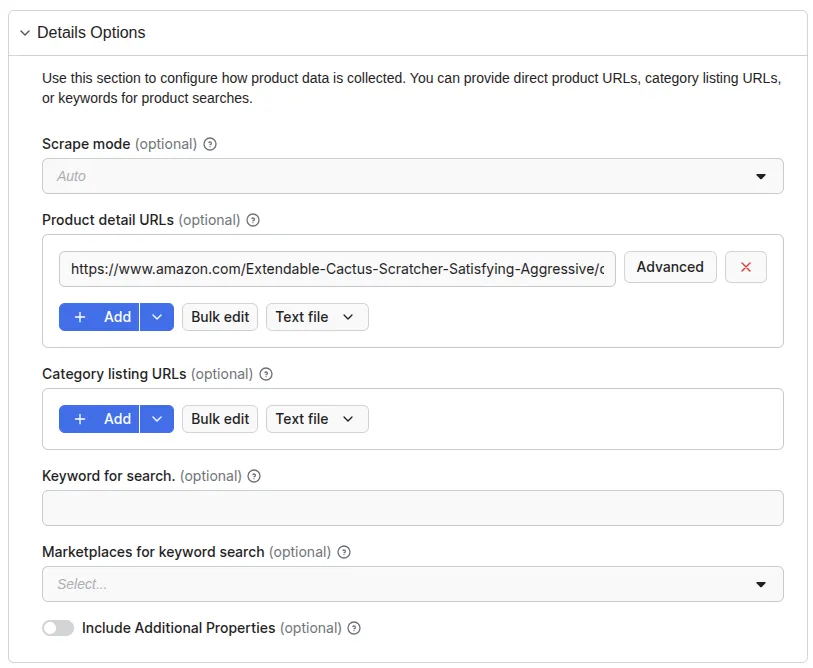
Scrape Mode - Choose how pages are rendered:
- AUTO (recommended) - System automatically selects the best method
- HTTP - Lightweight requests, faster but may miss JavaScript-loaded content
- BROWSER - Full browser rendering, slower but captures all data including dynamically loaded content
Input methods:
- Product detail URLs - Direct links to individual products (e.g. https://www.amazon.com/dp/B09WNK39JN/)
- Most accurate method - Extracts complete product information
- Best for: Monitoring specific products, price tracking lists
- Category listing URLs - Extract all products from a category page
- Keywords - Search by keyword
Include additional properties (optional)
- Standard fields: name, description, price, reviews, etc.
- Additional properties count as 1 data point
AI summary (optional)
- Custom prompt - Write your own instructions for the AI, or use Apify's default summary prompt
Total maximum products - Set maximum products to scrape per run (controls cost and runtime)
Search engine options
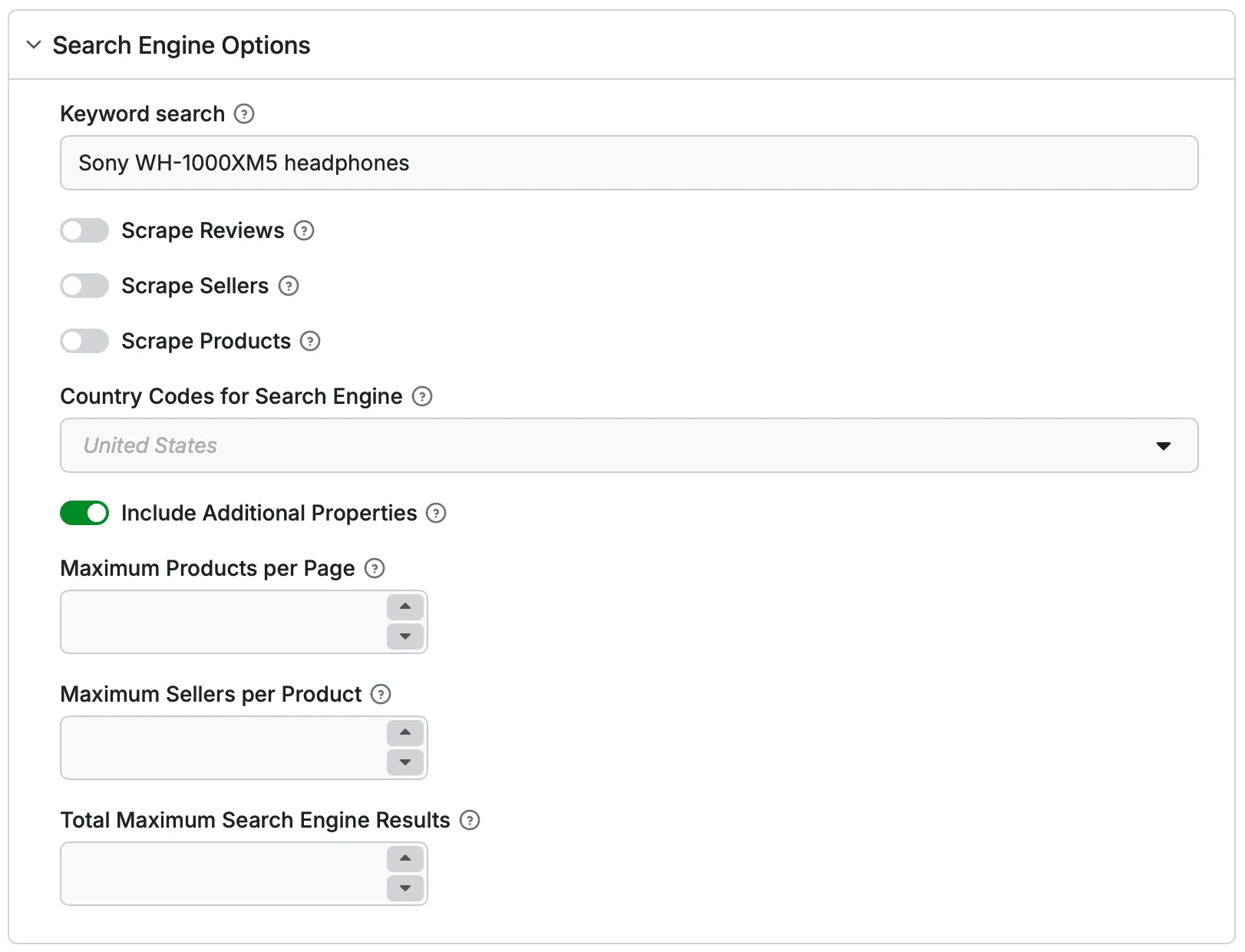
Search across multiple e-commerce sites simultaneously using Search Engines.
How it works:
- Enter keywords (e.g. "Sony WH-1000XM5 headphones")
- Select country/region for localized results
- Choose what to scrape: Products, Reviews, OR Sellers (one per run)
- Get aggregated data from hundreds of retailers
Input parameters:
| Parameter | Type | Required | Description |
|---|---|---|---|
| SearchEngineSearchKeyword | string | Yes | Search term for finding products |
| countryCode | string | No | ISO country code |
| scrapeProductsFromSearchEngine | boolean | No | Enable product scraping (default: false) |
| maxSearchEngineProducts | integer | No | Max products per search page |
| maxSearchEngineSellersPerProduct | integer | No | Max sellers per product |
| maxSearchEngineResults | integer | No | Total limit for run |
| additionalPropertiesSearchEngine | boolean | No | Include extra attributes (default: true) |
⚠️ Critical: Enable only one scraping mode (Products, Reviews, or Sellers) per run.
Example 1: Basic product search
Example 2: Price comparison (sellers mode)
Example 3: International search
Food delivery options
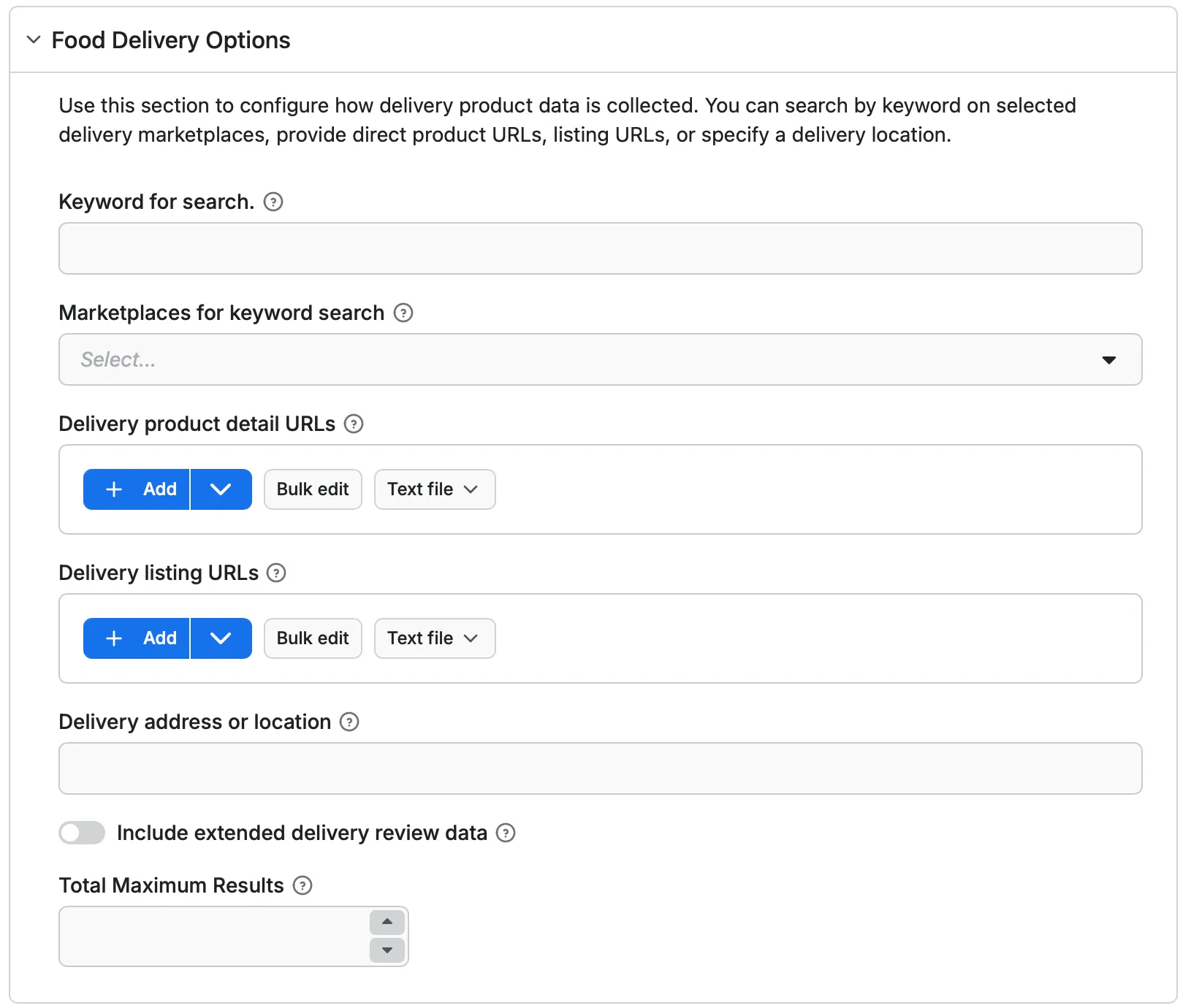
Extract product data from food delivery platforms. You can search by keyword on selected delivery marketplaces, provide direct product URLs, listing URLs, or specify a delivery location.
Input methods:
- Keyword for search - Search keyword used to find delivery products across selected delivery marketplaces
- Marketplaces for keyword search - Select which delivery marketplaces will be used for keyword-based product search
- Delivery product detail URLs - Direct links to individual delivery product pages. Each URL will be processed separately to extract product and review data
- Delivery listing URLs - Links to delivery category or listing pages. Products found on these pages will be processed automatically
Configuration options:
- Delivery address or location - Delivery location (e.g. city, ZIP code, or full address) used to localize delivery product availability and results
- Include extended delivery review data - When enabled, reviews will be included in the output
- **Total maximum results ** - Defines the maximum total number of delivery products or reviews to collect across the entire run
Review options
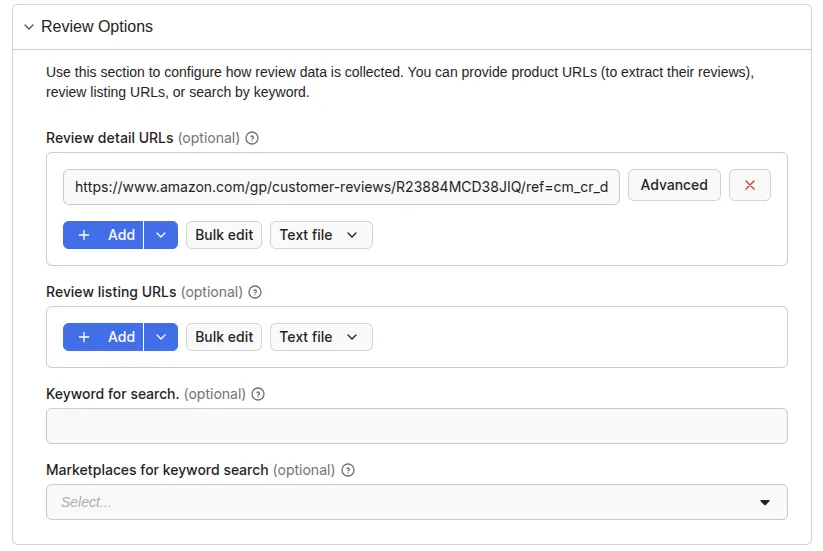
Extract customer feedback and ratings to analyze product quality and sentiment.
Input methods:
- Review detail URLs - Scrape all reviews for specific products
- Review listing URLs - Extract reviews from all products in a category
- Keywords + Marketplace - Find and scrape reviews based on search terms
Configuration options:
- Review sort type - Predefined sorting (most recent, highest rated, most helpful, most relevant)
- Include additional properties - Platform-specific review data (verified purchase badges, review images, helpful votes)
- Total max reviews - Limit number of reviews scraped per run
Seller options
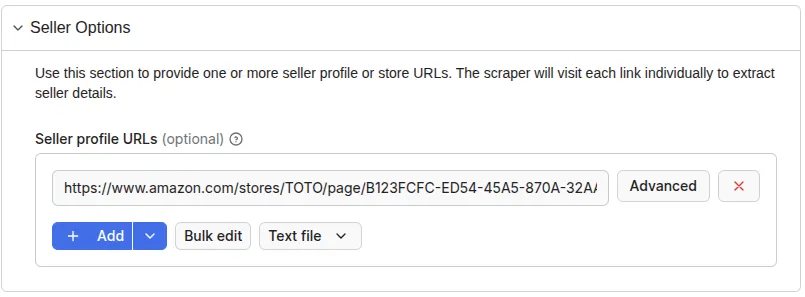
Gather seller information from marketplace platforms.
Input methods:
- Seller profile URLs - Direct links to seller pages on marketplaces
Configuration options:
- Total maximum sellers - Limit the number of sellers scraped per run
Influencer options
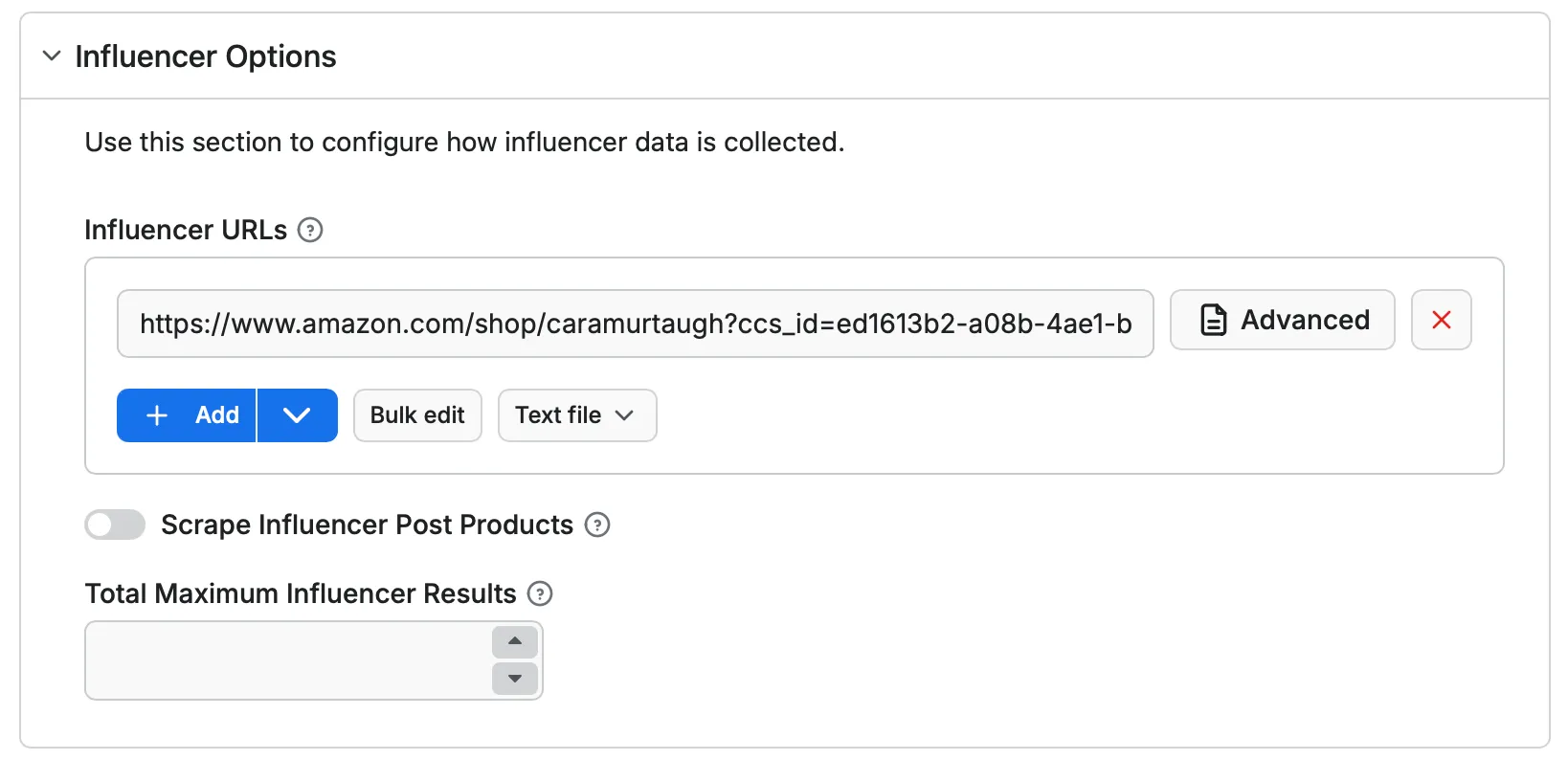
Scrape Amazon Influencer Storefronts - dedicated pages where influencers promote products.
Input methods:
- Influencer URLs
Configuration options:
- Scrape Influencer Post Products
- Total Maximum Influencer Results
⬆️ Output
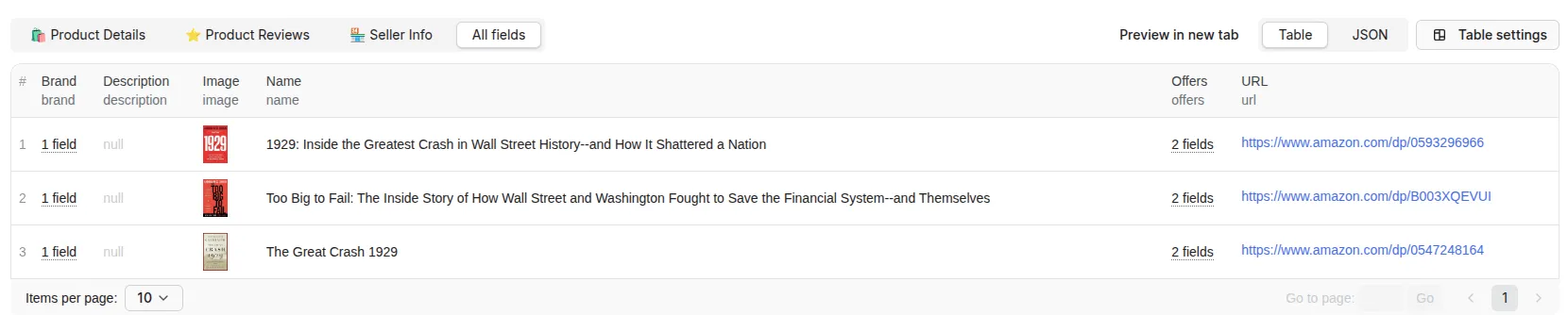
The results will be wrapped into a dataset, which you can find in the Output or Storage tab. You can view results as a table or JSON.
You can get specialized views for different use cases:
- Products details (default) - Standard product listing with all extracted fields. One row per product. Ideal for catalog analysis and product comparison.
- Product reviews - Each review in a separate row. Perfect for sentiment analysis and review mining.
- Seller info - Aggregate data by seller. Useful for marketplace vendor analysis.
- Influencer post - Aggregates product images and URLs.
- All fields - Complete view of every field scraped from the product.
Once the run is finished, you can also download the dataset in various data formats (JSON, CSV, Excel, XML, HTML). Before exporting, you can pick or omit specific output fields; alternatively, you can also choose to download the whole view, which includes thematically connected data.
Table view
JSON view
Output schema
Are there other e-commerce data scraping tools in Store?
We also have several more specific price, product, and product reviews scraping tools in Apify Store. Check out our other web scrapers to extract specific e-commerce data:
| ⏱️ Costco Fast Product Scraper | ❄️ Walmart Product Detail Scraper |
| 🏷️ Kroger Product Details Scraper | 🛒 Allegro Product Detail Scraper |
| 👀 Facebook Marketplace Scraper | 📦 Amazon Product Scraper |
❓ Frequently asked questions
Can I scrape Amazon, Walmart, eBay, and other major retailers?
Yes! E-commerce Scraping Tool works with virtually all e-commerce platforms, including Amazon, eBay, Alibaba, AliExpress, Etsy, Rakuten, Walmart, Target, Best Buy, Home Depot, Costco, Tesco, Argos, John Lewis, Flipkart, Zalando, Otto, Shopify stores, WooCommerce sites, Magento/Adobe Commerce, BigCommerce, PrestaShop, and more. It works with any online store with publicly accessible product pages.
Simply provide the product or category URL, and the scraper handles the rest. For optimal performance on specific platforms, consider using specialized scrapers.
How many products can I scrape per run?
There's no hard limit on the number of products you can scrape. The practical limit depends on your subscription plan, cost budget, and the complexity of the sites you're scraping.
Can I scrape products behind login or account walls?
No. E-commerce Scraping Tool only extracts publicly available data that doesn't require authentication.
How often should I schedule runs for price monitoring?
It depends on your market. Hourly for fast-moving categories, daily for most use cases, weekly for stable catalogs.
Can I scrape historical prices?
No. E-commerce Scraping Tool captures current data only, meaning whatever is visible on the website at the time of the run. However, you can build your own historical dataset by scheduling regular runs and storing each result.
The simplest approach is to set up daily or weekly runs and let the data accumulate. Each run creates a timestamped dataset in Apify's storage, so you can compare them over time to track price trends, seasonality, and patterns. For more advanced setups, push the data to your own database after each run and build time-series analysis on top of it.
What if the scraper doesn't work on a specific website?
E-commerce Scraping Tool is continuously updated to work with the most popular e-commerce platforms. If you encounter issues with the platform you are checking, use the Issues tab on the Actor page, create a new issue with all the details, and Apify support will help you troubleshoot.
Can I use integrations with E-commerce Scraping Tool?
You can integrate e-commerce API with almost any cloud service or web app. We offer ecommerce API integrations with Zapier, IFTTT, n8n, Slack, Airbyte, Make, LangChain, GitHub, Google Sheets, Google Drive, and plenty more.
Alternatively, you could use webhooks to carry out an action whenever an event occurs, such as getting a notification whenever E-commerce Scraping Tool successfully finishes a run.
Can I use E-commerce Scraping Tool with the Apify API?
The Apify API gives you programmatic access to the Apify platform. The API is organized around RESTful HTTP endpoints that enable you to manage, schedule, and run Apify Actors, including this e-commerce web scraper. The e-commerce scraper API also lets you access any datasets, monitor Actor performance, fetch results, create and update versions, and more.
To access the API using Node.js, use the apify-client NPM package. To access the API using Python, use the apify-client PyPI package.
Click on the API tab for code examples, or check out the Apify API reference docs for all the details.
Can I use E-commerce Scraping Tool through an MCP Server?
Yes. You can use E-commerce Scraping Tool with the Apify MCP server, directly connecting with clients like Claude Desktop, Claude Code, or any other MCP client. Read all about how you can set up Apify Actors with MCP.
To set up an MCP server with this E-commerce Scraping Tool, you only need to provide the URL to the MCP client: mcp.apify.com?tools=apify/e-commerce-scraping-tool.
If you need more detailed settings, go to the MCP tab and follow the instructions there.
Is scraping e-commerce data legal?
E-commerce Scraping Tool is legal as it only extracts publicly available data. It doesn't access or extract any hidden or private data, such as email addresses, gender, or location. It also doesn't extract data behind login. Product names, prices, and store information are all publicly available information. For more details, you can read our blog post on the legality of web scraping.
Your feedback
We're always working on improving the performance of our Actors. If you have any technical feedback for E-commerce Scraping Tool or have found a bug, please create an issue in the Issues tab.