

BBB Scraper: Business Leads, Reviews & Complaints
Pricing
from $8.80 / 1,000 business profiles
BBB Scraper: Business Leads, Reviews & Complaints
Find US and Canadian businesses on BBB. Collect company details, public contacts, customer reviews, complaints and replies for lead generation, supplier checks and reputation research. View each business in one place or export to CSV, Excel and JSON. No coding needed.
Pricing
from $8.80 / 1,000 business profiles
Rating
0.0
(0)
Developer

ArjunAI Data
Maintained by CommunityActor stats
0
Bookmarked
2
Total users
1
Monthly active users
19 days ago
Last modified
Categories
Features
Share
BBB Scraper turns BBB.org business profiles, customer reviews and complaints into data for lead generation, supplier checks and reputation research. Search by company or industry and location, or paste BBB links. No coding needed.
Get each business's details, collected reviews, complaints and replies together. Read a complete business page, download the full JSON, or use separate review and complaint tables for spreadsheet analysis.
BBB business data 🏢
- Find potential customers. Search US and Canadian businesses by industry and location, with available websites, phone numbers and public email addresses.
- Research companies before you reach out. Collect BBB ratings, accreditation, business history, listed contacts and services.
- Understand customer feedback. Read customer reviews, public complaints and the available business, consumer and BBB replies.
- Keep the full picture together. Each business record includes its collected reviews and complaints, so you can work with one complete result.
- Take the data into your workflow. Export to JSON, CSV or Excel, use the API, or schedule fresh collections in Apify.
| Your goal | What to collect |
|---|---|
| Sales prospecting and agency research | Business details and available public contacts |
| Supplier and vendor checks | BBB rating, accreditation, business history and complaints |
| Customer experience research | Review scores, review text and response threads |
| Market and competitor research | Businesses in selected locations, services and customer feedback |
Quick start 🚀
- Choose your businesses. Enter company names or industries and locations, or paste existing BBB links.
- Set your total business limit. This applies to the whole run.
- Choose your feedback. Switch on reviews and/or complaints to collect their text and replies. Use
10for a smaller sample or0for all available public records. - Click Start. Open View results & downloads, then choose a business to read its complete results or download your data.
Business details are on by default. Reviews and complaint text are off until you enable them. Selecting both search terms and links collects both, starting with the links.
Example: build a local business list
This example collects up to three plumbing businesses in Austin, with available contacts, business details and public feedback counts.
Example: collect a complete business profile
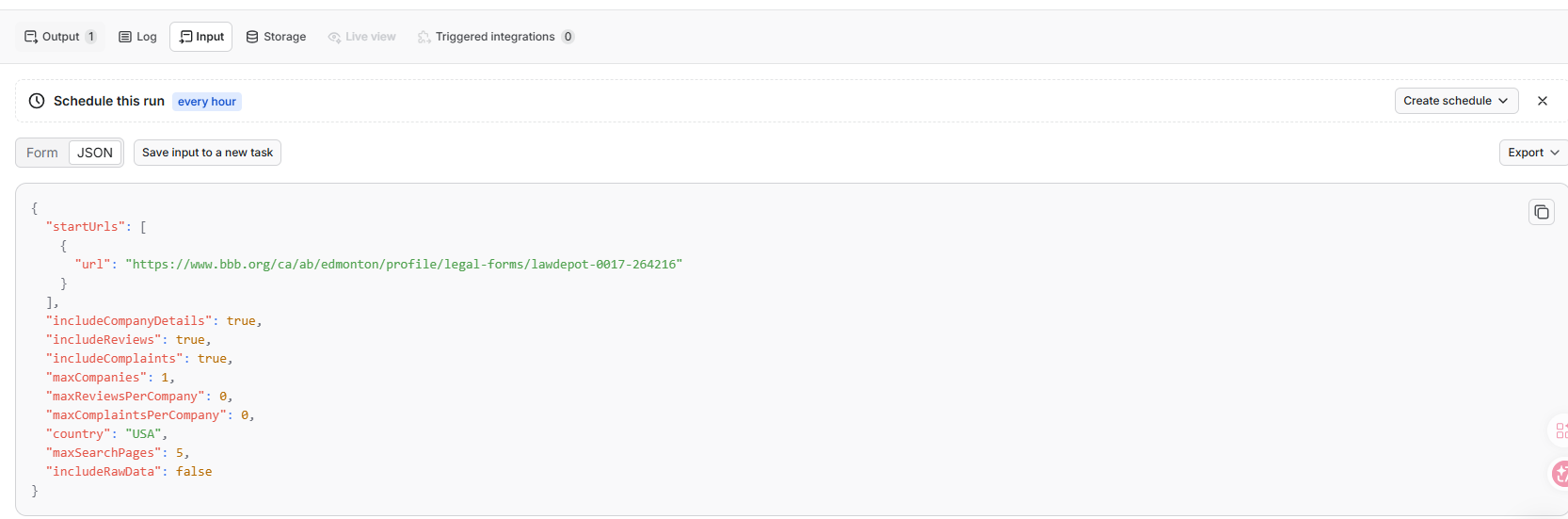
This example requests one business's details, all accessible public reviews and complaints, and their available replies.
To collect a smaller sample, replace either 0 with the number you want per business. Your run's spending limit and time limit still apply.
Input example in Apify: business details, reviews and complaints are enabled, with both feedback limits set to 0.
Your results 📊
Real example: a November 6, 2026 collection of LawDepot returned one business profile, 33 public reviews, 57 public complaints and 142 replies. All of that collected content was included in one business record. Source counts change over time, and each business publishes different information.
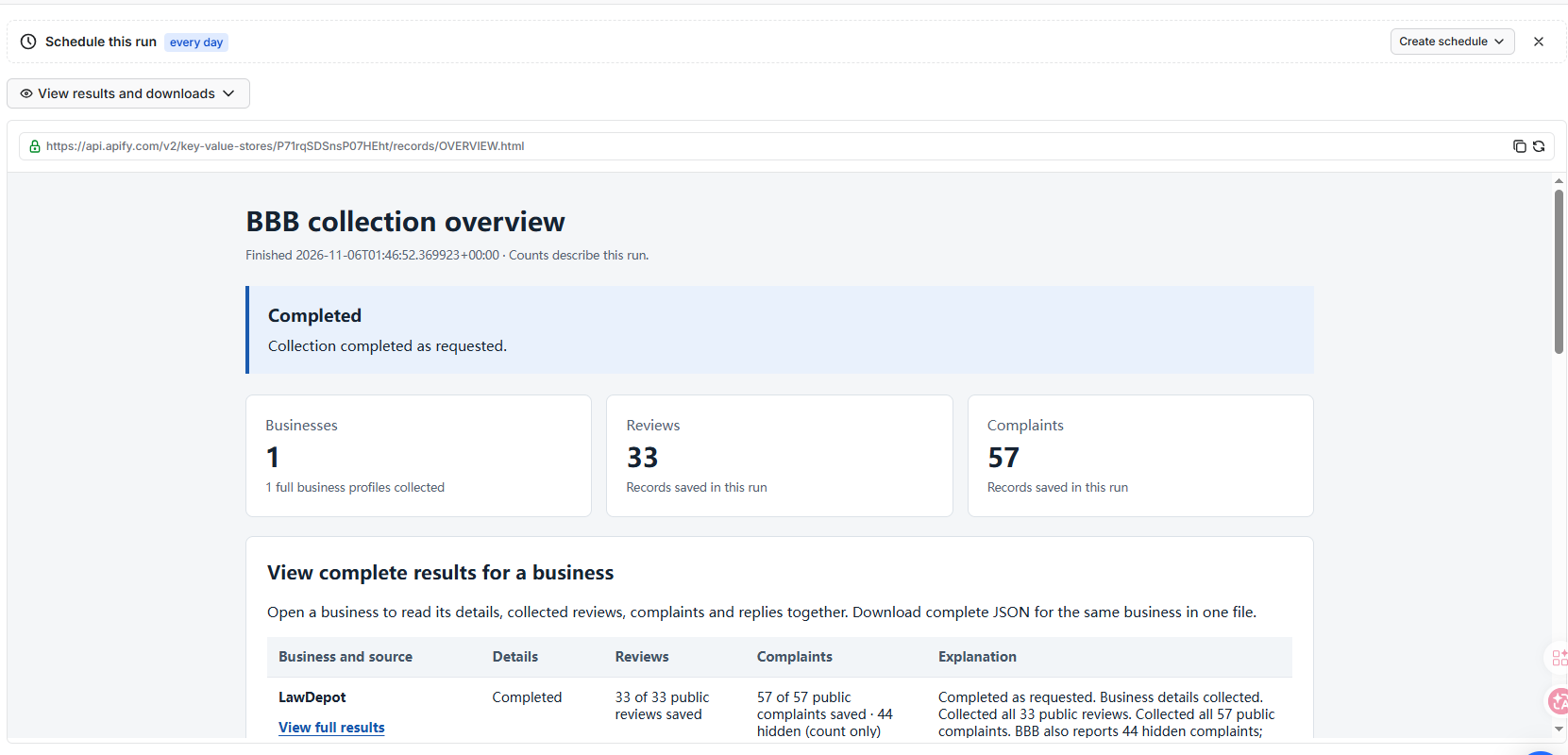
Start with View results & downloads:
- View full results opens one page with the business details, reviews, complaints and replies. Expand a feedback entry to read its full text and response thread.
- Download complete JSON saves one business and its collected feedback together.
- Business results contains one complete record per company. Select All fields to see every saved field, including reviews and complaints.
- Reviews only and Complaints only provide separate tables with one feedback entry per row. Their CSV exports include readable replies for spreadsheet analysis.
- Collection notes explains invalid links, empty results and any incomplete collection.
What data do you receive?
| Data | Included when available |
|---|---|
| Business profile | Name, industry, description, website, phone, public email and address |
| BBB information | Letter grade, accreditation, accreditation date and rating explanations |
| Company background | Business start date, years in business, listed contacts and business type |
| Services and policies | Products, services, operating hours, service areas, licenses and payment/refund information |
| Customer reviews | Star rating, date, public display name, review text and available replies |
| Complaints | Date, type, status, public complaint text and available replies |
| Collection summary | Available public totals, records saved, hidden complaint counts and source links |
Choose JSON to keep the complete business record and all its feedback together. Choose the separate Reviews or Complaints export when you want one review or complaint per spreadsheet row.
Input settings ⚙️
| Setting | Default | How to use it |
|---|---|---|
| Country for custom locations | United States | Applies to cities or postal codes you type yourself. Suggested cities use their own country automatically. |
| Business names or industries | Empty | Select an industry or type a company name. Pair it with one or more locations. |
| Cities, states or postal codes | Empty | Pick suggested cities or enter your own location. You can mix suggested US and Canadian cities. |
| BBB links | Empty | Paste business, review, complaint or search links. Leave names and locations blank to use only these links. |
| Total business limit | 20 | Maximum unique businesses across all links, searches and locations in this run. |
| Include business details | On | Collect available contacts, BBB information, company background and services. |
| Collect customer reviews | Off | Turn on to save review text, ratings and replies. |
| Reviews per business | 10 | Number of newest reviews for each business. 0 = all accessible public reviews. |
| Collect complaints | Off | Turn on to save public complaint text, status and replies. |
| Complaints per business | 10 | Number of most recent public complaints for each business. 0 = all accessible public complaints. |
| Search pages per search | 5 | Advanced: how many result pages to visit for each search, within your total business limit. |
| Include extra source data | Off | Advanced: add the original BBB data for custom analysis. Increases download size. |
Each business name or industry is searched in every selected location. For example, two industries and three cities create six searches, all sharing the same total business limit.
A country filter in a pasted search link takes priority. Direct business links keep their own country. Repeated links and matching business identifiers are combined within the run.
Pricing 💰
Pay for the records delivered. The same prices apply across Apify subscription tiers.
| What you collect | Price per 1,000 | Includes |
|---|---|---|
| Business details | $8.80 | Available business details and public contacts |
| Search listings, with business details off | $1.80 | Verified business information from search results |
| Customer reviews | $4.80 | Review text and available replies |
| Complaints | $4.80 | Public complaint text and available replies |
- Replies are included. They are not charged separately.
- Each business is charged for details or a search listing, once per run.
- Combined records and separate feedback tables do not double the feedback charge.
- Failed detail requests, unverified URL-only entries and hidden complaint counts have no result fee. Fields BBB has not published may still be empty in a successfully collected profile.
- Run computing and managed connections are included in these prices.
A startup charge of $0.00005 applies at the default 512 MB, including runs that start but return no records. Larger memory allocations can increase the startup charge.
Example: one business profile, 10 reviews and 10 complaints costs $0.10485, including the default startup charge. Your price depends on what is actually saved.
Set a spending limit in Apify's run settings to control your budget. If the limit is reached, the Actor stops further collection and keeps the records already saved.
FAQs 💡
Can I collect all reviews and complaints?
Yes. Enable the relevant option and set its per-business limit to 0. This requests all currently accessible public records, subject to your run's spending and time limits. Hidden complaint bodies and records no longer published by BBB are unavailable.
Why do I see feedback counts but no review or complaint text?
Business details include available public feedback counts. To collect the text, switch on Collect customer reviews and/or Collect complaints. Otherwise, the complete business record shows the counts and explains that text collection was not enabled.
Why are some contacts or business fields empty?
The Actor collects what BBB publishes for that business. Not every company lists an email, a license or a complete business history. Missing details are left empty. A BBB letter grade and a customer's star rating are separate measurements.
Why are fewer results saved than BBB reports?
Check the collection summary for business limits, per-business feedback limits, your spending limit or an unavailable page. Some complaints are counted by BBB but have hidden bodies. BBB also exposes a limited search window; use more specific cities or industries for broader research.
What does REMOVED or masked text mean?
BBB sometimes removes names or replaces parts of a review, complaint or reply with asterisks or REMOVED. The Actor preserves the text as published.
Can I collect fresh data regularly?
Yes. Use Apify schedules to run the Actor periodically. Each run collects a new snapshot; compare saved results in your own tools to follow changes. Records collected again in later runs are charged again.
Do I need coding skills or a BBB account?
No. Use the input form to start collecting publicly available data. Connections are handled automatically. Developers can also use the API below.
BBB data API 🔌
After a run finishes, one request retrieves the business details, collected reviews, complaints and replies together:
Each business includes reviews and complaints lists. Each review or complaint includes its available responses. Empty lists are explained by the collection status. New runs use this combined format; older runs retain their original output.
Use offset and limit to retrieve large runs in pages. Very large complete business records are subject to Apify's dataset size limits; use smaller per-business feedback limits when needed.
See the Apify dataset API for export options.
Help & support 🤝
Open the Issues tab on this Actor's page and include your run link, the affected BBB link and what you expected to receive.
Start with a few businesses or a small feedback sample, check the results, then expand your next run.
An independent tool for publicly available BBB data. Not affiliated with or endorsed by the Better Business Bureau.


