

Website to Markdown Crawler | LLM & RAG Ready, $1.50/1K
Pricing
from $1.05 / 1,000 page results
Website to Markdown Crawler | LLM & RAG Ready, $1.50/1K
Extract website pages to Markdown at a flat $1.50 per 1,000 pages: 34% under Apify's RAG Web Browser, no compute-unit billing like Apify's Website Content Crawler, and failed, duplicate or empty pages never charged. Clean main-content Markdown for RAG and LLMs, headings and links kept.
Pricing
from $1.05 / 1,000 page results
Rating
0.0
(0)
Developer

Aurelix
Maintained by CommunityActor stats
0
Bookmarked
1
Total users
0
Monthly active users
12 minutes ago
Last modified
Categories
Share
What is Website to Markdown Crawler?
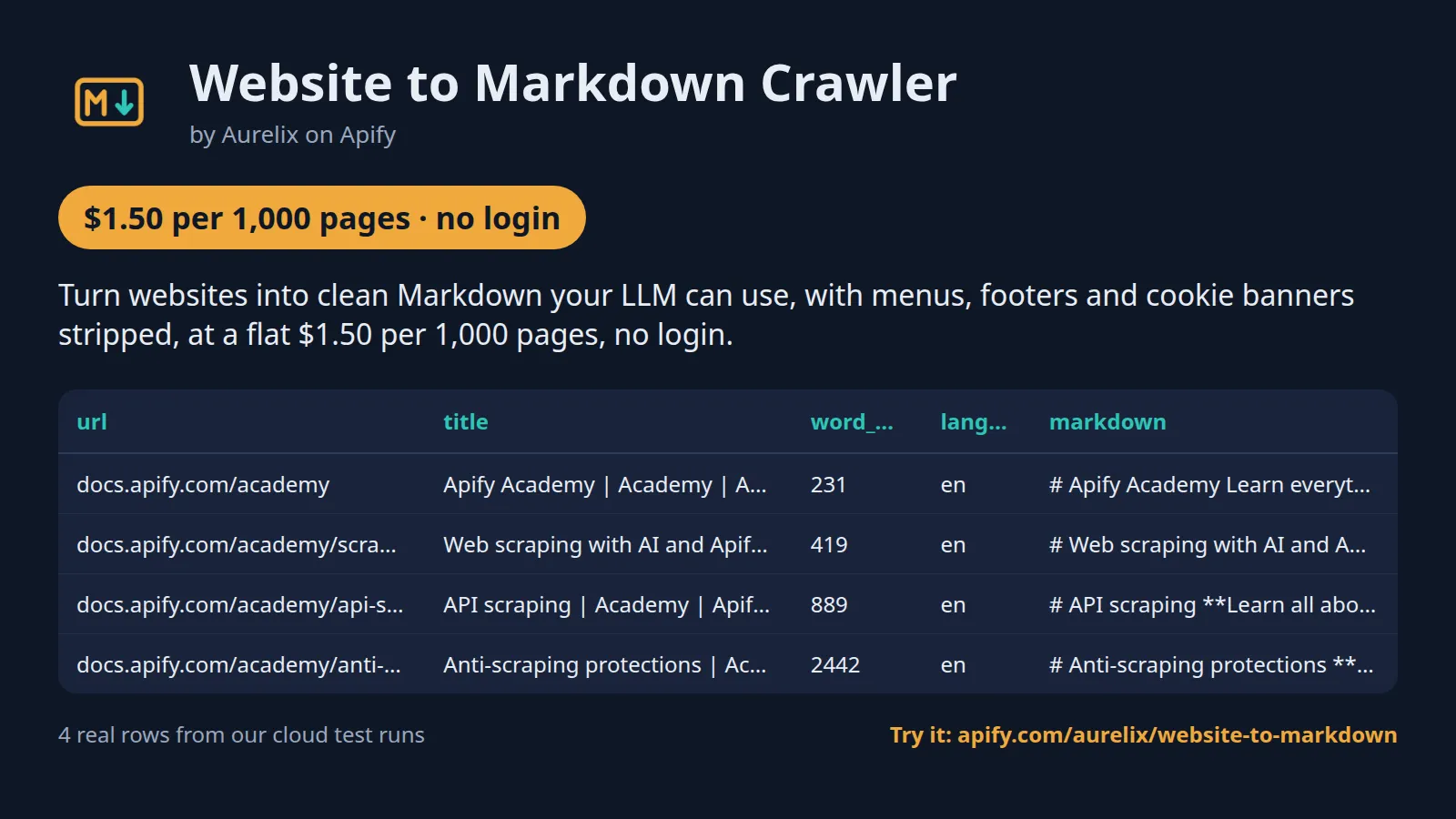
Turn websites into clean Markdown your LLM can use, with menus, footers and cookie banners stripped, at a flat $1.50 per 1,000 pages, no login.
For RAG pipelines, AI agents and docs search. Plain HTTP with no browser, so runs start in seconds; robots.txt is always obeyed, and failed, duplicate or empty pages are free. Your first run with the example input costs about $0.031 (20 pages in our test run).
| Start from | One or more start URLs |
| Scope | Under the start path or the whole site; include and exclude URL globs |
| Output | 13 fields per page; JSON, CSV, Excel, API |
| Automate | Schedules, webhooks, Zapier, Make, n8n, Google Sheets, MCP for AI agents |
| Price | $1.50 per 1,000 pages ($1.05 per 1,000 pages on paid Apify plans) |
| Login needed | No |
Why Website to Markdown Crawler users pick this one
- No compute-unit surprises. One flat price per page; failed, duplicate and empty pages are free.
- RAG-ready rows. Title, headings, word count and URL on every page for chunking and citations.
- Structure kept. Headings, lists, tables, code blocks and links stay Markdown; links made absolute.
- 34% under RAG Web Browser. $1.50 per 1,000 pages against $2.28 for Apify's RAG Web Browser.
- Starts in seconds. Plain HTTP with no browser; robots.txt and Crawl-delay always obeyed.
Get started in 3 steps
- Paste one or more start URLs, e.g. https://docs.apify.com/academy, and set Max pages.
- Choose the scope: 'Under the start path' for one docs section, or 'Whole site'. Optionally add include or exclude URL globs such as /blog/.
- Click Start, then download JSON, CSV or Excel, or send the pages to your vector database, LangChain, LlamaIndex, Zapier, Make or n8n through the API.
▶ Try it with the example input
The form opens with an example input already filled in: that run costs about $0.031 on the free plan.
How much does it cost to convert a website to Markdown?
Pay per event: you pay only for what the run returns, plus a small start fee. Bronze, Silver, Gold and higher Apify plans pay less per result.
| Pages | Free plan | Paid plans (Bronze, Silver, Gold) |
|---|---|---|
| 100 | $0.15 | $0.11 |
| 1,000 | $1.50 | $1.05 |
| 10,000 | $15.00 | $10.50 |
Totals include the $0.001 start fee per run, rounded to the cent. Apify's free plan includes $5 of credit a month, enough for about 3,300 pages.
Flat $1.50 per 1,000 pages: no compute-unit surprises. Skipped pages are not charged: pages blocked by robots.txt, fetch errors, non-HTML responses, duplicate URLs or identical Markdown, pages that need JavaScript and pages with no main content.
Billing events
| Event | Free plan | Paid plans (Bronze, Silver, Gold) |
|---|---|---|
page-result | $1.50 per 1,000 pages | $1.05 per 1,000 pages |
apify-actor-start | $0.001 per run | $0.001 per run |
Website to Markdown Crawler vs alternatives
| This Actor | apify/website-content-crawler | apify/rag-web-browser | |
|---|---|---|---|
| Price per 1,000 pages, free plan | $1.50 | billed by compute units | $2.28 |
| Price per 1,000 pages, paid plans | $1.05 | billed by compute units | $1.90 |
| Start fee per run | $0.001 | none (compute units) | $0.0018 at 8 GB |
| Platform usage billed on top | No | Yes | No |
| Crawls a whole site from start URLs | ✓ | ✓ | ✗ (search results or given URLs) |
| Default memory per run | 256 MB | 8 GB | 8 GB |
| Failed, duplicate and empty pages | Not charged | Compute still billed | not stated |
| robots.txt | Always obeyed | not stated | not stated |
| JavaScript rendering | ✗ (server HTML only) | ✓ | ✓ |
Prices checked regularly on each Actor's Store page.
Benchmarks: how we compare
| Test | Input | Result | Run time | Peak memory |
|---|---|---|---|---|
| First run (prefilled input) | docs.apify.com/academy, Max pages 20 | 20 pages for $0.031 in total | 28 s | 66 MB |
| Throughput | docs.python.org/3/library, run timeout 600 s | 172 pages, stopped itself cleanly before the timeout (about 1,300 pages an hour) | 512 s | 129 MB |
| Content accuracy | 10 real pages: Wikipedia, Python docs, MDN, GNU, Go, Martin Fowler, PostgreSQL docs, Apify docs, 2 practice shops | 98.5% to 100% of the content blocks kept on every page; 0 boilerplate blocks leaked | 6 s | 74 MB |
| Huge page | one 15.8 MB HTML page | skipped, not charged, run SUCCEEDED | 2 s | 51 MB |
| Large pages at once | 3 Wikipedia pages of about 1.9 MB each | 3 pages converted | 5 s | 130 MB |
| Mixed bad inputs | an HTTP 429 URL, an HTTP 404 URL and 2 good sites, Max pages 4 | 4 pages; the 429 and the 404 named in the status and not charged | 16 s | 92 MB |
| Blocked site | 3 start URLs all disallowed by robots.txt | 0 pages, 0 page charges, run SUCCEEDED | 3 s | 48 MB |
Measured on Apify cloud runs at the default 256 MB, plain HTTP, no proxy, one run per row. Accuracy compares each page's Markdown with an independent parse of the same page's content blocks (10 pages). The first-run cost includes the $0.001 start fee; its time and memory come from a cost-test run on the same input.
What data you get
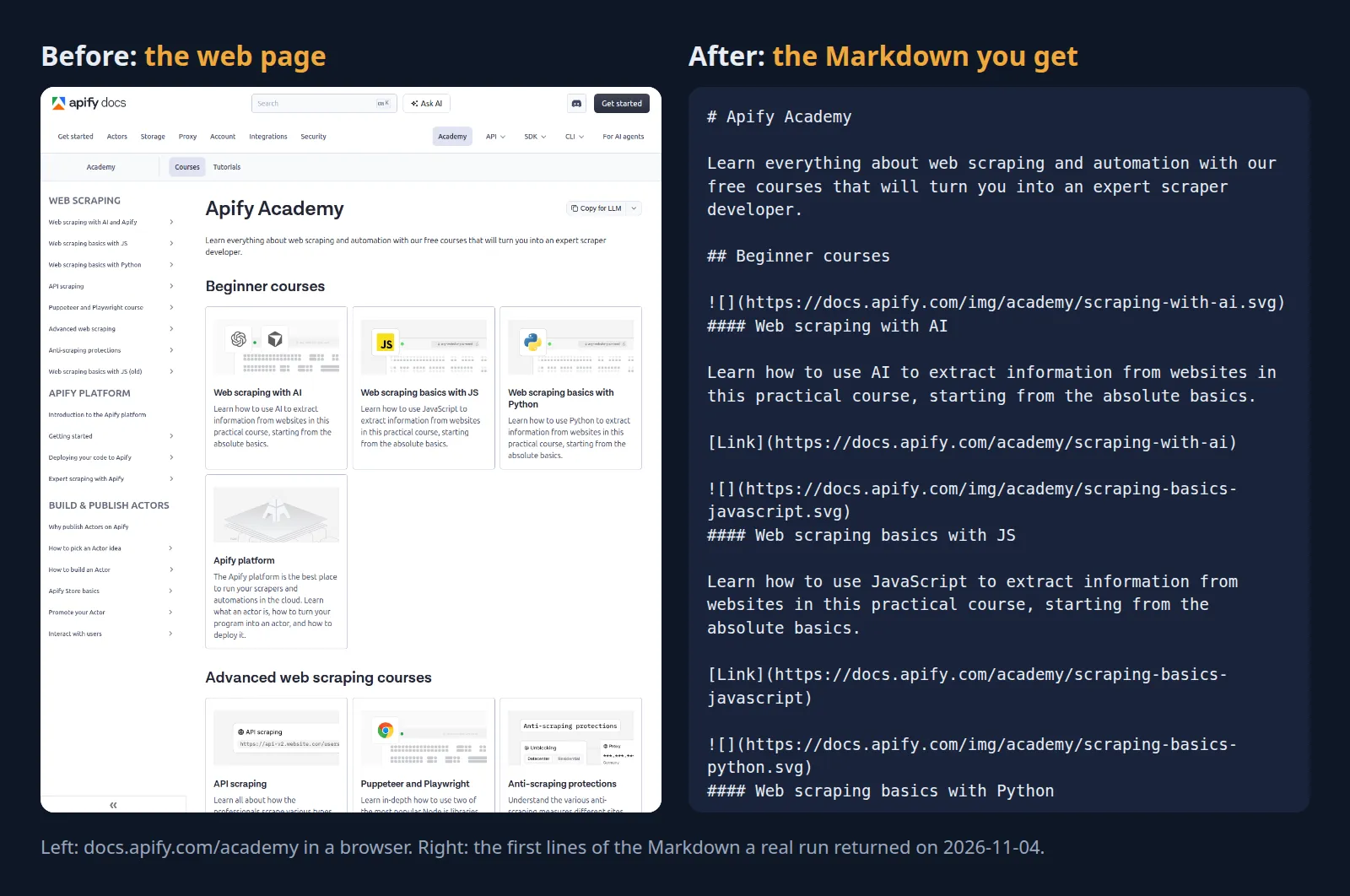
Website to Markdown Crawler crawls a website and turns each page into one row of clean Markdown of its main content, with navigation, headers, footers, sidebars, cookie banners and scripts stripped and headings, lists, tables, code blocks and links kept. Each row also carries the URL, title, meta description, language, last-modified date, headings, links and word count for chunking and citations. Crawl one docs section or the whole site, with include and exclude URL globs.
- url (final, after redirects), title, meta description, language, last_modified (ISO 8601 UTC)
- markdown: the page's main content as Markdown
- headings: [{level, text}] of the main content
- links: absolute URLs linked from the main content
- word_count, crawl_depth, http_status, scraped_at
| url | title | word_count | language | last_modified | markdown |
|---|---|---|---|---|---|
| https://docs.apify.com/academy | Apify Academy | Academy | Apify Documentation | 231 | en | 2026-11-04T01:19:44Z | # Apify Academy Learn everything about web scraping and ... |
| https://docs.apify.com/academy/scraping-with-ai | Web scraping with AI and Apify | Academy | Apify Docume... | 419 | en | 2026-11-04T01:19:43Z | # Web scraping with AI and Apify **Learn how to use AI t... |
| https://docs.apify.com/academy/api-scraping | API scraping | Academy | Apify Documentation | 889 | en | 2026-11-04T01:19:43Z | # API scraping **Learn all about how the professionals s... |
| https://docs.apify.com/academy/anti-scraping | Anti-scraping protections | Academy | Apify Documentation | 2442 | en | 2026-11-04T01:19:43Z | # Anti-scraping protections **Understand the various ant... |
One full page record, exactly as a real run returned it (long text and lists shortened here). From a real run:
Use cases
- AI developers loading documentation sites into a vector database for RAG
- Teams building a chatbot or support assistant on their own help center
- Researchers turning blogs and knowledge bases into clean text
- AI agents that need a site's pages as Markdown through MCP
Use-case recipes
Load a docs section into a vector database
For AI developers building RAG on product documentation. Set startUrls to the docs section and keep scope on path. Split each row's markdown on its headings, embed the chunks, and store url and title with each chunk so answers can cite the page.
Build a support chatbot from your help center
For support teams. Point startUrls at the help center home, set scope to domain, and exclude pages that are not answers, such as search and tag listings. Feed markdown to the chatbot's knowledge base and use last_modified to spot articles nobody has updated in a long time.
Copy a blog into clean text for research
For researchers and writers. Use includeGlobs to keep only article URLs. Sort the rows by word_count to find the long-form pieces, and read description and headings for a quick outline before opening the full markdown.
Keep the corpus fresh after the first copy
For teams that re-embed on a schedule. Run this Actor once for the full copy. Then schedule Website Change Tracker on the same startUrls and re-run this Actor only on the pages it reports as added or changed, so you re-embed only those.
Input
| Field | Type | What it does | Default |
|---|---|---|---|
startUrls (Start URLs) | array | Pages to start from, e.g. ['https://docs.apify.com/academy']. | ["https://docs.apify.com/academy"] |
maxPages (Max pages) | integer | Stop after this many pages are converted (and charged), e.g. 100. | 50 |
scope (Crawl scope) | string | 'path' = only URLs under the start URL's folder (start https://example.com/docs/ crawls /docs/...), 'domain' = the whole site of each... | "path" |
includeGlobs (Include URL globs) | array | Follow only links whose full URL matches one of these patterns, e.g. ['https://docs.apify.com/academy/**']. | |
excludeGlobs (Exclude URL globs) | array | Never follow links whose full URL matches one of these patterns, e.g. ['/changelog/', '**?page=*']. |
All 5 fields, with examples: see the Input tab.
Switching from apify/website-content-crawler
Already running apify/website-content-crawler? Map its input fields to this Actor's like this:
apify/website-content-crawler input | This Actor's input | Notes |
|---|---|---|
startUrls | startUrls | Same field. Plain URL strings or {"url": ...} objects both work; a URL without http(s):// gets https://. |
maxCrawlPages | maxPages | Ours counts only pages converted and charged; skipped pages (robots.txt, errors, duplicates, non-HTML) do not count. Range 1 to 10,000. |
maxCrawlDepth | no equivalent | There is no depth limit; limit the crawl with scope, includeGlobs, excludeGlobs and maxPages. Each row reports its crawl_depth. |
includeUrlGlobs | includeGlobs plus scope | Theirs extends the crawl beyond the start URLs; ours narrows it: only links matching a pattern are followed. To go beyond the start folder, set scope to domain. |
excludeUrlGlobs | excludeGlobs | Same idea: ** matches anything, * anything except /. |
crawlerType | not needed | Always plain HTTP with no browser. Pages that need JavaScript are skipped, listed in the log and not charged. |
respectRobotsTxtFile | not needed | robots.txt and Crawl-delay are always obeyed and cannot be switched off. |
proxyConfiguration | no equivalent | No proxy is used; pages are fetched directly with a named crawler user agent. |
removeElementsCssSelector / htmlTransformer | no equivalent | Main-content detection is automatic: menus, headers, footers, cookie banners and scripts are removed for you. |
useSitemaps | no equivalent | The crawl follows links from the start URLs only; sitemaps are not read. |
- Price model changes from compute units to a flat $1.50 per 1,000 converted pages plus $0.001 per run; skipped pages are never charged.
- Default memory is 256 MB, against 8 GB for website-content-crawler (comparison table above).
- Each row carries
url,title,description,language,last_modified,markdown,headings,links,word_count,crawl_depthandhttp_status; rename your downstream columns to match. - Duplicates are removed twice: a URL is returned once, and a page whose Markdown is identical to one already returned is skipped for free.
Use with AI agents (Apify MCP server, Claude, ChatGPT, n8n AI agent)
Website to Markdown Crawler is a ready-made tool for AI agents. Through the Apify MCP server an agent reads this Actor's input schema, fills in the input from your request, starts the run and reads the pages back. You pay the same per-result price as a run started by hand, from your own Apify account.
Example prompts
- "Crawl https://docs.apify.com/academy, up to 100 pages, and give me each page as Markdown with its title and URL so I can load it into a vector database"
- "Turn every page under https://example.com/help/ into Markdown, skip anything under /changelog/, and list the pages with their word counts in a table"
- "Fetch the whole site https://example.com as Markdown, at most 50 pages, and tell me which pages are longest and what headings they use"
Claude (claude.ai and Claude Desktop)
Open Settings > Connectors, choose Add custom connector, paste https://mcp.apify.com/?tools=aurelix/website-to-markdown and sign in to Apify when asked. Then ask Claude one of the prompts above.
Claude Code, Cursor, VS Code and other MCP clients
Clients configured with JSON take the same URL:
A client without Apify sign-in sends the header Authorization: Bearer <YOUR_APIFY_TOKEN>; to run the server locally instead, use npx -y @apify/actors-mcp-server --actors aurelix/website-to-markdown with APIFY_TOKEN set.
ChatGPT
Where your ChatGPT plan offers custom connectors (developer mode), add https://mcp.apify.com/?tools=aurelix/website-to-markdown as a connector, sign in to Apify, and ask for the data in plain words.
n8n AI agent
Give an AI Agent node an MCP Client Tool with the endpoint https://mcp.apify.com/?tools=aurelix/website-to-markdown and a Bearer credential holding your Apify token. The agent can then call Website to Markdown Crawler whenever a workflow step needs pages; for a fixed, non-agent workflow use Apify's n8n node with Run Actor instead.
Use it from AI agents (MCP), the API or no-code
Copy this to your AI assistant
MCP server URL for this Actor: https://mcp.apify.com/?tools=aurelix/website-to-markdown (setup for each client in the section above).
API
Start a run and read the dataset with Apify's REST API or the Python and JavaScript clients:
No-code: schedule it in 3 clicks
Send the results to Google Sheets, Zapier, Make, n8n, Slack or any webhook URL.
- Fill in the input, then click Save as a new task.
- In the task, click Schedule and pick daily or weekly (Apify Schedules).
- Open the task's Integrations tab to send every run's results to Slack, Google Sheets, email or any webhook.
Prefer n8n or Make? Ask in the Issues tab and we will share a ready-made workflow for it.
FAQ
Can I convert a website to Markdown without login?
Yes. It never logs in and needs no account on the site, only a free Apify account to run it. It reads the pages a logged-out visitor can see.
Is there a website to Markdown API?
You can use this Actor as one. Start it with Apify's REST API or the Python and JavaScript clients and read the results as JSON (see the code above), or call it from an AI agent through MCP.
How much does it cost to convert a website to Markdown?
About $1.50 for 1,000 pages on Apify's free plan and $1.05 on paid plans, start fee included. The free $5 monthly credit covers about 3,300 pages.
Can I export the Markdown to Excel or Google Sheets?
Yes. Download the results as Excel, CSV, JSON, XML or HTML from the run's Storage tab, or send them to Google Sheets with Apify's Google Sheets integration or the API.
Is it legal to scrape websites for RAG?
It reads only public data any logged-out visitor can see: the website you choose (crawl only sites you have the right to crawl). It goes at a polite pace, respects robots.txt, never logs in and never solves CAPTCHAs. It returns each page's main content as Markdown with title, headings and links; the content is returned as the site published it; copyright in it stays with its owner. To have a record removed, open an issue on this Actor's Issues tab; if a site owner formally asks us to stop, this Actor will stop. You are responsible for using the data lawfully, incl. anti-spam and privacy laws; this is not legal advice.
Does it work for JavaScript-heavy sites?
No. It uses plain HTTP without a browser, so pages that need JavaScript to show their content are skipped and not charged.
Does it respect robots.txt?
Always, and it cannot be switched off. Disallowed URLs are never requested, Crawl-delay is honoured, redirects into disallowed paths are not followed, and a site whose robots.txt returns a server error is not crawled. Links on pages marked nofollow are not followed.
What is 'main content'?
The page's


