

Website Screenshot & Visual Change Monitor
Pricing
$2.00 / 1,000 successful page checks
Website Screenshot & Visual Change Monitor
Monitor website visual changes and capture stable PNG screenshots in bulk. Compare every successful render with the last good baseline, get pixel-change ratios, highlighted diffs and changed regions, and send webhook-ready results for QA, ecommerce, compliance and competitor tracking.
Pricing
$2.00 / 1,000 successful page checks
Rating
0.0
(0)
Developer

Vadim Bezrukov
Maintained by CommunityActor stats
0
Bookmarked
1
Total users
1
Monthly active users
19 days ago
Last modified
Categories
Share
Paste a list of public page URLs and run the Actor. Each URL returns one dataset
row. Open screenshot_url on every row whose status is SUCCESS.
Use the public example Capture full-page website screenshots in bulk, or paste this input:
Open the Screenshots table. A successful row shows a preview and an Open link to the same PNG. A failed, blocked, or partial row shows its status and has no image.
For a lighter capture of an already rendered page, set "capturePreset": "fast".
Fast uses DOM content loaded, skips the extra delay, and does not scroll for
lazy content. A fast full-page image can miss sections that appear only while
scrolling. If Fast or a JPEG/WebP format is sent with monitor mode, the run
keeps the standard PNG capture and says so in warnings. A baseline is never
stored from the fast path.
PNG is the default. Screenshot mode can also ask for JPEG or WebP. Monitoring always stores PNG.
A URL that is invalid, blocked or incomplete stays in the dataset as its own row and is not charged. It does not cancel the other pages.
To compare those pages later, save the input as a Task, set "mode": "monitor",
and run that Task again. The first successful check stores a BASELINE. The
next complete check returns UNCHANGED or VISUAL_CHANGE, with the changed-pixel
ratio, changed regions and an optional highlighted diff. A timeout, blocked page,
incomplete render or storage failure never becomes unchanged and never replaces
a good baseline.
See what the diff means
These are controlled synthetic images of an example pricing card. The Actor's actual image-comparison code generated the diff. The price changes from $29 to $24 while a dynamic offer panel also changes.
| Before | After | Diff (red pixels changed) |
|---|---|---|
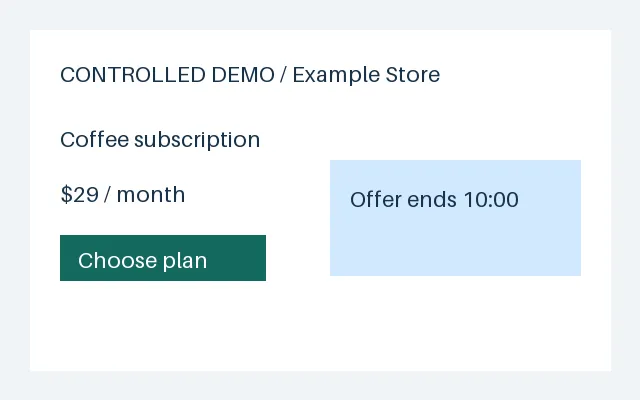 | 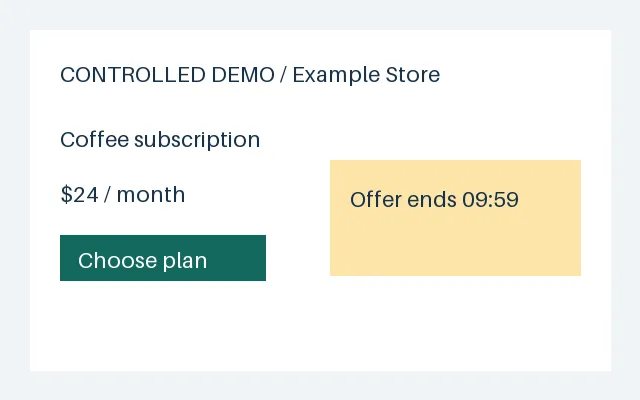 | 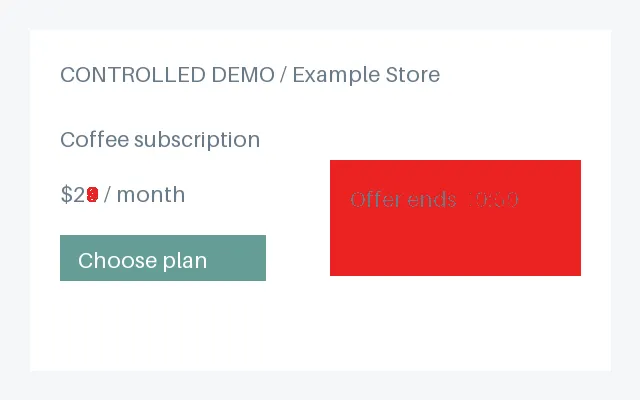 |
The unmasked images differ by 11.2652%. With the dynamic region masked in both images while preserving layout, the price change accounts for 0.0547%:
| Masked before | Masked after | Masked diff |
|---|---|---|
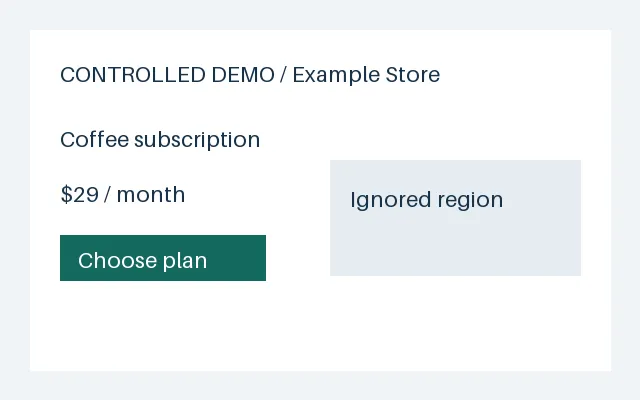 | 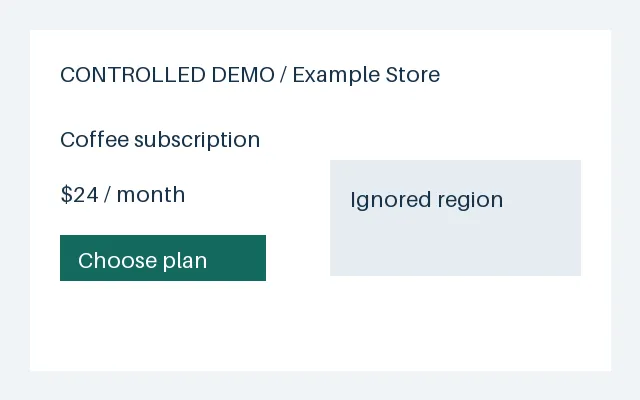 | 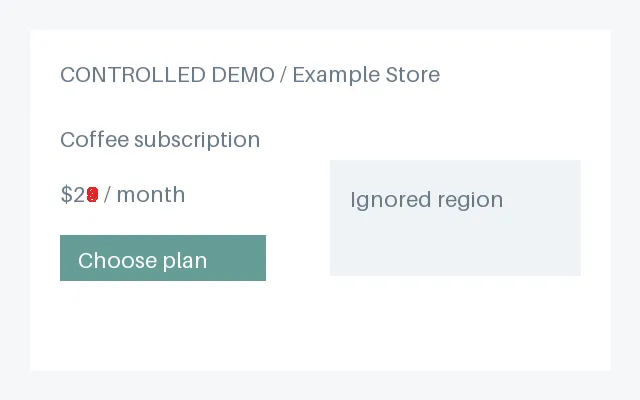 |
In the noise-only fixture, masking reduces changed pixels from 28,699 to zero. Reproducible pixel counts describe this image fixture; browser selectors must still be checked on your target page.
changeThreshold is a fraction: 0.01 means 1%. That default would miss the small price edit in this full-page example. For a small important change, mask known noise and lower the threshold (for these images, 0.0005 catches the 0.0547% change). Inspect the diff before choosing alert sensitivity. Use precise ignoreSelectors to mask changing content without reflow; hideSelectors removes content and can change layout.
Copy the monitor input in Quick start and run the same saved Task twice. Current, previous and diff PNGs are saved in each run's storage and are not overwritten by later runs. Export them if you need evidence beyond your Apify storage-retention period.
What you get
- PNG viewport or full-page website screenshots;
- stable desktop, mobile, locale, timezone and motion settings;
- bounded lazy-load scrolling, font/image settling and animation suppression;
ignoreSelectorsfor noisy content without layout reflow;hideSelectorsfor banners or widgets that should be removed;- deterministic pixel-change ratio and changed-region bounding boxes;
- optional highlighted diff PNG on meaningful changes;
- one explicit result for every requested URL, including invalid, failed and blocked pages;
- one atomic baseline record per monitoring configuration - no hidden screenshot-history database.
Who uses this website visual change monitor?
- QA and engineering teams comparing production pages after a release;
- ecommerce teams tracking product, pricing and checkout-page changes;
- compliance teams keeping timestamped visual evidence of public disclosures;
- agencies monitoring client landing pages and campaign assets;
- competitive-intelligence workflows that need a machine-readable change event, not just an image.
Ready-made example Tasks
One public example is available: Capture full-page website screenshots in bulk. Replace the three sample pages with your own list. The comparison, mobile viewport and selector setups below are inputs you can copy. They are not separate public Task pages.
Quick start
1. Basic screenshot
2. Full-page screenshot
3. Batch screenshots
One bad URL does not stop the others. Three inputs always produce three dataset records unless the whole Actor runtime cannot start.
4. Mobile viewport
Viewport and capture settings are part of the monitor state identity. Mobile and desktop captures never share a baseline.
5. Monitor mode
Run the same saved Task again. changeThreshold is a fraction: 0.01 means one
percent of the normalized common image canvas.
6. Visual diff
When the ratio reaches the threshold, the dataset row contains
VISUAL_CHANGE, changed_regions, and a diff_image_url with changed pixels
highlighted in red.
7. Ignore a cookie banner or live counter
Ignored elements keep their layout space but their content is invisible. Hidden
elements use display:none and can cause layout reflow. Prefer a precise selector
over a high global threshold. The Actor intentionally has no fragile built-in
database of banner selectors.
8. Daily schedule
- Run a
monitorinput successfully once. - In Apify Console, choose Save as task.
- Open Schedules, create a daily schedule, and select that Task.
- Keep URL, viewport, full-page, wait, delay and selector settings stable.
Monitor mode uses the persistent named KVS
website-screenshot-visual-monitor-state, so independent Task runs find the
last committed successful observation. Baseline metadata and its PNG are stored
together, after confirmed result delivery. Every result's current, previous and
diff PNGs, plus RUN_SUMMARY, live in that run's default storage. A new capture
configuration creates a separate BASELINE instead of comparing unlike screenshots.
Overlapping runs may compare with the same prior baseline; the last completed
baseline write wins as a complete observation. Schedule checks without overlap
when you need a strictly chronological comparison chain. externalId is a join
label and does not create a separate monitor. Valid legacy baselines migrate on
the first successfully delivered check; old artifacts are retained.
9. Webhook on VISUAL_CHANGE
Attach an ACTOR.RUN.SUCCEEDED webhook to the scheduled Task. In the receiver,
fetch the run dataset and act only on rows satisfying both conditions:
Never branch on changed alone: failure rows deliberately use changed: null.
The diff URL and changed regions make each matching row usable as an alert
payload without comparing two exports downstream.
Input reference
| Field | Default | Meaning |
|---|---|---|
urls | required | 1-500 public HTTP(S) pages, with optional externalId |
mode | snapshot | snapshot does not touch monitor state; monitor compares successful captures |
fullPage | true | Full scrollable page or viewport only |
capturePreset | standard | fast is snapshot-only and skips lazy-load scrolling |
imageFormat | png | jpeg or webp in screenshot mode; monitor stays PNG |
imageQuality | 80 | JPEG and WebP quality, 1-100; ignored for PNG |
viewport | 1440 × 900 | Deterministic CSS-pixel viewport |
waitUntil | networkidle | networkidle, load, or domcontentloaded |
delayMs | 500 | Extra render-settling time, 0-30 seconds |
navigationTimeoutMs | 45000 | Hard per-attempt navigation limit |
scrollForLazyLoad | true | Bounded scroll before full-page capture |
ignoreSelectors | [] | Preserve layout while hiding selected content |
hideSelectors | [] | Remove selected elements before capture |
changeThreshold | 0.01 | Changed-pixel fraction required for VISUAL_CHANGE |
saveDiffImage | true | Save one highlighted PNG for a meaningful change |
proxyConfiguration | direct | Optional user-controlled Apify/custom proxy |
Browser pool size, concurrency, Chromium arguments and retry timing are not Store inputs. They are conservative internal runtime choices.
Output and failure semantics
Every row carries source, stable source_id, source_url, scraped_at,
schema_version and fingerprint, plus screenshot/change fields.
Results can arrive in completion order; input_index is their zero-based input
position. Repeated normalized URLs share one capture: their alias rows retain
each external_id, carry duplicate_of, and incur no extra event charge.
Statuses:
SUCCESS- navigation, rendering, screenshot and KVS write all completed;PARTIAL- something rendered, but completeness or storage could not be verified;FAILED- navigation/browser/source failed after bounded retry where sensible, or the check was rejected before capture by a too-low run spending limit;BLOCKED- HTTP 401/403/407/429, CAPTCHA or a recognizable challenge page;INVALID_URL- rejected before browser access, including private/local targets.
Change types exist only on successful monitor captures:
BASELINE- first success for this URL and capture configuration;UNCHANGED- changed-pixel ratio is belowchangeThreshold;VISUAL_CHANGE- ratio reached the threshold.
Full-page dimension changes are normalized onto a common canvas. Added or removed width/height counts as change even when the added region is blank.
See examples/sample_output.json for a complete change event.
Send the list to n8n
Download the inactive n8n workflow. Import it, then:
- On both HTTP Request nodes, select an HTTP Header Auth credential. Header name
Authorization, valueBearer YOUR_APIFY_TOKEN. Keep the token in n8n credentials, not in the workflow. - In Configure list, leave
modeassnapshotfor PNG links. Setmodetomonitoronly when you want a later run of the same pages. - Replace the sample URLs. The template accepts 1 to 20 public
httporhttpsURLs and sendsmaxTotalChargeUsdof0.04(20 checks at $0.002). - Run it manually.
snapshotreturnsscreenshotrows plus anyproblemrows.monitorreturnsvisual_changerows, with the current, previous and diff URLs, plusproblemrows. Baselines and unchanged pages are omitted. A run that does not finish, or a change row missing an image URL, stops the workflow instead of inventing a result.
API use
Use the standard Apify Actor API with your own Actor ID and token. Never place a token in source control.
Use with AI agents through Apify MCP
Expose the Actor as a typed MCP tool:
Example prompt:
For a later comparison, run the same URLs with "mode": "monitor" and keep
only rows whose change_type is VISUAL_CHANGE.
The first successful monitor run creates a BASELINE. A blocked or partial
capture never becomes UNCHANGED and never replaces the last good baseline.
Pricing
The publication price is $0.002 per successful page check ($2 per 1,000).
A page check includes the persisted PNG, and in monitor mode it also includes
comparison with the last successful baseline, changed-region detection and the
optional highlighted diff image. There is no start fee.
| Successful page checks | Actor charge |
|---|---|
| 1 | $0.002 |
| 100 | $0.20 |
| 1,000 | $2.00 |
An unchanged monitor check is billable because the page was rendered, persisted
and compared. Invalid URLs, blocked pages, partial captures, failed captures and
retries are not charged. Platform usage is included in this pay-per-event price;
the Apify Console price shown at run time is canonical. If a run's maximum total
charge cannot cover every potentially successful URL in the batch, the Actor
stops before opening Chromium, writes one free BILLING_LIMIT_TOO_LOW result per
otherwise valid URL and fails the run. No monitor baseline is advanced without a
deliverable paid result. A batch containing only invalid URLs succeeds with one
explicit free INVALID_URL row per input because those are per-item outcomes,
not a system failure. Repeated normalized URLs are captured and charged only
once per run, with free alias rows for the remaining input positions.
A completed run is not replayed after resurrection. If output delivery was
interrupted or its acknowledgement was lost, the Actor retains existing output
and stops with DELIVERY_UNCERTAIN; start a new run for a new observation.
Dataset, billing and baseline storage do not form one transaction. A failed
baseline commit after successful delivery fails the run while retaining the
delivered PNG and result. RUN_SUMMARY distinguishes confirmed charges from
unknown delivery outcomes; use platform event counts for final accounting.
If all captures fail, the run fails with NO_SUCCESS and retains the free error rows.
Capture settings and proxy use
The Actor reuses one Chromium process, creates an isolated context per URL and runs at internal concurrency 2. Every HTTP(S) navigation and page resource is checked against local, private and reserved networks, and service workers are disabled so they cannot bypass that guard. Direct access is the default. Enable a proxy only when you are permitted to access the page and direct anonymous access is insufficient. The Actor does not automatically escalate to residential proxies and never attempts universal anti-bot bypass.
The default memory is 1 GiB. That is enough for an ordinary page and keeps a short run from paying for idle memory. Raise the run memory for a very tall full-page capture if the run runs out of memory. Dynamic content can produce visual
changes even without a site update: mask noisy regions and review the first
diff before connecting alerts. RUN_SUMMARY records page-check counts and usage.
Security, legal use and retention
This Actor is for public webpages only. Do not submit private dashboards, credentials, cookies, authenticated profiles or URLs carrying secrets. It does not bypass login, paywalls, CAPTCHA, account permissions or access controls.
Website terms and robots policies differ. You are responsible for having the right to access, capture, process and retain each page. A screenshot can contain public personal data or copyrighted material; visual monitoring grants no right to republish it.
The named monitoring KVS retains one current baseline envelope per URL/configuration. It contains both the PNG and its metadata, so competing writes cannot mix them. Result PNGs use content-addressed keys in each run's default KVS; current and previous share a key when their PNG bytes are identical. Dataset observations and run PNGs follow your Apify storage-retention policy. Legacy rolling artifacts are not automatically deleted during migration.
Known limitations
- Pixel comparison detects visible differences, not their business meaning.
- Personalization, A/B tests, ads, live counters and geography can create genuine pixel changes; use precise selectors and an observed threshold.
- Font/browser upgrades can change rendering. The pinned image reduces this risk; an intentional runtime/configuration change re-baselines safely.
- A page up to 30 million pixels and 50,000 CSS pixels tall is captured whole:
up to 20,833 px at the 1440 px desktop width. A longer page is captured from
the top down to 15 million pixels, which is 10,416 px at 1440 px wide, and
stays
SUCCESS;warningsgives the page height and how much the image covers, anddimensionsis the image size. Larger cuts took 30-47 seconds and could run Chromium out of memory at 1 GiB. - If Chromium crashes, for example out of memory on a very heavy page, the next URL starts a fresh browser and the URL in progress is retried once.
- Some image-heavy pages, for example many long Wikipedia articles, keep the
browser drawing a full-page image for more than 30 seconds at any memory
size. That row is
FAILED/SCREENSHOT_TIMEOUT, is not retried or charged, and a viewport capture (fullPage: false) of the same URL works. - If two individually valid captures require a comparison canvas above 30 million
pixels, the check returns
PARTIAL/COMPARISON_TOO_LARGEand preserves the baseline. - Full-page scrolling walks only the part that goes into the image, at most 60
viewport steps. On a page that keeps growing, such as an endless feed, the
image covers the scrolled part and
warningssays so. Visible images throughout the capture area must finish loading; broken or timed-out images returnPARTIAL/INCOMPLETE_IMAGES, without a charge or baseline update. Images masked by your selectors and images outside a viewport-only capture are excluded. - Closed shadow DOM, cross-origin frames and canvas animations cannot always be selectively ignored with CSS selectors.
- Login-required and strongly protected pages are intentionally unsupported.
FAQ and troubleshooting
Can I use this as a website screenshot API?
Yes. Run it through the Apify API with one URL or a batch of up to 500 URLs. Each input produces an explicit dataset row on an ordinary run, and screenshot files are stored in the Actor's key-value store.
How does visual change detection work?
The first successful monitor run creates a baseline. Later runs normalize the
two PNG canvases, compare pixels and report UNCHANGED or VISUAL_CHANGE based
on changeThreshold. Failed or incomplete checks never replace the baseline.
Why does a page report changes every day?
Ads, clocks, cookie banners, rotating content, personalization and A/B tests are
real pixel changes. Add precise ignoreSelectors or hideSelectors, keep the
viewport stable and raise the threshold only after reviewing representative
diffs.
Why is a screenshot blocked or partial?
BLOCKED means the site returned an authorization/rate-limit response or a
recognizable challenge. PARTIAL means the Actor could not prove a complete,
persisted capture. The Actor does not bypass login, CAPTCHA or access controls;
use a permitted proxy only when direct access is insufficient.


