
Google Maps Scraper & Business Leads Extractor
Pricing
from $1.08 / 1,000 scraped places
Google Maps Scraper & Business Leads Extractor
Turn a Google Maps search into a B2B lead list: name, address, phone, website, rating and hours, plus optional website e-mails and socials, reviews, photos, Hunter.io leads and e-mail verification, and AI competitor analysis (your keys). Many locations per run. Pay only for what is delivered.
Pricing
from $1.08 / 1,000 scraped places
Rating
0.0
(0)
Developer

Badr Bouargan
Maintained by CommunityActor stats
0
Bookmarked
2
Total users
1
Monthly active users
7 hours ago
Last modified
Categories
Features
Share
1. Overview
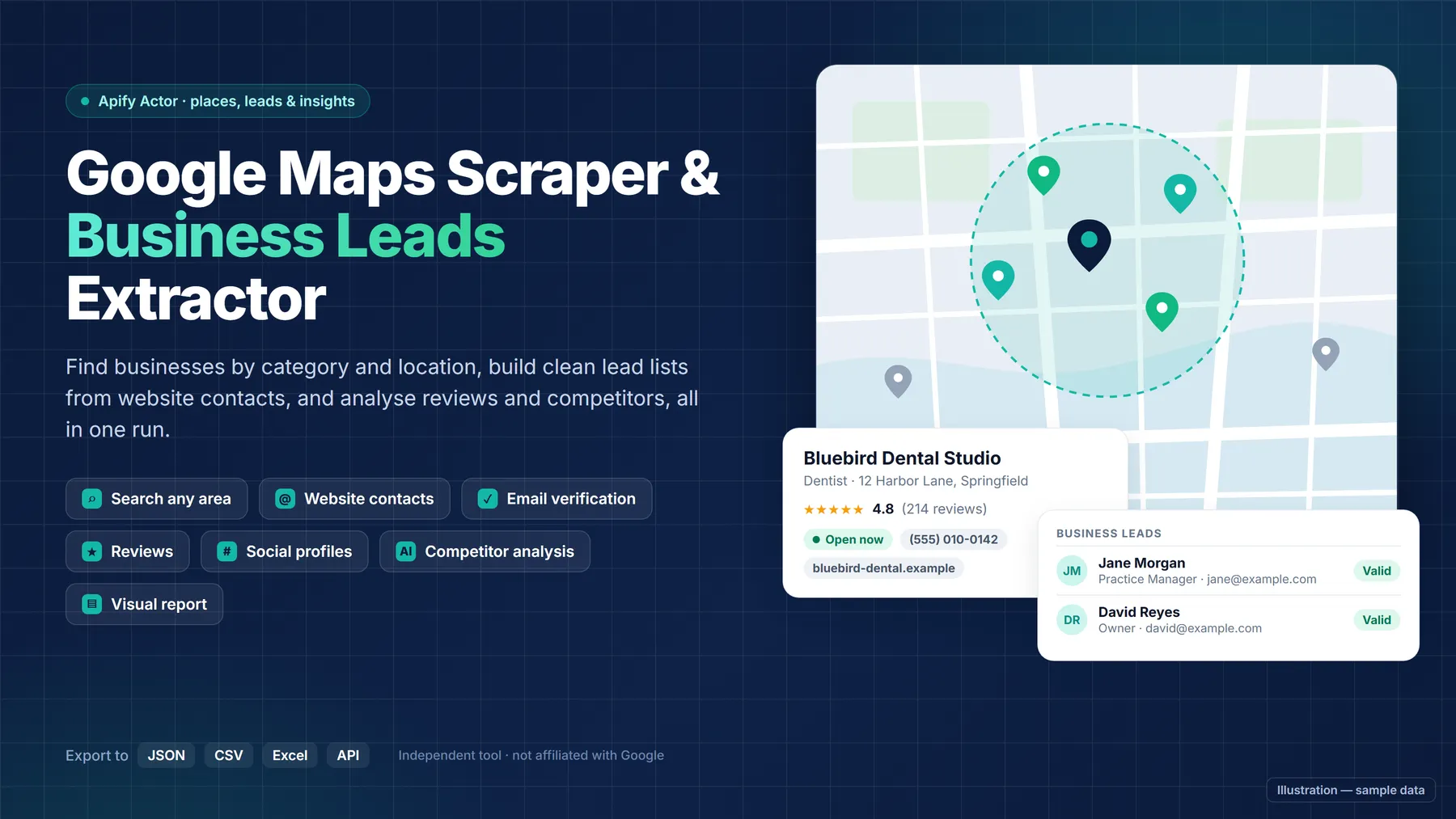
Google Maps Scraper & Business Leads Extractor turns a search such as "dentist in Chicago" into a clean, ready-to-use business list: name, category, address, coordinates, phone, website, rating, review count, opening hours and Google identifiers for every place. Then, only if you switch them on, it adds the layers a sales or market team usually has to assemble by hand:
- company contacts read from each business's own website (company e-mail, phone and social pages only), every item with the page it was found on;
- named business leads (people, job titles, work e-mails) and e-mail verification through your own Hunter.io key, as a separate add-on;
- company social profiles linked from the official website;
- reviews, images and place details;
- an AI competitor analysis of each place, written by your own AI key from the data the run collected.
Why it is worth a try
- Pay only for what is delivered. Every add-on is its own event, off by default, and charged per item actually delivered. Duplicates, places removed by filters, websites that did not answer, login walls, inconclusive verifications and failed AI calls are never charged.
- Nothing is guessed. E-mails come from the business website or from Hunter.io, never from a name pattern. AI quotes that are not found word for word in the reviews are dropped.
- Your keys, your costs, your data. Leads, verification and AI run on your own provider accounts: you see exactly what each provider bills you.
- A spending cap you can trust. Set Maximum cost of this run (
maxCostUsd, right under the main fields; Apify's "Maximum cost per run" is honoured too): the run stops cleanly before going over it, and paid work is reserved before it starts. - Many locations, all main categories. One run can search several cities, regions or countries (one per line) and, if you want, 59 common Google Maps categories at once; a business found twice is saved and billed once.
- Familiar input. The main field names (
searchStringsArray,locationQuery,maxCrawledPlacesPerSearch,scrapeContacts,maxReviews…) are the ones used by the most popular Google Maps scraper on the Store, so existing inputs run as they are.
2. Key features
| Feature | What you get | Event (only when on) |
|---|---|---|
| Business search | Places by keyword, category (or all main categories), one or many locations, radius, GeoJSON area, Google Maps URL or place ID | place-scraped |
| 14 filters | Rating, review count, website yes/no, phone, open now, city / country match, price level, closed places, name match, category, "with e-mail" | filter-applied per filter |
| Place details | Description, attributes, review distribution and tags, owner description, plus code, order-online link | place-details-scraped |
| Company contacts | E-mails, phones and social links from the official website, each with its source URL, plus free e-mail checks | contact-details-scraped |
| Business leads | Named people at the business domain via your Hunter.io key | lead-scraped |
| E-mail verification | Mailbox verification via your Hunter.io key; only decisive results charged | lead-email-verified |
| Social profiles | Public title, description, image and (when stated) follower count of the profiles linked on the website | social-profile-scraped |
| Reviews | About 5 reviews per place with stars, date, text, owner reply and its date | review-scraped |
| Images | A few photos per place with size, upload date and position | image-scraped |
| AI competitor analysis | Positioning, services, strengths and improvement areas quoted from reviews, ranks within the search | competitor-analyzed |
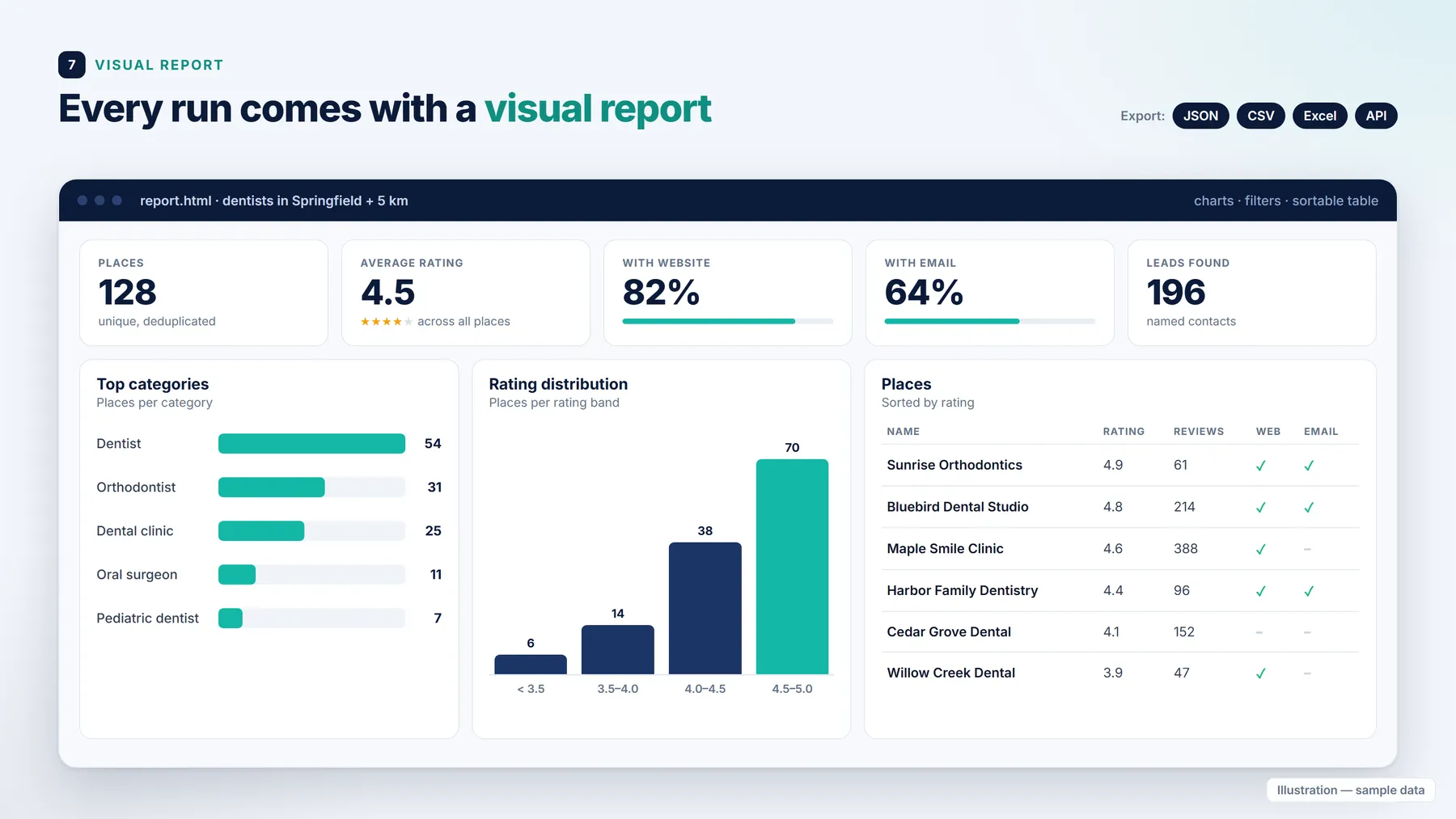
| Visual report | An interactive HTML page of the run, with charts, filters and CSV / JSON export | free |
3. Business search
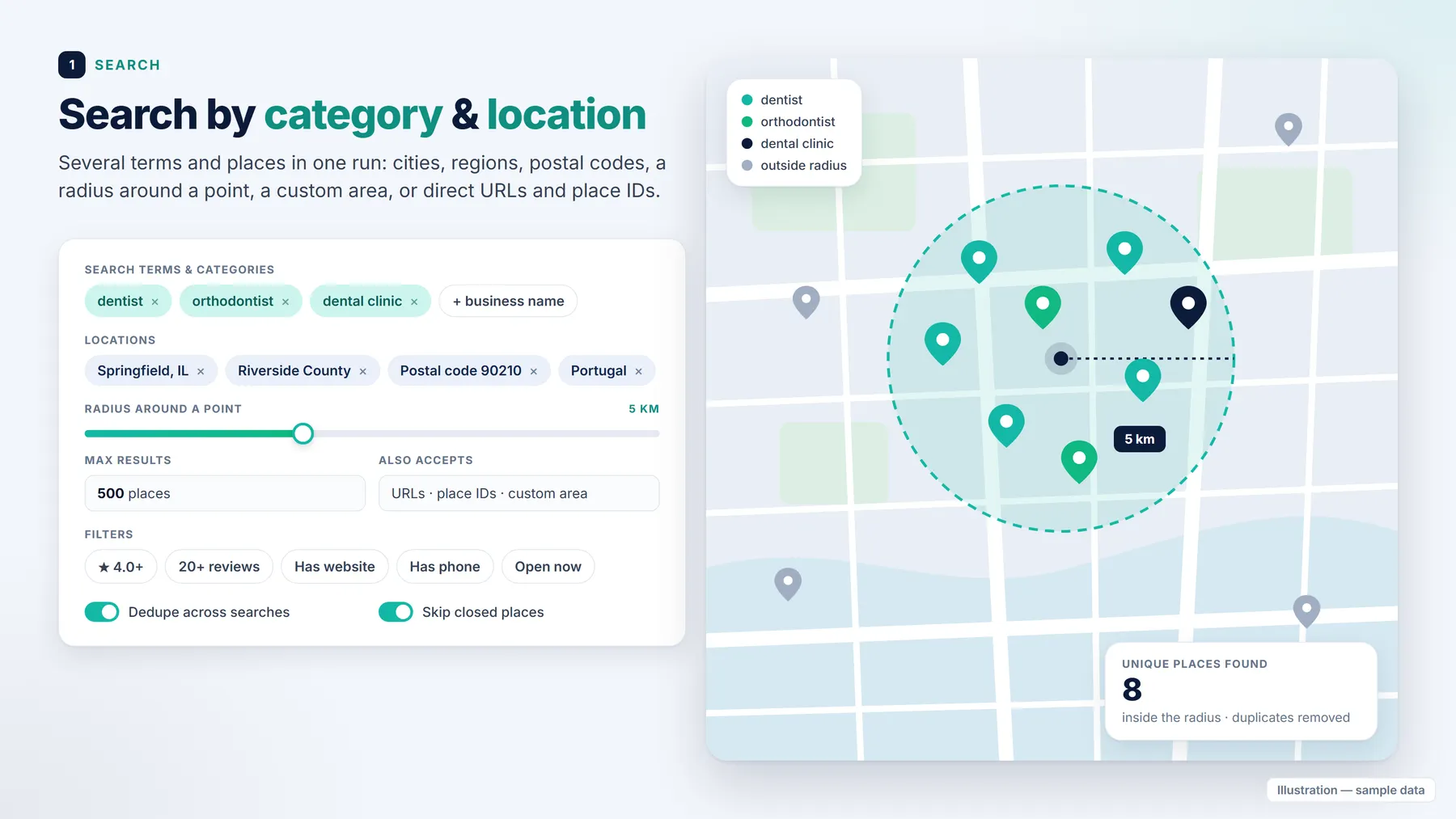
The top of the input form has four fields and the cost cap; the first click in Console already runs (restaurant, Paris, France, 20 places, English, at most $5):
- Search term(s) (
searchStringsArray):dentist,restaurant, or the place in the term itself (dentist in Chicago). Google Maps links and place IDs can be pasted here too. - Locations (
locations): one per line, in plain words, anywhere in the world:Casablanca, Morocco,Paris, France,Texas, USA,10001, USA,Shibuya, Tokyo, Japan. Locations are processed one after the other and every search term is searched in every location (2 terms x 3 locations = 6 searches). Big areas (a region, a country) are split into smaller map squares automatically, so results are not capped at the ~120 places Google shows for one view. - Number of places (
maxCrawledPlacesPerSearch): per search term, per location (20 with 2 terms and 3 locations = up to 120 places). Empty = every place found. - Language (
language). - Maximum cost of this run (USD) (
maxCostUsd, recommended): the run stops cleanly before its charges would go over it. Estimate: places x price per place, e.g. 10,000 places ≈ $21.60 at $2.16 / 1,000 (Starter plan), before add-ons. Apify's own "Maximum cost per run" is honoured too; the lower limit wins.
A business found by two terms or in two locations is saved and billed once (matched by place ID, CID or FID).
Large runs. A whole country, many locations or All main categories can return hundreds of thousands of places. When All main categories is on, more than 3 locations are given, or a region / country-sized location is searched with an empty Number of places, the run log starts with a warning that gives the number of searches, the maximum number of places, its estimated cost at your plan's price and whether a cost cap is set.
Then optional sections. Sections marked * are alternative ways to say where or what:
- All main categories (
searchAllMainCategories, first option of the filters & categories section, off by default): adds the 59 common categories listed below to your own search terms (duplicates skipped) and searches each of them in each location. It finds most places of an area, not 100 %: a business whose only Google category is rare (a taxidermist, a bonsai nursery…) is missing unless Google also lists it under one of these words. It multiplies the searches (59 x locations), so it takes longer and costs more: keep Number of places and Maximum cost set. The words are English for every run language: Google Maps matches English category words in every country (pharmacyin Casablanca finds the pharmacies), andlanguagestill sets the language of the category names delivered. - Categories (
searchCategories, same section): your own extra categories, each searched like a term. - Geographic area*: structured location (
countryCode,city,county,state,postalCode), a circle (latitude,longitude,radiusKm; places outside are dropped and not charged) or a GeoJSONcustomGeolocation(Point +radiusKm, Polygon, MultiPolygon). - Google Maps URLs or place IDs*:
startUrls(place or search URLs) andplaceIds. - Run limits & budget:
maxCrawledPlaces, a total number of places for the whole run.
Older inputs keep working unchanged. locationQuery (one location, the field name of inputs written before 2026-11-11 and of the most popular Google Maps scraper) is still accepted and hidden in the form; when both locationQuery and locations are given they are merged, duplicates removed. Inputs written for other popular Google Maps scrapers (locationQuery, maxCrawledPlacesPerSearch, scrapeSocialMediaProfiles with twitters, maxQuestions…) validate and run as before.
There is no "all places without a search term" mode: Google's map search answers nothing for an empty query, and generic words (business, shop) return a biased subset, not every place (checked live on 2026-11-11). All main categories is the closest option: it covers most places, not all.
Large areas are split into smaller squares automatically to go past the ~120 results Google shows for one view. Inputs that cannot be used (unknown location, malformed place ID, non-Google link…) are skipped, listed in FAILED_INPUTS with an error code, never charged, and never make the run fail. An empty API input runs the same demo as the form's first click (restaurants in Paris, France, 20 places at most).
4. Place details
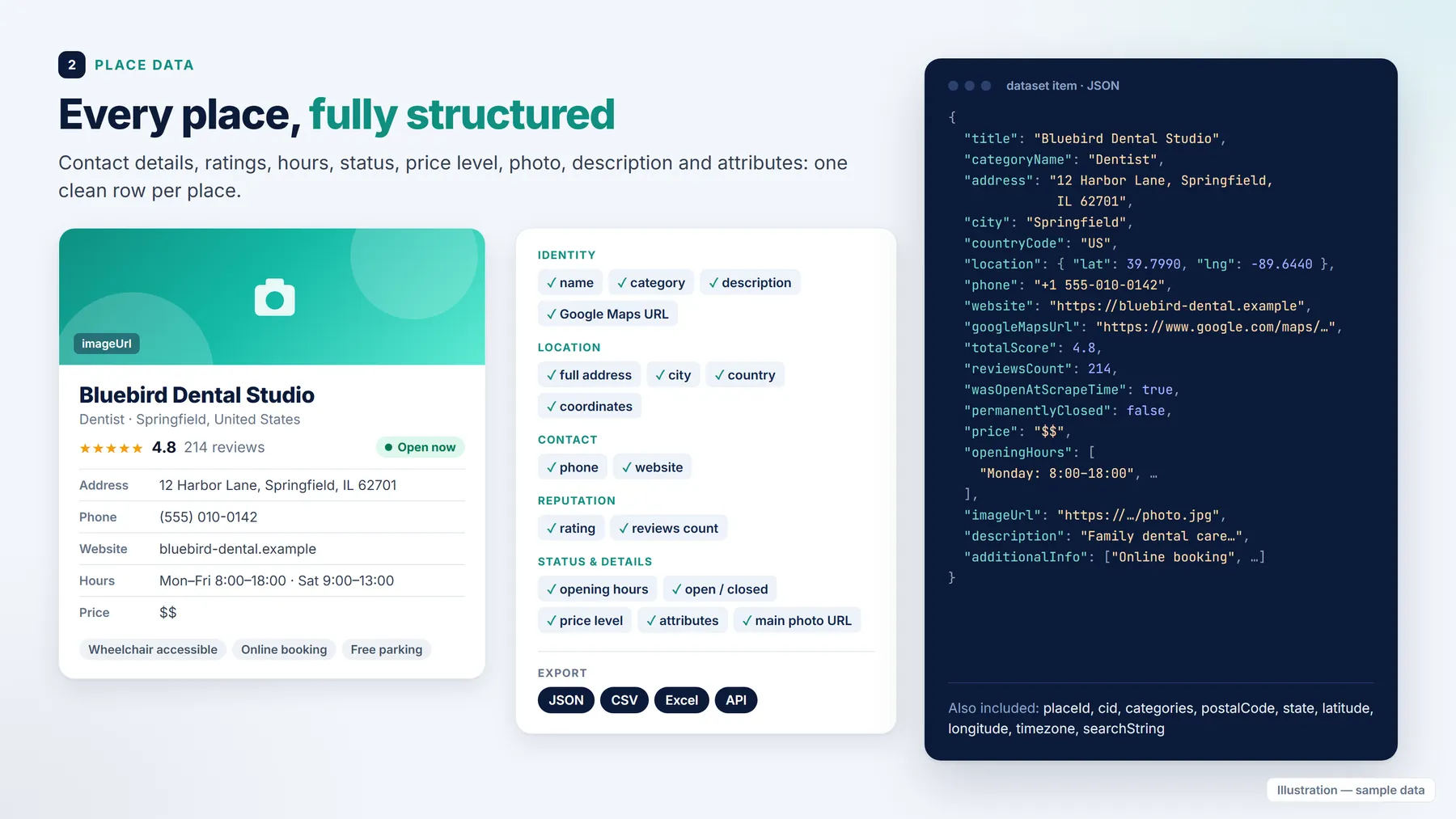
Every place comes with the fields of the Google Maps search answer: title, placeId, cid, fid, kgmid, categoryName, categories, address, street, city, state, postalCode, countryCode, location (lat / lng), phone, phoneInternational, website, domain, totalScore, reviewsCount, openingHours, openState, permanentlyClosed, temporarilyClosed, imageUrl, timezone, rank, scrapedAt.
With Add-on: place details (scrapePlaceDetailPage) the place's detail answer is read and adds reviewsDistribution (1 to 5 stars), reviewsTags, ownerDescription, plusCode, orderOnlineUrl and, when Google sends it, popularTimes.
5. Contacts enrichment
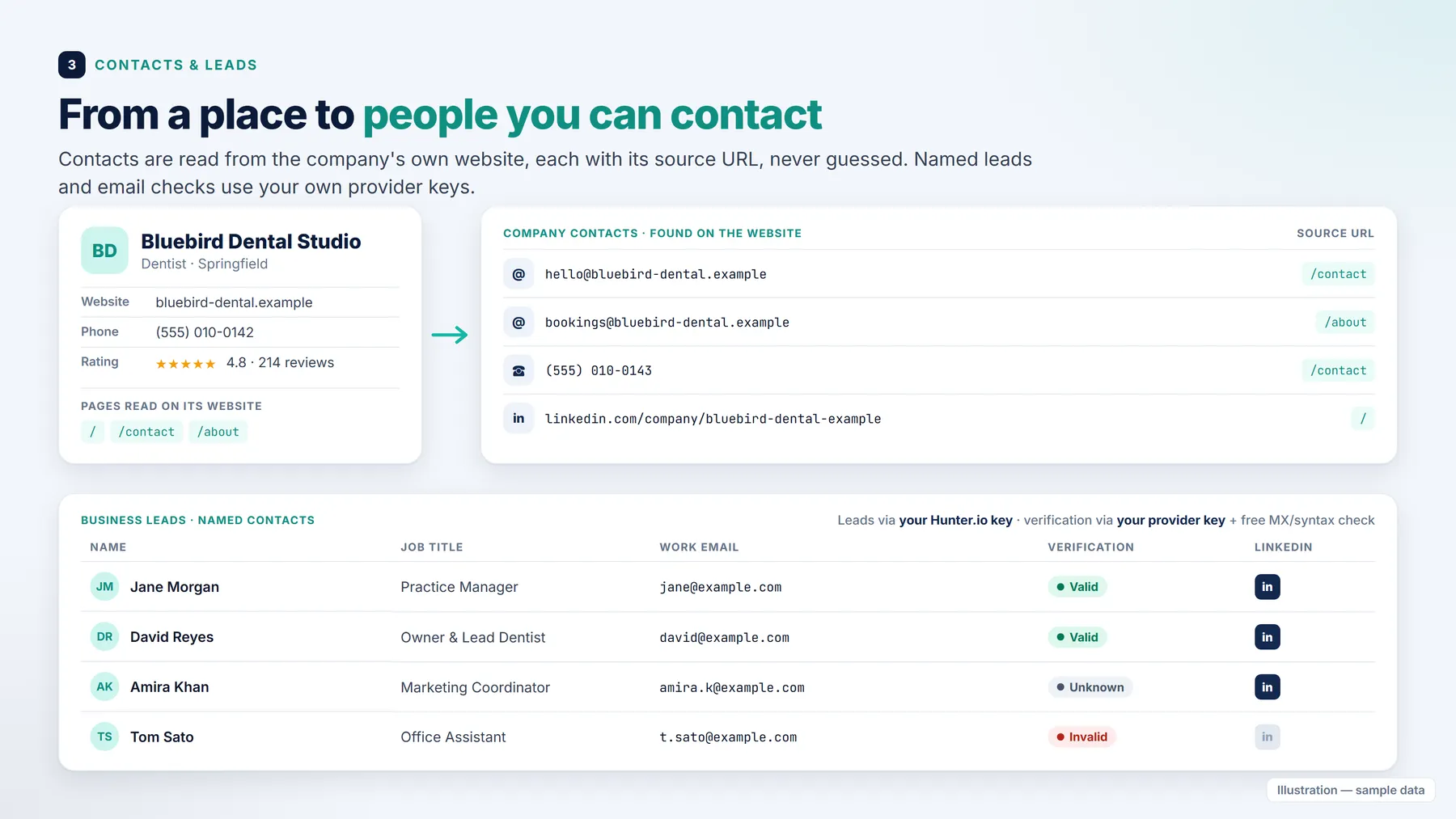
Add-on: company contacts (scrapeContacts) opens the official website of each place (home page, then up to four contact / about pages when the home page shows no e-mail) and collects business contacts only:
emailsandemail(first address), withcontacts.emails[].sourceUrl, the page each one was found on;- phones published as
tel:links (contacts.phones[]); - the company's social links (
facebookUrl,instagramUrl,linkedinUrl,twitterUrl,youtubeUrl,tiktokUrl,whatsappUrl, andcontacts.socialLinks[]with their source page); contacts.pagesRead, the exact pages visited.
Business contacts only. Website e-mails that look like a named person's address are left out: two alphabetic parts joined by ., _ or - (jean.dupont@, j.smith@), on the company's domain or on a free-mail domain (Gmail, Outlook…), unless one part is a role word (sales.team@, contact.paris@) or the address starts with the business's own name (cafe.dupont@ for Café Dupont, apams-plomberie@ for APAMS). Addresses without a separator (marie@) cannot be told apart from a business address and are kept. The count of e-mails left out is in RUN_SUMMARY.stats.personalEmailsSkipped. LinkedIn links are kept only for company / school / showcase pages: personal profiles (linkedin.com/in/…) are never collected or visited. Named people come only from the separate business leads add-on below.
Masked addresses (Cloudflare e-mail protection, name [at] domain [dot] com) are decoded; nothing is ever generated from a name pattern. Each e-mail also gets a free local check (emailChecks[]): syntaxValid, mxFound (DNS), disposableDomain, roleAddress (info@, contact@…). An MX record means the domain receives mail, not that the mailbox exists: mailbox verification is the separate add-on below.
When the place's "website" is only a social profile or a directory listing (facebook.com, instagram.com, linktr.ee, yelp.com, tripadvisor.com, booking.com…), it is not read and not charged; a social profile is still delivered as its link (instagramUrl, facebookUrl…).
onlyWithEmail keeps only places with an e-mail after the websites are read (it counts as one filter).
6. Business leads enrichment
Add-on: business leads per place (maximumLeadsEnrichmentRecords, 1 to 100) asks the Hunter.io Domain Search API, with your own Hunter key (hunterApiKey), for the people working at the domain of each business website. Each lead in leads[] has fullName, firstName, lastName, position, department, seniority, email, emailType, confidence (Hunter's score), linkedinUrl, twitter, phone (when Hunter has one), hunterVerificationStatus, organization, domain and source: "hunter.io".
- Narrow the search with
leadsEnrichmentDepartments(executive, sales, marketing, it, finance, hr…) andleadsSeniority(junior, senior, executive). - Websites on shared platforms (facebook.com, instagram.com, wixsite.com, linktr.ee, booking.com…) are skipped: Hunter would return the platform's own staff.
- A chain with the same domain in several places is searched once; repeats are shown again with
repeatedFromEarlierPlace: trueand not charged again. - No key: the add-on is skipped with a warning and nothing is charged. A refused key or an exhausted Hunter plan stops only this add-on; the run continues.
Hunter bills its credits to your Hunter account (at the time of writing, 1 credit per e-mail found by Domain Search; see hunter.io/pricing).
- Your key only. The add-on uses only the
hunterApiKey(and optionalemailVerificationApiKey) of your input. The Actor has no Hunter key of its own and never reads one from its environment: without your key, leads and verification are skipped and nothing is charged. - Person data comes only from Hunter's API. The Actor itself never visits LinkedIn profiles or any personal page; the
linkedinUrlof a lead is the link Hunter returned. - Nothing kept outside your run. Leads are written only to your run's default dataset (and counted in
RUN_SUMMARY/ theREPORTpage of your run's key-value store). No shared or named storage is used, and names and e-mail addresses are masked in log messages.
GDPR and similar laws. Named leads are personal data and you are the controller: use them lawfully (typically B2B prospecting on a documented legitimate interest), tell the people concerned where their data came from, honour objections and opt-outs at once, and collect only what you need (leadsEnrichmentDepartments, leadsSeniority, a small maximumLeadsEnrichmentRecords). Use the data in line with Hunter.io's terms.
7. Email verification
Add-on: e-mail verification (verifyLeadsEnrichmentEmails) checks the lead and website e-mails with the Hunter Email Verifier, using your key (hunterApiKey, or a separate emailVerificationApiKey). Each result in emailVerifications[] has email, status, decisive, provider, score.
status | Meaning | Charged |
|---|---|---|
valid | The mailbox exists | yes |
invalid | The mailbox does not exist | yes |
disposable | Throw-away mailbox provider | yes |
accept_all | The server accepts every address: the mailbox cannot be confirmed | no |
webmail | Webmail address (Gmail…) | no |
unknown | No conclusive answer (or still processing) | no |
Each address is verified once per run, at most 10 per place. Hunter bills its own verification credits to your account (at the time of writing, 0.5 credit per verification).
8. Social media enrichment
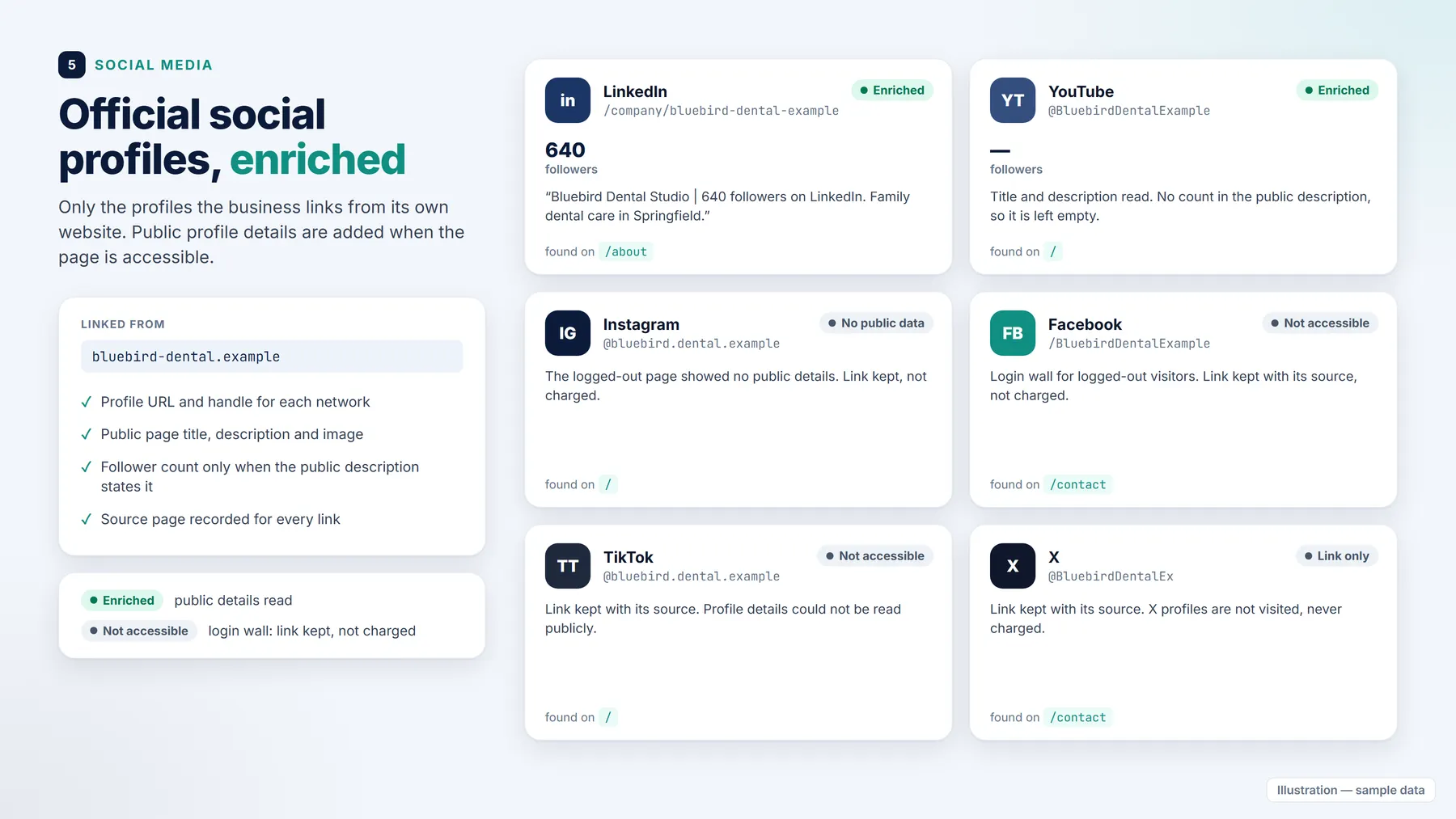
Add-on: social media profiles (scrapeSocialMediaProfiles, e.g. {"instagrams": true, "linkedins": true}) enriches only the profiles the business links from its own website, so you get the business's official accounts, not look-alikes. Supported keys: facebooks, instagrams, youtubes, tiktoks, linkedins (LinkedIn company pages only; personal /in/ profiles are never visited). X (Twitter) profiles are not visited, because X's terms forbid automated collection; the X link found on the website is still delivered as twitterUrl.
Each profile in socialProfiles[] has platform, handle, url, status, title, description, imageUrl, followersText, followersCount, foundOn (the website page that links it) and verification: "linkedFromOfficialWebsite".
- One logged-out visit per profile: no login, no cookies kept, no proxy rotation, a pause between two requests to the same platform.
- Only public meta tags are read (
og:title,og:description,og:image). A follower count is given only when the public description states it literally ("374 followers"); nothing is estimated. status:enriched(charged),notAccessible(login wall, HTTP 401/403/429),noPublicData,error(none of these is charged). Facebook and Instagram usually show a login wall to logged-out visitors, so expect most enriched profiles to come from LinkedIn and YouTube.
9. Reviews scraper
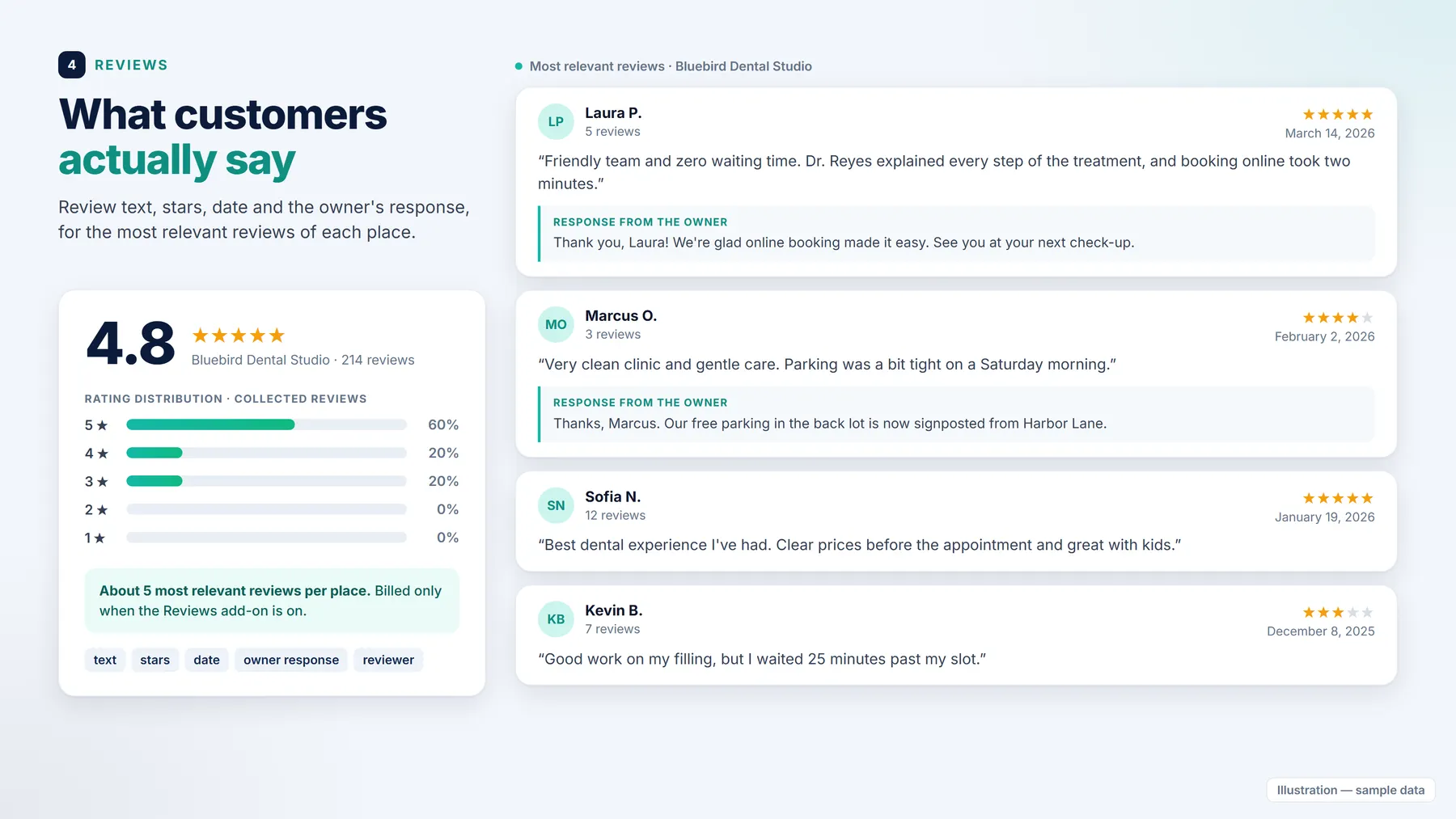
Add-on: reviews per place (maxReviews) delivers the reviews Google embeds with each place: about 5 per place, its most relevant ones. Each review has reviewId, stars, text, publishAt, publishedAtDate, reviewerNumberOfReviews, isLocalGuide, reviewOrigin, responseFromOwnerText, responseFromOwnerDate, reviewImageUrls and, if scrapeReviewsPersonalData is on (off by default), the reviewer's name, ID, profile URL and photo. Personal data (GDPR): off by default; switch it on only with a lawful reason — you are responsible for how you use it (honour objections, keep only what you need).
Free options: reviewsSort (re-orders the reviews received), reviewsStartDate (2024-05-03 or 3 months), reviewsFilterString. The Reviews view gives one review per row.
10. Images scraper
Add-on: images per place (maxImages) delivers the photos Google sends with each place (a few per place). Each image has imageUrl, photoId, sizeSuffix, originalWidth, originalHeight, uploadedAt, fromReview, latitude, longitude and authorName when Google sends it and scrapeImageAuthors is on (off by default). Personal data (GDPR): off by default; switch it on only with a lawful reason — you are responsible for how you use it (honour objections, keep only what you need). imageUrls and imagesCount summarise them.
11. AI competitor analysis
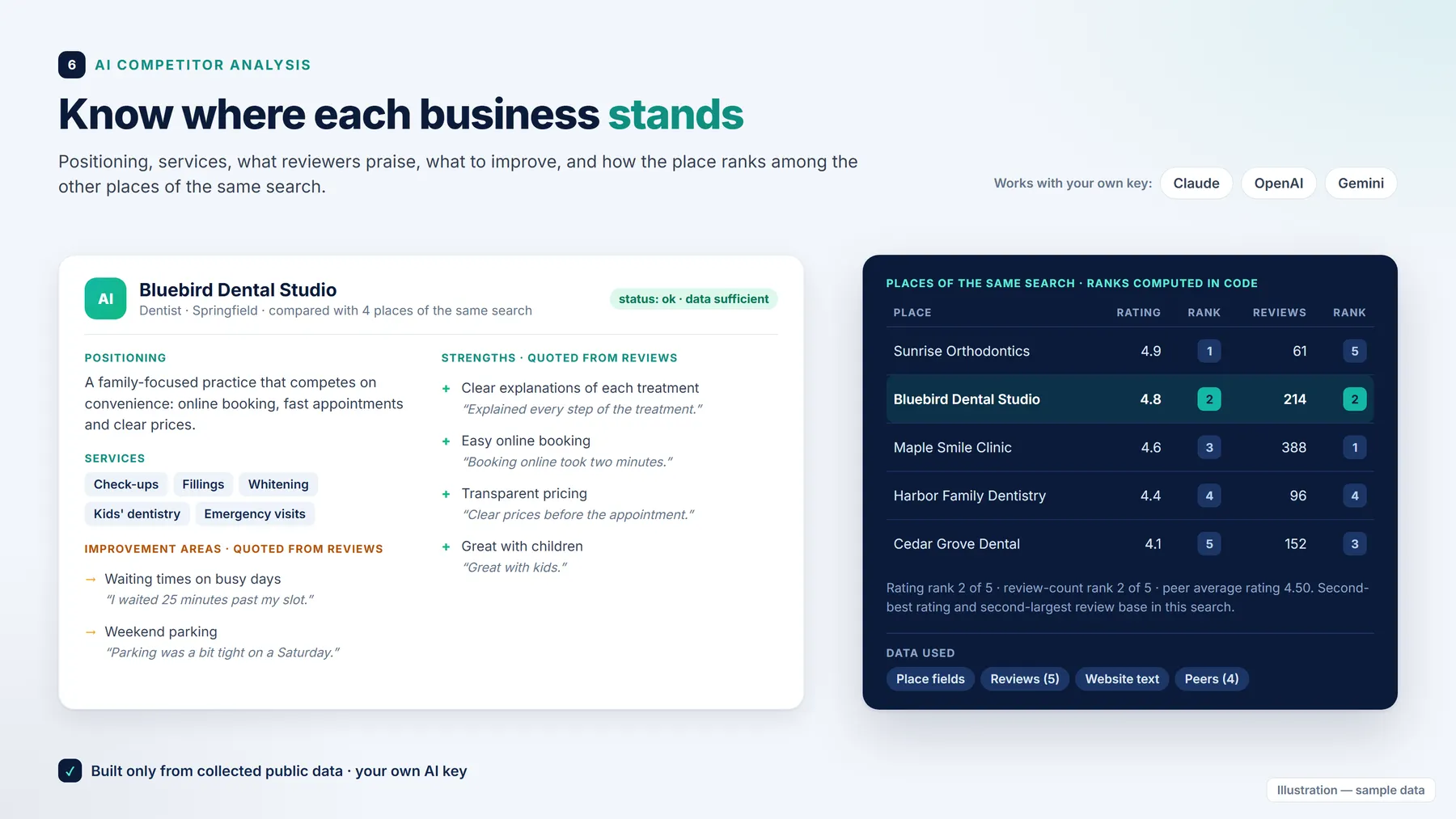
Add-on: AI competitor analysis (enableCompetitorAnalysis) writes a short competitor profile of each place with your own AI key: Anthropic (anthropicApiKey, default model claude-haiku-5-5), OpenAI (openaiApiKey, default gpt-6-luna) or Google Gemini (geminiApiKey, default gemini-3.5-flash-lite); aiModel picks another model of the same provider.
The model receives only data collected by this run: the place's fields, up to 10 of its reviews, a snippet of its website text (when contacts are on) and the other places of the same search (up to 15). The result in competitorAnalysis contains:
positioningandservices(only services named in the data);strengths[]andimprovementAreas[], each{point, evidence[]}where every quote must appear word for word in the reviews; unverified quotes are dropped and counted indroppedUnverifiedQuotes;comparison:ratingRank,reviewsCountRank,rankedAmong,peersCount,peerAverageRating(computed in code, not by the model) and a shortsummary;dataQuality(sufficient/thin, e.g. fewer than 3 reviews),dataUsed,tokens,status.
maxAnalyses (default 10) caps both the competitor-analyzed events and your AI spend. Only successful analyses are charged. Turn reviews and contacts on for richer analyses.
12. Quick start
- Open the Actor: the form is pre-filled (restaurant, Paris, France, 20 places, $5 cap). Type your own Search term(s) (
dentist) and Locations, one per line (Chicago, USA,Toronto, Canada). - Set Number of places (per term, per location) and check Maximum cost of this run (USD) just below. Open the Add-on sections you need (each one is off until you switch it on;
($)marks paid options). Paste your Hunter.io or AI key only for the add-ons that need one. - Optional: switch on All main categories to cover most businesses of the area without typing terms.
- Click Start. Download JSON, CSV or Excel, or open the Visual report from the run's Output tab.
Output views: Overview, Contacts & leads, Reviews (one per row), Social (one profile per row), AI analysis. Every run also writes RUN_SUMMARY (counts, add-ons, billable events, estimated cost), FAILED_INPUTS and the REPORT page to the key-value store.
13. Input JSON
Keys are secret input fields: stored encrypted by Apify, never written to logs, the dataset or the key-value store.
Most businesses of a few towns (all main categories, 30 places per category per town, capped at $10):
An older input with one locationQuery still runs as it is: {"searchStringsArray": ["plumber"], "locationQuery": "Austin, USA"}.
14. Output JSON
A real row from a local test run on 2026-11-10 ("bakery", Paris, 5 reviews, contacts, AI with Gemini), trimmed: one review kept, long URLs shortened, reviewer data not collected.
Contacts, e-mail checks and social profile of another real row ("yoga studio", Austin, same day):
Shape of a lead and of a verification (field names from the code; sample values):
15. API examples (cURL)
Run the Actor and get the dataset items in one call (for small runs):
Start a run asynchronously, then read one view of its dataset:
16. Python and JavaScript examples
Python (pip install apify-client):
JavaScript / Node.js (npm install apify-client):
The Actor also works with Apify integrations (webhooks, Make, Zapier, n8n) and the Apify MCP server.
17. Pricing
Pay per event: you pay for each item delivered, at the price of your Apify plan. Platform usage is included. Add-ons cost nothing while they are off.
| Event | Charged per | Free | Starter | Scale | Business |
|---|---|---|---|---|---|
place-scraped | place saved | $2.88 / 1,000 | $2.16 / 1,000 | $1.44 / 1,000 | $1.08 / 1,000 |
filter-applied | saved place × active filter | $0.72 / 1,000 | $0.72 / 1,000 | $0.54 / 1,000 | $0.378 / 1,000 |
place-details-scraped | place delivered with details | $1.44 / 1,000 | $1.44 / 1,000 | $1.08 / 1,000 | $0.756 / 1,000 |
contact-details-scraped | website actually read | $1.44 / 1,000 | $1.44 / 1,000 | $1.08 / 1,000 | $0.756 / 1,000 |
lead-scraped | person delivered (your Hunter key) | $2.70 / 1,000 | $1.80 / 1,000 | $1.35 / 1,000 | $1.08 / 1,000 |
lead-email-verified | decisive verification (your Hunter key) | $0.90 / 1,000 | $0.72 / 1,000 | $0.54 / 1,000 | $0.45 / 1,000 |
social-profile-scraped | profile enriched | $7.20 / 1,000 | $5.76 / 1,000 | $5.04 / 1,000 | $4.32 / 1,000 |
review-scraped | review delivered | $0.36 / 1,000 | $0.36 / 1,000 | $0.2664 / 1,000 | $0.1872 / 1,000 |
image-scraped | image delivered | $0.36 / 1,000 | $0.36 / 1,000 | $0.2664 / 1,000 | $0.1872 / 1,000 |
competitor-analyzed | successful AI analysis (your AI key) | $9.00 / 1,000 | $7.20 / 1,000 | $6.30 / 1,000 | $5.40 / 1,000 |
apify-actor-start | run start (per GB of memory) | $0.00005 | $0.00005 | $0.00005 | $0.00005 |
Bring-your-own-key services are billed by those providers to you, not by this Actor: Hunter.io credits for leads and verification, and the tokens of your Anthropic, OpenAI or Gemini account for the AI analysis. As an order of magnitude, one analysis uses about 2,000-2,500 input and 300-500 output tokens (measured in real runs), i.e. well under $0.001 with claude-haiku-5-5 or gpt-6-luna at list prices.
Worked examples (Actor charges only; the start event is negligible):
| Example | Free | Starter | Scale | Business |
|---|---|---|---|---|
| A. 1,000 places, no add-ons | $2.88 | $2.16 | $1.44 | $1.08 |
| B. 1,000 places, 2 filters, contacts (800 websites read) | $5.47 | $4.75 | $3.38 | $2.44 |
| C. 100 places with details, 5 reviews each, contacts (80 sites), 150 leads, 112 decisive verifications, 100 AI analyses | $3.04 | $1.73 | $1.37 | $1.09 |
In example C you also pay Hunter for 150 e-mails found and 150 verifications on your Hunter plan, and your AI provider for 100 analyses (about $0.05 with Claude Haiku 5.5 at list prices).
Keep control: maxCostUsd (at the top of the form), maxCrawledPlacesPerSearch (per term, per location), maxCrawledPlaces, maxAnalyses and maximumLeadsEnrichmentRecords all bound the cost before the run starts. Quick estimate: searches = terms x locations (All main categories adds 59 terms); places at most = searches x Number of places; cost ≈ places x your plan's place-scraped price (10,000 places ≈ $21.60 on Starter), before add-ons. RUN_SUMMARY.billing lists the billable events and the estimated cost of every run.
18. FAQ
Do I need a Google API key? No. The Actor reads the public Google Maps web answers.
Do I need a Hunter.io key? Only for business leads and mailbox verification. Search, details, contacts, free e-mail checks, social profiles, reviews and images work without any key.
Why only about 5 reviews per place? Google embeds its ~5 most relevant reviews in the public place answer. The full review list needs a signed-in browser session, which this Actor does not use. maxReviews above ~5 changes nothing, and you are only charged for reviews delivered.
Are the e-mails verified? Website e-mails get a free syntax / MX / disposable / role check, which is not a mailbox verification. Mailbox verification is the separate add-on with your Hunter key, and only valid, invalid and disposable results are charged.
Can the AI invent things? It is instructed to use only the data provided, and the code drops any review quote not found word for word. With few reviews the result says dataQuality: "thin". Treat the text as a summary of the collected data, not as an audit of the business.
Why is a Facebook or Instagram profile not enriched? Those platforms usually show a login wall to logged-out visitors. The link is kept with its source page and not charged.
What happens if a run is interrupted? The run state is saved: after a migration or a resume, places already delivered are not delivered or charged again.
Which export formats? JSON, CSV, Excel, XML, HTML, RSS from the dataset, plus the interactive visual report.
19. Limits and compliance
What this Actor does not do (honestly)
- Reviews: about 5 per place (the ones Google sends with the place), not the full history.
- Images: a few per place; image authors are usually absent.
- Questions & answers: not available. Google removed public Q&A from Maps;
maxQuestionsis accepted for compatibility, ignored and never charged. - Popular times: not available in practice; the field stays
nullunless Google sends it. Nothing is estimated. - Social profiles: public meta only, one logged-out visit; Facebook and Instagram are often login-walled; follower counts only when publicly stated. Profiles are only those linked from the business website.
- Leads and verification require your own Hunter.io key; there is no built-in lead database.
- Free MX check is not mailbox verification.
- AI analysis is built only from the data the run collected (place fields, reviews, website snippet, other places of the search) and needs your own AI key.
- Filters use the search-list data (except "with e-mail"), so the "open now" and price-level filters exclude places for which Google sends no value.
- Hotel listings mix in partner reviews (e.g. Tripadvisor) whose
starsvalue is empty.
Memory: the default run memory is 512 MB, enough for every add-on. With heavy add-ons (place details, contacts, social profiles, leads, reviews, images, AI analysis) the run checks its memory at start-up, before any Google request: under 256 MB it stops ("Run again with 512 MB of memory (Run options → Memory)"); under 512 MB with more than 2,000 places expected (or maxCrawledPlaces unset = all places) it stops ("Run again with 1 GB …"). The run is marked failed with notEnoughMemory in FAILED_INPUTS and nothing is charged. Thresholds keep ~2x headroom over measured peaks (all add-ons: 94 MB for 20 places, 106 MB for 100 places).
Compliance
- The Actor collects publicly available data only: the public Google Maps answers, the business's own public website and public social profile pages. No login, no cookies, no CAPTCHA solving.
- This Actor is an independent tool. It is not affiliated with, endorsed or sponsored by Google or by any social network.
- The company contacts add-on returns business contacts only (person-like e-mails and personal LinkedIn profiles are left out). Named leads (Hunter add-on, your key) and reviewer names are personal data. Under the GDPR and similar laws, you are the controller of the data you collect and use: you need a legal basis (often legitimate interest, with a documented balancing test), you must inform the people concerned, and you must respect objections, opt-outs and data-minimisation. Turn
scrapeReviewsPersonalDataoff and filter leads by department when you do not need more. Use the data in line with the terms of Hunter.io, your AI provider and the platforms concerned. - Results are stored only in your run's default dataset and key-value store; nothing is kept by the Actor's developer.
- Your API keys are secret inputs: stored encrypted by Apify and redacted from logs and outputs.
20. Business use cases
- B2B prospecting: every dentist, accountant or gym of a region, with the website e-mail, the decision-makers' work e-mails and a verification status, ready for your CRM.
- Web and marketing agencies: businesses without a website (
website: "withoutWebsite"), with poor ratings, or with few reviews, to pitch a site, SEO or reputation management. - Local SEO and reputation: ratings, review distribution, review topics and owner reply habits across a market.
- Competitor benchmarking: the AI analysis ranks each place against the other places of the same search and quotes what customers praise and criticise.
- Market research and site selection: density of a category per city or radius, opening hours, closed businesses.
- Data teams: stable Google identifiers (
placeId,cid,fid,kgmid) for deduplication and joins.
Which of our Google Maps Actors should I pick?
| You need | Pick |
|---|---|
| Lead lists with e-mails, worldwide, one flat price per place | Google Maps Leads Scraper |
| French businesses across French cities, results in French | Google Maps Scraper France |
| Everything above plus named leads, mailbox verification, social profiles and AI competitor analysis with your own keys | This Actor |
Related Actors
Other Actors by the same developer that work well with this one:
- Business Email Finder – run it on the website column of your leads to get the public e-mails published on the websites you just collected (pay only per e-mail found).
- Phone Number Validator & WhatsApp Checker – clean and validate the phone numbers of your leads before calling or messaging.
- Google Maps Scraper France – French businesses with French field values and a bilingual form.
- Ultimate SEO Audit & Website Analyzer – audit the websites of your prospects and open the conversation with real findings.
Feedback and reviews
If this Actor saved you time, a short review on its Store page helps other users find it. If something did not work as expected, please open an issue on the Issues tab with your run ID: we read every issue.


