
Google Maps Scraper with Emails
Pricing
from $1.75 / 1,000 place scrapeds
Google Maps Scraper with Emails
Google Maps places worldwide: name, category, address, coordinates, phone, website, rating, reviews, price level and hours. Optional contact extraction opens each business site for e-mails and socials. Tiled search beats Google's result cap. Example: 'restaurant', Los Angeles, 100 places.
Pricing
from $1.75 / 1,000 place scrapeds
Rating
0.0
(0)
Developer

Badr Bouargan
Maintained by CommunityActor stats
0
Bookmarked
2
Total users
1
Monthly active users
9 days ago
Last modified
Categories
Security
Limited permissionsShare
Google Maps Scraper with Emails – B2B Leads, Phone Numbers & Websites
This Google Maps scraper turns any search — dentist in Los Angeles, marketing agency in London, plumber in Casablanca — into a B2B lead list: business name, phone number, website, e-mail address and social profiles, address, GPS coordinates, rating, review count, opening hours and categories. No API key, no Google Cloud account. You pay only for the places delivered: errors, empty rows and duplicates are never billed.
One run over Los Angeles County returned 6,342 businesses in 44 minutes. A 40-company run with contact extraction found 21 e-mail addresses and 14 social accounts.
What you can do with it
- Generate B2B leads: every plumber, dentist, law firm or restaurant in a metro area, with phone, e-mail, website and LinkedIn/Facebook links, ready for cold e-mail or cold calling.
- Find businesses without a website: the best prospects for web agencies and local SEO consultants.
- Study a market: how many Italian restaurants in a city, their ratings and review counts.
- Enrich a CRM: pull back addresses, coordinates, phone numbers and opening hours for the businesses you target.
- Monitor competitors: schedule a weekly run and watch ratings, review counts and new openings move.
- Plan field sales: GPS coordinates for every location, ready for a map or a route planner.
Why this Actor
- Pay only for results. Each row in the dataset is one real business. Failed searches go to a separate
FAILED_INPUTSrecord, never to your bill. A business found by two keywords or in two overlapping areas is delivered — and billed — once. - Your budget is respected. Set a maximum cost per run in Apify and the Actor stops cleanly when it is reached, keeping everything collected so far.
- E-mails, which Google Maps never provides. Turn on Find e-mails and social profiles: the Actor opens each business website, reads the contact page, decodes protected addresses, and returns e-mails plus Facebook, Instagram, LinkedIn, X, TikTok, YouTube and WhatsApp links. No extra charge.
- Goes past Google's limit. Google returns 20 places per request and stops after a few pages. The Actor splits the area into smaller squares whenever a square comes back full, so a whole county fits in one run.
- Fast and light. Plain HTTP requests, no browser: the prefilled input returns about 20 dentists with their contacts in under a minute.
- Lead filters built in: no website, has phone, has e-mail, minimum rating, minimum reviews, category keywords, closed places.
How to use it in 3 steps
- Type what you are looking for in Search queries —
dentist,plumber, or directlydentist in Chicago. You can also paste Google Maps links or place IDs. - Type where in Areas —
Los Angeles, California, a postal code, or GPS coordinates34.05, -118.24(not needed if the place is already in the search). - Press Start. Download the leads as Excel, CSV or JSON, or open the Leads view.
Every input you can paste
The Actor tidies the input silently — extra spaces, duplicates, a list pasted on one line, bullets — so you can paste straight from a spreadsheet.
| You paste | What happens |
|---|---|
dentist + area Santa Monica, California | Dentists in Santa Monica |
dentist in Chicago, plombier à Lyon, restaurantes en Madrid | The place is read from the search itself |
dentist, plumber, lawyer on one line | Three separate searches |
https://www.google.com/maps/search/pizza/@40.75,-73.98,14z | "pizza" in the area shown on the map |
https://www.google.com/maps/place/… · https://maps.google.com/?cid=… · https://maps.app.goo.gl/… | That exact place, one row |
ChIJWc5u5MykwoARNj-pFAgiwfs (place ID) | That exact place, one row |
Area 34.0522, -118.2437 or a map link …/@34.05,-118.24,13z | Searched around those coordinates |
Area 90401, SW1A, London, Sao Paulo (no accent) | Resolved by OpenStreetMap |
An entry that cannot be used (a non-Google link, an expired short link, an area that does not exist) is skipped with a warning and listed in FAILED_INPUTS — it never stops the run and is never billed. An empty input runs the demo search (20 dentists in Santa Monica) instead of failing.
How it works
- The area you type is resolved to a bounding box through OpenStreetMap — free, no key.
- The Actor queries Google Maps' own map data for that box, 20 places per request, several requests in parallel.
- When a square returns a full set of results, it is divided into four and each part is searched again, down to the split depth you choose.
- Every place is de-duplicated on its Google place ID, and places outside your area are dropped.
- Optionally, each business website is read (directly, without residential proxy) to find e-mails and social profiles.
- Refused requests are retried with a fresh IP and increasing waits. At the end,
RUN_SUMMARYandFAILED_INPUTStell you exactly what happened.
Step-by-step tutorial
- In Search queries, enter one term per line:
dentist,plumber,coffee shop. - In Areas, write
city, region, country— for exampleSanta Monica, California. Ambiguous names likeSpringfieldalone can resolve to the wrong place. You can instead give Latitude, Longitude and a Radius. - Set Maximum places per search and area — it is an exact cap (0 means no limit).
- For lead generation, keep Find e-mails and social profiles on, and optionally Only places with an e-mail or Only places without a website.
- Press Start. Results appear live; download them as Excel, CSV or JSON, or open the Leads view.
Input example
Input names from other popular Google Maps scrapers are also accepted as-is: searchStringsArray, locationQuery, maxCrawledPlacesPerSearch, language, city, state, county, postalCode, categoryFilterWords, placeMinimumStars (number or four, threeAndHalf…), website (allPlaces / withWebsite / withoutWebsite), scrapeContacts, startUrls, placeIds.
Output example
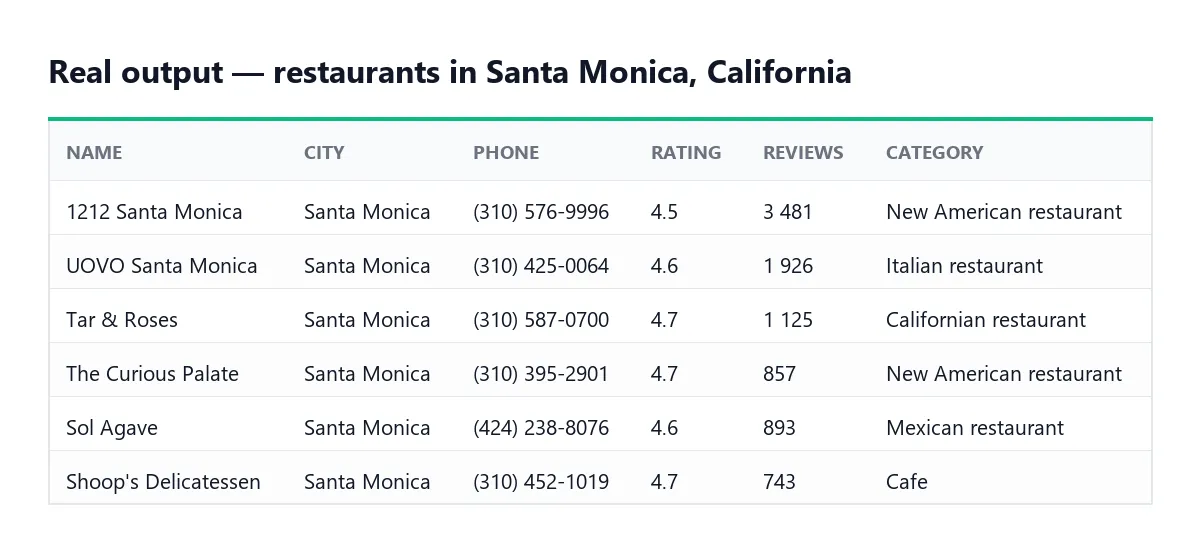
One row per business (shortened; real output from a test run):
Every row has the same columns, even when a value is missing (null or []), so spreadsheets and CRM mappings never break. Ratings and review counts are numbers; dates are ISO 8601. The Leads view shows name, phone, e-mail, website, category, rating, city, address and social links.
Each run also stores, in its key-value store:
RUN_SUMMARY— places delivered, e-mails found, searches succeeded, whether your budget was reached, duration.FAILED_INPUTS— each search/area pair that could not be completed, with the reason (not billed).
Pricing
Pay per event: you pay for each place delivered to the dataset, plus a tiny start fee per run. Proxy and compute costs are included, and there is no Google bill because no Google API is used.
| Plan | Price per 1,000 places |
|---|---|
| Free | $3.50 |
| Starter | $2.80 (−20%) |
| Scale | $2.275 (−35%) |
| Business | $1.75 (−50%) |
Start fee: $0.00005 per run. E-mail and social-profile extraction costs nothing extra. Failed searches, empty rows and duplicates are never charged. Prices are those shown on the Actor's pricing tab at the time of writing; the pricing tab is authoritative.
Example: 1,000 dentists with e-mails and phone numbers on the Free plan cost about $3.50.
FAQ
Do I need a Google API key? No. Neither yours nor anyone else's.
How do I control what I spend? Set Maximum places per search and area for an exact cap, and/or the maximum cost per run in the run options. When the budget is reached the Actor stops cleanly and keeps what it collected.
Will I pay twice for the same business? No, by default. A business found by several keywords or in overlapping areas is delivered once per run (Remove duplicates across searches and areas).
Why is an e-mail missing for some businesses? Many small firms publish only a contact form, or no website at all. In a test on 40 plumbing companies, 21 e-mails were found. Use Only places with an e-mail to receive — and pay for — only the ones with an address.
How many places can I get? As many as Google shows for that area. Raise Split depth to 3 for dense cities.
Some searches failed. Open FAILED_INPUTS to see why. If Google refused requests, run again or set the Proxy field to the RESIDENTIAL group. Failed searches are not billed.
What is not included? Review texts, photos, questions and answers and popular times. They live on each place's own page, which this Actor does not open — that is also why it is fast and inexpensive.
Can I schedule it? Yes — use Apify Schedules to re-run daily or weekly and track new businesses over time.
Can I scrape one specific business? Yes: paste its Google Maps link (place link, ?cid= link or maps.app.goo.gl short link) or its place ID into Search queries. You get one row, billed as one place.
What it can and cannot do
| ✅ Can | ❌ Cannot |
|---|---|
| Places by keyword and area, by Google Maps link or by place ID | Review texts, photos, popular times, questions & answers (see Google Maps Scraper Pro for reviews and images) |
| Phone, website, address, coordinates, rating, review count, hours, categories | Phone numbers or e-mails that the business does not publish |
| E-mails and social links from the business website | Data behind a Google login |
| Whole cities and counties, split automatically past Google's limit | Guarantee every place of a country in one run (search city by city) |
Troubleshooting
| Symptom | Fix |
|---|---|
| Fewer places than expected | Raise Maximum places (0 = no limit) and Split depth to 3; check Stay strictly inside the area |
Area not found on OpenStreetMap in FAILED_INPUTS | Write city, region, country (e.g. Springfield, Illinois, USA) or use GPS coordinates |
Google refused the requests | Run again, or set Proxy to the RESIDENTIAL group. Refused searches are not billed |
A link is listed in FAILED_INPUTS | Expired short link or non-Google link: open it in a browser and paste the full Google Maps address |
| No e-mails | Turn on Find e-mails and social profiles; many small businesses publish only a form |
| Warning about unknown input fields | A setting pasted from another Actor: remove it in the JSON input tab |
Use it via API
Replace YOUR_API_TOKEN with your token from Apify Console → Settings → API & Integrations.
Python (pip install apify-client)
JavaScript (npm install apify-client)
cURL (waits for the run and returns the places)
Add &view=leads to a dataset items URL to get only the lead columns.
Integrations
- Make, Zapier and n8n: start a run and receive the leads in any of their thousands of apps.
- Google Sheets: export each run to a sheet from the Integrations tab.
- CRM (HubSpot, Salesforce, Pipedrive…): send the Leads view through Make, Zapier or n8n, or through the API.
- API: start runs and download the dataset as JSON, CSV or Excel through the Apify API or client libraries (Python, JavaScript).
- Webhooks: notify your own service or Slack the moment a run finishes; read
RUN_SUMMARYfor the numbers. - Schedules: a weekly run keeps a dated history of a market.
- AI agents (MCP): add the Actor to Claude, Cursor or any MCP client through the Apify MCP server —
https://mcp.apify.com/?actors=badr_xba/google-maps-scraper— and ask "find 30 dentists in Chicago with their e-mails".
Support
Found a bug or need a field that is missing? Open an issue on the Actor's Issues tab; every report is read.
Did this Actor do the job? Leaving a short review on its Store page takes a minute and helps other people find it — and tells me which feature to build next.
Legal
This Actor collects only public business data: listing data anyone can see on Google Maps without signing in, and contact details businesses publish on their own websites. It never signs in and does not access private areas. Automated access may conflict with Google's Terms of Service.
E-mail addresses and phone numbers can be personal data (for example a sole trader's own address). You are responsible for how you use them: under the GDPR in the EU and UK, and laws such as CAN-SPAM elsewhere, you need a lawful basis, must tell people where their data came from, and must honour opt-outs. When in doubt, ask a lawyer.
En français
Google Maps Scraper with Emails transforme une recherche Google Maps en fichier de prospection B2B : nom de l'entreprise, téléphone, site web, adresse e-mail et réseaux sociaux relevés sur son site, adresse, coordonnées GPS, note, nombre d'avis, horaires et catégories — sans clé API. La zone est découpée automatiquement pour dépasser la limite de 20 résultats de Google, et chaque entreprise n'est livrée qu'une fois.
Vous ne payez que les fiches livrées : les recherches en échec (enregistrement FAILED_INPUTS), les lignes vides et les doublons ne sont jamais facturés, et le plafond de dépense fixé pour le run est respecté. Prix : 3,50 $ les 1 000 lieux en offre gratuite, moins sur les offres payantes. Pour les entreprises françaises, voyez aussi l'Actor Google Maps France. Les e-mails et téléphones peuvent être des données personnelles : leur usage relève du RGPD et de votre responsabilité.


