

Phone Number Validator & WhatsApp Checker
Pricing
from $1.00 / 1,000 numbers
Phone Number Validator & WhatsApp Checker
Validate, clean and deduplicate phone lists in bulk: E.164 format, country, carrier (when known), line type and time zone, with impossible numbers flagged. Optional WhatsApp check through your own provider and API key (this Actor never accesses WhatsApp itself). 199 countries.
Pricing
from $1.00 / 1,000 numbers
Rating
5.0
(1)
Developer

Badr Bouargan
Maintained by CommunityActor stats
0
Bookmarked
10
Total users
3
Monthly active users
3 days ago
Last modified
Categories
Features
Share
Turn a messy phone list into clean, valid, unique international numbers in seconds — and check WhatsApp with your own provider if you want.
- ☎️ Any format in, one E.164 number out:
+61…,0061…, local04…, Excel.0,wa.melinks, extensions. - ✅ Valid, mobile or landline: country, carrier, line type and time zone for every number.
- 💸 Duplicates billed once, junk never billed: 1,000 unique numbers = $2.00 on the Free plan.
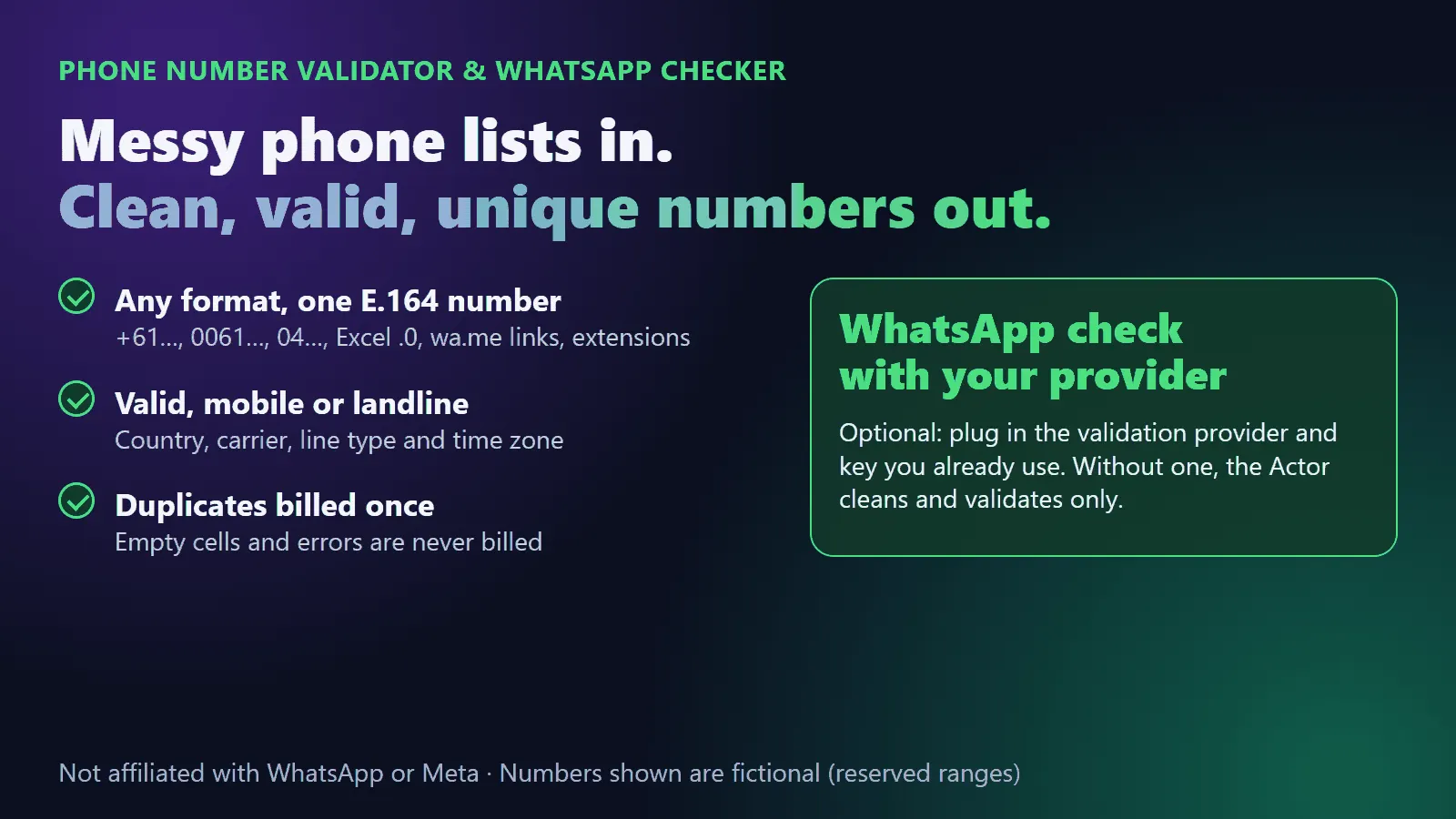
This Actor cleans and validates phone lists. It does not access WhatsApp itself: the optional WhatsApp check calls the provider you choose, with your own key. Not affiliated with, endorsed by or sponsored by WhatsApp or Meta.
What it does. It cleans, validates and deduplicates phone lists in bulk. Every number, however it is written, is converted to international E.164 format, checked against its country's numbering plan, merged with its duplicates, and enriched with country, carrier, line type (mobile / landline) and time zone. Optionally, it checks which numbers are registered on WhatsApp through your own validation provider.
The problem it solves. Real lead lists and CRM exports mix +61…, 0061…, 04…, Excel numbers ending in .0, wa.me links and empty cells. Duplicates get messaged twice, impossible numbers waste SMS / WhatsApp credits, and paid validators bill you for garbage. This Actor fixes the list first, locally, and only sends valid numbers to your provider.
Who it is for. Sales and marketing teams qualifying leads before outreach, agencies cleaning client lists before a campaign, CRM and ops teams deduplicating contact databases, and developers who need a phone-cleaning step in Make, Zapier or n8n.
What you get. One row per unique number: e164, valid, status, country, countryName, numberType, isMobile, carrier, timezone, international, national, issues, duplicateOf, whatsappStatus. Sample (fictional number from a range reserved for films and TV, real output of the Actor's cleaning code):
| input | e164 | valid | country | numberType | carrier | whatsappStatus |
|---|---|---|---|---|---|---|
| 0491 570 156 | +61491570156 | true | AU | mobile | Telstra | notChecked |
Start in 3 steps
- Open the Actor on the Store: apify.com/badr_xba/whatsapp-number-scraper and click Try for free, or start from the ready-made task (cleaning a Moroccan phone list before a campaign) listed on the same page.
- Paste your list into Phone numbers (one per line, a whole column from Excel / Google Sheets, or numbers separated by commas) and pick the country of numbers written locally (
0491 570 156), if any. Optional: Keep only mobile numbers, Keep only valid numbers, some countries only; open WhatsApp check to plug in your provider. - Click Start, then export CSV, Excel or JSON, or send the results to your tools (see Integrations).
Run it with an empty input and it processes a 5-number demo sample (a fraction of a cent) so you can see the output shape. The demo sample is never sent to your WhatsApp provider.
Why choose this one
- Works without any provider. Cleaning, validation, deduplication and enrichment run inside the Actor with Google's libphonenumber: a few seconds for thousands of numbers.
- No double billing. Numbers are deduplicated on their E.164 form before anything is delivered or checked.
- Impossible numbers never reach your paid provider, and a provider that refuses the first numbers (wrong key, address or method) stops the run's checks instead of burning your quota.
- Your provider, your keys. No provider is hard-coded; the address and the key are secret inputs, stored encrypted by Apify and never written to the dataset or the log.
- Pay only for verdicts. Provider errors, timeouts and empty cells are not billed; they are listed in
FAILED_INPUTSso you can re-run them. A maximum cost per run is respected. - Flat, consistent rows, ready for Google Sheets, a CRM import, Make, Zapier or n8n. 199 countries in the dropdown; every country code known to libphonenumber is understood.
How much it costs
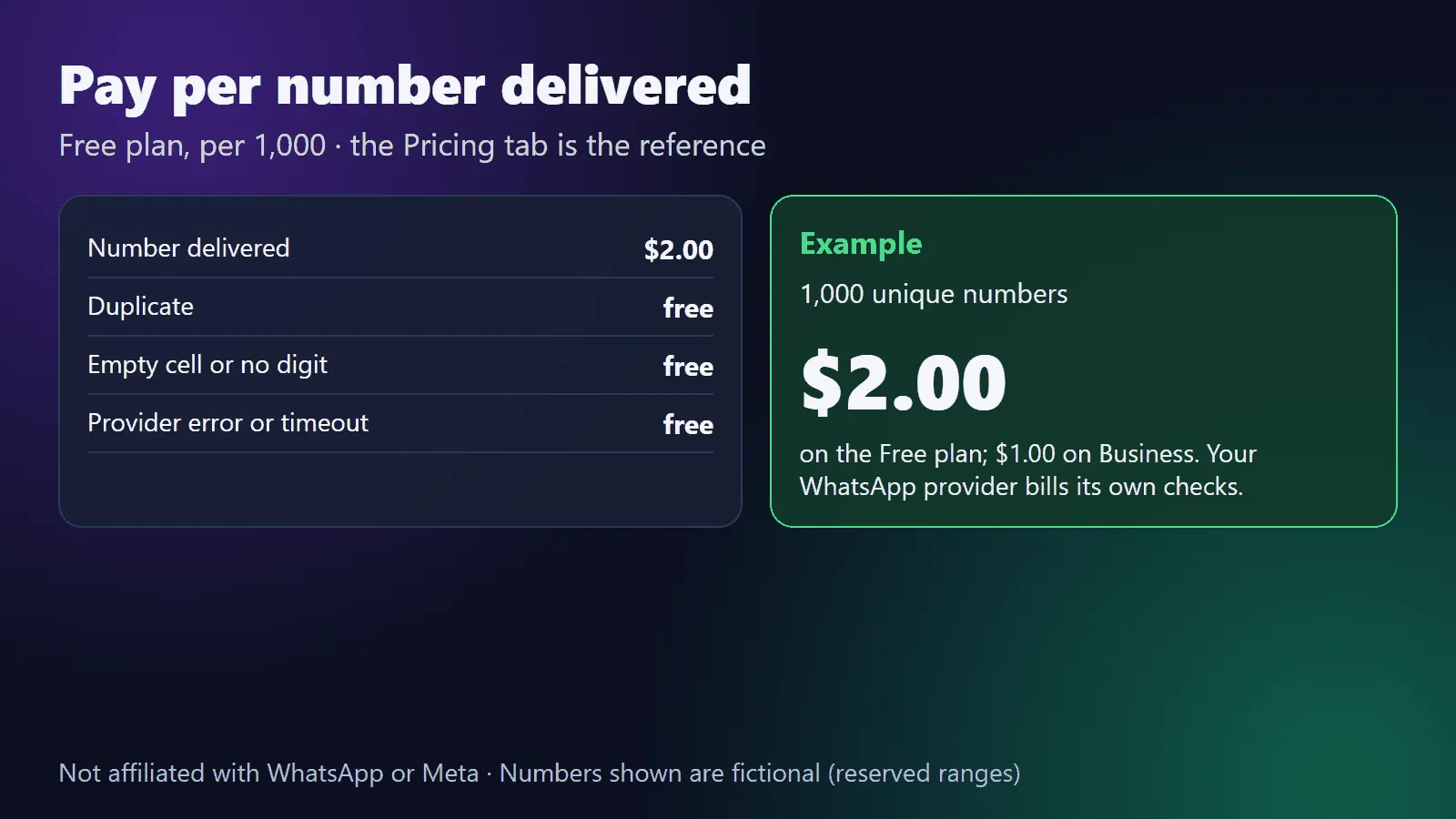
Pay per event: you pay for each number delivered in the dataset (one row per unique number), plus a tiny start fee. Platform costs are included.
| Apify plan | Price per 1,000 numbers delivered |
|---|---|
| Free | $2.00 |
| Starter | $1.60 |
| Scale | $1.30 |
| Business | $1.00 |
Plus $0.00005 per run start (per GB of memory; the default 512 MB counts as one). Not billed: duplicates, entries with no digit, numbers your provider could not answer for, and anything after your maximum cost per run. Turn on Keep only valid numbers if you do not want to pay for invalid-number verdicts. The WhatsApp provider, if you use one, bills you separately under your own plan.
Worked examples (Free plan): a list of 1,000 unique numbers ≈ $2.00. A CRM export of 12,000 rows that holds 9,000 unique numbers ≈ $18.00 (the 3,000 duplicates are free).
What you can do with it
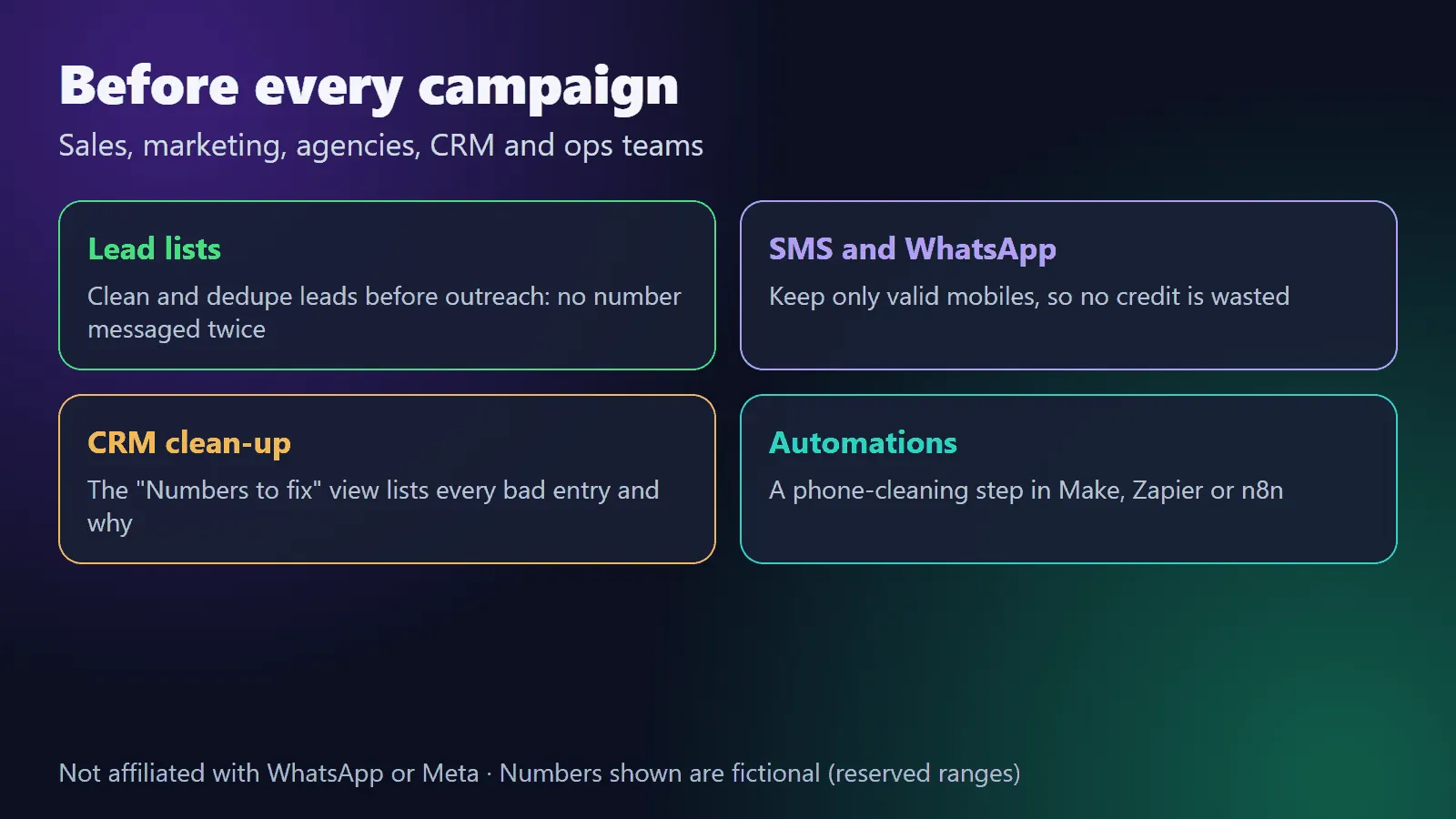
- Clean a lead list:
0491 570 156,+61 491 570 156and0061491570156become one E.164 number, counted and billed once. - Remove what cannot exist: wrong length for the country, prefixes no operator uses, repeated digits, cells with no number at all.
- Keep only mobiles before an SMS or WhatsApp campaign, or only certain countries.
- Fix your CRM: the Numbers to fix view lists every bad entry with the reason.
- Check WhatsApp registration (optional) with the provider and API key you already use, at the pace your plan allows.
How the WhatsApp check works — honestly
WhatsApp does not publish registration status anywhere. wa.me and api.whatsapp.com/send return the same page for a number that exists and one that does not, and web.whatsapp.com requires a signed-in session. So no Actor can read WhatsApp status from a public page: validators query a service that holds an authenticated connection.
This Actor puts you in control: switch on Check WhatsApp registration and fill in your provider's details — address, key, method, the name of the number field, and where the yes/no sits in their answer (for example data.exists). No provider is hard-coded. Nothing is sent to the numbers and no one is notified. Without a provider address, the Actor only cleans and validates — which is often all a CRM needs.
How it works
- Every entry is parsed (any writing, with or without country code) and converted to E.164.
- Duplicates are merged; impossible numbers are flagged (or dropped with Keep only valid numbers).
- Your filters apply: countries, mobile only, maximum numbers.
- If a provider is set, valid numbers are checked with retries (2 s, 4 s, 8 s… back-off with a little jitter on timeouts, 429 and 5xx; a
Retry-Afterheader from the provider is respected) at your requests-per-minute limit. If the provider refuses the very first numbers with HTTP 401/403/404/405 (wrong key, address or method), the Actor stops sending the rest of the list instead of burning your quota and time; those numbers go toFAILED_INPUTS, not billed. - Verdicts are written to the dataset in batches; progress is saved, so a migrated run resumes without re-checking or re-billing.
RUN_SUMMARYandFAILED_INPUTSare written at the end, with a final status message.
Accepted formats
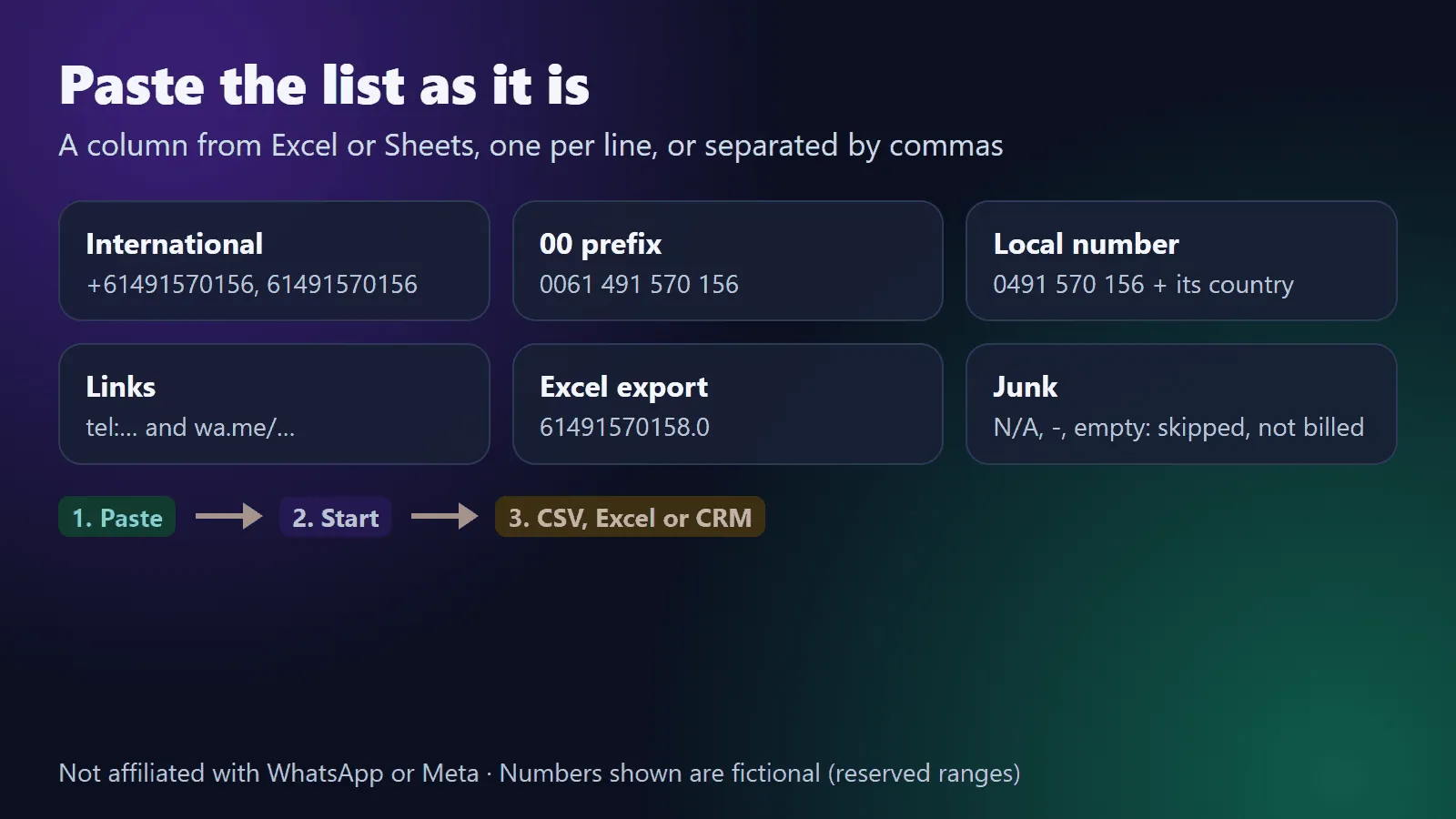
All of these are understood and normalised silently — no need to clean the list first. (Every number on this page is fictional: Australian numbers from the 0491 570 xxx and (02) 5550 xxxx ranges and US 555-01xx numbers reserved for films and TV.)
| You paste | You get |
|---|---|
+61491570156, 61491570156, +61 491-570-156 | +61491570156 |
0061 491 570 156 (international 00 prefix) | +61491570156 |
0491 570 156 with country Australia | +61491570156 |
tel:+61491570157, https://wa.me/61491570157?text=hi, api.whatsapp.com/send?phone=… | +61491570157 (WhatsApp links are always read as international numbers, whatever the default country) |
+1 (202) 555-0143 ext. 12 | +12025550143 (extension dropped) |
61491570158.0 (number column exported from Excel) | +61491570158 |
0491 570 156, 0491 570 157; +1 202-555-0143 in one line | three separate numbers |
N/A, -, empty cells | skipped, listed in FAILED_INPUTS, not billed |
Extra spaces, quotes and duplicates are removed automatically.
Input example
Here the three Australian spellings are one number (billed once) and N/A is not billed. provider.example is a placeholder: use the address your provider documents.
Output example
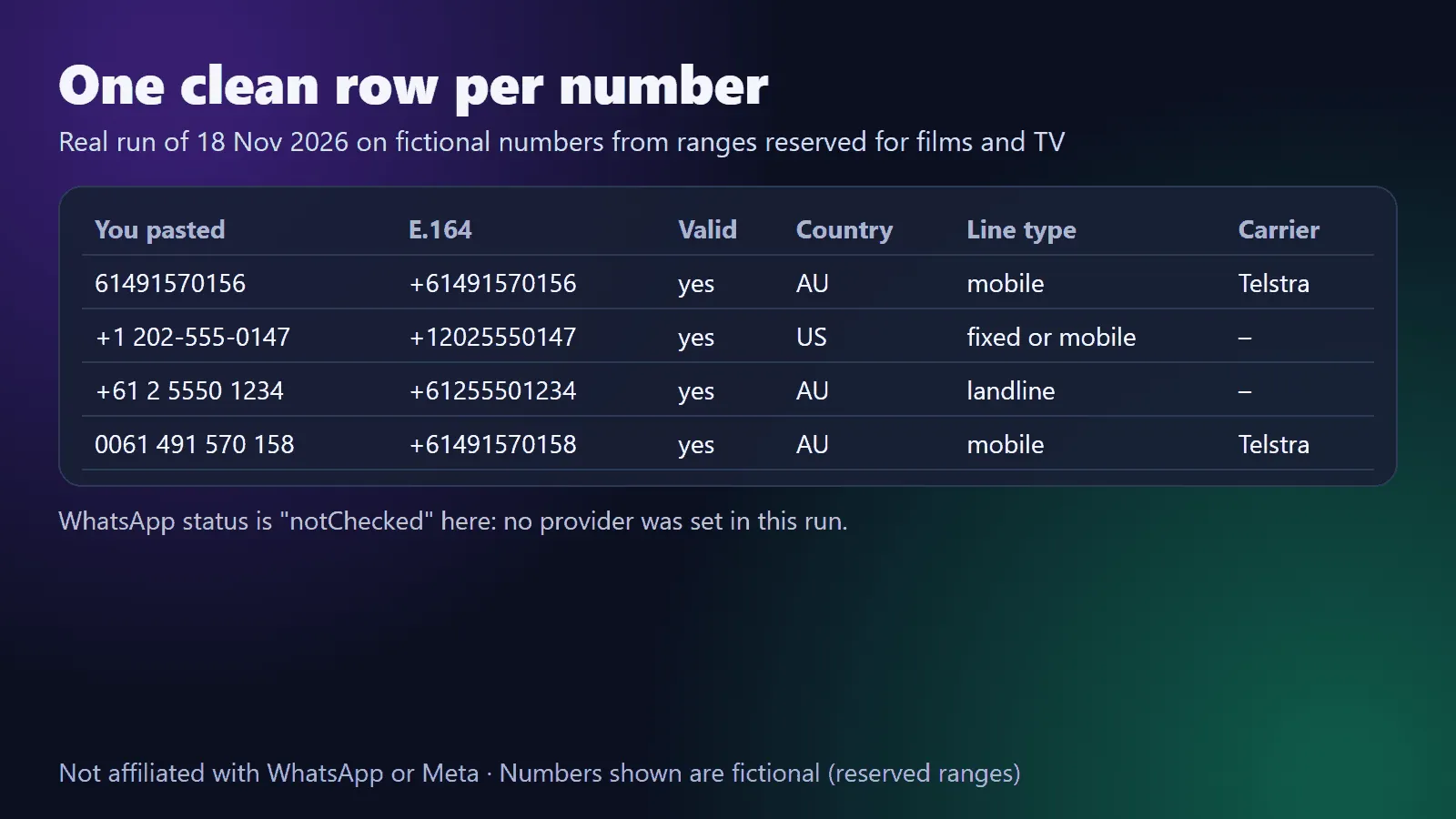
Real run of 18 Nov 2026 on fictional numbers from ranges reserved for films and TV.
One flat row per unique number (no provider set, so whatsappStatus is notChecked):
With a provider configured, exists is true / false, whatsappStatus is onWhatsApp / notOnWhatsApp and source is live.
status:success(valid number) orinvalid(seeerrorandissues).whatsappStatus:onWhatsApp,notOnWhatsApp,skippedInvalid(impossible numbers are never sent to your provider) ornotChecked(no provider set).- Carrier, location and time zone come from libphonenumber and are not available for every country (
carrierandlocationare often empty; a country with several time zones lists them all intimezones,timezoneis the first one). For Morocco the Actor returnsAfrica/Casablanca, the country's real time zone, where libphonenumber saysAtlantic/Canary.
Key-value store records
RUN_SUMMARY— counts: given, delivered, valid, invalid, duplicates, on / not on WhatsApp, not billed, andstoppedByBudget.FAILED_INPUTS— entries not delivered and not billed, with areason:whatsappCheckFailed,notAPhoneNumberormaxTotalChargeReached, and a stableerrorCode. For provider failures the code says why:providerUnreachable,providerRateLimited,providerServerError,providerAuthRejected,providerBadAddress,providerHttpError,providerBadAnswer,providerStoppedorunexpectedError.RUN_SUMMARY.failedByCodecounts them.RUN_STATS— kept for existing integrations.
Visual report
Every run also saves a visual report: one HTML page that turns your cleaned list into a validation dashboard.
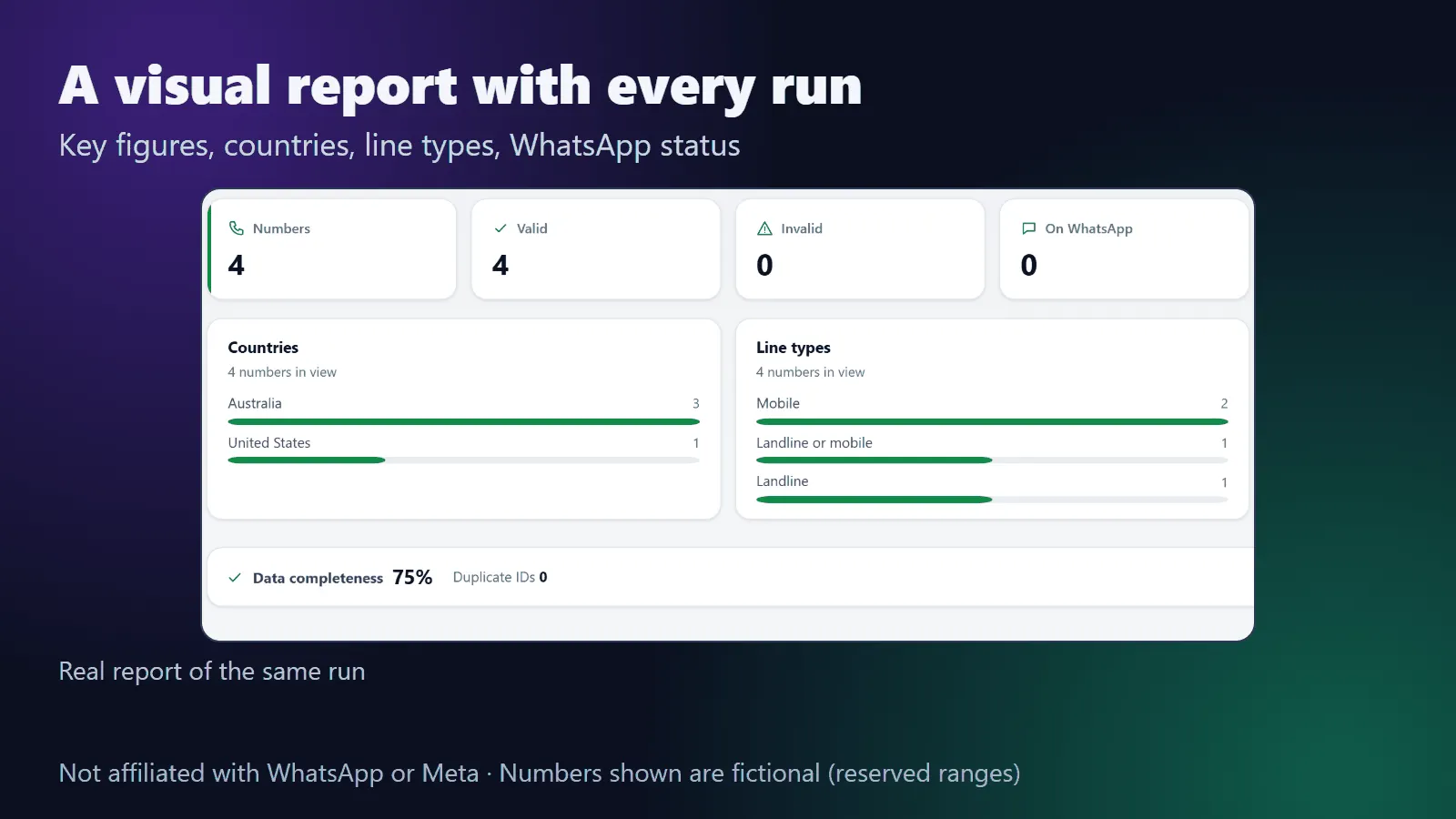
- Key figures: numbers delivered, valid, invalid, on WhatsApp, not on WhatsApp, unknown / not checked. They follow your filters.
- Charts: countries, line types (mobile, landline, VoIP…) and WhatsApp status.
- One card per number: country code and name, international, E.164 and national formats, validity and WhatsApp pills, line type, carrier, place, time zone, duplicate marker, issues (wrong length, unknown prefix…) and the reason a number is invalid. A table view shows the same in rows.
- Search, filters and sorting: search numbers, countries, carriers and places; filter by validity, WhatsApp status, issue, country, line type, carrier and mobile numbers; sort by input order, country, line type or number.
- Export: download the filtered rows as JSON or CSV, or the full dataset as JSON, CSV or Excel.
- Entries that gave nothing (no digit, check failed, budget reached) are listed at the top, grouped by error code with counts, next to the run warnings: they are not billed.
- Live progress: while a WhatsApp check runs, the page shows numbers processed / to process and refreshes itself every 30 s (at most one update a minute).
- Data-quality panel: how complete the key fields are (E.164, status, WhatsApp verdict, country, line type, carrier, place, time zone). It measures completeness, not accuracy.
- If a run stops on an unexpected error, the report is still saved with the status Failed.
How to open it: in the run, go to the Output tab and choose Visual report (or open the REPORT record of the key-value store). The page works in any browser, offline included.
The report shows no pictures at all: WhatsApp profile photos are never read or shown. It holds the first 2,000 numbers of a run; the full dataset is always one click away. Saving the report is never billed and can never make a run fail.
FAQ
Is it legal? The Actor does not scrape anything: it processes the list you give it, and it only checks WhatsApp through a provider you choose. Phone numbers are personal data: you are responsible for having a lawful basis (such as the GDPR's) to process them, for respecting WhatsApp's terms and anti-spam rules, and usually for having consent before sending marketing messages. See Legal below.
Does it message the numbers? No. Nothing is sent and no owner is notified.
Does it check WhatsApp without a provider?
No — and no honest tool can, see above. Without a provider it cleans, validates, deduplicates and enriches the list, and the whatsappStatus column says notChecked.
Are my provider address, key and header stored safely?
Yes. The provider address and the key are secret inputs: Apify stores them encrypted, and the Actor never writes them to the dataset or the log (only the provider's host name is logged). The header name and the prefix (for example Authorization and Bearer ) are plain settings, not secrets.
What happens when my provider times out or returns an error?
The number is retried with a growing pause. If it still fails, it is not delivered and not billed; it goes to FAILED_INPUTS so you can re-run just those numbers.
Am I charged for duplicates?
No. With Remove duplicates on (the default), each E.164 number is delivered once. If you turn it off, duplicate rows are delivered and billed, pointing to the first one via duplicateOf.
Can I cap what a run costs?
Yes. Set a maximum cost per run (or Maximum numbers to deliver). The Actor stops cleanly at the limit and lists the remaining numbers in FAILED_INPUTS.
Why is a number I know is dead marked valid? Because it is well-formed. A format check answers "could this number exist?"; whether it has an owner or a WhatsApp account is a different question.
Which countries are supported? All country codes known to libphonenumber. The dropdown (199 countries with dial codes) is only used for locally written numbers and for filtering.
How big can a list be? Cleaning handles thousands of numbers in seconds. With a WhatsApp provider, speed is set by your plan's requests per minute.
What it can and cannot do
- Can: normalise, validate, deduplicate and enrich any number with a country code known to libphonenumber; check WhatsApp registration through a provider you configure; stop at your budget.
- Cannot: tell whether a number is on WhatsApp without a provider (nobody can, see above); tell whether a valid number is currently assigned to someone; return names, profile pictures or "last seen" data.
Troubleshooting
- Local numbers come out invalid (
0491 570 156→invalid): set Country for numbers written locally to their country. - A number got the wrong country: it was written without
+and without a country setting, so the leading digits were read as a country code. Set the country, or add+. whatsappStatusisnotChecked: no provider address is set — the WhatsApp check is optional.- Every number is in
FAILED_INPUTSwithwhatsappCheckFailed: the provider refused or did not answer. Check the address, key, method, number field name and result path against your provider's documentation; theerrorcolumn shows the HTTP code. - Fewer rows than numbers given: duplicates were merged, or a filter (countries, mobile only, valid only, maximum numbers) dropped them.
RUN_SUMMARYgives the count for each reason.
Use it via API
Python (apify-client):
JavaScript (apify-client):
cURL (runs synchronously and returns the cleaned rows):
Integrations
- Make, Zapier and n8n: start a run from a new CRM contact or a new sheet row, then write
e164,validandwhatsappStatusback. - AI agents (MCP): add the Actor to Claude, Cursor or any MCP client through the Apify MCP server and ask it to clean a list.
- Google Sheets: export the dataset as CSV, or use Apify's Google Sheets integration to push results to a sheet.
- CRM (HubSpot, Salesforce, Pipedrive…): import the CSV, or connect through Make / Zapier / n8n. The flat columns map directly to contact fields.
- API: run the Actor and read the dataset (
?view=overview) as JSON, CSV or Excel; readRUN_SUMMARYfrom the key-value store. - Webhooks: get notified when a run finishes and fetch the results automatically.
- Schedules: clean new leads every night.
Related Actors
Other Actors by the same developer that work well with this one:
- Google Maps Scraper & Business Leads Extractor — build a lead list of local businesses with phones, websites and e-mails.
- Google Maps Leads Scraper (flat price) — lead lists with phones and e-mails at one flat price per place.
Support
Open an issue on the Actor's Issues tab for a bug, a country that misbehaves, or a provider format you cannot map. If the Actor saved you time, a short review on its Store page helps others find it.
Feedback and reviews
If this Actor saved you time, a short review on its Store page helps other users find it. If something did not work as expected, please open an issue on the Issues tab with your run ID: we read every issue.
Legal
This tool is meant for cleaning contact lists you have a legitimate relationship with — your customers, leads who gave you their number, your CRM — not for spam or unsolicited messaging. Phone numbers are personal data: under the GDPR and similar laws you need a lawful basis to process them, and usually prior consent before sending marketing messages; cleaning a list does not make it lawful to contact. Respect WhatsApp's terms and anti-spam rules; you are responsible for the provider you choose and for its compliance with those terms. This Actor is not affiliated with, endorsed or sponsored by WhatsApp or Meta. Results stay in your own Apify storage; nothing leaves the run unless you configure a provider yourself.
En français
Validateur et nettoyeur de listes de numéros de téléphone, en masse (vérification WhatsApp facultative via votre fournisseur). L'Actor n'accède pas lui-même à WhatsApp et n'est pas affilié à WhatsApp ni à Meta. Collez une liste de prospects ou un export CRM : chaque numéro est converti au format international E.164, validé selon le plan de numérotation de son pays, dédoublonné et enrichi (pays, opérateur, mobile / fixe, fuseau horaire). En option, la présence sur WhatsApp est vérifiée via votre propre fournisseur de validation. Vous ne payez que les verdicts livrés : les numéros impossibles à vérifier (erreur, délai dépassé) ne sont jamais facturés et sont listés dans FAILED_INPUTS. Tarif : 2,00 $ les 1 000 numéros (plan gratuit), jusqu'à 1,00 $ avec un abonnement. Usage réservé au nettoyage de contacts avec lesquels vous avez une relation légitime, dans le respect du RGPD — pas au spam.


