

LinkedIn Email Finder — Verified Work Emails, SMTP & Profiles
Pricing
from $6.80 / 1,000 profile with e-mails
LinkedIn Email Finder — Verified Work Emails, SMTP & Profiles
Find verified work e-mails on LinkedIn, no login or cookies: paste profile URLs or a CSV export, or search people by company, job title and location and get their e-mails in the same run. Every address is SMTP mailbox-checked: no verified mailbox, no e-mail charge. Full profile in each row.
Pricing
from $6.80 / 1,000 profile with e-mails
Rating
5.0
(3)
Developer

BlueskyScraper
Maintained by CommunityActor stats
0
Bookmarked
122
Total users
62
Monthly active users
a day ago
Last modified
Categories
Features
Share
LinkedIn Email Finder turns LinkedIn profile URLs into verified work e-mails, without a login, cookies or an API key. For each person it finds the company's own website, learns how that company writes its addresses, builds the address and checks the mailbox by SMTP — and returns it next to the full public profile (name, title, company, location, followers, experience, education).
- ✅ No verified mailbox, no e-mail charge. An e-mail is billed ($8 per 1,000) only when the SMTP check confirms the mailbox exists. Everything else is a plain profile row at $3.2 per 1,000 — never an e-mail price for a guess.
- 💸 Or pay only for matches (from 26 November 2026). Switch on Pay only for found e-mails: $0.02 per verified e-mail, $0 for a profile without one — cheaper than the $0.028–0.05 the most-used pay-per-found LinkedIn e-mail finders charge, and catch-all guesses are never billed.
- 🎯 Exact match only, if you want it. Set E-mail match → verified and nothing but an SMTP-confirmed mailbox ever reaches the
emailcolumn. - 📋 Paste a CSV export from HubSpot, Salesforce, Clay, Apollo or a recruiter tool — every LinkedIn link in any column is read.
- ⏭️ Resume long lists without paying twice. Profiles that already got a verified e-mail in an earlier run are skipped for free.
- 🔎 Every "no" is explained: catch-all domain, mailbox does not exist, no current company, unconfirmed domain — in plain words in
summary, with the best unverified guess inemailGuess. - 🔐 No LinkedIn account is used, so nothing of yours can be restricted. No third-party e-mail database is resold: each address is worked out from the company's own public website at the time of the run.
What is this LinkedIn Email Finder?
A LinkedIn email finder for sales prospecting, recruiting outreach and CRM enrichment. Paste profile links — https://www.linkedin.com/in/ondra-urban or just ondra-urban — and get a sheet with each person's verified work e-mail, the evidence behind it, and the person's public profile. It works as a LinkedIn to email API from Python, JavaScript, Make, Zapier, n8n, Clay or any AI agent through the Apify MCP server.
Who uses it
- SDRs and founders doing outbound — turn a list of decision makers into a send-ready list, with a mailbox that will not bounce.
- Recruiters — reach candidates at work with an address you can trust, and see their current title and company in the same row.
- RevOps and CRM admins — fill the e-mail column for contacts that only have a LinkedIn link, and flag the ones on catch-all domains.
- Agencies and lead-gen teams — enrich client lists in bulk, with per-row evidence to show the client.
- AI agents — ask in plain words: "find the work e-mails of these 20 LinkedIn profiles and return only verified ones".
Work e-mail or personal e-mail?
Two kinds of LinkedIn e-mail finders are on the Apify Store, and they answer different questions:
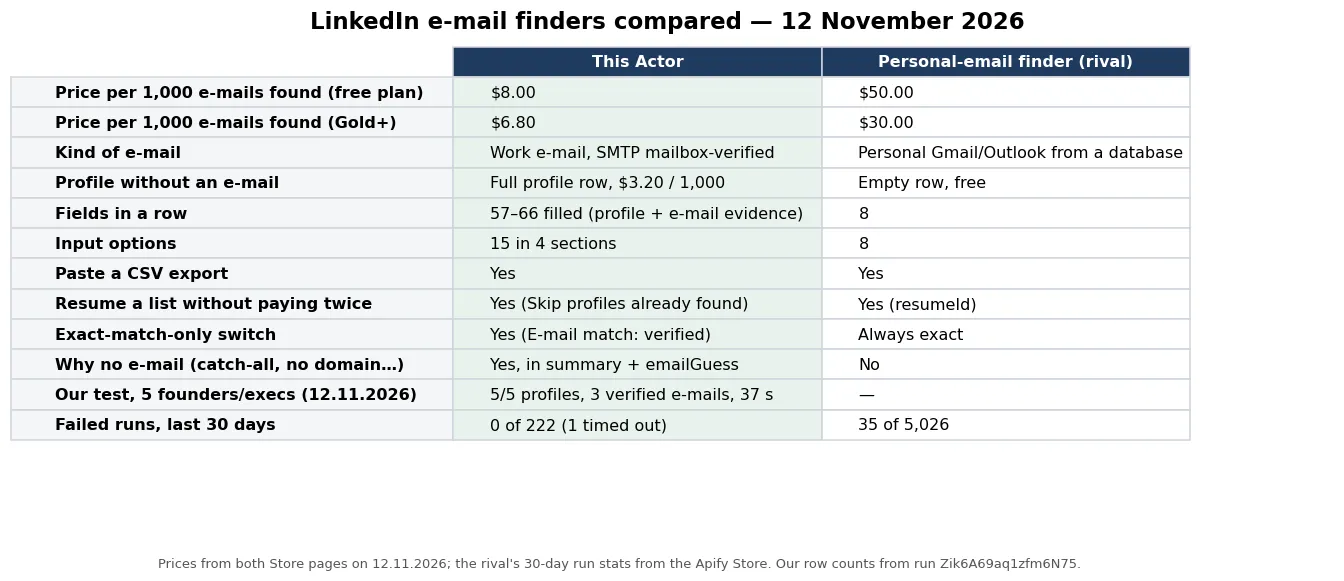
| This Actor | Personal-email lookups | |
|---|---|---|
| What you get | The person's work e-mail at their current company, SMTP mailbox-verified | A personal Gmail / Outlook / Yahoo from a pre-built database |
| Where it comes from | The company's own website and mail server, checked live during your run | Records collected earlier by the vendor |
| Best for | B2B outreach, sales sequences, account-based selling, CRM enrichment | Reaching someone after they leave a company; confidential recruiting |
| Price per 1,000 found | $8 (Gold and above: $6.80) | $30–50 |
| Profile without an e-mail | full profile row, $3.2 per 1,000 | empty row, free |
| What else is in the row | 57–66 filled fields: title, company, location, followers, experience, education, the domain and the evidence | 8 fields |
If you sell to companies, the work address is the one that reaches the buyer where they make decisions — and it is 4–6 times cheaper here. If a personal address is published on the profile itself, this Actor returns it too, for free, in personalEmailOnProfile.
How the e-mail is found
- Company — the current company from the profile (or your Company override). With several current jobs, the main one first; if it has no website, the next current company is tried.
- Domain — the company's website, accepted only with evidence: linked from its LinkedIn page, the domain spells the company name, the site carries the company name, or it is a known parent company. A domain that cannot be backed is not used — no address is built on a guess.
- Layout — a few pages of the company site are read; addresses published there show the layout (
first.last,flast,first,firstl…). - Mailbox check — the mail domain is checked for a mail server (MX), then the address goes through an SMTP mailbox check: the address published on the company site or built in the company's own layout first, then the most likely layouts, at most 2 checks per person, stopping at the first address whose mailbox exists. No e-mail is sent. The mailbox verified by the SMTP check is the only thing billed as an e-mail (
emailVerified: true,matchType: verified,confidence: verified). - Catch-all and unconfirmed — on a catch-all domain (the mail server accepts any address, e.g. hubspot.com, zapier.com) no mailbox can be confirmed by anyone: the address comes back unverified in
emailGuesswithemailCatchAll: trueandmatchType: catch-all, and is not charged as an e-mail. The same for a server that will not say (mailbox-unknown) and for layouts with no mailbox (mailbox-invalid). If the main company's server is catch-all, the one check left goes to the person's other current company. - The answer —
email+hasEmail: truewhen verified; otherwiseemailis empty,summarysays why in one sentence andemailGuess/alternativescarry the best unverified addresses.
On the Apify free plan a run gets 2 mailbox checks; after that addresses come back unchecked (mailbox-unchecked), also not charged as an e-mail. emailVerification shows every check made (status, score, time, the addresses tried).
How many profiles get a verified e-mail?
| Test | Profiles | Verified e-mails | Catch-all (unverified, not charged as e-mail) |
|---|---|---|---|
| 10 founders and executives, 9 October 2026 | 10 of 10 read | 7 | 3 |
| 5 founders and executives, 12 November 2026 (garrytan, williamhgates, kippbodnar, wadefoster, ondra-urban) | 5 of 5 read in 37 s | 3 | 2 (HubSpot, Zapier) |
The share depends on your list: companies with their own mail server and a public website give the most; big catch-all domains and people without a current company give none. You never pay the e-mail price for those.
💸 Pay only for found e-mails — no match, no charge
Starts on 26 November 2026, 04:00 UTC (Apify announces new prices 14 days ahead; before that the switch is ignored and the run is billed the usual way).
| Switch off (default) | Pay only for found e-mails | |
|---|---|---|
| Verified e-mail | $0.008 — full profile + e-mail | $0.02 — full profile + e-mail |
| Profile without a verified e-mail | $0.0032 — full profile + best guess | $0 — a short no-match row: name, title, company, why there is no e-mail |
Catch-all guess (emailGuess) | in the row | not returned |
| Gold, Platinum, Diamond | $6.80 / $2.72 per 1,000 | $16 per 1,000 found |
Which is cheaper for you? At a 60% match rate, 1,000 profiles cost $6.08 with the switch off (and you get 1,000 full profiles) or $12.00 with it on (600 e-mails, nothing for the 400 misses). Below about a 21% match rate the switch is the cheaper one; it is also the simpler one to budget — you pay for e-mails, never for empty rows.
How it compares (same 5 founders and executives, 12 November 2026):
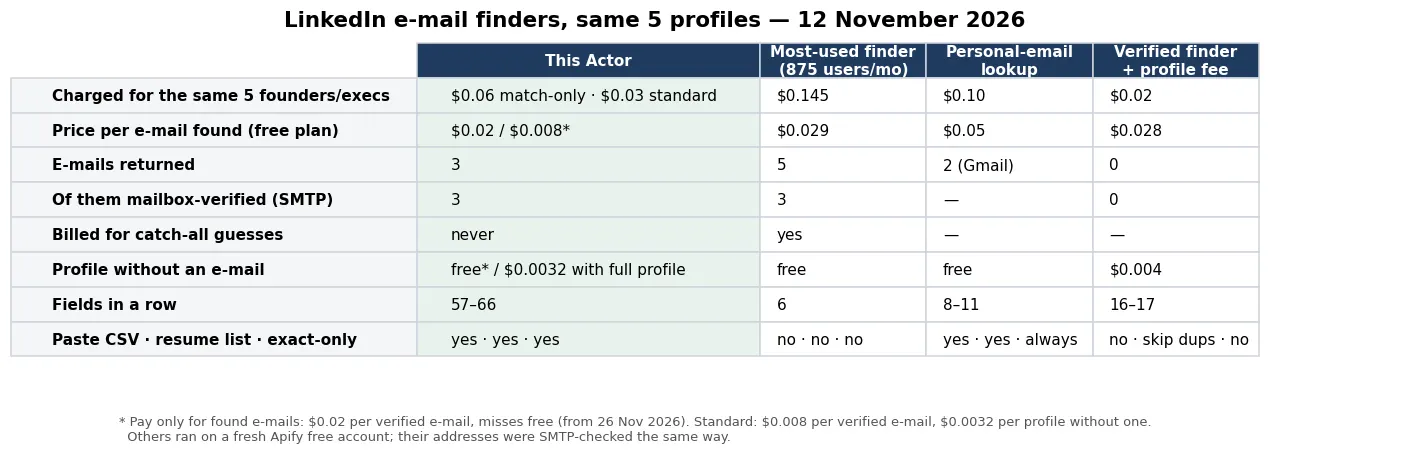
| Actor | E-mails returned | Of them mailbox-verified | Charged | Per found e-mail |
|---|---|---|---|---|
| This Actor, Pay only for found e-mails | 3 | 3 | $0.06 | $0.02 |
| This Actor, switch off | 3 + 2 unverified guesses | 3 | $0.0304 | $0.008 (+ $0.0032 per miss) |
| Most-used LinkedIn e-mail finder (875 users a month) | 5 | 3 — the other 2 are on catch-all domains, nobody can verify them | $0.145 | $0.029, catch-all guesses billed too |
| Personal-email lookup (Gmail / Outlook) | 2 personal addresses | — | $0.10 | $0.05 |
| Verified-email finder with profile fee | 0 | 0 | $0.02 | $0.028 + $0.004 per profile |
The other finders ran on a fresh Apify free account; the verified status of their addresses was checked with the same SMTP check this Actor uses.
Fair-use guard. A miss costs us the mailbox checks and the page route. If a list has so few verifiable e-mails that the found ones cannot pay for the free misses (after the first 10 profiles), the run stops taking new profiles, lists the rest in the NOT_ATTEMPTED record and says so in its status — run those with the switch off.
🎯 E-mail match: best or verified only
| Setting | What goes into email | When to use it |
|---|---|---|
| best (default) | A mailbox confirmed by the SMTP check. Only if the mailbox check is unavailable in a run, an address at or above Minimum e-mail confidence (published on the company site, or its layout seen there) | You want the most e-mails and read matchType / confidence yourself |
| verified | Only an SMTP-confirmed mailbox, ever. Every other address stays in emailGuess | Cold outreach where every bounce hurts your domain; you pay the e-mail price strictly for verified mailboxes |
In both settings a catch-all domain is never billed as an e-mail.
⏭️ Resume a list and scheduled runs
Turn on Skip profiles already found and give the list a name (List name, e.g. q4-founders). Every profile that gets a verified e-mail is remembered in your own Apify account. Next time you run the same list — after a stop, after adding new rows, or on a weekly schedule — those profiles are not read again and not charged; each gets one free notice row with the address found before (previousEmail, previousFoundAt). Profiles that had no verified e-mail are tried again — people change jobs, and companies change mail servers.
📋 Paste a CSV or connect a sheet
Three ways to give the list, usable together (duplicates are read once):
- 👤 LinkedIn profiles — one URL or slug per line.
- 📋 Paste a list or CSV export — paste the whole export from HubSpot, Salesforce, Clay, Apollo, Sales Navigator (public URLs) or a spreadsheet. Every
linkedin.com/in/…link in any column is read; a line that is just a slug works too. The value you gave comes back ininputUrl, so you can join the results to your sheet. - 📄 URLs from a file or sheet — upload a file or link a Google Sheet / any text or CSV URL.
Sales Navigator and Recruiter links (/sales/lead/…, ACwAA… IDs) open only for a logged-in viewer; they come back as free error rows that tell you how to copy the public URL instead.
What data does it return?
E-mail fields
| Field | Example | Meaning |
|---|---|---|
email | ondra@apify.com | Only a mailbox-verified address (in best mode, without a mailbox check: the evidence rule) |
hasEmail | true | Filter on it to get the send-ready list |
matchType | verified | verified, catch-all, guess-only, unverified-pattern, none; found-before on skipped rows |
emailVerified | true | false — checked, not confirmed; null — not checked |
emailCatchAll | false | true — the domain accepts any address, nothing can be confirmed |
emailVerification | { status: "safe", score: 98, checks: 2, tried: [...] } | Every mailbox check made |
confidence | verified | confirmed, high, medium, low, unusable without a mailbox check |
emailStatus | mailbox-verified | catch-all, mailbox-unknown, mailbox-invalid, mailbox-unchecked; undeliverable / risky / unknown when the domain fails the DNS check |
emailGuess | kipp.bodnar@hubspot.com | The best unverified address when it is not put into email — not charged as an e-mail |
alternatives | [{ email, pattern }] | Runner-up addresses |
domain / domainSource / domainEvidence | apify.com / linkedin / "the company's LinkedIn page links this website" | Why the domain is the company's |
unconfirmedDomains | [] | Domains found but not backed — nothing was built on them |
emailPattern / emailPatternSource | first / site | Layout used and where it was learnt |
foundOnSite, patternEvidence, patternEvidenceCount | false, [...], 0 | Addresses on the company site that show the layout |
emailProvider, emailMxHost | google, aspmx.l.google.com | Mail server facts |
emailIsRole, emailIsFree, emailIsDisposable | false | Role address, free mailbox, disposable domain |
emailsOnProfile | [] | Addresses the person wrote on the public profile itself (about, headline, website) — free |
personalEmailOnProfile | null | A Gmail / Outlook / Yahoo / iCloud / Proton address published on the profile — free |
emailCount | 1 | Verified e-mail + other addresses from the profile |
summary | "ondra@apify.com: the mailbox was confirmed by an SMTP check." | One line on the e-mail and on how the row was billed |
inputUrl, success | your value, true | Join key to your list; true for every profile read |
Profile fields (same row)
fullName, firstName, lastName, headline, title, company, companyLinkedinUrl, location, city, region, countryCode, about, followers, connections, website, experience, currentPositions, education, skills, certifications, languages, recommendations, similarProfiles, imageUrl, memberId, linkedinUrl and more — see the table below for how often LinkedIn shows each to logged-out visitors.
How often each profile field is filled
LinkedIn shows logged-out visitors a shorter profile than members see. Measured on 55 mixed profiles (3 October 2026):
| Filled in | Profile fields |
|---|---|
| Every profile | fullName, headline (as in the page title — for 7 in 10 people that is their current company), location, country, followers, connections, imageUrl, linkedinUrl |
| Most profiles | company and companyLinkedinUrl (9 in 10; with several current jobs — the main one, see companyChosenBy; the rest in otherCurrentCompanies), about (3 in 4), recommendations (7 in 10), education (6 in 10), website (5 in 10) |
| Some profiles | certifications, honorsAndAwards, languages, volunteering, publications (1 in 4 to 1 in 3) |
| Few profiles | job title and full experience with titles and dates (about 1 in 5 — LinkedIn masks past employers for logged-out visitors), skills (about 1 in 8) |
Added 5 October 2026 (checked on 7 public profiles): every role in the Experience section, including each role inside a company group (one long career went from 11 to 24 roles), with companyLogo and location; every school in the Education section with degree and fieldOfStudy (schools without dates used to be missing); city, region, countryCode; coverImageUrl, memberId, profileUrn; languageProficiencies, courses, projects, testScores, coursesTaught when the profile shows those sections. The exact connection count, Featured, interests and open-to-work / hiring flags are not shown to logged-out visitors, so they are not returned.
Added 5 October 2026 (round 2): similarProfiles — the "Other similar profiles" side rail of the public profile (LinkedIn's "People also viewed" as logged-out visitors see it): name, headline as the card shows it (usually the current company), location, followers, profile URL and photo of each person, 9–20 per profile (10 of 11 checked profiles show it). sameNameProfiles — "Others named …", when LinkedIn shows that rail (1 of 11). Same page, no extra request or charge.
An empty field means LinkedIn did not show it, not that the run failed.
Views in the dataset
| View | Columns |
|---|---|
| Work e-mails | name, title, company, e-mail, verified, guess, confidence, status, catch-all, domain, alternatives, LinkedIn URL, summary |
| Send-ready list (CRM import) | your input, hasEmail, e-mail, matchType, first and last name, title, company, domain, provider, personal e-mail on profile, location, LinkedIn URL |
| Profiles | the profile columns |
| Skipped — found in an earlier run | profiles skipped by Skip profiles already found, with the address found before |
| Inputs that could not be read | free error rows with the reason |
⬇️ Input example
⬆️ Output example — verified e-mail
⬆️ Output example — catch-all domain (billed as a plain profile)
⬆️ Output example — skipped, found in an earlier run (free)
When no mailbox can be verified, email is empty and summary says why — a catch-all domain, a mailbox that does not exist, no current company, a company without its own mail domain, a domain that could not be confirmed, or a domain that takes no mail.
💰 How much does it cost to find e-mails from LinkedIn?
| Row | Free plan | Bronze | Silver | Gold, Platinum, Diamond |
|---|---|---|---|---|
Profile with e-mail — email filled, mailbox verified by SMTP | $0.008 ($8 / 1,000) | $7.60 / 1,000 | $7.20 / 1,000 | $6.80 / 1,000 |
| Profile — no verified e-mail (catch-all, mailbox not confirmed, no company or domain); full profile + best guess | $0.0032 ($3.2 / 1,000) | $3.04 / 1,000 | $2.88 / 1,000 | $2.72 / 1,000 |
| E-mail found — only with Pay only for found e-mails on, from 26 Nov 2026 | $0.02 ($20 / 1,000) | $19 / 1,000 | $18 / 1,000 | $16 / 1,000 |
no-match rows (switch on), error rows, skipped "found before" rows, invalid input | free | free | free | free |
Each profile is billed once, as one of these. No start fee, no platform usage, proxies included.
Worked examples (free-plan prices):
- 1,000 founders with 60% verified → 600 × $0.008 + 400 × $0.0032 = $4.80 + $1.28 = $6.08, i.e. about $10.13 per 1,000 verified e-mails all-in, with 1,000 full profiles. A personal-email lookup at $50 per 1,000 found would charge $30 for 600 matches.
- Our 12 November test (5 profiles, 3 verified) → 3 × $0.008 + 2 × $0.0032 = $0.0304.
- Weekly re-run of the same 1,000 with Skip profiles already found → the 600 found before are free; you pay only for the 400 tried again: at most 400 × $0.008 = $3.20.
- Apify's free plan ($5 of monthly credit) covers about 600 verified e-mails a month.
Cap any run with Maximum profiles per run or Apify's Max cost per run — the run stops by itself and everything written is already paid for.
How to find e-mails from LinkedIn profiles
- Click Try for free.
- Paste profile URLs or slugs into 👤 LinkedIn profiles, or paste a whole CSV export into 📋 Paste a list or CSV export.
- Optional: E-mail match → verified for exact matches only; Company override (e.g.
hubspot.com) when the whole list works at one company; Skip profiles already found for long or repeated lists. - Click Start; open the Send-ready list view, filter
hasEmail = trueand export to CSV, Excel or JSON — or send it on through an integration.
Use cases
Sales prospecting and outbound
Turn a list of decision makers' LinkedIn URLs into an outreach list with verified work e-mails, title and company — ready for Lemlist, Instantly, Apollo sequences or HubSpot. The verified setting protects your sending domain from bounces.
Recruiting outreach
Reach candidates at their work address, with their current title, company and education in the same row. A personal address the candidate published on the profile comes back in personalEmailOnProfile.
CRM enrichment and clean-up
Fill the e-mail column for contacts that only have a LinkedIn link. matchType tells you which contacts sit on catch-all domains, so you can route them to LinkedIn or phone instead of e-mail.
Clay, HubSpot and Salesforce waterfalls
Put this Actor after a LinkedIn-URL column. Map email when hasEmail is true; fall through to the next provider when matchType is catch-all or none.
Account-based marketing
Enrich the buying committee of your target accounts — and get each company's domain and mail provider (emailProvider) for free along the way.
Integrations and API
Use LinkedIn Email Finder — Verified Work Emails, SMTP & Profiles like any Apify Actor:
- API: start a run and read the dataset over HTTP — see the API tab for ready-made calls.
- Python:
- JavaScript:
- No-code: Make, Zapier, n8n, Google Sheets, Airtable, Slack and webhooks through Apify integrations — send every finished run's rows wherever your team works.
- AI agents (MCP): add the Actor to Claude, ChatGPT, Cursor or any MCP client through the Apify MCP server (
https://mcp.apify.com) and ask for LinkedIn data in plain words. - Schedules: run it every day or week from the Schedules page; combine with Maximum results per run to cap the bill.
Use with AI agents
Paste this to Claude, ChatGPT, Cursor or any client connected to the Apify MCP server (https://mcp.apify.com?tools=blueskyscraper/linkedin-profile-email-finder):
What LinkedIn shows without a login
This Actor reads the public pages LinkedIn serves to logged-out visitors and search engines — no account, no cookies, nothing that could get an account banned. That decides what is possible:
- Hidden profiles. Some people hide their profile from logged-out visitors; LinkedIn then answers with a login wall or HTTP 999 for that profile from every address. On mixed lists about 1 in 4 or 5 profiles is refused on the first route. Those get one more try through an unblocking route, paid only from your run's own margin (never from a subsidy that would have to be priced in). Whatever still stays hidden comes back as a free error row saying so.
- Recent posts only. A logged-out visitor sees a company's ~10 newest posts (median 9 on a 20-company check, 2 of 20 showed none) and a person's ~5–10 newest posts, quote-shares and reposts plus up to 10 articles. A page with fewer posts than you asked for adds one free
noticerow saying how many LinkedIn showed. There is no paging back to older posts without a login — use the Only posts not delivered before switch on a daily schedule to build a full history from now on. - Shortened surnames. A few profiles show the surname as an initial ("Diego C.") to logged-out visitors; the row says so.
- No private data. Phone numbers, connections lists and contact info behind the login are not read.
Pages that do not exist (HTTP 404) are free error rows too. A run in which LinkedIn refuses everything ends with error rows and no charge.
❓ FAQ
Is it legal to scrape LinkedIn?
The Actor reads only pages that LinkedIn shows to anyone without an account. Scraping public data is generally lawful, but names, job titles and e-mails are personal data under laws such as the GDPR and CCPA: have a lawful reason to process them, keep them safe, and honour opt-outs. When in doubt, ask a lawyer.
Do I need a LinkedIn account, cookies or a proxy?
No. Nothing to log in to, no cookies to paste, no proxy to set up — your own LinkedIn account is never touched, so it cannot be restricted. Proxies are included in the price.
Can I use it with the Apify API?
Yes — every run can be started and read over the Apify API, from Python, JavaScript or any HTTP client. See Integrations and API above.
Can I use it through an MCP server?
Yes. Add it to the Apify MCP server (https://mcp.apify.com) and your AI assistant can call it directly.
Can I integrate it with other apps?
Yes: Make, Zapier, n8n, Google Sheets, Airtable, Slack and webhooks through Apify integrations.
Why did some pages come back as error rows?
Either the page does not exist (404), or LinkedIn hides it from logged-out visitors. Both are free — you pay only for rows with data. The error field says which.
Do I pay for errors, filtered-out posts or the start of a run?
No. There is no start fee; error rows and posts removed by your filters are never billed. Maximum results per run and Apify's Max cost per run are hard ceilings — when the cost limit is reached, the run stops by itself with everything written already paid for.
Are the e-mails verified?
Yes: the mailbox is verified by an SMTP check (no e-mail is sent), and only a verified mailbox is put into email and charged as an e-mail. Catch-all domains (the server accepts any address) are returned unverified in emailGuess with emailCatchAll: true and are not charged as an e-mail — no service can confirm a person's mailbox there.
Do I pay when no e-mail is found?
Not the e-mail price. A profile without a verified e-mail is billed as a plain profile ($0.0032) because you still get the full profile row, the company domain and the best unverified guess. Hidden profiles, profiles that do not exist and invalid input are free error rows.
Can I pay only when an e-mail is found?
Yes, from 26 November 2026: switch on Pay only for found e-mails. A verified e-mail is $0.02, a profile without one is a free no-match row.
What does "exact match" mean here?
With E-mail match → verified, email holds only an address whose mailbox the SMTP check confirmed for this person's name at this person's company — nothing guessed from a pattern alone.
Can it find personal Gmail or Outlook addresses?
Only when the person published one on the public profile (about, headline, website): it is returned in personalEmailOnProfile, free. This Actor does not buy or resell personal-e-mail databases.
What if the profile has no current company?
The row stays a plain profile with a summary explaining why. Fill Company override when you know the company.
Why is a known address of someone missing?
Usually the company's mail server is catch-all (it accepts any address, so nothing can be confirmed), or the person's current company on LinkedIn differs from the one you know. summary and matchType say which.
Can I run the same list again without paying twice?
Yes — turn on Skip profiles already found with the same List name. Found profiles are skipped for free; the others are tried again.
Can I use it from Clay, Make, Zapier or n8n?
Yes. All of them can start an Apify Actor with profileUrls and read the dataset; see Integrations and API above.
How fast is it?
About 7–12 seconds per profile with the e-mail search on 3 parallel pages (5 profiles in 37 seconds on 12 November 2026). Raise Parallel pages for long lists.
Is it legal?
The Actor reads only pages that LinkedIn and company websites show to anyone. Work e-mails are personal data under the GDPR, CCPA and similar laws: have a lawful basis (for example legitimate interest in B2B outreach), honour opt-outs and keep the data safe.
Changelog
- 12 November 2026 (2) — Pay only for found e-mails ($0.02 per verified e-mail, misses free; starts 26 Nov 2026); head-to-head with three other LinkedIn e-mail finders.
- 12 November 2026 — Paste a CSV export; E-mail match: verified only; Skip profiles already found with list names; new fields
hasEmail,matchType,emailCount,emailsOnProfile,personalEmailOnProfile,success; Send-ready list view for CRM import. - 9 November 2026 — runs stop cleanly before their timeout and list unread profiles in
NOT_ATTEMPTEDinstead of timing out. - 9 October 2026 — SMTP mailbox check; only a verified mailbox is billed as an e-mail.
Your feedback
Something missing or wrong? Open an issue on the Issues tab — we read every one.
You might also like
| Actor | What it does |
|---|---|
| LinkedIn Scraper | Profiles, work e-mails, company pages and latest posts in one Actor |
| LinkedIn Profile Details Scraper | Full public profiles from a list of profile URLs |
| LinkedIn Company Details Scraper | Company pages: website, industry, size, followers, address |
| LinkedIn Company Posts Scraper | Latest posts of company pages with likes and comments |
| LinkedIn Profile Posts Scraper | Latest posts and articles of people |


