

LinkedIn Scraper
Pricing
from $2.72 / 1,000 profiles
LinkedIn Scraper
Scrape LinkedIn without login or cookies: full profiles with experience, education and skills, optional work e-mail, company pages with industry, size and followers, and the latest posts of companies and people. Export data, run via API, schedule runs or plug into AI workflows.
Pricing
from $2.72 / 1,000 profiles
Rating
5.0
(7)
Developer

BlueskyScraper
Maintained by CommunityActor stats
0
Bookmarked
37
Total users
23
Monthly active users
12 hours ago
Last modified
Categories
Share
LinkedIn Scraper extracts LinkedIn data without a login, cookies or an API key: public profiles (headline, current company, location, about, education, followers), the person's work e-mail on request, company pages (website, industry, size, employees, followers, address) and the latest posts of companies and people. One Actor, three modes, pay only for rows with data — from $1.6 per 1,000 posts and $3.2 per 1,000 profiles.
Tested head-to-head — 9 October 2026
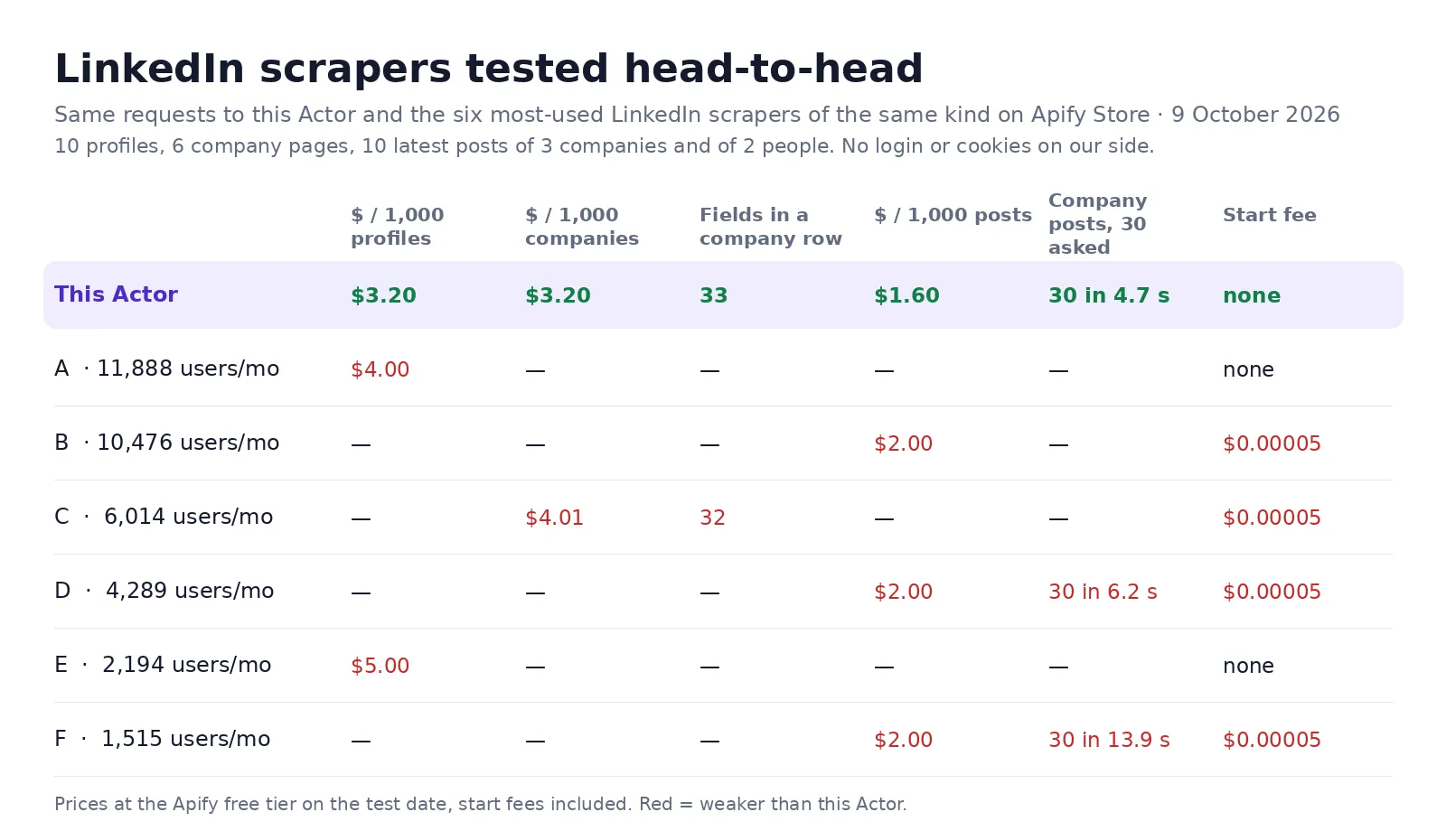
The same requests went to this Actor and to the most-used LinkedIn scrapers of the same kind on the Apify Store: 10 public profiles, 6 company pages (Microsoft, Stripe, HubSpot, OpenAI, Canva, Apify), the 10 latest posts of 3 companies and of 2 people, and the work e-mail of 10 people (founders and executives).
| This Actor | The most-used others | |
|---|---|---|
| Price per 1,000 profiles | $3.2 | $4.00–5.00 |
| Price per 1,000 company pages | $3.2 | $4.01–4.28 |
| Price per 1,000 posts | $1.6 | $1.42–2.00 on these runs (one charges $0.01 per run plus $0.001 per post) |
| Start fee per run | none | none to $0.01 |
| Company page: fields filled (6 companies) | 33, incl. street address, office locations, affiliated pages | 19–32 |
| Company posts: 30 asked from 3 pages | 30 in 4.7 s, reposts included | 24–30 in 6.2–13.9 s |
| Person posts: 20 asked from 2 people | 20, articles included | 20 |
| Profiles: 10 asked | 10 of 10 in 31 s | 10 of 10 in 26 s |
| Work e-mail of 10 people (9 October 2026) | 7 of 10 mailbox-verified (SMTP check); 3 on catch-all domains returned unverified and not charged as e-mails — $8 per 1,000 verified e-mails | the leader: 8 of 10 verified + 2 catch-all, all 10 billed at $10 per 1,000 |
What a logged-out visitor cannot see stays out of reach: 5 of the 10 test people limit their public profile, so for them LinkedIn shows only the headline, current company, location and followers — leaders that read LinkedIn with an account return full experience and skills there.
What is LinkedIn Scraper?
A LinkedIn scraper and LinkedIn data API for lead generation, recruiting, market research and AI agents. Paste LinkedIn URLs or slugs, pick a mode, and get a clean table you can export to Excel, CSV or JSON, or read from Python and JavaScript. No official LinkedIn API access is needed and your own LinkedIn account is never used, so it cannot be restricted.
- 👤 Profiles — the public profile of each person as LinkedIn shows it to logged-out visitors, optionally with a work e-mail found from the company's website.
- 🏢 Companies — the company page with website, industry, size band, employees on LinkedIn, followers, headquarters, founded year, specialties and office locations.
- 📰 Posts — the newest posts and reposts LinkedIn shows on company and personal pages, with likes, reactions, comments count, images, video, documents, link cards, mentions and hashtags; or single posts by URL with their top ~8–10 visible comments.
What data can LinkedIn Scraper extract?
| Mode | Fields |
|---|---|
| 👤 Profiles | fullName, headline, company, companyLinkedinUrl, location, country, about, followers, connections, education, recommendations, certifications, languages, volunteering, publications, honorsAndAwards, website, imageUrl, similarProfiles ("Other similar profiles"), and title, experience, skills when LinkedIn shows them |
| 📧 Work e-mail (option) | email, emailVerified, emailCatchAll, emailVerification, emailGuess, confidence, emailStatus, emailDomainStatus, domain, domainEvidence, emailPattern, alternatives, emailProvider, summary |
| 🏢 Companies | name, website, tagline, description, industry, companySize, employeesOnLinkedIn, followers, headquarters, street address, founded, companyType, specialties, locations, similarCompanies, affiliatedPages, companyId, coverImageUrl, jobsUrl, logoUrl, latestPosts |
| 📰 Posts | postType, text, headline (articles), publishedAt, likes, comments / commentsCount, reactionsCount, topReactionTypes, images, videoUrl, documentTitle, articleTitle / articleUrl, hashtags, mentions, links, authorHeadline, isRepost / repostedAt / repostedBy, quotedPost, postUrl, activityId, sourceName, sourceType, sourceHeadline, sourceFollowers, topComments (top ~8–10 visible comments — single post URLs, or with Add top comments); a free notice row when a page shows fewer posts than asked |
💰 How much does it cost to scrape LinkedIn?
Pay per row with data, no start fee, proxies included:
| Row | Price |
|---|---|
| Profile | $0.0032 — $3.2 per 1,000 |
Profile with e-mail (only when email is filled — the mailbox is verified by an SMTP check; catch-all domains are returned unverified and not charged as an e-mail) | $0.008 — $8 per 1,000 |
| Company | $0.0032 — $3.2 per 1,000 |
| Post (posts and articles) | $0.0016 — $1.6 per 1,000 |
A profile row is billed either as Profile or as Profile with e-mail, never both. Error rows, hidden profiles and posts removed by your filters are free. Apify's free plan ($5 of monthly credit) covers about 1,500 profiles, 1,500 companies or 3,000 posts a month. Paid Apify plans get tiered discounts automatically.
How to scrape LinkedIn with LinkedIn Scraper
- Click Try for free and open the Input tab.
- Choose What to get: Profiles, Companies or Posts.
- Paste LinkedIn profile URLs into 👤 LinkedIn profiles and / or company URLs into 🏢 LinkedIn companies — or link a Google Sheet in 📄 URLs from a file or sheet.
- For profiles, switch on 📧 Find the work e-mail if you need addresses.
- Click Start, then export the table as Excel, CSV or JSON, or read it through the API.
⬇️ Input
Profiles with work e-mail
Company pages
Latest posts of companies and people
In Profiles mode the 🏢 field is ignored and in Companies mode the 👤 field is ignored, so both can stay filled; Posts reads both.
Single posts and their top comments
Paste links to single posts — https://www.linkedin.com/posts/… or https://www.linkedin.com/feed/update/urn:li:activity:… — into 💬 Single post URLs. Each gives one post row (billed as one post) with every post field plus topComments: the top ~8–10 comments a logged-out visitor sees, not all (a post with 129 comments shows 8), with author, text, date and likes. Measured on 12 posts (5 October 2026): 8–10 comments on every post, each with author URL, date and likes.
includeComments adds the same top comments to posts found on the pages you list (off by default: topComments is then null).
⬆️ Output
Profile
Company
Post
How often each profile field is filled
LinkedIn shows logged-out visitors a shorter profile than members see. Measured on 55 mixed profiles (3 October 2026):
| Filled in | Profile fields |
|---|---|
| Every profile | fullName, headline (as in the page title — for 7 in 10 people that is their current company), location, country, followers, connections, imageUrl, linkedinUrl |
| Most profiles | company and companyLinkedinUrl (9 in 10; with several current jobs — the main one, see companyChosenBy; the rest in otherCurrentCompanies), about (3 in 4), recommendations (7 in 10), education (6 in 10), website (5 in 10) |
| Some profiles | certifications, honorsAndAwards, languages, volunteering, publications (1 in 4 to 1 in 3) |
| Few profiles | job title and full experience with titles and dates (about 1 in 5 — LinkedIn masks past employers for logged-out visitors), skills (about 1 in 8) |
Added 5 October 2026 (checked on 7 public profiles): every role in the Experience section, including each role inside a company group (one long career went from 11 to 24 roles), with companyLogo and location; every school in the Education section with degree and fieldOfStudy (schools without dates used to be missing); city, region, countryCode; coverImageUrl, memberId, profileUrn; languageProficiencies, courses, projects, testScores, coursesTaught when the profile shows those sections. The exact connection count, Featured, interests and open-to-work / hiring flags are not shown to logged-out visitors, so they are not returned.
Added 5 October 2026 (round 2): similarProfiles — the "Other similar profiles" side rail of the public profile (LinkedIn's "People also viewed" as logged-out visitors see it): name, headline as the card shows it (usually the current company), location, followers, profile URL and photo of each person, 9–20 per profile (10 of 11 checked profiles show it). sameNameProfiles — "Others named …", when LinkedIn shows that rail (1 of 11). Same page, no extra request or charge.
An empty field means LinkedIn did not show it, not that the run failed.
Each mode writes one kind of row, so the table stays clean; the Output tab has a view per kind and one for error rows.
What LinkedIn shows without a login
This Actor reads the public pages LinkedIn serves to logged-out visitors and search engines — no account, no cookies, nothing that could get an account banned. That decides what is possible:
- Hidden profiles. Some people hide their profile from logged-out visitors; LinkedIn then answers with a login wall or HTTP 999 for that profile from every address. On mixed lists about 1 in 4 or 5 profiles is refused on the first route. Those get one more try through an unblocking route, paid only from your run's own margin (never from a subsidy that would have to be priced in). Whatever still stays hidden comes back as a free error row saying so.
- Recent posts only. A logged-out visitor sees a company's ~10 newest posts (median 9 on a 20-company check, 2 of 20 showed none) and a person's ~5–10 newest posts, quote-shares and reposts plus up to 10 articles. A page with fewer posts than you asked for adds one free
noticerow saying how many LinkedIn showed. There is no paging back to older posts without a login — use the Only posts not delivered before switch on a daily schedule to build a full history from now on. - Shortened surnames. A few profiles show the surname as an initial ("Diego C.") to logged-out visitors; the row says so.
- No private data. Phone numbers, connections lists and contact info behind the login are not read.
Pages that do not exist (HTTP 404) are free error rows too. A run in which LinkedIn refuses everything ends with error rows and no charge.
How the work e-mail is found
For each profile with a current company the Actor finds the company's own website (from its LinkedIn page, the domain spelling the company name, or the site carrying the company's name — never a guess it cannot back), reads a few pages of that site to learn how the company writes its addresses (first.last, flast, first…), builds the person's address in that layout, checks that the domain accepts mail (MX record) and then verifies the mailbox by an SMTP check (no e-mail is sent; at most 2 checks per person, the best-backed address first). Only a mailbox verified by the SMTP check goes into email and gets the Profile with e-mail price (emailVerified: true, emailStatus: mailbox-verified). Catch-all domains (the server accepts any address) are returned unverified in emailGuess with emailCatchAll: true and are not charged as an e-mail; the same for mailbox-unknown and mailbox-invalid. emailVerification lists the checks made. If the mailbox check is unavailable in a run, the evidence rules apply instead: confidence confirmed / high / medium / low, and only an address at or above Minimum e-mail confidence (default medium) goes into email.
Use cases for LinkedIn data
Lead generation and sales prospecting
Turn a list of LinkedIn profiles into a CRM-ready sheet with job titles, companies and work e-mails.
Recruiting and talent research
Read current company, location, about, education and certifications of candidates in bulk.
Account research and market mapping
Pull company size, industry, headquarters and employee counts for a list of accounts.
Social listening and content research
Track what companies and creators post, which posts get likes and comments, and when.
AI and RAG pipelines
Feed clean, structured LinkedIn data to an AI agent through the API or the MCP server.
Integrations and API
Use LinkedIn Scraper like any Apify Actor:
- API: start a run and read the dataset over HTTP — see the API tab for ready-made calls.
- Python:
- JavaScript:
- No-code: Make, Zapier, n8n, Google Sheets, Airtable, Slack and webhooks through Apify integrations — send every finished run's rows wherever your team works.
- AI agents (MCP): add the Actor to Claude, ChatGPT, Cursor or any MCP client through the Apify MCP server (
https://mcp.apify.com) and ask for LinkedIn data in plain words. - Schedules: run it every day or week from the Schedules page; combine with Maximum results per run to cap the bill.
❓ FAQ
Is it legal to scrape LinkedIn?
The Actor reads only pages that LinkedIn shows to anyone without an account. Scraping public data is generally lawful, but names, job titles and e-mails are personal data under laws such as the GDPR and CCPA: have a lawful reason to process them, keep them safe, and honour opt-outs. When in doubt, ask a lawyer.
Do I need a LinkedIn account, cookies or a proxy?
No. Nothing to log in to, no cookies to paste, no proxy to set up — your own LinkedIn account is never touched, so it cannot be restricted. Proxies are included in the price.
Can I use it with the Apify API?
Yes — every run can be started and read over the Apify API, from Python, JavaScript or any HTTP client. See Integrations and API above.
Can I use it through an MCP server?
Yes. Add it to the Apify MCP server (https://mcp.apify.com) and your AI assistant can call it directly.
Can I integrate it with other apps?
Yes: Make, Zapier, n8n, Google Sheets, Airtable, Slack and webhooks through Apify integrations.
Why did some pages come back as error rows?
Either the page does not exist (404), or LinkedIn hides it from logged-out visitors. Both are free — you pay only for rows with data. The error field says which.
Do I pay for errors, filtered-out posts or the start of a run?
No. There is no start fee; error rows and posts removed by your filters are never billed. Maximum results per run and Apify's Max cost per run are hard ceilings — when the cost limit is reached, the run stops by itself with everything written already paid for.
Can I get the comments' text?
Yes — the top ~8–10 comments a logged-out visitor sees, in topComments (author name, profile URL, photo, text, images, date, likes, comment link). LinkedIn does not show logged-out visitors all comments of a post, nor replies: commentsCount gives the full number, topComments only what is visible. Paste post links into 💬 Single post URLs (comments always included), or switch on 💬 Add top comments to posts from pages to add them to the posts found on pages — one extra page request per post, so the run is slower; no extra charge. Per-type reaction counts and repost counts need a login.
Which mode should I use for the latest posts of a person?
Posts — paste the profile URL into 👤 LinkedIn profiles. In Profiles mode you can also switch on Add the person's latest posts to get them inside the profile row for free.
Your feedback
Something missing or wrong? Open an issue on the Issues tab — we read every one and usually fix within days.
You might also like
| Actor | What it does |
|---|---|
| LinkedIn Profile Details Scraper | Full public profiles from a list of profile URLs |
| LinkedIn Profile Email Finder | Work e-mail for each profile, with layout evidence and confidence |
| LinkedIn Company Details Scraper | Company pages: website, industry, size, followers, address |
| LinkedIn Company Posts Scraper | Latest posts of company pages with likes and comments |
| LinkedIn Profile Posts Scraper | Latest posts and articles of people |


