

RSS Feed Monitor & Reader with Daily Digest
Pricing
from $0.35 / 1,000 feed items
RSS Feed Monitor & Reader with Daily Digest
RSS feed monitor and reader: paste RSS, Atom or JSON feeds, or a website URL and it finds the feed. Get one dataset of items with title, link, date, summary, image and podcast enclosures; only new items per scheduled run, keyword filters and a ready-to-send Markdown and HTML digest.
Pricing
from $0.35 / 1,000 feed items
Rating
0.0
(0)
Developer

Brisa Works
Maintained by CommunityActor stats
0
Bookmarked
2
Total users
1
Monthly active users
2 days ago
Last modified
Categories
Share
This RSS feed monitor and feed reader turns RSS, Atom and JSON feeds, or plain website URLs, into one clean, deduplicated dataset. Paste a blog's address and it finds the feed for you. Schedule it and each run returns only the items that are new since the last run, with title, link, date, summary, image and podcast enclosures, filtered by your keywords, plus an optional digest (Markdown and a ready-to-send HTML page) and an AI overview written by Claude with your own key.
Contents: What it does · Use cases · How to use · Input · Output · Compared with other feed readers · AI agents (MCP) · API · Scheduling and integrations · Example tasks · Pricing · Limits · FAQ
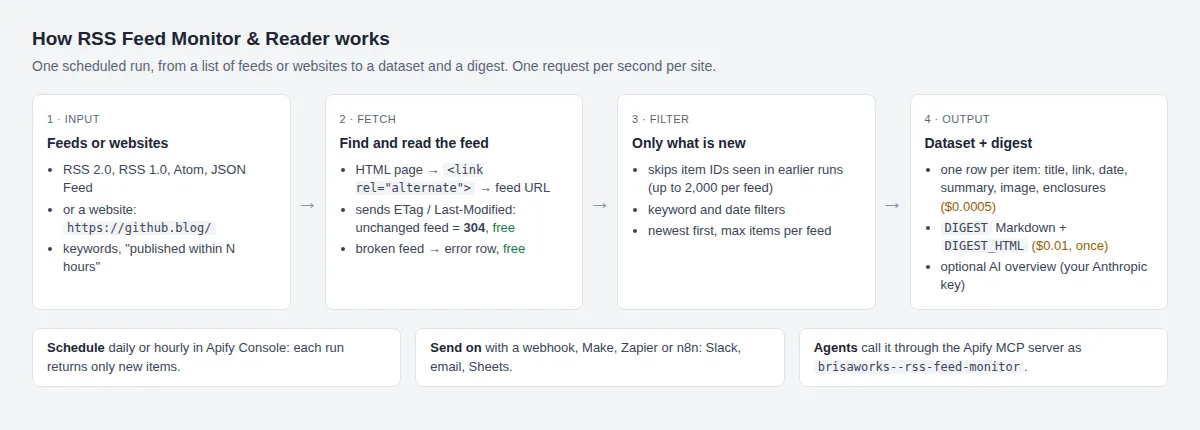
What it does
- Reads RSS 2.0, RSS 1.0 (RDF), Atom and JSON Feed, mixed in one run.
- Website URL to feed: paste
https://github.blog/instead of the feed URL. The Actor reads the page's<link rel="alternate">tags and uses the feed the site advertises (comment feeds last). In new-items mode it remembers the feed it found, so later runs go straight to it. - Returns title, link, publication date, summary, categories, the item's image (
imageUrl) and its enclosures (podcast audio, video or files, with type and size in bytes), and optionally the full text. - New-items mode: remembers what each feed returned and outputs only unseen items. It sends ETag and Last-Modified headers, so a feed that hasn't changed answers "304 Not Modified" and costs nothing.
- Keyword filter (any match in title, summary or categories) and a "published within N hours" filter.
- Digest: saves
DIGEST(Markdown) andDIGEST_HTMLto the run's key-value store, grouped by feed. With an Anthropic key it starts with a short overview and up to five highlights. - Fetches politely: one request per second per site, up to five sites at a time.
- Feeds that fail, pages without a feed and unchanged feeds are free.
Use cases
Each input below is ready to paste into the Actor's JSON input tab.
1. Daily news digest for a team. Five feeds, the five newest items each, only new items, one HTML page to email every morning.
2. Competitor blog alerts. Paste the blogs' home pages; the feeds are found for you. Only posts from the last 7 days that mention your keywords.
3. Release notes of the tools you depend on. Every GitHub repository has a releases feed at https://github.com/<owner>/<repo>/releases.atom.
4. New podcast episodes with their MP3 files. Each row carries the enclosure URL, MIME type and size, ready for a download or transcription step.
How to use
- Paste feed URLs or website URLs into Feed or website URLs.
- For monitoring, turn on Only new items and schedule the Actor (for example every morning at 07:00).
- Optionally add keywords or a time window, choose a digest, and add your Anthropic key for the AI overview.
- Read the dataset or the
DIGEST_HTMLrecord in Apify Console, through the API, or send them on with an integration (see Scheduling and integrations).
Input
| Field | Description |
|---|---|
feedUrls | Feed URLs or website URLs (required). Website URLs are resolved to the feed they advertise. |
maxItemsPerFeed | Newest first (default 50, 1–1,000). |
onlyNewItems | Monitor mode: only items not seen in earlier runs. |
keywords, publishedWithinHours | Filters. |
includeContent | Full item text (up to 20,000 characters). |
digest | none or markdown (Markdown + HTML). |
anthropicApiKey, model | Optional AI overview (default claude-haiku-5-5). |
Output
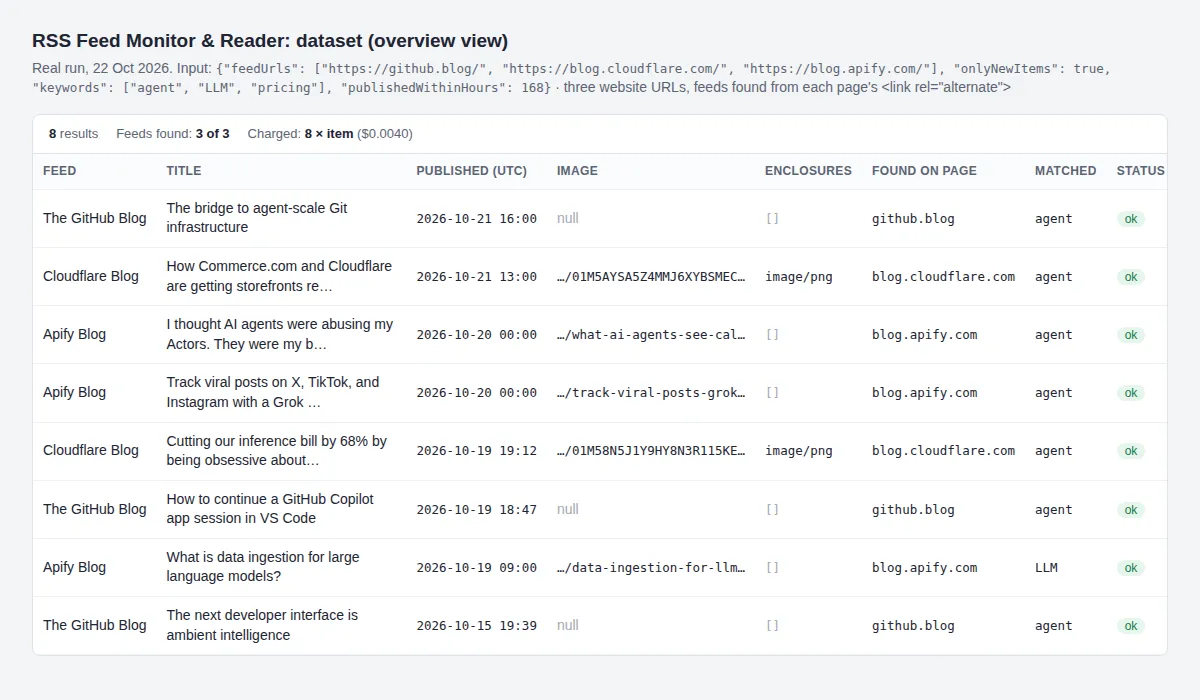
One row per item. These two rows come from real runs on 22 Oct 2026: the first from use case 2 (a website URL, so discoveredFrom is set), the second from use case 4 (summary shortened here).
imageUrlcomes from, in order: Media RSS thumbnail or image, an image enclosure,itunes:image, the JSON Feedimage, else the first<img>in the item's HTML (tracking pixels and author avatars are skipped).nullwhen there is none.enclosureslists RSS<enclosure>elements, Atomrel="enclosure"links, non-image Media RSS content and JSON Feed attachments.lengthis the size in bytes as the feed states it, ornull.- Feeds that fail return a free row with
statuserrorornot_a_feedand anerrormessage.
Compared with other RSS feed readers
How this Actor compares with the three leading RSS feed readers in Apify Store, from their own README and input schema (read 22 Oct 2026). Prices are base prices before any subscription discount.
| This Actor | technicaldost/rss-feed-scraper | automation-lab/rss-feed-reader | santamaria-automations/rss-feed-reader | |
|---|---|---|---|---|
| Formats | RSS 2.0, RSS 1.0, Atom, JSON Feed | RSS, Atom | RSS 2.0, Atom, RSS 1.0 ("JSON Feed not currently supported") | RSS 2.0, Atom 1.0, JSON Feed |
| Website URL to feed | yes | yes | not listed | yes |
| Only new items across runs | yes, built in | no ("does not maintain a cross-run seen-item history"; separate Actor) | no ("deduplicate by guid" downstream) | not listed (duplicates inside one feed removed) |
| Unchanged feed (ETag / 304) costs nothing | yes | not listed | not listed | not listed |
| Keyword filter | yes | yes | not listed | not listed |
| Date filter | yes (hours) | yes (publishedAfter) | yes (publishedAfter) | yes (filterByDate) |
| Markdown + HTML digest, AI overview | yes | not listed | not listed | not listed |
| Image field | yes | media metadata (no separate image field listed) | yes (imageUrl) | yes (item_image) |
| Enclosures (podcast audio, video) | yes | yes | not listed | yes, plus podcast duration and episode fields |
| Author names | not collected | yes | yes | yes |
| Failed feeds | free status row | free (listed in ERRORS) | row with error field | not listed |
| Price | $0.0005 per item; $0.01 per digest | $8.00 / 1,000 dataset rows (one extra metadata row per feed) | $0.001 per item + $0.035 per run | $0.002 per feed + $0.001 per run |
Choose this Actor when you run the same feeds on a schedule and want each item once, a digest to send, and no charge for quiet feeds. Choose a per-feed price (santamaria) when you read very long feeds once and need podcast episode metadata.
Use with AI agents (MCP)
Give Claude, ChatGPT, Cursor, VS Code or any MCP client this Actor as a tool through the hosted Apify MCP server at https://mcp.apify.com. The agent sees the input fields with their descriptions, runs the Actor and reads the items.
- MCP server URL for this Actor only:
https://mcp.apify.com/?tools=brisaworks/rss-feed-monitor - Tool name inside the agent:
brisaworks--rss-feed-monitor
Client config (mcp.json or the client's MCP settings; Claude Code: claude mcp add --transport http apify <URL>):
Example prompt: "Use brisaworks--rss-feed-monitor with {"feedUrls": ["https://github.blog/", "https://blog.cloudflare.com/"], "maxItemsPerFeed": 5, "keywords": ["agent"]} and list the posts as a table with title, date and link."
Run it from your code (API)
Get your token in Apify Console → Settings → API & Integrations. Each call below runs the Actor and returns its items.
cURL (waits up to 240 seconds and returns the dataset):
Node.js (npm install apify-client):
Python (pip install apify-client):
New-items mode keeps its memory in a named key-value store in your account (rss-feed-monitor), so API runs and scheduled runs share it.
Scheduling and integrations
- Schedule: in Apify Console, save your input as a task and add a schedule (for example daily at 07:00, or hourly for news). With Only new items on, each run returns only what appeared since the last one.
- Webhooks: add a webhook on "Run succeeded" to post the run to your own endpoint, then read the dataset or
DIGEST_HTML. - n8n: import the starter workflow (Workflows → Import from URL). It runs this Actor every morning at 07:00 with Only new items on, keeps rows whose
statusisokand ends in a placeholder step for your Slack, email or Google Sheets node. On its HTTP node, add a Header Auth credential (nameAuthorization, valueBearer <your Apify API token>) and put your feeds in the body. Each run is capped at $1. - Make, Zapier, Slack, Google Sheets: connect them through Apify's integrations (Console → the Actor or task → Integrations): run on a schedule, keep rows whose
statusisok, then send them to your own step.
Ready-made example tasks
Open one, check the input, and run it or copy it to your account:
- Daily tech news digest from 5 RSS feeds
- Competitor blog alerts by keyword (website URLs)
- GitHub release notes monitor (releases.atom)
- Podcast new episodes tracker with MP3 links
Pricing
| Event | Price | Per 1,000 | Charged when |
|---|---|---|---|
item | $0.0005 | $0.50 | A feed item is saved (in new-items mode, only unseen items) |
digest | $0.01 | $10.00 | A digest is saved (at most one per run) |
Apify subscription tiers pay less: an item costs $0.00045 on Bronze, $0.0004 on Silver and $0.00035 on Gold ($0.45, $0.40 and $0.35 per 1,000 items); a digest costs $0.009, $0.008 and $0.007.
Unchanged feeds, unreachable feeds, pages without a feed and non-feed URLs cost nothing. Finding a website's feed costs nothing extra. AI overviews use your Anthropic account.
How much does it cost to monitor RSS feeds?
- 20 feeds checked every morning in new-items mode, about 100 new items a day: $0.05 a day for items, $0.06 with a daily digest.
- The daily news digest task above (5 feeds, 5 items each): at most $0.0125 for items plus $0.01 for the digest on the first run; later runs charge only new items.
- A one-off export of 1,000 items: $0.50.
- Apify adds its standard small run-start fee per run.
Set a maximum cost per run in the run options: the Actor checks it before saving each item and before building the digest, and stops before going over it. In new-items mode, items it did deliver are remembered, so the next run neither repeats nor re-charges them.
Limits
- Feeds usually carry only their latest 10–50 items; run often enough not to miss items on busy feeds.
- New-items mode remembers up to 2,000 item IDs per feed.
- Website URLs work when the page advertises its feed with a
<link rel="alternate">tag (WordPress and Ghost blogs do, for example). The Actor doesn't guess feed paths. A page without such a tag returns a freenot_a_feedrow. - Some sites refuse requests that don't come from a browser (for example HTTP 403). The Actor uses no proxies; such feeds return a free
errorrow. - Author names and avatars are not collected.
- Private or password-protected feeds are not supported.
Data source
- The feeds and web pages you supply, fetched from their publishers. Formats per the RSS 2.0 specification (https://www.rssboard.org/rss-specification), Atom (RFC 4287, https://www.rfc-editor.org/rfc/rfc4287) and JSON Feed 1.1 (https://www.jsonfeed.org/version/1.1/), checked against live feeds on 2026-10-14; enclosures and images also per Media RSS (https://www.rssboard.org/media-rss) and feed autodiscovery per the RSS Advisory Board's autodiscovery spec (https://www.rssboard.org/rss-autodiscovery), checked against live sites on 2026-10-22. Respect each publisher's terms when you republish their content.
- Optional AI overview: Anthropic Messages API with structured outputs, https://platform.claude.com/docs/en/build-with-claude/structured-outputs.md (read 2026-10-14).
FAQ
How do I get only new items every day?
Turn on Only new items and schedule the Actor. It remembers the item IDs each feed returned and sends ETag/Last-Modified headers, so unchanged feeds answer with a free "not modified".
Can I paste a website instead of a feed URL?
Yes. Paste the home page or blog page. The Actor reads the page's <link rel="alternate"> tags, picks the main feed (comment feeds last) and adds discoveredFrom to each row. If you also list that feed directly, it is read once.
Can I get the digest by email or Slack?
The digest is saved as DIGEST (Markdown) and DIGEST_HTML in the run's key-value store. Use an Apify integration (Make, Zapier, n8n or a webhook) to send it on, or read the record through the API after the run.
Can I filter by keywords?
Yes. Items are kept when the title, summary or categories contain at least one keyword (case-insensitive, matched anywhere in a word, so agent also matches "agents"); each row lists the keywords it matched. Short keywords match inside longer words too (ai matches "again"), so prefer longer ones.
How much does a scheduled feed reader cost per month?
At 100 new items a day with a daily digest: about $0.06 a day, or $1.80 a month, plus Apify's run-start fee. Quiet days cost less: unchanged feeds are free.
Is it a feed reader app?
No. It has no reading interface; it gives you data (a dataset and a digest page) to read in Apify Console, your inbox, Slack, a spreadsheet or your own app.
Related Actors
- Wayback Machine website history: for pages that publish no feed, see when and how a page changed over time.
- Schema and JSON extractor: turn the articles your feeds link to into structured JSON.
Privacy
Author names and avatars are dropped. When you use the AI overview, item titles and summaries are sent to Anthropic under your own API account.
Support
Open an issue on the Actor's Issues tab; issues are answered within a few days and fixed within 14 days.


