

AI Web Scraper – JSON Schema Data Extractor
Pricing
from $7.00 / 1,000 page extracteds
AI Web Scraper – JSON Schema Data Extractor
AI web scraper: give URLs and your own JSON Schema or a ready-made preset (product, job, event, article); get one schema-valid JSON object per page. Claude reads page text and JSON-LD, every answer is validated and retried with the errors, and invalid output is free. Uses your own Anthropic API key.
Pricing
from $7.00 / 1,000 page extracteds
Rating
0.0
(0)
Developer

Brisa Works
Maintained by CommunityActor stats
0
Bookmarked
2
Total users
1
Monthly active users
3 days ago
Last modified
Categories
Share
An AI web scraper that turns any page into structured data: give a list of URLs and pick a ready-made schema (product, job, event, article) or paste your own JSON Schema; get back one JSON object per page that validates against that schema. Claude reads each page (text plus any JSON-LD) and fills your fields; every result is checked with a JSON Schema validator, invalid answers are sent back to the model with the errors, and anything still invalid is returned free. Runs on your own Anthropic API key, so you pay Anthropic's token prices directly.
Contents: What it does · How to use · Presets · Use cases · Writing a schema · Input · Output · Pricing · Comparison · MCP · API · Scheduling · FAQ · Limits
What it does
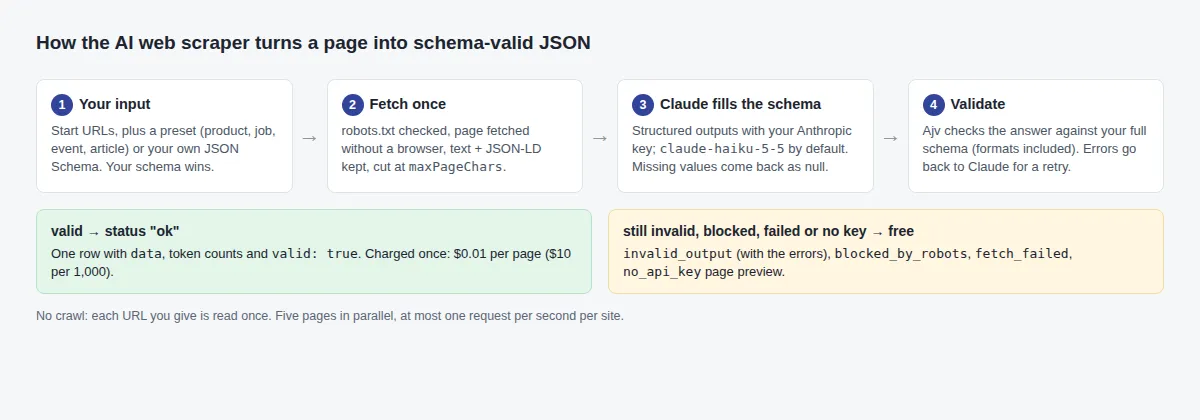
- Fetches each page once (no crawling), honours robots.txt, and converts it to clean text, keeping JSON-LD structured data.
- Uses the schema you choose: one of four presets, or your own JSON Schema, which always wins when both are set.
- Sends the page and the schema to Claude using structured outputs, adapting the schema where the API needs it (closed objects, constraints moved into descriptions); falls back to plain JSON prompting for schemas the API cannot take.
- Validates every answer against your original schema (draft-07 / 2020-12, formats included) and retries with the validation errors.
- Charges only for pages whose JSON validates. Previews, blocked pages, failed fetches and answers that still fail validation are free.
How to use
- Add start URLs: the exact pages you want read.
- Pick a Preset schema (product, job, event or article), or paste your own JSON Schema. Leave the JSON Schema field empty to use the preset.
- Add your Anthropic API key (console.anthropic.com). Without a key the run returns free page previews, so you can check that the pages load before you spend anything.
- Optionally pick a model (
claude-haiku-5-5by default;claude-sonnet-5-5for hard pages) and add extra instructions, such as "prices in EUR". - Run, then export the dataset as JSON, CSV or Excel, or call the Actor from your own code or AI agent through the Apify API.
The form opens with a working example: the product preset on a page of Books to Scrape, a demo shop made for scraping practice. Run it without a key to see the free preview; add your key to get the product record shown above.
Presets (ready-made schemas)
In each preset every field is required and may be null: Claude answers every field and says null when the page does not state it. Dates are YYYY-MM-DD, checked as dates.
| Preset | Fields in data |
|---|---|
product | name, brand, sku, price (number), currency (ISO code), availability, inStock, rating, reviewCount, category, description, imageUrl |
job | title, company, location, remote, employmentType, salaryMin, salaryMax, salaryCurrency, salaryPeriod, datePosted, applyUrl, skills (list), summary |
event | name, startDate, endDate, startTime, venue, city, country, online, organizer, price, eventUrl, summary |
article | headline, authors (list), datePublished, dateModified, publisher, language, summary, keyPoints (list), tags (list) |
Need other fields? Paste your own schema in JSON Schema: it replaces the preset, and the log says so.
Use cases with ready inputs
Each input below runs as it is; add "anthropicApiKey" to get data instead of previews.
1. Product data for price monitoring or a catalogue import. Name, SKU, price as a number and stock from any shop's product pages.
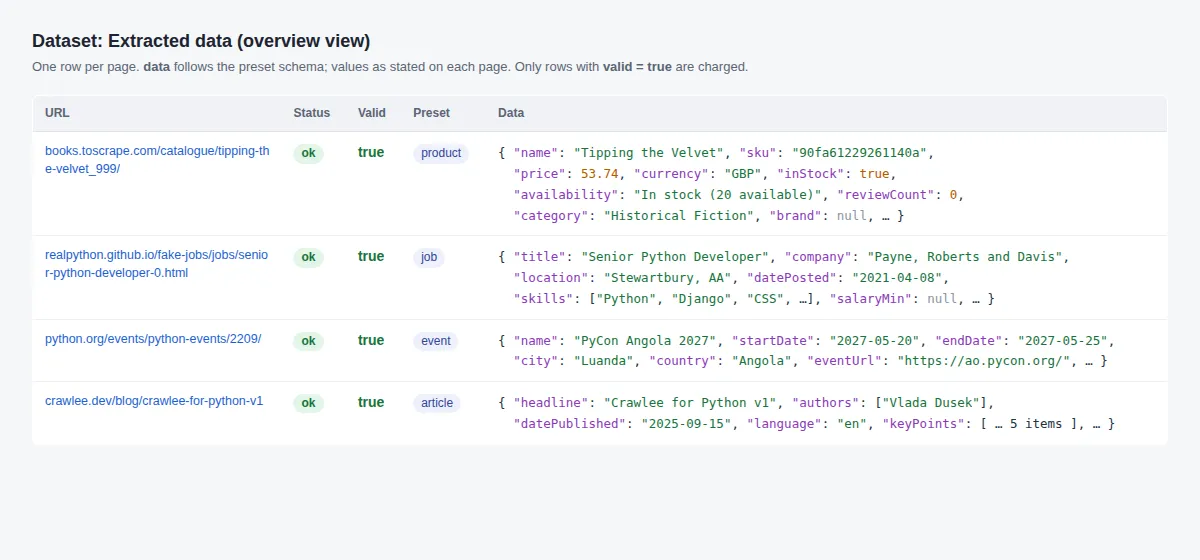
2. Job postings for a job board or a hiring dashboard: {"startUrls": [{"url": "https://realpython.github.io/fake-jobs/jobs/senior-python-developer-0.html"}], "preset": "job"}
3. Event listings for a calendar or a newsletter: {"startUrls": [{"url": "https://www.python.org/events/python-events/2209/"}], "preset": "event"}
4. Article metadata and summaries for a reading list or a RAG pipeline: {"startUrls": [{"url": "https://crawlee.dev/blog/crawlee-for-python-v1"}], "preset": "article"}
5. Every item of a list page, with your own schema. One record per page holds an array of all the items on it.
Example tasks
Ready-made tasks with these inputs, to open and run in one click:
- Extract product name, price, SKU and stock to JSON
- Scrape job postings into JSON: title, company, salary, location
- Extract event name, dates, venue and city from event pages
- Extract article headline, author, date and summary
- Scrape a list page into a JSON array with your own schema
How to write a good JSON Schema
The schema is both the instruction to Claude and the contract your data must meet. A few rules give much better results:
- Describe every field.
"description": "Price as a number, without currency symbol"does more than the field name alone. Say the unit, the format and what to do with ranges. - Use real types.
numberfor prices and counts,booleanfor yes/no,integerfor counts. The validator rejects"£53.74"for anumber, and the retry asks Claude to fix it. - Allow
nullfor anything a page may not state:"type": ["string", "null"]. Without it, Claude must put something in a required field and may guess; with it, a missing value comes back asnull. - Make fields required, so your columns stay the same on every row.
- Use formats for dates, emails and links:
"format": "date","email","uri". They are checked on every answer. Useurionly when pages give full links; a relative link fails the check. - Use
enumfor fixed choices (["full-time", "part-time"]) so values match across sites. - For list pages, wrap the items in an array (use case 5): one record and one charge per page.
- Keep it flat and small. Claude's structured outputs allow at most 16 fields with a union type (such as
["string", "null"]) and 24 optional fields per schema. Each preset stays inside these limits.
Good: "price": { "type": ["number", "null"], "description": "Current price as a number, without currency symbol; null if not shown" }
Weak: "price": { "type": "string" }: you get "£53.74", "53,74 €" or "From $10" from different sites.
Input
| Field | Description |
|---|---|
startUrls | Pages to extract (required). |
preset | product, job, event or article: a ready-made schema, used when jsonSchema is empty. |
jsonSchema | Your own JSON Schema. Wins over preset. |
anthropicApiKey | Your Anthropic key (secret). |
model | Default claude-haiku-5-5. |
instructions | Extra guidance for the model. |
maxPageChars | Page text sent per page (default 60,000 characters). |
maxRetriesOnInvalid | Corrective retries (default 1). |
respectRobotsTxt, includePageText | Crawling courtesy; return the page text too. |
A run needs a preset or a schema: with neither, it stops at once with a message and costs nothing.
Output
One row per page. With the default input and a key, the product preset gives (data values as stated on the page):
Token counts vary by page. Without a key, the same input gives this free preview (from a real run on 2026-10-22):
status is ok (charged) or one of the free statuses: invalid_output (with validationErrors), no_api_key (page preview), blocked_by_robots, robots_unreachable, fetch_failed or error. preset is the preset used, or null for your own schema.
Pricing
| Event | Price | Per 1,000 | Charged when |
|---|---|---|---|
page-extracted | $0.01 | $10.00 | A page yields JSON that validates against your schema |
Apify subscription discounts: Bronze $0.009 ($9 per 1,000), Silver $0.008 ($8 per 1,000), Gold $0.007 ($7 per 1,000). Claude tokens are billed by Anthropic to your account.
How much does AI web scraping cost?
- 1,000 pages with valid JSON: $10.00 here, plus Claude tokens on your Anthropic account. With
claude-haiku-5-5($0.10 per million input tokens and $0.50 per million output tokens, Anthropic's price list on 2026-10-22), a typical 10,000-token page costs about $0.001, so about $1 of tokens for 1,000 pages: about $11 in all. - Pages whose answer still fails your schema after the retries cost nothing here (Claude tokens are still used).
- Keyless previews, robots.txt blocks and failed fetches cost nothing and use no tokens.
- Apify adds its standard small run-start fee.
Set a maximum cost per run in the run options: the Actor checks it before sending each page to Claude, so it does not spend your tokens on pages it could not deliver, and stops before going over it.
Cost against Apify's AI Web Scraper
Apify's own AI Web Scraper costs $30 for 1,000 pages on the Free plan (Store price on 2026-10-22), AI tokens included. Here, 1,000 valid pages cost $10 plus about $1 of Haiku tokens on your Anthropic account. For 10,000 product pages a month that is about $110 against $300. You need your own Anthropic key, and pages that need a browser are out of reach (see Limits).
How it compares
Facts from each Actor's own README and input form, and Store prices, read on 2026-10-22.
| This Actor | Apify AI Web Scraper | tidytools AI Web Data Extractor | eloquent_mountain AI Web Scraper | |
|---|---|---|---|---|
| Price for 1,000 (Free plan) | $10 per page + your Claude tokens | $30 per page, tokens included | $10 per page, tokens included | $10 per vision call, tokens included |
| Describe the output with | presets or a full JSON Schema | a prompt | fields, a prompt or a JSON Schema; presets | a prompt; optional typed output fields |
| Every answer validated against the schema, with a retry | yes | no schema input | typed values and a completeness score | not stated |
| Pages that fail are free | yes, also answers that fail validation | not stated | yes | not stated |
| Choice of model | any Claude model | no model field | not stated | Gemini models |
| Browser for JavaScript pages | no | yes | yes (fallback) | yes |
| Proxy | no | yes | through Apify's network or your proxy | yes |
| Follows links or sitemaps | no | yes (scout and agentic modes) | follows links from a list page | yes |
| Your own LLM key needed | yes | no | no | no |
Pick this one when the data must match a schema every time or you want to choose the Claude model; pick another for JavaScript-heavy sites, crawling, or runs without an LLM key.
Use with AI agents (MCP)
Connect any MCP client (Claude Desktop, Claude Code, Cursor) to Apify's hosted MCP server at https://mcp.apify.com with this Actor as the tool brisaworks--schema-json-extractor (https://mcp.apify.com?tools=brisaworks/schema-json-extractor).
Example prompt: "Use brisaworks--schema-json-extractor with the job preset on these three job links and make me a table of company, salary range and location." The agent calls the tool with:
API
Run the Actor and get its dataset with your Apify token. cURL:
Node.js (npm install apify-client):
Python (pip install apify-client):
Scheduling and integrations
- Schedules: save your input as a task and add an Apify schedule, e.g. every morning for price or job checks.
- Webhooks: call your app when a run finishes, to load the new rows.
- Make, Zapier and n8n: Apify's integrations start a run and pass the rows on, e.g. to Google Sheets or Slack.
Related Brisa Works Actors
- Shopify Products Scraper & Price Tracker: product data from Shopify stores without AI, from the store's own product feed.
- RSS Feed Monitor & Reader: new articles from feeds; pass their links here with the article preset for summaries and key points.
FAQ
Do I need an Anthropic API key?
Yes, to get data. Claude runs on your own key, so tokens are billed by Anthropic at their list price. Without a key the run still succeeds and returns free page previews (title and the first 500 characters of text), which shows whether a page can be read before you spend anything.
What JSON Schema features are supported?
Validation uses the full schema (draft-07 and 2020-12, formats included). Claude's structured outputs accept most of it; numeric and length limits are moved into field descriptions for the model and still enforced by the validator. Recursive schemas and external $refs fall back to plain JSON prompting.
Will it make up values?
The model is told to use only what the page states and to return null when a value is missing, and every answer is checked against your schema. Allow null in your schema for fields a page may not state. Check samples before relying on the data.
Why did a page come back as invalid_output?
Claude's answer did not match your schema even after the retries. The row lists the errors in validationErrors, and it is free. Allow null where a page may not state a value, loosen formats, or raise maxRetriesOnInvalid.
Limits
- Pages are fetched without a browser: content rendered only by JavaScript is not seen. Pages behind logins are not supported.
- Long pages are cut at
maxPageChars(thetruncatedflag tells you). - Recursive schemas and external
$refs cannot use structured outputs and run in the slower fallback mode. - Five pages in parallel, at most one request per second per site.
Data source
- The pages you supply. Extraction: Anthropic Messages API structured outputs, https://platform.claude.com/docs/en/build-with-claude/structured-outputs.md (read 2026-10-14: unsupported schema features return a 400; objects need
additionalProperties: false;claude-haiku-5-5supported; complexity limits re-read 2026-10-22). Model prices from Anthropic's pricing page (https://platform.claude.com/docs/en/about-claude/pricing.md) as of 2026-10-22. - Example pages: Books to Scrape (https://books.toscrape.com/) and Real Python's fake job board (https://realpython.github.io/fake-jobs/), both made for scraping practice; python.org's events calendar; the Crawlee blog.
Privacy
Page text is sent to Anthropic under your own API account (Anthropic does not train on API inputs under its commercial terms). Extract personal data only where you have a lawful basis; the Actor stores nothing after the run.
Support
Open an issue on the Actor's Issues tab; issues are answered within a few days and fixed within 14 days.


