

Wayback Machine Website Change History & Diff
Pricing
from $0.70 / 1,000 archived captures
Wayback Machine Website Change History & Diff
Wayback Machine website history for a page, path or domain: every archived capture with dates and links, only real content changes, line diffs between versions, the copy closest to a date, a history summary per URL, and a monitor mode that returns only new captures.
Pricing
from $0.70 / 1,000 archived captures
Rating
0.0
(0)
Developer

Brisa Works
Maintained by CommunityActor stats
0
Bookmarked
2
Total users
1
Monthly active users
2 days ago
Last modified
Categories
Share
See the Wayback Machine website history of any page, site section or domain, and what changed between versions. The Actor lists every archived capture from the Internet Archive with its date, HTTP status and links, keeps only the captures whose content changed, and compares versions line by line: lines added and removed, title changes and a similarity score, plus a plain-English summary with your own Claude key. It also finds the copy closest to a date, gives one history summary row per URL (first and last capture, captures per year, gaps), and has a monitor mode for scheduled runs that returns only new captures.
Contents: What it does · Use cases · How to use · Input · Output · Monitor mode and schedules · Compared with other Wayback Machine Actors · Pricing · Use with AI agents (MCP) · API · Example tasks · Limits · Data source · FAQ
What it does
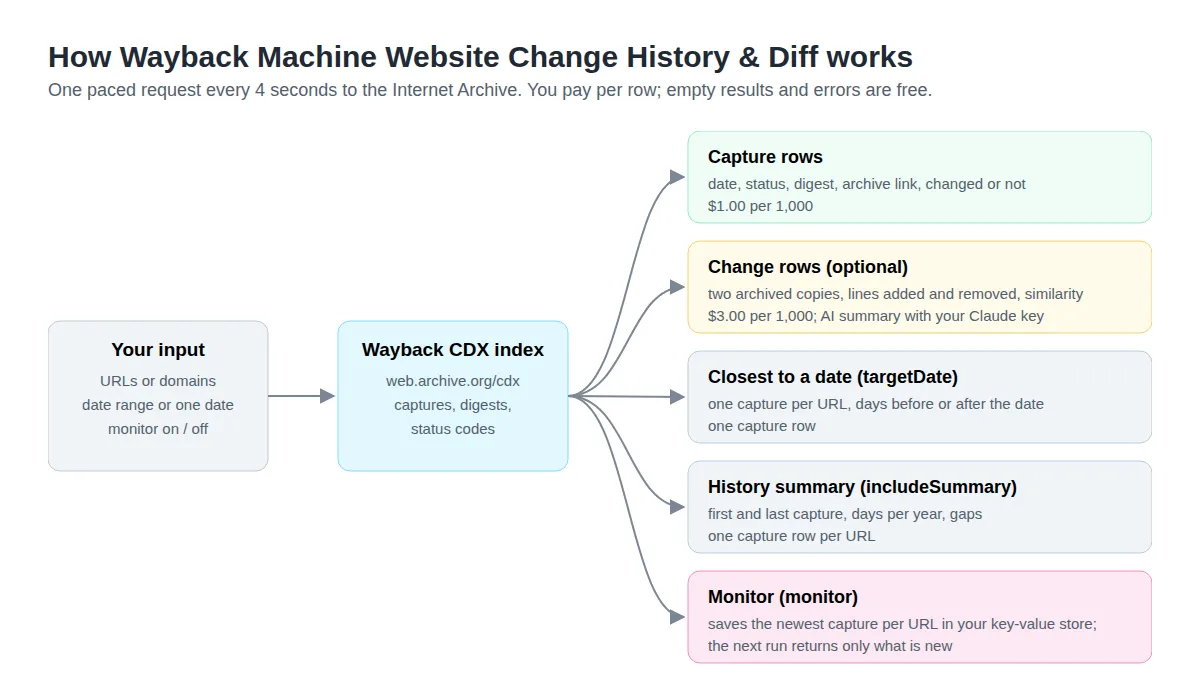
- Capture list. Queries the Wayback CDX index for one URL, every URL under a path (
prefix), a host or a whole domain, within a date range. Each row has the capture time, original URL, HTTP status, MIME type, content digest, size, and links to the archived page and to the raw capture without the Wayback toolbar. - Only real changes. With Only captures whose content changed on (the default), captures with the same content as the one before are skipped, so a page captured every day but changed a few times gives a few rows.
- Version diff. Summarise changes downloads consecutive changed HTML captures and reports the title before and after, word counts, lines added and removed with up to 5 sample lines each, and a similarity score from 0 to 1. With your Anthropic key it adds a one-or-two-sentence summary and a category: content, pricing, product, legal, navigation, design or minor. Many pages get a new digest on every capture (scripts, tokens) while their text stays the same; those pairs are skipped and not charged, and the Actor tries the next pair, up to 5 times the comparisons you asked for.
- Closest to a date. Set Closest to date (
targetDate, e.g.2020-06-15) to get the one capture nearest to that date for each URL, and how many days before (negative) or after the date it was taken. - History summary. Add a history summary row (
includeSummary) adds one row per URL with the first and last capture, days with captures per year, years with no capture and the longest stretch without one. - Monitor. Monitor (
monitor) remembers the newest capture per URL between runs, so a scheduled run returns only captures and changes added since the last one.
Use cases
Competitor pricing history
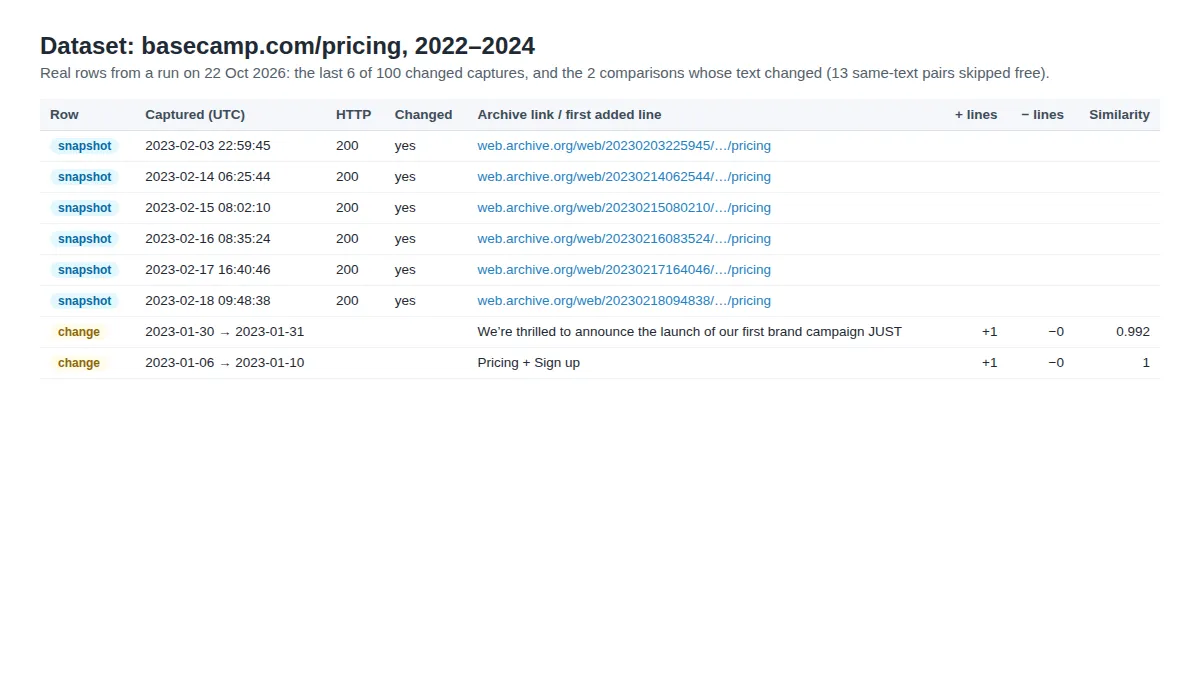
How did a competitor's pricing page change? List the changed versions from 2022 to 2024 and compare the newest versions whose text changed.
In our run on 22 Oct 2026 this returned 100 changed captures from 2022–2023 and 2 comparisons with real text changes, such as the January 2023 line "We’re thrilled to announce the launch of our first brand campaign…". 13 pairs whose text was the same were skipped free.
What did a page say on a given date?
For terms of service, privacy policies, product claims or ad copy: the archived copy nearest to a date, with a link you can cite.
The row's daysFromTarget tells you how far the capture is from the date, in days: negative before it, positive after it.
Domain vetting before you buy
An expired or aged domain with years of continuous captures is a different purchase from one that went dark for six years. One summary row per domain, no capture rows:
Lost pages and redirect maps after a site move
List archived URLs under an old section of a site, with dates and archive links, to recover content or map old URLs to new ones. Our run returned 50 Signal v. Noise posts captured in 2009 (prefix queries can take a few minutes on the archive's side).
Weekly watch on a page
Run it on a schedule with monitor on. The first run lists the newest captures; later runs return only what the Wayback Machine has captured since, with change summaries if you turn them on.
How to use
- Enter one or more URLs or domains and pick the match type (
exactfor one page). - Set a date range (
2019,202103,20210315), or a single date in Closest to date. - Optional: turn on Summarise changes (and add your Anthropic key), Add a history summary row, or Monitor for scheduled runs.
- Run it and open the dataset. Each row links to the archived page.
- Export as JSON, CSV or Excel, or call the Actor from your own code through the Apify API.
Input
| Field | Description |
|---|---|
urls | URLs or domains (required). |
matchType | exact (default), prefix, host or domain. |
from, to | Date range, yyyy[MM[dd]]. |
targetDate | Closest-date lookup: yyyy-MM-dd, yyyyMMdd or yyyyMMddhhmmss. One capture per URL; uses the exact URL and ignores the range and list options. |
onlyChanges | Skip captures with identical content (default on). |
statusFilter | HTTP status regex (default 200; empty keeps all). |
maxSnapshotsPerUrl, newestFirst | How many captures per URL (default 100, up to 10,000; 0 = summary row only), oldest or newest first. |
monitor | Return only captures new since the last run with the same URLs and settings. |
includeSummary | One history summary row per URL. |
summariseChanges, maxComparisonsPerUrl | Compare consecutive changed versions (default 10 per URL, newest first). |
anthropicApiKey, model | Optional AI summaries (default claude-haiku-5-5), billed to your Anthropic account. |
Output
Every row has type (snapshot, change or summary), url (your input) and status (ok, or a free no_captures, error or limit_reached row). The examples below are from real runs on 22 Oct 2026.
Capture row (type: "snapshot", a few fields left out), from the basecamp.com/pricing run (2022–2024):
Change row (type: "change", a few fields left out), the same run. summary and changeKind are filled when you add an Anthropic key:
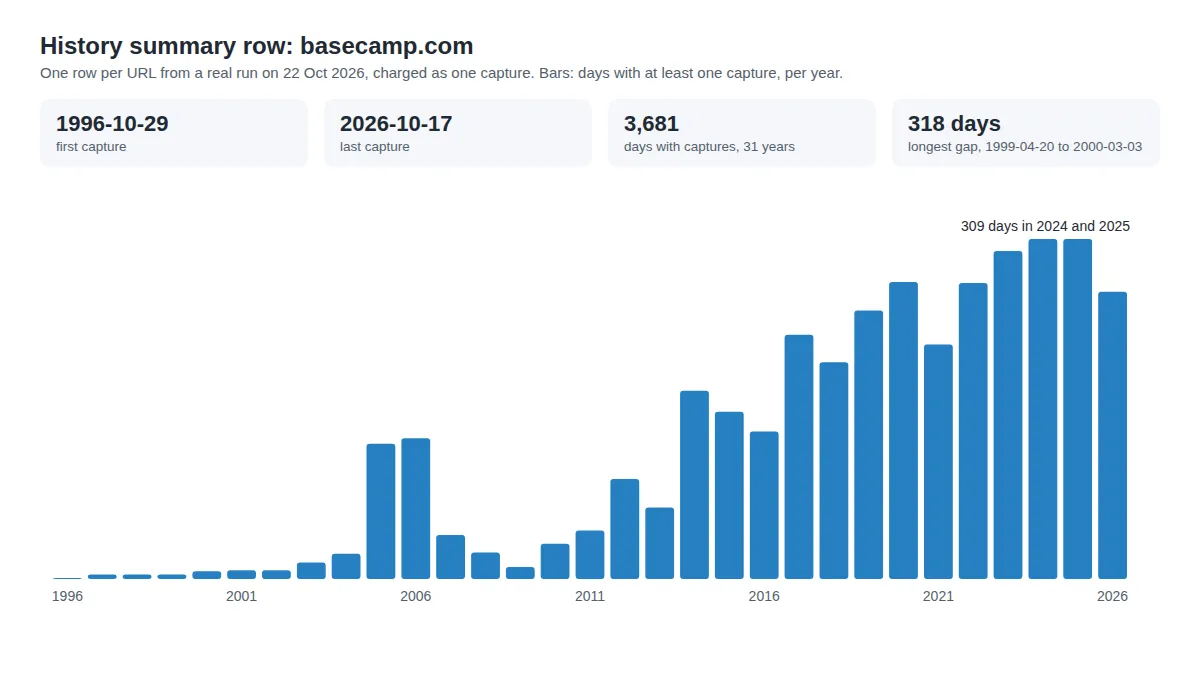
History summary row (type: "summary"), example.org, whole history:
Closest-date row: a full capture row plus targetDate and daysFromTarget (shortened here). For https://policies.google.com/terms and 2020-06-15, the nearest capture was 2 minutes before midnight, so daysFromTarget rounds to 0:
Monitor mode and schedules
Turn on Monitor and schedule the Actor (Apify Console → Schedules, for example every Monday at 08:00).
- The first run is a baseline: it returns the capture list as a normal run would.
- It saves, per URL, the newest capture it returned and each page's last content digest in a key-value store named
wayback-history-monitorin your account. - Every later run with the same URLs, match type, status filter and change setting reads forward from there and returns only newer captures. With Only captures whose content changed on, a new capture with the same content as the last one is not returned, so you only see real changes.
- With Summarise changes on, the first new version is compared with the last one an earlier run returned.
- If a run reaches your maximum cost, the saved position covers only rows you received and paid for; comparisons it could not afford come first next time. Nothing is skipped or charged twice.
- If more new captures exist than Max captures per URL, the run returns the oldest and the next run continues from there. Set
newestFirstto start the baseline from the newest captures.
Connect the schedule to a webhook (Console → Integrations) to get new rows in Slack, email, Google Sheets, Make, Zapier or n8n through Apify's integrations. A run with nothing new returns an empty dataset and costs only Apify's run-start fee.
Compared with other Wayback Machine Actors
Read from each Actor's README and input schema on 22 Oct 2026; prices are the Store's listed price per result that day. "—" means not listed in its README or input schema.
| This Actor | ryanclinton/wayback-machine-search | logiover/wayback-machine-url-extractor | scrapemint/website-history-checker | |
|---|---|---|---|---|
| Price per 1,000 results | $1.00 captures, $3.00 comparisons | $3.50 | $5.00 | $5.00 summary rows, $1.00 snapshot rows |
| Bronze/Silver/Gold discounts | yes | yes | yes | — |
| Capture list with match types and date range | yes, 4 match types | yes | yes, 4 match types | yes, year bounds |
| Only changed captures (digest) | yes | yes | — | — |
| Line diff between versions | yes | yes, with content on | — | — |
| Change category | with your Claude key | yes, regex rules, no key | — | — |
| Plain-English change summary | with your Claude key | keyDiffs phrases | — | — |
| Closest capture to a date | yes (targetDate) | yes (targetDate) | — | — |
| One history summary row per site | yes (includeSummary) | coverage score and gaps in its insights record | — | yes |
| Only new captures on scheduled runs | yes (monitor) | yes (monitor) | — | — |
| Rows per query | 10,000 per URL | 10,000 per query, auto-paginates | unlimited, streamed with resume keys | per-site cap |
Pricing
Pay per event: you pay for the rows you get, not for run time.
| Event | Price | Per 1,000 | Charged when |
|---|---|---|---|
snapshot | $0.001 | $1.00 | A capture is listed, a closest-date capture is found, or a history summary row is made |
change-summary | $0.003 | $3.00 | Two versions whose text or title differs are compared |
Apify subscribers pay less: Bronze $0.0009 / $0.0027, Silver $0.0008 / $0.0024, Gold $0.0007 / $0.0021 per capture / comparison.
| Plan | Captures per 1,000 | Comparisons per 1,000 |
|---|---|---|
| Free | $1.00 | $3.00 |
| Bronze | $0.90 | $2.70 |
| Silver | $0.80 | $2.40 |
| Gold | $0.70 | $2.10 |
Inputs with no captures, failed downloads, status rows and version pairs with the same text are free. AI summaries use your own Anthropic account.
How much does it cost to check a page's Wayback Machine history?
- One page, 100 changed captures: $0.10.
- The same with 10 change summaries: $0.10 + $0.03 = $0.13, plus Claude tokens on your Anthropic account if you add a key.
- One closest-date lookup: $0.001. A history summary for 100 domains: $0.10.
- A weekly monitor on one page that changes twice a month: about 2 captures a week, under $0.01 a month in events.
- Apify adds its standard small run-start fee.
Set a maximum cost per run in the run options. The Actor checks it before each row and before downloading each pair for a comparison, and stops before going over it.
Use with AI agents (MCP)
AI agents can call this Actor through Apify's hosted MCP server at https://mcp.apify.com. Add the server to your MCP client (Claude Desktop, Claude Code, Cursor, VS Code) and enable the tool brisaworks--wayback-history. Example prompt:
"Using brisaworks--wayback-history, find what https://policies.google.com/terms said around 15 June 2020 and give me the archive link."
The agent sends an input like this one:
API
Start a run and get its rows in one call (replace <YOUR_TOKEN> with your Apify API token):
Node.js (npm install apify-client):
Python (pip install apify-client):
Example tasks
Ready inputs you can open and run:
- Track a competitor's pricing page history
- Find what a page said on a given date
- Check a domain's archive history before you buy it
- Get only new archived captures of a page on a schedule
- List the archived pages under an old site section
Limits
- Speed. The Internet Archive does not publish a rate limit and has blocked bursts of automated traffic since September 2026, so the Actor makes one request every 4 seconds and backs off for a minute after a 429. This keeps runs from being blocked. A URL takes one request (two for a closest-date lookup, one more for a summary row), and a comparison up to two downloads, so 10 comparisons take about a minute and a half.
- The CDX server returns at most 150,000 rows per query and this Actor lists up to 10,000 captures per URL; use date ranges for very large domains.
- The history summary counts days with at least one capture (the CDX index's per-capture counter returned nothing in our checks), from up to 15,000 days per URL;
complete: falsemarks a longer history. Gaps are measured between days with captures. - Closest-date lookups use the exact URL, whatever the match type.
- A
prefix,hostordomainmonitor reads rows in URL order, not time order: if a run has more new captures than Max captures per URL, it returns a freelimit_reachedrow; raise the limit. - A comparison looks at up to 5 times Max comparisons per URL pairs of versions to find ones whose text changed; each extra pair is one more download (4 seconds) but no charge.
- Only HTML captures are compared. Pages that load their content with JavaScript may show little text in archived form.
Data source
- Wayback CDX Server API,
https://web.archive.org/cdx/search/cdx— https://github.com/internetarchive/wayback/blob/master/wayback-cdx-server/README.md, read on 2026-10-14 (url,matchType,output=json,fl,from/to,filter,collapse,limit; fieldsurlkey, timestamp, original, mimetype, statuscode, digest, length) and on 2026-10-22 (collapse=timestamp:8,showSkipCount,lastSkipTimestamp). - Archived content via the documented
id_capture URLs (https://web.archive.org/web/{timestamp}id_/{url}), checked live on 2026-10-14. - Rate behaviour: no official figure; third-party reports cite about 15 requests a minute and the Wayback Machine's director described new 429 protections against high-volume traffic on 2026-09-15.
FAQ
How do I see only the times a page actually changed?
Keep Only captures whose content changed on (the default). Captures with the same content digest as the one before are skipped.
Can I get the history of a whole website?
Yes. Set Match type to prefix, host or domain and use a date range; each capture row has its own original URL. Add includeSummary for one overview row.
How do I find what a page looked like on a specific date?
Set Closest to date to that date. You get the nearest capture, its archiveUrl and daysFromTarget. Open archiveUrl to see the page, or rawUrl for the HTML as archived.
How do I get alerts when a page changes?
Turn on Monitor, schedule the Actor, and add a webhook or a Slack, email or Zapier integration on the schedule's runs. Only new captures reach the dataset.
Do I need an API key?
No. The Wayback Machine is free and needs no key. An Anthropic key is only needed for the optional plain-English summaries.
Related Brisa Works Actors
- RSS Feed Monitor: new posts from competitors' blogs and changelogs on a schedule, next to their archived page history.
- Shopify Products: today's prices and stock of a Shopify store, with a price-change monitor, for the live side of pricing research.
Privacy
Only public archived web pages are read. Archived pages can contain personal data published at the time; the Actor returns page text only inside change samples you ask for.
Support
Open an issue on the Actor's Issues tab; issues are answered within a few days and fixed within 14 days.


