

Website Change Monitor & Diff Tracker
Pricing
from $24.00 / 1,000 site monitoreds
Website Change Monitor & Diff Tracker
Monitor any website for content changes with automatic diff detection. Track pricing pages, competitor sites, ToS updates, and more. Compares snapshots, reports added/removed text, and supports CSS selector targeting for precise monitoring.
Pricing
from $24.00 / 1,000 site monitoreds
Rating
0.0
(0)
Developer

Ryan Clinton
Maintained by CommunityActor stats
0
Bookmarked
48
Total users
10
Monthly active users
2 months ago
Last modified
Categories
Share
Website Change Monitor
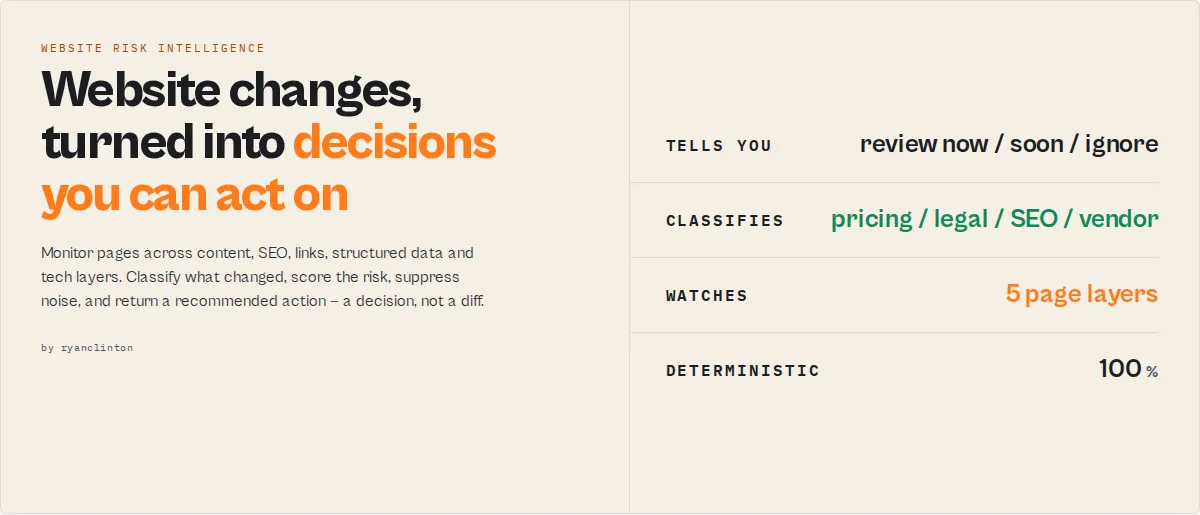
Website risk & competitive intelligence — for competitors, compliance, vendors, SEO, and uptime.
The output is not a diff. It's a decision.
Most website monitors tell you that a page changed. Website Change Monitor tells you what changed, why it matters, how significant it is, and whether you should act -- as a structured decision your automation branches on, not a raw diff you have to read.
It is built to catch the changes that carry business risk: competitor pricing moves, compliance drift, SEO regressions, vendor policy changes, and outages -- and to tell you which ones deserve attention.
It monitors five layers of every page (visible content, SEO metadata, links, structured data, technology stack), classifies and scores each change, suppresses date/counter noise so you stop getting spammed by meaningless diffs, and tracks each page's volatility over time. Schedule it hourly, daily, or weekly from the Apify console -- no code required.
Ready-to-run examples
Don't want to build an input from scratch? Each of these is a published, one-click example (see all) — open it, see real output, run it:
- Website Change Monitor — monitor any URL for content changes with severity, category, risk score and a recommended action per change
- Webpage Diff Tracker — see exactly what text was added and removed between runs, line by line
- Competitor Website Monitor — watch a competitor's site for pricing, launch and funding changes with keyword-escalated alerts
Most monitors vs Website Change Monitor
| Capability | Typical change monitor | Website Change Monitor |
|---|---|---|
| Detect a page changed | yes | yes |
| Classify what changed | no | yes |
| Score severity + risk | no | yes |
| Detect pricing changes | no | yes |
| Compliance drift (vs approved version) | no | yes |
| SEO / metadata / structured-data monitoring | no | yes |
| Vendor risk monitoring | no | yes |
| Competitive intelligence signals | no | yes |
| Suppress date/counter noise | limited | yes |
| Track volatility + trends | no | yes |
| Recommend an action | no | yes |
Most website monitors return this:
...which leaves every real question unanswered: Is it important? Is it pricing or just a footer tweak? Is it a legal change? Should you wake someone up? Or is it just a timestamp?
Website Change Monitor returns this:
Your workflow already knows what to do. Every field is a stable enum you can branch on in Zapier, Make, n8n, Slack rules, or an AI agent tool call -- no prose parsing.
A traditional monitor stops at { "changed": true } -- then a human has to open the page, read the diff, decide whether it matters, decide who owns it, and decide whether to act. Website Change Monitor has already done that work before the alert reaches you.
Built for expensive mistakes
This actor is designed for the website changes that cost money when missed:
- a competitor raises prices and your pricing is now stale
- a vendor quietly changes SLA, support, or security terms
- a privacy policy or terms page drifts from the version legal approved
- an SEO regression (removed canonical, dropped
Productschema) tanks rankings - an API doc ships a breaking change before your integration is ready
- a page goes down or redirects somewhere unexpected
It is not built to wake you up for a footer tweak, a "Last updated" date, or a view counter -- those are classified as noise and suppressed.
Unique capability: compliance drift detection
Every other monitor compares yesterday vs today. Website Change Monitor can compare the approved version vs the live version: set baselineMode: "locked" and it reports whether a page has drifted from what legal/compliance signed off on, with daysOutOfCompliance and a deviationCount -- a genuinely different question that ordinary diff tools cannot answer.
What happens when you miss these changes?
A diff that says { "changed": true } only matters if a human notices it in time. Here is what each missed change costs -- and what the actor hands you instead.
| Change | Cost of missing it | What the actor returns |
|---|---|---|
| Competitor raises prices | You leave money on the table for weeks | competitorSignals: ["pricing-increase"], riskScore: 91, recommendedAction: "review-now" |
| Vendor weakens its SLA | You find out during an incident, when it's too late | vendorRiskSignals: ["sla-change"], recommendedAction: "review-soon" |
Canonical / Product schema removed | Ranking loss and an organic-traffic decline you can't explain | changeCategory: "seo", primaryChangeLayer: "metadata" |
| Privacy policy drifts from approved | Compliance exposure on a page legal already signed off | complianceStatus: "drifted", daysOutOfCompliance: 12 |
| A monitored page goes down | Silent outage until a customer reports it | incidentType: "site-outage", recommendedAction: "review-now" |
Why a diff isn't enough
A traditional monitor hands you { "changed": true } -- and a human still has to read the diff, assess the impact, find the owner, decide the urgency, and create the action. Website Change Monitor does that decision support work before the alert reaches you: the category, the risk score, the severity, the persona, and the recommended action are already determined. You consume a decision, not a diff.
What jobs does this solve?
Pick a profile and the actor configures the right layers and keywords for the job.
Detect competitor moves
Set profile: "competitor" and point it at rival pricing and feature pages. The actor watches pricing, plans, features, and tech-stack changes and emits deterministic competitorSignals (new-pricing-tier, pricing-increase, feature-added, free-trial-removed, product-discontinued) so your team sees the move, not just the diff.
Compliance drift (legal & policy)
Set profile: "legal" with baselineMode: "locked" to freeze an approved version and alert on any deviation from it. Changes are categorised legal, given a compliance block (complianceStatus / daysOutOfCompliance / deviationCount), and routed to your reviewer.
Track SEO changes
Set profile: "seo" to monitor titles, meta descriptions, canonicals, hreflang, structured data, and links. A removed JSON-LD Product block or a changed canonical is caught even when the visible text is identical -- reported under layerChanges with category seo or structured-data.
Monitor vendor risk
Set profile: "vendor" and point it at a supplier's terms, privacy, security, status, and pricing pages. The actor emits deterministic vendorRiskSignals (terms-changed, privacy-policy-updated, security-page-changed, sla-change, support-policy-change, status-incident, pricing-increase) so vendor-management and procurement catch policy shifts without reading every page.
Detect competitor pricing changes
Set profile: "pricing" and point it at competitor pricing pages. The actor watches prices, plans, and discount terms, classifies the change as pricing, and escalates it to critical when a price moves, with a paste-ready whyItMatters line.
Watch API documentation
Set profile: "docs" plus watchKeywords: ["deprecated", "breaking change"] to watch API reference and changelog pages for deprecations, breaking changes, and endpoint edits that break your integration.
Why use Website Change Monitor?
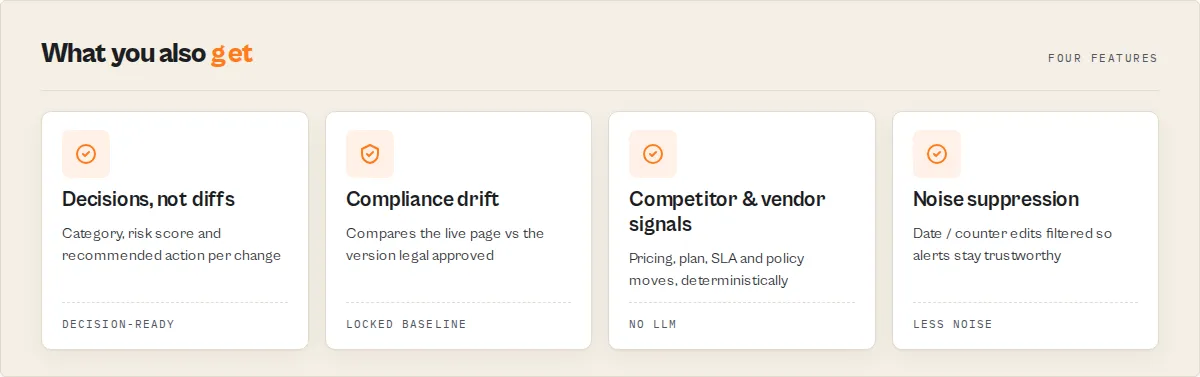
Naive change monitors create alert fatigue. They fire an alert every time a "Last updated" date or a view counter ticks over, training you to ignore them -- so you miss the change that actually mattered. Meanwhile the real risks pile up: competitors quietly change pricing, regulators revise policies, partners alter terms, and API docs ship breaking changes without notice.
Website Change Monitor solves both ends. It fetches each URL, detects what changed across five page layers, then adds a deterministic intelligence layer: it categorises the change, scores its magnitude 0-100, flags whether it is likely just noise, and tells you whether to review it now, review it soon, monitor it, or ignore it. Combined with Apify's scheduling and integrations, you get an alerting system that watches your most important pages around the clock and only escalates what actually matters.
Put simply, Website Change Monitor is a website risk intelligence actor: it does not just monitor websites, it monitors business risk on websites -- competitor, compliance, vendor, SEO, and operational -- and turns each change into a decision.
Key features
- Multi-layer monitoring -- watches five layers of each page (visible
content, SEOmetadata,links,structured-data,technologystack) and catches changes the text diff misses, like a removedProductschema or a dropped analytics tag. - Classification + risk score -- every change gets a
changeCategory, achangeSeveritytier, a sortableriskScore(0-100), and abusinessImpact/changePersona-- so you know what kind of change it is, not just how big. - Noise suppression -- date/counter-only edits are flagged
likelyNoiseand suppressed withignoreNoise. The cure for alert fatigue. - A recommended action, not a diff -- every change carries
recommendedAction(review-now/review-soon/monitor/ignore) +alertPriority-- stable enums your automation branches on. - Job profiles -- one
profile(pricing,legal,seo,competitor,vendor,docs,ecommerce,jobs) auto-configures layers + keywords for the job. - Business signals -- deterministic
competitorSignals(pricing-increase,feature-added, ...) andvendorRiskSignals(sla-change,terms-changed, ...) -- competitive and vendor intelligence without an LLM. - Compliance drift --
baselineMode: "locked"reportscomplianceStatus/daysOutOfComplianceagainst an approved baseline. - Cross-run trend intelligence -- with a named KV store each URL accumulates volatility,
changeVelocity,riskTrend,healthTrend,escalationHistory, and anexpectedNextChangeestimate.
Advanced intelligence features
- Incident detection --
incidentTypeclassifies outages, access errors, removed pages, and unexpected redirects from page health. - Self-tuning monitoring advice -- per-URL
monitoringRecommendation(observed vs recommended frequency, mode, reason) derived from the page's own history. - Monitoring confidence --
monitoringConfidence(level + reasons) tells you how reliably a page is tracked. - Page fingerprints -- per-layer SHA-256 hashes for audit trails and deployment verification.
- Primary change layer -- a one-glance
primaryChangeLayertriage field. - Executive rollups -- run summary
actionQueue+portfolioSummary(criticals, compliance risks, pricing/SEO changes, incidents, per-persona breakdown, oneactionRequiredflag). - Watch keywords + severity gating -- escalate on
watchKeywords;minSeverityoutputs only changes at/above a threshold.
Reliability & output
- Three comparison modes (text / HTML / CSS selector), ignore-rules engine (
ignorePatternsregex +ignoreSelectorsCSS), selector auto-discovery, and site-wide discovery viadiscoverFromSitemap. - Page-health tracking (status, response time, redirect, size delta) on every check.
- Robust fetching -- body-bounded timeout + retry on transient failures; errors become typed records, never a crash.
- Output profiles (
minimal/standard/full), per-URL change history in a named KV store, multi-URL batch with per-URL isolation, and enriched webhook + Slack payloads.
How to use Website Change Monitor
Using Apify Console
- Navigate to the actor page -- go to Website Change Monitor on Apify and click "Try for free" or "Start."
- Enter your URLs -- add one or more website URLs in the "URLs to Monitor" field. You can paste them one per line or use the string list editor.
- Select a comparison mode -- choose "Text" for clean visible-text comparison (recommended), "HTML" for full markup comparison, or "CSS Selector" to target a specific page section like
.pricingor#main-content. - Set a named KV Store -- enter a name in the "KV Store Name" field (e.g.,
my-website-snapshots) so snapshots persist between scheduled runs. Without this, snapshots are lost after each run and every execution will report all URLs as "new." - Run or schedule -- click "Start" for a one-off run, or configure a schedule (hourly, daily, weekly) from the Apify console to enable continuous monitoring.
Using the API
You can trigger the actor programmatically via the Apify API. Send a POST request to the actor's run endpoint with your input JSON in the request body. See the API and Integration section below for code examples in Python, JavaScript, and cURL.
Input parameters
| Field | Type | Required | Default | Description |
|---|---|---|---|---|
urls | string[] | Yes | -- | List of website URLs to monitor for content changes. |
mode | string | No | "text" | Comparison mode: text (visible text only), html (full HTML markup), or selector (CSS selector targeting). |
cssSelector | string | No | -- | CSS selector to target a specific page section (e.g., .pricing, #main-content). Only used when mode is selector. |
notifyOnlyChanges | boolean | No | true | If true, only output URLs with status changed, new, or error. If false, output all monitored URLs. |
kvStoreName | string | No | -- | Named Key-Value store for persistent snapshot + history storage across runs. If empty, uses the default actor KV store. |
watchKeywords | string[] | No | -- | Keywords to watch for in the diff. A change containing any of them is escalated to at least major severity and the matched terms appear in keywordHits. |
minSeverity | string | No | "cosmetic" | Only output and notify on changes at or above this severity: cosmetic, minor, major, or critical. Errors and first-run baselines always pass. |
ignoreNoise | boolean | No | false | If true, changes where only dates, timestamps, or numeric counters changed are suppressed from output and notifications. |
outputProfile | string | No | "standard" | Field detail per record: minimal (decision fields only), standard, or full (includes per-URL change history and full layer diffs). |
layers | string[] | No | ["content"] | Layers to monitor: content, metadata, links, structured-data, technology. Empty uses the profile's default. |
profile | string | No | "general" | Use-case preset that auto-configures layers + keywords: pricing, legal, ecommerce, seo, docs, jobs, competitor, vendor, custom. Explicit layers/watchKeywords override it. For compliance, pair profile: "legal" with baselineMode: "locked". |
baselineMode | string | No | "latest" | latest compares to the previous run; locked compares to a frozen approved baseline (compliance drift detection). |
ignorePatterns | string[] | No | -- | Regex patterns; matching lines are stripped before hashing/diffing. Kills false positives like "Last updated 2026-01-01". |
ignoreSelectors | string[] | No | -- | CSS selectors removed from the page before extraction (e.g. .timestamp, .view-counter). |
autoDetectSections | boolean | No | false | Return suggestedSelectors (monitorable CSS sections) per page. |
historyDepth | integer | No | 20 | Recent changes retained per URL for trend analysis (max 200). Requires a named KV store. |
discoverFromSitemap | boolean | No | false | Discover pages from each seed URL's sitemap.xml and add them to the monitored set. |
maxDiscoveredPages | integer | No | 50 | Cap on sitemap-discovered pages per seed (max 500). |
webhookUrl | string | No | -- | HTTP endpoint to POST change notifications to. Payload carries url, changeType, severity, category, magnitude, recommendedAction, alertPriority, keywordHits, whyItMatters, and snapshots. |
slackWebhookUrl | string | No | -- | Slack incoming webhook URL. Sends a formatted message with the change priority, category, plain-English summary, and a diff preview. |
Example input
Tips for input
- Always set a named KV Store for scheduled runs. Without it, the default KV store is ephemeral and every run reports all URLs as "new."
- Use CSS selector mode to reduce noise from ads, timestamps, or dynamic content. Target
.main-content,#article-body, or similar stable selectors. - Start with text mode unless you need to detect HTML structural changes. Text mode strips scripts, styles, SVG, and non-visible elements for cleaner comparisons.
- Split very large URL lists (500+) across multiple scheduled runs to stay within timeout limits.
Output
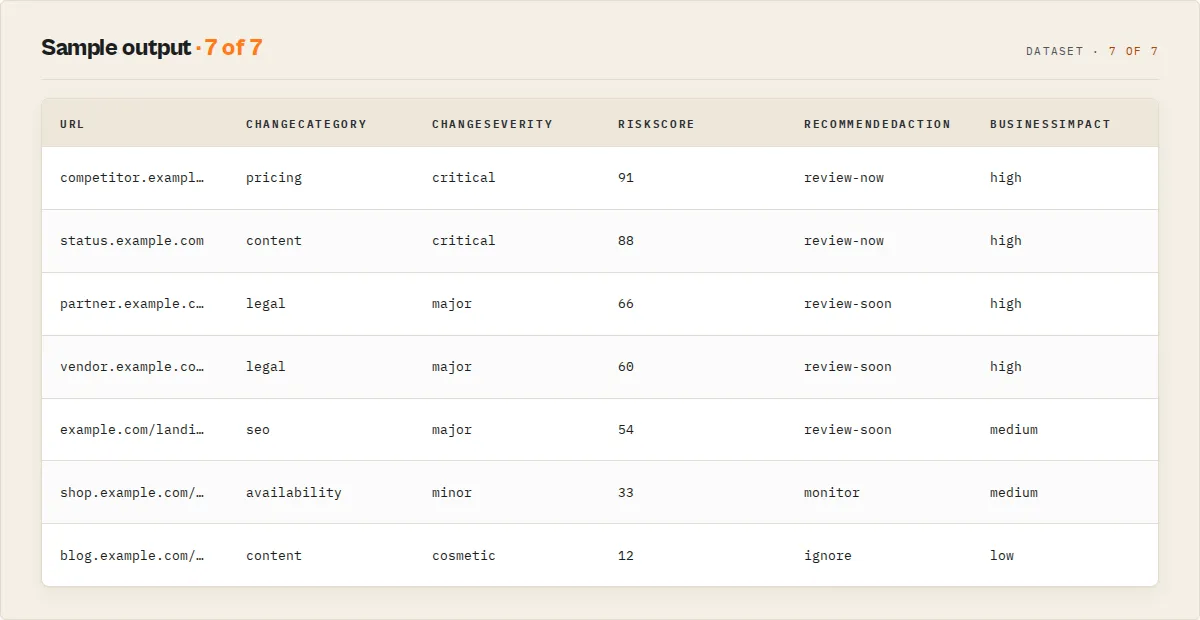
Each per-URL item carries recordType: "change-event". Here is a detected pricing change with the full intelligence + monitoring layers:
A change suppressed as noise (only a timestamp moved) -- reported with likelyNoise: true unless you set ignoreNoise:
Every run ends with one summary record (also written to the SUMMARY KV key):
Output fields
| Field | Type | Description |
|---|---|---|
recordType | string | change-event, summary, or error. |
schemaVersion | string | Output contract version (semver), additive within a major version. |
url | string | The monitored URL. |
status | string | One of changed, unchanged, new, or error. |
intelligence | object | Decision layer on changed pages: riskScore (0-100, sortable), changeMagnitude (0-100), changeSeverity, changeCategory, businessImpact, changePersona, competitorSignals[], vendorRiskSignals[], riskFlags[], keywordHits[], likelyNoise, recommendedAction, alertPriority, whyItMatters. |
primaryChangeLayer | string | Which layer changed most: content, metadata, links, structured-data, technology. |
monitoring | object | Cross-run lifecycle + trend: firstSeenAt (first observed), runsSeen, timesChanged, lastChangedAt (last meaningful change), daysSinceLastChange, changeFrequency, volatilityScore, volatilityBand, changeVelocity, stabilityIndex, averageDaysBetweenChanges, expectedNextChange, healthTrend, escalationHistory, recentHistory[]. (lastChecked at the record root is the last-observed time.) |
layerChanges | object | Per-layer diff when extra layers are monitored: metadata (SEO field changes), links (internal/external added/removed), structuredData (schema types added/removed), technology (tags added/removed). |
health | object | statusCode, responseTimeMs, redirected, finalUrl, contentSizeBytes, sizeChangePercent. |
incidentType | string | Operational incident class: site-outage, access-error, page-removed, redirect-change, slow-response. Absent when healthy. |
monitoringRecommendation | object | Self-tuning advice: recommendedMode, recommendedFrequency, reason. |
compliance | object | Locked-baseline drift: complianceStatus, daysOutOfCompliance, deviationCount. |
monitoringConfidence | object | How reliably the page is tracked: level (high/medium/low) + reasons[]. |
pageFingerprint | object | Per-layer SHA-256 hashes for audit / deployment verification. |
suggestedSelectors | string[] | Monitorable CSS selectors detected on the page (only when autoDetectSections is on). |
changes | object or null | addedText[], removedText[], summary, addedCount, removedCount, percentChanged. Null on error. |
previousSnapshot | string or null | Truncated content from the previous run (null on first run / error / minimal profile). |
currentSnapshot | string | Truncated content from the current run (empty on error). |
lastChecked | string | ISO 8601 timestamp of the current check. |
previousChecked | string or null | ISO 8601 timestamp of the previous check (null if first run). |
contentHash | string | SHA-256 hash of the current content (empty on error). |
errorMessage | string | Present only when status is error. Describes the failure reason. |
failureType | string | On error records: timeout, blocked, not-found, server-error, network, fetch-error, invalid-input, or actor-error. Lets you tell "site is blocking us" from "page is gone". |
jsWarning | string | Present when the page looks like a JavaScript app (React / Next.js / Nuxt / Angular / Vue) that renders content client-side, so raw-HTML monitoring may be inaccurate. |
Decision enums (stable, branch on these)
| Field | Values |
|---|---|
intelligence.changeSeverity | critical, major, minor, cosmetic, none |
intelligence.changeCategory | pricing, availability, legal, contact, navigation, content, date-or-counter, seo, links, structured-data, technology, unknown |
intelligence.recommendedAction | review-now, review-soon, monitor, ignore |
intelligence.alertPriority | critical, high, medium, low, none |
intelligence.businessImpact | high, medium, low |
intelligence.changePersona | business-critical, compliance-risk, seo-risk, operational, cosmetic, noise |
incidentType | site-outage, access-error, page-removed, redirect-change, slow-response |
monitoring.changeFrequency | volatile, active, occasional, stable, new |
monitoring.volatilityBand | high, medium, low, stable |
monitoring.changeVelocity | accelerating, slowing, steady, unknown |
monitoring.riskTrend | worsening, improving, stable, unknown |
monitoring.healthTrend | degrading, improving, stable, unknown |
Use cases
In practice: point it at 25 competitor pricing and feature pages on a daily schedule with profile: "competitor" and minSeverity: "major", wire the webhook to Slack, and the only thing that reaches your channel is the handful of review-now pricing and feature moves -- everything else is classified, scored, and filed without pinging anyone.
- Competitor pricing intelligence -- monitor competitor pricing pages to detect price changes, new tiers, or removed plans before they affect your market positioning.
- Compliance and legal monitoring -- track terms-of-service, privacy policy, and regulatory notice pages for changes that may require legal review or policy updates.
- SEO and content tracking -- watch competitor landing pages, meta content, and blog posts for changes that could impact your search strategy.
- API documentation monitoring -- detect changelog updates, deprecation notices, or breaking changes in third-party API docs before they cause production issues.
- Brand protection -- monitor pages that reference your brand to detect unauthorized modifications, counterfeit listings, or partner compliance violations.
- E-commerce inventory and availability -- track product pages for stock status changes, new product launches, or description updates.
- Government and regulatory watch -- monitor federal registers, agency announcements, or grant program pages for new postings and policy revisions.
- Deployment verification -- confirm your own website deployments went live correctly by comparing pre-deployment and post-deployment snapshots.
- News and media monitoring -- track press release pages, newsrooms, or publication landing pages for new content as it appears.
- Academic and research tracking -- watch institutional pages, journal tables of contents, or conference sites for new publications and calls for papers.
Deliver alerts to Slack and Notion (MCP connectors)
Send each run's change alerts straight into the apps your team uses, via Apify MCP connectors — a token-free alternative to the Slack webhook. Set notionConnector or slackConnector and the run delivers the severity counts plus the top changes. Your credentials stay encrypted on your Apify account; the actor never sees your Slack or Notion token.
- Slack — posts a digest (sites checked, changed, critical/major counts, action-required flag) and the top changes to a channel. One-click OAuth in Apify Console → Settings → MCP connectors.
- Notion — archives each run.
notionArchiveProfile: per-changewrites one page per change; the defaultsummarywrites one page per run. deliverTopNbounds how many changes are sent (default 10); the full record set always stays in the dataset.
Schedule the monitor and every run posts only what changed to your channel or Notion. Delivery is additive — unset connectors and the actor behaves exactly as before; each run records a deliveries block on its SUMMARY.
API & Integration
Python
JavaScript
cURL
Integrations
Website Change Monitor works with the Apify platform's built-in integrations:
- Webhooks -- trigger an HTTP POST to your endpoint whenever the actor finishes, sending change data to your backend.
- Zapier -- connect the output to 5,000+ apps for email, Slack, SMS, or spreadsheet alerts.
- Make (Integromat) -- build multi-step automation workflows that filter by status and route alerts.
- Google Sheets -- export change reports automatically for historical tracking and analysis.
- Slack / Microsoft Teams -- receive instant notifications in your team channel when pages change.
- Email notifications -- use Apify's built-in email integration for inbox alerts.
- Apify API -- programmatically trigger runs, retrieve datasets, and manage schedules.
Use in Dify
Drop this actor into Dify workflows via the Apify plugin's Run Actor node. Each changed page returns classified, scored, and recommended as structured JSON -- review-now / review-soon / monitor / ignore plus the changeCategory (pricing / legal / availability / ...) and alertPriority your downstream node branches on. A plain change monitor pointed at the same page returns a raw line diff; this returns a decision.
- Actor ID:
ryanclinton/website-change-monitor - Sample input (watch competitor pricing + partner terms, suppress noise, only surface real changes):
Branching on the decision
Dify's if/else node routes on equality matches, so the stable enums plug in directly. First filter to the records that matter with the recordType discriminator (change-event vs the run summary), then branch:
intelligence.recommendedAction == "review-now"→ send a Slack alert / open a ticketintelligence.recommendedAction == "review-soon"→ add to a daily digestintelligence.changeCategory == "pricing"→ route to the competitive-intel channelintelligence.changeCategory == "legal"→ route to the compliance reviewerintelligence.alertPriority == "critical"→ page on-call- everything else → no-op
Because every category and severity is a stable enum (additive within a major version), the branches never break when new values are added. The intelligence.whyItMatters and intelligence.keywordHits[] fields are paste-ready -- drop them straight into the alert body, no LLM rewriting needed.
Opt-in modes Dify workflows can leverage
watchKeywords-- escalate any change containing a term you care about, and read which terms hit fromkeywordHits[].minSeverity-- gate the whole run so onlymajor/criticalchanges reach your workflow.ignoreNoise-- drop date/counter-only edits before they ever reach a branch.outputProfile: "minimal"-- strip snapshots and history so the if/else node sees only the decision fields.kvStoreName-- persist snapshots + history across scheduled runs somonitoring.changeFrequencytells you which pages are volatile.
How it works
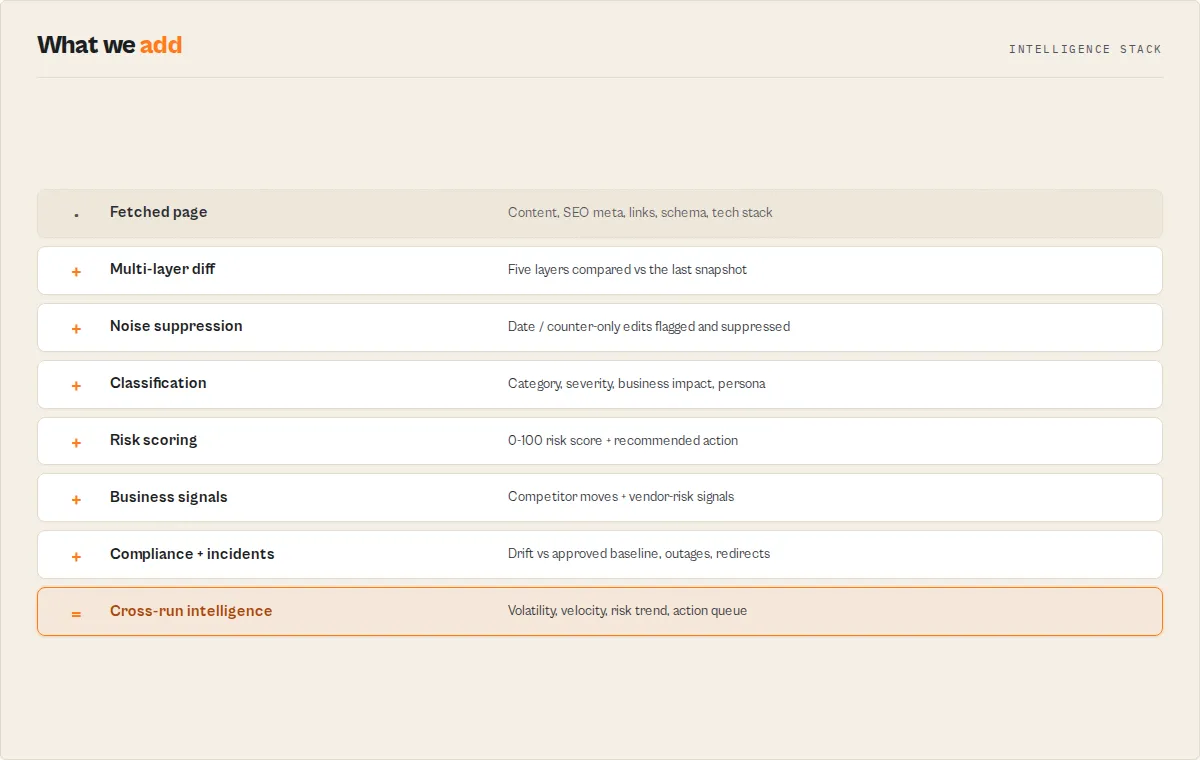
Website Change Monitor follows a sequential pipeline for each URL in the input list:
- Fetch -- the actor sends an HTTP GET request to each URL with a 30-second timeout using AbortController and a custom
ApifyBot/1.0User-Agent header. - Extract -- based on the selected mode, content is extracted:
textmode uses Cheerio to strip<script>,<style>,<noscript>,<svg>, and<head>elements then normalizes whitespace;htmlmode uses the raw response;selectormode uses Cheerio to extract text from elements matching the CSS selector. - Hash -- the extracted content is passed through SHA-256 (
crypto.createHash) to produce a 64-character hex digest. - Compare -- the hash is compared against the previously stored hash in the Key-Value store. If no previous snapshot exists, the URL is marked as
new. - Diff -- when hashes differ, a line-by-line Set-based comparison identifies lines present in the old snapshot but missing from the new (removed) and lines present in the new but missing from the old (added).
- Store -- the current content, hash, and timestamp are saved to the Key-Value store under the key
snapshot_{sha256(url)}for comparison on the next run. - Output -- results are filtered based on the
notifyOnlyChangessetting and pushed to the dataset.
Performance & cost
Website Change Monitor runs on the Apify platform. You receive $5 of free platform credits monthly, which covers substantial monitoring workloads.
| Scenario | URLs | Frequency | Est. Monthly Cost |
|---|---|---|---|
| Light monitoring | 5 URLs | Daily | ~$0.50 |
| Standard monitoring | 20 URLs | Daily | ~$1.50 |
| Frequent checks | 20 URLs | Every 6 hours | ~$5.00 |
| Heavy monitoring | 100 URLs | Daily | ~$7.00 |
| Enterprise | 100 URLs | Hourly | ~$40.00 |
The actor uses minimal memory (256 MB) and completes quickly since it only fetches and compares text content. Actual costs depend on page size and number of URLs. One actor compute unit (1 CU) costs approximately $0.25 at 256 MB memory.
Limitations
- No JavaScript rendering -- the actor fetches raw HTML via HTTP GET. Pages that rely on client-side JavaScript to render content will not be monitored accurately. The actor detects this case and sets a
jsWarningfield naming the framework (React / Next.js / Nuxt / Angular / Vue) so you know to switch to a browser-based scraper, but it does not render the page itself. - No authentication support -- the actor cannot log in or pass session tokens. Only publicly accessible pages can be monitored.
- Sequential processing -- URLs are processed one at a time with a 30-second timeout each. Very large batches (500+ URLs) may require splitting across multiple runs.
- Line-level granularity only -- the diff algorithm operates on whole lines using Set comparison. It does not detect character-level or word-level changes within a line.
- Dynamic content noise -- pages with timestamps, session IDs, ad rotations, or A/B test variants may trigger false positives. Use
ignorePatterns,ignoreSelectors, CSS selector mode, orignoreNoiseto suppress them. - No visual / screenshot monitoring -- this actor compares the page's HTML and its extracted layers (content, SEO, links, structured data, technology). It does not render the page or compare screenshots for layout/pixel changes. Visual layout monitoring needs a full browser engine and is a separate, heavier tool.
- Snapshot truncation in output -- dataset output truncates snapshots to 1,000 characters for readability. Full content is stored in the KV store but is not directly visible in dataset items.
- Single User-Agent -- all requests use the
ApifyBot/1.0User-Agent. Some websites may block or rate-limit this agent string.
Responsible use
- Respect robots.txt -- check that the websites you monitor allow automated access. Some sites explicitly block bots in their robots.txt or terms of service.
- Set reasonable frequencies -- avoid scheduling checks every few minutes unless necessary. Hourly or daily checks are sufficient for most monitoring use cases and reduce load on target servers.
- Monitor only public content -- do not attempt to use this actor to access paywalled, authenticated, or restricted content. It is designed for publicly available web pages.
- Comply with local laws -- ensure your monitoring activities comply with applicable data protection regulations, computer access laws, and website terms of service in your jurisdiction.
- Avoid excessive load -- when monitoring large URL lists, consider staggering runs or splitting lists to prevent sending too many requests to a single domain in a short period.
FAQ
How does the actor detect changes? It fetches each URL, extracts content based on your chosen mode (text, HTML, or CSS selector), generates a SHA-256 hash of the extracted content, and compares it against the hash stored from the previous run. If the hashes differ, it performs a line-by-line diff to identify exactly what was added and removed.
What happens on the first run?
On the first run for any URL, the actor captures a baseline snapshot and stores it in the Key-Value store. The URL is reported with status new and the summary reads "First snapshot captured. Changes will be reported on next run."
Do I need a named KV Store? For one-off runs, the default store works fine. For scheduled or recurring runs, you should always set a named KV Store so snapshots persist between runs. Without it, every run treats every URL as new.
Can I monitor pages behind a login? No. The actor makes unauthenticated HTTP GET requests only. It works with publicly accessible web pages.
What if a page returns an error?
The actor reports it with status error and includes the error message (e.g., "HTTP 503 Service Unavailable" or "Fetch failed: The operation was aborted"). Other URLs in the same batch continue processing normally.
How do I reduce false positives from dynamic content?
Use CSS selector mode to target only the stable section of the page you care about, such as .pricing-table, #terms-content, or article.main. This avoids false alerts from ads, timestamps, session tokens, or other elements that change on every page load.
Can I monitor hundreds of URLs in a single run? Yes. The actor processes URLs sequentially with a 30-second timeout per URL. For very large batches (500+ URLs), consider splitting them across multiple scheduled runs to stay within execution time limits.
What is the difference between text, HTML, and selector modes? Text mode uses Cheerio to strip all non-visible elements (scripts, styles, SVG, head) and normalizes whitespace for the cleanest comparison. HTML mode compares the full raw markup, catching structural changes but producing noisier diffs. Selector mode extracts text only from elements matching your CSS selector, giving you surgical precision over what gets compared.
How are snapshots stored?
Each URL's content, hash, and timestamp are stored in the Key-Value store under the key snapshot_{sha256(url)}. The URL is hashed to produce a safe key without special characters.
Does the actor support webhook notifications?
Yes, in two ways. First, you can set the webhookUrl input parameter to receive a JSON POST directly from the actor the moment a change is detected — no need to wait for the run to finish. Second, you can configure Apify platform webhooks to trigger when the entire run completes. For Slack, use the slackWebhookUrl input to get formatted change alerts with diff previews sent directly to your channel.
What does the notifyOnlyChanges flag do?
When set to true (the default), the actor only pushes items with status changed, new, or error to the dataset. Unchanged URLs are silently skipped. Set it to false to include all URLs in the output regardless of status.
Can I use this to verify my own website deployments? Yes. Add your own pages to the URL list and run the actor after a deployment. If the content hash changes as expected, your deployment went live. If it does not change, something may have gone wrong.
Help us improve
If you encounter issues, you can help us debug faster by enabling run sharing in your Apify account:
- Go to Account Settings > Privacy
- Enable Share runs with public Actor creators
This lets us see your run details when something goes wrong, so we can fix issues faster. Your data is only visible to the actor developer, not publicly.
Related actors
| Actor | Description | Link |
|---|---|---|
| Website Contact Scraper | Extract emails, phone numbers, and social links from any website. | Open |
| Website Content to Markdown | Convert web pages to clean Markdown format for documentation and archiving. | Open |
| Website Tech Stack Detector | Identify the technologies, frameworks, and tools powering any website. | Open |
| WHOIS Domain Lookup | Look up domain registration details including registrar, expiry dates, and nameservers. | Open |
| Brand Protection Monitor | Monitor the web for unauthorized use of your brand name and trademarks. | Open |
| SERP Rank Tracker | Track your keyword rankings across search engines over time. | Open |


![LinkedIn Company Data & Insights Scraper [NO COOKIE] avatar](https://images.apifyusercontent.com/svCwvsi6KESGk1EEmLtQUVYJwwmvIVkJlvWV5h9Jp7M/rs:fill:76:76/cb:1/aHR0cHM6Ly9hcGlmeS1pbWFnZS11cGxvYWRzLXByb2QuczMudXMtZWFzdC0xLmFtYXpvbmF3cy5jb20vNVRrZ2MySEM2a3ZnZWhmNmMtYWN0b3Itcmw1RVVJWVl3TjhNaDNqVWotclRoMmR2Z2NTeS1saW5rZWRpbl9jb21wYW55X2RhdGFfaW5zaWdodHNfbG9nby5wbmc.webp)


