
Barcode Price Checker: UPC & EAN Price Compare
Pricing
from $2.40 / 1,000 product with offers
Barcode Price Checker: UPC & EAN Price Compare
Look up prices for any UPC, EAN or GTIN barcode across Amazon, Best Buy and Target, matched exactly, plus Walmart, eBay and any store on Google Shopping. Price comparison, MAP checks, your price position and change monitoring, with results in seconds.
Pricing
from $2.40 / 1,000 product with offers
Rating
0.0
(0)
Developer

CleanPull
Maintained by CommunityActor stats
0
Bookmarked
3
Total users
2
Monthly active users
2 days ago
Last modified
Categories
Features
Share
This barcode price checker takes barcodes (UPC, EAN, GTIN) and shows every store's price, who is selling below your MAP, and where your own price ranks, in seconds: a UPC price comparison across Amazon, Best Buy, Walmart, Target, eBay and any store you name. Amazon and Best Buy are searched by the barcode itself; Walmart, Target, eBay and any store you name come from Google Shopping, matched by model number, with each marketplace seller by name. Run it once, through the API, or on a schedule to get only what changed: a new seller, a price drop, a new lowest price, a seller going below MAP.
How to check prices by barcode
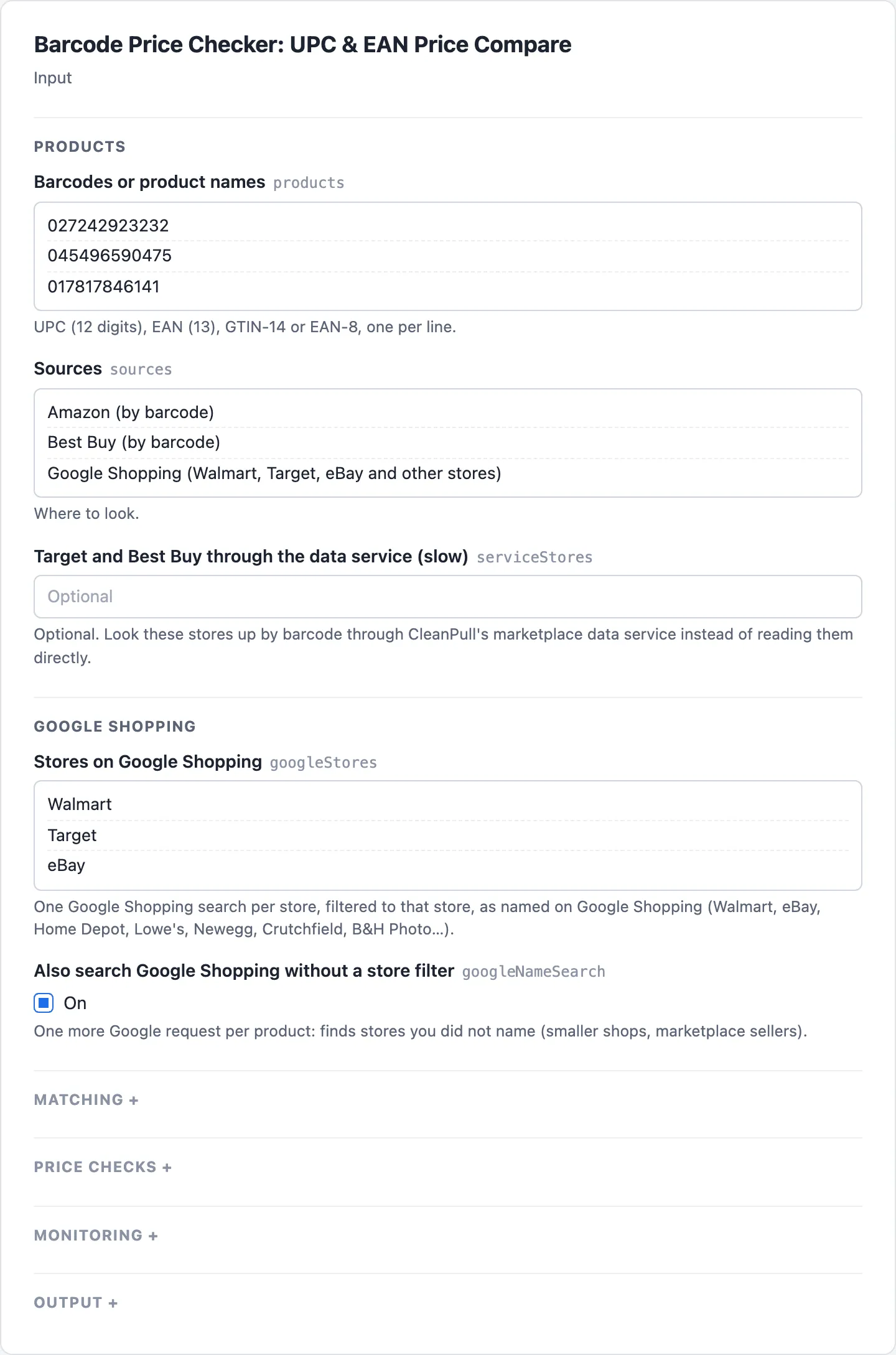
- Open Barcode Price Checker on Apify and go to its input form.
- Paste UPC or EAN codes in Barcodes or product names, one per line.
- Pick the Sources, and the Stores on Google Shopping to search (Walmart and Target by default; add eBay, Home Depot or any store by its Google Shopping name).
- To check MAP or your own price, fill Minimum advertised prices (MAP) or My prices with
{"barcode": price}. - Start the run. Open the Products view to read each barcode's Lowest price, Cheapest at, Lowest new price, Stores and Offers, the Offers (one row per store) view for each store's Price and Seller, and the MAP and my price view for Below MAP.
- To monitor prices, turn on Changes only (monitoring), give it a Monitor name, save it as a task and schedule it daily. The Changes (monitoring) view then lists new and removed sellers, price drops and rises and new lowest prices.
What the barcode price checker gives you
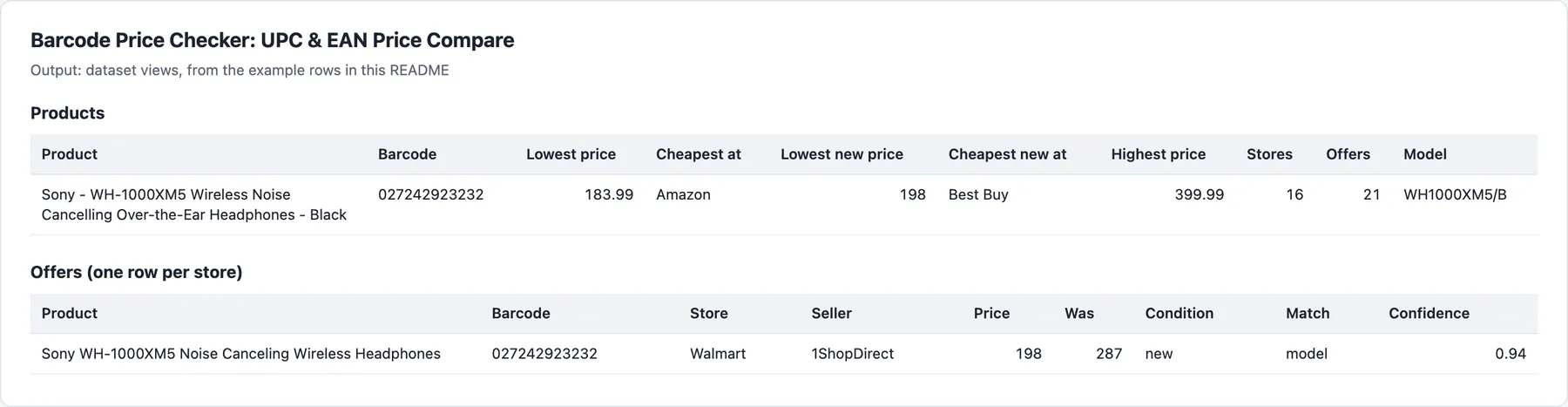
From our test runs on one barcode (UPC 027242923232, Sony WH-1000XM5): 21 offers from 16 stores in one record, lowest price and store at the top; with a $329.99 MAP, 15 sellers below it, each with its price, how far below, and a link.
- Every offer, cheapest first: store, marketplace seller, price, was-price, condition, stock where the store states it, link, and the store's own id (Best Buy SKU, ASIN).
- The lowest price and where, the highest, and the spread between them.
- MAP violations: each seller below your minimum advertised price, by how much, with a link to the listing.
- Your price position: how many offers undercut your price.
- How each price was matched:
barcode,modelorname, with a confidence score, so you can trust a price at a glance. - Changes only, on a schedule: new and removed sellers, price drops and rises, stock changes, new lowest prices, tracked seller by seller.
Who it's for
- Brands and distributors enforcing MAP: a daily list of who is below MAP, with links to send to the seller or marketplace.
- Resellers and repricers: the market price of every SKU you carry, and alerts when a competitor moves.
- Buyers, deal sites and procurement: the cheapest store for a product list, from barcodes you already have.
Barcode price matching
- Exact by barcode. Amazon and Best Buy are searched with the barcode, so their price belongs to the barcode's product: the same item, colour and edition.
- Any store on Google Shopping. Walmart and Target by default; add eBay, Home Depot, Lowe's, Newegg, Crutchfield, B&H Photo, or any store as named on Google Shopping. Marketplace sellers come with their names (
Walmart·Secondipity). - Matched by model number. A Google listing is kept when its title carries the product's model number (WH-1000XM5, AF101), taken from the stores' own product data. Another colour (
/Sfor/B), a bundle or add-on, a store outside the US, or a price far from the barcode-matched prices is set aside with the reason, never mixed into the lowest price or MAP. - Target and Best Buy through our data service (optional). With Target and Best Buy through the data service (slow), Target and Best Buy are looked up by the barcode through a third-party web data service that CleanPull holds the account for (nothing to set up, no key in your input). A store's offer is kept only when the store's own record states the same barcode. Target answers in seconds: its own search answer is read first (a protection page is read once more); a product whose barcode the answer does not state is checked on Target's own product answer, which states it (the variant with that barcode, at its own price, when the product has variants). Only a barcode still not answered clearly goes to the data service's search, with a note in the log. Best Buy goes to that search: every barcode of the run in one search, which takes 3 to 5 minutes per run whatever the number of barcodes, so it suits scheduled runs and lists more than one-off lookups.
- Honest about every source. Each product says per store whether it was found, not found or failed, so an empty answer is never a silent failure.
- Results in seconds. Products are checked in parallel and every record is complete when the run ends.
Barcode price checker input
| Field | Key | What it does |
|---|---|---|
| Barcodes or product names | products | UPC (12), EAN (13), GTIN-14 or EAN-8, or a product name (Google Shopping only) |
| Sources | sources | amazon, bestbuy, google (default); target by barcode is optional (see Limits) |
| Target and Best Buy through the data service (slow) | serviceStores | Optional, off by default: target, bestbuy looked up by barcode through CleanPull's marketplace data service. Target in seconds; Best Buy 3 to 5 minutes per run |
| Stores on Google Shopping | googleStores | Stores to search on Google Shopping, one request each (default Walmart, Target) |
| Also search Google Shopping without a store filter | googleNameSearch | One more Google request per product (other stores, marketplace sellers); default on |
| Conditions | conditions | new (default), renewed, used, open-box (refurbished from saved inputs means renewed); offers of unknown condition are kept |
| Minimum match confidence | minConfidence | Match threshold, 0 to 1 (default 0.7) |
| Include set-aside listings | includeSetAside | Also return set-aside listings with the reason |
| Minimum advertised prices (MAP) | mapPrices | {"barcode": price}: the offers below each product's MAP |
| My prices | myPrices | {"barcode": price}: how many offers are cheaper than you |
| Changes only (monitoring) | monitorMode | After the first run, only products whose offers changed, with what changed |
| Monitor name | monitorName | Keeps separate watches apart (default default) |
| Changes to report | changeTypes | new-offer, offer-removed, price-down, price-up, stock, new-lowest (all by default) |
| Minimum price change (%) | minPriceChangePercent | Smaller price moves are not reported (default 1) |
| Max cost per run (USD) | maxRunCostUsd | Optional. No product starts once the run's charges plus what products in progress could still cost would pass this. For scheduled runs, which may have no spending limit of their own |
| Output format | outputFormat | products (one record per product) or offers (one row per offer) |
| Fields | fields | Return only these fields |
| Products at once | maxConcurrency | Products checked in parallel (default 5, up to 20) |
| Proxy | proxyConfiguration | Optional; the actor picks proxies itself |
| History store | stateStoreName | The key-value store that keeps each monitor's last prices (default: its own store, cleanpull-barcode-prices); pick one when you run with a scoped API token |
barcodes, gtins, eans and upcs are accepted as names for the product list too.
Example inputs
Prices for three products, with eBay as well:
MAP check, daily, reporting only changes:
Exact barcode prices only (Amazon and Best Buy), the cheapest way:
Barcode price checker output
Example rows
A product record (real, shortened to three of its 21 offers):
The same Walmart offer with Output format offers, one row per offer:
Offer fields and set-aside listings
Every offer has source, store, seller, price, wasPrice, currency, condition, conditionBasis, inStock, offerType (listing, or lowest-offer when Amazon shows only its lowest marketplace offer), offerCount (offers on that listing when the store shows how many: Amazon's "N used & new offers"; 1 for Best Buy, whose SKUs have one seller each), title, url, urlSource, storeId (SKU, ASIN, Google offer id), rating, reviews, matchType, confidence and isInternationalVersion. url is the store's own page (urlSource: "store"); for a Google Shopping listing whose results page gives no store link it is Google's listing, and urlSource is "google". Google Shopping offers also carry googleUrl, Google's listing, whichever url is. isInternationalVersion is true when the title says "International Version", "Global Version" or "Intl" (a unit made for another country, whose warranty may differ); it is a clue only and sets nothing aside. Best Buy offers carry familyOfferCount: the rows Best Buy groups under the same product family (its own SKU, marketplace sellers' SKUs and refurbished ones), not offers of this SKU. Set-aside listings (returned in setAside with Include set-aside listings) carry a flag with the reason: other colour (…), other variant (/…) (the model with another colour code, also written without a separator, as "WH 1000XM5SA" for WH1000XM5/B), bundle or accessory (…), store outside the US, price far below the others (…) or price far above the others (…) (against the median), low confidence (…) or condition … (a condition not among Conditions). In monitoring, changes lists each change with the store, from and to. A barcode no store has comes back as one not-found row; when every source failed, a failed row.
Offer condition
condition is new, renewed (refurbished, reconditioned, certified pre-owned), used, open-box or unknown, and conditionBasis says where it came from:
conditionBasis | Meaning |
|---|---|
label | The store's own condition (Best Buy's condition, Google's "Refurbished" or "Pre-owned" label, Amazon's "new offers") |
title | A condition word in the offer's title: "(Renewed)", "Refurbished", "Open Box", "Pre-Owned", "Used - Good", "Like New", also in Spanish |
listing | The store's own featured listing, sold new (Amazon's featured price, Target, a data-service record that states no condition) |
unlabelled | A Google Shopping listing with no condition label and no condition word in its title: Google labels only items that are not new |
store-listing | A Google product card shows the catalog's title; the same store's own listing on the same page, at the same price, states the condition in its title, given as conditionListingTitle |
none | Nothing states it: unknown (Amazon's lowest offer over "used & new" offers) |
A store's label that is not new wins; otherwise a condition word in the title does, so a "(Renewed)" listing is renewed even where Google shows no label; otherwise the same store's own listing at the same price (Google showed StackSocial's open-box Sony WH-1000XM5 at $184.99 under the catalog's title, with no label). unknown is never counted as new.
lowestPriceandlowestPriceStoreare the lowest of every offer kept, whatever its condition, withlowestPriceCondition;lowestNewPriceandlowestNewPriceStorecover confirmed-new offers only.conditionCountscounts the offers by condition.mapViolationslists confirmed-new offers below MAP only, each with itstitle,condition,conditionBasis,seller,url,urlSource,googleUrlandisInternationalVersion. Offers below MAP whose condition is unknown are inmapUnconfirmed; renewed, used and open-box ones inmapOtherCondition. A new offer far below MAP is a violation all the same: nothing is classified by price. In offer rows,belowMapis any offer below MAP andmapViolationa confirmed-new one.
The run's final status message summarises the key numbers in plain text after "Done: N results.": per product the lowest new price and store (flagged when it is Amazon's Buy Box with other sellers unread), a cheaper offer in another condition, the offer and store counts with the highest price, and how many undercut your price, ending "More in the dataset." when not everything fits.
Every run writes RUN_SUMMARY to the key-value store: the outcome (COMPLETE, PARTIAL, NO_CHANGES, EMPTY or FAILED), products with offers, any source failures, Google requests, charges, the requests sent through the page reader (pageReads) and the records bought from the data service (serviceRecords). The final status ends with the pages read (and records bought) for the rows charged.
Pricing
Pay per product with offers and per Google Shopping search.
| Event | Free | Bronze | Silver | Gold |
|---|---|---|---|---|
| Product with offers | $3.00 | $3.00 | $2.70 | $2.40 |
| Google Shopping request (per store searched, per product) | $4.00 | $4.00 | $3.60 | $3.20 |
| Product with changes (changes only) | $2.00 | $2.00 | $1.80 | $1.60 |
| Provider record (an exact barcode match from Target or Best Buy through the data service, delivered as an offer) | $6.00 | $3.00 | $2.70 | $2.40 |
| Provider search (one data-service search that answered: one store, all the run's barcodes) | $40.00 | $20.00 | $20.00 | $20.00 |
Prices are per 1,000. With the defaults (an unfiltered search plus Walmart and Target) a product costs about $15 per 1,000 on the Free and Bronze plans; Amazon and Best Buy alone cost $3 per 1,000. The product event is charged only for a product with offers; Google requests are charged as made, also for a barcode no store knows (one web search for its name, then the Shopping searches). Each run also has a $0.00005 start fee. With Target and Best Buy through the data service (slow), each store adds one provider search per run ($0.02 on Bronze, flat: it covers the near matches the service returns and the wait) and one provider record for each barcode it sells, delivered as an offer ($0.003 on Bronze): 100 barcodes on Target and Best Buy add at most $0.04 + $0.60 on Bronze, and twice that on the Free plan. Near matches are not charged, and a search that failed or was blocked charges nothing. A run restarted after a platform migration never charges a record or a search again. Max cost per run (USD) counts the search fees and one record per barcode and store before any search starts; barcodes past that are not looked up through the service, with a note.
Limits
- US stores and US-dollar prices.
- Google Shopping does not look products up by barcode, so its listings are matched by model number or name, as each offer says. Products without a model number (games, toys, drinkware) are matched by name, with lower confidence.
- Amazon sometimes shows only its lowest marketplace offer ("19 used & new offers"), not a featured price: such offers are marked
lowest-offer. Over "used & new" offers the condition isunknown, so unlessusedis among the conditions it is listed but left out of the lowest price and price position; below MAP it is inmapUnconfirmed. - Google's results pages (as read up to November 2026) open a listing's store link only in the product viewer, after the page loads, so a Google Shopping offer's
urlis usually Google's listing (urlSource: "google"). When a card does link to the store's page, that page is theurl. - Google shows one price per listing; it does not list every seller of a product in one place, so smaller sellers appear when Google ranks them.
- Target's own API often refuses automated requests, so Target prices come from Google Shopping by default.
targetinsourcestries Target by barcode first, as a best effort; when Target refuses that request, its answer is read through the data service's page reader instead, at no extra charge. - When amazon.com refuses a barcode's search on every proxy tier, its search page is read through the data service's page reader instead, with the same exact-match rules, at no extra charge. A bot step in its place is asked once more, then Amazon is reported as failed for that barcode with both reasons. Once the first two barcodes of a run are both refused on every tier, the rest go to the page reader straight away (while it is available), without the slower proxy tiers.
- Best Buy's search page states no UPC. Its offer is taken only when its search for the barcode, uncorrected, finds exactly one product whose details are on the page, and that product's model or name does not contradict the barcode (a number in it holding only part of the barcode means Best Buy matched text, not the UPC: Best Buy is then reported as failed for that barcode, never as a match). Such an offer is near certain, not proven, so its
confidenceis 0.95, as for a Target offer whose barcode Target does not state; offers whose store states the barcode have 1. Both pass the default Minimum match confidence (0.7). - Stock is known for Best Buy; Google listings do not state it.
- Through the data service, a run waits 3 to 5 minutes for Best Buy (and for a Target barcode its own answer did not settle), and a barcode the store does not sell costs only its share of the search fee. A store that refuses the service's crawler is reported as failed for that run.
- Nothing found: a product no source lists still gets one free
recordType: "not-found"row with areason(a product every source failed for, a freefailedrow), and the run succeeds; the product event is not charged, though its Google requests are. With Changes only (monitoring), such a product gives no row. A run near its time limit stops starting products, delivers what it checked and gives each product left a freerecordType: "unreadable"row. Only a run in which every source failed for every product fails.
FAQ
How much does a barcode price check cost per product per day?
With the default sources (Amazon, Best Buy, and Google Shopping for Walmart and Target plus one unfiltered search), one product checked once a day costs $0.015 a day on the Free and Bronze plans (about $0.45 a month): $0.003 for the product with offers and $0.012 for three Google requests. Each store added to Stores on Google Shopping adds $0.004; Amazon and Best Buy alone cost $0.003. A barcode no store lists costs only its Google requests. With Changes only (monitoring), the first run bills each product as usual; after that an unchanged product costs only its Google requests ($0.012 with the defaults, nothing with Amazon and Best Buy alone), a product that changed costs $0.003 plus $0.002 for its changes, and one that changed by losing all its offers costs only the $0.002 change event (the product event is charged only for a product with offers). Target and Best Buy through the data service (slow) adds a provider search per store and run and a provider record per exact match (see Pricing above). Each run also has the start fee, and higher Apify plans pay less.
How often should I check prices by barcode?
Daily suits MAP enforcement and repricing. With Changes only (monitoring) and a schedule, each run returns only the products whose offers changed, with each change; Changes to report picks which count, and Minimum price change (%) (1 by default) keeps smaller moves out. A source that could not be read on a run keeps its last offers, so they are not reported as removed.
What is the difference between the lowest price and the lowest new price?
lowestPrice is the lowest of every offer kept, whatever its condition, with lowestPriceCondition; lowestNewPrice covers confirmed-new offers only. In the same way, mapViolations lists confirmed-new offers below MAP, while offers of unknown condition below it are in mapUnconfirmed and renewed, used or open-box ones in mapOtherCondition.
Why is a store's price missing?
- Set aside: another colour or variant, a bundle, a store outside the US, a price far from the others, low confidence or another condition; turn on Include set-aside listings to see each with its
flag. - Not listed by Google: Google shows one price per listing and does not list every seller in one place.
- Target: by default Target's prices come from Google Shopping; add
targetto Sources, or use Target and Best Buy through the data service (slow), for Target by barcode. - Best Buy: its offer is taken only when its search for the barcode finds exactly one product; otherwise Best Buy is reported as failed for that barcode.
- A source failed:
sourcessays per store whether it wasfound,not-foundorfailed. - Stock:
inStockis known for Best Buy; Google listings do not state it.
Which stores and countries does it support?
US stores and US-dollar prices: Amazon and Best Buy by barcode, Target by barcode as an option, and Walmart, Target, eBay, Home Depot, Lowe's, Newegg, Crutchfield, B&H Photo or any store as named on Google Shopping.
Can I use the barcode price checker through the API?
Yes. Start runs through the Apify API or an API client, and read the dataset through its Products, Offers (one row per store), MAP and my price and Changes (monitoring) views, or the RUN_SUMMARY record with the outcome, source failures and charges. Output format offers gives one row per offer, and Fields (fields) trims each row to the keys you need.
Does it work with Google Sheets, Make, Zapier or Claude?
Yes. Apify's integrations send each run's results to Google Sheets, Make, Zapier, webhooks and other tools, and a schedule keeps them updated. From Claude, the MarketMage plugin compares every store's price for a barcode, or watches sellers against your MAP, in a chat.
Is it allowed to check prices by barcode?
The actor reads public store and Google Shopping pages as a signed-out visitor sees them: no login, no account and no customer data. Seller names are the store and marketplace seller names the pages show. How you use the data, and following the laws and terms that apply to you, is your responsibility. This is not legal advice.
Related actors
Other CleanPull actors for monitoring:
- Catalog Matcher: match your catalogue to competitors' and find price gaps.
- Price Tracker & Stock Monitor for Any Online Store: price and stock changes on product pages of any online store.
- Amazon Product Scraper: Amazon price, Buy Box, every seller's offer and Best Sellers Rank by ASIN.
- Walmart Scraper: Walmart products, prices, UPC, sellers and stock.
Use it from Claude
The MarketMage plugin runs these actors from a Claude chat.
Found it useful? A rating on the Store helps others find it.
Changelog
- 0.3.13, status summary (2026-11-06): the final status message now summarises each product's key numbers after "Done: N results." (lowest new price and store, Amazon Buy Box flag, a cheaper other-condition offer, offer and store counts, offers under your price), so a reader can often skip the dataset read. Prices and events unchanged.
- 0.3.x, evidence clues (2026-11-04): every offer and MAP entry says where its link leads (
urlSource:storeorgoogle); Google Shopping offers keep Google's listing ingoogleUrland use the store's own page asurlwhen the card links to it. Best Buy'sofferCountis now the matched SKU's (1), not its product family's; the family's rows are infamilyOfferCount. NewisInternationalVersionfrom the title. A Google listing of the same model with another colour code written without a separator ("WH 1000XM5SA" for WH1000XM5/B) is set aside asother variant (/SA), as "/S" was, so it is no longer counted in prices or inmapViolations. Prices and events unchanged. Saved monitors: such a listing may show once as removed on the first run after the update. - 0.3.x, fewer blocked Target tries (2026-10-31): when Target blocks the actor's own requests on every proxy tier for the first 2 barcodes of a run (none read), the rest of the run reads Target straight through the page reader, without trying again. With the page reader available, a residential proxy is tried twice per barcode instead of six times before handing over; the datacenter tries, which cost nothing extra, stay as they were. The run summary gains
directPageReads(the actor's own requests per store, blocked tries included) andtargetPageReads. Same rows, prices and events. - 0.3.x, fewer reads (2026-10-30): a Target answer whose product does not state the barcode is checked on that product's own answer (one more request, seconds) instead of a data service search (3 records and minutes); a product with variants gives the variant with that barcode. A Target protection page is read once more before the data service is asked. The run summary gains
pageReadsandserviceRecords, and the final status says how many pages were read and records bought for the rows charged. Prices and events unchanged. - 0.3.x, Target in seconds (2026-10-26): Target by barcode is read from its own search answer through the data service's page reader: with
serviceStoresfirst (seconds instead of 3 to 5 minutes; a barcode it does not answer clearly goes to the data service's search as before, barcodes missing close together sharing one search), and withtargetinsourceswhen Target refuses the actor's own request. WithserviceStores, a product is taken from that answer only when Target states its barcode (the same GTIN, however written); otherwise the barcode goes to the search, unless the run is too near its time limit for one (then it is reported as not checked). Best Buy's new search page is read the same way as before (one uncorrected result for the barcode), withconfidence0.95 since the page states no UPC. Same events and prices: one provider search per store and run, whether Target answered by page or search, and a provider record per exact match delivered; the rescue undersourcescharges nothing more. A run resumed after a migration delivers the answers it had without reading again. Walmart and Best Buy were tested the same way and stay as they are: Walmart's search page does not show a barcode to confirm a match, and Best Buy's often did not answer in time. - 0.3.x, reliability (2026-10-24):
not-foundandfailedrows carry areason; input naming no product ends SUCCEEDED with a freeunreadablerow instead of FAILED; a run stops starting products before its time limit and ends with what it checked, never TIMED-OUT. Prices and events unchanged. - 0.3 (2026-10-16): Offer condition from the title too, and for a Google product card from the same store's own listing at the same price ("(Renewed)", "Open Box", "Pre-Owned"…, in English and Spanish), as
new,renewed,used,open-boxorunknown, withconditionBasis; unknown is never taken for new. New fieldslowestPriceCondition,lowestNewPrice,lowestNewPriceStore,conditionCounts,mapUnconfirmed,mapOtherCondition, andtitle,condition,conditionBasisin each MAP entry. Correctness fix:mapViolationsnow lists confirmed-new offers only; renewed, used and open-box offers below MAP moved tomapOtherCondition, unknown ones tomapUnconfirmed. A listing whose title says renewed (or used, open box) is now set aside when its condition is not amongconditions(defaultnew). Field names and inputs are unchanged:refurbishedinconditionsmeansrenewed, and saved monitors keep their offer keys. Saved monitors: an offer whose condition is newly detected (from its title or the store's own listing) may show a one-time change on the first run after the update: removed under its old key and new under its condition, or no longer counted when its condition is not amongconditions. - 0.2 (2026-10-15): Target and Best Buy by barcode through CleanPull's marketplace data service (
serviceStores, optional), one search per store for all the run's barcodes, exact barcode matches only. New events: provider record (an exact match delivered, $0.003 on Bronze, $0.006 on the Free plan) and provider search ($0.02 per store per run on Bronze, $0.04 on Free, only when the search answered). Off by default: runs without it are unchanged. - 0.1.x (2026-10-14): Max cost per run (
maxRunCostUsd), so a scheduled run stays within a budget even without a spending limit. - 0.1 (October 2026): Amazon and Best Buy by barcode; Google Shopping by store filter for any store, matched by model number or name; set-aside rules for colours, variants, bundles, foreign stores and outlier prices; MAP and own-price checks; changes-only monitoring by store; product and offer outputs.


