
Amazon Product Scraper: Buy Box, Offers & BSR
Pricing
from $2.40 / 1,000 products
Amazon Product Scraper: Buy Box, Offers & BSR
Amazon product data API by ASIN, URL, search or barcode in 22 marketplaces: price, Buy Box seller, every seller's offer, Best Sellers Rank at every level, bought-past-month, ratings, variants, specs and what changed since your last run. From $3 per 1,000 products.
Pricing
from $2.40 / 1,000 products
Rating
0.0
(0)
Developer

CleanPull
Maintained by CommunityActor stats
0
Bookmarked
13
Total users
5
Monthly active users
7 hours
Issues response
2 days ago
Last modified
Categories
Features
Share
This Amazon product scraper gets Amazon product data by ASIN, product URL, search or barcode in 22 marketplaces, as each country's shoppers see it: price and list price, the Buy Box seller (or that the Buy Box is suppressed), every seller's offer with seller rating and FBA, Best Sellers Rank at every category level, "bought in past month", ratings with the star breakdown, variants, images, specs and featured reviews. Schedule it and every row says what changed since your last run: price, Buy Box owner, stock, rank, rating, sellers joining or leaving. Every product row on amazon.com, .co.uk, .de, .fr, .it and .es also carries its Amazon referral and FBA fees. It runs once, on a schedule or through the API.
How to scrape Amazon product data
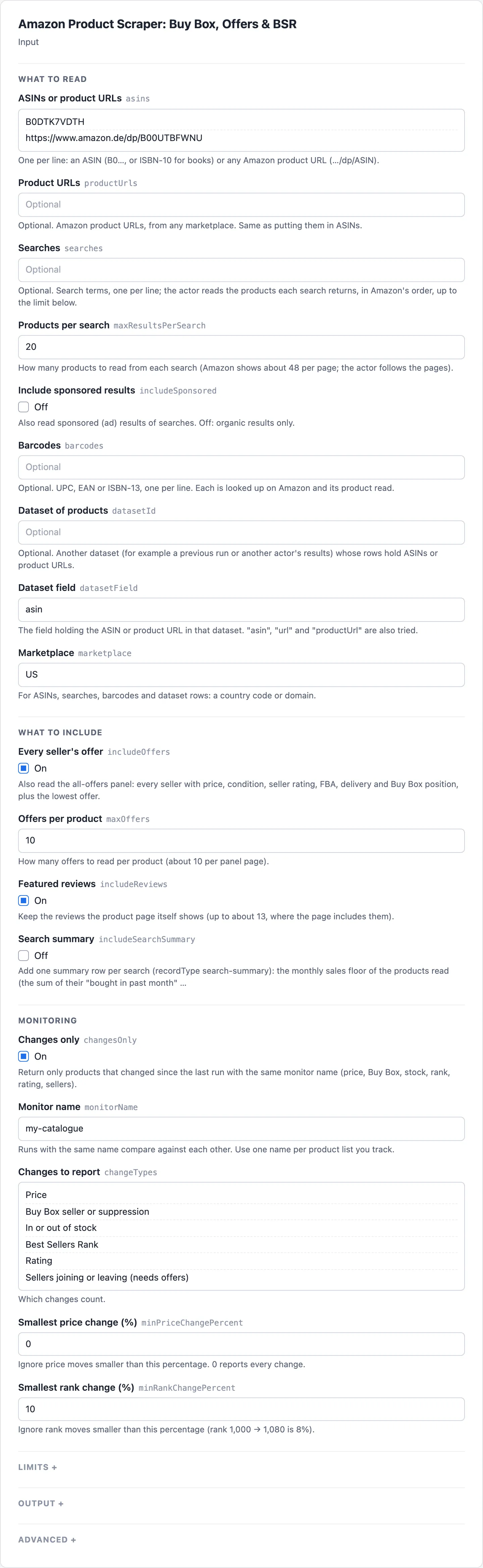
- Open Amazon Product Scraper on Apify and go to its input form.
- Enter ASINs or product URLs in ASINs or product URLs, one per line. To read search results instead, enter terms in Searches; for UPC, EAN or ISBN-13 codes, use Barcodes.
- Pick the Marketplace (US by default). Turn on Every seller's offer to read every seller's price and Buy Box position, and Search summary for each search's monthly sales floor.
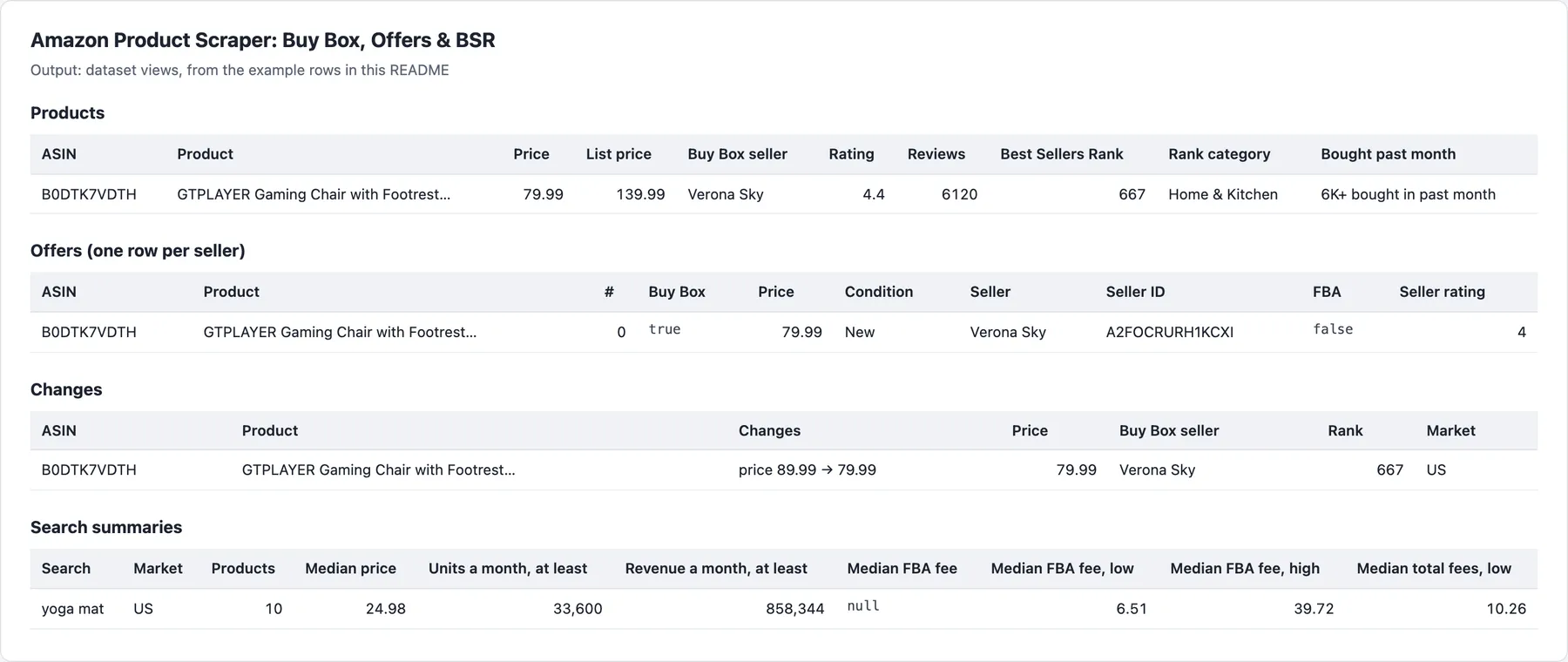
- Start the run. Open the Products view to read each product's Price, Buy Box seller, Best Sellers Rank, Bought past month and After fees, and the Offers (one row per seller) view for every seller.
- To monitor prices and the Buy Box, turn on Changes only, give the run a Monitor name, save it as a task and schedule it daily. The Changes view then lists only the products that moved, with the old and new value.
What the Amazon product scraper gives you
- "Who holds the Buy Box on my products, and at what price?" Read your ASINs with every seller's offer; Buy Box changes and suppression show up as changes.
- "Alert me when a competitor changes price or goes out of stock." Schedule Changes only: only products that moved are returned, with the old and new value.
- "Which products in this niche actually sell?" Search a term and get each product's rank at every category level and its "bought in past month" figure.
- "Is my product priced right in Germany, France and Japan?" The same ASIN in each marketplace, priced as local shoppers see it, in local currency.
- "What does Amazon keep from each sale?" Every product row on amazon.com, amazon.co.uk, amazon.de, amazon.fr, amazon.it and amazon.es carries its referral fee and FBA fee in that marketplace's currency, worked out from Amazon's published 2026 fee schedules and the product's size and weight.
- "How much does this niche sell at least?" Search with the search summary on: the sum of the leaders' "bought in past month" badges, and that times their price.
- "Look up products from a list of barcodes." UPC, EAN or ISBN-13: each is matched to its Amazon product.
- "Enrich another dataset." Point it at a dataset whose rows hold ASINs or product URLs.
Amazon product data accuracy
- Each marketplace is read from that country. Amazon shows a page for the delivery country of the visitor's address, and a signed-out visitor cannot change it: from abroad, offers that do not ship there disappear and the Buy Box can look suppressed. This actor reads amazon.de from Germany, amazon.co.jp from Japan and so on, and every row gives the delivery location Amazon used. A page shown for another country is read again on a fresh address; if Amazon keeps showing another country's view, the row says
localView: falseand is left out of change tracking. - The whole page, every time. Amazon sometimes serves only the top half of a product page (no details, rank or review breakdown). The actor notices and fetches the missing half, so those fields are filled rather than silently empty.
- A suppressed Buy Box is reported as such (
buyBoxSuppressed: true), not as a missing price; the offers still list who sells it and for how much. - Only delivered products are billed. A product that could not be read is listed in the run summary with the reason, never charged.
- Runs do not fail for one bad entry. An unknown ASIN, a non-product URL or a malformed barcode is skipped with a warning; an empty input runs the form's example.
Amazon product scraper input
| Field | Key | What it does |
|---|---|---|
| ASINs or product URLs | asins | ASINs (B0…, or ISBN-10 for books) or product URLs, one per line. A URL uses its own marketplace; a barcode here is looked up as in Barcodes |
| Product URLs | productUrls | Product URLs from any marketplace (string or { "url": … }). Same as putting them in ASINs or product URLs |
| Searches | searches | Search terms, one per line; products are read in Amazon's order |
| Products per search | maxResultsPerSearch | How many products to read from each search; pages are followed (default 20) |
| Include sponsored results | includeSponsored | Also read the ads in search results. Off (the default): organic results only |
| Barcodes | barcodes | UPC, EAN or ISBN-13, each matched to its product |
| Dataset of products | datasetId | Another dataset whose rows hold ASINs or product URLs |
| Dataset field | datasetField | The field holding the ASIN or URL in that dataset (default asin; url and productUrl are also tried) |
| Marketplace | marketplace | For ASINs, searches, barcodes and dataset rows: US, GB (or UK), DE, FR, IT, ES, CA, MX, BR, JP, IN, AU, NL, SE, PL, BE, TR, AE, SA, SG, EG, IE (default US) |
| Every seller's offer | includeOffers | Every seller's offer from the all-offers panel, with the lowest offer |
| Offers per product | maxOffers | How many offers to read per product (default 10) |
| Featured reviews | includeReviews | Keep the featured reviews the product page shows (on by default) |
| Search summary | includeSearchSummary | One free summary row per search: the monthly sales floor and median Amazon fees of the products read |
| Changes only | changesOnly | Return only products that changed since the last run with the same monitor name |
| Monitor name | monitorName | Runs with the same name compare against each other (default default) |
| Changes to report | changeTypes | Price, Buy Box seller or suppression, in or out of stock, Best Sellers Rank, rating, sellers joining or leaving (all by default) |
| Smallest price change (%), Smallest rank change (%) | minPriceChangePercent, minRankChangePercent | Ignore small moves (defaults 0%, every price change, and 10% for rank) |
| Max products | maxItems | Stop after this many product rows |
| Only these fields | fields | Keep only these fields, for example asin, title, price, buyBoxSeller, rank |
| Products at a time | maxConcurrency | Products read in parallel per marketplace (default 3; Amazon answers bursts with 503s) |
| Retries for half pages | fullPageRetries | How often a product page served without its lower half is read again, keeping the fullest (default 1) |
| Proxy | proxyConfiguration | Optional; the actor picks proxies itself |
| Start URLs | startUrls | Product URLs, accepted for compatibility with other Amazon actors; same as Product URLs |
| History store | stateStoreName | Optional key-value store for earlier runs' products (default cleanpull-amazon-products); pick one when running with a scoped token in Restricted access mode |
Example inputs
Your products with every seller, checked daily for changes:
The top 50 organic results of a search in the UK:
Barcodes to Amazon products:
Amazon product scraper output
Example rows
One row per product. The main fields:
Amazon fees
Every product row on amazon.com, .co.uk, .de, .fr, .it and .es carries fees. A real US row:
-
Referral fee: Amazon's published rate for the category, matched from the product's browse path (tiered categories and the $0.30 minimum included; the $1.80 closing fee on books, music, video, software, video games, consoles and video game accessories in
closingFee). Without a browse path, the Best Sellers Rank category stands in as a near match (confidence medium at most). -
A level that is not a fee category of its own: some category levels hold products charged at different rates, so a path that stops there could be more than one fee category:
- Electronics, Computers & Accessories, Cell Phones & Accessories, Camera & Photo, and their "… & Accessories" levels: a device, or the electronics accessories rate.
- Amazon Devices & Accessories: a device, or the 45% device accessories rate.
- Video Games or a platform: a console (8%), or games and accessories (15%).
- Clothing, Shoes & Jewelry down to "Women" or "Men": clothing, shoes, jewelry, watches or bags.
- Tools & Home Improvement, or Power & Hand Tools: a base power tool (12%) or other tools.
- Automotive, or Tires & Wheels: tyres (10%) or other parts (12%).
- Home & Kitchen (furniture over $200) and Patio, Lawn & Garden (mowers, patio furniture).
When the page's path (or its Best Sellers Rank category) stops at such a level:
referralCategoryis null;referralFeeRangegives the lowest and highest fee over those categories, with the categories, andreferralFeeis null;- the total, after-fees and percentage ranges carry the range through;
confidenceis low, andbasisstarts "category not specific enough".
If every category gives the same fee at that price, the fee is exact, as a near match. Where clothing and shoes, jewelry, watches or bags are all possible, the FBA fee is a range over the apparel and the standard rate cards.
-
measured.dimensionalWeightLbis the dimensional weight the size tier used: length × width × height ÷ 139, with width and height of at least 2 in for bulky and extra-large tiers. -
FBA fee: Amazon's published 2026 US rate card (non-peak, or holiday peak from 15 October to 14 January; apparel rates for clothing), for the size tier and shipping weight the page's dimensions and weight give, with the 3.5% fuel and logistics surcharge.
afterFeesis the price minus all of it: what a sale pays out before product cost, freight and ads. -
When the page is not enough, it says so: no dimensions or weight gives
fbaFee: nulland lists them inmissing. A page with two sides and no height, or with the item's size where that size is bulky (a yoga mat laid flat, assembled furniture), givesfbaFeeRange(and the total, after-fees and percentage ranges) instead, with the assumption inassumes. When both ends of that range cost the same (a small, thin item is in the same tier flat or tall), the exactfbaFeeand totals come instead, with the assumption kept inbasis. -
No category matched: a browse path the fee table does not name (or no path at all) keeps the Everything Else rate (15%), with
confidence: "low"and anotModelledentry "category not matched; Everything Else rate assumed", so check the fee category in Seller Central. -
Numbers as the page writes them: "1,200 Grams" is 1,200 g; a size or weight implausible together (denser than 20 kg per litre of the stated size, or over 1,000 kg) is most likely a misread number, so
confidenceis low andnotModelledsays so. -
confidence:highfor a package size and an exact category match, one step down for each doubt (item size or an FBA range, a near category match);lowwhen the category is not specific enough or not matched, or the weight is implausible for the size. -
Not included: dangerous goods, lithium battery, overmax and low-inventory fees, storage, inbound placement and returns.
Amazon fees in the UK and EU
UK, Germany, France, Italy and Spain: the same fields, from Amazon's European rate card effective 2 November 2026 (sources and pages in the schedule file), in the marketplace's currency (currency: GBP on amazon.co.uk, EUR on the others):
- VAT: the price includes VAT (
priceIncludesVat: true) and Amazon works out the referral fee on it. Every fee is Amazon's published fee, excluding VAT.afterFeesis the price minus the fees with the VAT still in the price.afterFeesExVat(andafterFeesExVatRangewhen the fees are a range) is the price excluding VAT minus the fees: the payout before product cost, freight and ads. It uses the standard VAT rate invatRate: UK 20% (GOV.UK), Germany 19%, France 20%, Italy 22%, Spain 21% (European Commission, Your Europe). Books, grocery, supplements, pet food and baby products often carry a reduced rate, so for themvatRateandafterFeesExVatare null andnotModelledsays why. On amazon.com, whose prices exclude sales tax, these fields are null. - Referral fee: the UK/EU rate for the category, matched from the browse path in the marketplace's language (Küche, Haushalt & Wohnen; Cuisine et Maison; Casa e cucina; Hogar y cocina…), with the £0.25 / €0.30 minimum, the £20 / €20 heavy oversize and £25 / €25 special oversize minimums, and the closing fee on media (£0.50; €1.01 books and €0.81 other media in Germany, Italy and Spain; €0.61 in France). Clothing over £40 / €45 takes the FBA rule (15% up to it, 7% above). Lighting (no row of its own on the card) gives a range over home products and DIY; Handmade is 12%. Top levels that span rates (Home & Kitchen: kitchen, home products, furniture, home linen; Fashion: clothing, shoes, jewellery, watches, bags; Electronics and Computers: device or accessory; and others) give
referralFeeRange, as in the US. - FBA fee: local FBA from stock in that country, by size tier (light, standard, large and extra-large envelope; small and standard parcel; small, standard light, standard heavy and standard large oversize; bulky, heavy and special oversize) on the card's dimensional weight (L × W × H cm ÷ 5000,
measured.dimensionalWeightKg),shippingWeightKgthe weight charged; with the fuel and logistics surcharge (1.5% from 17 April 2026, 2% from 2 November 2026).- Low-Price FBA applies on its own (Amazon enrols eligible products automatically) at or under £20 / €20, or £10 / €11 (DE) / €12 (FR, IT, ES) in the categories the card names (beauty and health, business and industrial, office, grocery, books, Amazon device accessories, kitchen).
- Selected categories (clothing, footwear, bags, grocery, home linen and rugs, mattresses, pet clothing and food, baby pushchairs and safety…) have their own parcel tiers on unit weight.
- Festive peak rates in the UK and Germany from 15 October 2026 to 14 January 2027 (
period: "peak"), apparel excluded as the card says (clothing keeps the non-peak rates,period: "non-peak"); France, Italy and Spain have none (period: "year-round"). - Germany uses the "DE only" rates (stock stored in Germany only); sellers in the Central Europe Programme pay €0.26 less per unit (said in
basis).
- Said, not guessed: the card gives oversize increments "per kg" (and selected-category ones "per 100 g") without saying whether a part is charged whole, so where the two readings differ
fbaFeeRangespans them; where the card does not define a case (a special oversize girth that counts only with the length, a box over 126 kg dimensional weight),fbaFeeis null andnotModelledsays why. Also not included here: the digital services fee (it depends on where the seller is established), cross-border (EFN) fees and Pan-EU oversize and low-inventory surcharges, dangerous goods, storage and returns. - Product details are read in the marketplace's language ("Produktabmessungen", "Peso dell'articolo", "Dimensioni prodotto", "Dimensiones del paquete"…); a package row makes the size the package's, as on amazon.com. The German, French, Italian and Spanish row names were written from Amazon's usual wording and have not yet been checked against live pages: a page whose rows are named otherwise gives
missing: ["dimensions"]or["weight"]rather than a guess. - Numbers are read as each marketplace writes them: "1.200 Gramm" and "1 200 g" are 1,200 g, and "1,250 Kilogramm" is 1.25 kg on amazon.de, .fr, .it and .es.
Other marketplaces give supported: false with the reason.
Search summary rows
One search-summary row per search with Search summary (includeSearchSummary; free, not counted in Max products). A real row:
The fee medians: medianReferralFee, medianFbaFee, medianTotalFees and medianFeePercentOfPrice are over the products whose fee is exact. Each …Range is over the products with that fee exact or as a range, an exact fee counting as both ends: low is the median of the low ends, high the median of the high ends. In this row every mat's page gives its unrolled size, so the FBA fee is a range from a rolled-up box to a box the mat's size.
Each search counts its own results, including ones another search or your ASINs also list (read and charged once). productsRead counts the results delivered or checked; a result that could not be read or that a limit stopped is left out, and complete is then false. A search that failed part-way is not complete either, and searchCutShort says after how many results and why. A product shown again on a later results page counts once. salesFloor is at least what the leaders sell: a product without a badge counts 0, and "10K+" can be far more than 10,000. It is never an estimate of actual sales.
Other fields and views
Also: images, features, description, specs (every row of the details tables), availability, unitPrice, coupon, deal, featuredReviews (title, rating, date, verified purchase, text, helpful votes, variant; no reviewer names), reviewsNeedSignIn (true when Amazon showed its sign-in prompt instead of the featured reviews) and reviewsMissing (sign-in, left-out or null; with includeReviews), dateFirstAvailable where Amazon shows it, offerCount, localView, missingSections, barcodeVerified (for barcode lookups: whether the page lists that barcode; a product listing a different one is not delivered), scrapedAt.
The run's final status message summarises the key numbers in plain text after "Done: N results.": per search the bought-in-past-month floor, the median price, rating and reviews, how many are sold by Amazon and the median Amazon fees; per product looked up directly its price, rating, reviews, badge floor, lowest offer and payout after fees; ending "More in the dataset." when not everything fits.
Dataset views: Products, Offers (one row per seller), Changes and Search summaries. Search summary rows share the dataset with product rows, and dataset views cannot filter rows, so the Products view starts with the row type (recordType). A dataset with search summaries given back as datasetId skips them. RUN_SUMMARY in the key-value store gives the outcome (COMPLETE, PARTIAL, NO_CHANGES, EMPTY, FAILED), counts, charges and every product that could not be read, with the reason.
Pricing
| Event | Free and Bronze | Silver | Gold and above |
|---|---|---|---|
| Product (a delivered row) | $3.00 | $2.70 | $2.40 |
Every seller's offer (add-on, with includeOffers) | $1.00 | $0.90 | $0.80 |
| Product read outside the US (add-on) | $3.00 | $2.70 | $2.40 |
| Product checked, unchanged (Changes only) | $0.50 | $0.45 | $0.40 |
Per 1,000 products. Each run also has a $0.00005 start fee. Outside the US, pages are read as local shoppers see them (with a delivery postcode in the country on amazon.de, .fr and .co.uk, and through addresses in the country elsewhere), so you get local prices, sellers and Buy Box; that is what the add-on covers. A daily check of 100 US products with Changes only is 3,000 checks a month: $1.50 on the Free and Bronze plans, plus the products that changed.
Limits
- Reviews: the featured reviews on the product page only (Amazon shows full review lists to signed-in shoppers, and this actor never signs in). The star breakdown and review count cover all reviews. amazon.com (US) now shows no featured reviews to signed-out shoppers ("Sign in to see customer reviews"): US rows have
featuredReviews: []withreviewsNeedSignIn: trueandreviewsMissing: "sign-in", and the run summary and status say so; the run staysCOMPLETE. Other marketplaces still show them. A product with star ratings but no written review has noreviewsMissing. A page Amazon served without its reviews card givesreviewsMissing: "left-out"and a warning; the product is still delivered and the run staysCOMPLETE. - Delivery location: a central postcode on amazon.de (10115 Berlin), amazon.fr (75001 Paris) and amazon.co.uk (SW1A 1AA London), and the marketplace's country as a whole elsewhere. Delivery dates and some regional offers can differ for another address.
- Searches follow Amazon's own ranking, as far as Amazon pages through the results for that term.
- Prices for Subscribe & Save, business pricing and Prime-only deals are not separate fields.
- Nothing found: when no product could be read because none exists (an ASIN Amazon does not have, a barcode with no match, input that names no product), the run still succeeds, with one free
recordType: "unreadable"row per item giving thereason; nothing is charged. A run near its time limit stops starting products, delivers what it read and lists the rest the same way.
FAQ
How much does Amazon product data cost per product per day?
One US product read once a day costs about $0.003 a day (about $0.09 a month) on the Free and Bronze prices. With Changes only, a day it did not change costs $0.0005 instead, and a day it changed costs the full product. Every seller's offer adds about $0.001 for a product with offers, and a product read outside the US adds about $0.003 (unchanged checks included), for local prices, sellers and Buy Box. Higher Apify plans pay less (see Pricing below). Products that could not be read and search summary rows are never charged.
How often should I check Amazon prices and the Buy Box?
Daily suits most sellers; busy listings can be checked hourly. With Changes only and a schedule, each run returns only the products that moved, and Smallest price change (%) and Smallest rank change (%) (10% by default) keep small moves out. Changes to report picks which changes count.
What is the difference between price, list price and lowest offer?
price is the featured offer's price on the product page, the one the Buy Box seller sells at. listPrice is the struck-through list price, given only when it is higher than price (savingsPercent is the difference Amazon shows). lowestOfferPrice is the lowest price Amazon shows among other sellers, which can be below the Buy Box price: with Every seller's offer on, the lowest of the offers read (up to Offers per product, so a cheaper seller past it is not seen); with it off, the product page's "New (N) from" price.
Why is a price, review or fee missing?
- Buy Box suppressed:
buyBoxSuppressed: truewithpriceandbuyBoxSellernull; the offers still list who sells it and for how much. - Reviews on amazon.com: US rows have
featuredReviews: []withreviewsNeedSignIn: true, because amazon.com shows them only to signed-in shoppers. The star breakdown and review count are still there. - Half page: a page Amazon served without its lower half on every retry lists the empty parts in
missingSections. Raise Retries for half pages to try more. - FBA fee: a page without dimensions or weight gives
fbaFee: nulland names them inmissing; marketplaces other than the six with fees givesupported: false. - Product not found: an ASIN Amazon does not have or a barcode with no match gives a free
recordType: "unreadable"row with thereason, andRUN_SUMMARYlists every product that could not be read.
Which Amazon countries does it support?
22 marketplaces: US, GB (or UK), DE, FR, IT, ES, CA, MX, BR, JP, IN, AU, NL, SE, PL, BE, TR, AE, SA, SG, EG and IE. Enter a country code or a domain in Marketplace; a product URL uses its own marketplace. Amazon fees are worked out on amazon.com, .co.uk, .de, .fr, .it and .es.
Can I use the Amazon product scraper through the API?
Yes. Start runs through the Apify API or an API client, and read the dataset through its Products, Offers (one row per seller), Changes and Search summaries views, or the RUN_SUMMARY record. Only these fields (fields) trims each row to the keys you need, and Dataset of products reads ASINs from another run's dataset.
Does it work with Google Sheets, Make, Zapier or Claude?
Yes. Apify's integrations send each run's results to Google Sheets, Make, Zapier, webhooks and other tools, and a schedule keeps them updated. From Claude, the MarketMage plugin checks prices, the Buy Box and sellers in a chat.
Is it allowed to scrape Amazon product data?
The actor reads public Amazon product, offer and search pages as a signed-out shopper sees them: no login, no account and no customer data. Featured reviews keep their title, rating, date and text, but no reviewer names. How you use the data, and following the laws and terms that apply to you, is your responsibility. This is not legal advice.
Related actors
Other CleanPull actors for marketplace:
- Amazon Best Sellers Scraper & Rank Tracker: Amazon Best Sellers, New Releases and Movers & Shakers with rank changes.
- Amazon Keyword Rank Tracker: where your products rank on Amazon search for your keywords.
- Barcode Price Checker: prices for a UPC, EAN or GTIN across stores.
- Reviews Monitor: new reviews and rating moves on Shopify review apps, Amazon and Trustpilot.
Use it from Claude
The MarketMage plugin runs these actors from a Claude chat.
Found it useful? A rating on the Store helps others find it.
Changelog
-
0.1.18, local pages on amazon.de, .fr and .co.uk (2026-11-08): product pages and searches there are read with a delivery postcode in the country (10115 Berlin, 75001 Paris, SW1A 1AA London), as a local shopper sets it, which gives the same prices, sellers, stock and ranks as before and makes those reads faster to retry.
brandno longer keeps the store link's wording on amazon.fr ("Visiter la boutique Lotus" is now "Lotus") or on other marketplaces. Prices and events unchanged. -
0.1.17, status summary (2026-11-06): the final status message now summarises the key numbers after "Done: N results." (per search the sales floor, median price, rating and reviews, Amazon-sold count and median fees; per product its price, rating, reviews, badge floor and lowest offer), so a reader can often skip the dataset read. Prices and events unchanged.
-
0.1.x (2026-11-04): Amazon fees on amazon.co.uk, amazon.de, amazon.fr, amazon.it and amazon.es product rows, from Amazon's European rate card effective 2 November 2026 (referral fee by category, FBA fee by size tier with Low-Price FBA, the selected-category parcel tiers and the UK and German peak), in the marketplace's currency, excluding VAT. New fields on every
fees:marketplace,priceIncludesVat,vatNote,vatRate,afterFeesExVat,afterFeesExVatRange,shippingWeightKg,notModelled, andmeasured.sidesCm,weightKg,dimensionalWeightKg. On every marketplace, amazon.com included, a browse path no fee category matches keeps the Everything Else rate at low confidence with anotModellednote, and a weight implausible for the size lowers the confidence to low. Product details in German, French, Italian and Spanish are now read for the size and weight. Prices and events unchanged. -
0.1.x, fix (2026-10-27): amazon.com shows featured reviews only to signed-in shoppers now. Rows say so with
reviewsNeedSignIn: true(withincludeReviews), and the run summary (reviewsNeedSignIn, a warning) and status message count the delivered ones, instead of an emptyfeaturedReviewswith no reason. A page served without its reviews card is flagged (reviewsMissing: "left-out",reviewsLeftOut, a warning); star-only products are not flagged. Prices and events unchanged. -
0.1.x, reliability (2026-10-24): runs that find nothing (missing ASINs, unmatched barcodes, input naming no product) end SUCCEEDED with a free
unreadablerow per item saying why, instead of FAILED; a run stops starting products before its time limit and ends with what it read, never TIMED-OUT. A run whose every product Amazon refused still fails. Prices and events unchanged. -
0.1.x, fix (2026-10-23): a two-sides FBA range whose ends are equal is now the exact
fbaFee, with totals and after-fees (it wasfbaFeeRange {low: 2.71, high: 2.71}withfbaFee: null); the assumption stays inbasis, the confidence is unchanged. -
0.1.x (2026-10-23): Amazon fees on every US product row (
fees: referral and FBA fee from Amazon's published 2026 schedule, the size tier, what is left after fees, and what the page lacked); optional free search summary rows with the leaders' monthly sales floor (includeSearchSummary). Prices and events unchanged. -
0.1 (October 2026): products by ASIN, URL, search, barcode or dataset in 22 marketplaces, read from each country; every seller's offer; Best Sellers Rank at every level; half pages completed; monitoring with changes; Buy Box suppression.


