

Shopify Scraper: Products, Stock & Sales Estimates
Pricing
from $0.60 / 1,000 products
Shopify Scraper: Products, Stock & Sales Estimates
Shopify scraper for any store: every product and variant with prices by country, stock, sales estimates, best-seller rank, store apps, cross-store comparison and changes-only competitor monitoring. From $0.80 per 1,000 products; compact JSON for AI agents.
Pricing
from $0.60 / 1,000 products
Rating
0.0
(0)
Developer

CleanPull
Maintained by CommunityActor stats
0
Bookmarked
2
Total users
1
Monthly active users
2 days ago
Last modified
Categories
Features
Share
This Shopify scraper gets Shopify product data from any Shopify store: every product and variant with prices, compare-at prices and discounts, availability, SKUs, options, images, tags, vendors and dates. Go further than a catalogue: exact stock and estimated sales per day (where the store publishes stock), the store's own best-seller rank, prices in other countries and currencies, a store summary with the apps it runs, cross-store price comparison, and a changes-only monitoring mode for new products, price moves, discounts, sell-outs and restocks. Fast HTTP requests to Shopify's public storefront data, no browser and no sign-in; it runs once, on a schedule or through the API.
Also known as a Shopify store scraper, Shopify product scraper, Shopify products.json scraper, Shopify price tracker and Shopify competitor monitor.
How to scrape Shopify stores
- Open Shopify Scraper on Apify and go to its input form.
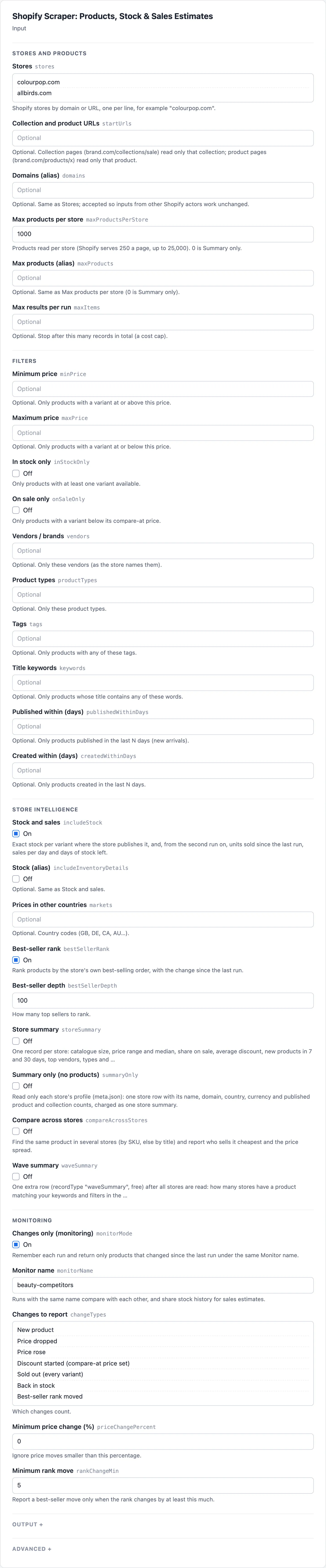
- Enter store domains in Stores, one per line ("colourpop.com"). To read one collection or one product instead, paste its link in Collection and product URLs.
- Narrow the catalogue with Minimum price, Maximum price, In stock only, On sale only, Vendors / brands, Title keywords or Published within (days); the actor applies them to each product it reads. Turn on Stock and sales, Prices in other countries, Best-seller rank or Store summary for more than the catalogue.
- Start the run. Open the Products view to read each product's From, To, On sale, Max discount %, Available, Stock and Sales per day, and the Store summaries view for Median price, On sale % and App categories.
- To watch competitors, turn on Changes only (monitoring), give it a Monitor name, save it as a task and schedule it daily. The Changes (monitoring) view then lists new products, price moves, discounts, sell-outs and restocks, with Price before and Price now.
What the Shopify scraper gives you
- Copy a catalogue: "Every product and variant from gymshark.com, as one row per variant for a spreadsheet." Set Output format to variants.
- Watch competitors: schedule daily runs with Changes only (monitoring) and get only what changed: new products, price drops and rises, discounts starting or ending, items selling out or coming back, sizes restocking.
- See what sells: turn on Stock and sales and run daily. Where a store publishes stock, each run gives units sold since the last run, sales per day and days of stock left per variant, and Best-seller rank shows the store's own best-selling order.
- Compare international pricing: Prices in other countries set to
GB,DE,CAgives each product's price in those countries and currencies, for stores that sell abroad with Shopify Markets. - Profile a store: Store summary returns catalogue size, price range and median, share on sale, new products in the last 7 and 30 days, top vendors and product types, the theme, the apps it runs (reviews, email and SMS, subscriptions, loyalty, payments, support, analytics…) and its social profiles.
- Size many stores fast: Summary only (no products) reads only each store's profile, one row per store with its name, domain, country, currency and published product count, and no products, for example to keep the stores under 200 products before reading them in full.
- Find the cheapest seller: list several stores with Compare across stores and get every product they share (matched by SKU, else by title) with the cheapest store and the price spread.
- Feed an AI agent or a sheet: choose only the fields you need in Only these fields, or get flat rows.
Shopify data accuracy
- More than the catalogue. Stock and sales estimates, best-seller rank, prices by market, store analytics with app detection, cross-store comparison and change monitoring, in one actor and one run.
- Works on more stores. Stores that redirect to
www, use locale paths, or run a headless front are found through their Shopify address. A store that moved to a new domain (the old one redirects there) is read on the new one, withinputkeeping the address you gave andprimaryDomainthe new one. A store that rate-limits its product feed is waited out once; one that still refuses it is read through its sitemap and product pages instead. A site that is not Shopify is reported, not returned empty. - Pay for what you use. Stock, market prices and store summaries are add-ons billed only when switched on and only where the store gives the data (no charge for hidden stock or a product not sold in a market); unchanged products in monitoring cost a fraction of a product (see Pricing below).
- Alias inputs. Domains (alias) (
domains), Max products (alias) (maxProducts) and Stock (alias) (includeInventoryDetails) are read as Stores, Max products per store and Stock and sales, and Collection and product URLs takes strings or{ "url": … }. - Honest data. Stock is reported only where the store publishes it (null otherwise, never a guess), a compare-at price of 0 means no discount, and a product not sold in a market has a null price there.
Shopify scraper input
| Field | Key | What it does |
|---|---|---|
| Stores | stores | Stores to read in full (up to Max products per store), by domain or URL |
| Collection and product URLs | startUrls | Collection pages (only that collection) or product pages (only that product) |
| Domains (alias) | domains | Same as Stores |
| Max products per store | maxProductsPerStore | Products per store (default 1,000; up to 25,000). 0 is Summary only |
| Max products (alias) | maxProducts | Same as Max products per store |
| Max results per run | maxItems | Stop after this many records in the run. In monitoring mode, unchanged products checked are billed in bulk and not capped by it |
| Minimum price, Maximum price | minPrice, maxPrice | Only products with a variant at or above / at or below this price |
| In stock only, On sale only | inStockOnly, onSaleOnly | Only available products / only discounted products |
| Vendors / brands, Product types, Tags, Title keywords | vendors, productTypes, tags, keywords | Filters by vendor, type, any tag, or title words |
| Published within (days) | publishedWithinDays | New arrivals only |
| Created within (days) | createdWithinDays | Only products created in the last N days. The created date does not reset when a product is republished; combine with Published within (days) to require both |
| Stock and sales | includeStock | Exact stock per variant (where published) and, from the second run, units sold, sales per day, days of stock left |
| Stock (alias) | includeInventoryDetails | Same as Stock and sales |
| Prices in other countries | markets | Prices in those countries and their currencies (GB, DE, CA, AU…) |
| Best-seller rank, Best-seller depth | bestSellerRank, bestSellerDepth | The store's best-selling order, with movement since the last run; depth is how many top sellers to rank (default 100) |
| Store summary | storeSummary | One store record: catalogue analytics, theme, apps, social profiles, top sellers |
| Summary only (no products) | summaryOnly | Only each store's profile: one store row with published product and collection counts; no products read or charged (also Max products per store 0) |
| Compare across stores | compareAcrossStores | The same product across stores, cheapest store and spread |
| Wave summary | waveSummary | One free recordType: "waveSummary" row after all stores: stores checked (each store once), split into storesWithMatch, storesWithoutMatch, storesUnreadable (refused, blocked or errored) and storesNotShopify; storesNotRead (left when the run stopped early), partial (stores left, or a store read only in part) and stopReason (max-items, spending-limit or time); and per matching store its match count, earliest created and published dates and cheapest matching price |
| Changes only (monitoring), Monitor name | monitorMode, monitorName | Changes only, compared with the last run under the same name (default default) |
| Changes to report | changeTypes | new-product, removed-product, price-drop, price-rise, discount-started, discount-ended, sold-out, back-in-stock, variants-changed, best-seller-move (all by default) |
| Minimum price change (%), Minimum rank move | priceChangePercent, rankChangeMin | Ignore smaller price or rank moves (defaults 0 and 5) |
| Output format | outputFormat | products (the default: one record per product) or variants (one flat row per variant) |
| Description HTML | includeDescriptionHtml | Also return description HTML (text is always included) |
| Only these fields | fields | Return only these fields (dotted paths reach into lists) |
| Proxy | proxyConfiguration | Optional. The actor picks proxies itself (direct, then datacenter, then residential only if a store blocks the others) |
| History store | stateStoreName | Optional key-value store for what earlier runs saw (default cleanpull-shopify-monitor); pick one when running with a scoped token in Restricted access mode |
Example inputs
A daily competitor watch with sales estimates (schedule it once a day):
A full catalogue as spreadsheet rows:
International pricing for one collection:
Shopify scraper output
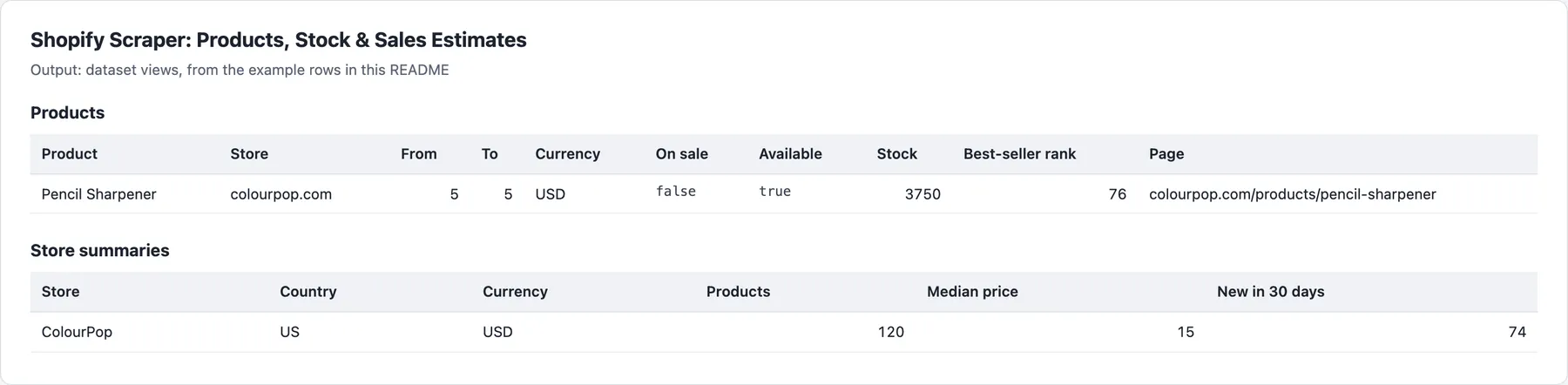
Views in the Output tab: Products, Changes (monitoring), Store summaries, Cross-store comparison and Wave summary.
Example rows
A product (shortened; a real record from 5 October 2026, run with stock, rank and UK prices):
Sales fields fill in from the second run under the same Monitor name. In monitoring mode each record also has changeTypes, previousPriceMin, priceChangePercent, variantChanges (price, availability and compare-at changes per variant) and previouslySeenAt.
A store summary (Store summary, same store, first 120 products read):
Summary only, comparison and run summary
With Summary only (no products) (summaryOnly), the store row comes from the store's profile alone: storeDomain, primaryDomain, storeName, description, country, city, currency, myshopifyDomain, shopId, publishedProductsCount, collectionCount, summaryOnly: true, url, input, scrapedAt. It is charged as one store summary, and no products are read. Only these fields never cuts it below storeDomain, storeName and publishedProductsCount. Monitor mode is turned off with a warning (there are no products to compare), and product filters and options are listed as not used.
Comparison records (Compare across stores) carry matchKey, matchedBy (sku or title), storeCount, cheapestStore, cheapestPrice, highestPrice, priceSpreadPercent and every store's offer. Every run also writes RUN_SUMMARY to the key-value store: the outcome (COMPLETE, PARTIAL, NO_CHANGES, EMPTY or FAILED), counts, warnings and the reason for any failed store.
Shopify sales estimates
Shopify stores that track stock often publish the count per variant. Each run records it under your Monitor name; the next run reads the drop as units sold (and a rise as a restock), divided by the days between runs. Returns, cancellations and stock moved between warehouses are not visible, so treat it as an estimate. Stores that hide stock get null, never a guess.
Pricing
Pay only for results delivered. Stores that fail are never charged.
| Event | Free and Bronze | Silver | Gold |
|---|---|---|---|
| Product (all its variants) | $0.80 | $0.70 | $0.60 |
| Change (monitoring mode: one changed product) | $1.00 | $0.90 | $0.80 |
| Unchanged product checked (monitoring mode) | $0.15 | $0.13 | $0.12 |
| Stock and sales tracking (add-on per product) | $0.50 | $0.45 | $0.40 |
| Price in another market (add-on per product per country) | $0.30 | $0.27 | $0.24 |
| Store summary (per store) | $3.00 | $2.70 | $2.40 |
| Cross-store comparison group | $1.00 | $0.90 | $0.80 |
Prices are per 1,000; your tier depends on your Apify plan. Each run also has a $0.00005 start fee. The variants output format is billed per product, not per row. The first monitoring run (every product new) is billed at the product price, not the change price. Cross-store comparisons run in catalogue mode only. The wave summary row is free.
Limits
- Only what a Shopify store publishes to every visitor: no orders, revenue or customer data. Stores can hide stock, the best-selling sort or market prices; the fields are then null and the run says so in its warnings.
- Shopify serves up to 25,000 products a store through its product feed.
- Best-seller rank follows the store's own sort over its catalogue (or its default collection, which some stores redirect to).
- Two runs with the same Monitor name and store at the same time share one memory; schedule them apart.
- Product pages do not show availability. A monitoring run that had to read them (the store refused its product feed) compares prices and options but not sell-outs or restocks, says so in its warnings, and keeps the last known availability for the next run. A product the run did not read is not checked: never reported as sold out or removed.
- Monitoring chosen collections or product URLs reports changes to those products, but not products leaving a collection; monitor the whole store for removals.
- A market a store does not sell to separately (same currency as home) is skipped with a warning;
UKis read asGB. - Stores that can't be read: a store that is not on Shopify, a domain that does not exist, or a store that turned every request away this time is not a failure. Each gets one free
recordType: "unreadable"row giving thereason, also when other stores were read; when no store gives anything and every store is one of these, the run still succeeds and nothing is charged. Any other failure (a store too large to read, an unexpected error) is listed inRUN_SUMMARYwith the reason; when no store gives anything and any store failed that way, the run ends FAILED, no free rows are given, even for the other stores, and nothing is charged. A run near its time limit stops starting stores, delivers what it read and lists the rest in RUN_SUMMARY. - Time limit inside a store: shortly before the run's timeout, the store being read stops there. The time kept is a twentieth of the run (between 30 seconds and 3 minutes) plus time to deliver the products already read, and never more than half the run, so even a very short run reads its first store. The products read until then are delivered and charged as usual, the run ends SUCCEEDED, a warning names the store, and
RUN_SUMMARYcounts it incutShortForTime. When every product was read but stock, market prices or ranks were not finished in time, the products are delivered without them, a warning says which, andRUN_SUMMARYcounts the store inaddOnsCutShortForTimeinstead; a store summary not read in full is not delivered or charged. Either way the outcome isPARTIAL. Only the run's own timeout stops a store: a run with no timeout reads each store to the end. - A store that refuses its product feed has its product pages read 4 at a time, and one at a time from the first refused page on. One that then refuses 12 pages in a row is left with a free
unreadablerow instead of trying every page. One that refuses 12 pages in a row after some were read keeps those: they are delivered, a warning says the rest was refused, andRUN_SUMMARYcounts it incutShortForBlocks.
FAQ
How much does Shopify product data cost per store per day?
A store of 1,000 products read once a day costs $0.80 a day on the Free and Bronze plans. With Changes only (monitoring), the first run costs the same (every product is new); after that, a day with 20 changed products and 980 unchanged costs about $0.17 ($0.02 for the changes, $0.147 for the unchanged checks). Stock and sales adds $0.50 per 1,000 products where the store publishes stock (unchanged products included), Prices in other countries $0.30 per 1,000 delivered products for each country where a product has a price (in monitoring, only on changed products, not on unchanged checks), and Store summary $0.003 per store. A store that could not be read is never charged, and the wave summary row is free. Each run also has the start fee, and higher Apify plans pay less (see Pricing below).
How often should I check a Shopify store for changes?
Daily suits most competitor watches. With Changes only (monitoring) and a schedule, each run returns only the products that changed since the last run under the same Monitor name; Changes to report picks which changes count, and Minimum price change (%) and Minimum rank move keep small moves out. Sales estimates need at least two runs under the same Monitor name, and daily runs give the clearest units-sold figures. Schedule two runs with the same Monitor name and store apart, never at the same time.
What is the difference between price, compare-at price and market prices?
Each variant's price is what the store charges now in its home currency (currency), and compareAtPrice is the was-price the store sets; a compare-at price of 0 or none gives null. A variant priced below its compare-at price has a discountPercent, which makes the product onSale, with the biggest discount in discountPercentMax. priceMin and priceMax span the variants' prices. marketPrices holds the prices in each country you asked for in Prices in other countries, in that country's currency.
Why is stock, sales or a market price missing?
- Stock hidden: a store that does not publish stock gets
totalInventory: nulland no counts per variant, never a guess, and the stock add-on is not charged. - First run:
unitsSoldSinceLastRun,salesPerDayanddaysOfStockLeftstaynulluntil a second run under the same Monitor name. - Time ran out: a store cut short at the run's timeout keeps the products read, but stock, market prices, ranks and its store summary may be missing (the warnings say which; a missing store summary is not charged). Raise the timeout in Run options.
- Feed refused: a store that refused its product feed is read from its product pages, which show no availability, so
availableisnulland sell-outs and restocks are not compared that run (the warnings say so). - Not sold in a market: a product the store does not sell in a country has a
nullprice there, not billed; a country the store does not sell to separately is skipped with a warning. - Store not read: a store that is not on Shopify, does not exist or turned every request away gets a free
recordType: "unreadable"row with thereason. A store that failed any other way (too large to read, an unexpected error) is listed inRUN_SUMMARY; if no store gave anything, such a failure ends the run FAILED, with no free rows.
Which Shopify stores does it support?
Any store on Shopify, by its own domain, its myshopify.com address or a collection or product link, including stores that redirect to www, use locale paths or run a headless front with a Shopify address. Up to 25,000 products a store. Prices in other countries takes any two-letter country code the store sells to with Shopify Markets (GB, DE, CA, AU…). A site that is not on Shopify gets a free row saying so.
Can I use the Shopify scraper through the API?
Yes. Start runs through the Apify API or an API client, and read the dataset through its Products, Changes (monitoring), Store summaries, Cross-store comparison and Wave summary views, or the RUN_SUMMARY record with the outcome, counts and reasons. Only these fields (fields) trims each record to the keys you need, and Output format variants gives flat rows for CSV and Excel.
Does it work with Google Sheets, Make, Zapier or Claude?
Yes. Apify's integrations send each run's results to Google Sheets, Make, Zapier, webhooks and other tools, and a schedule keeps them updated. From Claude, the MarketMage plugin profiles a competitor's Shopify store and watches whole stores for new products, price moves and discounts in a chat.
Is it allowed to scrape Shopify stores?
The actor reads public Shopify storefront data as a signed-out visitor sees it: no login, no account and no customer data. How you use the data, and following the laws and terms that apply to you, is your responsibility. This is not legal advice.
Related actors
Other CleanPull actors for monitoring:
- Price Tracker & Stock Monitor for Any Online Store: price and stock changes on product pages of any online store.
- Competitor Promotions & New Products Monitor: competitor sales, discount codes and new products.
- Reviews Monitor: new reviews and rating moves on Shopify review apps, Amazon and Trustpilot.
- Catalog Matcher: match your catalogue to competitors' and find price gaps.
Use it from Claude
The MarketMage plugin runs these actors from a Claude chat.
Found it useful? A rating on the Store helps others find it.
Changelog
-
0.1.x, time limits (2026-11-12): a store still being read near the run's timeout stops there and delivers the products read so far, with a warning and
cutShortForTimeinRUN_SUMMARY, instead of the whole run timing out with nothing. A store that refuses its product feed has its product pages read 4 at a time (one at a time once a page is refused), with progress in the status message, and is left after 12 refused pages in a row (what was read is kept, counted incutShortForBlocks). Prices and events unchanged. -
0.1.x, moved stores (2026-11-09): a store whose address now redirects to another domain (a rebrand) is read on the new domain, following up to 3 moves; a redirect loop gets a free row. The status message says where it was read. A store that refused every request, or is not on Shopify, gets a free
unreadablerow also when other stores were read, and a run whose every store was refused now ends SUCCEEDED with those rows instead of FAILED. Prices and events unchanged. -
0.1.x, reliability (2026-11-01): a store address that does not exist (no such domain, with or without www) is now found before any proxy is tried, so it always ends with a free
unreadable'not found' row (a proxy's own error could make it a failed run), and a passing DNS fault is no longer called 'not found'. A store whose bare domain does not resolve is read at its www address directly, and an address that points inside a private network is no longer fetched. Prices and events unchanged. -
0.1.x, summary only (2026-10-24):
summaryOnly(ormaxProductsPerStore: 0) reads only each store's profile and delivers one store row with its published product count, charged as one store summary, with no products read or charged. A domain that is not Shopify gets the usual free row. Prices and events are unchanged. -
0.1.x, reliability (2026-10-24): runs that find nothing (stores not on Shopify, domains that do not exist) end SUCCEEDED with a free
unreadablerow per store, instead of FAILED; a store refused on every route is told apart from one that is not Shopify, and a run whose every store was refused still fails; a run stops starting stores before its time limit, never TIMED-OUT. Prices and events unchanged. -
0.1 (October 2026): catalogues by store, collection or product; filters; stock and sales estimates; best-seller rank; prices by market; store summaries with app detection; cross-store comparison; changes-only monitoring; flat variant rows and field selection.


