

Amazon Best Sellers Scraper & Rank Tracker
Pricing
from $1.20 / 1,000 product rows
Amazon Best Sellers Scraper & Rank Tracker
Amazon Best Sellers, New Releases and Movers & Shakers with all 100 ranks in 22 marketplaces, plus what changed since your last run: rank moves, new entries, drop-outs and computed movers, with a summary per chart. Bestseller rank tracking from $1.50 per 1,000 products.
Pricing
from $1.20 / 1,000 product rows
Rating
0.0
(0)
Developer

CleanPull
Maintained by CommunityActor stats
0
Bookmarked
8
Total users
5
Monthly active users
2 days ago
Last modified
Categories
Features
Share
This Amazon Best Sellers scraper tracks the Amazon bestseller rank of every product on Amazon's Best Sellers and New Releases charts in 22 marketplaces, with all 100 ranks (also the ranks Amazon loads only as you scroll), and shows what changed since your last run: products that climbed or fell and by how many places, new entries, re-entries, products that dropped out, days on chart, price changes, and our own Movers & Shakers computed from your runs. Products that are on both charts are flagged, and every chart gets a summary row (new entries, drop-outs, volatility, median price, brands entering and leaving). Add product details for the top products: Best Sellers Rank at every category level, brand, seller, stock, parent product and "bought in past month". Fast HTTP; it runs once, on a schedule or through the API.
How to scrape Amazon Best Sellers
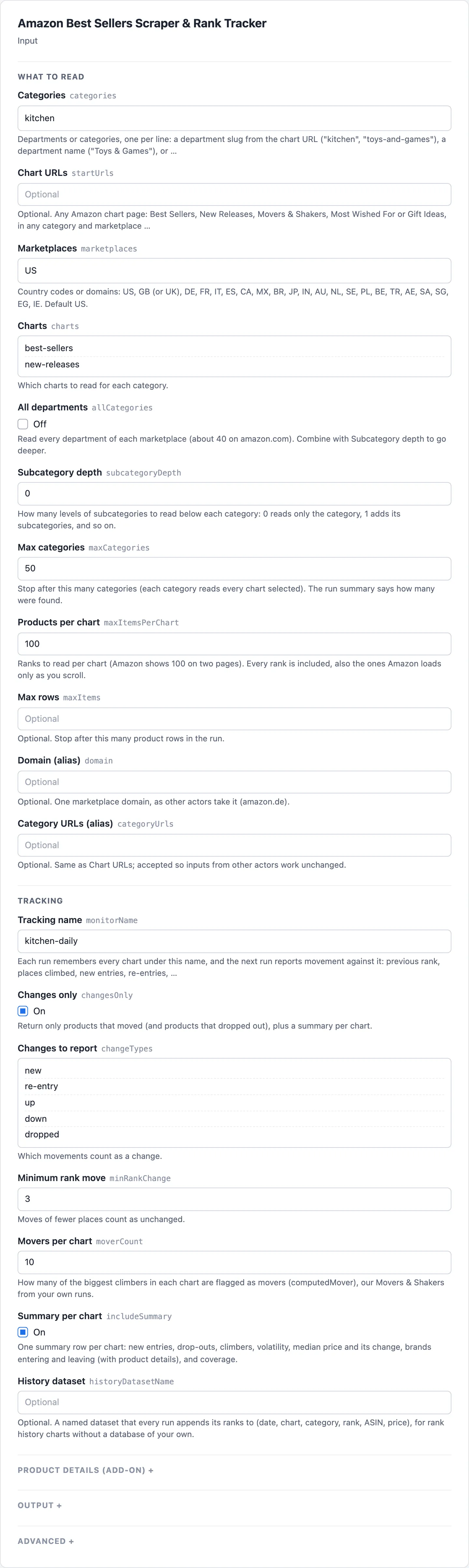
- Open Amazon Best Sellers Scraper & Rank Tracker on Apify and go to its input form.
- Enter departments in Categories, one per line (
kitchen,Toys & Games, orkitchen/289728for a subcategory), or paste chart pages in Chart URLs. - Pick the Marketplaces (US by default) and the Charts (Best Sellers by default; add New Releases). Turn on Product details for the Best Sellers Rank at every level, brand, seller and "bought in past month" of the top products.
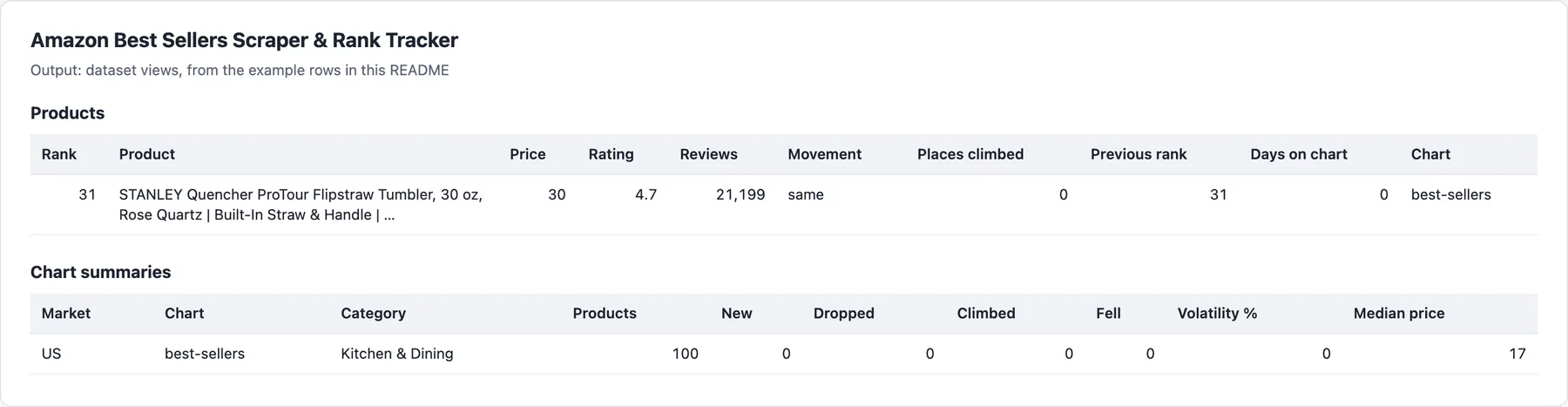
- Start the run. Open the Products view to read each product's Rank, Price, Rating, Reviews, Movement and Places climbed, and the Chart summaries view for each chart's new entries, drop-outs and median price.
- To track bestseller ranks over time, turn on Changes only, give the run a Tracking name, save it as a task and schedule it daily. The Movers and new entries view then shows the climbers and new entries, and Dropped out the products that left.
What the Amazon Best Sellers scraper gives you
- Find products before they peak: schedule a daily run with Changes only and get the new entries, the biggest climbers and the products that are both a New Release and a Best Seller.
- Watch your category: a summary row per chart tells you how much the top 100 moved, which brands came in or left, and where the median price went.
- Track your own products and rivals: every row says where a product was last time, how long it has been on the chart, and how its price moved.
- Build a rank history: name a history dataset and every run appends its ranks, ready to chart in Sheets or a BI tool, without a database of your own.
- Research many categories: read every department, and their subcategories to any depth, with a category limit.
Amazon bestseller rank accuracy
- All 100 ranks, verified. Amazon puts only about 30 of each page's 50 products in the page itself and loads the rest as you scroll. This actor loads the rest the way the page does and adds a coverage block to each chart summary listing any rank whose details Amazon did not serve (its rank and ASIN are still given).
- Movement, not just a list. Previous rank, places climbed, new, re-entry, dropped out, days on chart, price change and computed movers in every row; a changes-only mode where unchanged products cost $0.10 per 1,000.
- Our own Movers & Shakers. Amazon currently shows its Movers & Shakers, Most Wished For and Gift Ideas pages empty in most categories ("no movers and shakers available"). This actor still reads them when Amazon fills them (with Amazon's own percentage change), reports them as empty and never bills an empty chart, and flags the biggest climbers from your own runs (
computedMover). - Local prices. Pages are requested in the marketplace's own currency, and every row says which currency its price is in; prices in different currencies are never compared.
- Cross-chart signals.
new-release-on-best-sellers,best-seller-is-new-release,new-entry-top-10andcomputed-mover. - 22 marketplaces, one language each. Pages are always requested in the marketplace's own language and currency, so a product never appears twice under two titles.
- Honest failures. A category a marketplace does not have (Amazon then shows its all-departments chart instead) is reported, not billed as data. Blocked pages are retried through datacenter and then residential proxies; Amazon's "continue shopping" interstitial is passed automatically.
Amazon Best Sellers scraper input
| Field | Key | What it does |
|---|---|---|
| Categories | categories | Department slugs (kitchen, toys-and-games), department names (Toys & Games) or department/node for a subcategory (kitchen/289728) |
| Chart URLs | startUrls | Any chart URL: Best Sellers, New Releases, Movers & Shakers, Most Wished For, Gift Ideas, in any category and marketplace |
| Marketplaces | marketplaces | US, GB (or UK), DE, FR, IT, ES, CA, MX, BR, JP, IN, AU, NL, SE, PL, BE, TR, AE, SA, SG, EG, IE (default US) |
| Charts | charts | best-sellers (the default), new-releases, movers-and-shakers, most-wished-for, gift-ideas |
| All departments | allCategories | Every department of each marketplace (about 40 on amazon.com) |
| Subcategory depth | subcategoryDepth | How many subcategory levels below each category (default 0, the category only) |
| Max categories | maxCategories | Stop after this many categories (default 50) |
| Products per chart | maxItemsPerChart | Ranks per chart, up to 100 (the default) |
| Max rows | maxItems | Stop after this many product rows in the run |
| Domain (alias) | domain | One marketplace domain, as other actors take it (amazon.de) |
| Category URLs (alias) | categoryUrls | Same as Chart URLs |
| Tracking name | monitorName | The memory each run compares with (default default) |
| Changes only | changesOnly | Only products that moved (and products that dropped out), plus a summary per chart when Summary per chart is on |
| Changes to report | changeTypes | Which movements count: new, re-entry, up, down, dropped (all by default) |
| Minimum rank move | minRankChange | Moves of fewer places count as unchanged (default 3) |
| Movers per chart | moverCount | Climbers flagged as movers per chart (default 10) |
| Summary per chart | includeSummary | A summary row per chart (on by default) |
| History dataset | historyDatasetName | A named dataset every run appends its ranks to; free |
| Product details | includeProductDetails | Product pages for the top products of each chart; billed per product |
| Details for the top | productDetailsTopN | How many products from the top of each chart get details (default 20) |
| Only these fields | fields | Return only these fields, for example rank, asin, title, price, rankChange |
| Categories at a time | maxConcurrency | Categories read in parallel (default 2; Amazon answers bursts with CAPTCHAs) |
| Proxy | proxyConfiguration | Optional; the actor picks proxies itself |
| History store | stateStoreName | Optional key-value store for earlier runs' charts (default cleanpull-amazon-charts); pick one when running with a scoped token in Restricted access mode |
categoryUrls and domain from other best-seller actors work as they are.
Example inputs
Kitchen in the US, both charts, a daily watch for what moved:
Every department in the UK and Germany, one level of subcategories, top 50:
Amazon Best Sellers scraper output
Example rows
A product row (a real row from 6 October 2026: the second run under the same tracking name, an hour after the first, when this product had not moved; movement is up, down, new or re-entry when it has):
Product pages are read as local shoppers see them (with a delivery postcode in the country on amazon.de, .fr and .co.uk, and through addresses in the country elsewhere), so seller and stock are what local shoppers see. When Amazon does not serve a product's page, its row carries "detailsNotRead": true instead of details, and no product details are charged for it.
The first run under a tracking name is a baseline: movement fields are null and every product is returned. A dropped row names a product that left the chart (lastRank, lastSeen, firstSeenOnChart).
The chart summary from the same run (when the chart has moved, new entries, drop-outs and climbers are counted here; brandsEntering and brandsLeaving compare the brands of the detailed top products):
The run's final status message summarises the key numbers in plain text after "Done: N results.": per chart the products listed, the median price, rating and review count, how many have under 500 reviews and, from a second run, new and dropped products, ending "More in the dataset." when not everything fits.
Every run writes RUN_SUMMARY to the key-value store: the outcome (COMPLETE, PARTIAL, NO_CHANGES, EMPTY or FAILED), charts read, charts Amazon shows empty, categories found, charges, warnings and failures.
Pricing
Pay only for results. Empty charts and failed pages are never charged.
| Event | Free and Bronze | Silver | Gold |
|---|---|---|---|
| Product row | $1.50 | $1.35 | $1.20 |
| Change (changes only: a product that moved, entered or dropped out) | $2.00 | $1.80 | $1.60 |
| Unchanged product checked (changes only) | $0.10 | $0.09 | $0.08 |
| Chart summary | $2.00 | $1.80 | $1.60 |
| Product details (per product page) | $4.00 | $3.60 | $3.20 |
Prices are per 1,000; your tier depends on your Apify plan. Each run also has a $0.00005 start fee. The history dataset is free.
Limits
- Only what Amazon shows every visitor. Sales figures are not public; "bought in past month" appears only on products where Amazon shows it, and Best Sellers Rank is Amazon's own.
- Amazon currently shows Movers & Shakers, Most Wished For and Gift Ideas empty in most categories. They are read whenever Amazon fills them; meanwhile the computed movers cover chart movement.
- Chart pages are read without a delivery postcode, so chart prices are those Amazon shows to a visitor without one. Product pages are read with a postcode in the country on amazon.de, .fr and .co.uk (see the output section).
- Movement compares runs under the same tracking name; schedule them at a steady interval (daily is typical). Two runs with the same name at the same time share one memory.
- Large crawls (every department, deep subcategories) take time: Amazon answers bursts with CAPTCHAs, so requests are paced.
- Nothing found: when no chart could be read because none exists (a category or department name Amazon does not have, a chart it 404s), the run still succeeds, with one free
recordType: "unreadable"row per item giving thereason; nothing is charged. A run near its time limit stops starting categories, delivers what it read and lists the rest the same way.
FAQ
How much does Amazon Best Sellers tracking cost per chart per day?
One chart of 100 products read once a day, with its summary row, costs about $0.15 a day (about $4.56 a month) on the Free and Bronze prices. With Changes only, after the first run, each unchanged product costs $0.0001 and each product that moved, entered or dropped out $0.002: about $0.05 a day when 20 of the 100 move. Product details add $0.004 per product page read. Higher Apify plans pay less (see Pricing below). Empty charts, failed pages and the history dataset are never charged.
How often should I check the Amazon Best Sellers charts?
Daily suits most uses: Amazon updates the charts through the day, and runs under the same Tracking name at a steady interval give comparable movement. Changes only then returns only the products that moved, and Minimum rank move (3 places by default) keeps small reshuffles out. Hourly works for fast categories.
What is the difference between Best Sellers Rank and the chart rank?
rank is the product's place on the chart you read (1 to 100 in that category). The Best Sellers Rank in details.bestSellersRanks is Amazon's rank for the product in each of its categories, from the top level down, read from its product page with Product details.
Why is a movement or product detail missing?
- First run: movement fields (
previousRank,rankChange,movement) are null on the baseline run under a Tracking name. - Details not served: a product whose page Amazon did not serve has
"detailsNotRead": trueinstead ofdetails, and no product details are charged for it. - Ranks without details: the chart summary's
coveragelists inmissingDetailRanksany rank whose details Amazon did not serve; its rank and ASIN are still given. - Empty chart: Movers & Shakers, Most Wished For and Gift Ideas are often empty at Amazon; the summary says
amazonShowsEmpty: trueand nothing is charged. - Category not found: a category Amazon does not have gives a free
recordType: "unreadable"row with thereason, andRUN_SUMMARYlists the failures.
Which Amazon countries does it support?
22 marketplaces: US, GB (or UK), DE, FR, IT, ES, CA, MX, BR, JP, IN, AU, NL, SE, PL, BE, TR, AE, SA, SG, EG and IE. Enter country codes or domains in Marketplaces; each is read in its own language and currency.
Can I use the Amazon Best Sellers scraper through the API?
Yes. Start runs through the Apify API or an API client, and read the dataset through its Products, Movers and new entries, Chart summaries and Dropped out views, or the RUN_SUMMARY record. Only these fields (fields) trims each row to the keys you need, and History dataset keeps every run's ranks in one named dataset.
Does it work with Google Sheets, Make, Zapier or Claude?
Yes. Apify's integrations send each run's results to Google Sheets, Make, Zapier, webhooks and other tools, and a schedule keeps them updated. From Claude, the MarketMage plugin finds products selling now from the Best Sellers charts in a chat.
Is it allowed to scrape Amazon Best Sellers?
The actor reads public Amazon chart and product pages as a signed-out shopper sees them: no login, no account and no customer data. How you use the data, and following the laws and terms that apply to you, is your responsibility. This is not legal advice.
Related actors
Other CleanPull actors for marketplace:
- Amazon Product Scraper: Amazon price, Buy Box, every seller's offer and Best Sellers Rank by ASIN.
- Amazon Keyword Rank Tracker: where your products rank on Amazon search for your keywords.
- TikTok Shop Scraper & Sales Tracker: TikTok Shop units sold per day, revenue and rising products.
- Google Trends Scraper & API: Google Trends interest over time, regions and related queries.
Use it from Claude
The MarketMage plugin runs these actors from a Claude chat.
Found it useful? A rating on the Store helps others find it.
Changelog
- 0.1.15, local product details on amazon.de, .fr and .co.uk (2026-11-08): product pages there are read with a delivery postcode in the country (10115 Berlin, 75001 Paris, SW1A 1AA London), as a local shopper sets it, which gives the same seller, stock, price and ranks as before.
brandno longer keeps the store link's wording on amazon.fr ("Visiter la boutique Lotus" is now "Lotus") or on other marketplaces. A page lacking only the review histogram (not delivered here) no longer triggers a second request. Prices and events unchanged. - 0.1.14, product details in Europe (2026-11-08): product details on amazon.de, .fr, .it, .es and .co.uk are read again (Amazon was answering product pages with its 503 throttling page), through addresses in the marketplace's country, with Best Sellers Rank completed when Amazon leaves it off the page. Details that could not be read are never charged: the row says
detailsNotRead. Prices and events unchanged. - 0.1.12, status summary (2026-11-06): the final status message now summarises each chart's key numbers after "Done: N results." (products listed, median price, rating and reviews, how many under 500 reviews, new and dropped since the last run), so a reader can often skip the dataset read. Prices and events unchanged.
- 0.1.x, reliability (2026-10-24): runs that find nothing (unknown categories or department names, missing charts) end SUCCEEDED with a free
unreadablerow per item saying why, instead of FAILED; a run stops starting categories before its time limit and ends with what it read, never TIMED-OUT. A run whose every chart Amazon refused still fails. Prices and events unchanged. - 0.1.x (2026-10-23):
priceMedianuses the shared median, to the cent (an even count's mean was rounded to 0.1). - 0.1 (October 2026): Best Sellers, New Releases, Movers & Shakers, Most Wished For and Gift Ideas in 22 marketplaces; all 100 ranks; movement between runs, computed movers, cross-chart signals, chart summaries; changes-only mode; history dataset; product details.


