

Supplier Price Finder: Wholesale & Landed Cost
Pricing
from $4.00 / 1,000 product summaries
Supplier Price Finder: Wholesale & Landed Cost
Wholesale and dropship cost for a product idea: unit prices, MOQ, price breaks and supplier ratings from Made-in-China, AliExpress and Alibaba search, plus DHgate and Alibaba offer pages you pick, with a landed-cost estimate where a page shows shipping. Only your Apify account needed.
Pricing
from $4.00 / 1,000 product summaries
Rating
0.0
(0)
Developer

CleanPull
Maintained by CommunityActor stats
0
Bookmarked
2
Total users
1
Monthly active users
2 days ago
Last modified
Categories
Features
Share
This supplier price finder takes product ideas in a few words ("silicone baking mat", "dog harness") and returns what it costs to source them, with a landed cost estimate where a page shows shipping: factory offers from Made-in-China.com with unit price, minimum order (MOQ), quantity price breaks, and the supplier's name, badge, audit, years and reviews. Add the DHgate and Alibaba offer pages you found to compare them in the same table: DHgate pages bring the shipping cost and delivery days to the US, so those offers get a landed cost per unit (labelled an estimate). AliExpress and Alibaba search join through CleanPull's marketplace data service when you add them to Sources to search, with only your Apify account needed. Each idea gets one summary row: the spread of unit prices and MOQs, the cheapest, lowest-MOQ and cheapest-landed offers, and a landed-cost range where a page shows shipping. It runs once or through the API, with no sign-in.
How to find supplier prices and landed cost
- Open Supplier Price Finder on Apify and go to its input form.
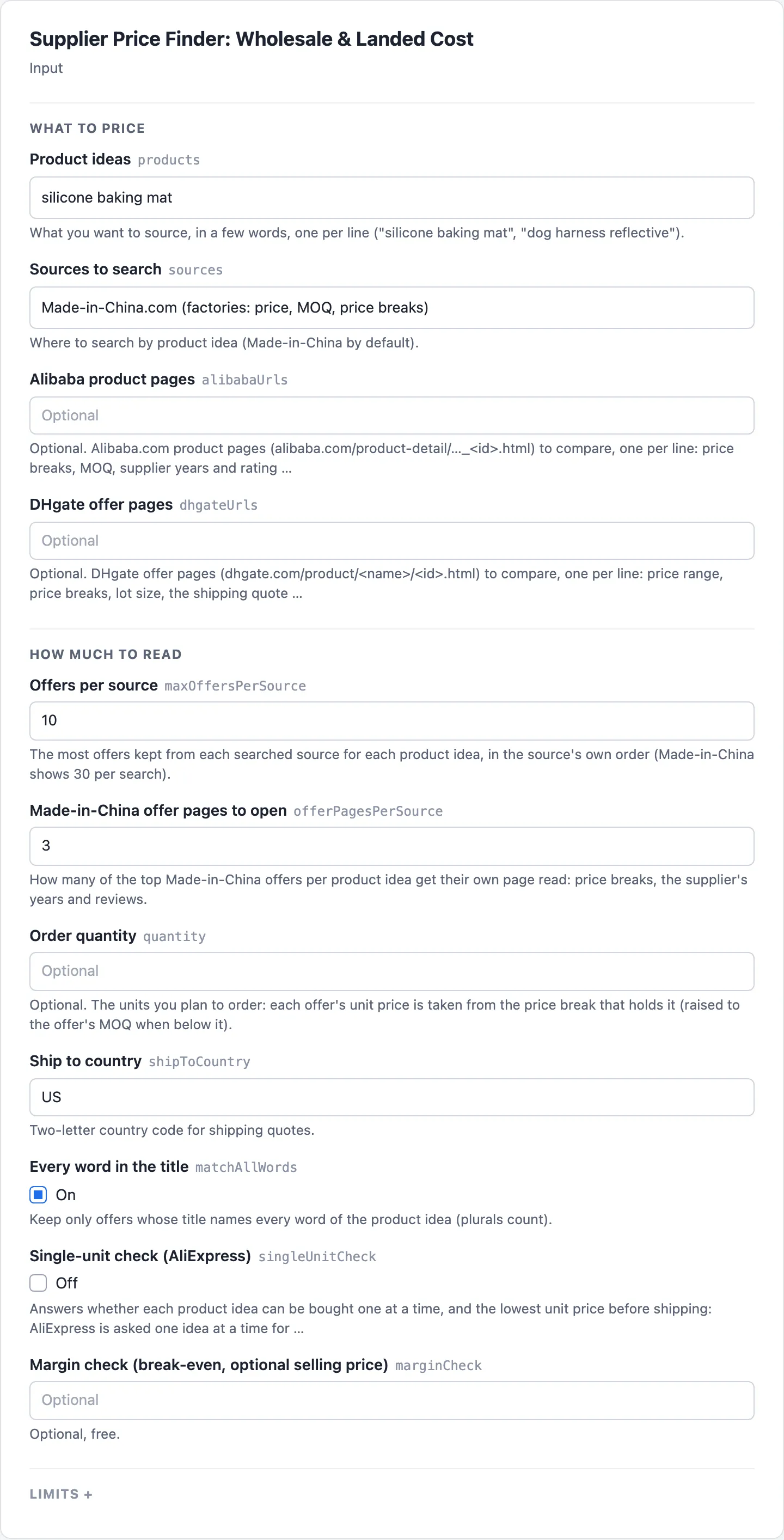
- Enter what you want to source in Product ideas, a few words each, one per line.
- Pick Sources to search (Made-in-China by default; add AliExpress and Alibaba), and paste offer pages you found in DHgate offer pages or Alibaba product pages. Set Order quantity for the unit price at your order size.
- Turn on Single-unit check (AliExpress) to learn whether one unit can be bought and for how much, and set Margin check (break-even, optional selling price) for the margin after ad cost.
- Start the run. Open the Product summaries view to read each idea's Lowest unit price, Median unit price, Lowest MOQ and Landed cost from (est.), and the Offers view for each offer's Unit price from, MOQ, Shipping, Supplier and Badge.
What the supplier price finder gives you
- "What would this product cost me to source?" One product idea, ten Made-in-China offers: the summary gives the lowest, median and highest unit price and MOQ in one row.
- "What do these DHgate listings cost landed in the US?" Paste the DHgate offer pages you found: each gets its US shipping quote, delivery days, price breaks and a landed cost per unit, as an estimate.
- "What is the unit price at 1,000 units?" Set an order quantity: each offer's price comes from the price break that holds it.
- "Compare the Alibaba quotes I found with other suppliers." Paste Alibaba product pages next to a product idea: their price breaks, MOQ, supplier years and rating join the same summary.
- "Check margins for a product I want to sell." Turn on Margin check (break-even, optional selling price) for the margin after the channel fee and ad cost on each summary; the MarketMage plugin also feeds the unit and landed cost into its product check.
- "Dropship from AliExpress." Add
aliexpressto Sources to search: its prices per piece join the comparison, from its search for your product idea. - "What do Alibaba factories ask for it?" Alibaba search gives each offer's price or price range, its minimum order and the supplier; give an offer's page for its price breaks.
Supplier price sources
| Source | How | What it adds |
|---|---|---|
| Made-in-China.com | Searched by product idea (30 offers per search), plus the top offers' own pages | Unit price or range, MOQ, price breaks, Diamond or Gold member badge, audit, province, business type, years, reviews |
| DHgate offer pages | The pages you give (dhgate.com/product/…/ | Price range, list price, price breaks, lot size, shipping cost and days to the US, store age, feedback, on-time delivery |
| Alibaba.com product pages | The pages you give (alibaba.com/product-detail/…) | Price breaks, MOQ, supplier name, years, rating, on-time delivery, verification, units sold |
| AliExpress search | aliexpress.us search, through CleanPull's marketplace data service | Price per piece in USD as a returning buyer pays it, list price, store name where shown. No price breaks, no shipping cost |
| Alibaba.com search | alibaba.com search, through CleanPull's marketplace data service | Price or price range in USD, MOQ (from the search page), supplier name, country, years, rating. No price breaks or shipping |
Pages this actor reads itself are read signed out, as any visitor sees it, and only at addresses the site's robots.txt allows. DHgate is not searched: its robots.txt disallows its search pages (/w/) and any address with a query string; its offer pages are read when you give them, as are Alibaba's. 1688.com needs a sign-in and is not read.
The marketplace data service is a third-party web data provider. CleanPull holds the account and its keys, which never appear in your input, logs or results. AliExpress is read from its search page first, through the service's page unlocker: about 15 to 25 seconds per product idea, its listings and prices taken from the data embedded in the page. An idea AliExpress finds nothing for is answered from its page (no results). An idea whose page does not come back within a minute (one retry), or comes back without its listing data twice in a row (it is read once more first), is searched through the service's AliExpress dataset instead, which visits each result's page and takes several minutes; those ideas go there a few seconds after their page fails, without waiting for the other pages, and the run's log says which ideas went that way and why. Offers read from the search page show the card's price (unitPriceMin and unitPriceMax are that one price; where the card's sale price is AliExpress's first-order welcome deal, "New shoppers save $0.91", they are what a returning buyer pays: the sale price plus the new-shopper subsidy the card's discount breakdown lists, never above the original price, with the welcome price in newShopperPrice and the original price in regularPrice), the store name where the card shows it, and no spec clues (category, specs, variantOptions are null). Alibaba is read from its search page first the same way, asked from a US address so its prices are in US dollars, and in English: about 35 to 80 seconds per product idea, 6 at once, its listings taken from the data embedded in the page. A page that comes back in another language anyway is read once more. A page that does not come back within 90 seconds (one retry), comes back in another language twice or in another currency, without its listing data, with fewer listings than asked while it loads the rest later, or full pages (48 listings each) that still hold fewer usable listings than Offers per source asks once pages 2 and 3 are read, is searched through the service's Alibaba dataset instead (about a minute, all such ideas together), with the reason in the log; cards priced in another currency are left out, and cards with no price shown ("Negotiable") are kept with the price empty. Alibaba is never answered as "nothing found" from its page: a page with no listings is read once more, then goes to the dataset. It is searched only when Sources to search lists aliexpress or alibaba. Each result delivered as an offer row is a provider record on your bill; results the title filter or Offers per source leave out are not charged per record. Each search job (one source with the run's ideas) is one provider search, a flat fee that covers the results left out; AliExpress is one provider search for the run whether its ideas were read from their pages, through the dataset, or both, and so is Alibaba. Its offers carry no price breaks and no shipping cost, so they have no landed cost, and each offer row says so in notes. AliExpress sells single pieces (MOQ 1); Alibaba offers read from the search page carry the card's minimum order (moq, unit), the supplier's years, rating and country, and units sold; those read through the dataset have no minimum order (moq is null).
In tests from Apify's servers, every Made-in-China and DHgate page was read on the first try from Apify's own address, and every DHgate offer page given had a US shipping quote.
Supplier price accuracy
- Landed cost only where a page shows shipping. It is the unit price plus the shipping the page shows for your country, spread over the units of that quote. It never guesses a freight rate, and it excludes import duties, taxes, payment fees and customs brokerage. Every landed figure is labelled as an estimate, with its basis. Today that means DHgate offer pages you give, quoted to the US.
- Prices only in US dollars. A price is taken only where the page marks it as US dollars (US$, Alibaba's dollar fields, DHgate's USD fields, AliExpress's currency code); anything else stays empty, with a note in the row. Nothing is silently read as dollars.
- Unit prices per piece. DHgate sells some products by the lot: the unit price is the lot price divided by the pieces per lot, and the row keeps the lot price and lot size.
- Only offers about your product. Search results get padded with unrelated "recommended" listings; an offer whose title does not name every word of the idea (plurals count) is left out and never charged. Turn off Every word in the title to keep them.
- Specs to compare like with like. Two "silicone baking mats" can differ in material, size or thickness. Each offer carries the source's own attribute table (
specs: Material, Size, Capacity, Model NO.… as the supplier filled them in), itscategoryand the options a buyer picks from (variantOptions: colours, sizes), wherever the page or search record already read shows them. They are passed through as written, never normalised or checked, and cost nothing extra: no further request is made for them. - Prices at your quantity. With an order quantity, the price break that holds it is used; below an offer's MOQ, the quantity is raised to the MOQ and the row says so.
- A block is never an empty result. Each source gets its own proxy ladder (Apify's own address, then datacenter, then residential for a source that blocks the others, up to 3 requests per page there; a refusal moves to a new address, a server error is retried on the same one), at most 2 requests at a time, waiting longer after each refusal, at most 2 minutes per page. A source or page that cannot be read is named in the summary row and the run summary, with the reason; the others still deliver.
- A service problem stops only its sources. If the marketplace data service is unavailable, AliExpress and Alibaba are named in the summary row with the reason, and Made-in-China and your pages still deliver.
- Only delivered rows are billed, and the summary describes them. A failed source, a removed page, a filtered offer or an idea with no offers (its summary is free) costs nothing. Runs stop cleanly at your spending limit or at Max cost per run (USD); the summary then covers only the offers delivered with it (
offersFoundsays how many were found).
Supplier price finder input
| Field | Key | What it does |
|---|---|---|
| Product ideas | products | Product ideas, a few words each (up to 50). keywords, queries and searchTerms are accepted too |
| Sources to search | sources | Searched by idea: made-in-china (the default), aliexpress, alibaba |
| Alibaba product pages | alibabaUrls | Alibaba product pages to compare; with one product idea they join its summary |
| DHgate offer pages | dhgateUrls | DHgate offer pages to compare (shipping to the US); with one product idea they join its summary |
| Offers per source | maxOffersPerSource | Offers kept per searched source and idea (10 by default, up to 100) |
| Made-in-China offer pages to open | offerPagesPerSource | Top Made-in-China offers whose own page is read: price breaks, supplier years (3 by default) |
| Order quantity | quantity | Your order quantity: the price break that holds it |
| Ship to country | shipToCountry | Country for shipping quotes (US by default) |
| Every word in the title | matchAllWords | Keep only offers whose title names every word of the idea (on by default) |
| Single-unit check (AliExpress) | singleUnitCheck | Single-unit check on AliExpress: can I buy one, and at what unit price (off by default) |
| Margin check (break-even, optional selling price) | marginCheck | Optional, free: margin after ad cost per summary; with no selling price, the break-even and floor |
| Max cost per run (USD) | maxRunCostUsd | A product idea starts only when its worst case fits under this amount |
| Product ideas at a time | maxConcurrency | How many product ideas are priced at once (3 by default); each source still gets at most 2 requests at a time |
| Fields | fields | Only these fields in each row (dotted paths such as unitPrice.median); recordType and product always stay |
| Proxy | proxyConfiguration | Your own proxy, tried after the direct attempt |
Example inputs
One product idea on Made-in-China:
Landed cost to the US for DHgate listings you found, next to factory prices:
Unit price at 1,000 units on every searched source, with Alibaba pages you found for their price breaks:
Single-unit check
"singleUnitCheck": true answers, per product idea, whether you can buy a single unit and the lowest unit price before shipping, usually in under a minute: each idea's AliExpress search page is read for its top 3 results, 6 ideas at once (all the run's checks start together, whatever maxConcurrency is), and the run's status says it is checking AliExpress. An idea whose search page does not answer goes to the data service's dataset, usually 5 to 10 minutes, up to 20 counted from the start of its check, 4 ideas at once; the status then says the run is waiting for AliExpress. Leave the run's timeout at its default (60 minutes) or at least 22 minutes, so a check that falls back fits. With no sources it reads AliExpress alone; list made-in-china too and its offers with a minimum order of 1 count as well:
Each summary row gets a singleUnit answer, and each offer row sellsSingleUnit:
unitPriceMin is the price for one unit: on AliExpress the sale price (else the price) at the lowest variant, never a new shopper's first-order price; on Made-in-China the price tier that covers 1 piece (an offer with no such tier is not a single-unit offer). Only AliExpress and Made-in-China offers count, and currency is the offer's own (a price shown without a currency is left empty, never read as dollars). An idea AliExpress does not answer within 20 minutes gets a free recordType: "unreadable" row (kind: "unavailable", reason "AliExpress didn't answer within 20 minutes") and nothing is charged for it; its summary, if another source gave one, says "moq1OfferFound": null and "aliexpress": "no answer" unless an offer was found. An idea whose 20-minute check would end past the run's time limit (a timeout under 22 minutes, or ideas queued behind 4 others near the end of the run) is not started and gets a free stopped row; its summary, if another source gave one, says "aliexpress": "not checked". The run still succeeds. Billing is the same as AliExpress search, whichever way it was read: one provider search for the run and a provider record per offer delivered. Without singleUnitCheck, AliExpress search runs as before.
Margin check
marginCheck works out, on each summary, what is left of your selling price after the unit cost, the channel fee and the ad cost per sale. It is free (no extra event) and changes no other field. Every key is optional; give sellPrice (USD) for the profit at that price:
| Key | Meaning |
|---|---|
sellPrice | Your planned price per sale, USD (optional: without it, the break-even price and floor only) |
feePercent | The channel's fee as a percent of the price, 0 to 50 (default 2.9) |
fixedFee | The channel's fee per order, USD (default 0.30) |
adCosts | Ad cost per sale, USD, to work the margin at (default [8, 12]); the break-even uses the lowest |
The defaults, 2.9% + USD 0.30, are a common card-payment rate in your own store; on TikTok Shop, pass that platform's rate. The summary gets a margin object:
unitCostis the price for one unit, before shipping: the single-unit answer'sunitPriceMinwhen it is in US dollars, else the cheapest offer of any source with a minimum order of 1 priced in US dollars (DHgate at its 1-unit price break), so a cheaper offer in another currency is skipped (unitCostFromsays which).channelFee=sellPrice×feePercent/ 100 +fixedFee. For each ad cost,profit=sellPrice−unitCost− channel fee − ad cost, andmarginPercent= profit ÷sellPrice× 100.breakEvenPrice= (unitCost+ ad cost +fixedFee) ÷ (1 −feePercent/ 100), at the lowest ad cost given (breakEvenAdCost).costFreeFlooris the same at a unit cost of zero: below it, even a free product loses money on that ad cost.- Sums use unrounded values, and the figures shown are rounded against you:
channelFeeto the cent with a half cent up;profitto the cent andmarginPercentto one decimal with a half going down (a loss of 2.625 shows as −2.63, never smaller);breakEvenPriceandcostFreeFloorup to the cent, the lowest price that does not lose money ((6.93 + 8 + 0.30) ÷ 0.971 = 15.6849 gives 15.69, since 15.68 still loses), never to a shop price ending in .99. - Without
sellPrice(for example"marginCheck": {}), you get the break-even price and the cost-free floor only, which do not depend on the selling price:"sellPrice": null,"channelFee": nulland noperAdCost; the other fields as above.breakEvenPriceis the price to aim above. - No price for one unit read:
"unitCost": null,"reason": "no unit cost read", with the fee (channelFeeonly whensellPricewas given) andcostFreeFloorstill given. With no such price in US dollars, the reason is"unit cost not in USD", or"unit cost currency not shown"when the price came without a currency.
Supplier price finder output
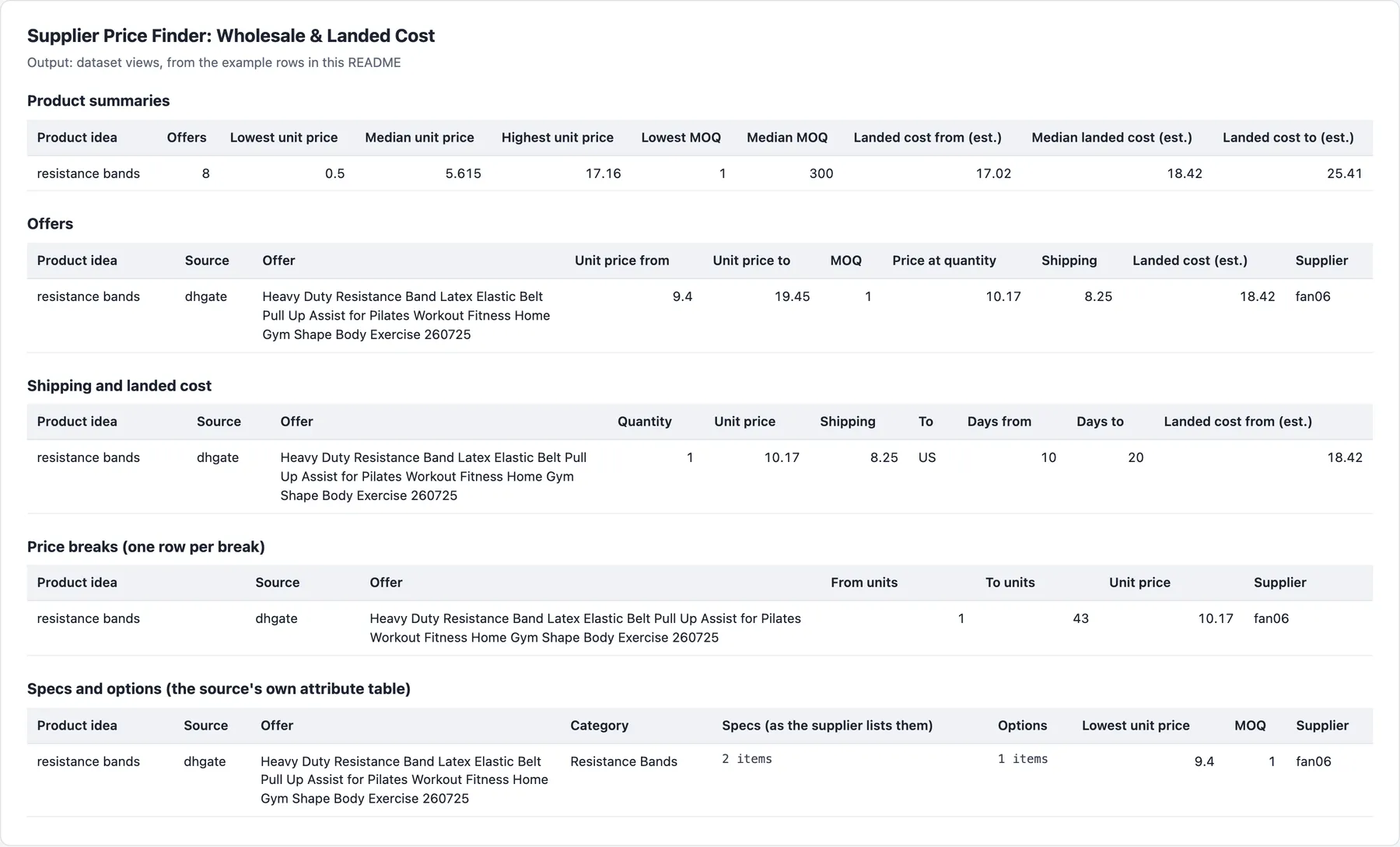
First a summary row per product idea, then its offer rows (recordType says which).
Example rows
A real summary row (shortened):
A real offer row (shortened):
Fields
Every row has recordType (summary or offer) and product. Besides the fields in the example rows, offers carry: offerKey (SHA-256 of source and listing id, stable across runs), image, unit, lotSize and lotPriceMin (DHgate offers sold by the lot), shippingFree, shippingMethod, supplierUrl, supplierRating, supplierRatingCount, supplierType, supplierLevel (Diamond Member, Gold Supplier, Verified…), supplierVerified, supplierLocation, newShopperPrice (a number in USD, null on offers without one: AliExpress offers whose card shows a first-order welcome deal, "New shoppers save $0.91", or the words "New shoppers": the price a new shopper's first order gets, paid for by AliExpress; unitPriceMin is then what a returning buyer pays, the sale price plus the new-shopper subsidy the card itemises, capped at the original price, and a note in notes says so; where the card doesn't itemise the subsidy, unitPriceMin is null and the note gives the range, "A returning buyer pays between USD 1.09 and 2.00; the page doesn't show the exact price."), regularPrice (AliExpress: the struck-through original price the card shows, in USD; null where none is shown and on other sources; offers read through the data service take the record's original price, and their newShopperPrice is null because those records don't show welcome deals, with a note that the price may be a welcome price), ordersCount and ordersCountText (units sold: the count and the words the source shows, such as 2395 and "2,000+ sold"; AliExpress search pages carry the exact count behind a rounded figure, else the figure shown is rounded down, so "1,000+ sold" is 1000; Alibaba search cards and offer pages show it too; null where the listing shows no sales, and on AliExpress offers read through the data service, whose records carry no count), notes, and the spec clues: category, specs (name and value pairs, at most 40, values up to 200 characters) and variantOptions (name and values), null where the source shows none in what was read. Where they come from: Made-in-China offer pages (attribute table and category path; its search cards show only price and MOQ), DHgate offer pages (attributes, category, options), Alibaba offer pages (attribute table and options; the page names its category by id only), AliExpress search records read through the dataset (specifications and options; none from the search page) and Alibaba search records (category path and options). The Specs and options (the source's own attribute table) view lists them.
Besides the fields in the example row, summaries carry unitPriceP25, unitPriceP75, pricedOffers, moqMax, lowestMoqOffer, quantity, the units-sold spread (offersWithOrdersCount, ordersCountMedian rounded down, ordersCountMax) with bestSellingOffer (the offer with the most sold; ordersCount is also on cheapestOffer and the other picked offers where shown), and margin with marginCheck (above).
Final status message
The run's final status message summarises the key numbers in plain text after "Done: N results.": per idea the offers, unit price median and range (with p25), MOQ median and landed cost, then the single-unit answer and margin arithmetic when asked, ending "More in the dataset." when not everything fits.
Dataset views and run summary
Dataset views: Product summaries, Offers, Shipping and landed cost, Price breaks (one row per break) and Specs and options (the source's own attribute table). RUN_SUMMARY in the key-value store gives the outcome (COMPLETE, PARTIAL, EMPTY, FAILED), counts per source, charges, pageReads (search page requests, retries included) and datasetRecords (records the data service delivered), and every source or page that could not be read, with the reason. The final status ends with the pages and dataset records read for the rows delivered.
Pricing
| Event | Free and Bronze | Silver | Gold and above |
|---|---|---|---|
| Product summary (one product idea priced; free when no offer is found) | $5.00 | $4.50 | $4.00 |
| Supplier offer (a delivered offer row) | $2.00 | $1.80 | $1.60 |
| Page through residential proxy (add-on, per delivered page, only for a site that blocks the rest) | $7.00 | $7.00 | $7.00 |
| Provider record (an AliExpress or Alibaba search result delivered as an offer row) | $3.00 | $2.70 | $2.40 |
| Provider search (one per source and run: all the run's product ideas on it) | $20.00 | $20.00 | $20.00 |
Per 1,000. Each run also has a $0.00005 start fee. One product idea with 10 Made-in-China offers costs about $0.025 on the Free and Bronze plans; each DHgate or Alibaba page you add is one more offer. The add-on is charged only for a page that came back through residential addresses and was delivered, with that page's row; each page gets at most three such requests (a refused page is never billed), capped at 150 KB each, 450 KB in all. In tests every source answered on Apify's own address, so the add-on did not apply. A provider record is billed with its offer row, and the provider search with the first product idea's summary that has offers; an idea with no offers is free. Five product ideas on AliExpress at 10 offers each are one provider search ($0.02) and 50 provider records ($0.15) on the Free and Bronze plans, plus the summaries and offers; results filtered out by title cost nothing per record. Max cost per run (USD) counts one provider search per idea and source, since an idea can be its own search.
Limits
- Landed cost needs a shipping quote. Made-in-China pages say "contact the supplier" for freight and Alibaba loads shipping for a signed-in buyer, so their offers have unit prices but no landed cost. DHgate offer pages show shipping, quoted to the US (the country of the actor's addresses); for another country, they have no landed cost either.
- DHgate is read only from the pages you give. Its search pages are disallowed by robots.txt.
- AliExpress and Alibaba search results come from the US sites, without price breaks or shipping (and, for Alibaba ideas read through the dataset, without MOQ). Give Alibaba offer pages for their breaks.
- Prices are list prices for a signed-out visitor, in US dollars. Negotiated, sample, coupon and member prices are not included; "Negotiable" offers and prices in other currencies have no price.
- DHgate price ranges cover all variants; its price breaks are for the default variant.
- One-off research. Each run is a fresh look; there is no watchlist or change tracking.
- robots.txt: only addresses each site's robots.txt allows are read: Made-in-China
/products-search/hot-china-products/and supplier offer pages, DHgate/product/…pages without a query string, Alibaba/product-detail/pages. Read at a pace and scale the sites' terms allow (2 requests at a time per source). - Nothing found: when nothing could be read because the pages do not exist (a removed Alibaba or DHgate offer page), the run still succeeds, with one free
recordType: "unreadable"row per page giving thereason; nothing is charged. A run near its time limit stops starting product ideas, delivers what it read and lists the rest with the reason.
FAQ
How much does a supplier price check cost per product idea?
One product idea with 10 Made-in-China offers costs about $0.025 on the Free and Bronze plans: $0.005 for its summary and $0.002 per offer. Each DHgate or Alibaba page you add is one more offer, $0.002. Adding AliExpress or Alibaba search adds, per offer delivered from it, a provider record ($0.003) on top of the offer, and one provider search ($0.02) per source for the whole run, so one idea with 10 Made-in-China and 10 AliExpress offers costs about $0.095, and each further idea on both about $0.075. The residential add-on ($0.007 a page) applies only to a page that came back through residential addresses and was delivered. An idea with no offers is free, and so are filtered offers, failed sources, removed pages and the Margin check (break-even, optional selling price). Each run also has the start fee, and Silver and Gold plans pay less for summaries, offers and records (see Pricing below).
How often should I run a supplier price check?
Each run is one-off research: a fresh look at what the product ideas cost to source now, with no watchlist or change tracking. Run it when you shortlist an idea, and again before you order, since supplier prices and MOQs change. For scheduled and API runs without a spending limit, Max cost per run (USD) starts a product idea only when its worst case still fits under that amount, counting what the run has already charged.
What is the difference between unit price, price at quantity and landed cost?
unitPriceMin and unitPriceMax are an offer's unit price range in US dollars, per piece (DHgate lot prices are divided by the pieces per lot). unitPriceAtQuantity is the unit price from the price break that holds your Order quantity, raised to the offer's MOQ when your quantity is below it. landedUnitCostMin and landedUnitCostMax add the shipping the page shows for Ship to country, spread over the units of that quote; they are always an estimate (landedCostIsEstimate: true) and leave out import duties, taxes, payment fees and customs brokerage. On AliExpress, unitPriceMin is what a returning buyer pays, and a first-order welcome price is kept apart in newShopperPrice.
Why is a landed cost, price break or price missing?
- No shipping quote: Made-in-China pages say "contact the supplier" for freight and Alibaba shows shipping only to a signed-in buyer, so their offers have no landed cost; DHgate offer pages quote shipping to the US only.
- Search results: AliExpress and Alibaba search results carry no price breaks or shipping; give Alibaba offer pages for their breaks. Alibaba offers read through the data service's dataset have no MOQ (
moqis null). - Made-in-China search cards: only the top offers given in Made-in-China offer pages to open get their page read for price breaks and supplier years.
- No price: "Negotiable" offers and prices in another currency have no price, with a note in the row; an AliExpress card that does not itemise its new-shopper subsidy has
unitPriceMinnull and the range innotes. - No specs:
category,specsandvariantOptionsare null where the source shows none in what was read. - Nothing found: a source or page that could not be read is named in the summary row and
RUN_SUMMARY, with the reason. FreerecordType: "unreadable"rows come only when the run delivers nothing, one per entry that gave nothing (a removed Alibaba or DHgate offer page, for example); when a page was blocked, such a run ends FAILED with no rows. The exception is Single-unit check (AliExpress): an idea AliExpress did not answer in time gets its free row even when the run delivered others.
Which supplier sites and countries does it support?
Made-in-China.com searched by idea; AliExpress and Alibaba search on their US sites, through CleanPull's marketplace data service; and the DHgate and Alibaba offer pages you give. DHgate is not searched (its robots.txt disallows its search pages), and 1688.com needs a sign-in, so it is not read. Prices are in US dollars, and shipping quotes, where a page shows them, are to the US.
Can I use the supplier price finder through the API?
Yes. Start runs through the Apify API or an API client, and read the dataset through its Product summaries, Offers, Shipping and landed cost, Price breaks (one row per break) and Specs and options (the source's own attribute table) views, or the RUN_SUMMARY record. Fields (fields) trims each row to the keys you need, and the run's final status message sums up each idea's key numbers in plain text.
Does it work with Google Sheets, Make, Zapier or Claude?
Yes. Apify's integrations send each run's results to Google Sheets, Make, Zapier, webhooks and other tools. From Claude, the MarketMage plugin finds what a product idea costs to source, with unit-cost and landed-cost ranges, in a chat.
Is it allowed to scrape supplier prices?
The actor reads public Made-in-China, DHgate and Alibaba pages as a signed-out visitor sees them, only at addresses each site's robots.txt allows, and gets AliExpress and Alibaba search results through a third-party web data provider: no login, no account and no buyer data. How you use the data, and following the laws and terms that apply to you, is your responsibility. This is not legal advice.
Related actors
Other CleanPull actors for sourcing:
- AliExpress Scraper: AliExpress products, prices, reviews and landed price to your country.
- Alibaba Scraper: Alibaba.com products with quantity price tiers, MOQ and supplier trust fields.
- Made-in-China Scraper: Made-in-China.com offers with price tiers, MOQ and supplier badges.
- Marketplace Search Scanner: one keyword across Amazon, eBay, Etsy, Walmart and more, with market stats.
Use it from Claude
The MarketMage plugin runs these actors from a Claude chat.
Found it useful? A rating on the Store helps others find it.
Changelog
- 0.3.x, AliExpress new-shopper prices marked only in the card's data (2026-11-11): a card marked as a new shopper's price only in its data, with no "New shoppers" words, gave that price as the unit price (US $0.33 on a cat toy that a dropshipping app's supplier price puts at 4.27). It is now priced like a card showing the deal: the sale price plus its itemised new-shopper subsidy where the card lists it, else the unit price empty, the sale price in
newShopperPriceand the range innotes. The note's words are now the same as AliExpress Scraper'spriceNote("USD 0.33 is AliExpress's new-shopper price (first order only). A returning buyer pays between USD 0.33 and 5.67; ..."). - 0.3.x, AliExpress returning-buyer price, not the new-shopper price (2026-11-11): an AliExpress card whose sale price is the welcome deal for a new shopper's first order ("New shoppers save $0.91", paid for by AliExpress) gave that price as the unit price, so many different listings showed US $1.09. Such an offer's unit price is now what a returning buyer pays: the sale price plus the new-shopper subsidy listed in the card's own discount breakdown, never above the original price (US $1.09 becomes 4.89 on a card whose original is 9.99; the card's other discounts still apply). The welcome price is in the new
newShopperPricefield and the original price in the newregularPricefield, with a note. Cards without the deal are unchanged, including those with only a hidden new-shopper marker and no welcome words. Offers read through the data service keep their price, with a note that it may be a welcome price. Same events and prices. - 0.3.22, status summary (2026-11-06): the final status message now summarises each idea's key numbers after "Done: N results." (offers, unit price median and range, MOQ median, landed cost; the single-unit answer and margin when asked), so a reader can often skip the dataset read. Prices and events unchanged.
- 0.3.x, Alibaba's newer search layout (2026-11-02): Alibaba now answers many search pages in a newer layout with its listings written into the page instead of the data the actor read, so those ideas went to the dataset (minutes, billed per record). Its listings are now read from the page (price, minimum order, supplier, rating), and a listing priced in a currency written as a code ("PEN 10.05") is left out as another currency instead of kept without a price. Same offers, fields, events and prices.
- 0.3.x, AliExpress in US dollars (2026-11-02): AliExpress search pages are now asked from a US address, and a page that still comes back drawn for another country (seen once: priced for Sweden in SEK, whose cards' prices were left empty) is read once more before its idea goes to the dataset. Same offers, fields, events and prices.
- 0.3.x, Made-in-China reliability (2026-11-02): a Made-in-China page refused on every proxy tier is now read through the page reader the service already uses for AliExpress and Alibaba, within the page's own time, instead of failing its product idea (its check comes and goes by address). Such a page adds no residential add-on. A card title holding an HTML tag comes out as plain text. Same offers, prices and events.
- 0.3.x, Alibaba in English (2026-10-31): Alibaba picks its page language from where it places the visitor's address, and some US addresses got the Spanish page, whose idea then went to the dataset (minutes, and billed per record). Search pages now ask Alibaba for English outright, and a page that still comes back in another language is read once more before the dataset. Same offers, fields, events and prices.
- 0.3.x, fewer dataset fallbacks (2026-10-30): a search page that comes back without listings is read once more before its idea goes to the dataset, and an Alibaba idea asking for more offers than a full page holds reads pages 2 and 3 first (each listing once), so far fewer ideas wait minutes on the dataset.
RUN_SUMMARYgainspageReadsanddatasetRecords; the final status says how many were read for the rows delivered. Same offers, prices and events. - 0.3.10, Alibaba from its search page (2026-10-26): every Alibaba search first reads its search page through the data service's page unlocker from a US address (prices in US dollars), about 35 to 80 seconds per idea, and takes the listings from the data embedded in the page; each offer now has its card's minimum order and unit, and the supplier's years, rating and country. A page not delivered within 90 seconds (one retry), in another language or currency, without listing data, loading its listings later, or holding fewer listings than Offers per source asks is searched through the dataset as before, with a warning naming why; cards in another currency are left out. AliExpress and Alibaba pages share 6 requests at once; a refusal of one source's page request stops only that source's pages. Offers from the dataset no longer put the product's rating in
supplier.rating. Same top-N and title filter, same events and prices (one provider search per source and run, a provider record per offer delivered). - 0.3.8, AliExpress from its search page (2026-10-26): every AliExpress read (search and single-unit check) first reads the search page through the data service's page unlocker, about 15 to 25 seconds per idea instead of 5 to 26 minutes, and takes the listings from the data embedded in the page. An idea whose page is not delivered within a minute (one retry) or has no listing data is searched through the dataset as before, with a warning in the log naming why; the 20-minute wait applies only then, counted from when its page request started. A search AliExpress finds nothing for is answered from the page as no results. A run resumed after a migration delivers the offers its pages gave before, not a fresh read. Same top-N and title filter, same events and prices (one provider search per source and run, a provider record per offer delivered). Offers read from the page have one card price, the store name only where the card shows it, and no spec clues.
- 0.3.x, single-unit check waits for AliExpress (2026-10-26): the check now waits up to 20 minutes for AliExpress (usually 5 to 10), instead of 2, so it answers: the data service visits each result's page, and 2 minutes was never enough. The free row for an idea not answered says "within 20 minutes". Same events, prices and output fields.
- 0.3.x, margin check without a price (2026-10-25):
marginCheck.sellPriceis optional. Without it, themarginobject gives the break-even price and the cost-free floor only (sellPriceandchannelFeenull, noperAdCost); with it, the output is unchanged. - 0.3.x, margin check (2026-10-25): optional
marginCheck(your selling price, channel fee and ad costs per sale) adds amarginobject to each summary: profit and margin per ad cost, the break-even price and the cost-free floor at the lowest ad cost. Free; no other field changes. - 0.3.x, fast single-unit check (2026-10-24):
singleUnitCheckasks AliExpress one idea at a time for its top 3 results (about 1 to 2 minutes per idea, 4 at once) and adds asingleUnitanswer to each summary (MOQ-1 offer found, lowest unit price before shipping, a sample page) andsellsSingleUnitto each offer; Made-in-China offers with a minimum order of 1 count when listed. An idea not answered within 2 minutes gets a freeunavailablerow. Same events and prices; off by default, so saved inputs run as they did. - 0.3.x, reliability (2026-10-24): runs that find nothing (removed offer pages, input naming nothing readable) end SUCCEEDED with a free
unreadablerow per item saying why, instead of FAILED; a run stops starting product ideas before its time limit and ends with what it read, never TIMED-OUT. A run where every source blocked us still fails. Ship to country is checked in the input form. Prices and events unchanged. - 0.3 (October 2026): spec clues on every offer row:
category,specs(the source's attribute table: material, size, capacity…) andvariantOptions, taken from the pages and search records already read; no new requests, events or prices. Only fields are added: saved inputs run as they did. - 0.2 (October 2026): AliExpress and Alibaba searched by product idea through CleanPull's marketplace data service; no AliExpress app key needed (inputs with the old key fields run as they are, the keys ignored). New events: provider record (a search result delivered as an offer row) and provider search ($0.02 per source per run on the Free and Bronze plans). Default sources stay as 0.1 ran them: with no
sourcesin the input, only Made-in-China is searched, so a saved task withoutsourcescosts what it did. AliExpress and Alibaba are searched (and billed) only whensourceslists them; a saved task that listsaliexpressnow searches it through the service, without a key. - 0.1 (October 2026): Made-in-China search and offer pages, DHgate and Alibaba offer pages by URL, AliExpress affiliate API with your key; summary per product idea with unit price and MOQ spread and a landed-cost range where a page shows shipping; prices only in US dollars; DHgate lots priced per piece; title matching; order quantity; Max cost per run.


