
TikTok Shop Scraper & Sales Tracker: Units per Day
Pricing
from $1.60 / 1,000 products
TikTok Shop Scraper & Sales Tracker: Units per Day
TikTok Shop scraper and sales tracker: exact units sold, units and revenue per day, rising products and GMV for every product, keyword, shop and category you track. Whole shop catalogues, deep keyword lists, stock per variant, filters, changes only. US, from $3 per 1,000 products.
Pricing
from $1.60 / 1,000 products
Rating
0.0
(0)
Developer

CleanPull
Maintained by CommunityActor stats
0
Bookmarked
4
Total users
3
Monthly active users
2 days ago
Last modified
Categories
Features
Share
Know what's selling on TikTok Shop, and how fast. This TikTok Shop scraper reads TikTok Shop US products by keyword, shop, category or URL with TikTok's exact units sold (9,857, not "9.8K"), and its TikTok Shop sales tracker turns every run into sales velocity: units sold per day, revenue per day and a rising, steady or falling trend for every product. It also adds the totals for every keyword, shop and category you track. Run it once for a snapshot with lifetime GMV estimates, or schedule it or call it through the API, and it becomes your own record of TikTok Shop sales.
How to track TikTok Shop sales
- Open TikTok Shop Scraper & Sales Tracker on Apify and go to its input form.
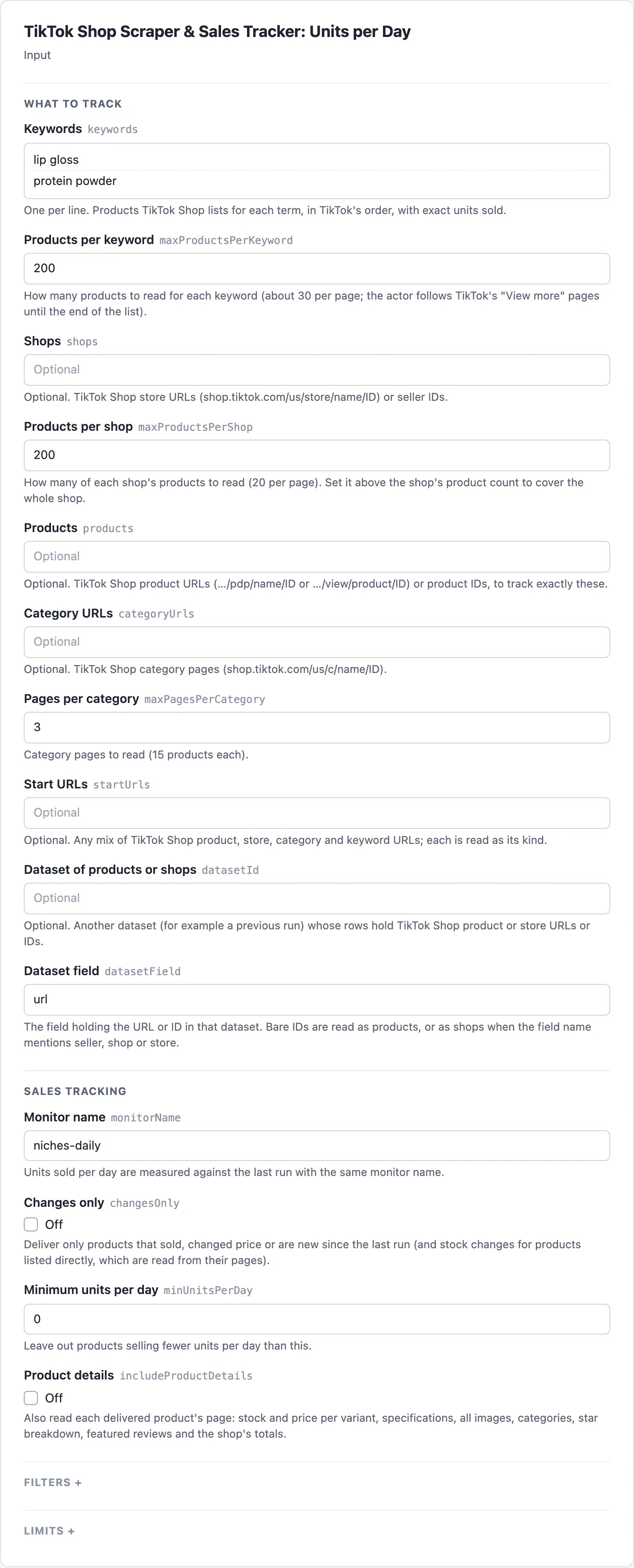
- Enter shopping terms in Keywords, one per line, and set Products per keyword. To follow a store or exact products instead, paste their links in Shops or Products.
- Give the list a Monitor name, and narrow it if you like with Minimum price, Maximum price, Minimum rating, Discounted only or Title must not include. Turn on Product details for stock per variant, the video and the shop's scores.
- Start the run. Open the Products view to read each product's Units sold, Price and Lifetime GMV (est.), and the Summaries view for each keyword's Units sold (lifetime) and Top sellers.
- Save the input as a task and schedule it daily. From the second run, Units / day, Revenue / day (est.) and Sold since last run fill in, and from the third, Trend. Turn on Changes only to get just the products that sold, changed price or are new.
What the TikTok Shop scraper gives you
- Units sold per day for every product. Each run remembers every product's sold count. The next run gives
unitsSoldSinceLastRun,unitsPerDayandrevenuePerDayEstimate. From the third run,trendsays whether sales are speeding up or slowing down. - A sales leaderboard for every keyword, shop and category. One summary row each, with units and revenue per day in total, the top 10 sellers, the products whose sales are rising, and products new to that keyword or shop since your last run.
- A shop's daily sales, from its whole catalogue. Give a store and the actor reads every product, up to 20,000. The shop summary adds up their sales, so you see the shop's units and revenue per day as they happen.
- Lifetime GMV estimates.
gmvEstimate(units sold × price) for every product, andgmvEstimateTotalwith a top 10 by GMV for every keyword, shop and category. - Deep keyword lists. Each keyword is followed through TikTok's "View more" pages to the end of the list, typically 100 to 140 products for popular terms (raise Products per keyword above its default of 100 to get them all), each with its exact sold count.
- Sale and deal data on every row: price, original price, discount %, when the deal ends, free shipping and TikTok's sale labels.
- Product details when you want them:
- stock and price for every variant, with the stock change since the last reading with stock and a low-stock flag;
- the product's own video, the description and specifications;
- delivery fee and days, categories with IDs;
- the star breakdown and featured reviews (verified and incentivized flags);
- the seller's business name and address;
- the shop's badge, totals and service scores (positive feedback, on-time delivery, chat).
- One row per product. A product found by two keywords and a shop is delivered once. It lists every source, its position there and its rank by units per day.
- Filters that run before you pay: price range, minimum rating, reviews, units sold or units per day; discounted or free-shipping only; title words to include or exclude; sellers to include or exclude. The actor applies them itself to what TikTok lists, and filtered products are not billed. Filters apply to products found through keywords, shops and categories; products you list directly are always delivered.
- Changes only. Deliver just the products that sold, changed price or are new. Unchanged products are billed at the lower checked rate (see Pricing below), so a daily tracker stays cheap.
Who it's for
- Product researchers and dropshippers: find what's taking off this week, not what sold the most since launch.
- Brands and sellers: track your products and your competitors' daily, with price moves and stock.
- Agencies and analysts: size a niche by keyword (units and revenue per day, lifetime GMV), compare shops, and feed a dashboard.
TikTok Shop sales accuracy
- Exact numbers. Sold counts come straight from TikTok Shop's own data, as exact integers. TikTok's note says they count items sold since listing, excluding returns.
- You never pay for a skipped day. A reading becomes the baseline for next time only once it is delivered, so a run cut by your spending limit or Maximum products never loses sales.
- Runs that finish.
- A keyword TikTok has no page for, or a removed product, is noted in the run summary, and everything else is delivered.
- Refused requests are retried automatically.
- An empty input runs an example keyword, so you can see the output first.
- Fast and light. Plain HTTP, no browser.
TikTok Shop scraper input
| Field | Key | What it does |
|---|---|---|
| Keywords | keywords | Shopping terms, one per line; the products TikTok Shop lists for each, in TikTok's order |
| Products per keyword | maxProductsPerKeyword | Products to read per keyword (default 100, up to 1,000) |
| Shops | shops | Store URLs (shop.tiktok.com/us/store/name/ID) or seller IDs |
| Products per shop | maxProductsPerShop | Products to read per shop (default 200, up to 20,000); set it above the shop's product count to cover the whole shop |
| Products | products | Product URLs (…/pdp/name/ID, …/view/product/ID) or IDs, read from their product pages |
| Category URLs | categoryUrls | Category pages (shop.tiktok.com/us/c/name/ID); best for discovery, as category lists vary |
| Pages per category | maxPagesPerCategory | Category pages to read, 15 products each (default 3, up to 50) |
| Start URLs | startUrls | Any mix of product, store, category and keyword URLs |
| Dataset of products or shops | datasetId | Products or shops from another dataset, such as a previous run |
| Dataset field | datasetField | The field holding the URL or ID in that dataset (default url); bare IDs are shops when the field name mentions seller, shop or store |
| Monitor name | monitorName | Units per day are measured against the last run with this name (default default); use one name per list you track |
| Changes only | changesOnly | Only products that sold, changed price or are new (stock changes too, for products you list directly); the first run delivers everything |
| Minimum units per day | minUnitsPerDay | Leave out products selling fewer units per day (products without a velocity yet are kept) |
| Product details | includeProductDetails | Product pages: variants with stock, video, description, delivery, reviews, seller and shop details |
| Minimum price | minPrice | Leave out products cheaper than this (USD) |
| Maximum price | maxPrice | Leave out products dearer than this (USD) |
| Minimum rating | minRating | Leave out products rated below this (0–5) |
| Minimum reviews | minReviews | Leave out products with fewer reviews |
| Minimum units sold | minUnitsSold | Leave out products that have sold fewer units in total |
| Discounted only | onlyDiscounted | Only products on sale |
| Free shipping only | onlyFreeShipping | Only products with free shipping |
| Title must include | titleIncludes | Words every title must contain |
| Title must not include | titleExcludes | Leave out titles containing any of these words |
| Only these sellers | sellers | Seller IDs, shop names or store URLs to keep |
| Leave out these sellers | excludeSellers | Seller IDs, shop names or store URLs to leave out |
| Low stock at | lowStockThreshold | With product details, this many units or fewer is marked lowStock (default 10) |
| Summary per keyword, shop, category and product list | includeSummaries | One summary row per keyword, shop and category, and one for your listed products (default on) |
| Maximum products | maxItems | Stop after this many product rows; when it cuts the list, the fastest sellers are kept |
| Fields | fields | Only these fields in each row (dot paths like details.stock); recordType is always kept |
| Parallel requests | maxConcurrency | Keywords, shops and product pages read at the same time (default 3, up to 10) |
| Proxy | proxyConfiguration | By default the actor picks its own route (direct, then US proxies, as needed) |
| History store | stateStoreName | The key-value store that keeps earlier readings (default: its own store, cleanpull-tiktok-shop); pick one when you run with a scoped API token |
Example inputs
What's selling fastest in two niches, every day (schedule it daily):
A whole shop's daily sales:
Discounted lip oils under $30 rated 4.5 and up, without refills:
Your products, with stock per variant, only when something changed:
TikTok Shop scraper output
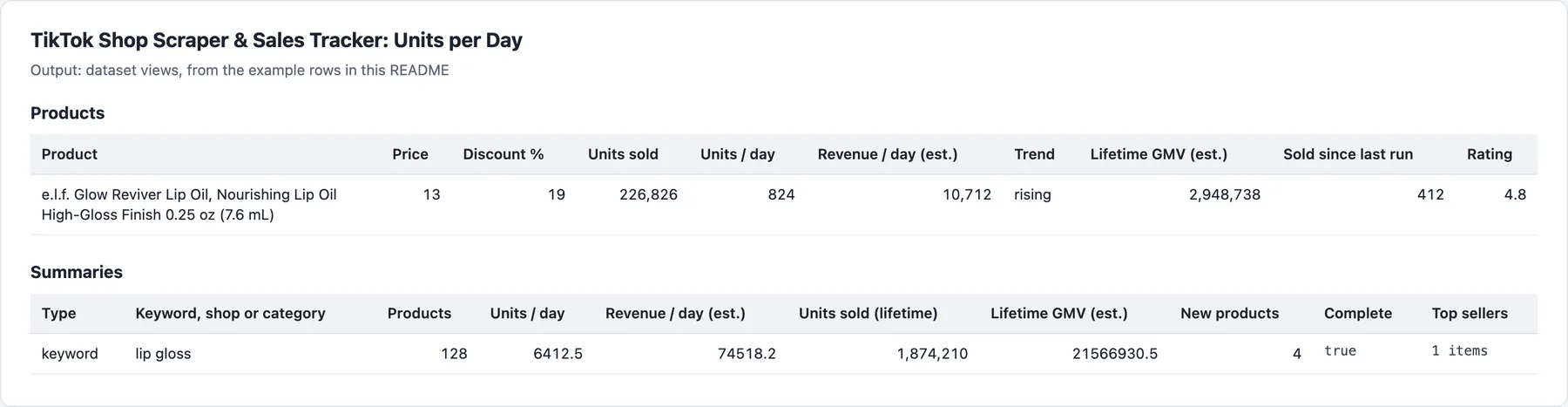
Product rows (recordType: "product") and one summary row per keyword, shop and category (recordType: "summary"); the Products and Summaries views show each.
Example rows
A product row (second run, 12 hours after the first):
The keyword's summary row from the same run (illustrative values; shortened: the top lists hold up to 10 products, and topByGmv, rising, topNewProducts, relevantToKeyword, relevanceBasis and marketplaceFees are left out here):
Product details, summaries and run summary
With Product details, a details object adds:
- Stock:
stock,stockChange,lowStock, andskus(options, price, stock, available). - Content:
video(URL, duration, cover),description,specifications,images. - Logistics:
delivery(free shipping, fee, minimum and maximum days, estimate),categories,categoryIds. - Reviews:
ratingBreakdownandfeaturedReviews. - Seller and shop:
sellerBusinessName,sellerBusinessAddress, andshop(units sold, products, followers, rating, badge, service scores).
A summary row per keyword, shop and category, and one for the products you listed directly (type: product):
- Coverage:
products,complete,productsWithVelocity. - Totals:
unitsSoldTotal,gmvEstimateTotal,unitsPerDayTotal,revenuePerDayEstimate. - Lists:
topByUnitsPerDay,topByGmv,rising,newProducts,topNewProducts. - Shops also get TikTok's own
shoptotals. - Fees:
marketplaceFees, TikTok Shop US's published referral fee list rate (6% for most categories, 5% for some jewelry and pre-owned), with what it leaves out (creator commissions, Fulfilled by TikTok, shipping) and its source. - Keywords also get
relevantToKeyword: the same totals (products,productsWithVelocity,unitsSoldTotal,gmvEstimateTotal,unitsPerDayTotal,revenuePerDayEstimate) over the products whose title carries the keyword, withrelevanceBasisstating the rule andtotalsCoversaying the main totals cover every product listed. The top lists mark each productrelevantToKeyword.
The run's final status message summarises the key numbers in plain text after "Done: N results.": per keyword, category or shop the top listings' lifetime units sold and prices (for a keyword, among titles that carry it), the units-sold total and, from a second run, units per day, ending "More in the dataset." when not everything fits.
The run summary (key-value store, RUN_SUMMARY) gives the outcome (COMPLETE, PARTIAL, NO_CHANGES, EMPTY or FAILED), counts, charges, warnings and anything that could not be read.
TikTok Shop keyword relevance
TikTok's keyword search also lists related products (a "lip gloss" search lists lip oils, liners and blush), and its list cards carry no category, so a keyword's totals add up unrelated products. Each keyword source on a product row has relevantToKeyword and keywordWordsMissing: a plain title check, true when every word of the keyword (filler words like "for" and "the" left out) is in the title, singular or plural, or written as one ("lipgloss"). It is a clue, not a verdict: synonyms and misspellings are not matched. Nothing is filtered on it, and titles are delivered as TikTok gives them.
Pricing
| Event | Free | Bronze | Silver | Gold and above | When |
|---|---|---|---|---|---|
product | $3.00 | $2.00 | $1.80 | $1.60 | A delivered product row, velocity and GMV included |
product-checked | $0.50 | $0.50 | $0.45 | $0.40 | An unchanged product with Changes only |
product-details | $1.00 | $1.00 | $0.90 | $0.80 | A product page read for includeProductDetails |
source-summary | $1.00 | $1.00 | $0.90 | $0.80 | A summary row per keyword, shop, category or product list |
Prices are per 1,000 events. Products given in products are read from their product pages at the product price.
Limits
- TikTok Shop US.
- The first run is the baseline. Units per day appear from the second run under the same monitor name, and the trend from the third. Schedule runs a few hours to a day apart for the steadiest numbers; runs less than 15 minutes apart count from the earlier reading.
- GMV is an estimate: lifetime units sold × today's price.
- Summaries cover every product a keyword, shop or category lists, including those your filters leave out of the product rows, so they describe the whole market. For keywords,
relevantToKeywordgives the same totals over the products whose title carries the keyword. - Categories come with product details only. TikTok's search and list cards carry no category or product type (checked on the keyword, category and shop lists);
details.categoriescomes from the product page with Product details. A product found through a category page has that category among itssources. - Video and image links are signed by TikTok and stop working after a few hours (
video.urlExpiresAt); download what you want to keep. - Original price and discount come from list cards (keywords, shops, categories); for products you list directly, the row shows the sale labels and the deal end.
- Category pages vary between visits. Use them to discover products, then track those through keywords, shops or products.
- Reviews: the star breakdown, the total and the featured reviews shown on the product page.
- Nothing found: when the run reads nothing because none of it exists (a keyword, shop, category or product TikTok Shop has no page for, or a list with no products), it still succeeds, with one free
recordType: "unreadable"row per item giving thereason; nothing is charged. When the run read something, such items are listed in the run summary'swarningsandfailuresinstead, and a source that failed with an error (blocked or refused) is listed infailures. A run near its time limit stops starting sources and product pages, delivers what it read and lists the rest in the run summary (as free rows only when it read nothing at all). A run TikTok blocked on every route, with nothing read, fails.
FAQ
How much does TikTok Shop sales tracking cost per keyword per day?
A keyword read once a day with 100 products costs $0.201 a day on Bronze ($0.20 for the product rows plus $0.001 for its summary), about $6 a month, and $0.301 on the Free plan, where a product costs $3.00 per 1,000. With Changes only, from the second run each unchanged product costs $0.0005 on the Free and Bronze plans and each product that sold, changed price or is new costs $0.002 on Bronze ($0.003 on Free), so a day when nothing on the list moved still costs $0.051 on Free and Bronze (100 checks plus the summary row, which is billed every run that delivers it). Product details add $0.001 per product page read. Filtered products and items that could not be read are never charged. Each run also has the start fee, and higher Apify plans pay less (see Pricing above).
How often should I run the TikTok Shop sales tracker?
Daily suits most lists: units per day are measured from the last delivered run under the same Monitor name, and runs a few hours to a day apart give the steadiest numbers. Runs less than 15 minutes apart count from the earlier reading, and a product read again within those 15 minutes is not counted as changed. With Changes only, each run delivers just the products that sold, changed price or are new.
What is the difference between units sold, units per day and GMV?
unitsSold is TikTok's lifetime count of items sold since listing, excluding returns. unitsSoldSinceLastRun is how much it grew since your last run under the same Monitor name, and unitsPerDay scales that to 24 hours; revenuePerDayEstimate is units per day × price. gmvEstimate is lifetime units sold × today's price, an estimate of lifetime sales, not of today's.
Why are units per day or the trend missing?
- First run: the first run under a Monitor name is the baseline;
unitsPerDayappears from the second run andtrendfrom the third. - New product: a product first seen this run has no earlier reading (
tracked: false). - Runs too close together: runs less than 15 minutes apart count from the earlier reading.
- No sold count: a product TikTok lists without a sold count gives no velocity.
- Stock and categories:
details.stockanddetails.categoriescome only with Product details, or for products you list directly.
Which TikTok Shop countries does it support?
TikTok Shop US only: keywords, stores (shop.tiktok.com/us/store/…), categories (shop.tiktok.com/us/c/…) and product pages. A product not sold in the US is reported as not found.
Can I use the TikTok Shop scraper through the API?
Yes. Start runs through the Apify API or an API client, and read the dataset through its Products and Summaries views, or the RUN_SUMMARY record with the outcome, counts, charges and anything that could not be read. Fields (fields) trims each row to the keys you need, and productId is stable across runs for joining.
Does it work with Google Sheets, Make, Zapier or Claude?
Yes. Apify's integrations send each run's results to Google Sheets, Make, Zapier, webhooks and other tools, and a schedule keeps them updated. From Claude, the MarketMage plugin finds products selling now on TikTok Shop and checks product ideas against TikTok Shop sales, in a chat.
Is it allowed to scrape TikTok Shop?
The actor reads public TikTok Shop pages as a signed-out visitor sees them: no login, no account and no customer data. Featured reviews keep their rating, text, date and flags, never the reviewer's name, and seller business details are the ones TikTok shows on the product page. How you use the data, and following the laws and terms that apply to you, is your responsibility. This is not legal advice.
Related actors
Other CleanPull actors for marketplace:
- Amazon Best Sellers Scraper & Rank Tracker: Amazon Best Sellers, New Releases and Movers & Shakers with rank changes.
- Shopify Scraper: every product and variant from any Shopify store, with stock and sales estimates.
- Ad Library Monitor: competitors' new and stopped ads on Facebook, Google and TikTok.
- AliExpress Scraper: AliExpress products, prices, reviews and landed price to your country.
Use it from Claude
The MarketMage plugin runs these actors from a Claude chat.
Found it useful? A rating on the Store helps others find it.
Changelog
- 0.2.7, status summary (2026-11-06): the final status message now summarises each source's key numbers after "Done: N results." (the top listings' lifetime units and prices, the units-sold total, units per day from a second run), so a reader can often skip the dataset read. Prices and events unchanged.
- Price lowered on 5 Nov 2026: a product now costs $2.00 / $1.80 / $1.60 per 1,000 (Bronze / Silver / Gold), down from $3.00 / $2.70 / $2.40. Free plan and other events unchanged.
- 0.2.x, reliability (2026-10-24): runs that find nothing (keywords, shops, categories or products with no page) end SUCCEEDED with a free
unreadablerow per item saying why; a run stops starting sources before its time limit and ends with what it read, never TIMED-OUT. A run TikTok blocked on every route still fails. Prices and events unchanged. - 0.2.x (2026-10-23):
marketplaceFeeson summary rows: TikTok Shop US's published referral fee list rate. Prices and events unchanged. - 0.2.x (2026-10-16): keyword relevance:
relevantToKeywordandkeywordWordsMissingon each keyword source of a product row, and keyword summaries with totals over the relevant products next to the totals over all of them. Nothing changes in price, filters or existing fields. - 0.2: original price, discount and deal end; lifetime GMV estimates; filters (price, rating, reviews, units, discount, free shipping, title, sellers); product video, description, delivery, category IDs, seller business details, shop badge and service scores; stock change and low-stock flag.
- 0.1: first release.


