

10times Trade Shows & Conferences Scraper
Pricing
from $1.96 / 1,000 event saveds
10times Trade Shows & Conferences Scraper
Find 10times trade shows and conferences by country, city, industry and date to plan exhibiting, travel and sales outreach. Get dates, venues, industries, organizers and visitor estimates. No login.
Pricing
from $1.96 / 1,000 event saveds
Rating
0.0
(0)
Developer

Cliqto Media
Maintained by CommunityActor stats
0
Bookmarked
2
Total users
1
Monthly active users
2 days ago
Last modified
Categories
Features
Share
Choose a country, city, industry or date range, and this Actor collects matching trade shows and conferences from the public 10times event catalog. You get one row per event with name, format, dates, city, country, venue and industries, and you can add organizer, visitor estimates and website with one checkbox. No 10times login is needed, and a typical run of 20 events costs about $0.06.
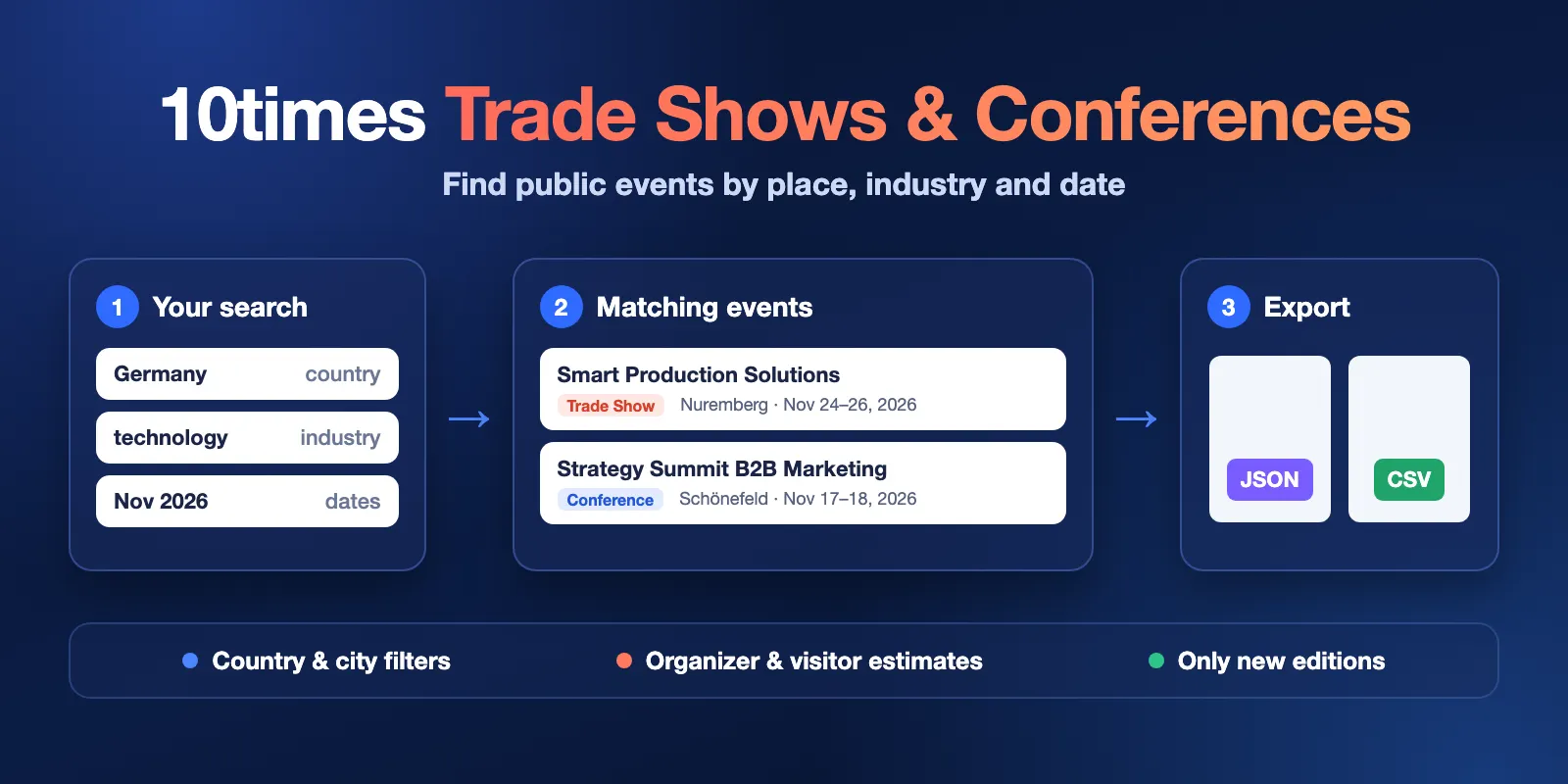
Table of contents
- What it does
- How it works
- Quick start
- Use cases
- Input
- Output
- Pricing
- Limits
- API, export and integrations
- Troubleshooting
- FAQ
- Related Actors
- Support
What it does
The Actor reads public event lists on 10times.com. It finds trade shows and conferences for the places, industries, keywords and dates you choose. It saves each event as a row in a dataset: name, format (trade show or conference), start and end date, city, country, venue, industries, rating and the 10times link.
Turn on Read event details to open each event page. Then the row also gets the organizer, visitor and exhibitor estimates, the official website, opening hours, a description, ticket prices and FAQ, when 10times shows them.
Turn on Only new editions to watch a search. The next run saves only event editions that the earlier runs did not save.
Data source: the public pages of 10times. The 10times terms of service apply to how you use the data.
Good fit
- Plan which trade shows to visit or exhibit at next quarter in one country or industry.
- Build a calendar of conferences in a city for travel or sales trips.
- Find organizers and official websites of events for partnership or sales outreach.
- Get a weekly list of new event editions in your market.
How it works
- The Actor opens the public 10times list pages for your countries, cities and industries, or the 10times URLs you paste.
- It keeps only events that match your format, dates and keywords. With Read event details on, it also opens each matching event page.
- It saves the events to the dataset and writes a short run summary (
RUN_SUMMARY) with the status, the stop reason and the pages it read.
The run stops when it reaches Maximum events, when the lists end, or when a safety limit is reached. The summary tells you which one.
Quick start
-
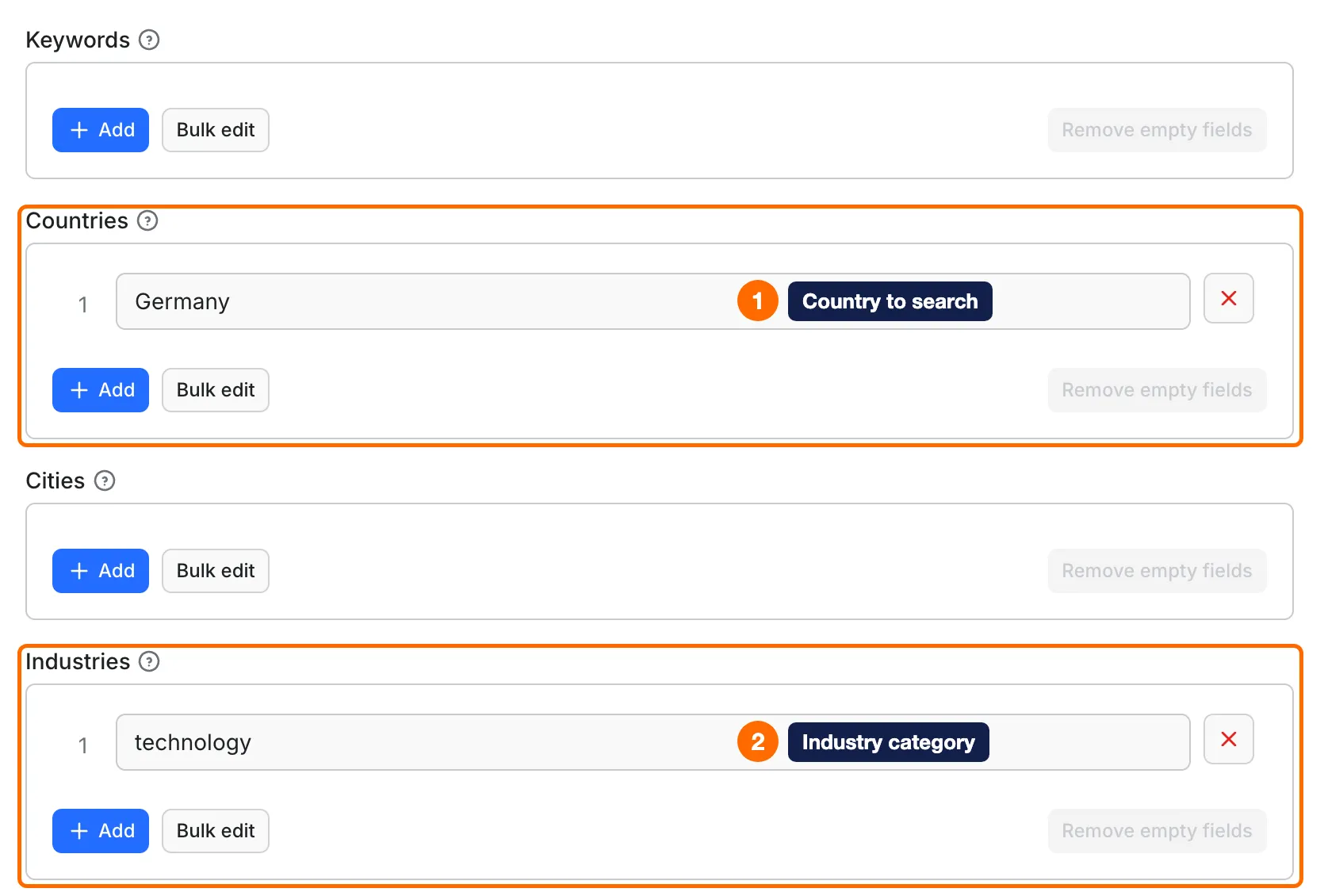
Open the Input tab. In Countries, keep
Germanyor type your country (box 1 in the picture). -
In Industries, keep
technologyor type another 10times category, such asmedical-pharma(box 2). -
Click Start. Maximum events is 20 by default.
-
Open the Output tab and check the Event, Format, Starts, Ends, City and Country columns (box 4).
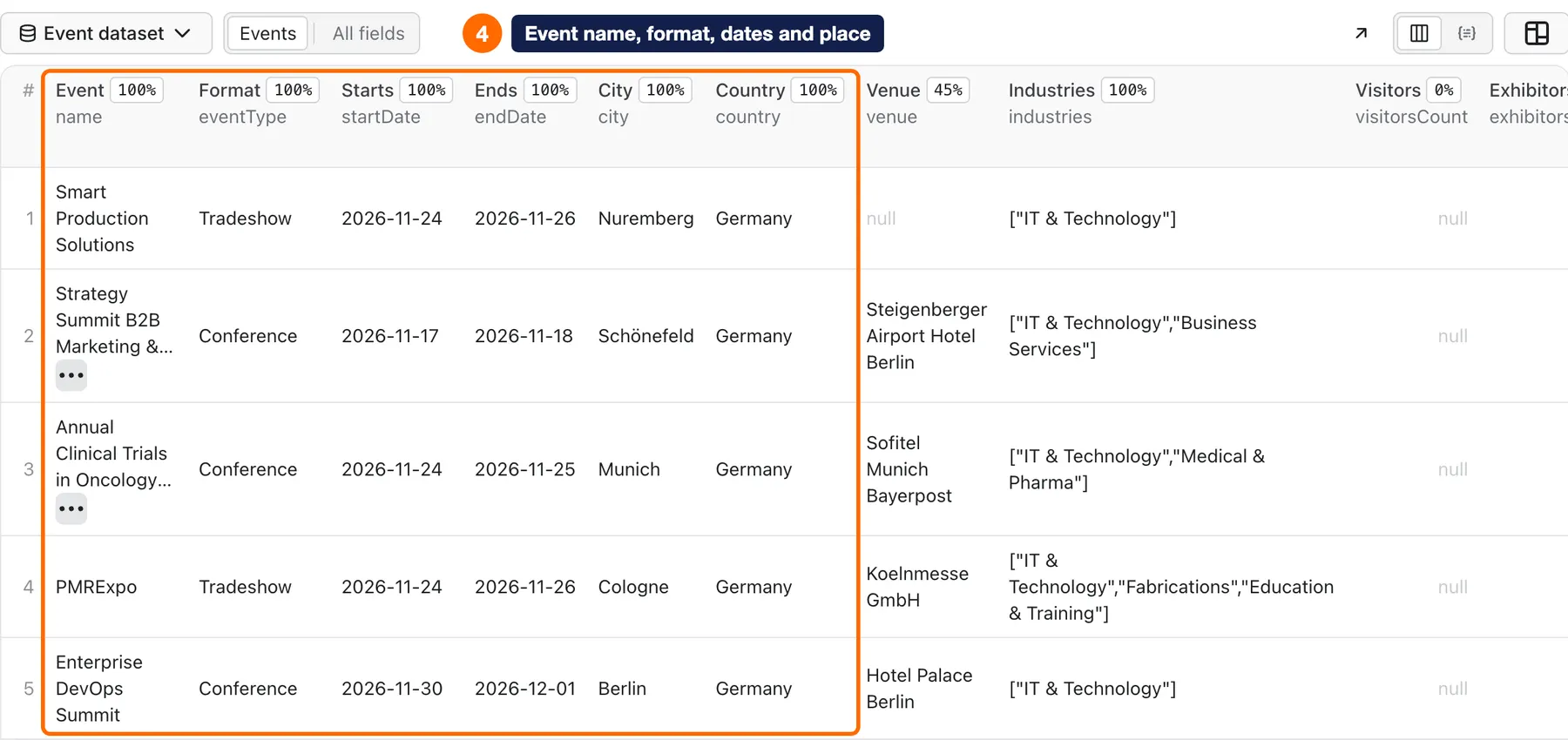
Expected result: about 20 technology trade shows and conferences in Germany usually in 5–60 seconds; up to about 2 minutes when 10times answers slowly and pages are retried.
Use cases
| Buyer job | Input path | Output entity | Key fields | Next integration |
|---|---|---|---|---|
| Plan trade shows to visit or exhibit at | countries, industries, eventType = tradeshows | Event | name, startDate, city, venue, industries | Export to CSV or Google Sheets |
| Build a city conference calendar | cities, dateFrom, dateTo, eventType = conferences | Event | name, startDate, endDate, venue | Calendar or Notion |
| Find organizers for sales outreach | industries + includeDetails | Event with details | organizer, organizerUrl, website, visitorsCount | CRM import, Website Contact Scraper |
| Watch for new event editions | onlyNew + monitorName, run on a schedule | New event edition | name, startDate, url | Slack or Notion summary |
| Check known events | startUrls with event links + includeDetails | Event with details | exhibitorsCount, visitorsCount, rating, timings | Spreadsheet or API |
Input
Input fields
| Field | Plain name | Type | Required | Default / prefill | Allowed values | Effect | Example | Recommendation |
|---|---|---|---|---|---|---|---|---|
countries | Countries | list of text | no | prefill ["Germany"] | English country name or 2-letter code, up to 8 | Reads events in these countries | ["Germany", "FR"] | Start with one country |
cities | Cities | list of text | no | empty | City name or 10times city slug, up to 8 | Reads events in these cities | ["Berlin", "rotterdam-nl"] | Use for a city calendar |
industries | Industries | list of text | no | prefill ["technology"] | 10times category slug, up to 8 | Reads events in these categories | ["medical-pharma"] | Combine with a country for a short list |
searchQueries | Keywords | list of text | no | empty | Up to 8 phrases | Keeps events whose name or categories contain every word of at least one phrase | ["smart production"] | Add a place or industry too |
dateFrom | From date | text | no | empty | YYYY-MM-DD | Keeps events that end on or after this day | 2026-12-01 | Use for a quarter or month |
dateTo | Through date | text | no | empty | YYYY-MM-DD, not before dateFrom | Keeps events that start on or before this day | 2027-02-28 | Use with dateFrom |
maxItems | Maximum events | number | no | default and prefill 20 | 1–100 | Total row limit for the run | 50 | Main cost control |
eventType | Event format | choice | no | all | all, tradeshows, conferences | Keeps one format or both | tradeshows | Pick one format for a cleaner list |
startUrls | 10times URLs | list of URLs | no | empty | Public https://10times.com list or event links, up to 12 | Reads these pages | https://10times.com/sps-ipc-drives | Use for known events |
includeDetails | Read event details | checkbox | no | off | on / off | Opens each event page for organizer, visitors, website and more | true | Turn on when you need contacts or audience size |
onlyNew | Only new editions | checkbox | no | off | on / off | Skips editions saved by earlier runs with the same monitor name | true | Use with a schedule |
monitorName | Monitor name | text | no | default | Letters, numbers, hyphens, up to 48 | Name of the saved list for onlyNew | de-tech-weekly | One name per saved search |
deliveryConnector | Send results to | MCP connector | no | empty | Your Slack, Notion or other connector | Posts a short summary after the run | — | Optional |
deliveryTarget | Notion page or channel | text | no | empty | Notion page link or Slack channel ID | Where the summary goes | — | Needed for Notion |
Empty input reads technology events in Germany. The same event edition is saved once per run, even if two of your searches find it.
Interacting settings
| When | Input A | Input B | Effective behavior | Example | Cost/result effect |
|---|---|---|---|---|---|
| You set places and industries | countries or cities | industries | The Actor reads every place × industry list | 2 countries × 3 industries = 6 lists | More list pages, so a higher page cost |
| Too many lists | countries, cities, industries | startUrls | Places × industries plus URLs must be 12 or fewer | 4 countries × 4 industries = 16 | The run stops at once with an input error |
| Only keywords | searchQueries | no place, industry or URL | Reads the general 10times event list | ["cybersecurity"] | Fewer matches than with a place or industry |
| Country and city | countries | cities | The city must also be in one of the countries | Germany + Berlin | A shorter list |
| Event link and filters | startUrls (event link) | industries, dates, eventType | The event is saved only if it matches the filters | SPS link + conferences | No row when it does not match |
| Watching a search | onlyNew | monitorName | Saved editions are skipped next time | Weekly schedule | Skipped events are not charged |
Input examples
Trade shows in one country and industry
Expected behavior: reads the technology lists for Germany and keeps trade shows only.
Expected output: events with name, startDate, city, venue and industries.
Limit or cost note: up to 50 event rows plus the list pages it reads.
Full details for one known event
Expected behavior: opens the event page and reads the details shown there.
Expected output: one row with organizer, visitorsCount, exhibitorsCount, website and timings.
Limit or cost note: one detail row and one page, about $0.015 on the Free plan.
Weekly watch for new conferences
Expected behavior: the first run saves current conferences. Later runs save only editions that are new for this monitor name. Expected output: new event rows only. Limit or cost note: a run with nothing new costs only the start and the list pages.
Output
Output fields
| Field | Meaning | Type | Can be empty? | Example / enum | Source / notes |
|---|---|---|---|---|---|
eventId | 10times event ID | text | no | "1254" | List or event page |
editionId | ID of this edition | number | yes | 2561932 | When 10times shows it |
name | Event name | text | no | "Smart Production Solutions" | |
startDate, endDate | First and last day | text | rarely | "2026-11-24" | YYYY-MM-DD |
city, country, countryCode | Place | text | yes | "Nuremberg", "Germany", "DE" | |
venue, venueAddress | Venue name and address | text | yes | "Steigenberger Airport Hotel Berlin" | Often empty in list rows |
industries | 10times categories | list | can be [] | ["IT & Technology"] | |
eventType | Format | text | yes | "Trade Show", "Conference" | |
eventStatus | Status shown by 10times | text | yes | "Active", "EventScheduled" | |
rating, ratingCount | 10times rating | number | yes | 4.3, 18 | |
url | 10times event page | text | no | "https://10times.com/sps-ipc-drives" | |
organizer, organizerUrl | Organizer and its 10times page | text | yes | "Mesago Messe Frankfurt GmbH - Stuttgart" | Details only |
visitorsCount, visitorsCountUpper, visitorsCountKind | Visitor estimate | number, text | yes | 20000, 50000, "range" | Details only; lower and upper bound |
exhibitorsCount, exhibitorsCurrentEdition, exhibitorsCountKind | Exhibitor counts | number, text | yes | 1142, 30, "reported" | Details only |
website | Official event website | text | yes | "https://sps.mesago.com/nuernberg/en.html" | Details only |
description, speakerCount, timings, imageUrl, ticketPrices, faq | More event details | mixed | yes | [{"time":"9:00 AM - 6:00 PM","label":"(General)"}] | Details only, when shown |
source, fetchedAt | Source and read time | text | no | "10times", ISO time | |
detailsFetched | Row has event page details | boolean | no | true | |
status | Row status | text | no | "ok", "invalid_input" | invalid_input rows are free |
Output entities and surfaces
| Situation | Dataset/API/KVS/live view | Result shape | User action |
|---|---|---|---|
| Normal item | Dataset, Output tab | One event row with status: "ok" | Open, export or use url |
| Domain-empty result | Dataset is empty; RUN_SUMMARY has status: "not_found" | No rows | Remove a filter or widen the dates |
| Partial result | Dataset rows; RUN_SUMMARY has status: "partial" and a stopReason such as SCOPE_LIMIT or DETAILS_UNAVAILABLE | Saved rows stay; detail fields can be null | Read stopReason, narrow the search |
| Technical failure or retry | Run ends as failed; RUN_SUMMARY has status: "error" or "partial", stopReason: "SOURCE_ERROR" and failedScopes | Rows saved before the error stay | Run again later; report it if it repeats |
| Bad URL in input | Dataset row with status: "invalid_input" | Row names the bad startUrls item | Fix the URL; this row is not charged |
Output example
This example is trimmed. It is one row from a real run with Read event details on. Without details, organizer, visitorsCount, exhibitorsCount and website are always null, and venue is often null. null means 10times did not show the value on the page the Actor read. It does not mean the value is zero.
Send results to Slack or Notion
Pick your connector in the optional deliveryConnector field. After the run saves its data, the Actor posts a short summary (up to 25 rows and a link to the full dataset) there. Put a Notion page link or a Slack channel ID in deliveryTarget: in Notion every run is added on top of that one page, so your workspace does not fill up with new pages. Without a page link, Notion delivery is skipped and the log says so. A delivery error never fails the run and costs nothing extra. Connect a service once in Apify Console → MCP connectors.
Use case → fields
| Buyer job | Input path | Output entity | Key fields | Next integration |
|---|---|---|---|---|
| Event planning | countries, industries, eventType | Event | name, startDate, city, venue | CSV, Google Sheets |
| Sales outreach | includeDetails | Event with details | organizer, website, visitorsCount | CRM |
| Monitoring | onlyNew, monitorName | New edition | name, startDate, url | Slack, Notion |
Pricing
Pricing unit
You pay per event. Every run has these charges:
| Event | What it is | Free plan | Bronze | Silver | Gold and up |
|---|---|---|---|---|---|
| Actor start | One per run | $0.0026 | $0.0026 | $0.0026 | $0.0026 |
| List page | Each 10times list page the Actor reads | $0.0048 | $0.00432 | $0.00384 | $0.00336 |
| Event | Each saved event row without details | $0.0028 | $0.00252 | $0.00224 | $0.00196 |
| Event with details | Each saved event row with Read event details | $0.0075 | $0.00675 | $0.006 | $0.00525 |
The start fee is for the default 256 MB of memory. It scales with run memory (per GB).
A valid run with no matching events costs the start and the list pages it read, for example $0.0074 for one page on the Free plan. A watch run with nothing new costs the same. Skipped (already saved) editions and invalid_input rows are not charged. When an event page cannot be opened, you get a basic row at the basic price. If you set a maximum cost per run, the Actor stops before it goes over and keeps the rows saved so far.
Cost examples
| Scenario | Input scope | Expected item/event count | Base charge | Optional charge | Stop/cap behavior |
|---|---|---|---|---|---|
| Prefill | Germany + technology, 20 events | 1 start, 1 list page, 20 events | $0.0634 (Free plan) | none | Stops at 20 events |
| No match | One URL, filter that does not match | 1 start, 1 list page | $0.0074 (Free plan) | none | not_found |
| One event with details | One event URL + details | 1 start, 1 page, 1 detail row | $0.0149 (Free plan) | included | Stops at 1 event |
| Large list | Several countries, 100 events | 1 start, about 5–16 pages, 100 events | about $0.31–$0.36 (Free plan) | details: +$0.0047 per row | Stops at 100 events or 16 pages |
Apify platform usage is included in these prices.
Limits
- Up to 100 events per run. Run more runs or a schedule for bigger lists.
- Up to 12 starting lists or URLs (places × industries plus URLs) and up to 16 list pages per run. When 10times hides the next pages behind a login, the run stops with
SCOPE_LIMITand keeps what it found. - Keywords and dates filter only the events on the public lists. The Actor does not search the full 10times database.
- Visitor and exhibitor numbers are the estimates 10times shows. They are not checked by the Actor.
- The Actor does not collect visitor lists, exhibitor lists, people or contact details.
- Two runs with the same
monitorNameat the same time can both save the same new edition. - 10times terms limit automated and commercial use. Check that your use is allowed.
API, export and integrations
- API: start a run with the Apify API and the same JSON input as in the examples above. Get rows from the run's dataset endpoint and the summary from the
RUN_SUMMARYrecord. - Export: download the dataset as JSON, CSV, Excel, XML or HTML from the Output tab.
- Scheduling: create an Apify schedule with
onlyNew: trueand amonitorNameto get only new editions each week. - Webhooks / no-code: use an Apify webhook or the Make, Zapier or n8n Apify integration to send new rows on. Use
urlas the unique key. - SDK / MCP / agent: call the Actor from the Apify JavaScript or Python client, or from an AI agent (below).
Use with AI agents (MCP)
-
MCP server URL with only this Actor:
https://mcp.apify.com?tools=cliqtomedia/10times-events-scraper. -
Smallest useful input:
{ "countries": ["Germany"], "industries": ["technology"], "maxItems": 20 } -
Key output fields:
name(event name),startDateandendDate(YYYY-MM-DD),cityandcountry(place),eventType(trade show or conference),url(10times page). -
A prefill run usually takes 5–60 seconds (up to about 2 minutes with retries) and costs about $0.06 on the Free plan. A run can save at most 100 events and read at most 16 list pages.
Troubleshooting
The run saved no events
Symptom: the dataset is empty and the run succeeded.
Likely reason: your filters do not match any public event. RUN_SUMMARY shows status: "not_found".
Check: open RUN_SUMMARY and see pagesRead. Check the date range and the eventType.
Action: remove keywords, widen the dates or try a nearby city.
The run failed with SOURCE_ERROR
Symptom: the run ends as failed, and the status message names the problem.
Likely reason: 10times did not answer for one or more lists, even after retries. After two such lists the run stops.
Check: RUN_SUMMARY lists the pages in failedScopes. Rows saved before the error are in the dataset.
Action: run again later. If it repeats, report it with the run ID.
Fewer events than expected
Symptom: the run stops with SCOPE_LIMIT.
Likely reason: the 16-page limit, or 10times shows more pages only after login.
Check: cappedScopes and outstandingScopes in RUN_SUMMARY.
Action: split the search by city, industry or month, and run each part.
Organizer and visitors are empty
Symptom: organizer and visitorsCount are null.
Likely reason: Read event details is off, or 10times does not show these values for this event.
Check: detailsFetched in the row. A DETAILS_UNAVAILABLE stop means event pages did not open.
Action: turn on Read event details and run again.
FAQ
Do I need a 10times account or login?
No. The Actor reads only public 10times pages. You need only an Apify account.
How do I find the right industry slug?
Open an industry list on 10times. The last part of the link is the slug, for example technology, medical-pharma or engineering.
What does an empty run cost?
The start and the list pages the Actor read, about $0.0074 for one page on the Free plan. Events that do not match are not charged.
How fresh and complete is the data?
Each run reads 10times at run time, and fetchedAt shows when. The Actor saves what the public lists show. It does not promise every event in a country, and detail fields are empty when 10times does not show them.
Can I get only new events every week?
Yes. Turn on Only new editions, set a Monitor name and run the Actor on a schedule. Use a new monitor name to start again.
Related Actors
- Events Scraper — public events from Eventbrite, Meetup and Luma, for smaller meetups and local events.
- Website Contact Scraper — get emails and social links from the event
websitefield.
Support
For a bug, question or feature request, open the Issues tab of this Actor on Apify. Add the run ID, your input (without private data) and the status message. Never send tokens, cookies or passwords.
⭐ Found it useful? Rate this Actor. Something wrong? Report a problem — we fix reported problems.


