

Adobe Stock Scraper: Search, Keywords & Asset Data
Pricing
from $0.38 / 1,000 asset records
Adobe Stock Scraper: Search, Keywords & Asset Data
Search Adobe Stock by keyword, contributor, asset ID or search URL. Get titles, full keyword lists, author, type, size, premium and AI flags, downloads and watermarked previews. No login, no Adobe account needed.
Pricing
from $0.38 / 1,000 asset records
Rating
0.0
(0)
Developer

Cliqto Media
Maintained by CommunityActor stats
0
Bookmarked
2
Total users
1
Monthly active users
5 days ago
Last modified
Features
Share
Search Adobe Stock by keyword, contributor, asset ID or search URL and get one row per asset: title, full keyword list, author, type, size, Premium and AI flags, downloads and preview links.
It is for stock contributors, designers and marketers who research a niche or track new uploads. No login and no Adobe account are needed: the smallest run is one keyword, for example coffee shop, and it returns 20 assets in a few seconds for about $0.012.
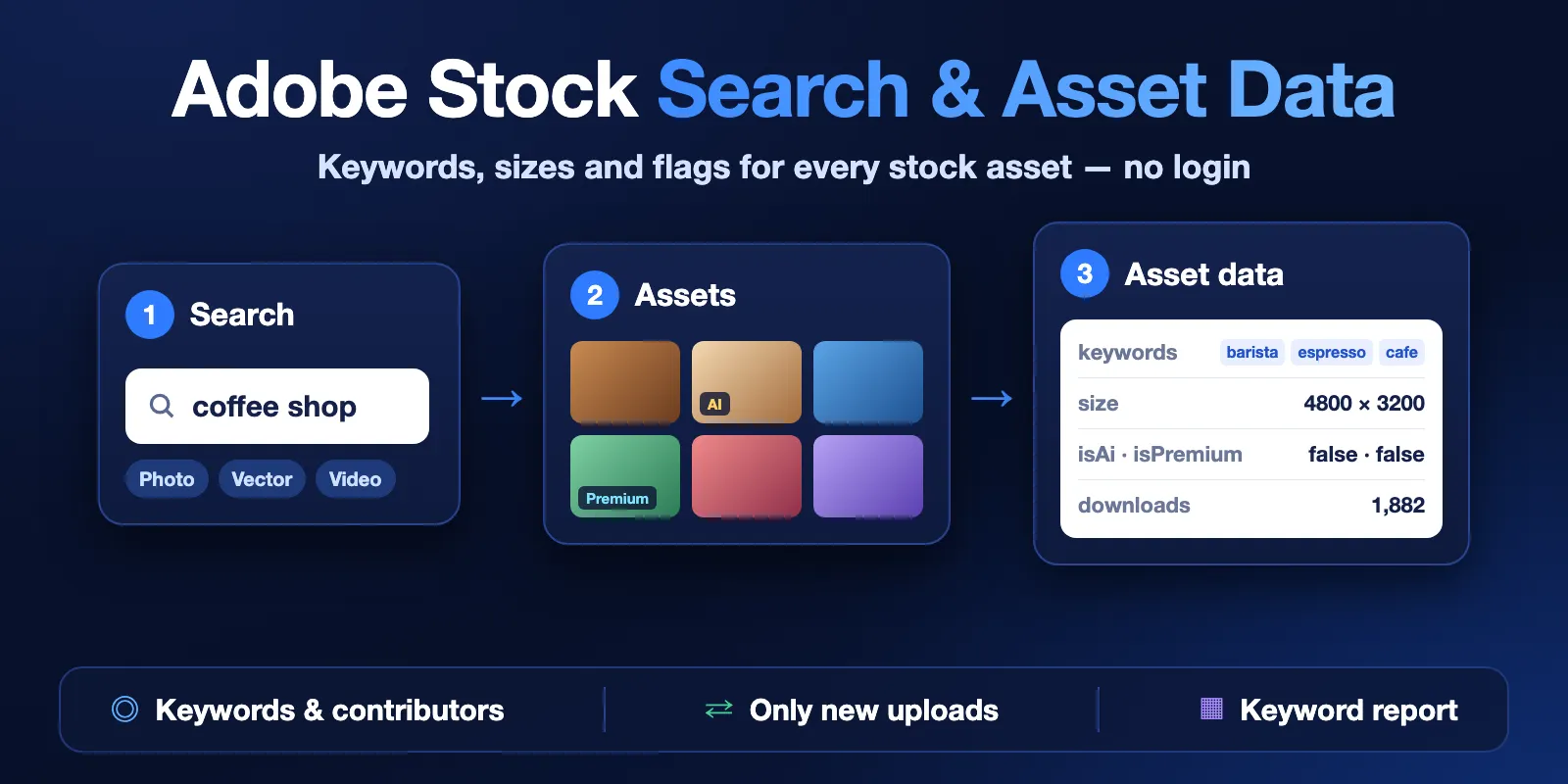
Table of contents
- What it does
- How it works
- Quick start
- Use cases
- Input
- Output
- Pricing
- Limits
- API, export and integrations
- Troubleshooting
- FAQ
- Related Actors
- Support
What it does
The Actor reads public Adobe Stock search results and asset data. You add keywords, contributor IDs, asset IDs or stock.adobe.com search URLs. It saves one Dataset row for each asset it finds. Each row has the asset ID, title, all keywords, author, type (photo, vector, illustration, video, template, 3D), width and height, Premium and generative AI flags, download count and preview links.
It does not download or license files. Previews are the watermarked images and video clips that Adobe Stock shows to everyone.
This is an unofficial tool. It is not affiliated with, endorsed by or connected to Adobe. Adobe Stock is a trademark of Adobe.
Good fit
- See which keywords top sellers use for a niche (
sortBy: downloadsplus the keyword report). - Watch a contributor's portfolio or a search for new uploads on a schedule (
onlyNew). - Check many asset IDs at once: title, keywords, size, Premium and AI flag.
- Build a reference board of thumbnails and links for a design brief.
How it works
- The Actor reads Adobe Stock search pages and asset data through the same public interface the stock.adobe.com website uses. If that interface fails, it reads the public search pages instead.
- It applies your filters (asset type, orientation, AI content, Premium, color, date, size) and removes duplicates, so each asset is saved once per run.
- It saves each asset as a Dataset row. It also saves
RUN_SUMMARY(status, counts, IDs not found, warnings) and, if you ask,KEYWORD_REPORTin the Key-value store.
The run stops at maxItems, at the end of the results, or at your maximum cost per run, whichever comes first.
Quick start
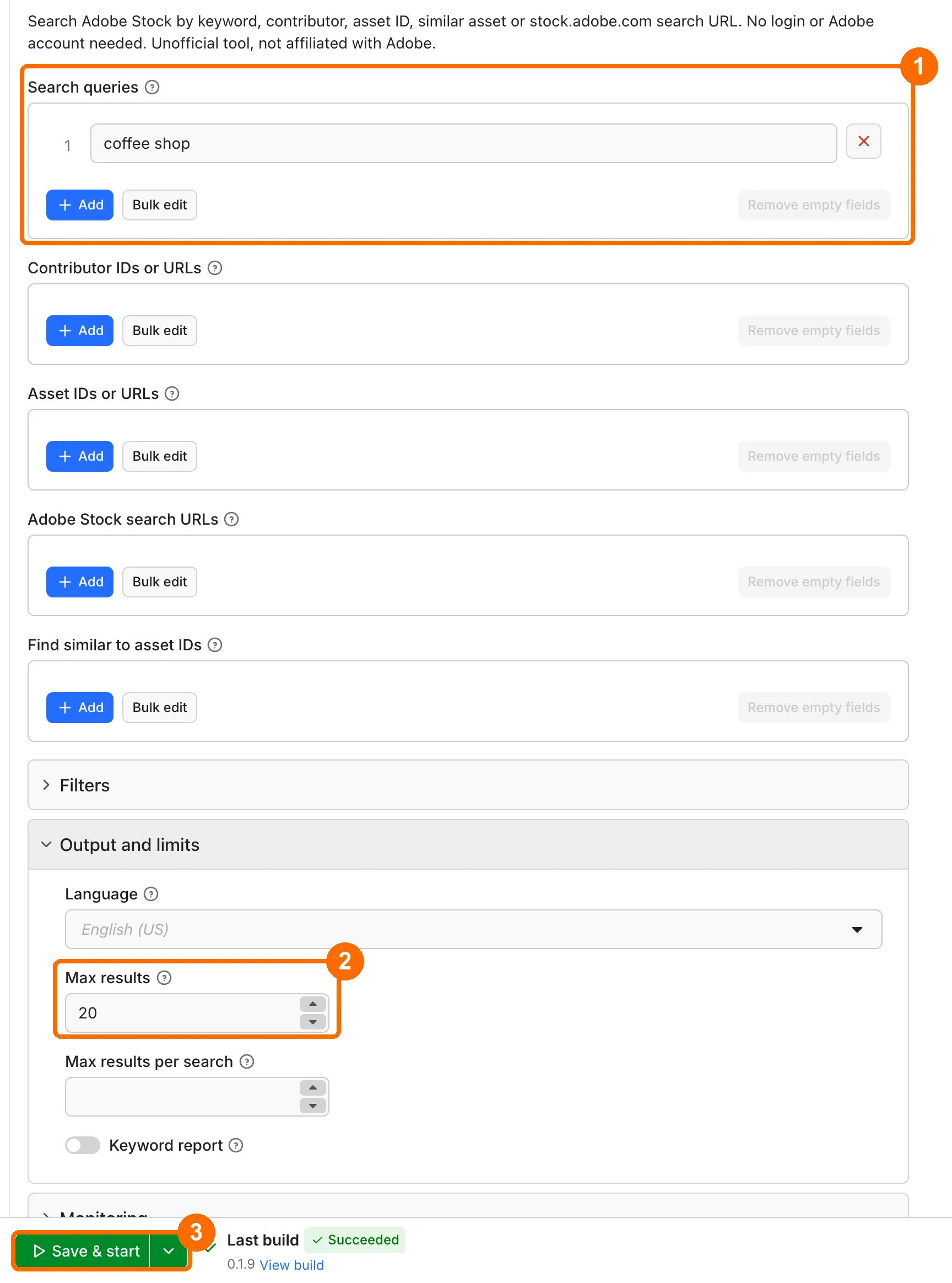
-
Open the Input tab. The form already has
coffee shopin Search queries (box 1 in the picture). -
Add your own keyword, one per line, or keep
coffee shop. -
Open Output and limits and keep Max results at the prefilled 20 (box 2). If you leave the field empty, the default is 100.
-
Click Save & start (box 3).
-
Open the Output tab and check the Overview table: keyword count (box 1), author (box 2), and the Premium and AI flags (box 3).
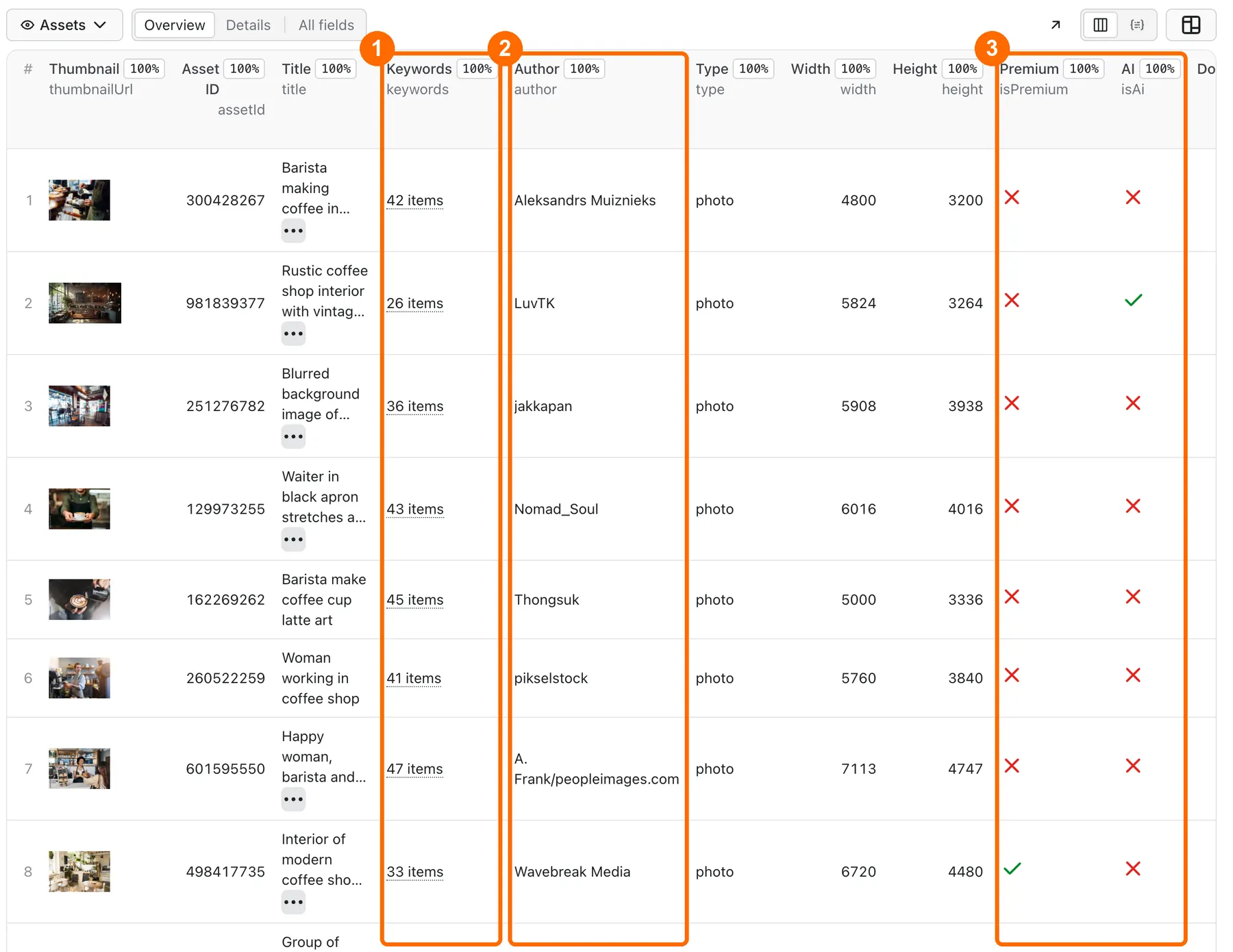
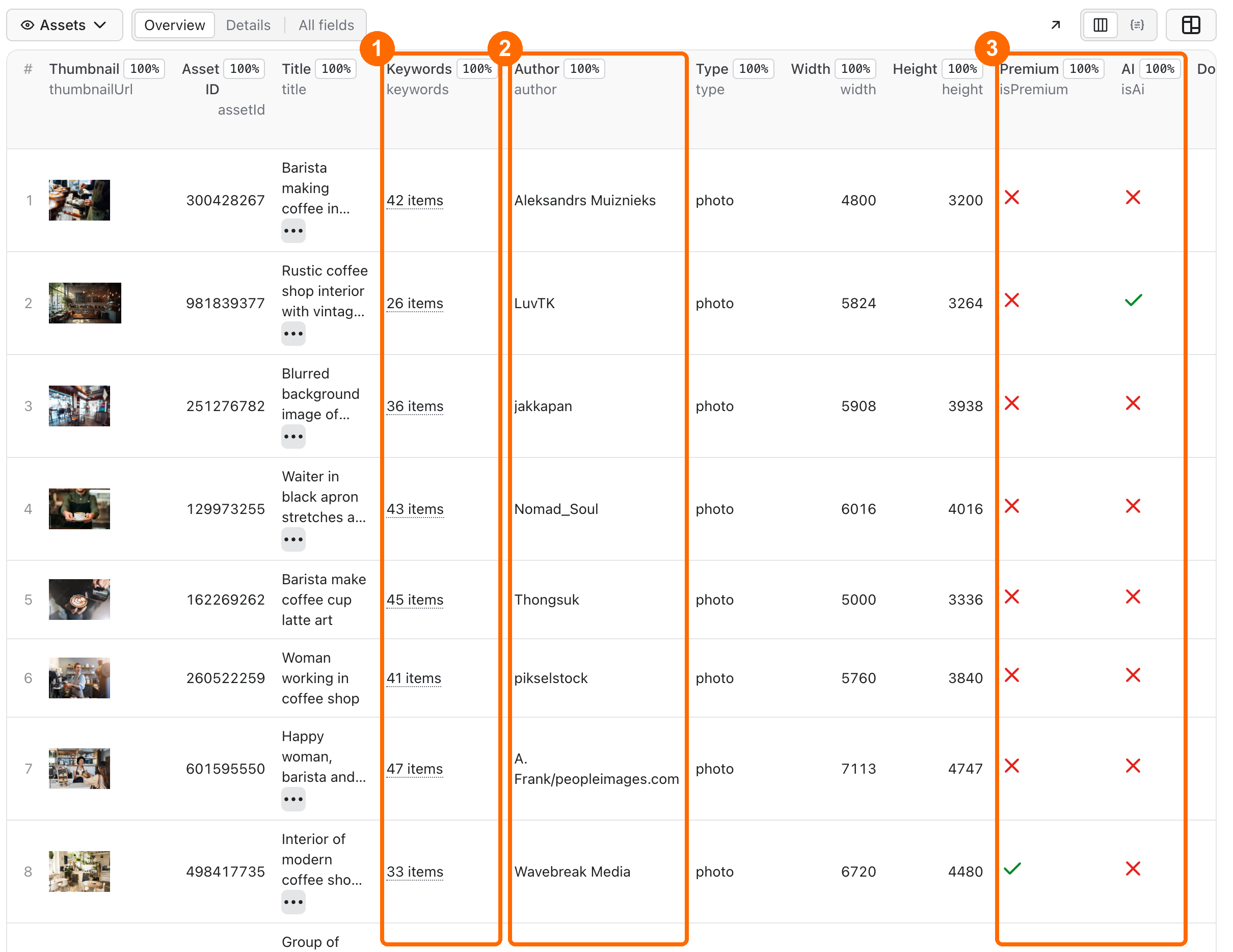
Expected result: 20 coffee shop assets in about 3 seconds, each with a title, keywords and a link to the asset page.
Use cases
| Buyer job | Input path | Output entity | Key fields | Next integration |
|---|---|---|---|---|
| Keyword research for a niche | searchQueries + sortBy: downloads + keywordReport | asset rows + KEYWORD_REPORT | keywords, downloads, title | spreadsheet export |
| Track new uploads | searchQueries or creatorIds + onlyNew on a schedule | new asset rows only | assetId, createdAt, url | Slack or Notion summary |
| Check a list of assets | assetIds | one row per ID | isPremium, isAi, width, height | CSV / JSON export |
| Study a contributor | creatorIds | portfolio assets | type, category, downloads | API or dataset export |
| Find look-alike assets | similarToAssetIds | similar assets | thumbnailUrl, url | design board |
Input
Add at least one of searchQueries, creatorIds, assetIds, startUrls or similarToAssetIds. If all are empty, the run stops at once with a clear message and costs only the start fee.
Input fields
| Field | Plain name | Type | Required | Default / prefill | Allowed values | Effect | Example | Recommendation |
|---|---|---|---|---|---|---|---|---|
searchQueries | Search queries | array of text | one input group | prefill ["coffee shop"] | up to 100 | each keyword is searched on its own | ["coffee shop","latte art"] | main way to start |
creatorIds | Contributor IDs or URLs | array of text | one input group | empty | ID or contributor page URL | contributor's portfolio; with searchQueries, only their matching assets | ["206426067"] | portfolio research |
assetIds | Asset IDs or URLs | array of text | one input group | empty | up to 1,000 | one row per existing asset | ["645588089"] | check known assets |
startUrls | Adobe Stock search URLs | array of URLs | one input group | empty | stock.adobe.com search, category, contributor or asset URLs | the Actor reads the query and filters from the URL | https://stock.adobe.com/search?k=coffee+shop | copy a search from the website |
similarToAssetIds | Find similar to asset IDs | array of text | one input group | empty | asset IDs or URLs | visually similar assets | ["645588089"] | look-alike research |
assetTypes | Asset types | array | no | all types | photo, illustration, vector, video, template, 3d | keeps only these types | ["vector"] | narrow the search |
orientation | Orientation | text | no | all | all, horizontal, vertical, square, panoramic | image or video shape | horizontal | banners and headers |
aiContent | AI-generated content | text | no | all | all, only, exclude | include, keep only, or remove generative AI assets | exclude | clean reference sets |
premium | Premium | text | no | all | all, standard, premium | Standard or Premium collection | standard | budget checks |
sortBy | Sort by | text | no | relevance | relevance, newest, downloads, featured, undiscovered | result order | downloads | see what sells |
color | Main color (hex) | text | no | empty | 6-digit hex | dominant color | #1E90FF | brand color boards |
addedWithin | Added within | text | no | any | any, 1w, 1m, 6m, 1y, 2y | upload date | 1m | fresh content |
releases | Model releases | text | no | all | all, with | only assets with a model or property release | with | commercial use checks |
videoDuration | Video duration | text | no | any | any, 10, 20, 30, 30+ (seconds) | clip length | 30+ | video only |
copySpaceOnly | Copy space only | boolean | no | false | true, false | only assets with empty space for your text, as marked by Adobe Stock | true | banners and ads with text |
transparentOnly | Transparent background only | boolean | no | false | true, false | PNG cut-outs only | true | design assets |
minWidth, minHeight | Minimum width / height (px) | integer | no | empty | 1–100,000 | keeps assets at least this large | 3000 | print use |
minMegapixels | Minimum megapixels | number | no | empty | 0.1–1,000 | keeps assets at least this large | 12 | print use |
language | Language | text | no | en_US | 18 locales | language of titles and keywords | de_DE | keyword research in other markets |
maxItems | Max results | integer | no | default 100, prefill 20 | 1–100,000 | total rows saved in the run | 500 | keep it small for the first run |
maxItemsPerSearch | Max results per search | integer | no | empty | 1–10,000 | cap for each query, contributor, URL or similar search | 50 | many queries in one run |
keywordReport | Keyword report | boolean | no | false | true, false | also saves the 200 most used keywords | true | niche research |
onlyNew | Only new assets | boolean | no | false | true, false | skips assets saved by earlier runs | true | scheduled monitoring |
stateName | State name | text | no | default | letters, digits, -, _ | separate memory per monitoring task | coffee-weekly | one name per schedule |
deliveryConnector | Send results to | MCP connector | no | empty | your Slack, Notion or other connector | posts a short summary after the run | — | team alerts |
deliveryTarget | Notion page or channel | text | no | empty | Notion page link or Slack channel ID | where the summary goes | — | needed for Notion |
apiKey | Your Adobe Stock API key | secret text | no | empty | your own key | used instead of the public web key | — | not needed |
Duplicate queries, IDs and URLs are merged. An asset found by two inputs is saved once. Asset IDs that do not exist are listed in RUN_SUMMARY.notFoundAssetIds and are not charged as rows.
The Actor also accepts the input field names of other popular Adobe Stock scrapers, such as query, aiFilter, priceFilter, order, creatorId, transparent. Fields it does not know are listed in RUN_SUMMARY.ignoredInputFields with a warning in the log.
Interacting settings
| When | Input A | Input B | Effective behavior | Example | Cost/result effect |
|---|---|---|---|---|---|
| both are set | creatorIds | searchQueries | each query is searched inside each contributor's portfolio | 2 contributors × 3 queries = 6 searches | more searches, more requests |
| both are set | maxItems | maxItemsPerSearch | the run stops at maxItems; each search stops at maxItemsPerSearch | 10 queries, 50 per search, 300 total | rows stop at the smaller limit |
| a URL has its own filters | startUrls | orientation, sortBy and other filters | filters in the URL win; form filters fill only what the URL does not set | URL with orientation=horizontal + form vertical → horizontal | none |
| size or transparency filters | minWidth, minHeight, minMegapixels, transparentOnly | maxItems | these filters are checked on each row, so the Actor may read more pages to fill maxItems | very large minMegapixels | more pages read; stops after 20 pages in a row with no match |
| scheduled monitoring | onlyNew | stateName | assets saved before under this state name are skipped | weekly run, name coffee-weekly | skipped assets are not charged |
Input examples
Keyword research for a niche
Expected behavior: the Actor reads the 100 most downloaded non-AI coffee shop assets.
Expected output: 100 rows with title, keywords, downloads, plus KEYWORD_REPORT with the most used keywords.
Limit or cost note: one search page holds up to 100 assets, so this run makes one request.
Weekly check for new uploads of a contributor
Expected behavior: the first run saves up to 200 assets; later runs save only assets that were not saved before.
Expected output: new asset rows with assetId, createdAt, url.
Limit or cost note: when nothing is new, the run saves 0 rows and pays only the start fee and the requests it made.
Output
Output fields
| Field | Meaning | Type | Can be empty? | Example / enum | Source / notes |
|---|---|---|---|---|---|
assetId | Adobe Stock asset ID | integer | no | 300428267 | stable ID for joins and monitoring |
title | asset title | text | rarely | Barista making coffee… | extra spaces and line breaks removed |
keywords | all keywords of the asset | array of text | can be [] | ["barista","espresso"] | duplicates that differ only in case removed |
author | contributor name | text | yes | Aleksandrs Muiznieks | |
authorId, authorCountry | contributor ID and country | integer, text | yes | 206684585, Latvia | |
type | asset type | text | no | photo, illustration, vector, video, template, 3d | |
width, height | original size in pixels | integer | yes | 4800, 3200 | |
megapixels, orientation | size and shape | number, text | yes | 15.36, horizontal | |
isPremium, premiumLevel | Premium collection | boolean, integer | no | false, 0 | |
isAi | marked as generative AI by Adobe Stock | boolean | no | false | |
isTransparent, isEditorial, hasReleases | background, editorial use, model release | boolean | yes | false | |
category, categoryId | Adobe Stock category | text, integer | yes | Drinks, 214 | |
createdAt | upload time | ISO date | yes | 2019-11-04T20:15:00.800Z | |
downloads | download count shown by Adobe Stock | integer | yes | 1882 | |
thumbnailUrl, thumbnail1000Url | 500 px and 1000 px thumbnails | URL | yes | https://as1.ftcdn.net/… | |
previewUrl | watermarked preview | URL | yes | https://stock.adobe.com/Rest/… | the watermarked preview Adobe Stock shows to everyone |
videoPreviewUrl, durationSeconds, frameRate | video preview and clip data | URL, number | yes (null for images) | null | videos only |
url | asset page | URL | no | https://stock.adobe.com/300428267 | |
searchQuery, sourceInput, inputType, position | which input found the asset, and its place in results | text, integer | searchQuery can be null | coffee shop, search, 1 | inputType: search, creator, asset, url, similar |
totalResults | total results Adobe Stock reports for the search | integer | yes | 12836205 | |
scrapedAt, source | time saved and route used | ISO date, text | no | api or html |
Output entities and surfaces
| Situation | Dataset/API/KVS/live view | Result shape | User action |
|---|---|---|---|
| Normal item | Dataset, views Overview and Details | one row per asset | open, export or use assetId |
| Domain-empty result | Dataset empty, RUN_SUMMARY.status = not_found | run SUCCEEDED with a clear message | try a broader query or fewer filters |
| Partial result | Dataset + RUN_SUMMARY.status = partial, per-input status in RUN_SUMMARY.inputs | rows from inputs that worked | check the failed input and run it again |
| Technical failure or retry | run FAILED, RUN_SUMMARY.status = error | error text without secrets | run again later, or open an issue with the run ID |
| Keyword report | Key-value store KEYWORD_REPORT | top 200 keywords with count and share | use for tags and titles |
RUN_SUMMARY.stopReason says why the run stopped: MAX_ITEMS, DONE, PAID_ITEMS_LIMIT or CHARGE_LIMIT (your maximum cost per run).
Output example
This example is trimmed (the keyword list is shorter and some fields are left out) and shows one row from the coffee shop run. null means Adobe Stock has no value for this asset, for example no video preview for a photo. Adobe Stock results change often, so the same search can return different assets on different days.
Field names compared with kawsar/adobe-stock-scraper
If you move from that Actor, the input field names work as they are. The output names differ:
| kawsar field | Our field |
|---|---|
assetTitle | title |
keywordList (objects) | keywords (text list) |
creatorName, creatorId, countryName | author, authorId, authorCountry |
pixelWidth, pixelHeight | width, height |
premiumLevelId | premiumLevel, isPremium |
isGenerativeAi | isAi |
thumbUrl, thumb1000Url | thumbnailUrl, thumbnail1000Url |
compUrl | previewUrl |
detailsUrl | url |
downloadCount | downloads |
categoryInfo | category, categoryId |
contentType, mediaTypeId | mimeType, type |
Send results to Slack or Notion
Pick your connector in the optional deliveryConnector field. After the run saves its data, the Actor posts a short summary (up to 25 rows and a link to the full dataset) there. Put a Notion page link or a Slack channel ID in deliveryTarget: in Notion every run is added on top of that one page, so your workspace does not fill up with new pages. Without a page link, Notion delivery is skipped and the log says so. A delivery error never fails the run and costs nothing extra. Connect a service once in Apify Console → MCP connectors.
Use case → fields
| Buyer job | Input path | Output entity | Key fields | Next integration |
|---|---|---|---|---|
| Keyword research | searchQueries, keywordReport | asset rows, KEYWORD_REPORT | keywords, downloads | spreadsheet |
| New uploads | creatorIds, onlyNew | new rows | assetId, createdAt, url | Slack or Notion |
| Asset check | assetIds | one row per ID | isPremium, isAi, width, height | CSV export |
Pricing
Pricing unit
You pay per event. The main event is Asset record: one asset saved to the Dataset.
| Event | When it is charged | Free plan | Bronze | Silver | Gold and higher |
|---|---|---|---|---|---|
| Asset record (main) | one asset saved to the Dataset | $0.00055 ($0.55 / 1,000) | $0.000495 | $0.00044 | $0.000385 |
| Adobe Stock request | one search page (up to 100 assets) or asset lookup that Adobe Stock answers | $0.0002 | $0.0002 | $0.0002 | $0.0002 |
| Actor start | once per run, per GB of memory | $0.0005 | $0.0005 | $0.0005 | $0.0005 |
- The start fee scales with run memory: the default 256 MB counts as one event.
- A request is charged only when Adobe Stock answers it, also when the answer is empty. A failed request is not charged.
- A valid search with no results, or a filter that matches nothing, costs the start fee plus the requests made. A monitoring run with no new assets costs the same; skipped old assets are not charged.
- An input with no usable value (for example only an unreadable asset ID, or a bad filter value) stops before any request and costs only the start fee.
- Platform usage (compute) is paid by the developer, not by you.
- Set Maximum cost per run in the run options. The Actor checks it before each request and each row and stops with
stopReason: CHARGE_LIMIT; it never starts work that your limit cannot pay for.
Cost examples
Free plan prices. Counts are from real runs.
| Scenario | Input scope | Expected item/event count | Base charge | Optional charge | Stop/cap behavior |
|---|---|---|---|---|---|
| First run (prefill) | coffee shop, 20 results | 1 start, 1 request, 20 rows | $0.0117 | none | stops at maxItems |
| Default run | one query, 100 results | 1 start, 1 request, 100 rows | $0.0557 | none | stops at maxItems |
| Larger run | one query, 1,000 results | 1 start, about 12 requests, 1,000 rows | about $0.553 | none | stops at maxItems |
| No results | 100 queries with no matches | 1 start, 100 requests, 0 rows | $0.0205 | none | ends with not_found |
| Low cost limit | 2 queries, 200 results, limit $0.003 | 1 start, 1 request, 4 rows | $0.0029 | none | stops at CHARGE_LIMIT |
Limits
- Up to 100 queries, 1,000 asset IDs and 300 searches (contributors × queries plus URLs) per run;
maxItemsup to 100,000. - Adobe Stock shows at most about 50,000 results for one search. To get more, split the search into several queries or filters.
- In our test, one run with the 1-hour timeout and 256 MB saved about 27,600 rows, then stopped with
DEADLINE_REACHEDand kept every row. For more, raise the run timeout or split the work into several runs. - The Actor does not download, license or remove watermarks from files. It returns public data and preview links only.
- Some website filters are not available here: isolated objects, people, icon style and the free collection. We tested them on Adobe Stock's search (2026-11-19): isolated, people and free do not narrow the results, and the icon style filter is rejected. Copy space works and is the
copySpaceOnlyfield. downloadsand other counts are what Adobe Stock shows at the moment of the run. Results and order change often.- Very long runs: a run that saves tens of thousands of assets can take most of an hour. Set a run timeout that fits your
maxItems. - Requests to Adobe Stock: at most 4 attempts each, a 30-second timeout (45 seconds on the web-page fallback), a short pause between requests, up to 20,000 requests and 12 MB per answer in one run.
- A value in
assetIds,creatorIds,similarToAssetIdsorstartUrlsthat cannot be read is skipped with statusinvalidinRUN_SUMMARY.inputs; the other values still run. With saved rows the run ispartial; with a valid but empty search it isnot_found. The run stops with an input error only when no valid value is left.
API, export and integrations
- API: start a run with
POST https://api.apify.com/v2/acts/cliqtomedia~adobe-stock-scraper/runsand the input JSON; read rows from the run's dataset items endpoint. - Export: download the Dataset as JSON, CSV, Excel, XML or HTML from the Output tab or the API.
- Scheduling: create an Apify schedule with
onlyNew: trueand your ownstateNameto get only new uploads each time. - Webhooks / no-code: use Apify webhooks, Make, Zapier or n8n to send
url,titleandkeywordsof each new row to your tools. - SDK / MCP / agent: use the Apify client for JavaScript or Python, or the MCP server below.
Use with AI agents (MCP)
- MCP server URL with only this Actor:
https://mcp.apify.com?tools=cliqtomedia/adobe-stock-scraper. - Smallest useful input:
{"searchQueries":["coffee shop"],"maxItems":20}. - Key output fields:
assetId(stable ID),title,keywords(all asset keywords),type,isAi(generative AI flag),url(asset page). - A 20-row run takes about 3 seconds and costs $0.0117 on the Free plan. Keep
maxItemssmall; checkRUN_SUMMARY.statusandstopReasonbefore you use the rows.
Troubleshooting
The run finished with 0 rows
Symptom: the Dataset is empty and the status message says no assets matched.
Likely reason: the query is too narrow or the filters exclude everything (for example minMegapixels that is too high, or transparentOnly on videos).
Check: open RUN_SUMMARY and read inputs and warnings.
Action: try a broader query or remove one filter at a time.
The run stopped before maxItems
Symptom: fewer rows than maxItems, stopReason is CHARGE_LIMIT.
Likely reason: your Maximum cost per run is lower than the run needs.
Check: compare the limit with the prices in Pricing.
Action: raise the limit or lower maxItems.
Some asset IDs are missing
Symptom: you sent 10 asset IDs and got 8 rows.
Likely reason: the missing assets were removed from Adobe Stock or the IDs are wrong.
Check: RUN_SUMMARY.notFoundAssetIds.
Action: open https://stock.adobe.com/<ID> to check the asset.
A field I used is ignored
Symptom: the log says "Ignored unknown input fields".
Likely reason: the field name is not supported.
Check: RUN_SUMMARY.ignoredInputFields.
Action: use the field names from Input.
FAQ
Do I need an Adobe account or API key?
No. The Actor needs no login, no cookies and no Adobe account. If you have your own Adobe Stock API key, you can add it in apiKey, but it is not required.
Why are some assets missing or in a different order than on the website?
Adobe Stock changes its results often, and new uploads move older assets down. Two runs a few minutes apart can differ a little. Use assetId to compare runs, and onlyNew for monitoring.
Can I download the full-size files?
No. The Actor returns public metadata, thumbnails and watermarked previews. To use a file, license it on Adobe Stock.
How much does an empty run cost?
The start fee ($0.0005) plus $0.0002 for each search page Adobe Stock answered. For example, one query with no results costs $0.0007.
Related Actors
- Google Images Scraper — find the same images on the open web: image URLs, sizes and source pages.
- Pinterest Search Scraper — see which pins and boards people save for the same keyword.
Support
For a bug, question or feature request, open the Actor's Issues tab on Apify. Include the run ID, which input fields you used and the error text from the log. Never send tokens, cookies or API keys.
⭐ Found it useful? Rate this Actor. Something wrong? Report a problem — we fix reported problems.


