

Airbnb Scraper: Listings, Prices, Calendar - No Login
Pricing
from $1.89 / 1,000 listings
Airbnb Scraper: Listings, Prices, Calendar - No Login
Get Airbnb listings with total stay prices, discounts, calendars, reviews and area price summaries from a city or link. Track changes over time. No login or API key.
Pricing
from $1.89 / 1,000 listings
Rating
0.0
(0)
Developer

Cliqto Media
Maintained by CommunityActor stats
0
Bookmarked
2
Total users
1
Monthly active users
3 days ago
Last modified
Categories
Security
Limited permissionsShare
Enter a city, an Airbnb search link or a room link, and get listings with nightly and total stay prices, discounts, ratings, calendars and reviews from Airbnb. You get a table for CSV, Excel or API use, plus an area price summary. You do not need a login or an API key. A run with 10 listings takes about 35 seconds and costs about $0.03.
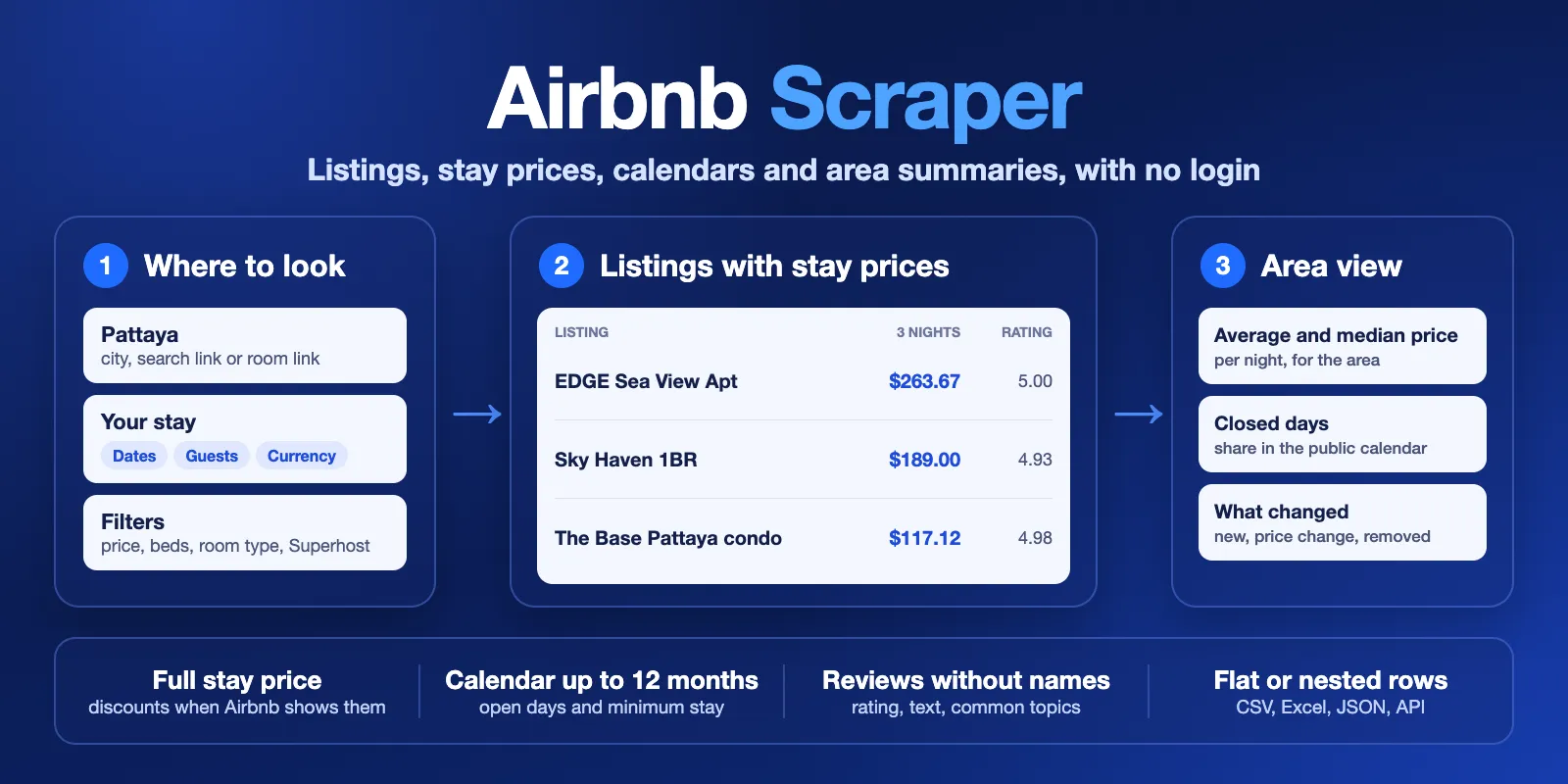
Table of contents
- What it does
- How it works
- Quick start
- Use cases
- Input
- Output
- Pricing
- Limits
- API, export and integrations
- Troubleshooting
- FAQ
- Support
What it does
This Actor has five modes:
- Search listings: find listings by city, area, map box or Airbnb search link.
- Listing details: get full data for room links you already have.
- Calendar: get open days and minimum stay, one row per day. Daily prices are optional.
- Reviews: get review text, rating, date and language, one row per review.
- Track changes: compare a search with your last run and mark each listing as new, changed, unchanged, missing or removed.
Each run also saves an area summary with average price, median price, average rating and superhost share.
Good fit
- You compare stay prices for the same dates in a city or area.
- You check open days and minimum stay for a set of listings.
- You read reviews to learn what guests like or dislike.
- You track new listings and price changes on a schedule.
It is not a good fit if you need host contact details, guest identities or actual booking numbers. The Actor has no contact or profile fields, and Airbnb does not show bookings.
How it works
- You enter a location or links and choose your dates. If you set no dates, the Actor uses 3 nights starting 30 days from today.
- The Actor reads public Airbnb pages. It makes about 1 request per second, and you need no proxy or account.
- It saves one row per listing, day or review. You can open the rows in the table, export them, or get them by API.
Quick start
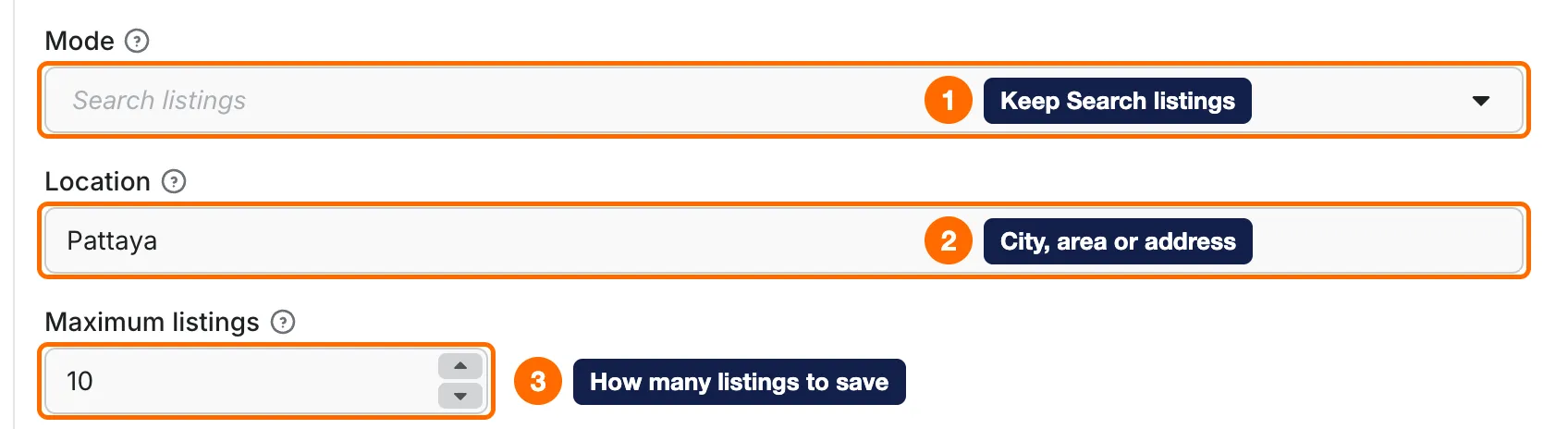
- Open the Input tab and keep Mode on Search listings (box 1).
- Keep Pattaya in Location, or type your city (box 2).
- Keep Maximum listings at 10 (box 3).
- Click Start.
- When the run ends, open the Output tab (box 5).
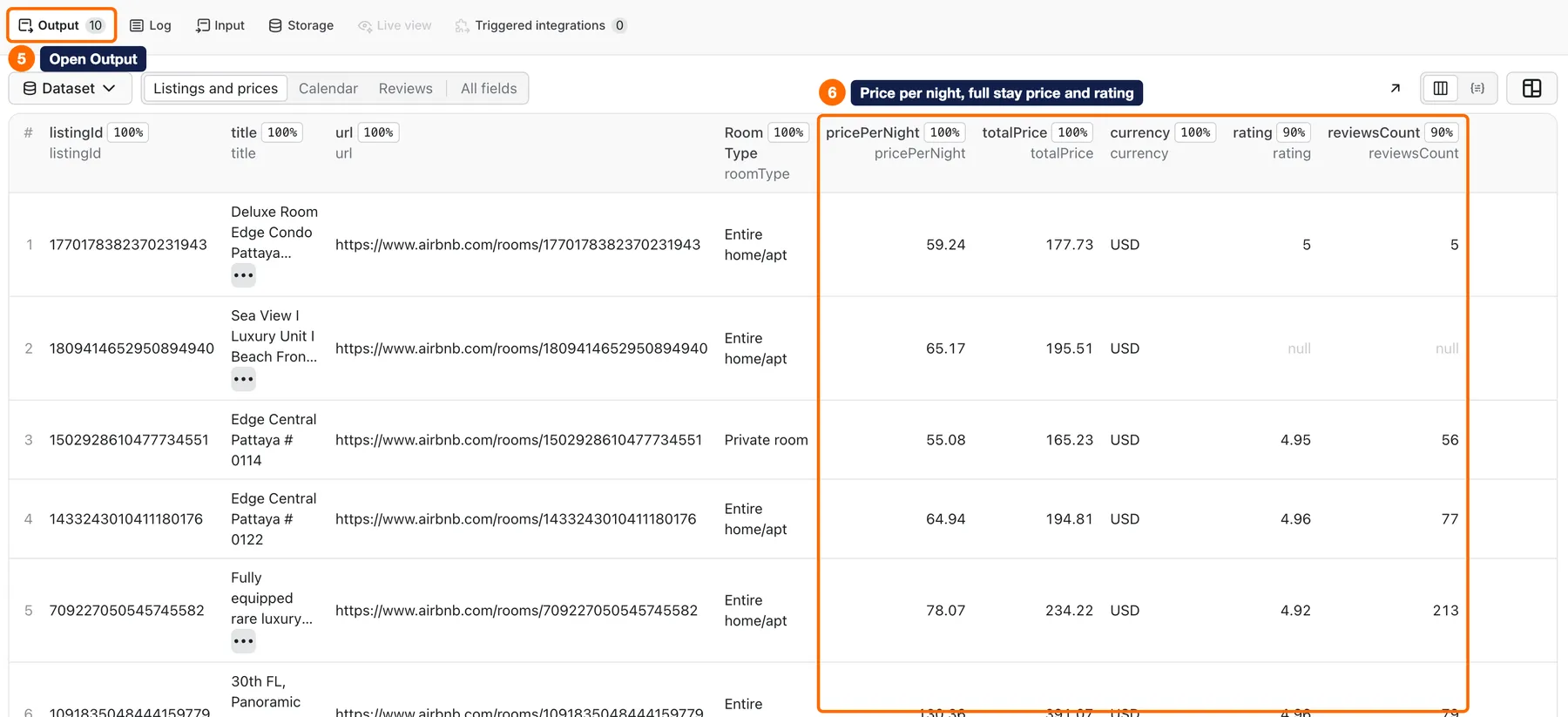
- Check
pricePerNight,totalPrice,currency,ratingandreviewsCount(box 6).
Expected result: about 10 rows in about 35 seconds, for about $0.03.
Use cases
| Buyer job | Input path | Output entity | Key fields | Next integration |
|---|---|---|---|---|
| Compare prices in an area | search, location, checkIn, checkOut | Listing rows, area summary | pricePerNight, totalPrice, originalPrice, rating | CSV or Excel for price analysis |
| Compare one area on several dates | search, location, dateRanges | One row per listing and date range, summary per period | checkIn, checkOut, totalPrice | Google Sheets through API |
| Check open days for a listing | calendar, listingUrls, calendarMonths | Day rows | date, available, minNights, pricePerNight | Your pricing sheet |
| Learn from guest reviews | reviews, listingUrls, maxReviews | Review rows | text, rating, createdAt, language | A text analysis tool |
| Track an area over time | monitor, location, snapshotName, onlyChanges | Changed listing rows | changeStatus, pricePerNight, fetchedAt | Apify Schedule with Slack or Notion summary |
Input
No field is required by the form. Search listings and Track changes search Pattaya when you give no location or link. Listing details, Calendar and Reviews stop with INVALID_INPUT if you give no links.
Input fields
| Field | Plain name | Type | Required | Default / prefill | Allowed values | Effect | Example | Recommendation |
|---|---|---|---|---|---|---|---|---|
mode | Mode | string | No | search | search, details, calendar, reviews, monitor | Chooses what the run collects | search | Start with search |
location | Location | string | No | Prefill Pattaya | City or area | Searches this place | Pattaya | Use a city name |
maxItems | Maximum listings | integer | No | 10 | 1 or more. Tested up to 1000 fast rows and 240 full rows | Row limit across all inputs and date ranges, shared evenly between searches. In reviews mode it is also the default review limit per listing | 10 | Test with 10 first |
locationQueries | More locations | string array | No | Empty | City or area names | Adds more places to search | ["Phuket"] | maxItems is shared evenly between places |
startUrls | Airbnb search or room links | URL list | No | Empty | Airbnb links | Uses the link, its dates and its filters. Country links change to www.airbnb.com | [{ "url": "https://www.airbnb.com/s/Pattaya/homes" }] | Good when you already set filters on Airbnb |
listingUrls | Listing links | string array | For details, calendar and reviews, unless you use startUrls | Empty | Room links with a numeric ID | Reads these listings | https://www.airbnb.com/rooms/1770178382370231943 | Use for known listings |
includeDetails | Include full listing details | boolean | No | true | true, false | true adds description, amenities, rules and more, but runs slower | false | Use false for large runs |
checkIn | Check-in date | string | No | 30 days from today | YYYY-MM-DD | Start of the stay | 2026-12-04 | Set both dates, or the run stops with INVALID_INPUT |
checkOut | Check-out date | string | No | 3 nights after check-in | YYYY-MM-DD | End of the stay | 2026-12-07 | Must be later than checkIn |
dateRanges | Multiple date ranges | object array | No | Empty | {checkIn, checkOut} | One listing row per date range. Each range gets an even share of maxItems | [{"checkIn":"2026-12-04","checkOut":"2026-12-07"}] | Raise maxItems to get more rows per range |
adults | Adults | integer | No | 2 | 1 or more | Guests used for the price | 2 | Use your real group size |
children | Children | integer | No | 0 | 0 or more | Guests used for the price | 1 | Optional |
infants | Infants | integer | No | 0 | 0 or more | Guests used for the price | 1 | Optional |
pets | Pets | integer | No | 0 | 0 or more | Guests used for the price | 1 | Optional |
currency | Currency | string | No | USD | 48 currency codes | Currency of prices | EUR | Keep one currency per comparison |
locale | Language | string | No | en | Airbnb language code | Language of listing text, when Airbnb has it | de | See Limits |
priceMin | Minimum nightly price | number | No | Empty | 0 or more | Search filter | 50 | Check the currency |
priceMax | Maximum nightly price | number | No | Empty | 0 or more | Search filter | 200 | Check the currency |
minBeds | Minimum beds | integer | No | Empty | 0 or more | Search filter | 2 | Optional |
minBedrooms | Minimum bedrooms | integer | No | Empty | 0 or more | Search filter | 1 | Optional |
minBathrooms | Minimum bathrooms | number | No | Empty | 0 or more | Search filter | 1 | Optional |
roomTypes | Room types | string array | No | Empty | Entire home/apt, Private room, Shared room, Hotel room | Search filter | ["Private room"] | Optional |
amenities | Amenity IDs | integer array | No | Empty | Airbnb amenity IDs | Search filter | [4] | Copy IDs from an Airbnb search link |
instantBook | Instant Book only | boolean | No | Off | true, false | Search filter | true | Optional |
superhost | Superhosts only | boolean | No | Off | true, false | Search filter | true | Optional |
boundingBox | Map area | object | No | Empty | neLat, neLng, swLat, swLng | Searches inside this box. Set location too | {"neLat":12.97,"neLng":100.92,"swLat":12.88,"swLng":100.85} | Use it for one area of a city |
splitMap | Split large map searches | boolean | No | true | true, false | Splits a large area when Airbnb shows only part of it | true | Keep it on |
calendarMonths | Calendar months | integer | No | 0 | 0 to 12. Calendar mode uses 1 when 0 | Months of days to read | 3 | See the cost note below |
calendarStartDate | Calendar start | string | No | Check-in date or today | YYYY-MM-DD | First calendar day | 2026-12-01 | Optional |
calendarEndDate | Calendar end | string | No | Empty | YYYY-MM-DD, within 12 months | Last calendar day | 2027-02-28 | Optional |
includeDailyPrices | Quote each available date | boolean | No | false | true, false | Gets a price for each day that allows check-in. Slower | true | Use for short periods |
maxReviews | Reviews per listing | integer | No | 0 | 0 or more. Reviews mode uses maxItems when 0 | Review limit per listing | 50 | Keep 0 in search if you do not need reviews |
reviewSort | Review order | string | No | MOST_RECENT | MOST_RECENT, MOST_RELEVANT, HIGHEST_RATING, LOWEST_RATING | Order of reviews | MOST_RECENT | Keep it with reviewsSince |
reviewsSince | Reviews since | string | No | Empty | YYYY-MM-DD | Keeps newer reviews only | 2026-01-01 | Stops early only with most recent order |
snapshotName | Snapshot name | string | No | default | Letters, numbers and dashes, up to 63 | Name of the saved history | pattaya-weekly | Use one name per tracked search |
onlyChanges | Return only changes | boolean | No | false | true, false | Saves only rows that changed | true | Good for schedules |
outputFormat | Output format | string | No | nested | nested, flat | Keeps nested objects or flattens them | flat | Use flat for spreadsheets |
maxResults | Maximum results (compatibility) | integer | No | Empty | 1 or more | Other name for maxItems. It wins if you set both | 10 | Use maxItems |
deliveryConnector | Send results to (optional) | connector | No | Empty | Your Slack or Notion connector | Sends a short summary | See Send results | Optional |
deliveryTarget | Notion page or channel (optional) | string | No | Empty | Slack channel ID or Notion page link | Place for the summary | C0123456789 | Optional |
Interacting settings
| When | Input A | Input B | Effective behavior | Example | Cost/result effect |
|---|---|---|---|---|---|
| Search speed | includeDetails: true | maxItems | Reads each listing page, about 2.3 seconds per listing | 100 listings take about 4 minutes | Same price per row, more time |
| Fast search | includeDetails: false | maxItems | Skips listing pages | 1000 listings take 3.5 to 4.5 minutes | Fewer fields, same price per row |
| Many dates or places | dateRanges or locationQueries | maxItems | Each search gets an even share. Rows a search does not use move to the next one, not back to an earlier one | 2 ranges and maxItems: 10 give 5 rows per range | A run can save fewer rows than maxItems when a later search has few listings |
| Links with dates | startUrls | checkIn | Dates in the link are used for that link | A link with December dates | Prices follow the link dates |
| Calendar in a listing | mode: search or details | calendarMonths | Adds days inside the listing row | calendarMonths: 1 | Pays calendar per month, no calendar-day |
| Calendar rows | mode: calendar | calendarMonths | Saves one row per day | 12 months give about 362 rows | Pays calendar and calendar-day, about $1.00 per listing for a year |
| Daily prices | includeDailyPrices | calendarMonths | Asks a price only for days that are open and allow check-in | 12 of 28 days got a price | Pays daily-price only for a price received |
| Reviews in search | mode: search | maxReviews | Saves reviews as their own rows | maxReviews: 20 | Pays review-page and review |
| Review date stop | reviewsSince | reviewSort | Stops early only with MOST_RECENT | Other orders read further | Other orders can cost more pages |
| Tracking | mode: monitor | onlyChanges | Unchanged listings get no row | 3 rows and 7 checks | Unchanged listing costs check, not result |
Input examples
Small search
Expected output: about 10 listing rows with full details in about 35 seconds. Cost note: about $0.03.
Large fast search
Expected output: up to 1000 rows without description, amenities and rules. Limit or cost note: about $2.87. Set the run timeout to 600 seconds. With the default 300 seconds, most tests finished 1000 rows in 3.5 to 4.5 minutes. One run on an early build stopped at 931 rows.
Calendar with daily prices
Expected output: one row per day. Days that allow check-in also get a price. Cost note: our test had 28 days and 12 prices, took about 35 seconds and cost about $0.11.
Reviews
Expected output: up to 60 review rows, in 5 to 8 seconds. Cost note: about $0.16 for 60 reviews.
Track changes
Expected behavior: the first run marks all rows as new. Later runs save only rows that changed.
Cost note: first run about $0.03. A later run with 2 changes and 8 unchanged listings cost about $0.017.
Output
The table has three views: Listings and prices, Calendar and Reviews. Use recordType to tell the rows apart in API data.
Output fields
Listing rows (recordType: listing):
| Field | Meaning | Type | Can be empty? | Example / enum | Source / notes |
|---|---|---|---|---|---|
listingId | Airbnb listing ID | string | No | 1770178382370231943 | Room link |
url | Listing link | string | No | https://www.airbnb.com/rooms/... | Airbnb |
title | Listing title | string | Rarely | Deluxe Room Edge Condo... | Airbnb |
roomType | Room type | string | Yes | Entire home/apt | Full details only |
propertyType | Property type | string | Yes | Entire rental unit | Airbnb |
personCapacity | Guests allowed | integer | Yes | 2 | Full details only |
bedrooms, beds, bathrooms | Room counts | number | Yes | 1 | Filled for about 9 in 10 listings |
pricePerNight | Price per night for these dates | number | Yes | 59.24 | Empty when Airbnb gives no price |
averageTotalPerNight | Total divided by nights | number | Yes | 59.24 | Calculated |
totalPrice | Stay price shown by Airbnb | number | Yes | 177.73 | For the listed dates and guests |
originalPrice | Price before a discount | number | Yes | 275 | Only when Airbnb shows it. In tests, about 1 in 5 listings |
priceLabel | Price text from Airbnb | string | Yes | $178 for 3 nights | Airbnb |
priceBreakdown | Lines of the price | array | Yes | [{"label":"3 nights x $59.24","amount":177.73}] | Can show discounts |
priceIncludesTaxes | Taxes in the price | boolean | Often | true | Empty when Airbnb does not say |
fees | Cleaning, service and tax | object | Values often empty | {"cleaning":null,"service":null,"taxes":null} | Empty in all 341 test listings |
currency | Currency code | string | No | USD | Your input |
checkIn, checkOut | Stay dates | string | No | 2026-12-04 | Your input or the default |
rating | Average rating | number | Yes | 5 | Empty with no rating yet |
reviewsCount | Number of reviews | integer | Yes | 5 | Airbnb |
lat, lng | Map position | number | Rarely | 12.9311 | Airbnb's public map position |
hostIsSuperhost | Superhost mark | boolean | Yes | false | Full details only |
description | Listing text | string | Yes | A stylish condominium... | Full details only |
photos | Photo links | array | Rarely | ["https://a0.muscache.com/..."] | Airbnb |
amenities | Amenities | array | Yes | [{"group":"Bathroom","title":"Hair dryer","available":true}] | Full details only |
houseRules | House rules | array | Yes | [{"title":"No pets"}] | Full details only |
categoryRatings | Ratings by category | array | Yes | [{"category":"cleanliness","rating":5}] | Full details only |
ratingDistribution | Share per star | array | Yes | [{"stars":5,"share":1}] | Full details only |
cancellationPolicy | Cancellation text | string | Yes | Free cancellation for 24 hours... | Full details only |
calendar | Days inside the listing | array | Yes | See calendar rows | With calendarMonths |
occupancy | Share of closed days | object | Yes | {"observedDays":28,"unavailableDays":16,"unavailableShare":0.57,"method":"unavailable_calendar_days","isBookingOccupancy":false} | Closed days, not bookings |
reviewSummary | Common review words | object | Yes | {"collectedCount":44,"topics":[{"term":"clean","mentions":9}]} | With maxReviews |
available | Open for these dates | boolean | Yes | true | When known |
changeStatus | Change since last run | string | Yes | new, changed, unchanged, missing_from_search, reappeared, removed, unknown | Track changes mode |
status | Row problem | string | Yes | not_found, partial | A listing that could not be fully read |
calendarStatus | Calendar problem | string | Yes | partial | Part of the calendar is missing |
source | Source name | string | No | Airbnb | Fixed |
fetchedAt | Time of reading | string | No | 2026-11-04T03:19:56.515Z | UTC |
Calendar rows (recordType: calendar):
| Field | Meaning | Type | Can be empty? | Example / enum | Source / notes |
|---|---|---|---|---|---|
date | Calendar day | string | No | 2026-12-07 | Airbnb |
available, bookable | Day is open | boolean | Rarely | true | Airbnb |
availableForCheckIn, availableForCheckOut | Check-in or check-out allowed | boolean | Rarely | true | Airbnb |
minNights, maxNights | Stay limits | integer | Yes | 3 | Airbnb |
pricePerNight, totalPrice | Price for a stay from this day | number | Yes | 87.89 | With includeDailyPrices |
averageTotalPerNight, fees, priceNights | More price data | mixed | Yes | 3 | With a price. priceNights is the minimum stay or 1 |
priceStatus | Price result | string | No | available, unavailable, error, not_requested | Only available is paid |
Review rows (recordType: review):
| Field | Meaning | Type | Can be empty? | Example / enum | Source / notes |
|---|---|---|---|---|---|
reviewId | Review ID | string | No | 1808350674592173172 | Airbnb |
text | Review text | string | Rarely | Clean room, great host... | Contacts are removed from free text |
rating | Stars | number | Yes | 5 | Airbnb |
language | Text language | string | Yes | en | Airbnb |
createdAt | Review date | string | Yes | 2026-10-31T01:09:59.000Z | Airbnb |
Output entities and surfaces
| Situation | Dataset/API/KVS/live view | Result shape | User action |
|---|---|---|---|
| Normal item | Dataset, RUN_SUMMARY, MARKET_SUMMARY | Rows, status: succeeded | Use the rows |
| Domain-empty | Empty dataset, summaries saved | Run SUCCEEDED, stopReason: NO_RESULTS, or NO_CHANGES in monitor | Change the filters, or do nothing for no changes |
| Partial | Saved rows, partial: true | Cost limit: SUCCEEDED, stopReason: CHARGE_LIMIT. Timeout: SUCCEEDED, stopReason: DEADLINE, unfinished inputs in unprocessedInputs. A timeout with no saved rows is FAILED | Use saved rows. Raise the limit or timeout |
| Technical failure | Summaries, maybe saved rows | Run FAILED with stopReason | Check Troubleshooting and run again later |
MARKET_SUMMARY has listingCount, quoteCount, pricedListingCount, averagePricePerNight, medianPricePerNight, averageRating, superhostShare, currency, partial, coverageComplete and one block per date range in periods. It is a summary of the returned rows, not of the whole market.
RUN_SUMMARY has status, stopReason, mode, listingCount, savedItems, checkedListings, searchPages, requests, calendarDays, reviews, skippedListings, skippedSample, dailyPriceErrors, partial, coverageComplete and delivery. A search stopped by maxItems has coverageComplete: false. A run stopped by its timeout also has unprocessedInputCount and unprocessedInputs, up to 25 entries. The first entry can be the input in progress when the run stopped, so rows already saved from it stay in the Dataset and are charged.
Output example
Lists are shortened here.
Send results to Slack or Notion
Pick your connector in the optional deliveryConnector field. After the run saves its data, the Actor posts a short summary (up to 25 rows and a link to the full dataset) there. Put a Notion page link or a Slack channel ID in deliveryTarget: in Notion every run is added on top of that one page, so your workspace does not fill up with new pages. A delivery error never fails the run and costs nothing extra. Connect a service once in Apify Console → MCP connectors.
Use case → fields
| Use case | Fields to read |
|---|---|
| Price comparison | pricePerNight, totalPrice, originalPrice, priceBreakdown, currency, checkIn, checkOut |
| Listing quality | rating, reviewsCount, categoryRatings, hostIsSuperhost, amenities |
| Availability | date, available, availableForCheckIn, minNights, occupancy.unavailableShare |
| Guest opinion | text, rating, createdAt, language, reviewSummary.topics |
| Monitoring | changeStatus, pricePerNight, fetchedAt |
Pricing
Pricing unit
You pay per event. The main event is one saved listing row (result). The developer pays Apify platform usage, so you pay only the events below.
| Event | When it is charged | No plan or Free | Gold and above |
|---|---|---|---|
result | One saved listing row | $0.0027 | $0.00189 |
search-page | One search page | $0.0016 | $0.00112 |
first-listing-page | First listing link in details, calendar or reviews mode | $0.0018 | $0.00126 |
listing-page | Each more listing link in those modes | $0.0002 | $0.00014 |
calendar | One calendar month | $0.0018 | $0.00126 |
calendar-day | One saved day row in calendar mode | $0.0027 | $0.00189 |
daily-price | One day that got a price | $0.0027 | $0.00189 |
review-page | One page of up to 50 reviews | $0.0005 | $0.00035 |
review | One saved review row | $0.0027 | $0.00189 |
check | One listing checked with no paid row (unchanged, missing, removed or not found) | $0.0012 | $0.00084 |
input-check | A run stopped by invalid input | $0.0016 | $0.00112 |
Bronze saves 10%. Silver saves 20%. Gold, Platinum and Diamond save 30%.
- Zero results: a search with no rows pays for the search page it read, about $0.0016.
- Filter with no match: same as zero results.
- Unchanged monitor: each unchanged listing pays
checkwhenonlyChangesis on. - Partial and failed runs: you pay for the work done before the stop. Pages are charged before the request, so a page that fails can still count.
Cost examples
Prices are for no plan or Free, from our test runs.
| Scenario | Input scope | Expected item/event count | Base charge | Optional charge | Stop/cap behavior |
|---|---|---|---|---|---|
| Small search | Pattaya, 10 listings, about 35 s | 10 result, 1 search-page | $0.0286 | None | Stops at maxItems |
| Medium search | Bangkok, 100 full listings, about 4 min | 100 result, 7 search-page | $0.2812 | None | Stops at maxItems |
| Large fast search | Pattaya, 1000 listings, about 3.5 min, timeout 600 s | 1000 result, 92 search-page | $2.8472 | None | Default 300 s can stop near 900 rows |
| Listing details | 1 link, 3 to 6 s | 1 first-listing-page, 1 result | $0.0045 | None | One row per link |
| Calendar for a year | 1 listing, 12 months, 9 to 12 s | 1 first-listing-page, 12 calendar, 362 calendar-day | $1.0008 | None | Limit with calendarEndDate |
| Calendar with prices | 1 listing, 1 month, about 35 s | 1 first-listing-page, 1 calendar, 28 calendar-day | $0.0792 | 12 daily-price: $0.0324 | Total $0.1116 |
| Reviews | 1 listing, 60 reviews, 5 to 8 s | 1 first-listing-page, 2 review-page, 60 review | $0.1648 | None | Stops at maxReviews |
| Monitor, later run | 10 listings, 4 changed, about 33 s | 4 result, 6 check, 1 search-page | $0.0196 | None | Unchanged rows are not saved |
| No match | Filter with no listings, 2 to 5 s | 1 search-page | $0.0016 | None | Ends with NO_RESULTS |
| Invalid input | Wrong link, a few seconds | 1 input-check | $0.0016 | None | Run FAILED with INVALID_INPUT |
Set Maximum cost per run when you start a run to cap your spend. The run then stops with saved rows and stopReason: CHARGE_LIMIT.
Limits
- Prices: a price is a quote for your dates and guests at the time of the run. It is not a booking guarantee.
- Fees: cleaning, service and tax values stay empty when Airbnb does not show them. They were empty in all 341 listings we tested. Discounts appear in
priceBreakdownandoriginalPricewhen Airbnb shows them. - Taxes:
priceIncludesTaxesis often empty. - Occupancy:
unavailableShareis the share of closed days. A host can block days, so it does not prove bookings. - Language: fast search and part of the listing text stay in English. Price breakdowns are in English.
- Time: speed changes from run to run. At the default timeout of 300 seconds, 100 full listings finished in about 4 minutes, and 1000-listing fast runs finished in 3.5 to 4.5 minutes. One run on an early build stopped at 931 rows after 286 seconds. With a timeout of 600 seconds, the same fast search finished 1000 rows in 3.5 to 4 minutes. A 240-listing run with full details took about 9 minutes, with a timeout of 900 seconds. Raise the timeout for runs above about 100 full listings or 900 fast listings.
- Size: 12 MiB per response, 512 MiB and 100000 requests per run. The Actor makes about 1 request per second and up to 3 attempts per request. A failed search page stops the run with the rows already saved. A listing that cannot be read is skipped without a charge for its row, and the run goes on; 3 failures in a row, or a block, stop the run.
- Tracking: run one monitor at a time per
snapshotName. The saved history holds up to 512 KiB, and old entries are dropped first, so a listing can show asnewagain. A listing ismissing_from_searchonly after a search with complete coverage, andremovedonly after its page returns 404 or 410. - Privacy: the Actor has no host or guest profile or contact fields, and it removes contact details from free text. Review text stays as written, so a guest can mention a host's first name in it.
- Airbnb terms: Airbnb's terms restrict automated collection and grant no data reuse licence. This Actor is not made or approved by Airbnb. Check that your use fits the terms and your local law.
API, export and integrations
- API: start a run and read rows with the Apify API. The Actor ID is
cliqtomedia/airbnb-scraper. - Export: download rows as CSV, Excel, JSON or XML from the Output tab.
- Scheduling: use Apify Schedules with Track changes mode.
- Webhooks: use Apify webhooks to act when a run ends.
- SDK and MCP: use the Apify client or the MCP server below.
Use with AI agents (MCP)
This Actor works with the Apify MCP server at https://mcp.apify.com?tools=cliqtomedia/airbnb-scraper.
- Minimal input:
{"location":"Pattaya","maxItems":10} - Key fields:
title,url,pricePerNight,totalPrice,currency,rating - Typical run: about 35 seconds and about $0.03 for 10 listings.
- Limits: prices are quotes for the given dates.
feesvalues are often empty. UseincludeDetails: falsefor large searches.
Troubleshooting
Run has no rows
- Symptom: the run succeeded, and the table is empty.
- Likely reason:
stopReasonisNO_RESULTS, so no listing matches your place and filters. In monitor mode,NO_CHANGESmeans nothing changed. - Check:
RUN_SUMMARY,priceMin,priceMax,currencyand the dates. - Action: remove filters or use a wider area.
Run stopped with DEADLINE
- Symptom: the run is SUCCEEDED with
partial: true, and rows are saved. With no saved rows, the run is FAILED. - Likely reason: the timeout ended first. One 1000-listing run on an early build stopped at 931 rows after 286 seconds. In
monitorwithonlyChanges, a run with no changed rows saved yet is FAILED, and itscheckevents stay charged. - Check:
stopReason,savedItemsandunprocessedInputsinRUN_SUMMARY. - Action: use the saved rows, raise the timeout in the run options, or use
includeDetails: false.
Run failed with INVALID_INPUT
- Symptom: the run ends in a few seconds, with no rows.
- Likely reason: a link is not an Airbnb link, or a needed field is missing.
- Check:
listingUrls,startUrlsand the mode. - Action: use room links such as
https://www.airbnb.com/rooms/1770178382370231943.
Run failed with another reason
- Symptom: the run is FAILED, and
partialis true or no rows are saved. - Likely reason: Airbnb blocked requests or changed its page data.
- Check:
stopReasonand the run log. - Action: try a small run later. If it fails again, open an issue.
Fees or prices are empty
- Symptom:
feesvalues orpricePerNightarenull. - Likely reason: Airbnb did not show them for these dates and guests.
- Check:
priceBreakdown,priceLabelandavailable. - Action: try other dates. Use
totalPriceandpriceBreakdownfor price checks.
Some listings were skipped
- Symptom: the run succeeded,
stopReasonisLISTINGS_SKIPPED, andpartialis true. - Likely reason: a listing was removed after the search found it, or its page could not be read.
- Check:
skippedListingsandskippedSampleinRUN_SUMMARY. The sample has the listing ID and the reason. - Action: nothing, if the rows you got are enough. You don't pay a row price for a skipped listing, but work done before the failure stays paid: pages read, saved review or calendar rows, and a listing row marked
partial. To retry, put the listing link inlistingUrls.
Some daily prices are missing
- Symptom:
stopReasonisDAILY_PRICES_INCOMPLETE, andpartialis true. - Likely reason: Airbnb did not answer for some days.
- Check:
dailyPriceErrorsinRUN_SUMMARY. These days havepriceStatusset toerror. - Action: run the listing again. You don't pay
daily-pricefor a day without a price.
Run stopped with CHARGE_LIMIT
- Symptom: the run succeeded with fewer rows, and
partialis true. - Likely reason: the run reached your maximum cost.
- Check:
stopReasoninRUN_SUMMARY. - Action: raise Maximum cost per run, or lower
maxItems.
Listing shows as new again
- Symptom: a listing you saw before has
changeStatus: new. - Likely reason: the history reached its size limit and dropped the old entry, or you changed
snapshotName. - Check:
snapshotNameand how many listings you track. - Action: use a separate
snapshotNamefor each small search.
FAQ
Do I need an Airbnb account? No. You do not need a login, cookies or an API key.
Is the total price the final price? It is the price Airbnb shows for your dates and guests. Airbnb can change it at checkout.
Can I get host emails or phone numbers? No. The Actor does not output contact details.
How many listings can I get from one city?
Set maxItems to the number you need. A large search needs more time, so raise the timeout. splitMap helps when one area has many listings.
Do I pay when nothing changed?
In monitor mode with onlyChanges, you pay search-page and check, not result. That is much less than a full row.
Can I get prices for many dates?
Yes. Use dateRanges for fixed stays, or Calendar mode with includeDailyPrices for each open day.
Support
Open a request in the Issues tab of this Actor. Include the run ID, the input mode and the error text. Do not include tokens or cookies.


