

Booking.com Scraper: Hotels, Prices, Reviews, No Login
Pricing
from $1.58 / 1,000 hotel results
Booking.com Scraper: Hotels, Prices, Reviews, No Login
Get Booking.com hotels with stay prices, room rates, guest reviews and price calendars for your dates from a city or hotel link. Track price changes. No login or API key.
Pricing
from $1.58 / 1,000 hotel results
Rating
0.0
(0)
Developer

Cliqto Media
Maintained by CommunityActor stats
0
Bookmarked
2
Total users
1
Monthly active users
2 days ago
Last modified
Categories
Security
Limited permissionsShare
Booking.com Scraper takes a city, a Booking.com search link or a hotel link and returns hotels with stay prices, room offers, guest reviews and price calendars for your dates, so you can compare a market or watch price changes without manual copying. Add one city and run 10 hotels with no login or API key: this costs about $0.03 on the Free plan.
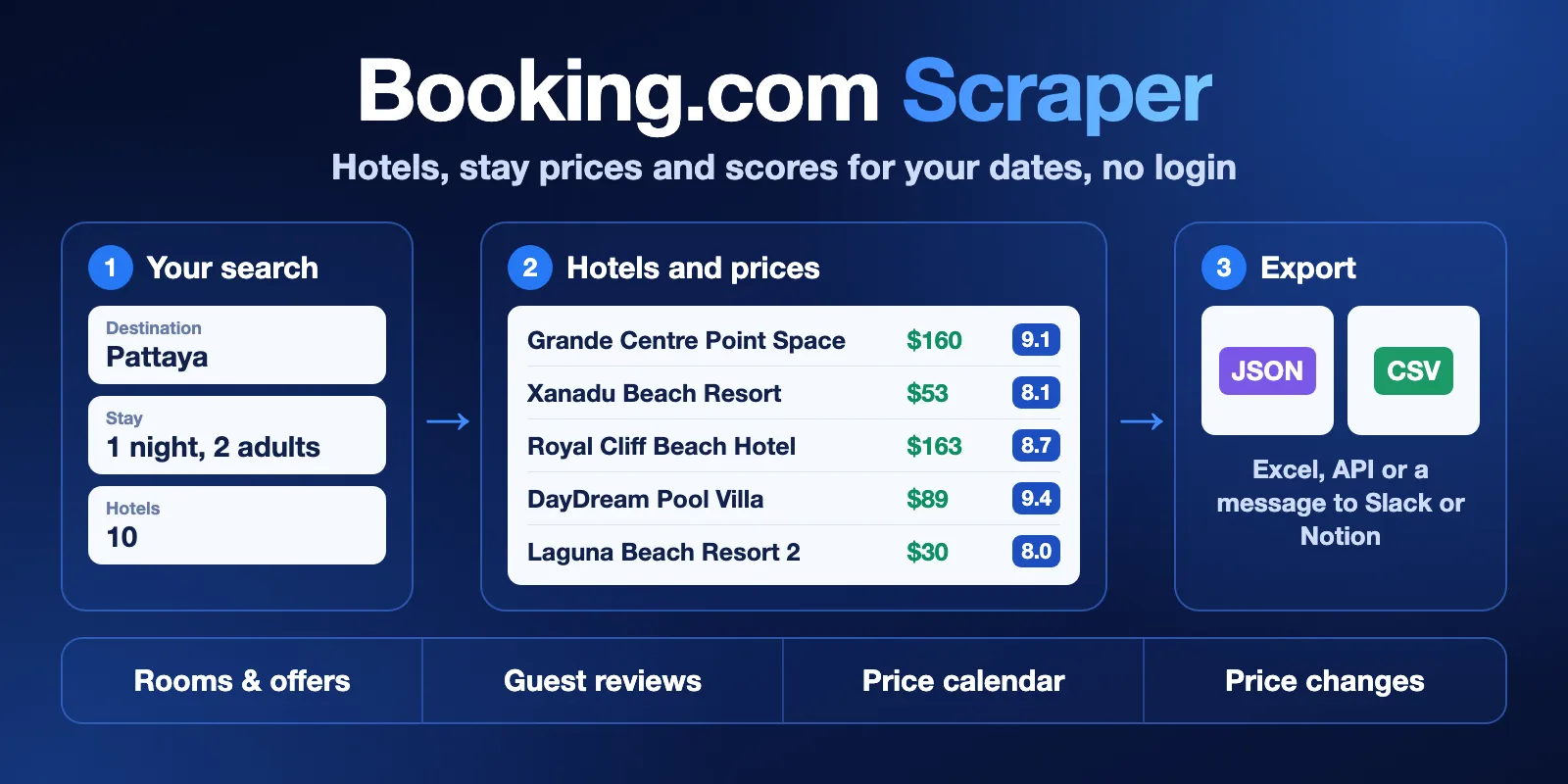
Table of contents
- What it does
- How it works
- Quick start
- Use cases
- Input
- Output
- Pricing
- Limits
- API, export and integrations
- Troubleshooting
- FAQ
- Related Actors
- Support
What it does
The Actor collects public Booking.com data in five modes, which you choose in mode:
mode | What you add | What you get |
|---|---|---|
search | City, region or search link | One row per hotel with the price for your stay |
hotel | Hotel link or hotel ID | The same row for hotels you already know |
reviews | Hotel link, hotel ID or city | One row per review, without author names |
calendar | Hotel link, hotel ID or city | One row per check-in date, up to 365 dates |
monitor | Same as search and a name for the history | Only hotels whose price changed since the last run |
Every hotel row can also carry room offers, photos, facilities, category scores and nearby places.
Good fit
- You need hotel prices for exact dates and guests, for one city or many.
- You compare your hotel with others nearby, or follow prices every day.
- You read guest reviews in a spreadsheet or give them to an AI agent.
Not a fit:
- Genius, member, mobile-only and other personal prices. The Actor does not log in.
- Flights, car rental and attractions.
- Hotel contact details and leads.
- Booking a room. The Actor only reads data.
How it works
- You add a city, a link or a hotel ID, and your dates and guests.
- The Actor opens the public Booking.com results for that stay and reads hotels, rooms, reviews or dates, without a login.
- Rows go to the Dataset, a short report goes to
RUN_SUMMARY, and you export them or send a summary to Slack or Notion.
Quick start
-
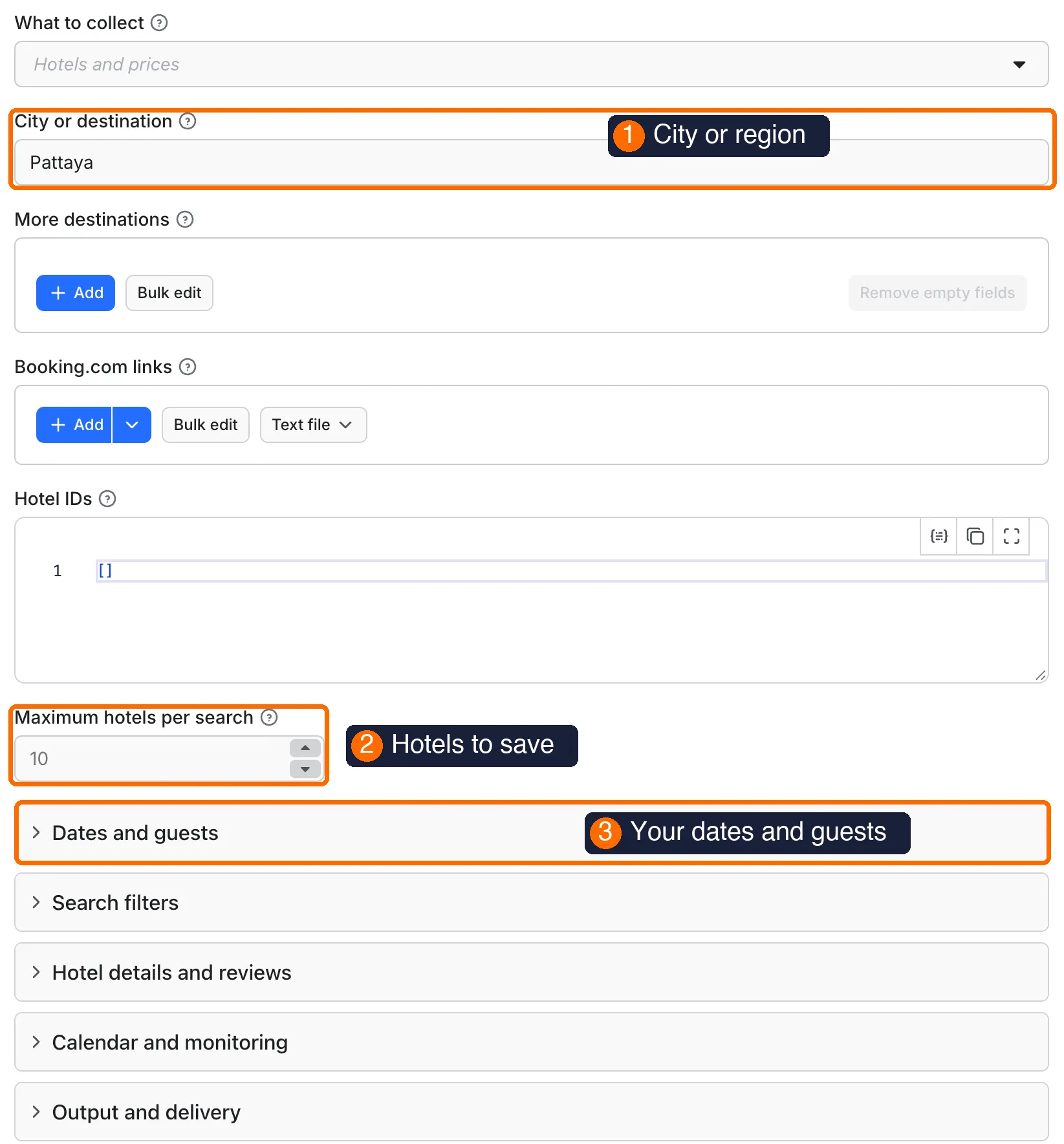
Open the input form. Keep
Pattayaor type your city indestination(box 1 in the picture). -
Keep
maxItemsat 10 (box 2 in the picture). This is the number of hotels to save. -
Open Dates and guests (box 3 in the picture) and set
checkInandcheckOut. If you leave both empty, the Actor checks one night, seven days from today. -
Press Start. A run with these settings usually takes about two minutes.
-
Open the Hotels and prices tab and check
name,priceandrating(box 5 in the picture).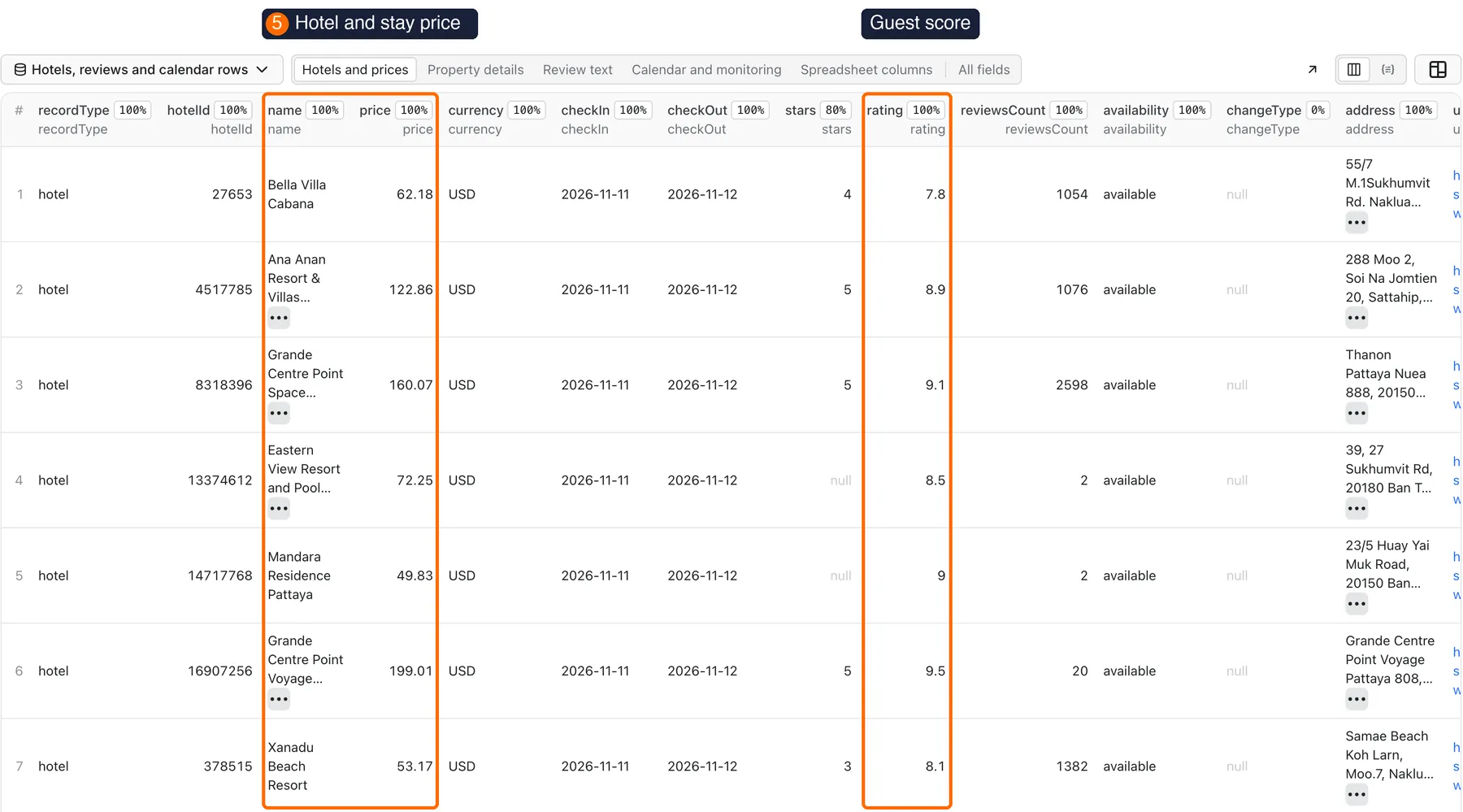
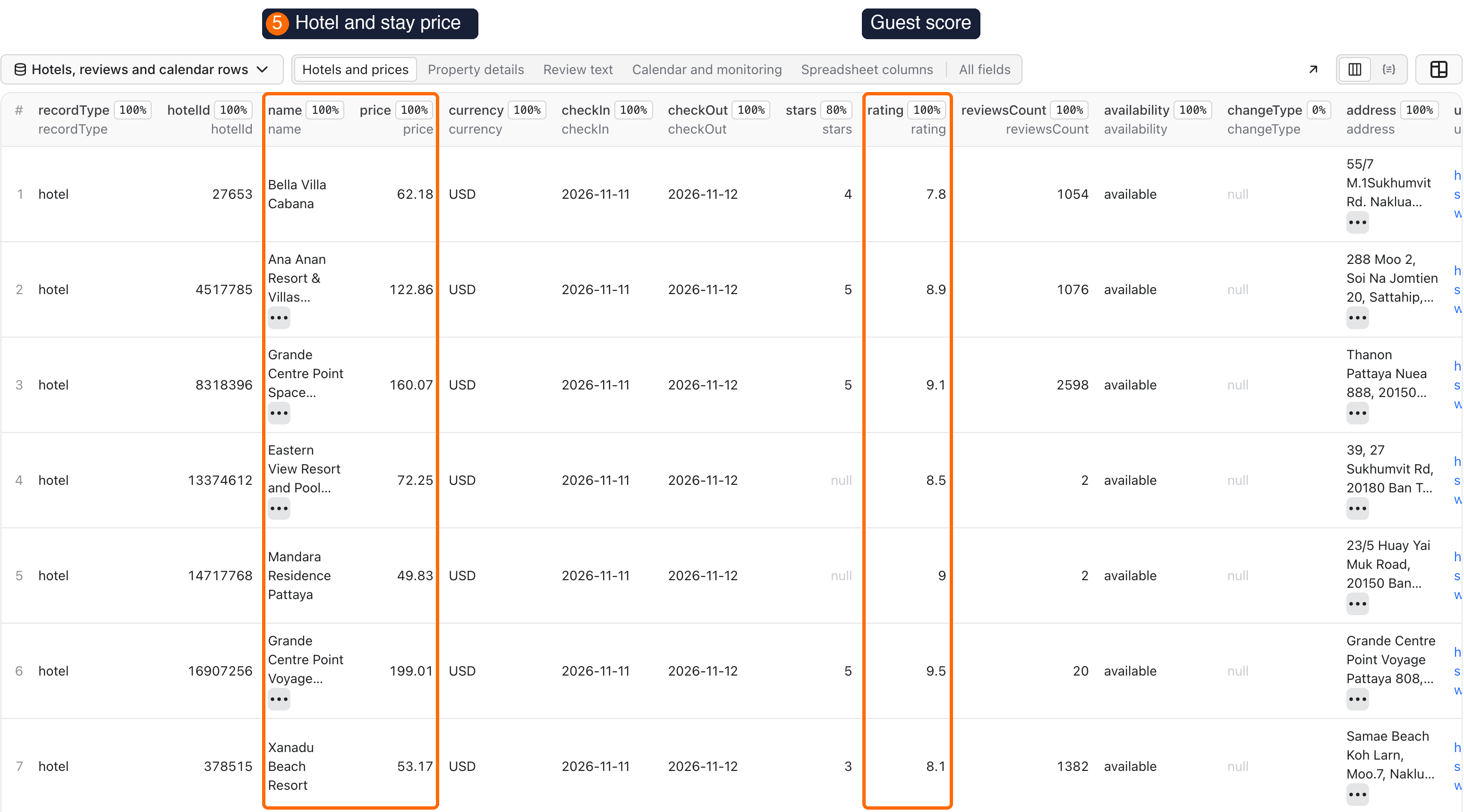
Expected result: 10 rows with recordType set to hotel and status set to ok. price is the total for the whole stay in currency. The run status is SUCCEEDED and RUN_SUMMARY shows stopReason as COMPLETED, with truncated: true because Pattaya has more than 10 hotels.
Use cases
| Buyer job | Input path | Output entity | Key fields | Next integration |
|---|---|---|---|---|
| Compare prices in a city for one stay | destination, checkIn, checkOut | Hotel row | name, price, rating, stars | CSV or Excel, Google Sheets |
| Check rooms and terms at hotels you follow | startUrls with hotel links, includeRooms | Hotel row with roomRates | roomRates, freeCancellation, excludedCharges | API, your database |
| Read what guests say | mode: reviews, startUrls, reviewAfter | Review row | reviewDate, rating, positiveText, negativeText | AI agent, spreadsheet |
| Find cheap dates for a hotel | mode: calendar, calendarDays | Calendar row | checkIn, price, availability | Spreadsheet, chart |
| Get told when prices move | mode: monitor, stateName, an Apify schedule | Changed hotel row | changeType, previousPrice, priceChange | Slack or Notion summary |
Input
All fields are optional. With an empty input the Actor searches Pattaya and returns up to 10 hotels for one night, seven days from the current UTC date. destinations and hotelIds take plain values, startUrls takes {"url"} objects. Duplicates in destinations, startUrls and hotelIds are removed.
Input fields
| Field | Plain name | Type | Required | Default / prefill | Allowed values | Effect | Example | Recommendation |
|---|---|---|---|---|---|---|---|---|
mode | What to collect | string | No | search | search, hotel, reviews, calendar, monitor | Sets the row type | reviews | Start with search |
destination | City or destination | string | No | Prefill Pattaya | City or region name | Searches this place | London | Leave empty if you add links |
destinations | More destinations | array | No | Empty | City or region names | Adds searches | ["Phuket","Krabi"] | Each place has its own maxItems |
startUrls | Booking.com links | array | No | Empty | Hotel or search links | Uses these hotels or that search | [{"url":"https://www.booking.com/hotel/th/hilton-pattaya.html"}] | In JSON, each link is a {"url"} object. Link filters are kept |
hotelIds | Hotel IDs | array of integers | No | Empty | Positive numbers | Checks these hotels | [27653] | Links are usually easier |
maxItems | Maximum hotels per search | integer | No | 10 | 1 or more | Stops each search at this number | 100 | Start small, see Limits |
checkIn, checkOut | Check-in and check-out dates | string | No | One night, seven days from today | YYYY-MM-DD | Stay dates | 2026-12-01 | Set both or neither |
dateRanges | Several date ranges | array | No | Empty | {"checkIn","checkOut"} objects | Repeats the search per range | [{"checkIn":"2026-12-01","checkOut":"2026-12-03"}] | Replaces the two date fields |
adults | Adults | integer | No | 2 | 1 to 50 | Guests for the price | 3 | Match your real stay |
rooms | Rooms | integer | No | 1 | 1 to 50 | Rooms for the price | 2 | Match your real stay |
childrenAges | Children's ages | array | No | Empty | 0 to 17 | Adds children to the stay | [4,9] | One number per child |
currency | Currency | string | No | USD | Three-letter code | Price currency | EUR | |
currencies | Several currencies | array | No | Empty | Three-letter codes | Repeats each search | ["USD","THB"] | Replaces currency, multiplies cost |
language | Language | string | No | en-gb | Booking.com code | Hotel text language | de | Review text stays original |
languages | Several languages | array | No | Empty | Booking.com codes | Repeats each search | ["en-gb","fr"] | Replaces language, multiplies cost |
minPrice, maxPrice | Stay price limits | number | No | Empty | 0 or more | Total for the whole stay, without excluded charges | 50, 150 | Not a price per night |
minScore | Minimum guest rating | number | No | Empty | 0 to 10 | Keeps hotels at or above it | 8 | |
stars | Star ratings | array | No | Empty | Star numbers | Keeps these stars | [4,5] | Empty also includes unrated hotels |
propertyType | Property type | string | No | Any | hotel, apartment, hostel, resort, villa, guestHouse, holidayHome | Limits the search | villa | |
sortBy | Sort hotels by | string | No | distance_from_search | price, bayesian_review_score, review_score_and_price, class_asc, class_desc, class_and_price, popularity | Order of the search | price | Matters with a small maxItems |
freeCancellationOnly | Free cancellation only | boolean | No | false | true, false | Keeps these offers | true | Read the deadline in the room offer |
breakfastIncluded | Breakfast included only | boolean | No | false | true, false | Keeps these offers | true | |
includeDetails | Hotel descriptions and facilities | boolean | No | true | true, false | Adds text, photos, policies | false | Turn off for speed |
includeRooms | Room types and offers | boolean | No | true | true, false | Adds roomTypes, roomRates | false | Turn off for speed |
includeReviewScores | Category scores and review summary | boolean | No | true | true, false | Adds score fields | false | |
includeSurroundings | Nearby places | boolean | No | false | true, false | Adds surroundings | true | |
includeReviews | Also collect anonymous reviews | boolean | No | false | true, false | Adds review rows after hotels | true | Adds review charges |
maxReviewsPerHotel | Maximum reviews per hotel | integer | No | Empty | 1 or more | Stops reviews per hotel and language | 500 | Empty: all in reviews mode, 100 in others |
reviewSort | Sort reviews by | string | No | NEWEST_FIRST | MOST_RELEVANT, OLDEST_FIRST, SCORE_DESC, SCORE_ASC | Review order | SCORE_ASC | Keep newest with reviewAfter |
reviewAfter | Reviews from date | string | No | Empty | YYYY-MM-DD | Keeps this date and later | 2026-01-01 | Limits history and cost |
reviewLanguages | Review text languages | array | No | Empty | Language codes | Skips other reviews | ["en","de"] | More pages may be checked |
reviewScore | Review score group | string | No | ALL | REVIEW_ADJ_SUPERB, REVIEW_ADJ_GOOD, REVIEW_ADJ_AVERAGE_PASSABLE, REVIEW_ADJ_POOR, REVIEW_ADJ_VERY_POOR | Keeps one score group | REVIEW_ADJ_POOR | |
calendarStartDate | Calendar start | string | No | First check-in date | YYYY-MM-DD | First date to check | 2026-12-01 | |
calendarDays | Calendar days | integer | No | 30 | 1 to 365 | Dates per hotel | 90 | |
calendarNights | Nights per calendar stay | integer | No | 1 | 1 to 30 | One night: rounded price. More: exact total | 3 | More than one night adds a check per date |
stateName | Monitor name | string | No | default | Letters, numbers, _, - | Name of the saved history | pattaya-2-adults | One name per guest set |
onlyNew | Only new records | boolean | No | false | true, false | Skips records seen before | true | Works with stateName |
includeUnchanged | Include unchanged prices | boolean | No | false | true, false | Monitor also returns unchanged hotels | true | Adds hotel charges |
outputFormat | Output format | string | No | nested | nested, flat | flat writes arrays as JSON text | flat | Use flat for spreadsheets |
proxyConfiguration | Proxy | object | No | Apify datacenter | Datacenter groups or your proxy URLs | Network route | {"useApifyProxy":true} | Keep the default |
deliveryConnector | Send results to | string | No | Empty | Your connector | Posts a short summary | Choose in the form | See Slack or Notion |
deliveryTarget | Notion page or channel | string | No | Empty | Notion page link or Slack channel ID | Where the summary goes | Slack channel ID |
Interacting settings
| When | Input A | Input B | Effective behavior | Example | Cost/result effect |
|---|---|---|---|---|---|
| Links and a city together | destination | startUrls | Both run. In the form, clear destination if you only want links | Pattaya + one hotel link | Adds one more search |
| Several values | maxItems | destinations, dateRanges, currencies, languages | The limit applies to each combination | 2 cities × 2 date ranges × 10 | Up to 40 hotels |
| Date fields | checkIn, checkOut | dateRanges | dateRanges wins | Both set | Only the ranges are checked |
| One date only | checkIn | no checkOut | The run stops with BOTH_DATES_REQUIRED | Check-in only | No charge |
| Search link filters | startUrls | minScore, stars, other filters | A filter you set here replaces the same filter in the link | Link with 4 stars + stars: [5] | Other link filters stay |
| Empty stars | stars: [] | stars: [4,5] | The empty list includes unrated hotels, the list does not | [4,5] | Fewer rows |
| Monitor with guests | stateName | adults, rooms, dates | Use a separate name for each guest set | pattaya-2-adults | Mixed names compare unlike prices |
| Reviews from a city | mode: reviews, destination | maxItems | maxItems sets hotels, maxReviewsPerHotel sets reviews | 5 hotels × 100 | Up to 500 reviews |
Input examples
Hotels in a city
- Expected behavior: one search for one night and 2 adults.
- Expected output: up to 10 hotel rows with
price,ratingandroomRates. - Limit or cost note: about $0.03 on the Free plan and usually about two minutes.
Fast price list without details
- Expected behavior: several search pages, with repeated hotels removed.
- Expected output: up to 850 hotel rows with prices and scores, without rooms and descriptions.
- Limit or cost note: about $1.94 on the Free plan and about one minute.
Reviews of one hotel
- Expected behavior: newest reviews first, up to 800.
- Expected output: review rows with
reviewDate,rating,positiveText,negativeTextandmanagerReply. - Limit or cost note: about $1.47 on the Free plan. Use
reviewAfterto stop early.
A year of dates for one hotel
- Expected behavior: 365 check-in dates of one night each.
- Expected output: calendar rows with
checkIn,availability,minimumNights,priceandpriceText. - Limit or cost note: about $0.18 on the Free plan.
priceIsRoundedistruebecause Booking.com shows rounded labels for this view.
Price changes every day
- Expected behavior: the first run saves the prices as a base and marks hotels as
new. Later runs compare with that base. - Expected output: rows with
changeTypeset topriceDown,priceUp,soldOut,availableornew. - Limit or cost note: if nothing changed, the run ends with
NO_CHANGESand you pay only for the checks.
Output
The Dataset has one table with three row types in recordType: hotel, review and calendar. Use the tabs Hotels and prices, Property details, Review text, Calendar and monitoring and Spreadsheet columns, or open All fields. A field with no value in the source is null, not 0.
Output fields
| Field | Meaning | Type | Can be empty? | Example / enum | Source / notes |
|---|---|---|---|---|---|
recordType | Row type | string | No | hotel, review, calendar | |
status | Row status | string | No | ok | |
hotelId | Booking.com property number | integer | No | 27653 | Use with hotelIds |
name | Hotel name | string | No | Bella Villa Cabana | |
url | Hotel page | string | No | https://www.booking.com/hotel/th/... | Without personal parameters |
price | Total for the whole stay | number | Yes | 62.18 | In calendar rows, a rounded label if priceIsRounded is true |
pricePerNight | price divided by nights | number | Yes | 62.18 | |
priceBeforeDiscount | Crossed-out price | number | Yes | 100.29 | Only if shown |
excludedCharges | Taxes and fees not in price | number | Yes | 3.93 | |
priceWithCharges | price plus excludedCharges | number | Yes | 66.11 | |
currency | Price currency | string | No | USD | |
availability | Can you book these dates? | string | Yes | available, soldOut, unknown | |
stars | Star class | number | Yes | 4 | Many apartments have none |
rating | Guest score, 0 to 10 | number | Yes | 7.8 | In review rows, the score of that review |
reviewsCount | Number of reviews | integer | Yes | 1054 | |
address, city, countryCode | Location | string | Yes | Naklua, th | With details on |
lat, lng | Coordinates | number | Yes | 12.99, 100.92 | |
distanceFromCenterMeters | Distance from the city center | number | Yes | 122 | null for region searches such as Pattaya |
distanceLabel | Distance as Booking.com shows it | string | Yes | 1.2 km from center | In the language you chose |
checkIn, checkOut, nights, adults, rooms | The stay you asked for | mixed | No | 2026-11-11 | |
roomRates | Offers for your dates | array | Yes | Price, meal plan, cancellation | With includeRooms |
roomTypes | Room descriptions and facilities | array | Yes | With includeRooms | |
facilities, photos, description | Hotel details | mixed | Yes | With includeDetails | |
reviewCategories, reviewDistribution, reviewSummary | Score details | mixed | Yes | Staff 8.4 | With includeReviewScores. reviewSummary is not on every hotel |
surroundings | Nearby places | array | Yes | With includeSurroundings | |
changeType, previousPrice, priceChange | Change since the last run | mixed | Yes | priceDown, priceUp, soldOut, available, new, unchanged | monitor only |
reviewId, reviewDate, title, positiveText, negativeText | Review content | string | Yes | review rows | |
travelerType, roomType, stayCheckIn, stayCheckOut, managerReply | Review context | mixed | Yes | review rows. No author name, photo or profile | |
minimumNights, stayNights, priceText, priceIsRounded | Calendar details | mixed | Yes | $55, true | calendar rows |
destination, language, fetchedAt | Run context | string | Yes | Pattaya | fetchedAt is the time of the check |
Output entities and surfaces
| Situation | Dataset/API/KVS/live view | Result shape | User action |
|---|---|---|---|
| Normal item | Dataset | Hotel, review or calendar row. RUN_SUMMARY has stopReason COMPLETED | Export or read through the API |
| Domain-empty result | Key-value store RUN_SUMMARY | No rows, status SUCCEEDED, stopReason NO_MATCHES, NOT_FOUND or NO_CHANGES | Check the name, filters or link |
| Partial result | Dataset and RUN_SUMMARY | Saved rows stay. CHARGE_LIMIT is SUCCEEDED with partial: true. COMPLETED_WITH_SKIPS means some hotels had broken data and were skipped. truncated: true means maxItems was reached | Raise the limit, or use the rows as they are |
| Technical failure or retry | Log, RUN_SUMMARY | Status FAILED, a SOURCE_* code or DEADLINE, saved rows stay, partial: true. Each request is tried up to 3 times first | Run again later or read Troubleshooting |
| Reports | Key-value store COMPARISON, MARKET_SUMMARY | Price comparison by destination and dates, summary of the saved rows | MARKET_SUMMARY describes your rows, not the whole market |
Output example
This is a shortened row from the Quick start run (Pattaya, 2026-11-11 to 2026-11-12). distanceFromCenterMeters is null because Pattaya is a region search. changeType is null outside monitor.
Send results to Slack or Notion
Pick your connector in the optional deliveryConnector field. After the run saves its data, the Actor posts a short summary (up to 25 rows and a link to the full dataset) there. Put a Notion page link or a Slack channel ID in deliveryTarget: in Notion every run is added on top of that one page, so your workspace does not fill up with new pages. A delivery error never fails the run and costs nothing extra. Connect a service once in Apify Console → MCP connectors.
Use case → fields
| Use case | Fields to read |
|---|---|
| Price list | name, price, currency, checkIn, checkOut, rating |
| Full cost of a stay | price, excludedCharges, priceWithCharges, roomRates |
| Reputation check | rating, reviewCategories, reviewDate, positiveText, negativeText |
| Cheap dates | checkIn, availability, price, priceIsRounded, minimumNights |
| Price alert | changeType, previousPrice, price, priceChange |
Pricing
You pay per result and per check. The Actor pays its own Apify platform usage, so you do not get a separate usage bill for the run.
Pricing unit
Prices per event on the Free plan. Paid Apify plans pay less: Bronze 10% less, Silver 20% less, Gold and higher 30% less. The Store page shows your price.
| Event | Free plan price | When it is charged |
|---|---|---|
hotel (main price) | $0.00225 ($2.25 per 1,000) | Each saved hotel row |
review | $0.0018 ($1.80 per 1,000) | Each saved review |
calendar-day | $0.00045 ($0.45 per 1,000) | Each saved calendar date |
check | $0.0035 | Each search page or hotel check, including checks that find no matches or no changes |
review-page | $0.001 | Up to 25 reviews read after a city search, or each page after the first for a direct hotel link |
calendar-page | $0.001 | Up to 31 dates read after a city search, or each batch after the first for a direct hotel link |
Cost examples
Free plan prices. Real numbers can be a little higher when one search has to be split into several price ranges.
| Scenario | Input scope | Expected item/event count | Base charge | Optional charge | Stop/cap behavior |
|---|---|---|---|---|---|
| Quick start | 1 city, 10 hotels | 1 check, 10 hotel | $0.026 | None | Stops at maxItems |
| Medium run | 1 city, 100 hotels | 1 check, 100 hotel | $0.2285 | None | Stops at maxItems or your spending limit |
| Large price list | 1 city, 850 hotels | 9 check, 850 hotel | $1.944 | None | Stops at maxItems or your spending limit |
| Hotel reviews | 1 hotel link, 800 reviews | 1 check, 31 review-page, 800 review | $0.0035 + $0.031 | $1.44 | Stops at maxReviewsPerHotel |
| Year calendar | 1 hotel link, 365 dates | 1 check, 11 calendar-page, 365 calendar-day | $0.0035 + $0.011 | $0.16425 | Stops at calendarDays |
| No matches or no changes | Any | At least 1 check, 0 rows | From $0.0035 | None | SUCCEEDED, NO_MATCHES or NO_CHANGES |
- Spending limit: the smallest limit that the run accepts is $0.006, enough for one check and one hotel. When the limit is reached, the run stops with
CHARGE_LIMIT, keeps saved rows and starts no new work. - Empty results: a search with no matches, or a monitor with no changes, is charged for its checks only.
- Invalid input: rejected before any request, with no charge.
- Failed runs: you pay for rows and checks finished before the failure. The rows stay in the Dataset.
Limits
- Time: with details and rooms on, one hotel takes about 5 to 6 seconds in our tests, so 100 hotels take 7 to 11 minutes. Without details, 850 hotels took under one minute. A run that reaches its timeout stops with
DEADLINEand keeps saved rows. The default timeout is 3600 seconds: for more than about 550 hotels with details, raise it in Run options or turn details off. - One hotel: up to 40 seconds and 2.5 MiB of responses per hotel. Over that, or with broken data, the hotel is skipped without a
hotelcharge. A run stops on the third skip; every 20 saved rows allow one more, but three in a row always stop it. - Tested sizes: 850 hotels from one search, 800 reviews from one hotel, 365 calendar dates.
maxItemshas no fixed upper limit, but a larger run depends on what Booking.com shows. - Search window: Booking.com shows about 1,000 results per search. The Actor splits a larger search by price range and removes repeated hotels. If a range cannot be split further, the run stops with a clear error.
- Prices: prices are public prices for the chosen dates, guests and currency at the time of the check. Genius, member and mobile-only prices are not included. Booking.com can show different visitors different prices: in our tests most prices matched across repeated runs, but one run in eight was 7% higher, and one hotel showed $53 in one run and $172 in the next, minutes apart, because only the first visitor got a discount.
- Calendar: one night gives rounded labels (
priceIsRounded: true). UsecalendarNightsabove 1 for exact stay totals, ordateRangeswithincludeRoomsfor full offers. - Monitor: because visitor prices can differ, a single
priceUporpriceDownis a signal to check, not proof of a new rate. Confirm it with the next run before you act.soldOutneeds a direct check. A hotel missing from a search is not marked sold out. History keeps up to 30,000 records perstateNameand drops the oldest and sold-out records first. - Reviews: author name, photo and profile are not returned. Review text is cleaned of the shown name and contact details on a best-effort basis, so read it before you publish it.
- Rooms: an offer in
roomRatescan havename: nullwhen Booking.com does not name it. Price and terms are still there. - Reports:
MARKET_SUMMARYandCOMPARISONdescribe your saved rows, not the whole market. - Proxy: Apify datacenter proxies are used by default. Residential, Unblocker and Google SERP groups are rejected with
USE_DATACENTER_OR_CUSTOM_PROXY. Your own proxy URLs are allowed.
API, export and integrations
- Export: download the Dataset as JSON, CSV, Excel, XML or HTML from the run page. For spreadsheets, set
outputFormattoflat. - API: start the Actor with the Apify API and read rows from the default Dataset.
RUN_SUMMARYis in the default key-value store. - Scheduling: create an Apify schedule with
mode: monitorto follow prices every day. - Webhooks: use Apify webhooks or the Make, Zapier and n8n integrations to send new rows to your systems.
- SDK: call the Actor from the Apify client for JavaScript or Python.
This Actor is a separate tool. It is not a Booking.com API and is not connected with Booking.com.
Use with AI agents (MCP)
- MCP server URL with only this Actor:
https://mcp.apify.com?tools=cliqtomedia/booking-scraper. - Smallest useful input:
- Key output fields:
name,price,currency,rating,url. - Time and cost: usually about two minutes and about $0.03 on the Free plan.
- Limits: public prices only. Set
checkInandcheckOut, or the stay is one night, seven days from today.
Troubleshooting
The run has no rows
- Symptom: SUCCEEDED, an empty Dataset,
stopReasonisNO_MATCHES. - Likely reason: the place has no offers for these dates, or the filters are too narrow.
RUN_SUMMARYshows how many rows were dropped infiltered. - Check: try the same search on Booking.com in your browser.
- Action: remove
minPrice,maxPrice,minScoreorstars, or change the dates.
A hotel was not found
- Symptom:
stopReasonisNOT_FOUND, ornotFoundis above 0 inRUN_SUMMARY.notFoundInputslists the first 20 of them. - Likely reason: the link or the ID is old or wrong.
- Check: open the link in your browser.
- Action: copy the link again from Booking.com.
The monitor returns nothing
- Symptom:
stopReasonisNO_CHANGES. - Likely reason: prices did not change since the last run with this
stateName. - Check:
unchangedinRUN_SUMMARY. - Action: this is normal. Set
includeUnchangedtotrueto see all prices.
The run stopped with CHARGE_LIMIT
- Symptom: fewer rows than
maxItems,partial: true. - Likely reason: your maximum cost per run was reached.
- Check:
eventsinRUN_SUMMARY. - Action: raise the limit or lower
maxItems.
The run failed with DEADLINE
- Symptom: status FAILED, saved rows are in the Dataset,
partial: true. - Likely reason: the run timeout ended before the work did.
- Check: the timeout in Run options and the number of saved rows.
- Action: raise the timeout, lower
maxItems, or turn offincludeDetailsandincludeRooms.
The run failed with SOURCE_BLOCKED, SOURCE_RATE_LIMIT or SOURCE_TIMEOUT
- Symptom: status FAILED, rows saved before the error stay.
- Likely reason: Booking.com did not answer for now, even after repeats.
- Check: the error text in the log and
blockedRequestsinRUN_SUMMARY. - Action: wait some minutes and run again. If you changed the proxy, go back to the default.
The run ended with COMPLETED_WITH_SKIPS
- Symptom: status SUCCEEDED,
partial: true,hotelsSkippedis above 0 andwarningsnames the reason. - Likely reason: Booking.com returned broken or very large data for that hotel. One hotel may use up to 40 seconds and 2.5 MiB of responses. Over that, it is skipped and the run moves on.
- Check:
hotelsSkippedandwarningsinRUN_SUMMARY. A skipped hotel adds nohotelcharge. - Action: run that hotel again later by its link. The run stops on the third skip. Every 20 saved rows allow one more skip, but three in a row always stop it. It ends with status FAILED and the source code, because that usually means a wider problem at the source.
The run failed at once with an input error
- Symptom: status FAILED, no rows, no charge, a code such as
BOTH_DATES_REQUIRED,INVALID_DATES,INVALID_BOOKING_URLorINVALID_CURRENCY. - Likely reason: a value has the wrong format.
- Check: the message in the log and in
RUN_SUMMARY. - Action: fix that field. Dates are
YYYY-MM-DD, and check-out must be after check-in.
FAQ
Do I need a Booking.com account or an API key?
No. The Actor reads public pages without a login. You need only an Apify account.
Why is price different from my browser?
Your browser can show Genius or member prices, another currency, or other guests. Booking.com prices also change often. Compare with a private window and the same dates and guests. excludedCharges shows taxes and fees that are not in price.
Is this an official Booking.com API?
No. It is a separate tool that returns public data through the Apify API. It is not connected with Booking.com.
Do I pay when there are no results?
You pay only for the checks, usually $0.0035 on the Free plan. Invalid input costs nothing.
Can I get hotel emails or phone numbers?
No. The Actor does not return contact details.
Do reviews include guest names?
No. Rows have the review text, score, date, traveler type and room type, without the author's name, photo or profile.
How fresh is the data?
Each row is read during your run. fetchedAt shows the time. Rows are not reused from earlier runs.
Related Actors
- Google Flights Scraper - Prices & Times, No Login: flight prices and times for your route and dates.
- OpenTable Reviews & Restaurants Scraper, No Login: restaurants and guest reviews.
- OpenStreetMap POI Extractor: Cafes, Shops, Hotels by City: cafes, shops and hotels by city from open map data.
Support
Open a request in the Issues tab of this Actor. Add the run ID, the mode and the error text. Do not send tokens, cookies or passwords.


