
Audio & Podcast Transcriber (Speech to Text)
Pricing
from $8.30 / 1,000 transcribed minute (tiny/base)s
Audio & Podcast Transcriber (Speech to Text)
Transcribe audio and video links or podcast RSS feeds to text with Whisper. Timed segments, SRT and VTT subtitles, auto language detection. No login, no API key.
Pricing
from $8.30 / 1,000 transcribed minute (tiny/base)s
Rating
0.0
(0)
Developer

Cliqto Media
Maintained by CommunityActor stats
0
Bookmarked
2
Total users
1
Monthly active users
11 days ago
Last modified
Share
Podcast and audio transcription with timestamps. Add direct links to MP3, M4A, WAV, OGG, Opus or MP4 files, or a podcast RSS feed, and get the text, plus SRT or VTT subtitles if you want them.
No login and no API key. The Actor runs the open-source Whisper speech-to-text model through faster-whisper on Apify, so your audio is not sent to a third-party AI service. A 1-minute clip is ready in about 30 seconds and costs about $0.03.
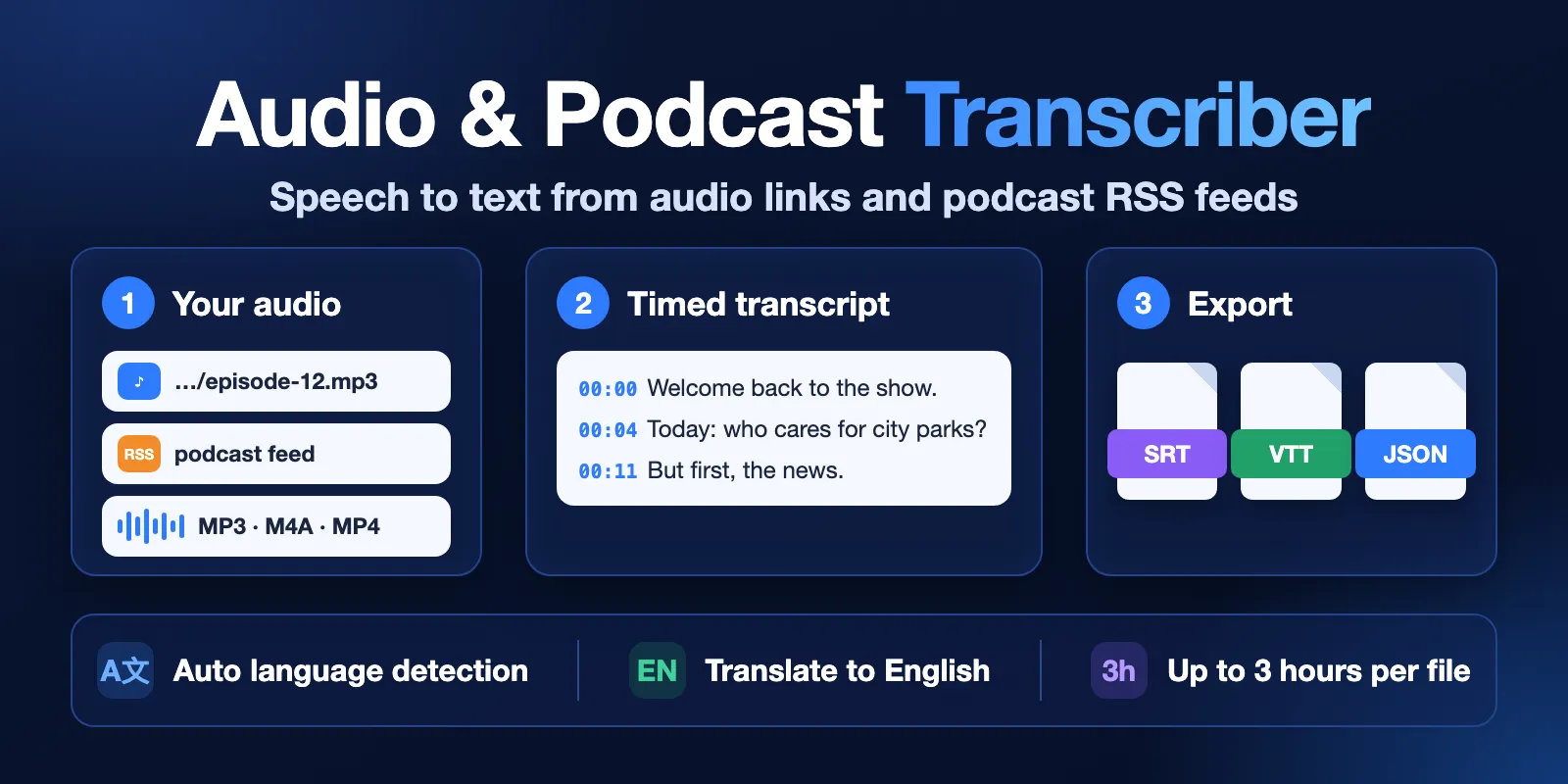
Table of contents
- What it does
- Quick start
- Input
- Output
- Pricing
- Use cases
- Scheduling
- API, export and integrations
- Limits and partial results
- Troubleshooting
- FAQ
- Related Actors
- Support
What it does
The Actor downloads each media file, reads the audio track and transcribes it with Whisper. You get one dataset row per file or podcast episode. Each row has the full text, the language, the duration and, if you choose, timed segments or a subtitle file.
- Input: direct media links (
audioUrls), or a podcast RSS feed or Apple Podcasts show link (podcastRssUrl). - Output: the transcript text, timed segments
{start, end, text}, SRT or WebVTT subtitles, the detected language and the episode details from the feed. - Languages: Whisper detects the spoken language. You can also choose it, or translate the speech to English.
- Privacy: the audio is processed inside the run and is not saved to storage.
Good fit
- Transcribe the newest episodes of a podcast from its RSS feed.
- Make SRT or VTT subtitles for a video file you host.
- Turn interviews, lectures and voice notes into searchable text for notes, search or an AI pipeline.
Not a fit / limits
- No downloads from YouTube, TikTok, Spotify, Instagram or other page links. The link must point straight to a media file (the URL usually ends with
.mp3,.m4a,.wav,.ogg,.mp4and so on). - No speaker labels (who said what). There is one text stream per file.
- Live streams are not supported.
- Whisper can misspell names and rare words. Check important quotes against the audio.
Quick start
- Open the Input tab.
- In Audio or video URLs (
audioUrls), keep the example LibriVox file or paste your own direct media link. - Keep the defaults: model
baseand outputsegments. - Click Start.
- Open the Transcripts view in the Output tab and read the
textcolumn.
Expected result: one row with status complete, the language en and about 160 words of text. It takes about 25–30 seconds.
Input
Input fields
| Field | Plain name | Type | Required | Default / prefill | Allowed values | Effect | Recommendation |
|---|---|---|---|---|---|---|---|
audioUrls | Audio or video URLs | array of strings | one of audioUrls or podcastRssUrl | prefill: 1 LibriVox MP3 (78 s) | up to 100 public http(s) links to media files | each link becomes one row | use direct file links; duplicates are removed |
podcastRssUrl | Podcast RSS feed | string | one of audioUrls or podcastRssUrl | empty | RSS feed URL or podcasts.apple.com/.../id123 link | adds the newest episodes of the feed | use for podcasts; Apple links are turned into the RSS feed |
maxEpisodes | Max episodes | integer | no | 3 | 1–50 | how many newest feed episodes to transcribe | start with 1–3 |
model | Model | string | no | base | tiny, base, small | speed, quality and price | base for most audio; tiny for fast drafts; small for hard audio and non-English (use 4096 MB memory or more) |
language | Language | string | no | auto | auto or a Whisper language code (en, es, de, …) | skips detection when set | set it when you know the language |
outputFormat | Output format | string | no | segments | segments, text, srt, vtt | adds timed segments or a subtitle file to each row | srt/vtt for subtitles, text for the smallest rows |
translateToEnglish | Translate to English | boolean | no | false | true/false | returns English text instead of the original language | use for non-English audio |
maxDurationMinutes | Max minutes per file | integer | no | 120 | 1–180 | only the first N minutes of each file are transcribed and charged | lower it to test a long file cheaply |
Empty input (no URLs and no feed) stops the run with a clear error. Every row always has text; segments and subtitles depend on outputFormat.
Interacting settings
| When | Input A | Input B | Effective behavior |
|---|---|---|---|
| Both are set | audioUrls | podcastRssUrl | both are processed in one run: feed episodes come after the links |
| Long file | maxDurationMinutes | file length | the file is cut, the row gets status: partial and error code TRUNCATED |
| Spending cap | Max cost per run in run options | number of minutes | when the cap is reached, the current file stops (partial) and the next files get CHARGE_LIMIT |
| Language set | language | translateToEnglish | the chosen language is read; with translation the text is in English |
Input examples
Newest podcast episodes
Expected behavior: the Actor finds the RSS feed of NASA's "Houston We Have a Podcast" from the Apple Podcasts link, takes the 2 newest episodes with audio and transcribes them.
Expected output: 2 rows with podcastTitle, title, publishedAt, text and segments.
Subtitles for a video file
Expected output: 1 row with the SRT file in subtitles.
Output
Output example
Prefill input, outputFormat: segments (segments trimmed):
The real file says "LibriVox". Whisper wrote "LibraVox": this is a typical name error.
Output fields
| Field | Meaning | Type | Can be empty? | Example / enum |
|---|---|---|---|---|
sourceUrl | media file URL (your link or the feed enclosure) | string | no | https://…/episode.mp3 |
sourceType | where the row came from | string | no | url, rss_episode, rss_feed (feed-level error) |
podcastTitle | podcast name from the feed | string | null for audioUrls | My Podcast |
title | episode title from the feed | string | null for audioUrls | Episode 12 |
publishedAt | episode date from the feed, ISO 8601 UTC | string | null for audioUrls or when the feed has no date | 2026-10-01T08:00:00Z |
episodeGuid | episode ID from the feed | string | null for audioUrls | abc-123 |
episodeUrl | episode web page from the feed | string | null when missing | https://… |
status | result of this file | string | no | complete, partial, not_found, error |
durationSec | length of the media in seconds | number | null on errors | 77.95 |
transcribedSec | seconds actually transcribed | number | null on errors | 77.95 |
truncated | only the first part was transcribed | boolean | no | false |
language | language code used (detected or chosen) | string | null on errors | en |
languageProbability | confidence of language detection, 0–1 | number | null when you set language or on errors | 0.991 |
task | transcribe or translate | string | no | transcribe |
model | Whisper model used | string | no | base |
text | full transcript | string | null on errors | This is … |
wordCount | words in text | integer | null on errors | 161 |
segments | timed parts {start, end, text} in seconds | array | null unless outputFormat is segments | see example |
subtitles | SRT or WebVTT file content | string | null unless outputFormat is srt or vtt | 1\n00:00:00,750 --> … |
chargedMinutes | minutes charged for this file | integer | 0 on errors | 2 |
processingSec | download, decoding and transcription time | number | null when the file was skipped | 19.2 |
error | {code, message} when something went wrong | object | null when none | {"code": "NOT_FOUND", …} |
fetchedAt | when the row was made, ISO 8601 UTC | string | no | 2026-10-13T14:35:23Z |
Output surfaces
| Situation | Where | Result | What to do |
|---|---|---|---|
| Normal file | Dataset, view Transcripts | row with status: complete | use text; timed output is in view Timestamps and subtitles |
Long file cut by maxDurationMinutes or by the spending cap, or a download that broke off midway | Dataset | status: partial, truncated: true, error code TRUNCATED | raise the limit or the cap and run the file again |
| File or feed does not exist (HTTP 404), feed without audio episodes | Dataset | status: not_found, code NOT_FOUND or NO_EPISODES | check the link |
| Broken link, web page instead of a file, YouTube link, slow server | Dataset | status: error with a code | see Troubleshooting |
| Whole run | Key-value store, record RUN_SUMMARY | status, counts, minutes, error codes | check status and errorCodes |
Pricing
Pricing unit
This Actor uses pay-per-event pricing. You pay for:
- Actor start: $0.01 per GB of run memory. The default 2048 MB memory makes it $0.02 per run.
- Transcribed minute (models
tinyandbase): per started minute of audio in each file. - Transcribed minute, small model (model
small): per started minute of audio in each file.
| Event | Free | Bronze | Silver | Gold |
|---|---|---|---|---|
Transcribed minute (tiny, base) | $0.0098 | $0.0093 | $0.0088 | $0.0083 |
Transcribed minute (small) | $0.032 | $0.030 | $0.029 | $0.028 |
Minutes are counted per file and rounded up: a 78-second file is 2 minutes. Only transcribed audio is charged. Files with status not_found or error cost nothing beyond the start fee. A run where every link is broken costs only the start fee ($0.02 at 2048 MB). Platform usage (compute) is included in these prices.
Cost examples (Free plan, 2048 MB)
| Scenario | Audio | Charge |
|---|---|---|
| One short clip | 1 file × 1 min | $0.030 |
| One podcast episode | 1 file × 30 min | $0.314 |
| A long lecture | 1 file × 60 min | $0.608 |
| 10 files in one run | 10 files × 10 min | $1.000 |
| 100 files in one run | 100 files × 10 min | $9.820 |
| 1,000 files in 10 runs | 1,000 files × 10 min | $98.20 |
small model, 4096 MB | 1 file × 30 min | $1.000 |
The start fee is paid once per run, so many files in one run are cheaper than one run per file. 100 files of 10 minutes take about 4 hours with base at 2048 MB: raise the run timeout, or use 4096 MB to make it about 2 times faster at the same price per minute (start fee $0.04). Use Max cost per run in the run options to set a hard spending cap.
Use cases
| Buyer job | Input path | Output entity | Key fields | Next step |
|---|---|---|---|---|
| Podcast show notes and search | podcastRssUrl + maxEpisodes | one row per episode | title, publishedAt, text, segments | send text to a summary or search tool |
| Subtitles for your video | audioUrls + outputFormat: srt | one row per file | subtitles, language | save subtitles as a .srt file |
| Meeting or interview notes | audioUrls | one row per file | text, wordCount, durationSec | paste text into notes or an AI agent |
| English version of foreign audio | audioUrls + translateToEnglish | one row per file | text, language, task | read or index the English text |
Scheduling
You can run a podcast feed on an Apify schedule, for example every morning. Each run transcribes the newest maxEpisodes episodes again and charges them again. There is no "only new episodes" mode, so for a daily schedule use maxEpisodes: 1.
API, export and integrations
- API: start the Actor with the Apify API or a client library and read the default dataset.
- Export: download the dataset as JSON, CSV, Excel or HTML from the Output tab or the API.
- Integrations: use Apify integrations or webhooks to send each finished run to Make, Zapier, n8n, Google Drive or your own endpoint.
Use with AI agents (MCP)
- MCP server URL with only this Actor:
https://mcp.apify.com?tools=cliqtomedia/audio-video-transcriber. - The smallest useful input:
- Key output fields:
status,text,language,segments(withoutputFormat: segments),error.code. - A 1–2 minute file takes about 25–30 seconds and costs about $0.03. A 30-minute file takes about 7 minutes at 2048 MB.
- Only direct media links work, up to 180 minutes per file.
Limits and partial results
Speed
| Model | Memory | Time per minute of audio | Note |
|---|---|---|---|
tiny | 2048 MB | about 6 s | fastest, lower quality |
base | 2048 MB | about 13 s | default |
base | 4096 MB | about 7 s | same price per minute, start fee $0.04 |
small | 8192 MB | about 12 s | best quality here; give it 4096 MB or more |
Limits
-
Up to 180 minutes per file (
maxDurationMinutes), up to 100 links and 50 feed episodes per run. -
Files up to 1.5 GB.
-
The default run timeout is 3600 seconds. A 3-hour file with
baseat 2048 MB takes about 38 minutes. For several long files, raise the timeout or the memory. -
When the run timeout comes near, the current file is saved as
partialand the remaining files getRUN_TIME_LIMIT. -
Partial and failed rows are never charged for audio that was not transcribed. A
partialrow is charged only for the minutes in itstext.
Troubleshooting
The row has error code UNSUPPORTED_SOURCE
Symptom: a YouTube, TikTok, Spotify or similar link returns an error. Reason: these are web pages, not media files. The Actor does not download from them. Action: use a direct link to the media file, for example the MP3 from the podcast RSS feed.
The row has error code NOT_MEDIA
Symptom: the link opens a web page. Reason: the server returned HTML, not audio or video. Action: open the page, find the download link of the file and use it.
The row has error code DOWNLOAD_TIMEOUT or TOO_SLOW
Symptom: the server did not answer for 15 seconds, or sent the file very slowly.
Reason: the media server is down or limits downloads. A download slower than about 1 MB/s is checked after a few seconds: if the part received so far is not readable audio, the file stops with TOO_SLOW. After two silent servers, the remaining links in the run are skipped with SKIPPED_SLOW_SOURCES and are not charged.
If the connection breaks after part of the file arrived, the Actor transcribes the received part: the row is partial with the reason "the download was interrupted".
Action: try again later or use another copy of the file.
The row has status: partial
Symptom: truncated is true and the error code is TRUNCATED, CHARGE_LIMIT or RUN_TIME_LIMIT.
Reason: the file is longer than maxDurationMinutes, the run reached its spending cap or timeout, or the download broke off midway (only the received audio is transcribed and charged).
Action: raise the limit, the cap or the timeout, then run the file again.
The text has wrong words
Reason: background music, noise, accents or rare names.
Action: set language, or try the small model with 4096 MB memory.
FAQ
Do I need an OpenAI or other API key?
No. The Whisper model runs inside the Actor. You only pay the Apify events above.
Which languages work?
Whisper supports about 100 languages. We tested English and Spanish. Quality is best for English and other widely spoken languages; small helps for others.
Are my files stored?
No. The file is downloaded into the run, transcribed and deleted. Only the text rows and the run summary are saved.
Can it tell who is speaking?
No. There are no speaker labels.
Why is a short clip more expensive than one minute?
Each run has a start fee ($0.02 at 2048 MB) and minutes are rounded up per file. Put many files into one run to share the start fee.
Related Actors
- YouTube Subtitles & Transcript Scraper API: get existing subtitles of YouTube videos without speech recognition.
- Apple Podcast Directory & RSS Contacts Scraper: find podcasts and their RSS feeds, then transcribe episodes here.
Support
For bugs, questions or feature requests, open an issue on the Issues tab of this Actor. Add the run ID, the input mode and the error code. Do not share private links or tokens.


