

Bulk URL Status & Redirect Checker — Link Route Audit
Pricing
from $0.90 / 1,000 http url results
Bulk URL Status & Redirect Checker — Link Route Audit
Find broken links and check redirects before or after a site migration or SEO review. Get the final HTTP status, each redirect hop with its code and the final URL for up to 100 URLs per run, then export a table.
Pricing
from $0.90 / 1,000 http url results
Rating
0.0
(0)
Developer

Cliqto Media
Maintained by CommunityActor stats
0
Bookmarked
2
Total users
1
Monthly active users
2 days ago
Last modified
Categories
Share
Find broken links and check redirects before or after a site migration. Bulk URL status checker for a list of up to 100 public URLs: for each URL it returns the final HTTP status code, the redirect chain with the status of each hop, the final URL, a broken-link flag and the content type, size and server of the answer. No login or API key is needed; it costs USD 0.00225 per checked URL on the Free plan and down to USD 0.0009 on paid Apify plans, with platform usage included. Use it before a site migration, after a release or for an SEO link review; the smallest run checks one URL in a few seconds.
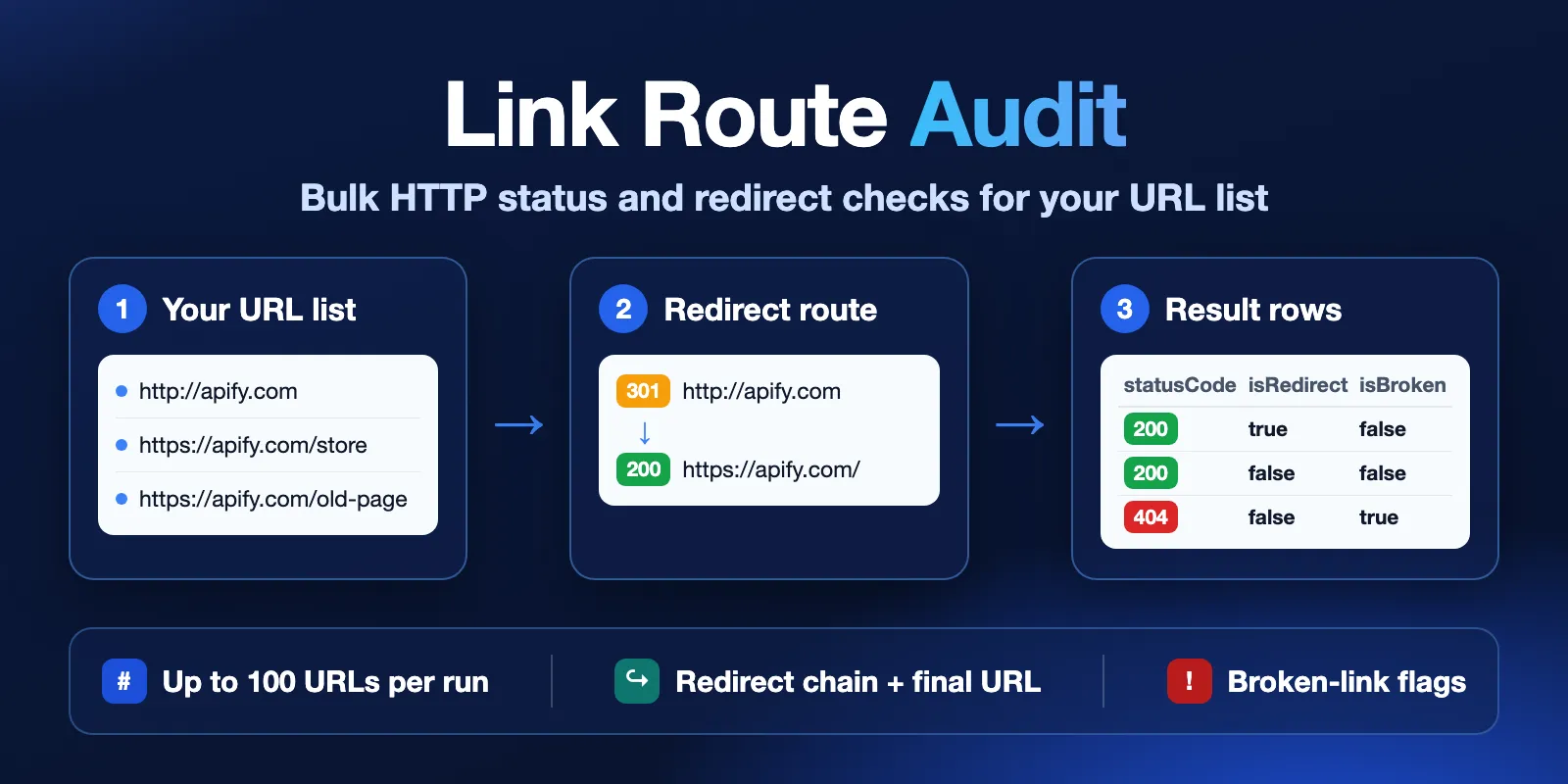
Table of contents
- What it does
- How it works
- Quick start
- Use cases
- Input
- Output
- Pricing
- Limits
- API, export and integrations
- Troubleshooting
- FAQ
- Related Actors
- Support
What it does
You give the Actor a list of URLs. It checks each URL like a browser would ask a server for it, follows the redirects and saves one result row per unique URL. The row tells you the final HTTP status code (for example 200, 301 → 200, 404 or 503), every redirect destination in order, the final URL and whether the link is broken.
It does not crawl a site, find new URLs, render JavaScript, sign in or read page text. A 200 status shows that the server answered with success; it does not prove that the page shows the right content.
Good fit
- Site migration check: old URLs → are they redirected, and where do they end?
- Broken link check: links from a report or a spreadsheet → which ones return 404, 5xx or no answer?
- Redirect audit: known redirects → how many hops, loops, or a missing final page?
How it works
- It reads your URL list, removes spaces and duplicates, and rejects items that are not full public
http://orhttps://URLs. - It sends a light request (HEAD, or GET without downloading the page when a server rejects HEAD; you can also choose GET only) and follows up to 10 redirects (you can set 0–10). Each new address is checked again for safety. Network errors, 429 and 5xx answers get up to 2 retries.
- It saves one row per unique URL in the Dataset and a run summary in the Key-value store.
Quick start
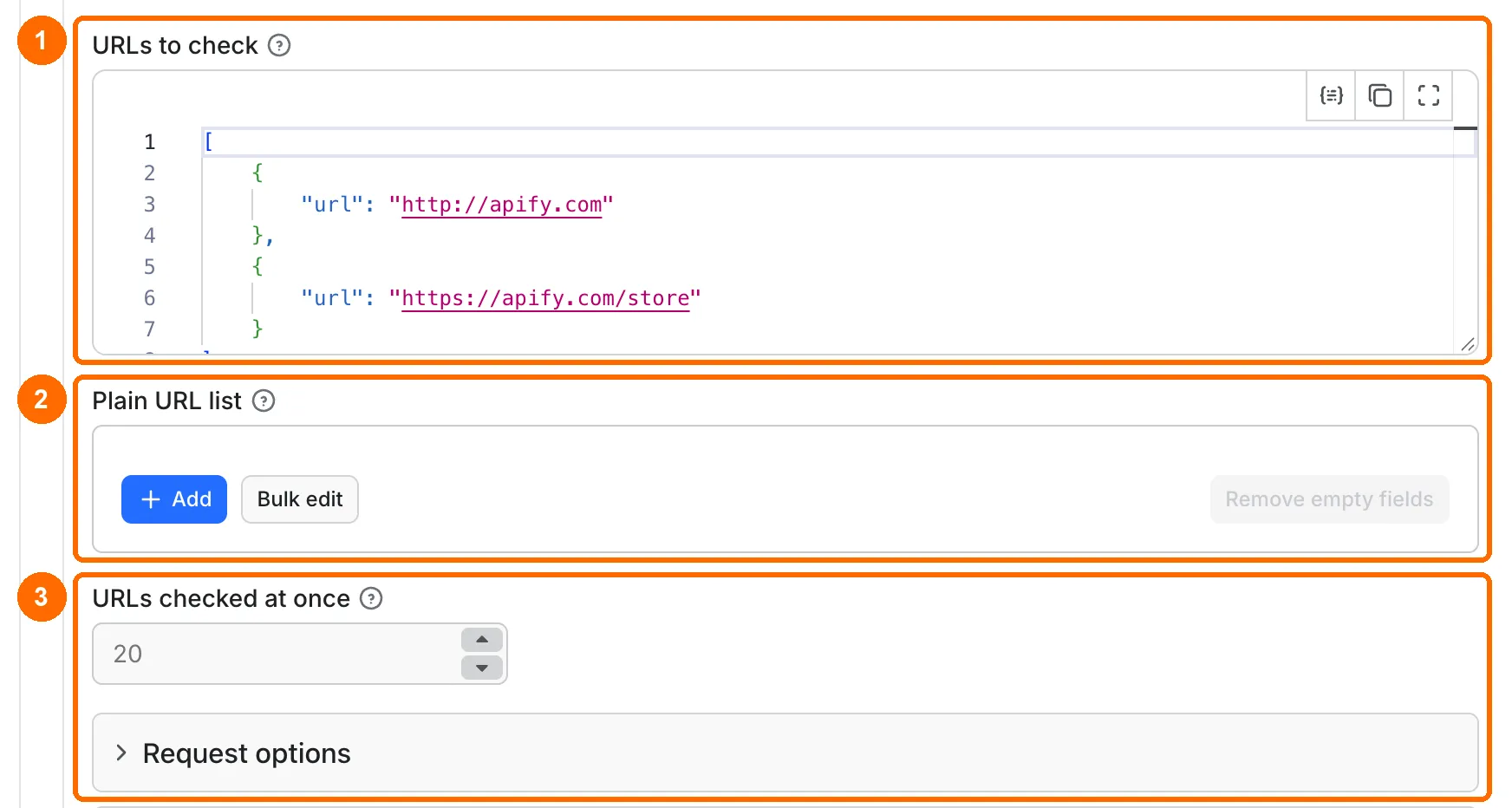
-
Open the Input tab. URLs to check (
startUrls) already holdshttp://apify.comandhttps://apify.com/store(box 1 in the picture). -
Keep them, or check your own list: clear
startUrlsand paste your URLs into Plain URL list (urls), one per line with Bulk edit (box 2). -
Keep the default settings: 20 URLs at once, up to 10 redirects, HEAD then GET, no proxy, 10-second request timeout (box 3).
-
Click Start below the form.
-
Open Output → URL results and look at
statusCode,isBroken,isRedirectandfinalUrl(orange boxes in the picture below; ✕ = false, ✓ = true).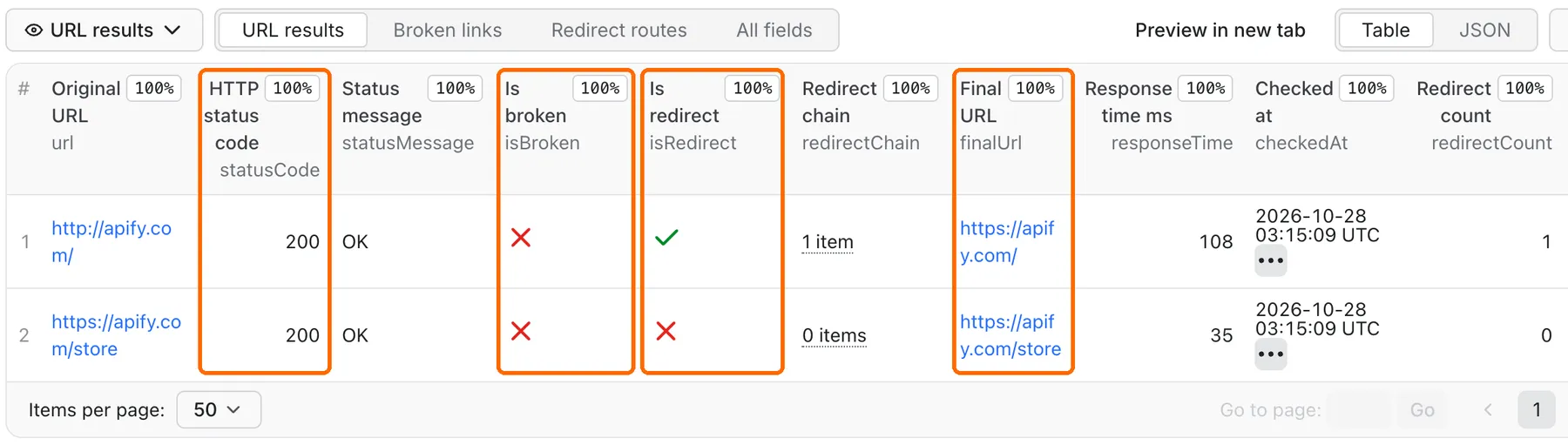
Expected result: two rows in about 5 seconds. http://apify.com shows isRedirect: true and finalUrl https://apify.com/; https://apify.com/store shows status 200 without a redirect.
Use cases
| Buyer job | Input path | Output entity | Key fields | Next integration |
|---|---|---|---|---|
| Check redirects after a site migration | startUrls with old URLs | One row per URL | statusCode, redirectChain, finalUrl | Compare finalUrl with your redirect map in a spreadsheet |
| Find broken links on a website or in a link list | urls pasted from a link report | One row per URL | isBroken, errorType, statusCode | Filter isBroken = true and fix the links |
| Audit redirect chains for SEO | startUrls with known redirects | One row per URL | isRedirect, redirectChain, redirectStatusCodes | Shorten chains with more than one hop |
| Check key pages after a release | startUrls with key public pages | One row per URL | statusCode, responseTime, checkedAt | Keep the dated export; re-check failed rows |
Input
Input fields
| Field | Plain name | Type | Required | Default / prefill | Allowed values | Effect | Example | Recommendation |
|---|---|---|---|---|---|---|---|---|
startUrls | URLs to check | Array of {"url": "..."} objects | Yes, or urls | No default; form prefill http://apify.com, https://apify.com/store | Up to 100 items together with urls, each URL up to 4,096 characters, http or https | The list to check | [{"url": "https://apify.com/store"}] | Use full public URLs. Split longer lists into runs of 100 |
urls | Plain URL list | Array of strings | Yes, or startUrls | Empty | Up to 100 together with startUrls; blank lines skipped | The same check for a pasted plain list, after startUrls | ["https://apify.com/store"] | Paste a column from a spreadsheet with Bulk edit |
maxConcurrency | URLs checked at once | Integer | No | 20 | 1–100 | How many URLs are checked at the same time | 5 | Use 2–5 for one slow or strict site |
maxRedirects | Max redirects to follow | Integer | No | 10 | 0–10 | A longer chain is broken (TOO_MANY_REDIRECTS); 0 returns the first answer, for example a 301, without following it | 0 | Use 1–3 to flag long chains for SEO |
httpMethod | Request method | String | No | HEAD_THEN_GET | HEAD_THEN_GET, GET | HEAD first, GET again when HEAD gets 400, 403, 404, 405 or 501; or GET only. The page body is never downloaded | GET | Use GET for a site that answers HEAD badly |
userAgent | User-Agent | String | No | Empty (the Actor's own User-Agent) | Printable ASCII, up to 256 characters | User-Agent header of every request | MyCompany-LinkAudit/1.0 | Set it when a site owner asks you to identify your checks |
proxyConfiguration | Connection mode | Object | No | {"useApifyProxy": false} (direct) | useApifyProxy, optional groups, countryCode | Sends requests through Apify Proxy | {"useApifyProxy": true} | Use only when a site blocks direct requests or you need a country |
requestTimeoutSecs | Request timeout (seconds) | Integer | No | 10 | 1–30 | Longest wait for each step of one request | 15 | Raise for slow servers; one URL still stops after 40 seconds in total |
The list size is counted before duplicates are removed. Duplicates are checked once and counted in the summary. Invalid items are skipped and listed in failedInputs in the summary. If no valid URL is left, the run fails with INVALID_INPUT. In failedInputs, items of urls are numbered after the startUrls items. URL passwords, secret query values, custom proxy URLs, other headers and cookies are not accepted.
Interacting settings
| When | Input A | Input B | Effective behavior | Example | Cost/result effect |
|---|---|---|---|---|---|
| A server is slow or does not answer | requestTimeoutSecs | retries (fixed, 2) | Up to 3 tries per request; one URL stops after 40 seconds in total | 30-second timeout on a dead site | Row with status 0 and Check time limit reached |
| Many URLs on one site | maxConcurrency | the site's rate limits | More requests at once can get 429 answers and retries | 100 URLs of one shop at 20 at once | Slower run; check rateLimits in the summary |
| Proxy is on | proxyConfiguration | redirects and retries | Every request and hop goes through the proxy | Redirect chain with 3 hops | Proxy traffic is small (no page bodies) |
| HEAD gets 404 but the page exists | httpMethod HEAD_THEN_GET | the server | The Actor repeats the request with GET; usedGetFallback: true | Shop that blocks HEAD with 403 | One extra request, same price per row |
| Both lists are filled | startUrls | urls | Both are checked; one URL in both lists is checked once | 40 + 60 URLs | Up to 100 URLs together |
Input examples
Migration check of a few old URLs
Expected behavior: three checks with the default settings.
Expected output: http://apify.com → statusCode 200, isRedirect: true, finalUrl https://apify.com/; https://apify.com/store → 200; https://apify.com/old-page → 404, isBroken: true.
Limit or cost note: three useful results. Site answers can change over time.
Plain list, first answer only
Expected behavior: one GET request per URL, redirects are not followed.
Expected output: http://apify.com → statusCode 301, isRedirect: false, isBroken: false, finalUrl http://apify.com; https://apify.com/store → 200.
Limit or cost note: two useful results.
Gentle check of one strict site
Expected behavior: at most two requests at once and a longer wait per request.
Expected output: one row per URL with statusCode and responseTime.
Limit or cost note: same price per result; a slower run uses more time.
Output
Output fields
| Field | Meaning | Type | Can be empty? | Example / enum | Source / notes |
|---|---|---|---|---|---|
url | The URL you gave | String | No | http://apify.com | Spaces removed |
statusCode | Final HTTP status code | Integer | No | 200, 404, 503; 0 = no HTTP answer | Last response in the chain |
statusMessage | Status text or reason | String | No | OK, Not Found, Network request failed, Request timeout, Check time limit reached, Redirect loop detected | Safe text; no raw error details |
isBroken | The link needs attention | Boolean | No | true for status 0, 400+, loops, too many hops, blocked targets | |
errorType | Why the link is broken, as a stable code | String or null | Yes, null when isBroken is false | HTTP_ERROR, TIMEOUT, CHECK_TIME_LIMIT, NETWORK_ERROR, BLOCKED_URL, REDIRECT_LOOP, TOO_MANY_REDIRECTS, REDIRECT_WITHOUT_LOCATION, CANCELLED, NO_RESPONSE | Use it for filters and scripts; statusMessage stays human text |
isRedirect | At least one redirect was seen | Boolean | No | true | |
redirectChain | Redirect destinations in order, the last one included | Array of strings | Yes, [] without redirects | ["https://apify.com/"] | The input URL is not repeated |
finalUrl | Where the route ends | String or null | Yes, null when there is no HTTP answer | https://apify.com/ | |
responseTime | Time for the whole check in milliseconds | Integer | No | 99 | Includes hops and retries; not a page speed score |
checkedAt | When the check started | String, UTC ISO time | No | 2026-10-26T13:45:31.564Z | |
redirectCount | Number of redirects followed | Integer | No | 1; 0 without redirects | Usually the length of redirectChain; a redirect answer without a Location header is counted but adds no destination |
redirectStatusCodes | Status of each redirect hop | Array of integers | Yes, [] without redirects | [301], [301, 302] | Same order as redirectChain, one code per redirect answer |
contentType | Content type of the last answer | String or null | Yes, null when missing or no answer | text/html; charset=utf-8 | From the Content-Type header |
contentLength | Size of the last answer in bytes | Integer or null | Yes, null when the server does not send it | 5120 | From the Content-Length header; many servers leave it out |
server | Server software of the last answer | String or null | Yes, null when missing or no answer | nginx, cloudflare | From the Server header |
requestMethod | Method of the request that gave the final answer | String or null | Yes, null when no answer | HEAD, GET | |
usedGetFallback | HEAD was rejected and GET gave the answer | Boolean | No | false | Shows servers that answer HEAD differently |
Output entities and surfaces
| Situation | Dataset/API/KVS/live view | Result shape | User action |
|---|---|---|---|
| Normal item | Dataset URL results (table, JSON, API) | One row per unique URL, all 17 fields | Filter by isBroken, statusCode or isRedirect |
| Domain-empty result | Not applicable | Every valid URL gets a row | — |
| Partial result | Dataset + RUN_SUMMARY / OUTPUT in the Key-value store | Rows for checked URLs; unprocessed and failedInputs in the summary | Read the summary, re-run the rest |
| Technical failure or retry | Dataset row with statusCode: 0; summary counters attempts, retries, rateLimits | finalUrl: null, reason in statusMessage | Re-check a small set later, lower maxConcurrency or try the proxy |
RUN_SUMMARY holds counts (received, valid, duplicates, processed, technicalFailures, unprocessed, attempts, retries, rateLimits), outcome (succeeded, partial or error), timings and failedInputs. OUTPUT holds the rows, the same summary and a link to the Dataset. A 404 result still counts as a successful check: the server gave a clear answer.
In the run's Dataset you get four tabs: URL results (all 17 fields), Broken links (only what you need to fix a dead link), Redirect routes (original URL, each hop with its code, final address) and the standard Apify All fields tab with the raw rows.
Output example
Real row from run Du4rpX5L5plrQxRgX on 2026-10-27 with the prefilled input:
This is the full row for one URL. For a dead site the same row has statusCode: 0, finalUrl: null, errorType: "NETWORK_ERROR" and a reason such as Network request failed. Times differ from run to run.
Use case → fields
| Buyer job | Input path | Output entity | Key fields | Next integration |
|---|---|---|---|---|
| Find broken links | startUrls or urls | URL row | isBroken, errorType, statusCode | Spreadsheet filter or ticket list |
| Check migration redirects | startUrls | URL row | redirectChain, redirectStatusCodes, finalUrl | Compare with the redirect map; 301 vs 302 matters for SEO |
| Watch key pages | startUrls | URL row | statusCode, checkedAt | Keep dated exports |
Pricing
Pricing unit
This Actor uses pay per event. You pay only for these events; Apify platform usage is included in the price.
| Event | When it is charged | Free plan | Bronze | Silver | Gold and above |
|---|---|---|---|---|---|
| Actor start | Once per run; the start fee scales with run memory, one event per GB (default 128 MB = one event) | USD 0.001 | USD 0.001 | USD 0.001 | USD 0.001 |
| HTTP URL result | A stored row with an HTTP status 100–599, including 404 and 503 | USD 0.00225 | USD 0.0018 | USD 0.00135 | USD 0.0009 |
| Failed URL check | A stored row where the site did not answer: network error or timeout after all retries | USD 0.001 | USD 0.001 | USD 0.001 | USD 0.001 |
Duplicates, invalid inputs, blocked private addresses, cancelled checks and the summary record are free. If every input is invalid, the run fails with a clear message and only the Actor start (USD 0.001) is charged.
Cost examples
| Run | Free plan | Gold plan |
|---|---|---|
| Prefill: 2 URLs that answer | USD 0.0055 | USD 0.0028 |
| 10 URLs that answer | USD 0.0235 | USD 0.010 |
| 100 URLs that answer | USD 0.226 | USD 0.091 |
| 100 URLs, 10 of them do not answer | USD 0.2135 | USD 0.092 |
Set Maximum cost per run in the run options. The Actor checks only as many URLs as this limit can pay for; the rest is listed as unprocessed in the summary. The smallest accepted limit is USD 0.00325.
Limits
- Up to 100 URLs per run, counted before duplicates are removed. Split longer lists.
- Only public
httpandhttpsaddresses. Private network, local and unsafe addresses are blocked, also inside redirects. - Up to 10 redirect hops (set with
maxRedirects); a loop or a longer chain gives a broken row. - One URL stops after 40 seconds in total, with retries and hops.
- A server that sends response headers larger than 16 KB gives a
statusCode: 0row for that URL only; the other URLs are checked as usual. - No crawling, sitemap import, JavaScript rendering, login, custom headers (except
userAgent) or cookies. - No page content checks: a "soft 404" page with status 200 is not detected.
- Results are saved together at the end of the run. A hard stop before that can lose the rows of that run.
- 100 URLs that all do not answer take about 3 minutes; the default run timeout is 5 minutes. With a shorter run timeout, new checks stop 50 seconds before it, so the rows are still saved; the rest is listed as
unprocessed. - A status 0, 403 or 429 shows what this run saw; it does not prove the page does not exist.
API, export and integrations
- API: start a run with
POST https://api.apify.com/v2/acts/cliqtomedia~bulk-url-status-redirect-checker/runsand the JSON input; read rows from the run's default Dataset. Send your Apify token in theAuthorization: Bearerheader, never in the URL. - Export: open Output → URL results → Export and choose JSON, CSV or Excel. JSON keeps arrays and
nullvalues as they are. - Scheduling: save the input as a task in Apify Console and add a schedule for it to re-check the same list.
- Webhooks / no-code: Apify integrations can send the finished Dataset to your next tool; use
isBrokenandstatusCodeas the filter.
Use with AI agents (MCP)
- MCP server URL with only this Actor:
https://mcp.apify.com?tools=cliqtomedia/bulk-url-status-redirect-checker. - Smallest useful input:
- Key output fields:
statusCode(final HTTP code, 0 = no answer),isBroken(needs attention),errorType(stable reason code),isRedirect,redirectChain(destinations in order),finalUrl(where the route ends, or null). - Typical run: 2 URLs in about 5 seconds for USD 0.0055 at the Free tier. Limits: 100 URLs per run, public addresses only, 40 seconds per URL at most.
Troubleshooting
The run fails at once
Symptom: the run ends as FAILED with INVALID_INPUT.
Likely reason: the list is empty, has more than 100 items, or has no valid URL.
Check: RUN_SUMMARY → error.message and the startUrls shape ({"url": "..."}), or use urls for plain strings.
Action: fix the list and start again.
Many rows with status 0
Symptom: statusCode: 0, finalUrl: null, statusMessage Network request failed or Request timeout.
Likely reason: the domain does not exist, the server is down, TLS fails, or the site drops automated requests.
Check: open one of the URLs in your browser.
Action: re-check a small set later, raise requestTimeoutSecs, or turn on Apify Proxy.
Many 403 answers from big sites
Symptom: popular sites return statusCode 403 with errorType: "HTTP_ERROR", even after the GET retry (usedGetFallback: true).
Likely reason: the site's bot protection refuses automated requests; in a test of 100 popular sites 16 did so. The row is still charged as an HTTP result, because the server answered.
Check: open the URL in your browser; a page that opens there exists.
Action: set your own userAgent, or turn on Apify Proxy, and re-check only those URLs.
Many 429 answers or a slow run
Symptom: rateLimits and retries in the summary are high.
Likely reason: the site limits how fast it answers.
Check: are most URLs on one site?
Action: lower maxConcurrency to 2–5.
Fewer rows than URLs
Symptom: the Dataset has fewer rows than your list.
Likely reason: duplicates, invalid items, or the cost limit stopped the list.
Check: duplicates, failedInputs and unprocessed in RUN_SUMMARY.
Action: fix the items, or raise Maximum cost per run.
FAQ
Does it show the status code of every redirect hop?
Yes. redirectStatusCodes holds the code of each hop (for example [301, 302]) in the same order as the destinations in redirectChain; statusCode is the final code.
Can I see a redirect without following it?
Yes. Set maxRedirects to 0: each row shows the first answer, for example statusCode 301, and it is not marked broken. isRedirect stays false and redirectChain stays empty, because no redirect was followed; read the 3xx statusCode instead.
Is a redirect a broken link?
No. A redirect that ends at a 200 page has isRedirect: true and isBroken: false. A redirect that ends at 404 is broken.
Does it find soft 404 pages?
No. It does not read the page, so a page that says "not found" with status 200 looks fine.
Can it check pages behind a login or on my local network?
No. It does not sign in, and private or local addresses are blocked for safety.
Is responseTime a page speed score?
No. It is the time of the whole check from the Apify server, with hops and retries.
Does it compare results between runs?
No. Export the rows with checkedAt and compare them in your own sheet.
Related Actors
- XML Sitemap URLs Extractor: Indexes & Gzip — get the URL list of a site from its sitemap, then check those URLs here.
- Website Metadata & Open Graph Scraper: Meta Tags & Canonical — read titles and meta tags of the final URLs that answer 200.
- Domain WHOIS (RDAP) & DNS Lookup, No Login — check the domain of URLs that give status 0.
- Website JSON-LD Structured Data Scraper — after a migration, confirm the final pages still carry their schema.org data.
- Website Screenshot & PDF Generator: Full Page & Mobile — take a screenshot of the final URLs to see what visitors land on.
Support
For a bug, question or feature request, open the Actor's Issues tab on Apify. Include the run ID, the number of URLs and the connection mode. Never send tokens, cookies, passwords or a private URL list.


