

Xianyu (Goofish) Second-hand Listings Scraper
Pricing
from $1.96 / 1,000 listings
Xianyu (Goofish) Second-hand Listings Scraper
Scrape Xianyu (Goofish, 闲鱼) second-hand listings from item and seller links to check prices in China and follow sellers: CNY price, condition, brand, photos, want count, city and seller rating. No login.
Pricing
from $1.96 / 1,000 listings
Rating
0.0
(0)
Developer

Cliqto Media
Maintained by CommunityActor stats
0
Bookmarked
2
Total users
1
Monthly active users
a day ago
Last modified
Categories
Features
Share
Xianyu (Goofish, 闲鱼) Second-hand Listings Scraper reads public item and seller links from goofish.com and saves each listing as one row: price in CNY, condition, brand, description, photos, want count, city and seller rating. No login, no cookies and no Goofish account are needed.
Use it to check second-hand prices in China, follow a seller's listings or see if an item is still on sale. The smallest run is one item link: it takes a few seconds and costs about $0.0033.
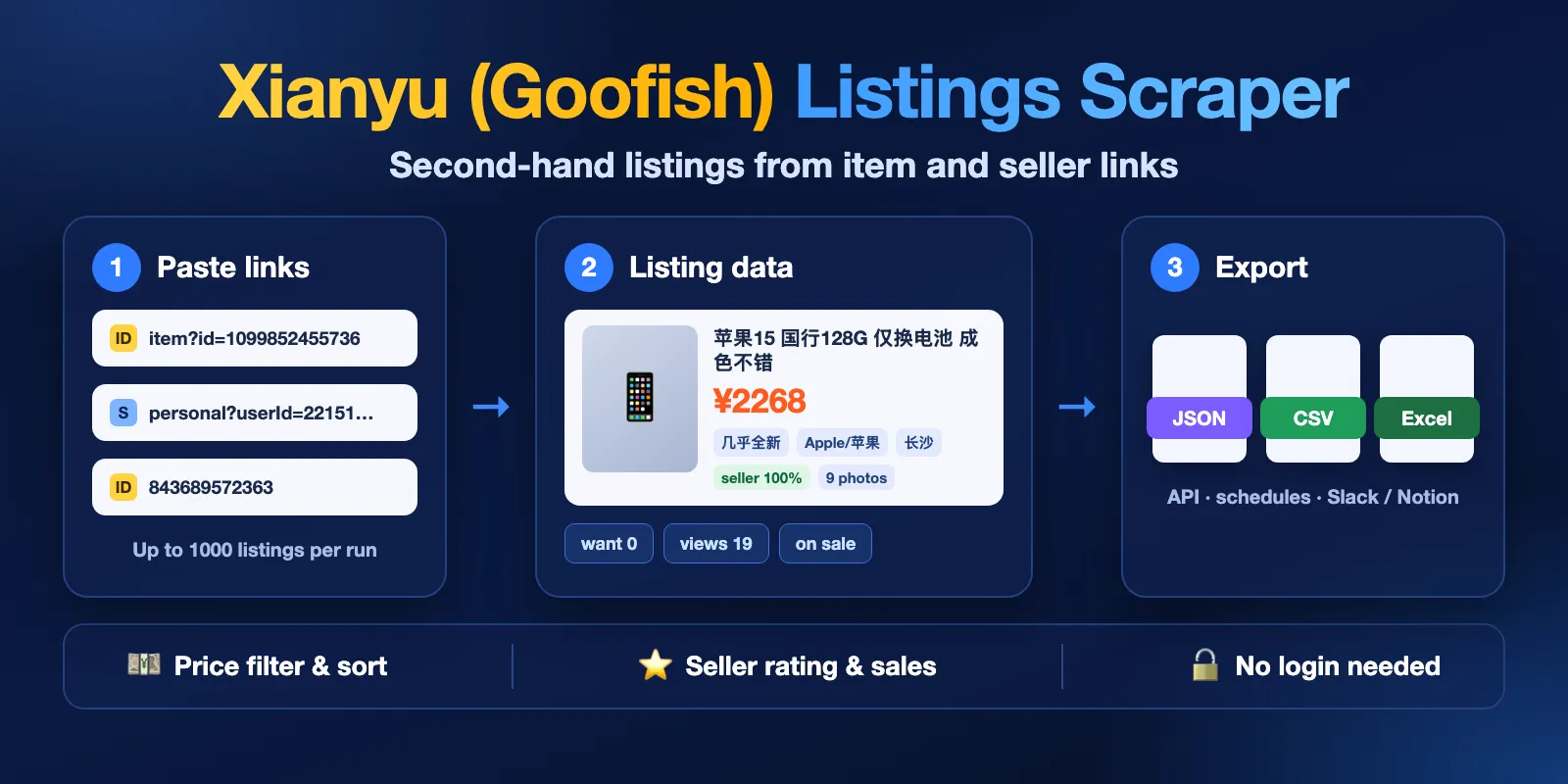
Table of contents
- What it does
- How it works
- Quick start
- Use cases
- Input
- Output
- Pricing
- Limits
- API, export and integrations
- Troubleshooting
- FAQ
- Related Actors
- Support
What it does
Xianyu (闲鱼, also called Goofish or Idle Fish) is the largest second-hand marketplace in China. This Actor takes item links and seller profile links and returns one row per listing.
For an item link it saves the full listing page: title, description, price, original price, condition, brand, category, all item attributes, all photos, want and view counts, city, publish time and the seller's rating, sales and reply rate.
For a seller link it reads the seller's listings on sale, page by page. You can keep only a price range, a minimum condition, recent listings or free shipping, and choose an order. By default it also opens each item page for the full data. Turn this off to save only the list fields (title, price, first photo, want count) at a lower price.
Run the same links on a schedule with Track changes on, and each row also says whether the listing is new, changed (price, status or title) or unchanged since the last run.
The Actor does not search Goofish by keyword: keyword search on goofish.com needs a login. It never logs in, never messages sellers and never collects phone numbers. Phone numbers and messenger IDs in descriptions are replaced with [contact removed].
Good fit
- Check second-hand prices of a phone, camera or bag in China from a list of item links.
- Follow one or more sellers: what they sell, at what price, and how many people want it.
- Check a list of saved items: which ones are still on sale, sold or removed.
- Compare sellers by rating, sales count and reply rate before you buy through an agent.
- Watch a seller or a list of items every day and see only what is new or got cheaper.
How it works
- You paste item links, seller links or bare IDs. The Actor checks each link and removes duplicates.
- For each item it reads the public listing page on goofish.com. For each seller it reads the public list of listings on sale, then applies your price range, order and filters (condition, date, free shipping). With change tracking on, it compares each listing with the last run.
- It saves one Dataset row per listing. Removed items, unknown sellers and bad links also get a row with
statusand a plainerrorMessage, so you can see what happened to every link. - At the end it writes a run summary (
RUN_SUMMARY) with counts per link and, if you want, posts a short summary to Slack or Notion.
If Goofish refuses many requests in a row, the Actor waits once, tries again and then stops. The rows it already saved are kept.
Quick start
-
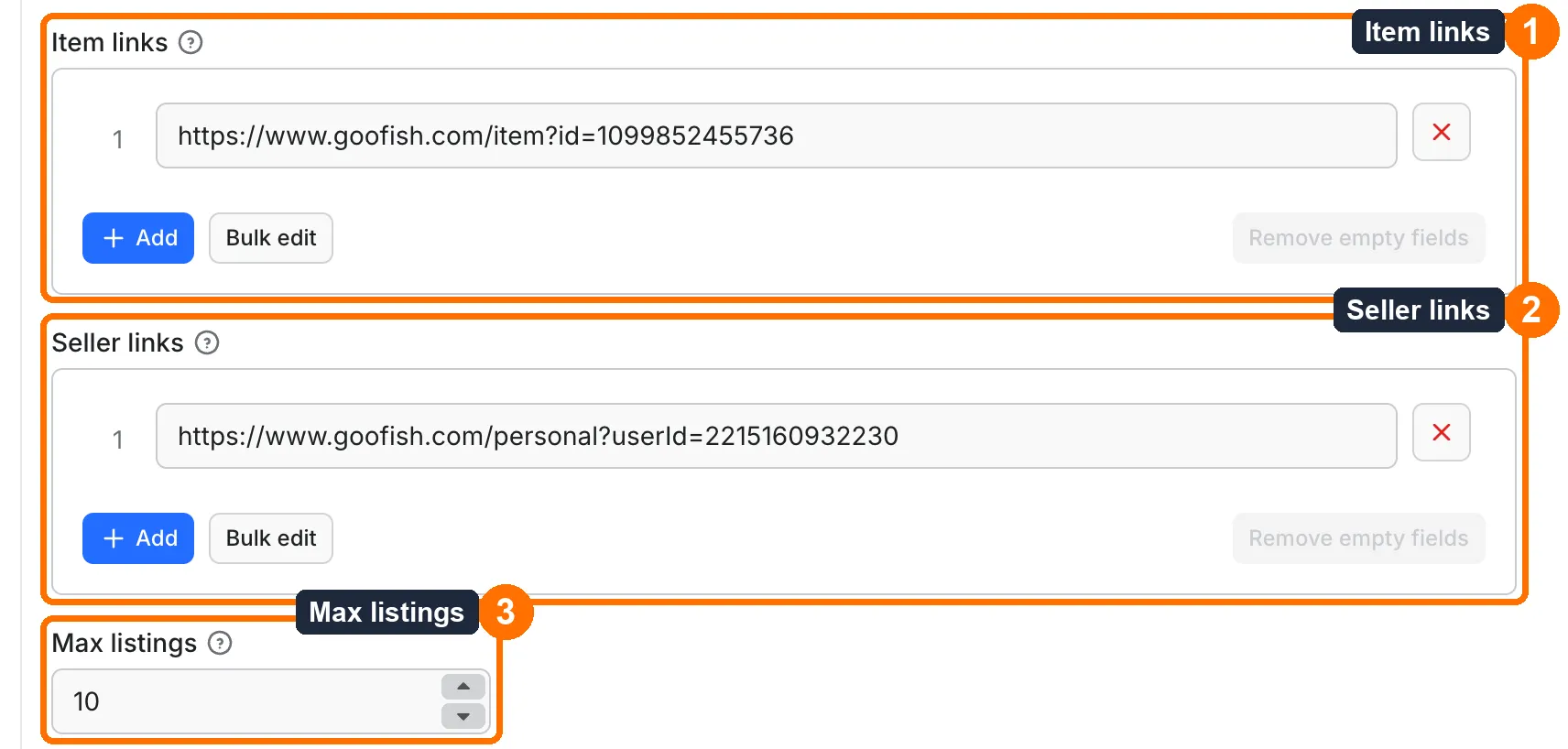
Open the Input tab. Item links already has one example item (box 1).
-
Seller links already has one example seller (box 2). Keep it, replace it with your seller, or clear it.
-
Max listings is 10 in the form (box 3). Leave it empty for the default of 20, or set up to 1000.
-
Click Start.
-
Open the Output tab. The Listings view shows photo, title, price, condition, want count, city and seller rating (box 5).
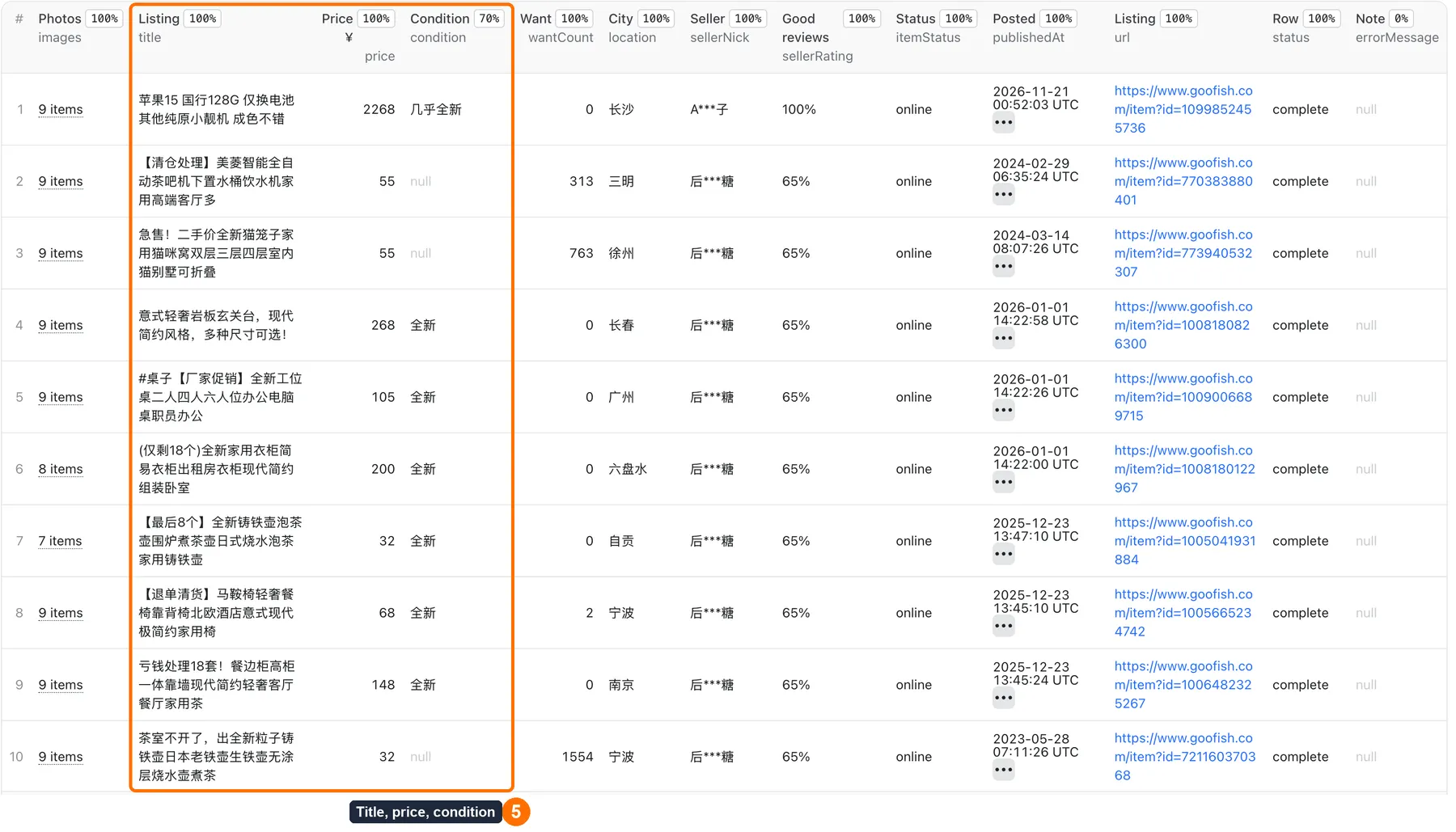
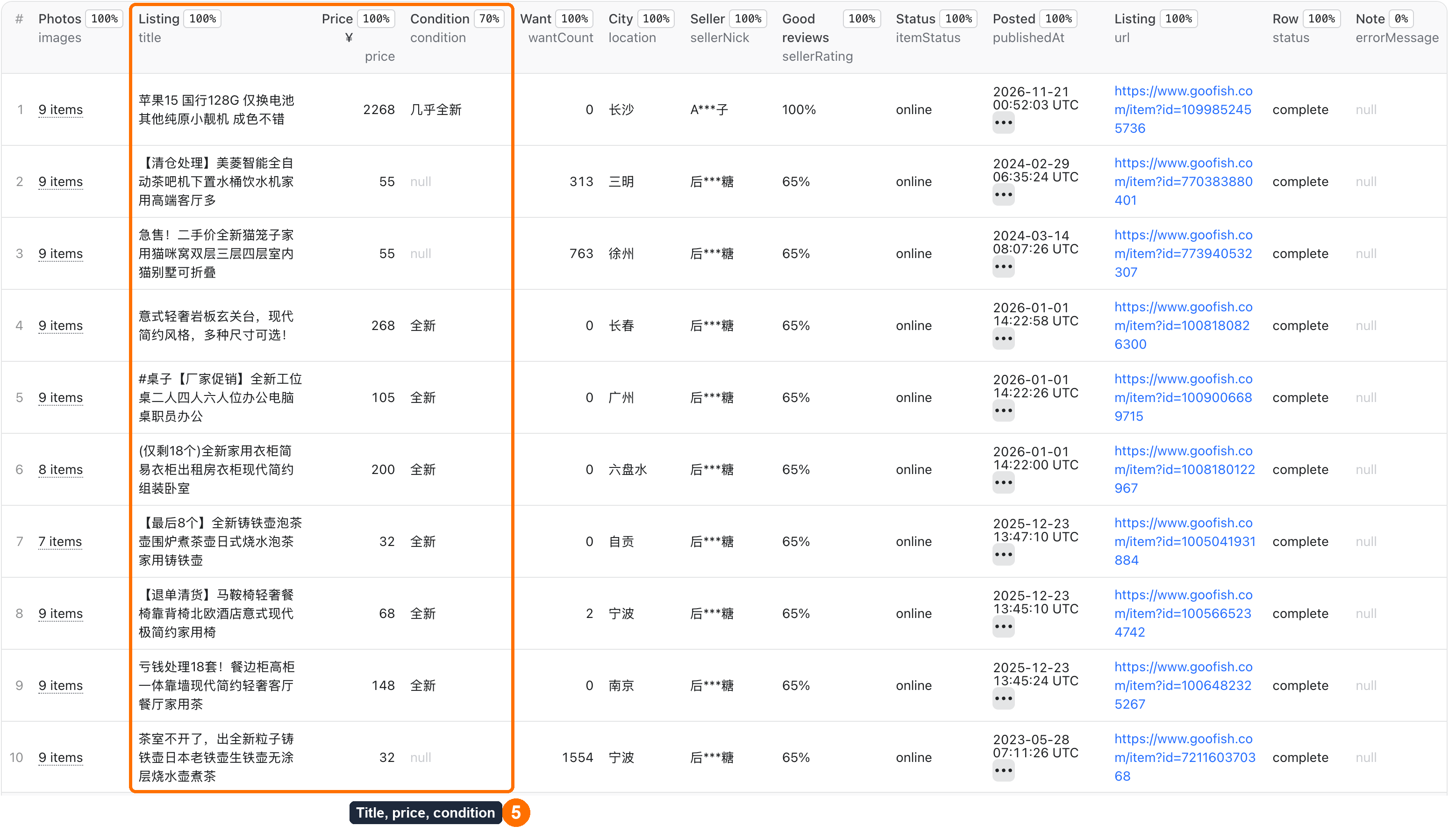
Expected result: 10 listing rows in about 10–20 seconds (up to about a minute if Goofish asks the run to wait), one from the item link and nine from the seller.
Use cases
| Buyer job | Input path | Output entity | Key fields | Next integration |
|---|---|---|---|---|
| Check second-hand prices | itemUrls | Listing | price, condition, brand, attributes | Export to Excel or Google Sheets |
| Follow a seller | sellerUrls | Listing | title, price, wantCount, publishedAt | Schedule + Slack summary |
| Find cheap listings of a seller | sellerUrls + maxPrice + sort | Listing | price, position, url | Dataset API |
| Check if items are still on sale | itemUrls | Listing or not-found row | itemStatus, status, errorCode | Webhook or schedule |
| Compare sellers | sellerUrls | Listing | sellerRating, sellerSoldCount, sellerReplyRate24h, sellerVerified | Export to CSV |
| Watch for new listings and price drops | sellerUrls or itemUrls + trackChanges | Listing with change columns | changeType, changedFields, price, lastRunPrice | Schedule + Slack summary |
Input
Input fields
| Field | Plain name | Type | Required | Default / prefill | Allowed values | Effect | Example | Recommendation |
|---|---|---|---|---|---|---|---|---|
itemUrls | Item links | list of strings | one of itemUrls or sellerUrls | prefill: one example item | goofish.com item links or bare item IDs, up to 1000 | Reads each item page | https://www.goofish.com/item?id=1099852455736 | Open short m.tb.cn share links in a browser first and copy the goofish.com address |
sellerUrls | Seller links | list of strings | one of itemUrls or sellerUrls | prefill: one example seller | goofish.com seller links or bare user IDs, up to 50 | Reads the seller's listings on sale | https://www.goofish.com/personal?userId=2215160932230 | Use Max listings to control the size |
maxItems | Max listings | integer | no | default 20, prefill 10 | 1–1000 | Most listing rows in the run, across all links | 200 | For 1000 rows keep the timeout at 900 s |
includeDetails | Read full item pages | boolean | no | true | true, false | For seller links: full item page (Listing price) or list fields only (Basic listing price) | false | Turn off when you need only title, price and photo |
minPrice | Min price, CNY | integer | no | empty | 0 or more | Seller lists only: skips cheaper listings | 100 | Skipped listings are not charged |
maxPrice | Max price, CNY | integer | no | empty | 0 or more | Seller lists only: skips more expensive listings | 3000 | Use with sort |
sort | Order | string | no | default | default, priceAsc, priceDesc, newest | Seller lists only: order of the saved rows | priceAsc | default is fastest |
minCondition | Minimum condition | string | no | empty | new, likeNew, lightlyUsed | Seller lists only: keeps listings at least this good by the Goofish condition (成色) | likeNew | Needs includeDetails; listings without a condition are skipped |
listedWithinDays | Listed in the last N days | integer | no | empty | 1–3650 | Seller lists only: keeps listings posted within N days | 7 | Needs includeDetails |
freeShippingOnly | Free shipping only | boolean | no | false | true, false | Seller lists only: keeps listings marked 包邮 | true | Works with and without includeDetails |
trackChanges | Track changes since the last run | boolean | no | false | true, false | Adds changeType, changedFields, lastRunPrice, lastRunStatus, firstSeenAt to each row | true | Free; for scheduled runs |
historyName | History name | string | no | empty | letters, digits, ., -, _, up to 60 | Keeps one history under this name, even when you edit the links | phones-weekly | Without it, each set of links has its own history |
deliveryConnector | Send summary to | MCP connector | no | empty | Slack, Notion or another MCP connector | Posts a short summary after the run | your Slack connector | Optional |
deliveryTarget | Notion page or Slack channel | string | no | empty | Notion page link or Slack channel ID | Where the summary goes | C0123456789 | Needed for Notion |
Empty input, or input with no Goofish link, stops at once with a clear message and costs only the start fee. Duplicate links (the same ID on www.goofish.com, m.goofish.com or as a bare ID) are read once. A link that is not a Goofish item or seller gets an error row with INVALID_URL and is not charged.
Interacting settings
| When | Input A | Input B | Effective behavior | Example | Cost/result effect |
|---|---|---|---|---|---|
| Item and seller links together | itemUrls | sellerUrls | Items first, then sellers, until maxItems | 3 items + 1 seller, maxItems 10 | 3 item rows + 7 seller rows |
| Order other than default | sort | maxItems | The Actor reads the whole seller list (up to 1000 listings), sorts it, then saves the first maxItems | priceAsc, maxItems 20 | More seller pages read, each page $0.0002 |
| Default order | sort = default | maxItems | Stops reading pages as soon as maxItems is reached | maxItems 20 | Fewest page reads |
| Price range | minPrice / maxPrice | sellerUrls | Applies only to seller lists; item links are always saved | minPrice 100 | Filtered-out listings are not charged |
| Basic mode | includeDetails = false | sellerUrls | No item pages; item links still open the item page | 1 seller, 100 rows | 100 × $0.0012 instead of 100 × $0.0028 |
| Condition or date filter | minCondition / listedWithinDays | includeDetails | The condition and date are only on the item page, so each listing is read and then kept or skipped. With includeDetails off these filters are ignored and the log says so. A run reads and skips at most the larger of 50 and 5 × maxItems, then stops and says so | minCondition likeNew | Each skipped listing costs one check, $0.0002 |
| Free shipping | freeShippingOnly | includeDetails | With item pages: by the item page. Without: by the mark on the seller list | freeShippingOnly true | Skipped on the list: not charged; skipped after the item page: $0.0002 |
| Filters and item links | any filter | itemUrls | Filters apply only to seller lists; item links are always saved | 1 item + filter | No change for items |
| Change tracking | trackChanges | historyName | The first run starts the history, so the change columns are empty; later runs compare with the run before | daily schedule | No extra charge |
Input examples
One item
Expected behavior: reads one item page.
Expected output: one listing with price, condition, brand, images and seller fields.
Limit or cost note: about $0.0033 (start + one listing).
Cheapest listings of a seller
Expected behavior: reads the seller's whole list, keeps listings from ¥100, sorts by price and saves the first 50 with full item pages.
Expected output: 50 listings with price, position, title, url.
Limit or cost note: 50 × $0.0028 + $0.0002 per seller page + start.
Watch a seller for new listings and price changes
Expected behavior: reads the seller's listings, keeps those in like-new condition or better, and compares them with the last run of the history seller-daily. Put it on a daily schedule.
Expected output: up to 50 listings; from the second run on, changeType is new, changed or unchanged, and changedFields lists what changed.
Limit or cost note: 50 × $0.0028 + $0.0002 per seller page and per skipped listing + start. Tracking itself is free.
Output
Output fields
| Field | Meaning | Type | Can be empty? | Example / enum | Source / notes |
|---|---|---|---|---|---|
status | Row result | string | no | complete, partial, not_found, error | partial: list fields only |
itemId | Goofish item ID | string | on seller-level rows | 1099852455736 | |
title | Listing title | string | on not-found rows | 苹果15 国行128G 仅换电池… | As the seller wrote it, usually Chinese |
description | Listing text | string | without item page | 电池健康85 … | Contacts replaced with [contact removed] |
price | Asking price, CNY | number | rarely | 2268 | |
originalPrice | Price new, CNY | number | yes | null | Only when the seller gives it |
currency | Currency | string | no | CNY | Always CNY |
condition | Condition | string | yes | 几乎全新 (almost new) | As Goofish shows it |
conditionLevel | Condition as a number | integer | yes | 2 | 3 brand new, 2 like new, 1 lightly used, 0 visibly used; for sorting |
brand, category, categoryId | Brand and category | string | yes | Apple/苹果, 手机 | From item attributes |
attributes | All item attributes | object | can be {} | {"存储容量": "128GB"} | Name → value |
itemStatus | Sale status | string | yes | online, sold, offline, unknown | itemStatusText has the Goofish text |
freeShipping | Free shipping (包邮) | boolean | yes | true | |
shippingFee | Shipping fee, CNY | number | yes | 0 | item page only |
wantCount, viewCount, collectCount | Wants, views, saves | integer | yes | 0, 19, 0 | Change over time |
quantity | Pieces on sale | integer | yes | 1 | item page only |
images, imageCount | Photo links and count | array, integer | can be [] | 9 photos | One photo in basic rows |
publishedAt | When posted (UTC) | string | yes | 2026-11-21T00:52:03.000Z | ISO 8601 |
location | City | string | yes | 长沙 | |
sellerId, sellerNick, sellerUrl | Seller | string | yes | A***子 | Nickname is masked by Goofish |
sellerRating | Share of good reviews | string | yes | 100% | |
sellerSoldCount, sellerGoodReviews, sellerBadReviews | Sales and reviews | integer | yes | 47, 6, 0 | |
sellerReplyRate24h, sellerReplyTime, sellerLastSeen | Reply rate, typical reply time, last online | string | yes | 87%, 3小时, 2小时前来过 | |
sellerSince, sellerVerified, sellerItemCount | Joined, ID check, listings on sale | string, boolean, integer | yes | 2022-07-02…, true, 34 | |
url | Listing link | string | on seller-level rows | https://www.goofish.com/item?id=… | |
detailsIncluded | Full item page read | boolean | no | true | false in basic mode |
input, fromSellerId, position | Where the row came from | string, string, integer | fromSellerId and position for seller rows only | position is after filters and order | |
errorCode, errorMessage | Why a row is partial, not found or error | string | null on complete rows | ITEM_NOT_FOUND | Plain-language message |
changeType | New, changed or unchanged since the last run | string | without trackChanges and on the first run | changed | new, changed, unchanged |
changedFields | What changed | array | same as changeType | ["price"] | price, itemStatus, title |
lastRunPrice, lastRunStatus | Price and sale status in the last run | number, string | same as changeType; also when the last run had no value | 2400, online | |
firstSeenAt | When this history first saw the listing | string | without trackChanges | ISO 8601 | |
scrapedAt | When read | string | no | ISO 8601 |
Output entities and surfaces
| Situation | Dataset/API/KVS/live view | Result shape | User action |
|---|---|---|---|
| Normal item | Dataset, Listings and Details views | One row, status complete | Export or use price, condition, url |
| Removed item or unknown seller | Dataset, Problems view | Row with status not_found and errorCode ITEM_NOT_FOUND, SELLER_NOT_FOUND or SELLER_HAS_NO_ITEMS | Check the link; the item may be sold or hidden |
| Item page failed for a seller row | Dataset | status partial, errorCode DETAIL_FAILED, list fields only | Run the item link again later |
| Change tracking on | Dataset, Changes since last run view | Row with changeType, changedFields, lastRunPrice | Sort by changeType to see only new or changed listings |
| Bad link or Goofish refused | Dataset Problems view, RUN_SUMMARY | status error, errorCode INVALID_URL, SOURCE_BLOCKED or SOURCE_ERROR; RUN_SUMMARY.stopReason | Fix the link, or try again later |
RUN_SUMMARY in the Key-value store has the run status (complete, partial, not_found, error), stopReason, counts and one entry per link.
Output example
This example is trimmed (some fields and the photo list are left out) and contains one listing from the One item input above. null means Goofish did not show the value. Text fields stay in Chinese as on goofish.com. Counts such as wantCount and viewCount change over time.
Send results to Slack or Notion
Pick your connector in the optional deliveryConnector field. After the run saves its data, the Actor posts a short summary (up to 25 rows and a link to the full dataset) there. Put a Notion page link or a Slack channel ID in deliveryTarget: in Notion every run is added on top of that one page, so your workspace does not fill up with new pages. Without a page link, Notion delivery is skipped and the log says so. A delivery error never fails the run and costs nothing extra. Connect a service once in Apify Console → MCP connectors.
Use case → fields
| Buyer job | Input path | Output entity | Key fields | Next integration |
|---|---|---|---|---|
| Check second-hand prices | itemUrls | Listing | price, condition, attributes | Excel, Google Sheets |
| Follow a seller | sellerUrls | Listing | title, price, wantCount | Schedule + Slack |
| Still on sale? | itemUrls | Listing or not-found row | itemStatus, status | Webhook |
Pricing
Pricing unit
You pay per event. Apify platform usage (compute, proxy) is included: the developer pays it.
| Event | What it is | FREE | BRONZE | SILVER | GOLD and higher |
|---|---|---|---|---|---|
item | Listing: one row with the full item page | $0.0028 | $0.00252 | $0.00224 | $0.00196 |
item-basic | Basic listing: one row with seller-list fields only | $0.0012 | $0.00108 | $0.00096 | $0.00084 |
check | Page checked: one seller-list page read, or one item link that Goofish says is gone | $0.0002 | $0.0002 | $0.0002 | $0.0002 |
apify-actor-start | One run start, per GB of memory | $0.0005 | $0.0005 | $0.0005 | $0.0005 |
$2.80 per 1000 full listings on the FREE tier, $1.96 on GOLD.
The start fee scales with run memory (per GB). At the default 256 MB it is one event, $0.0005.
Runs with no results still pay a little. A seller with nothing on sale, a removed item and a price range that matches nothing save 0 listings and pay the start and one check per page read. A bad link, a refused request and an empty input are not charged beyond the start. A row whose item page failed is charged as a basic listing, never more. A not-found item ($0.0002) always costs less than a found one. Listings removed by your price range, or by free shipping on the seller list, are not charged. A listing read and then skipped by the condition, date or free-shipping filter costs one check ($0.0002), because its item page was read. Change tracking is free. A partial run pays only for the rows and pages it saved and read. The maximum cost per run setting is respected: the run stops with CHARGE_LIMIT, its status stays SUCCEEDED and its rows are kept. The smallest allowed limit is $0.005.
Cost examples
Amounts are for the FREE tier at the current prices. Row and page counts are from real runs of this Actor; the Basic mode row uses the same 20 listings per seller page.
| Scenario | Input scope | Expected item/event count | Base charge | Optional charge | Stop/cap behavior |
|---|---|---|---|---|---|
| One item | 1 item link | 1 listing | $0.0033 | None | Stops after the item |
| Quick test (form) | 1 item + 1 seller, maxItems 10 | 10 listings, 1 page | $0.0287 | None | Stops at maxItems |
| Typical | 21 items + 1 seller, maxItems 150 | 150 listings, about 7 pages | about $0.42 | None | Stops at maxItems |
| Large | 2 sellers, priceAsc, maxItems 1000 | 1000 listings | $2.80 + start + $0.0002 per page | None | Needs a timeout of 600–900 s |
| Basic mode | 1 seller, includeDetails off, 100 rows | 100 basic listings, 5 pages | $0.1215 | None | Stops at maxItems |
| Removed item | 1 item link that is gone | 0 listings, 1 check | $0.0007 | None | Ends after the check |
| No matches | 1 seller with up to 20 listings, price range matches nothing | 0 listings, 1 page | $0.0007 | None | Ends when the seller list ends |
| Condition filter | 1 seller, minCondition likeNew, 20 listings read, 8 kept | 8 listings, 12 skipped, 1 page | $0.0255 | None | Ends when the seller list or maxItems ends |
| Cost cap | Maximum cost $0.01 | 3 listings | $0.01 or less | None | Stops with CHARGE_LIMIT |
Limits
- No keyword search. Goofish shows search only to logged-in users, and this Actor does not log in. Use item or seller links.
- Up to 1000 listings per run and up to 50 seller links. Speed is about 2–2.5 full listings per second, so 1000 listings need a timeout of at least 600 s (the default is 900 s). For more, use several runs.
- Goofish may refuse requests when there are many in a short time. Then the run waits once, tries again and stops early with
SOURCE_ERROR; the saved rows are kept and the status is SUCCEEDED. On the Apify Free plan we measured about 600 full listings before Goofish started to refuse. - With a non-default
sort, the Actor reads at most the first 1000 listings of each seller list. - With a condition, date or free-shipping filter, a run reads and skips at most the larger of 50 and 5 ×
maxItems(a few more can finish while it stops). If listings or links are still left unread, it stops there, keeps what matched and says so: statuspartial,stopReasonFILTER_LIMIT. Each skipped listing costs $0.0002, so 50 skipped cost $0.01 and the worst case (5000 skipped atmaxItems1000) costs $1.00. When nothing matched, the run still ends SUCCEEDED with the statusnot_found. - Change tracking keeps up to 20,000 listings per history, the most recently seen first, in the store
goofish-scraper-historyof your Apify account. Delete that store to start over. Do not run two runs with the same history at the same time: the one that ends last overwrites the other. If the history cannot be read, the run is not compared and the history is left as it was. - Short m.tb.cn share links are not supported. Open them in a browser and copy the goofish.com address.
- No phone numbers, chat or contact data. Seller nicknames are masked by Goofish.
- Data is what goofish.com shows at run time. Text is not translated. We do not promise that every field is filled for every listing.
API, export and integrations
- API: start a run with the Apify API (
POST /v2/acts/cliqtomedia~goofish-scraper/runs) and the same JSON as the input form. Read rows from the run's default Dataset. - Export: download the Dataset as JSON, CSV, Excel, XML or HTML from the Output tab or the API.
- Scheduling: save your seller links as a task and add an Apify schedule to follow prices every day.
- Webhooks / no-code: use Apify webhooks or the Make, Zapier and n8n integrations to send new rows on. The next system usually reads
url,priceanditemStatus. - Slack or Notion: set
deliveryConnectoranddeliveryTargetfor a short summary after each run.
Use with AI agents (MCP)
-
MCP server URL with only this Actor:
https://mcp.apify.com?tools=cliqtomedia/goofish-scraper. -
Smallest useful input:
{ "itemUrls": ["https://www.goofish.com/item?id=1099852455736"] } -
Key output fields:
price(CNY asking price),condition(Goofish condition text),itemStatus(online,sold,offline),sellerRating(share of good reviews),url(listing link). Rows that are not listings havestatusnot_foundorerrorand anerrorMessage. -
One item takes a few seconds and costs about $0.0033. The form example (10 listings) usually takes 10–20 seconds, up to about a minute, and costs about $0.029.
-
Limits: item or seller links only (no keyword search), up to 1000 listings per run.
Troubleshooting
The run failed with "None of the links is a Goofish item or seller link"
Symptom: the run is FAILED with INVALID_INPUT and the Dataset has only INVALID_URL rows.
Likely reason: the links are not goofish.com item or seller links, or they are m.tb.cn share links.
Check: a link should look like https://www.goofish.com/item?id=… or https://www.goofish.com/personal?userId=….
Action: open share links in a browser, copy the goofish.com address and start again.
A row has ITEM_NOT_FOUND
Symptom: the row has status not_found.
Likely reason: the item was sold and removed, hidden by the seller, or the ID is wrong.
Check: open the url of the row in a browser.
Action: none needed; the row is not a technical error.
The run stopped with SOURCE_ERROR
Symptom: the status message says Goofish refused several requests in a row; RUN_SUMMARY.stopReason is SOURCE_ERROR.
Likely reason: too many requests to Goofish in a short time, often in big runs or several runs at once.
Check: the saved rows are in the Dataset; RUN_SUMMARY.unprocessed lists the links that were not read.
Action: wait a while and run the links that are left. Split very big jobs into several runs.
The run stopped before the timeout
Symptom: the status message says the run stopped before the run timeout; stopReason is DEADLINE.
Likely reason: the timeout is too short for the number of listings.
Check: about 2–2.5 listings per second, so 1000 listings need 600 s or more.
Action: set a timeout of 900 s or use a smaller maxItems.
The run stopped with CHARGE_LIMIT
Symptom: fewer rows than maxItems, status SUCCEEDED, stopReason CHARGE_LIMIT.
Likely reason: the maximum cost per run was reached.
Check: the run's charged events in the run details.
Action: raise the maximum cost per run, or lower maxItems.
Rows have status partial
Symptom: detailsIncluded is false and errorCode is DETAIL_FAILED.
Likely reason: the item page could not be read or was removed after the seller list showed it.
Check: open the url in a browser.
Action: run that item link again later. These rows are charged as basic listings.
FAQ
Do I need a Goofish account, cookies or proxies?
No. The Actor reads public pages without a login and uses Apify Proxy, which is included in the price.
Can I search Goofish by keyword?
Not in this Actor. Keyword search on goofish.com needs a login. Find items or sellers in the Goofish app or website and paste their links.
Why did I pay for a run with 0 listings?
Every run pays the start fee ($0.0005 at 256 MB). Each seller page read and each item that Goofish says is gone costs $0.0002. Bad links and refused requests are not charged.
Does it return phone numbers or WeChat IDs?
No. Phone numbers and messenger IDs in descriptions are replaced with [contact removed], and the seller nickname stays masked as on Goofish.
How do I see only what changed since the last run?
Turn on Track changes (trackChanges) and run the same links on an Apify schedule. Open the Changes since last run view and sort by changeType. The first run only starts the history. Give the same History name to keep the history while you add or remove links.
Is the text translated to English?
No. Titles, descriptions, condition and city are saved in Chinese as Goofish shows them. Field names and status values are in English.
How fresh and complete is the data?
Each row is what goofish.com showed at scrapedAt. Some listings do not have every field (for example originalPrice or condition); then the value is null.
Related Actors
- Taobao & 1688 Scraper: new-product prices from Taobao and 1688 to compare with second-hand prices.
- Xiaohongshu (RedNote) Notes Scraper, No Login: what people in China say about a product.
- Wallapop & Poshmark Scraper - Secondhand Listings, No Login: second-hand listings and prices in Europe and the US.
- Vinted Scraper - Listings, Prices & Brands in 25 Countries: second-hand fashion listings and prices.
Support
For a bug, question or feature request, open the Issues tab of this Actor on Apify. Include the run ID, the links you used (or one example) and the errorMessage or stopReason. Never send tokens, cookies, private data or billing data.
⭐ Found it useful? Rate this Actor. Something wrong? Report a problem — we fix reported problems.


