

Taobao, Tmall & 1688 Scraper: Prices, Sellers, No Login
Pricing
from $1.40 / 1,000 products
Taobao, Tmall & 1688 Scraper: Prices, Sellers, No Login
Search Taobao, Tmall and 1688.com (Alibaba China wholesale) products by keyword, or read Taobao product pages by link: price in CNY, seller, Tmall or Taobao shop, images and link. Price filters. No login, pay per product.
Pricing
from $1.40 / 1,000 products
Rating
0.0
(0)
Developer

Cliqto Media
Maintained by CommunityActor stats
0
Bookmarked
24
Total users
12
Monthly active users
a day ago
Last modified
Categories
Features
Share
Search Taobao, Tmall and 1688.com (Alibaba China) by keyword, or read Taobao product pages by link. You get one row per product with the price in CNY, the seller, the store type (Tmall or Taobao), images and links, with no login and no cookies.
It is for sourcing teams, resellers and price researchers. The smallest run is one keyword: phone case on 1688 gives 10 offers in about 7 seconds and costs about $0.023.
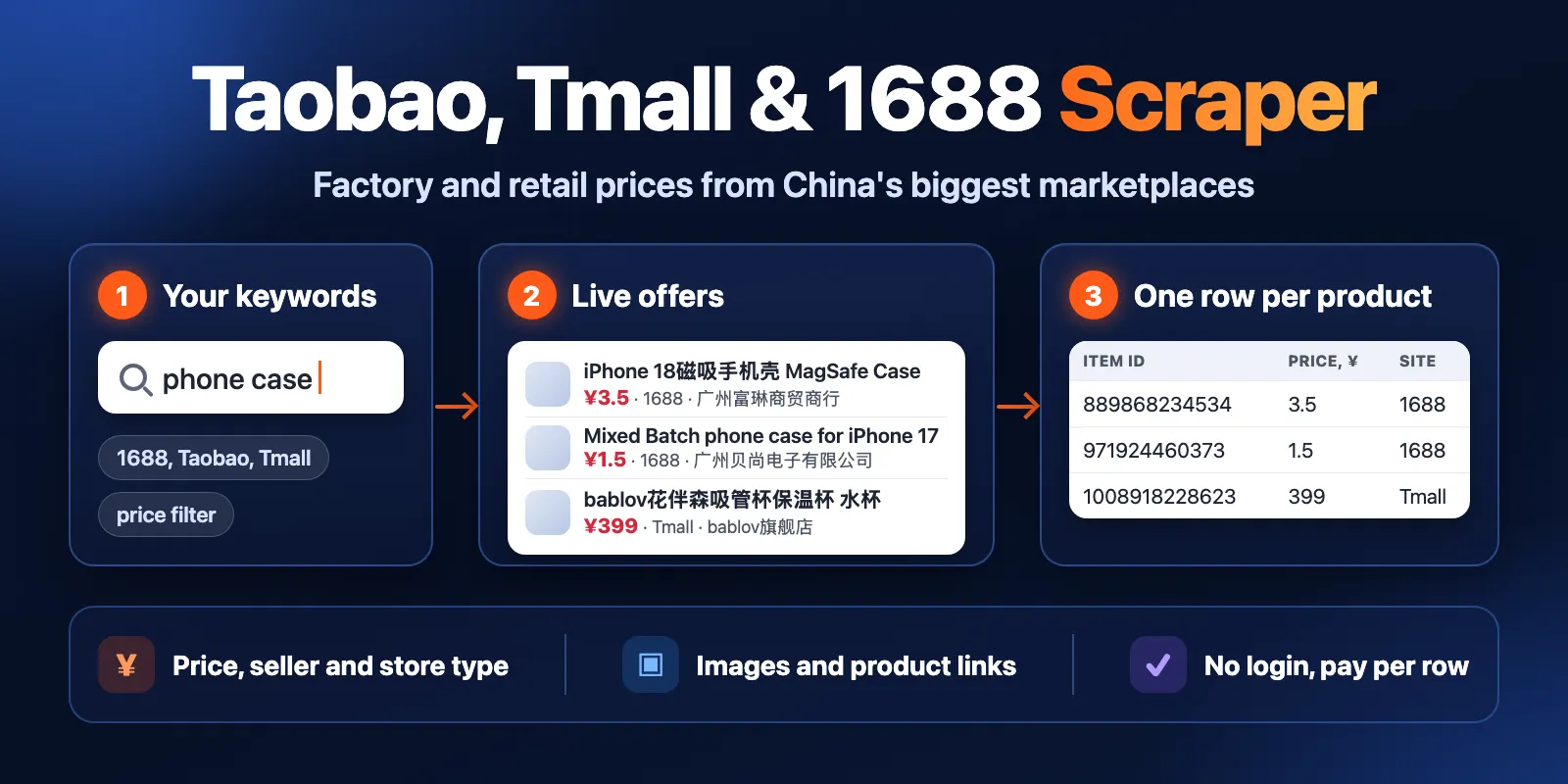
Table of contents
- What it does
- How it works
- Quick start
- Use cases
- Input
- Output
- Pricing
- Limits
- API, export and integrations
- Troubleshooting
- FAQ
- Related Actors
- Support
What it does
The Actor reads public product listings from the biggest Chinese marketplaces:
- Taobao and Tmall — retail. Search by keyword, or give Taobao product page links. Every row says whether the shop is a Tmall store (official brand and flagship stores) or an ordinary Taobao shop, and you can keep only Tmall stores.
- 1688.com — the wholesale site of Alibaba for factories and trading companies. Search by keyword.
For each product you get the item ID, title, price in CNY, seller name, store type, image links and the product links. On Taobao you can also open each product page to add the seller location and the shop link. Optional filters skip products by price or by words in the title before they are saved, so you do not pay for them.
It does not log in, does not read reviews and does not collect any personal contact data.
Good fit
- Find factory prices on 1688 for a product idea before you order samples.
- Compare Tmall brand-store prices with ordinary Taobao shops for the same product type.
- Check the current price, shop and location of a list of Taobao products.
How it works
- You choose the site (
1688ortaobao) and add keywords or Taobao product page links. - The Actor opens the public search or product pages of that site and reads the product cards.
- Filters (Tmall only, price, words to skip) drop products before they are saved.
- It saves one Dataset row per product and a short
RUN_SUMMARYrecord with counts and the reason if the run stopped early.
Keywords with no results and products that do not exist get their own row with status not_found, so you can see what was missing.
Quick start
-
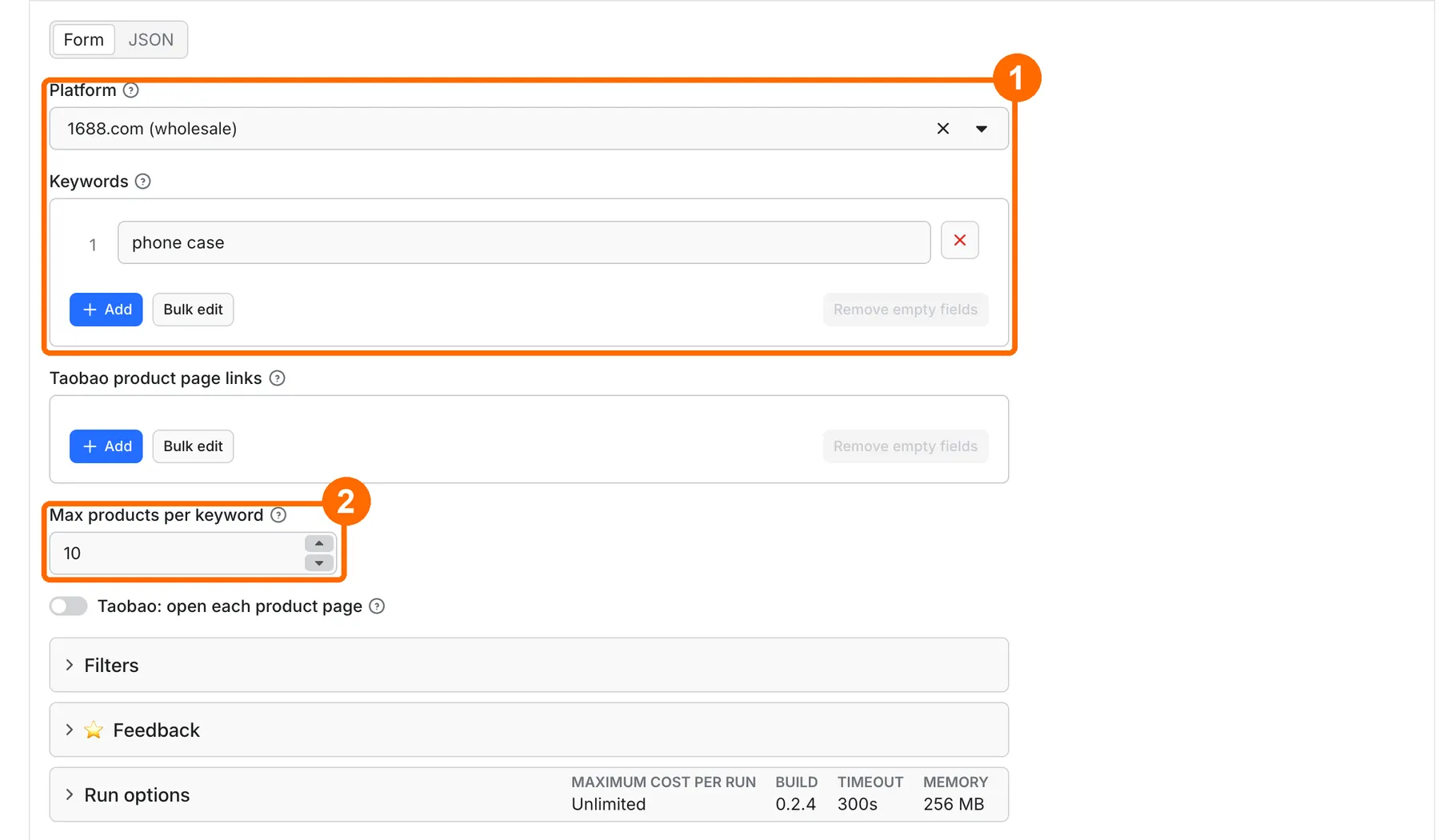
Open the Input tab. Platform is
1688and Keywords isphone case(the prefill, box 1 in the picture). -
Keep these values, or put your own search word in Keywords.
-
Keep Max products per keyword at the prefill
10(box 2). -
Click Start.
-
Open the Output tab. Check
title(box 1),price(box 2) andseller(box 3) in the first rows.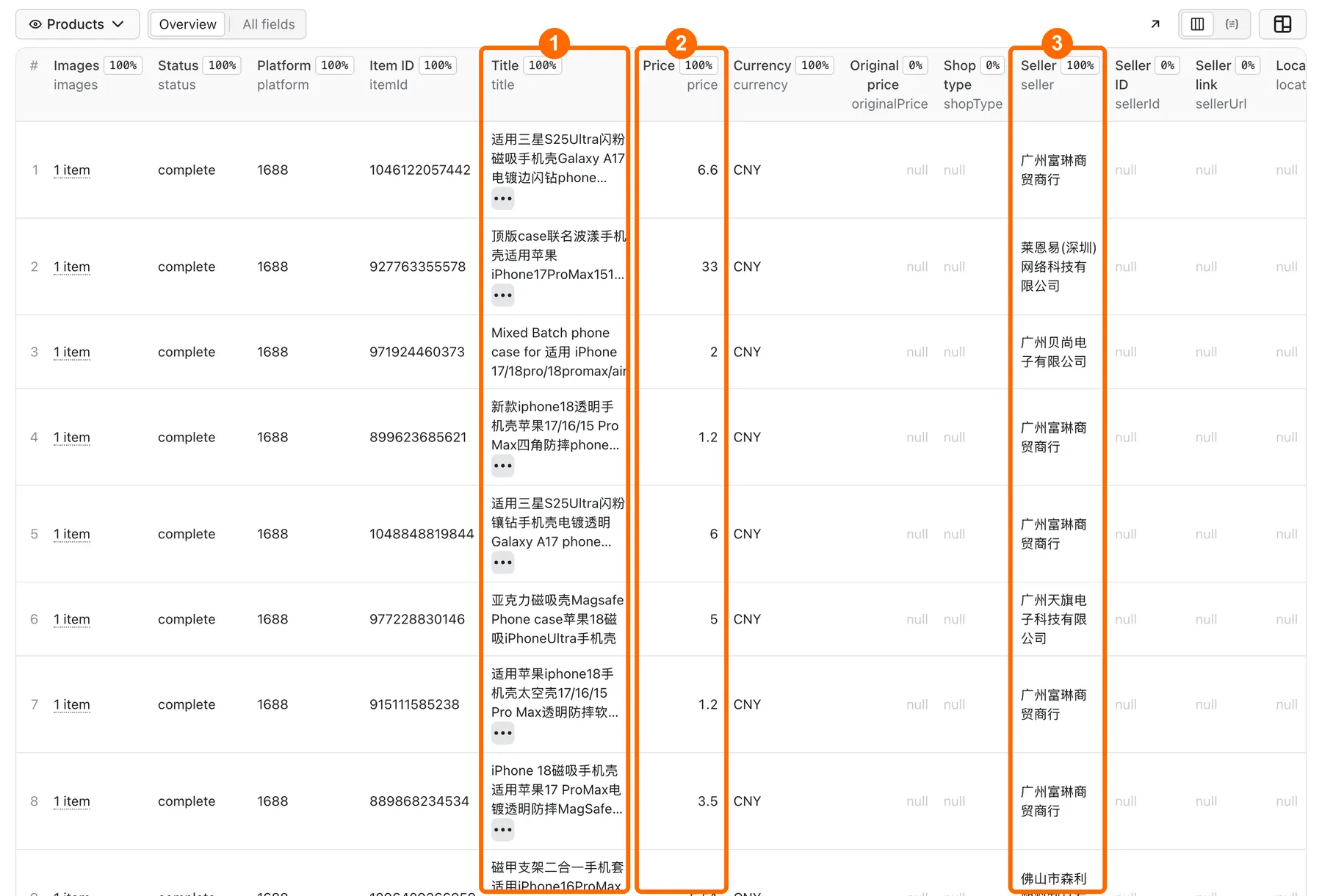
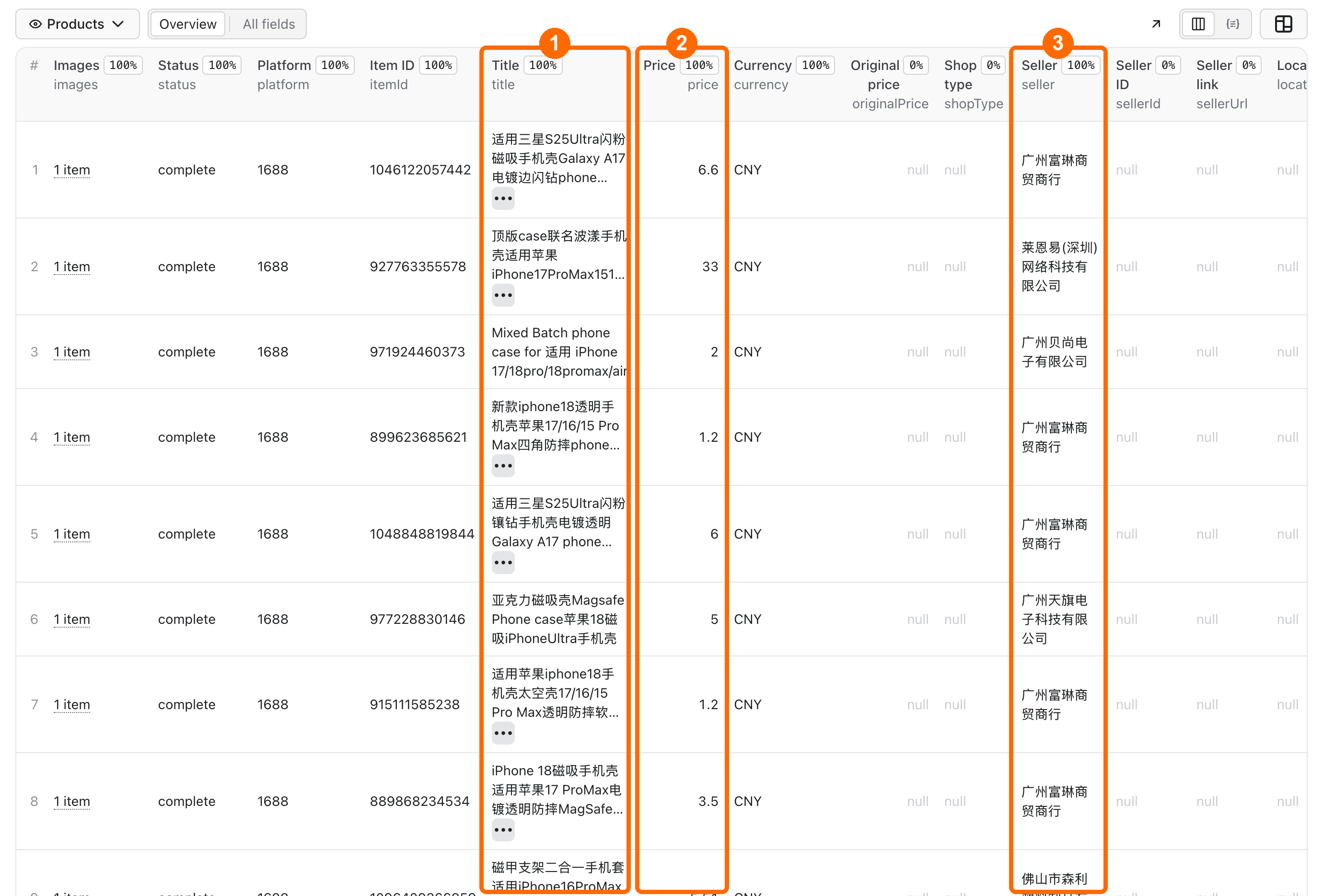
Expected result: 10 rows with status complete, each with a price in CNY, a 1688 seller and a link to the offer.
Use cases
| Buyer job | Input path | Output entity | Key fields | Next integration |
|---|---|---|---|---|
| Factory price research | platform: 1688, keywords | 1688 offer | price, seller, url, images | Export to Google Sheets or CSV |
| Tmall brand-store prices | platform: taobao, keywords, onlyTmall: true | Tmall product | price, seller, shopType, productPageUrl | Schedule a daily run, compare prices |
| Retail price check in a price band | platform: taobao, keywords, minPrice, maxPrice | Taobao/Tmall product | price, seller, sellerId, categoryId | Send a summary to Slack or Notion |
| Product list lookup | platform: taobao, productUrls | Taobao/Tmall product with page details | price, seller, location, sellerUrl | API or webhook to your own system |
Input
Input fields
| Field | Plain name | Type | Required | Default / prefill | Allowed values | Effect | Example | Recommendation |
|---|---|---|---|---|---|---|---|---|
platform | Site | text | no | default 1688, prefill 1688 | 1688, taobao | Which site to search | taobao | 1688 for wholesale, taobao for Taobao and Tmall |
keywords | Search words | list of text | one of keywords / productUrls | prefill ["phone case"] | up to 20, each up to 100 characters | One search per keyword | ["手机壳", "保温杯"] | On Taobao use popular or Chinese words (see Limits) |
productUrls | Taobao product page links | list of text | one of keywords / productUrls | empty | up to 200 links like https://www.taobao.com/list/item/<code>.htm | Reads each product page | value of productPageUrl from an earlier row | Works only with platform: taobao; numeric item IDs are skipped (see Limits) |
maxItems | Max products per keyword | whole number | no | default 20, prefill 10 | 1–2000 | Stops each keyword at this many saved rows | 100 | Taobao gives about 100 per keyword at most |
includeDetails | Open each product page (Taobao) | true/false | no | false | true, false | Adds location and sellerUrl to keyword results; billed as a detailed product | true | Turn on only when you need location or the shop link |
onlyTmall | Only Tmall stores (Taobao) | true/false | no | false | true, false | Keeps rows with shopType: tmall | true | For brand and flagship store prices |
minPrice | Min price (yuan) | number | no | empty | 0 or more | Skips cheaper products | 20 | Leave empty for no lower limit |
maxPrice | Max price (yuan) | number | no | empty | 0 or more, not below minPrice | Skips more expensive products | 500 | Leave empty for no upper limit |
excludeKeywords | Skip titles with these words | list of text | no | empty | up to 50 words | Skips products whose title contains any of them (not case-sensitive) | ["二手", "定制"] | Chinese words work best: titles are in Chinese |
deliveryConnector | Send results to | MCP connector | no | empty | your Slack, Notion or other MCP connector | Posts a short run summary | your Notion connector | See Send results to Slack or Notion |
deliveryTarget | Notion page or channel | text | no | empty | Notion page link or Slack channel ID | Where the summary goes | C0123456789 | Notion needs a page link here |
Empty input: the run ends with a clear message: add at least one keyword or one product link. The same keyword written twice, or the same product link twice, is read only once. More than 20 keywords or 200 links in these fields: Apify refuses the input before the run starts (error 400, nothing charged), so split the list. A longer list sent under another field name, such as queries or startUrls, is cut to the first 20 (or 200) and the status message says so.
Interacting settings
| When | Input A | Input B | Effective behavior | Example | Cost/result effect |
|---|---|---|---|---|---|
| Product links on 1688 | platform: 1688 | productUrls | Links are not read; with no keywords the run ends with a message | 1688 offer link | Only the start fee |
| Taobao options on 1688 | platform: 1688 | includeDetails or onlyTmall | Ignored, the status message says so | — | No extra cost |
| Product links on Taobao | platform: taobao | productUrls | Always read with page details | 5 product page links | Each found product is a detailed product |
| Keywords and links together | keywords | productUrls | Both run; maxItems applies only to keywords | 1 keyword + 3 links | Rows add up |
Filters and maxItems | onlyTmall, minPrice, maxPrice, excludeKeywords | maxItems | maxItems counts saved rows; skipped products do not count | onlyTmall + maxItems: 20 | Skipped products are free |
minPrice above maxPrice | minPrice: 50 | maxPrice: 10 | The run ends with a message what to fix | — | Only the start fee |
Input examples
Factory offers on 1688
Expected behavior: one 1688 search, first 10 offers.
Expected output: 10 rows with itemId, title, price, seller, url.
Limit or cost note: about $0.023 on the Free plan.
Tmall stores only, price from 20 yuan, no used goods
Expected behavior: Taobao search for phone cases, keeps Tmall stores with a price of 20 yuan or more and no 二手 (used) in the title.
Expected output: in our test 20 rows with shopType: tmall, in about 12 seconds (the Actor reads a few more result pages to fill the filter).
Limit or cost note: about $0.043 on the Free plan; skipped products are free.
Taobao products by link
Expected behavior: reads the public product page. Take the link from productPageUrl of any Taobao row.
Expected output: 1 row with price, seller, shopType, location, sellerUrl.
Limit or cost note: about $0.007 on the Free plan ($0.004 per product plus the $0.003 start).
Output
Output fields
| Field | Meaning | Type | Can be empty? | Example / enum | Source / notes |
|---|---|---|---|---|---|
platform | Site | text | no | 1688, taobao | From input |
status | Row result | text | no | complete, partial, not_found, error | See the table below |
itemId | Item or offer ID | text | on error rows | 1008918228623 | Tmall items use the same ID |
title | Product title | text | on not_found/error rows | bablov花伴森吸管杯保温杯… | In Chinese as on the site; many Taobao titles are in traditional characters |
titleTruncated | Title was cut by the source | true/false | no | false | |
price | Price | number | yes | 399 | CNY, as shown on the card; on 1688 the card price, not every wholesale tier |
currency | Currency | text | no | CNY | Always CNY |
originalPrice | Price before discount | number | usually empty | null | Taobao only; the public pages rarely show it |
shopType | Store type | text | on 1688 | tmall, taobao | From the product page when it is read; in search rows from the shop name (flagship and Tmall store names), right for 39 of 40 products in our check |
seller | Shop or company name | text | yes | bablov旗舰店 | |
sellerId | Seller ID | text | yes | 452107751 | Taobao only |
sellerUrl | Shop link | link | yes | https://shop.m.taobao.com/… | Taobao with page details only |
location | Seller city or province | text | yes | 浙江金华 | Taobao with page details only |
freeShipping | Free shipping flag | true/false | yes | false | Taobao only, as the site marks it |
categoryId | Category ID | text | yes | 50006889 | |
url | Product link | link | on error rows | https://item.taobao.com/item.htm?id=1008918228623 | Taobao and Tmall may ask you to log in on this link |
productPageUrl | Public product page | link | on 1688 and error rows | https://www.taobao.com/list/item/Zm5j….htm | Opens without login; put it in productUrls to read the product again |
images | Image links | list | can be [] | ["https://img.alicdn.com/…png"] | |
keyword | Keyword that found the row | text | for product links | 保温杯 | |
position | Place in the search results | number | for product links | 1 | |
sourceUrl | Page or input the row came from | text | no | For error rows, your input | |
errorCode | Why a row is not complete | text | yes | NO_RESULTS, ITEM_NOT_FOUND, NO_PRICE, DETAIL_FAILED, INVALID_URL, UNSUPPORTED_URL, SOURCE_BLOCKED, SOURCE_ERROR | |
errorMessage | Plain note | text | yes | What to change | |
fetchedAt | Time read | date | no | 2026-11-26T05:33:25.031Z | UTC |
minOrder, sales | Minimum order, sales count | — | always empty now | null | The public pages this Actor reads do not show them |
Output entities and surfaces
| Situation | Dataset/API/KVS/live view | Result shape | User action |
|---|---|---|---|
| Normal product | Dataset, view Overview | status: complete row | Export or use price, seller, url |
| No results or missing product | Dataset | status: not_found, NO_RESULTS or ITEM_NOT_FOUND | Check the keyword or the link |
| Partial result | Dataset | status: partial, NO_PRICE or DETAIL_FAILED; search fields are kept | Use the row; run productPageUrl again for details |
| Wrong or unsupported link, source failure | Dataset + RUN_SUMMARY in the Key-value store | status: error row; the run status message says what failed | Fix the link, or run again later |
| Mistake in the input | Run status message + RUN_SUMMARY | No rows; the run ends as succeeded with the message what to fix | Change the input and start again |
Output example
This is one full row from a Taobao keyword run with page details on (保温杯, 40 products). null means the site did not show that value for this product. A 1688 row has the same fields; sellerId, shopType, location, freeShipping and productPageUrl are empty there.
Send results to Slack or Notion
Pick your connector in the optional deliveryConnector field. After the run saves its data, the Actor posts a short summary (up to 25 rows and a link to the full dataset) there. Put a Notion page link or a Slack channel ID in deliveryTarget: in Notion every run is added on top of that one page, so your workspace does not fill up with new pages. Without a page link, Notion delivery is skipped and the run summary says so. A delivery error never fails the run and costs nothing extra. Connect a service once in Apify Console → MCP connectors.
Use case → fields
| Buyer job | Input path | Output entity | Key fields | Next integration |
|---|---|---|---|---|
| Factory price research | platform: 1688, keywords | 1688 offer | price, seller, url | CSV or Google Sheets |
| Tmall brand-store prices | onlyTmall: true | Tmall product | price, shopType, productPageUrl | Daily schedule |
| Product list lookup | productUrls | Taobao/Tmall product | price, location, sellerUrl | API or webhook |
Pricing
Pricing unit
You pay per row saved, plus a small start fee. Platform usage is included: you do not pay for compute or proxy.
| Event | Free plan | Bronze | Silver | Gold and higher |
|---|---|---|---|---|
| Product row (search result) | $0.002 | $0.0018 | $0.0016 | $0.0014 |
| Detailed product (Taobao page read) | $0.004 | $0.004 | $0.004 | $0.004 |
| Not found (keyword without results or missing product) | $0.0002 | $0.0002 | $0.0002 | $0.0002 |
| Actor start | $0.003 | $0.003 | $0.003 | $0.003 |
What a run costs with the start fee:
| Rows | Free plan | Bronze | Silver | Gold and higher |
|---|---|---|---|---|
| 1 product row | $0.005 | $0.0048 | $0.0046 | $0.0044 |
| 10 product rows | $0.023 | $0.021 | $0.019 | $0.017 |
| 100 product rows | $0.203 | $0.183 | $0.163 | $0.143 |
| 1 detailed product | $0.007 | $0.007 | $0.007 | $0.007 |
| 10 detailed products | $0.043 | $0.043 | $0.043 | $0.043 |
| 100 detailed products | $0.403 | $0.403 | $0.403 | $0.403 |
- A row is charged once: a detailed product is not charged again as a product row.
- Products skipped by filters, wrong links, unsupported links and rows the site failed to give after retries (
status: error) are free. - A mistake in the input costs only the start fee: the run ends with a message what to fix and saves no rows.
- The start fee is charged once per run for each 1 GB of run memory (minimum one). The default 256 MB is one start fee.
- A run with no results still pays the start fee and $0.0002 for each keyword or product not found.
- You can set Maximum cost per run in the run options. The Actor stops when it is reached and keeps the rows saved so far (
stopReason: CHARGE_LIMIT). The Max items run option limits paid rows for the whole run.
Cost examples
Measured on real runs in November 2026, Free plan prices.
| Scenario | Input scope | Rows | Time | Charge | Stop/cap behavior |
|---|---|---|---|---|---|
| Prefill | 1688, phone case, 10 | 10 | 7 s | $0.023 | Stops at maxItems |
| Taobao search | 保温杯, 40 | 40 | 14 s | $0.083 | Stops at maxItems |
| Taobao with page details | 保温杯, 40, includeDetails | 40 | 32 s | $0.163 | Stops at maxItems |
| Tmall only with filters | 手机壳, 20, onlyTmall, minPrice: 20, excludeKeywords | 20 | 12 s | $0.043 | 21 products skipped by filters, not charged |
| Product links | 3 product page links + 1 numeric ID | 3 (+1 free error row) | — | $0.015 | All links read |
| Bigger 1688 search | 5 keywords × 200 | 972 | about 1 min | $1.947 | Stops at maxItems or at the cost limit |
| No results | 1 keyword without results | 0 (+1 not found) | — | $0.0032 | Ends not_found |
| Mistake in the input | only numeric item IDs | 0 | — | $0.003 | Ends with a message what to fix |
Limits
- Taobao keywords: Taobao keeps public search pages only for popular search words, mostly Chinese ones.
phone caseanddronework;laptop bagdoes not, but笔记本电脑包does. A word without a page gives anot_foundrow with this hint. - Taobao depth: about 100 products per keyword at most (about 20 per sort order or filter on the site). Use more specific keywords for more products.
- 1688 depth: deep; about 3,500 offers in one run with the default 300-second timeout. Raise the timeout for more.
- Up to 20 keywords and 200 product links per run. In the input form and the API the lists stop at 20 and 200: a longer list is refused by Apify before the run starts (error 400, nothing charged), so split it into several runs.
- Page details: about 1 product per second, so about 200 detailed products in one default run.
- Product links need the item code: since November 2026 Taobao no longer opens product pages by numeric item ID,
item.taobao.comordetail.tmall.comlinks. Such links get a freeerrorrowUNSUPPORTED_URLwith the reason. UseproductPageUrlfrom a Taobao row instead, or search by keyword. - Price by link can differ from search: a product read by link takes the price from its product page; the search card of the same product may show another price (for example a coupon price).
- Placeholder prices: about 1 in 10 rows from deep Taobao searches has a placeholder price of 10,000 CNY or more; the Actor keeps it as shown. Use
maxPriceto skip them. On 1688 the price is the card price, not each wholesale tier. - Strict filters stop early: with a price, word or Tmall filter, a keyword stops after 5 search pages in a row without a matching product, and the whole run reads at most 10 such pages (after that each keyword stops at its first page without a match). If a keyword found nothing, its
not_foundrow says so; if it found some rows and then stopped,stoppedByFilters: truefor that keyword in theRUN_SUMMARYrecord shows it. Loosen the filter or use a more specific keyword. - Store type in search rows comes from the shop name; with
includeDetailsit comes from the product page. - No minimum order or sales count; old price usually empty: use the product link to see them on the site.
- 1688 offer links are not supported (1688 product pages need a CAPTCHA). Use keywords for 1688.
- The sites can limit access: Taobao and 1688 can change or block their public pages at any time. The Actor retries and then saves an
errorrow or ends early with a clear message; those rows are free. - Titles in Chinese: many Taobao titles come in traditional characters.
- Not a drop-in replacement for other Taobao or 1688 scrapers: field names are different.
- No login, no cookies, no reviews, no personal contact data.
API, export and integrations
- API: start a run with
POST https://api.apify.com/v2/acts/cliqtomedia~taobao-1688-scraper/runsand the input JSON; read rows from the run's default Dataset. - Export: download the Dataset as JSON, CSV, Excel or XML from the Output tab or the API.
- Scheduling: create a Task with your keywords and add a schedule in Apify to track prices daily.
- Slack or Notion: a short summary after each run, see Send results to Slack or Notion.
- Webhooks / no-code: use an Apify webhook on run success, or the Apify apps for Make, Zapier or n8n, to send rows to Google Sheets or your database.
Use with AI agents (MCP)
- MCP server URL with only this Actor:
https://mcp.apify.com?tools=cliqtomedia/taobao-1688-scraper. - Smallest useful input:
{"platform": "1688", "keywords": ["phone case"], "maxItems": 10}. - Key output fields:
price(number, CNY),seller(shop or company),shopType(tmallortaobao),productPageUrl(public Taobao page),status(complete,partial,not_found,error),errorMessage(what to change). - A 10-row run takes about 7 seconds and costs about $0.023. Keep
maxItemssmall for quick answers; Taobao keywords work best in Chinese.
Troubleshooting
Run ends with a message and no rows
Symptom: the run succeeded, the Dataset is empty, the status message starts with "Invalid input".
Likely reason: a mistake in the input, for example no keywords, only numeric item IDs, or minPrice above maxPrice.
Check: the status message says what to change and gives an example.
Action: fix the input and start again. Such a run costs only the start fee.
Product links give UNSUPPORTED_URL
Symptom: status: error rows with "Not supported" in errorMessage.
Likely reason: the link is a numeric item ID, an item.taobao.com or detail.tmall.com link, or a 1688 link.
Check: Taobao links must look like https://www.taobao.com/list/item/<code>.htm.
Action: use productPageUrl from a Taobao search row. These rows are free.
Taobao keyword gives not_found
Symptom: one row with status: not_found and NO_RESULTS.
Likely reason: Taobao has no public search page for this word.
Check: try the same word in Chinese.
Action: use a popular Chinese keyword, for example 笔记本电脑包 instead of laptop bag.
Fewer Taobao rows than maxItems
Symptom: a keyword stops at about 20–100 rows. Likely reason: Taobao public pages show a limited number of products per keyword; filters skip more. Check: the run status message says which keywords ran out. Action: add more specific keywords, or loosen the filters.
Run ends early: time limit (DEADLINE)
Symptom: status partial, stopReason: DEADLINE in RUN_SUMMARY, message about the time limit.
Likely reason: too many keywords, a high maxItems or many product links for one run.
Check: RUN_SUMMARY counts.
Action: raise the run timeout, or split the input into smaller runs. Saved rows are kept.
Rows with SOURCE_BLOCKED or SOURCE_ERROR
Symptom: status: error rows and a failed run message.
Likely reason: the site did not answer after several retries.
Check: the errorMessage of the row.
Action: run again later. These rows are free. If the site fails 8 times in a row, the run stops early with the message "is not answering right now", so a site outage costs you only the start fee.
FAQ
Do I need a Taobao or 1688 account?
No. The Actor reads public pages only. It does not log in and does not use cookies.
How do I get only Tmall products?
Turn on Only Tmall stores (onlyTmall: true) with platform: taobao. Every Taobao row also has shopType, so you can filter later instead.
Can I get the minimum order quantity or sales count?
Not now. The public pages this Actor reads do not show them, so minOrder and sales are always empty.
Why is a price very high?
Some Taobao sellers put a placeholder price (10,000 CNY or more) on a listing. The Actor shows the price as the site does. Set maxPrice to skip these products.
Can I sort by price?
Not in the input. The public 1688 pages ignore sort options, and Taobao sorts only its first page of about 20 products. Sort the Output by the price column in Apify Console, or sort the exported file. To get only a price band, use minPrice and maxPrice.
Is the data live?
Yes. Each run reads the sites at run time. fetchedAt shows when each row was read.
Related Actors
- AliExpress Scraper: Products, Prices & Reviews, No Login — compare Chinese factory and retail prices with AliExpress listings.
- JD.com Scraper: Prices, Review Counts & Ratings, No Login — the other big Chinese retail site, with review counts and ratings.
- Temu Scraper: Home Feed Products, Prices & Sales — Temu products and prices from the home feed, for a third price point.
- Text Translator: 50 Languages, No API Key — translate Chinese product titles.
- Historical Exchange Rates & Currency Converter (ECB) — convert CNY prices to your currency for a given date.
Support
For a bug, question or feature request, open the Actor's Issues tab on Apify. Include the run ID, the platform and the keyword or link, and the errorMessage text. Never send tokens, cookies or other private data.
⭐ Found it useful? Rate this Actor. Something wrong? Report a problem — we fix reported problems.


