
Google Flights Scraper - Prices & Times, No Login
Pricing
from $14.00 / 1,000 flight search with results
Google Flights Scraper - Prices & Times, No Login
Get Google Flights prices for a route and dates: airlines, flight numbers, departure and arrival times, duration, stops, layovers, CO2 and exact price in your currency. One-way or round trip, cabin, passengers, stops filter, date range. No login.
Pricing
from $14.00 / 1,000 flight search with results
Rating
0.0
(0)
Developer

Cliqto Media
Maintained by CommunityActor stats
0
Bookmarked
2
Total users
1
Monthly active users
2 days ago
Last modified
Categories
Share
Google Flights Scraper searches Google Flights for your route and dates and returns one row per flight: airline, flight numbers, departure and arrival time, duration, stops, layovers, CO₂ and the exact price in your currency.
Add two airport codes and a date. A normal search takes a few seconds, costs one search event and needs no login, cookies or API key.
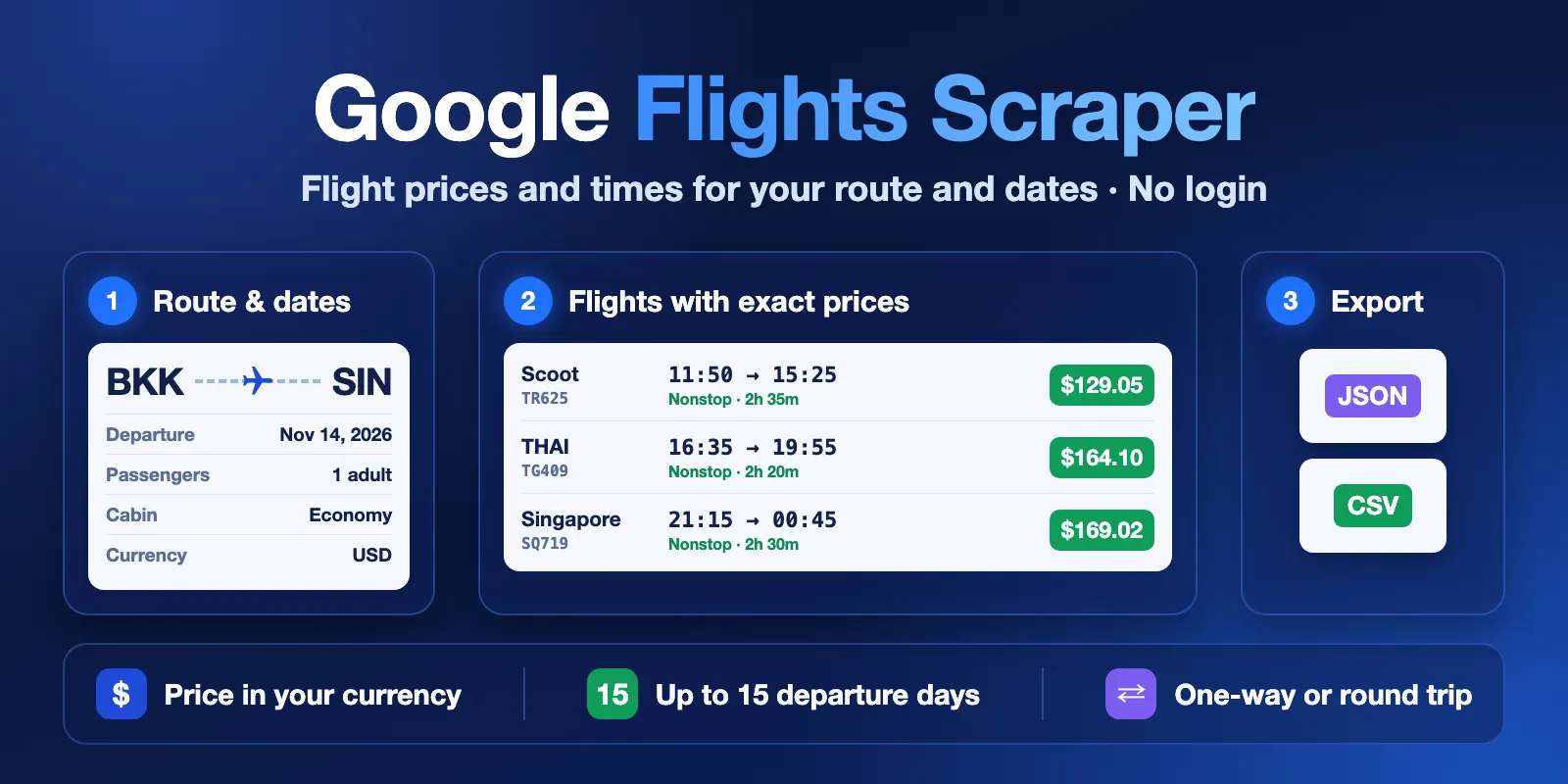
Table of contents
- What it does
- Quick start
- Input
- Output
- Pricing and limits
- Use cases
- API, export and integrations
- Troubleshooting
- FAQ
- Support
What it does
The Actor opens the public Google Flights results page for one route, one departure date and your passengers, the same page you see in a browser without signing in. It reads the flight list from that page and saves each flight option as one Dataset row. Prices are the total for all passengers, in the currency you choose.
You can search one-way or round trip, choose the cabin class and the maximum number of stops, and search up to 15 departure days in one run to find the cheapest day.
Good fit
- Compare fares and flight times for one route on one or more dates.
- Find the cheapest departure day in a short date range.
- Collect flight prices on a schedule to see how they change over time.
Not a fit / limits
- No booking, no booking links and no airline-site prices: the Actor only reads what Google Flights shows on its results page.
- No price insights (price level, price history graph) and no multi-city trips.
- Round trip: each row is an outbound flight with the round-trip total price, as Google shows it on the first step. Return flights are not listed.
- Searches with children or lap infants: on some routes Google does not put the flights into the page and loads them later in the browser. Such a date gets a free
errorrow withSOURCE_INCOMPLETE. With children, Google can also show fewer flights than for adults only. - Prices change often and can differ from the price on the airline website.
Quick start
- Open the Input tab.
- Keep the prefilled route
BKK→SINanddepartureDate+30(30 days from today), or add your own airport codes and date. - Click Start.
- Open the Flights view of the Dataset and check
airline,departure,priceandcurrency.
Expected result: about 10–60 flight rows (prefill: up to 20) in a few seconds, best flights first, as Google orders them.
Input
Input fields
| Field | Plain name | Type | Required | Default / prefill | Allowed values | Effect |
|---|---|---|---|---|---|---|
origin | From airport | string | yes | prefill BKK | 3-letter IATA code | Departure airport |
destination | To airport | string | yes | prefill SIN | 3-letter IATA code, not the same as origin | Arrival airport |
departureDate | Departure date | string | yes | prefill +30 | YYYY-MM-DD or +N days from today, up to about 330 days ahead | First departure date |
returnDate | Return date | string | no | empty (one-way) | YYYY-MM-DD or +N, not before departureDate | Makes the search a round trip |
additionalDepartureDays | Extra days | integer | no | 0 | 0–14 | Also searches the next N days; each day is one search |
adults | Adults | integer | no | 1 | 1–9 | Passengers aged 12+ |
children | Children | integer | no | 0 | 0–8 | Passengers aged 2–11 |
infantsOnLap | Infants on lap | integer | no | 0 | 0–8, at most one per adult | Passengers under 2 without a seat |
cabinClass | Cabin | string | no | economy | economy, premium_economy, business, first | Cabin to search |
maxStops | Stops | string | no | any | any, nonstop, 1, 2 | Keeps flights with at most this many stops |
currency | Currency | string | no | USD | 3-letter ISO code, e.g. EUR, THB | Currency of price |
country | Point of sale | string | no | US | 2-letter country code | Google's point of sale; prices can differ by country |
maxResults | Max flights per date | integer | no | 50 (prefill 20) | 1–300 | Maximum rows for each departure date |
proxyConfiguration | Proxy | object | no | No proxy | Apify proxy settings | Leave as is; see below |
Passengers in total: 9 at most. The run checks the input before it sends any request. A wrong input (for example, the same airport twice or a return date before the departure date) ends the run with INVALID_INPUT and costs nothing.
Interacting settings
| When | Input A | Input B | Effective behavior |
|---|---|---|---|
| Date range | departureDate | additionalDepartureDays | Searches departureDate and the next N days, in date order |
| Round trip with a date range | returnDate | additionalDepartureDays | The return date moves with each departure date, so the trip length stays the same |
| Many flights | maxResults | Google's list | You get at most maxResults rows per date. Google usually lists 10–60 flights for one search |
| Proxy | proxyConfiguration | — | With "No proxy" the run connects directly and, only if Google refuses, moves to Apify datacenter and then residential proxy automatically. This is included in the price. You cannot choose the RESIDENTIAL group by hand (the run fails at once, free). If Google answers only through residential proxy and lists no flights for 3 dates, the run stops with REQUEST_CAP and marks the other dates as not processed |
Input example
Expected behavior: one Google Flights search, one-way, 1 adult, economy, USD.
Expected output: up to 20 flight rows with airline, flightNumbers, departure, arrival and price.
Cost: one flight-search event.
Output
Each flight option is one row in the default Dataset. The Flights view shows the main columns as a table. The key-value store record RUN_SUMMARY has the run status and, for each date, how many flights Google listed and the cheapest price.
Output example
This example is trimmed: it shows one row from the input example above, and some fields (origin, children, airlines, airport names and times inside segments) are left out. null means Google did not show the value. It never means zero.
Output fields
| Field | Meaning | Type | Can be empty? | Example / enum |
|---|---|---|---|---|
status | Row type | string | no | complete, not_found, error |
statusReason | Why a row is not_found or error | string | yes | Plain-English reason |
errorCode | Error type for error rows | string | yes | SOURCE_BLOCKED, SOURCE_INCOMPLETE, SOURCE_UNAVAILABLE |
route | Origin and destination | string | no | BKK-SIN |
tripType | One-way or round trip | string | no | one_way, round_trip |
departureDate, returnDate | Search dates | string | returnDate yes | 2026-11-14 |
cabinClass, adults, children, infantsOnLap | Search settings | string / integer | no | economy, 1 |
rank | Position in Google's list | integer | for flight rows no | 1 |
isBest | In Google's "Best" group | boolean | for flight rows no | true |
airline | Main airline | string | yes | Scoot |
airlines, airlineCodes | All airlines of the trip | array | yes | ["TR"] |
flightNumbers | Flight numbers, in order | array | yes | ["TR625"] |
departureAirport, arrivalAirport | Airports | string | yes | BKK |
departure, arrival | Local date and time | string | yes | 2026-11-14T11:50 |
durationMin | Total travel time in minutes | integer | yes | 155 |
stops | Number of stops | integer | yes | 0 |
layovers | Stop airport and wait time | array | yes | [{"airport": "KUL", "durationMin": 95, …}] |
segments | Each flight leg: flight number, airline, operator, airports, times, aircraft, legroom | array | yes | see example |
price | Total price for all passengers | number | yes, when Google writes "Price unavailable" | 129.05 |
currency | Currency of price | string | yes | USD |
emissionsKg, typicalEmissionsKg | CO₂ of this flight and a typical one for the route, kg | integer | yes | 96 |
sourceUrl | The Google Flights page of this search | string | no | https://www.google.com/travel/flights?tfs=… |
fetchedAt | When the page was read (UTC) | string | no | ISO time |
Rows and run status
| Situation | What you get | What to do |
|---|---|---|
| Flights found | One complete row per flight, up to maxResults per date | Use price, departure, flightNumbers |
| Google listed no flights for a date | One not_found row with statusReason | Check the airport codes, date and filters |
| Unknown airport code | One not_found row: "check that both airport codes exist" | Fix origin or destination |
| A date failed (block, Google error, flights not in the page) | One free error row with errorCode. After a page without flights the run goes on with other dates; after a block, a Google error or two failed dates in a row it stops, and the other dates get free "Not processed" rows | Run again later or change the input (see Troubleshooting) |
| The max charge is reached | Rows of paid dates stay; run status PARTIAL, CHARGE_LIMIT | Raise the max charge of the run |
RUN_SUMMARY.status is COMPLETE, NO_RESULTS, PARTIAL, ERROR or INVALID_INPUT. A run with a failed date ends as failed, but the rows it saved stay in the Dataset.
Pricing and limits
Pricing unit
You pay per search. One search is one route and one departure date.
| Event | When | Free plan | Bronze | Silver | Gold and higher |
|---|---|---|---|---|---|
flight-search | Google listed flights for the date. Includes every row up to maxResults | $0.025 | $0.015 | $0.0145 | $0.014 |
empty-search | Google listed no flights for the date, or does not know an airport code (one not_found row) | $0.001 | $0.001 | $0.001 | $0.001 |
Error rows and invalid input are free. Proxy and platform usage are included in the price. The price does not depend on how many rows a search returns.
If the next search does not fit into the maximum charge you set for the run, the Actor does not write it and stops with PARTIAL and CHARGE_LIMIT.
Cost examples (Free plan prices)
| Scenario | Input | Events | Charge |
|---|---|---|---|
| One date (prefill) | BKK → SIN, +30 | 1 flight-search (17 flights in our test) | $0.025 |
| Cheapest day in two weeks | additionalDepartureDays: 14 | 15 flight-search | $0.375 |
| Route without flights | 1 date | 1 empty-search | $0.001 |
| Wrong input | same airport twice | none | $0 |
Limits and speed
- Up to 15 departure dates per run (
additionalDepartureDays0–14) and up to 300 rows per date. This is a limit, not a typical count: in our tests Google listed 10–60 flights per date. - In our tests a search took about 1–3 seconds; 15 dates with 260 flights took 4.3 seconds.
- Dates can be up to about 330 days ahead, as on Google Flights.
Use cases
| Buyer job | Input | Key fields | Next step |
|---|---|---|---|
| Compare fares for a trip | origin, destination, departureDate, returnDate | airline, departure, arrival, stops, price | Export to CSV or a spreadsheet |
| Find the cheapest day | additionalDepartureDays | departureDate, price (or cheapestPrice in RUN_SUMMARY) | Sort by price |
| Track a route over time | Same input on a schedule | flightNumbers, departure, price, fetchedAt | Compare runs by flight number and departure time |
| Travel CO₂ reports | Route and dates | emissionsKg, typicalEmissionsKg, durationMin | Join with your trip list |
API, export and integrations
- Export: download the Dataset as JSON, CSV, Excel, XML or HTML from the run page, or use the Apify API.
- API: start the Actor with the Apify API and read rows from the default Dataset (
view=flightsfor the table columns). - Scheduling: create an Apify schedule with the same input to collect prices every day. Each run is a new search; the Actor does not keep state between runs.
- Webhooks / no-code: use Apify webhooks or the Make, Zapier and n8n integrations to send new rows to your sheet or database.
Use with AI agents (MCP)
- MCP server URL with only this Actor:
https://mcp.apify.com?tools=cliqtomedia/google-flights-scraper. - Smallest useful input:
- Key output fields:
airlineandflightNumbers(who flies),departureandarrival(local time),stops,pricewithcurrency(total for all passengers),status(complete,not_foundorerror). - One date usually finishes in a few seconds and costs one search event (see Pricing). Limits: 15 dates and 300 rows per date per run; airport codes must be 3-letter IATA codes.
Troubleshooting
A date has not_found
Symptom: one not_found row and no flights.
Likely reason: Google has no flights for this route, date and filter, or an airport code is wrong.
Check: open sourceUrl in a browser and read statusReason.
Action: check the codes, try maxStops: "any" or another date.
A date has error with SOURCE_INCOMPLETE
Symptom: the search has children or lap infants, and the row says Google did not include flights in the page. Likely reason: on some routes Google loads these results later in the browser. Action: search for adults only, or try another date. This row is free.
A date has error with SOURCE_BLOCKED or SOURCE_UNAVAILABLE
Symptom: Google showed an unusual-traffic page or an internal error after retries.
Action: run again later. Keep proxyConfiguration on "No proxy" so the Actor can move to Apify proxy by itself. Error rows are free.
The run stopped with REQUEST_CAP
Symptom: the summary says Google answered only through residential proxy and listed no flights for 3 dates. Likely reason: Google refused the direct and datacenter routes, and the route has no flights on these dates. Action: check the route and dates, then run the rest later. The rows for dates that were not processed are free.
The run stopped with CHARGE_LIMIT
Symptom: status PARTIAL, fewer dates than asked.
Action: raise the maximum charge of the run or search fewer days.
The run failed at once with INVALID_INPUT
Read the run status message. It says which field to fix, for example a 2-letter airport code or a return date before the departure date. Nothing was charged.
FAQ
Do I need a Google account, login or API key?
No. The Actor reads the public Google Flights results page, without login or cookies.
Is the price the same as on the airline website?
Not always. The Actor returns the price Google Flights shows for the point of sale in country at the time in fetchedAt. Airlines and agents can show other prices, and fares change often.
Why do I get fewer flights than in my browser?
The Actor returns the flights Google puts on the first results page, up to maxResults. With children, Google can put fewer flights into the page. Booking options for each flight are not part of the output.
Is there an official Google Flights API?
No public one. This Actor gives you the same flight list as JSON through the Apify API.
Support
For bugs, questions or feature requests, open an issue in the Issues tab of this Actor. Include the run ID and the route and date that gave an unexpected result. Do not send API tokens or private data.


