

LinkedIn Ad Library Scraper: Competitor Ads, No Login
Pricing
from $1.26 / 1,000 ads
LinkedIn Ad Library Scraper: Competitor Ads, No Login
Scrape the LinkedIn Ad Library without login. Search ads by company, keyword or payer and get ad text, CTA, images, video, run dates, impressions by country and targeting. Track your competitors' new ads.
Pricing
from $1.26 / 1,000 ads
Rating
0.0
(0)
Developer

Cliqto Media
Maintained by CommunityActor stats
0
Bookmarked
2
Total users
1
Monthly active users
6 days ago
Last modified
Security
Limited permissionsShare
Scrape ads from the public LinkedIn Ad Library by company, keyword or payer, and get each ad's text, CTA, images or video, run dates, impressions by country and targeting.
Use it to see what your competitors advertise on LinkedIn. You don't need a LinkedIn account. The smallest run is one company name and 10 ads: it takes a few seconds and costs $0.037 on the Free plan.
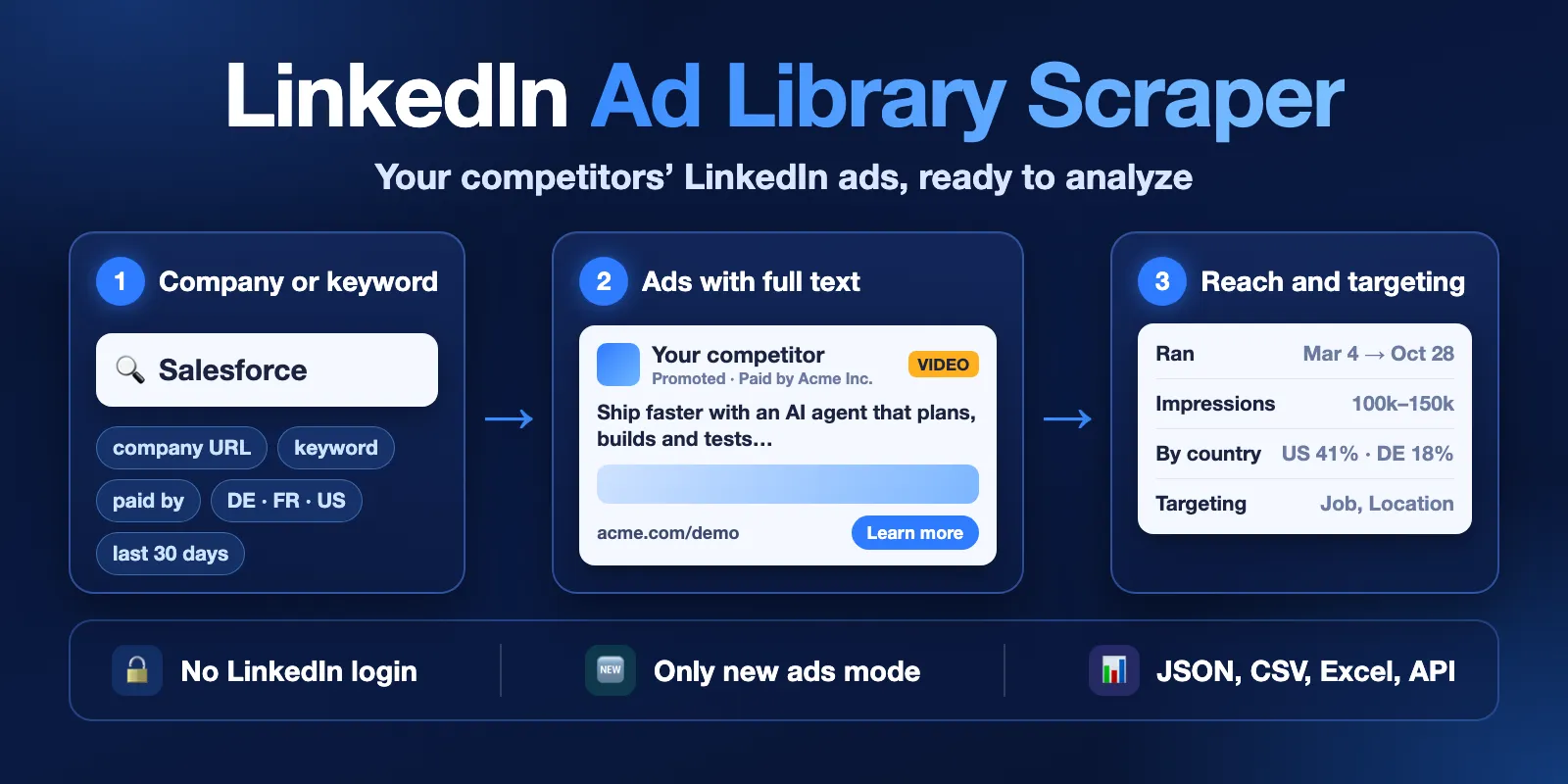
Table of contents
- What it does
- How it works
- Quick start
- Use cases
- Input
- Output
- Pricing
- Limits
- API, export and integrations
- Troubleshooting
- FAQ
- Related Actors
- Support
What it does
The LinkedIn Ad Library shows ads that companies run on LinkedIn. This Actor searches the library the same way you do in a browser and saves one row for each ad.
For each ad you get:
- Who runs it: advertiser name, LinkedIn company ID and page, logo, and who paid for the ad.
- The ad itself: format (image, video, document, carousel, text, message and more), headline, full text, CTA button and link, landing domain, images, video, document pages, carousel cards.
- When and how much: first and last date shown, days running, impressions range, and the share of impressions by country.
- Targeting: what LinkedIn shows about the audience: language, location, job, company and other categories, with included and excluded values.
LinkedIn shows run dates, impressions and targeting only for ads shown in the EU. For other ads these fields are empty. The Actor only reads company ads in the public library. It does not log in and does not open personal profiles.
Good fit
- Watch a competitor's LinkedIn ads: texts, offers, CTAs and landing pages.
- Find ads about a topic in chosen countries and a date range.
- Get only ads you have not seen before, on a schedule.
How it works
- You give company names, company page URLs, keywords, payers, Ad Library URLs or ad IDs. You can add countries, a date range and other filters.
- The Actor runs each search in the public LinkedIn Ad Library and reads the result pages. If you keep Open each ad for full details on, it also opens every ad's page for the full text, media, dates, impressions and targeting.
- It saves one row for each ad in the dataset. A short report of the run (status, searches, counts) is saved as
RUN_SUMMARYin the key-value store.
Quick start
-
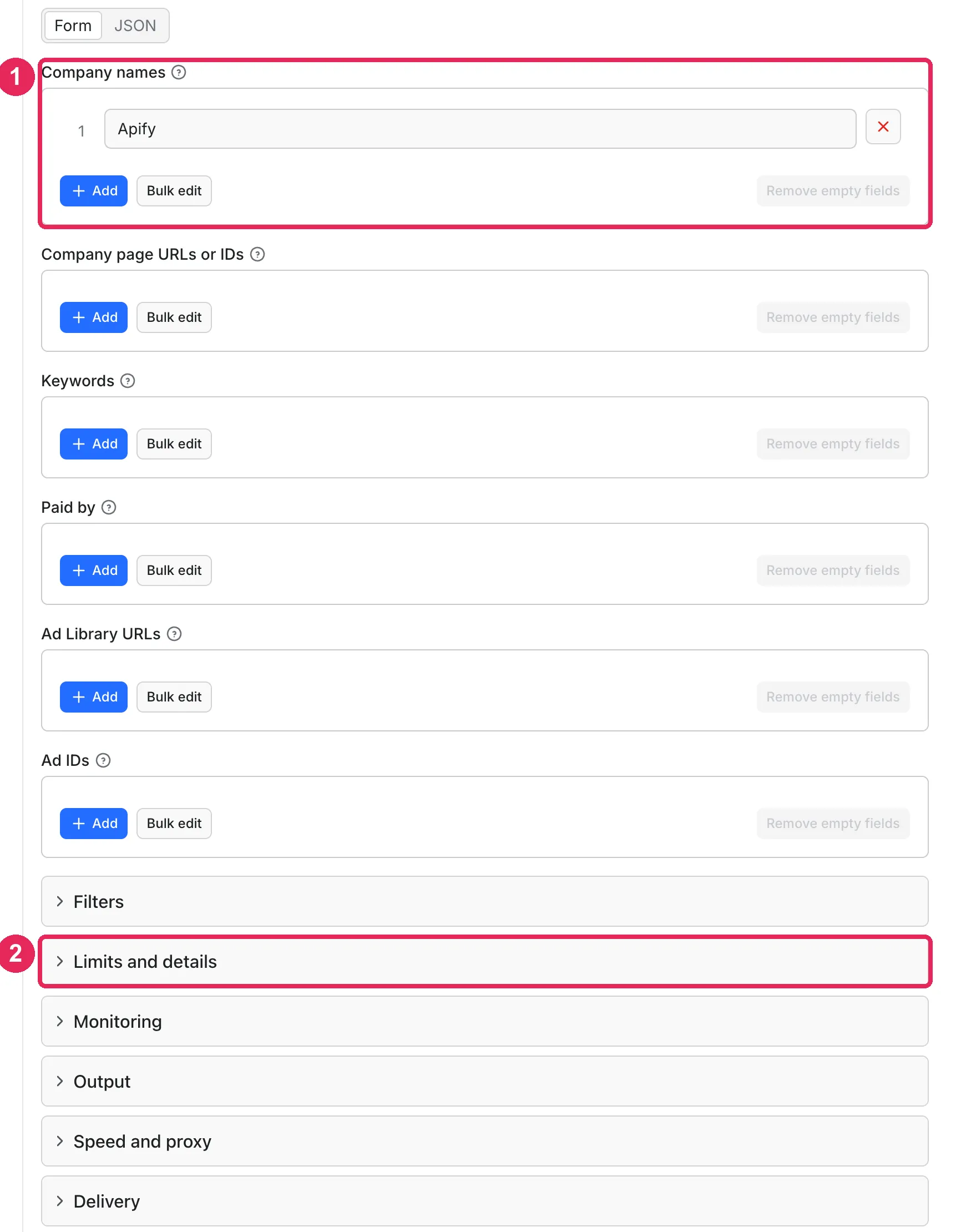
Open the Input tab. Company names already has
Apify(box 1 in the picture). Replace it with your competitor's name. -
Open Limits and details (box 2). Keep Max ads per search at
10for a first test. Keep Open each ad for full details on to get the full text, dates, impressions and targeting. -
Click Start at the bottom of the page (below the form, not in the picture).
-
Open the Output tab (box 1 below). The Ads view (box 2) shows the advertiser, format, text, CTA, landing URL, dates and impressions. Dates, impressions and targeting shows reach by country and targeting.
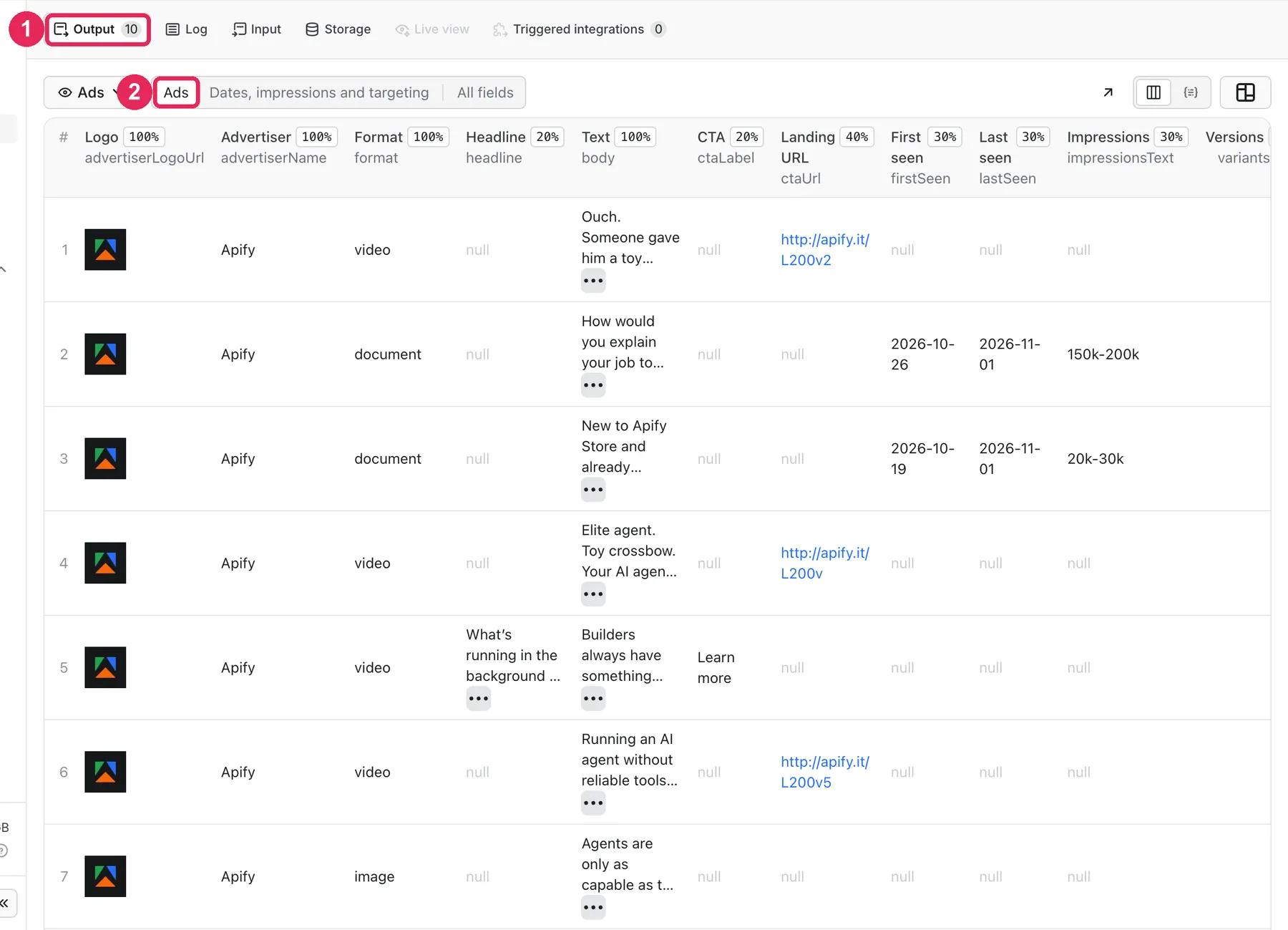
Expected result: 10 rows, one for each Apify ad, newest first, in about 10 seconds. Some ads have no dates or impressions: LinkedIn shows them only for ads shown in the EU.
Use cases
| Buyer job | Input path | Output entity | Key fields | Next integration |
|---|---|---|---|---|
| See all ads of a competitor | companyUrls or companyNames | ad | headline, body, ctaUrl, firstSeen, lastSeen | CSV or Excel export |
| Find ads about a topic in some countries | keywords + countries + dateRange | ad | advertiserName, body, format, impressionsText | Google Sheets via export |
| Check where and to whom an ad was shown | adIds or companyNames | ad | impressionsByCountry, targeting | your BI tool via API |
| Get only new competitor ads every week | companyUrls + onlyNew | ad | changeStatus, firstFoundAt, adLibraryUrl | Schedule + Slack or Notion |
Input
You need at least one search: a company name, company URL, keyword, payer, Ad Library URL or ad ID. Each value is a separate search. Empty input stops with INVALID_INPUT and costs nothing. The same ad found by two searches is saved once.
Input fields
| Field | Plain name | Type | Required | Default / prefill | Allowed values | Effect | Example | Recommendation |
|---|---|---|---|---|---|---|---|---|
companyNames | Company names | string list | one search field | prefill ["Apify"] | any text | searches ads by advertiser name | ["HubSpot"] | quick, but can match companies with similar names |
companyUrls | Company page URLs or IDs | string list | one search field | — | linkedin.com/company/<name>, /showcase/<name> or a number | exact search by company ID | ["https://www.linkedin.com/company/salesforce"] | best for one exact company |
keywords | Keywords | string list | one search field | — | any text | searches ad text | ["crm software"] | combine with countries |
payers | Paid by | string list | one search field | — | any text | searches the "Paid by" name | ["HubSpot, Inc."] | for agencies and legal entities |
startUrls | Ad Library URLs | URL list | one search field | — | linkedin.com/ad-library/search?... or /detail/<id> | copies filters from the URL | a search URL from your browser | when you already set filters on LinkedIn |
adIds | Ad IDs | string list | one search field | — | numeric ID or detail URL | reads these ads only | ["1612091784"] | to refresh known ads |
countries | Countries | string list | no | all countries | ISO codes like US, DE, GB; ALL | where the ad was shown | ["DE", "FR"] | — |
dateRange | Date range | text | no | all-time | all-time, last-30-days, current-month, current-year, last-year, custom-date-range | when the ad was shown | last-30-days | — |
startDate, endDate | From / to date | date | with custom-date-range | — | YYYY-MM-DD | custom period | 2026-09-01 | — |
impressionsMin, impressionsMax | Impressions range | number | no | — | 0 and more | only ads with this reach | 10000 | — |
targetingIncluded, targetingExcluded | Targeting includes / excludes | list | no | — | LANGUAGE, LOCATION, AUDIENCE, DEMOGRAPHIC, COMPANY, EDUCATION, JOB, INTERESTS_AND_TRAITS | only ads with this targeting | ["JOB"] | EU ads only have targeting |
adFormats | Ad formats | list | no | all | image, video, document, carousel, text, spotlight, follower, message, event, article, job, other | keeps only these formats | ["video"] | other ads are charged as checked ads |
exactCompanyMatch | Exact company match | yes/no | no | false | — | drops ads of companies with a different name | true | use with companyNames |
sortOrder | Order | text | no | newest | newest, oldest | order of results | oldest | — |
maxAds | Max ads per search | number | no | 100, prefill 10 | 1–5000 | stops each search at this number | 500 | start small |
includeDetails | Open each ad for full details | yes/no | no | true | — | opens every ad page | false | off is faster and cheaper |
trackChanges | Track new ads | yes/no | no | false | — | marks each ad new or seen | true | for monitoring |
onlyNew | Only new ads | yes/no | no | false | — | saves only ads not seen before | true | for schedules |
stateName | Tracking memory name | text | no | linkedin-ad-library-state | store name | where seen ads are kept | competitor-a | one name per watch list |
includeAdvertiserSummary | Advertiser comparison summary | yes/no | no | false | — | saves ADVERTISER_SUMMARY | true | to compare advertisers |
concurrency | Ad pages read at once | number | no | 5 (1 without proxy) | 1–10 | speed of detail pages | 3 | lower it if you see many retries |
requestDelayMs | Pause between requests (ms) | number | no | 250 (1000 without proxy) | 0–10000 | slower, more polite pace | 1000 | — |
proxyConfiguration | Proxy | proxy | no | Apify Proxy | Apify Proxy groups | IPs for requests | default | keep the default |
deliveryConnector, deliveryTarget | Send results to | text | no | — | Slack or Notion connector; channel ID or page URL | posts a short summary | — | see below |
The input also accepts resultsLimit (same as maxAds), skipDetails (opposite of includeDetails) and maxConcurrency (same as concurrency), so you can reuse input from other LinkedIn Ad Library Actors.
Interacting settings
| When | Input A | Input B | Effective behavior | Example | Cost/result effect |
|---|---|---|---|---|---|
| You use both | onlyNew | trackChanges | onlyNew turns tracking on | onlyNew: true | seen ads are not saved, they cost $0.0001 each |
| You filter formats | adFormats | maxAds | reads more results to fill maxAds | 10 videos | filtered ads cost $0.0001 each |
| You use an Ad Library URL | startUrls | countries, dateRange | filters in the URL are used; the form filters are added when the URL has none | a URL with countries=DE | none |
| Details are off | includeDetails: false | targeting…, impressions… filters | LinkedIn still filters by them, but the rows have no targeting or impressions | — | about half the price |
Input examples
All ads of one company
Expected behavior: finds the company ID and reads up to 1000 of its ads with details.
Expected output: one row for each ad, with headline, body, ctaUrl, firstSeen, impressionsText.
Limit or cost note: 1000 ads with details took about 11 minutes and cost $3.60 at the Free plan price.
New ads only, every week
Expected behavior: the first run saves all ads and remembers them. Later runs save only new ads.
Expected output: rows with changeStatus: "new". The list of new ad IDs is in CHANGES.
Limit or cost note: an ad you have already seen costs $0.0001.
Output
Output fields
| Field | Meaning | Type | Can be empty? | Example / enum | Source / notes |
|---|---|---|---|---|---|
adId | LinkedIn ad ID | text | no | 1612091784 | search result |
adLibraryUrl | link to the ad page | URL | no | https://www.linkedin.com/ad-library/detail/1612091784 | — |
advertiserName | advertiser | text | rarely | Apify | — |
advertiserId, advertiserUrl | LinkedIn company ID and page | text, URL | yes | 10608457 | — |
advertiserLogoUrl | logo image | URL | yes | — | LinkedIn image links expire after some time |
paidBy | who paid for the ad | text | yes | Apify Technologies s.r.o. | — |
format, formatLabel | ad format | text | no | image, video, document, carousel, text, spotlight, follower, message, event, article, job, other | — |
headline, body, description | ad texts | text | yes | — | bodyIsPreview: true means the text is the short version from the search page |
ctaLabel, ctaUrl, landingDomain | button and its link | text, URL | yes | Learn more | tracking parameters are removed from ctaUrl |
bodyLinks, hashtags | links and hashtags in the text | list | empty list | — | — |
images, videoUrl, videoPosterUrl | media | URL | yes | — | details only |
document | document title, pages, cover images | object | yes | {"pageCount": 12} | document ads |
carousel, messageButtons, variants | carousel cards, message buttons, other versions of the ad | list | empty list | — | details only |
firstSeen, lastSeen, daysRunning | when the ad was shown | date, number | yes | 2026-10-26 | details only; EU ads only |
impressionsText, impressionsMin, impressionsMax | impressions range | text, number | yes | 150k-200k | EU ads only |
impressionsByCountry | share of impressions by country | list | empty list | {"country": "Germany", "percent": 9} | EU ads only; under 1% is shown as 0.5 with lessThanOnePercent: true |
targeting | targeting by category | list | empty list | {"category": "Location", "included": ["DACH"], "excluded": ["India"]} | EU ads only |
targetingParameters | which categories were used | list | empty list | {"parameter": "Job", "targeted": true} | EU ads only |
hasTransparencyData | the ad has impressions or targeting | yes/no | no | true | — |
detailsStatus | result of opening the ad page | text | no | ok, not_requested, not_found, failed, skipped | — |
changeStatus, firstFoundAt | new or seen before | text, date | yes | new, seen | with trackChanges or onlyNew |
searchSource | which search found the ad | text | no | Apify | — |
fetchedAt | when the row was saved | date-time | no | 2026-11-01T04:42:47.016Z | — |
Output entities and surfaces
| Situation | Dataset/API/KVS/live view | Result shape | User action |
|---|---|---|---|
| Normal item | Dataset, views Ads and Dates, impressions and targeting | one row for each ad | export or use the API |
| No ads for this search | RUN_SUMMARY.searches[].status = "not_found"; if no search found ads, RUN_SUMMARY.status = "NO_RESULTS" (run succeeds, you pay $0.001 for each search) | no rows | check the name, try companyUrls or fewer filters |
| Part of the ads | RUN_SUMMARY.status = "CAPPED" (cost limit) or "PARTIAL" (time or request limit: run succeeds; a failed search: run fails) | rows that were saved stay; you pay only for them | read RUN_SUMMARY.reason and message |
| Run aborted by you | RUN_SUMMARY.status = "CANCELLED" | rows saved before the abort stay; you pay only for them | start a new run |
| LinkedIn blocked or failed | RUN_SUMMARY.status = "ERROR", the run fails | no rows, no charge | run again later or lower concurrency |
RUN_SUMMARY also has totalCountEstimate for each search: how many ads LinkedIn says it has. With trackChanges or onlyNew the Actor saves CHANGES (new ad IDs). With includeAdvertiserSummary it saves ADVERTISER_SUMMARY (ads per advertiser, formats, dates, countries).
Output example
This example is trimmed. It is one row from the prefill run (companyNames: ["Apify"], maxAds: 10). null means LinkedIn does not show this value for the ad. This ad has no CTA button. An empty list means there is nothing of this kind.
Send results to Slack or Notion
Pick your connector in the optional deliveryConnector field. After the run saves its data, the Actor posts a short summary (up to 25 rows and a link to the full dataset) there. Put a Notion page link or a Slack channel ID in deliveryTarget: in Notion every run is added on top of that one page, so your workspace does not fill up with new pages. A delivery error never fails the run and costs nothing extra. Connect a service once in Apify Console → MCP connectors.
Use case → fields
| Buyer job | Input path | Output entity | Key fields | Next integration |
|---|---|---|---|---|
| Compare offers and CTAs | companyUrls | ad | headline, body, ctaLabel, landingDomain | Excel export |
| See which ads run longest | companyNames | ad | firstSeen, lastSeen, daysRunning | Google Sheets |
| See EU reach and audience | countries + details | ad | impressionsByCountry, targeting | API |
| Alert on new ads | onlyNew + schedule | ad | changeStatus, adLibraryUrl | Slack or Notion |
Pricing
Pricing unit
You pay per event. Prices on the Free plan:
| Event | When | Free | Bronze | Silver | Gold and higher |
|---|---|---|---|---|---|
ad | one ad saved to the dataset | $0.0018 | $0.00162 | $0.00144 | $0.00126 |
ad-details | the ad page was opened and read (only with Open each ad for full details) | $0.0018 | $0.00162 | $0.00144 | $0.00126 |
search | one search ran (each company, keyword, payer or URL; a list of ad IDs is one search) | $0.001 | $0.001 | $0.001 | $0.001 |
ad-checked | an ad was read but not saved: seen before in onlyNew, removed by adFormats or exactCompanyMatch, or an ad ID that does not exist | $0.0001 | $0.0001 | $0.0001 | $0.0001 |
So 1000 ads cost $1.80 without details and $3.60 with details on the Free plan. We pay the platform usage (compute and proxy), you pay only the events above.
- A search that finds no ads costs only the search: $0.001.
- An
onlyNewrun with no new ads costs the search and $0.0001 for each seen ad. - If LinkedIn blocks a search or an ad page does not load, you pay nothing for it. A failed ad page still gives you the row from the search page; you pay
adbut notad-details. - Invalid input costs nothing.
- If you set a maximum cost for the run, the Actor stops before it goes over it. It does not open ad pages it cannot pay for. The run ends with
CAPPED.
Cost examples
| Scenario | Input scope | Expected item/event count | Base charge | Optional charge | Stop/cap behavior |
|---|---|---|---|---|---|
| First test | 1 company, maxAds: 10 | 1 search, 10 ads, 10 details | $0.019 | $0.018 details | about 10 s |
| One competitor | 1 company, maxAds: 1000 | 1 search, 1000 ads, 1000 details | $1.801 | $1.80 details | about 11 min |
| Quick list | 1 keyword, maxAds: 5000, no details | 1 search, 5000 ads | $9.001 | none | about 8 min |
| Weekly check, nothing new | 1 company, onlyNew, 100 ads seen before | 1 search, 100 checked | $0.011 | none | — |
| Nothing found | 1 keyword with no ads | 1 search | $0.001 | none | — |
Prices are for the Free plan. Paid Apify plans get the lower prices in the table above.
Limits
- Up to 5000 ads for each search and up to 100 searches in one run.
- One run makes at most 3000 requests to LinkedIn and runs at most 1 hour. With details, each ad needs about 1.25 requests, so one run gives about 2000–2400 ads with details (our test: 2400 ads in 33 minutes). Without details, 5000 ads need about 220 requests. When a limit is reached, the run stops, keeps the saved ads and ends with
PARTIALand reasonTIME_LIMIT(the run still succeeds). The default run timeout is 1 hour; a shorter timeout gives fewer ads. - If two searches in a row fail because LinkedIn does not answer, the Actor skips the remaining searches and says so in
RUN_SUMMARY.warnings. You pay nothing for skipped searches. onlyNewremembers up to 20,000 ads for eachstateName; the oldest are forgotten first.- Run dates, impressions and targeting exist only for ads shown in the EU. LinkedIn shows impressions as a range, not an exact number.
- The library has ads from about the last year. LinkedIn decides what it shows; the Actor does not promise every ad an advertiser ever ran.
- Search by company name can find companies with similar names. Use
companyUrlsorexactCompanyMatchfor one exact company. - No personal profiles, no login, no private data. Image and video links come from LinkedIn and can expire.
API, export and integrations
- API: start a run with
POST https://api.apify.com/v2/acts/cliqtomedia~linkedin-ad-library/runsand the input JSON. Read rows from the run's dataset. - Export: download the dataset as JSON, CSV, Excel, XML or HTML from the Output tab or the API.
- Scheduling: create a schedule in Apify Console with
onlyNew: trueto get only new ads each time. - Webhooks / no-code: use Apify integrations (Make, Zapier, n8n, Google Sheets) on the run's dataset.
Use with AI agents (MCP)
- MCP server URL with only this Actor:
https://mcp.apify.com?tools=cliqtomedia/linkedin-ad-library - Smallest useful input:
{"companyNames": ["Apify"], "maxAds": 10} - Key output fields:
advertiserName(who runs the ad),body(ad text),ctaUrl(where the ad leads),firstSeen/lastSeen(when it ran),impressionsByCountry(EU reach). - The prefill run takes about 10 seconds and costs $0.037 on the Free plan. Keep
maxAdssmall; a run has at most 3000 requests and 1 hour.
Troubleshooting
No ads for a company
Symptom: the dataset is empty and RUN_SUMMARY.searches[].status is not_found.
Likely reason: the company has no ads in the library for these filters, or LinkedIn knows it under another name.
Check: open the company in the LinkedIn Ad Library in your browser.
Action: use the company page URL in companyUrls, or remove countries and dateRange.
The run stopped before maxAds
Symptom: fewer ads than maxAds; RUN_SUMMARY.status is CAPPED or PARTIAL.
Likely reason: CAPPED with reason CHARGE_LIMIT means your maximum cost for the run was reached. PARTIAL with reason TIME_LIMIT means the 3000 request limit or the run timeout was reached.
Check: RUN_SUMMARY.reason and RUN_SUMMARY.message.
Action: raise the maximum cost or the run timeout, split the searches into more runs, or turn details off.
Some rows have detailsStatus "failed"
Symptom: rows have the short text from the search page and no dates.
Likely reason: LinkedIn did not answer for this ad page after several tries.
Check: RUN_SUMMARY.http.retries.
Action: run these ads again with adIds, or lower concurrency. You did not pay ad-details for them.
The run failed with ERROR
Symptom: the run failed and has no rows.
Likely reason: LinkedIn refused all searches for a while.
Check: RUN_SUMMARY.message.
Action: run again later. You were not charged for the blocked searches.
FAQ
Do I need a LinkedIn account or cookies?
No. The Actor reads the public LinkedIn Ad Library without login.
Why are dates, impressions and targeting empty for some ads?
LinkedIn shows them only for ads shown in the EU. Use countries with EU countries to find such ads.
Does it get every ad of a company?
It gets what the LinkedIn Ad Library shows for your search, up to maxAds. RUN_SUMMARY.searches[].totalCountEstimate tells you how many ads LinkedIn says it has.
How fresh is the data?
Each row is read at run time (fetchedAt). lastSeen is the last day LinkedIn says the ad ran.
Can I use the input from another LinkedIn Ad Library Actor?
Mostly yes: startUrls, resultsLimit, skipDetails and maxConcurrency are supported.
Related Actors
- Google Ads Transparency Scraper - Ad Text, No Login: see the same competitor's Google ads.
- Website Contact Scraper | Contacts & Social Links: get contacts from the landing pages (
landingDomain) of the ads.
Support
For a bug, question or feature request, open the Actor's Issues tab on Apify. Include the run ID, your input without private data and the RUN_SUMMARY message. Never send tokens, cookies or other secrets.


