

Marketplace Fee Calculator: Etsy, eBay & Amazon Payout
Pricing
from $0.63 / 1,000 result rows
Marketplace Fee Calculator: Etsy, eBay & Amazon Payout
Marketplace fee calculator for Etsy, eBay, Amazon, Poshmark and 17 more US platforms: seller fees line by line, net payout, profit, margin, break-even and target price. Fee data by SellersCalc.
Pricing
from $0.63 / 1,000 result rows
Rating
0.0
(0)
Developer

Cliqto Media
Maintained by CommunityActor stats
0
Bookmarked
2
Total users
1
Monthly active users
2 days ago
Last modified
Categories
Share
Calculate seller fees, payout, profit and break-even price for Etsy, eBay, Amazon, Poshmark, Mercari, TikTok Shop and 15 more US marketplaces and payment platforms. Fee rates come from the open SellersCalc fee data (CC BY 4.0), with every fee line shown separately.
Use it to price products, compare platforms or check margins in a spreadsheet. The smallest useful run is one Etsy sale: about 3 seconds and less than one cent. No login or API key is needed.
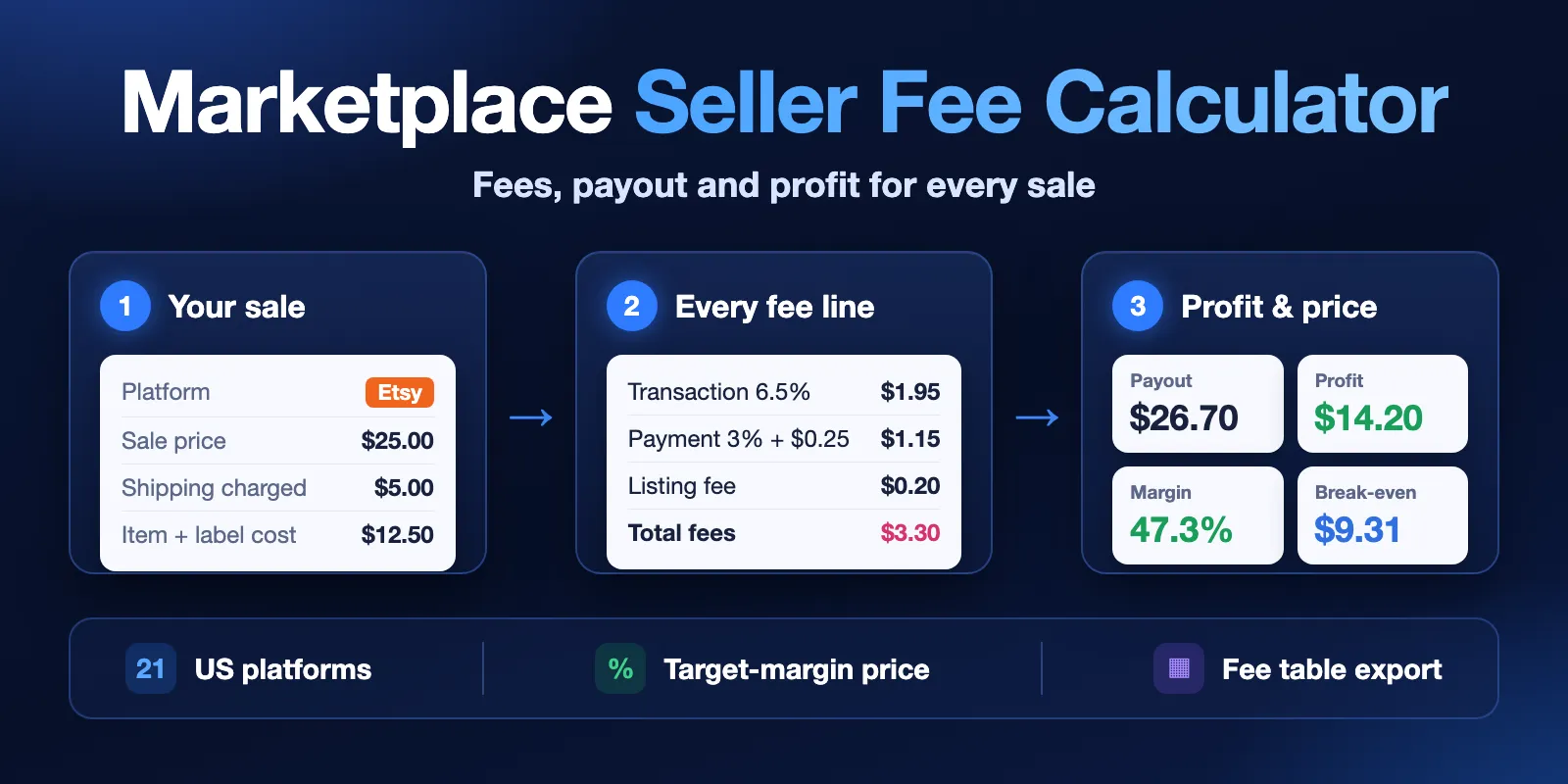
Table of contents
- What it does
- Quick start
- Use cases
- Input
- Output
- Pricing and limits
- API and integrations
- Troubleshooting
- FAQ
- Data source and licence
- Support
What it does
You add one or more sales (price, shipping you charged, your item cost and label cost) and choose platforms. For each sale on each platform the Actor returns one Dataset row:
- every fee line with its rate and dollar amount (transaction, payment processing, listing, referral, FBA and other fees);
- total seller fees and your net payout;
- profit and margin when you give your item cost;
- the break-even price and, if you ask, the lowest price for your target margin;
- costs that are not included (sales tax, returns, ads, subscriptions, currency conversion), so you never read them as zero.
The export mode returns the fee table itself: 57 fee lines of 21 platforms with rate, payer, minimum, cap and source link.
Supported platforms: Amazon, Depop, eBay, Etsy, Facebook Marketplace, GOAT, Grailed, Gumroad, Mercari, OfferUp, PayPal, Poshmark, Reverb, Shopify Payments, Square, StockX, Stripe, TikTok Shop, Vinted, Walmart Marketplace, Whatnot.
Good fit
- Price a product so that it still makes money after Etsy, eBay or Amazon fees.
- Compare the same sale on 5–20 platforms in one run and see where you keep more.
- Get a clean fee table for your own spreadsheet, repricer or AI agent.
Not a fit / limits
- US fee schedules in USD only. Other countries and currencies return a
not_supportedrow, not guessed fees. - One standard rate per platform. Category rates, seller levels, Amazon FBA size tiers and promotions are not modeled.
- Amazon always includes the single published FBA fee. For merchant-fulfilled orders add
amazon.fbaFeetoexcludeFeeKeys. - Sales tax, returns, ads, subscriptions, storage and currency conversion are listed in
notIncluded, not calculated. - Rates are as last reviewed by SellersCalc (
scheduleLastReviewed). This is not a legal or accounting guarantee; check the platform page inofficialSourcebefore big decisions.
Quick start
- Open the Input tab.
- Keep the prefilled example: platform
etsyand three sales inscenarios. - Click Start.
- Open the Calculations view of the Dataset and check
totalSellerFees,netPayoutandprofit.
Expected result: three rows, one for each sale. The first sale ($25 + $5 shipping) shows fees $3.30, payout $26.70, profit $14.20 and break-even price $9.31.
Use cases
| Buyer job | Input path | Output entity | Key fields | Next integration |
|---|---|---|---|---|
| Price one product for a margin | scenarios, targetMarginPercent | calculation row | profit, marginPercent, breakEvenSalePrice, targetSalePrice | spreadsheet, repricer |
| Compare platforms for the same sale | platforms (several), scenarios | one row per platform | platform, totalSellerFees, netPayout, effectiveFeeRatePercent | BI table, dashboard |
| Check a whole catalog | scenarios (up to 100) | one row per product and platform | scenarioId, fees[], profit | Google Sheets, CSV |
| Keep a fee table | mode = export | fee row | feeKey, value, unit, minimumAmount, capAmount | your own calculator |
| Answer a fee question in an AI agent | prefill input via MCP | calculation row | fees[], netPayout, notIncluded | AI chat, agent |
Input
Input fields
| Field | Plain name | Type | Required | Default / prefill | Allowed values | Effect | Example | Recommendation |
|---|---|---|---|---|---|---|---|---|
mode | What to return | string | no | default calculate | calculate, export | calculate = fees and profit for your sales; export = fee table lines | calculate | Use export to see fee keys |
platforms | Platforms | array of strings | yes for calculate | prefill ["etsy"] | 1–25 platform ids; facebook, tiktok and other short names also work | One row for each sale on each platform | ["etsy","ebay"] | Empty in export = all platforms |
country | Country | string | no | default US | 2-letter code | Picks the fee schedule | US | Only US has data now |
scenarios | Sales | array of objects | yes for calculate | prefill: 3 Etsy sales | 1–100 sales | Each sale is calculated on every platform | see below | Add itemCost to get profit |
scenarios[].salePrice | Item price | number | yes | — | 0–1,000,000 | Price paid by the buyer for the item | 25 | Before sales tax |
scenarios[].shippingCharged | Shipping charged | number | no | 0 | 0–1,000,000 | Added to the order total; most percent fees use it | 5 | Use 0 if the buyer pays shipping to the platform |
scenarios[].itemCost | Item cost | number | no | empty | 0–1,000,000 | Needed for profit, marginPercent, break-even and target price | 8 | Leave empty if you only need fees |
scenarios[].shippingCost | Label cost | number | no | 0 | 0–1,000,000 | Your shipping cost, part of totalCosts | 4.5 | |
scenarios[].currency | Currency | string | no | schedule currency | e.g. USD | A different currency gives not_supported | USD | Leave empty |
scenarios[].id | Your label | string | no | empty | any text | Copied to scenarioId | mug | Use your SKU |
targetMarginPercent | Target margin | integer | no | empty | 0–95 | Adds targetSalePrice | 30 | |
excludeFeeKeys | Fees to skip | array of strings | no | empty | platform.feeKey, up to 100 | Line shown with status excluded, not added | ["amazon.fbaFee"] | Get keys from export |
- Money is rounded to cents. A negative or non-number price gives an
invalidrow for that sale; the other sales still run. - Repeated platforms (
etsy,Etsy) are counted once. Repeated sales are kept as separate rows. - An empty
scenarioslist incalculatemode stops the run with a clear input error.
Interacting settings
| When | Input A | Input B | Effective behavior | Example | Cost/result effect |
|---|---|---|---|---|---|
| Profit needs your cost | scenarios[].itemCost | targetMarginPercent | Without itemCost, profit, marginPercent, breakEvenSalePrice and targetSalePrice are null | {"salePrice": 25} | Same price per row |
| Export ignores sales | mode = export | scenarios | Sales are not used; one row per fee line | {"mode":"export","platforms":["etsy"]} | 4 rows for Etsy |
| Skip a fee | excludeFeeKeys | platforms | The line stays in fees[] with status excluded and is not added | ["amazon.fbaFee"] | None |
Input examples
Compare three platforms with a target margin
Expected behavior: one calculation for each platform.
Expected output: 3 rows with totalSellerFees, netPayout, profit and targetSalePrice. In our test run fees were $5.01 on Etsy, $6.93 on eBay and $9.60 on Poshmark; the 30% margin price was $37.10, $39.72 and $44.00.
Limit or cost note: 3 charged rows.
Amazon without FBA
Expected output: the referral fee only (15%, $4.50), payout $25.48, profit $13.58. The FBA line is shown with status excluded; storage lines are not_included.
Fee table of all platforms
Expected output: 57 fee rows.
Output
The Dataset has two views: Calculations (type = calculation) and Fee schedule (type = fee). Views select columns, not rows: a run has one mode, so use the view of that mode. The run summary is in the Key-value store record RUN_SUMMARY.
Output fields (calculation)
| Field | Meaning | Type | Can be empty? | Example / enum | Source / notes |
|---|---|---|---|---|---|
status | Row result | string | no | complete, partial, not_supported, invalid | see Row status |
scenarioIndex | Position of the sale in your list | integer | yes, for an unknown platform row | 0 | |
scenarioId | Your label | string | yes | mug | from scenarios[].id |
platform | Platform id | string | yes, for an invalid sale row | etsy | |
platformName, platformKind | Platform name and kind | string | yes | Etsy, marketplace | SellersCalc |
country, currency | Fee schedule | string | currency yes | US, USD | |
salePrice, shippingCharged, orderTotal | Your sale; orderTotal = price + shipping charged | number | yes for invalid | 25, 5, 30 | |
itemCost, shippingCost, totalCosts | Your costs | number | itemCost, totalCosts yes | 8, 4.5, 12.5 | |
totalSellerFees | All fees you pay | number | yes if not calculated | 3.3 | only real charges |
totalBuyerFees, buyerPays | Fees the buyer pays, total the buyer pays | number | yes if not calculated | 0, 30 | e.g. Vinted |
netPayout | Money you receive | number | yes if not calculated | 26.7 | orderTotal − totalSellerFees |
profit | Payout minus your costs | number | yes without itemCost | 14.2 | |
marginPercent | Profit / order total | number | yes without itemCost or for a $0 order | 47.33 | |
effectiveFeeRatePercent | Fees / order total | number | yes for a $0 order | 11 | |
breakEvenSalePrice | Lowest price (in cents) with profit ≥ 0 | number | yes | 9.31 | same shipping and costs |
targetMarginPercent, targetSalePrice | Lowest price for your target margin | number | yes | 30, 16.4 | |
fees[] | Every fee line | array | no | key, name, ratePercent, fixedAmount, amount, status | status: applied, excluded, not_included, … |
notIncluded[] | Costs not in the calculation | array | no | sales_tax | not zero, just unknown |
assumptions[], warnings[] | How the result was made | array | no | ||
scheduleLastReviewed | Date SellersCalc reviewed the rates | string | yes | 2026-08-15 | not the date rates took effect |
officialSource, calculatorUrl | Platform fee page, SellersCalc calculator | string | yes | https://www.etsy.com/legal/fees | |
message | Reason for a non-complete row | string | yes | ||
source | Provider, URL, fetch time, licence, attribution | object | no | SellersCalc, CC BY 4.0 |
Output fields (fee schedule, mode = export)
| Field | Meaning | Type | Can be empty? | Example |
|---|---|---|---|---|
platform, platformName | Platform | string | no | etsy |
feeKey, feeName | Fee line id and name | string | no | transactionPct, Transaction fee |
role, payer | charge, threshold, minimum, cap, …; who pays | string | yes | charge, seller |
valueType, value, unit | Rate or amount | string / number | yes | percent, 6.5, percent |
basis, appliesTo, condition | What the fee is based on | string | yes | |
minimumAmount, capAmount | Limits of the fee | number | yes | 0.5 |
calculatorTreatment | How the calculator uses the line | string | no | percent_of_order_total |
note, scheduleLastReviewed, officialSource, source | Notes and source | string / object | yes |
Row status
| Status | Meaning | Charged? |
|---|---|---|
complete | All fee lines applied | yes |
partial | A fee line has a rule the Actor does not know; see warnings | yes |
not_supported | Unknown platform, country or currency (one row per platform or per sale) | no |
invalid | The sale failed checks (one row per sale) | no |
At most 10 free rows (not_supported, invalid) are saved per run. The others are listed in RUN_SUMMARY.skipped.
Output entities and surfaces
| Situation | Dataset/API/KVS/live view | Result shape | User action |
|---|---|---|---|
| Normal item | Dataset, Calculations view | one complete row per sale and platform | read netPayout, profit |
| Domain-empty result | Dataset + RUN_SUMMARY, status NO_RESULTS, run SUCCEEDED | not_supported / invalid rows with message | check platform, country, currency, prices |
| Partial result | Dataset, RUN_SUMMARY status PARTIAL | mix of row statuses | read status and message |
| Technical failure | RUN_SUMMARY status ERROR, run FAILED, no rows | message | run again later |
Output example
This example is trimmed and shows the first prefill sale. null means "not known" (for example no target margin was asked), never zero.
Pricing and limits
Pricing unit
This Actor uses pay per event:
| Event | Price |
|---|---|
| Actor start | $0.0009 per run (256 MB) |
Result row (complete or partial calculation, or one fee table line) | $0.0009 (Free plan), $0.00085 (Bronze), $0.0008 (Silver), $0.00075 (Gold and higher) |
not_supportedandinvalidrows are free.- A run with no useful rows (
NO_RESULTS) costs only the start event. - A run that stops on an input error or a source error costs only the start event and saves no rows.
- Platform usage is included in the price.
Cost examples
| Scenario | Input scope | Charged rows | Start | Rows (Free plan) | Total |
|---|---|---|---|---|---|
| Prefill | 3 Etsy sales | 3 | $0.0009 | $0.0027 | $0.0036 |
| Compare | 1 sale × 10 platforms | 10 | $0.0009 | $0.009 | $0.0099 |
| Catalog | 100 sales × 1 platform | 100 | $0.0009 | $0.09 | $0.0909 |
| Bulk | 100 sales × 10 platforms | 1,000 | $0.0009 | $0.90 | $0.9009 |
| Fee table | export, all platforms | 57 | $0.0009 | $0.0513 | $0.0522 |
| Nothing to calculate | country GB | 0 | $0.0009 | $0 | $0.0009 |
Limits
- Up to 100 sales and 25 platform names per run. 21 platforms are supported, so at most 2,100 charged rows plus up to 10 free rows. A full run took a few seconds in our tests.
- One request to the fee data per run.
- If Apify moves a run to another server, the run continues where it stopped: rows are not written or charged twice.
- Default timeout 300 seconds, memory 256 MB.
API and integrations
- API: start the Actor with the input JSON from the examples and read Dataset items. Use the
calculationsorfeeScheduleview. - Export: download the Dataset as JSON, CSV or Excel from the run page.
- Scheduling: run
mode=exporton an Apify schedule to keep your fee table up to date.
Use with AI agents (MCP)
- MCP server with only this Actor:
https://mcp.apify.com?tools=cliqtomedia/marketplace-fee-calculator - Smallest useful input:
- Key output fields:
totalSellerFees(all fees),netPayout(money you get),profit,breakEvenSalePrice,notIncluded(costs not counted). - A typical call takes 2–5 seconds and costs under one cent. Limits: 100 sales, 25 platforms, US/USD only.
Troubleshooting
All rows are not_supported
Symptom: the run ends with NO_RESULTS.
Likely reason: an unknown platform id, a country other than US or a currency other than USD.
Check: the message of the row and RUN_SUMMARY.supported.
Action: use a platform id from the list above, country = US and no currency or USD.
profit is empty
Symptom: profit, marginPercent and breakEvenSalePrice are null.
Likely reason: no itemCost in the sale.
Action: add itemCost (use 0 if the item cost you nothing).
Amazon fees look too high
Likely reason: the single published FBA fee is included.
Action: add amazon.fbaFee to excludeFeeKeys for merchant-fulfilled orders.
The run failed with ERROR
Likely reason: the fee data was not available or changed its format. No rows are saved and no rows are charged. Action: run again later. If it repeats, open an issue.
FAQ
Do I need an account on Etsy, eBay or Amazon?
No. The Actor uses open fee data. It does not log in and does not read your shop.
How fresh are the fees?
Each row has scheduleLastReviewed, the date SellersCalc last checked the rates. The Actor reads the data on every run. Platforms can change fees at any time; check officialSource for the platform page.
Why is my break-even price one cent different from another calculator?
The Actor finds the lowest price in whole cents that gives profit ≥ 0, using fee amounts rounded to cents, as shown in fees[]. Some calculators use unrounded rates.
Are taxes and returns included?
No. They are listed in notIncluded so you can add them yourself.
Data source and licence
Fee data by SellersCalc, licensed under CC BY 4.0. Each row carries this attribution in source. SellersCalc and this Actor are not connected to Etsy, eBay, Amazon or other platforms.
Support
Use the Issues tab of this Actor. Add the run ID, your input (without private data) and the row message you saw. Do not send API tokens or passwords.


