

Website Tech Stack Detector: CMS, Versions & CDN, No Login
Pricing
from $1.50 / 1,000 site checkeds
Website Tech Stack Detector: CMS, Versions & CDN, No Login
Find the live technology stack of up to 1,000 websites: CMS, ecommerce, analytics, CDN, server, frameworks and payments with versions and confidence. 7,600+ fingerprints, one row per site. No login.
Pricing
from $1.50 / 1,000 site checkeds
Rating
0.0
(0)
Developer

Cliqto Media
Maintained by CommunityActor stats
0
Bookmarked
2
Total users
1
Monthly active users
9 days ago
Last modified
Categories
Share
Find out which technologies a website uses today. Give a list of domains or URLs, and the Actor loads each page, matches it against 7,600+ technology fingerprints and returns one row per site: CMS, ecommerce platform, analytics, CDN, web server, frameworks and payments, with versions and confidence where the page shows them. No login, no API key.
It is for sales and lead generation teams, market researchers, agencies and developers. The smallest run is the prefilled input apify.com, shopify.com, wordpress.org: three rows in a few seconds, for about $0.01 on the Apify Free plan.
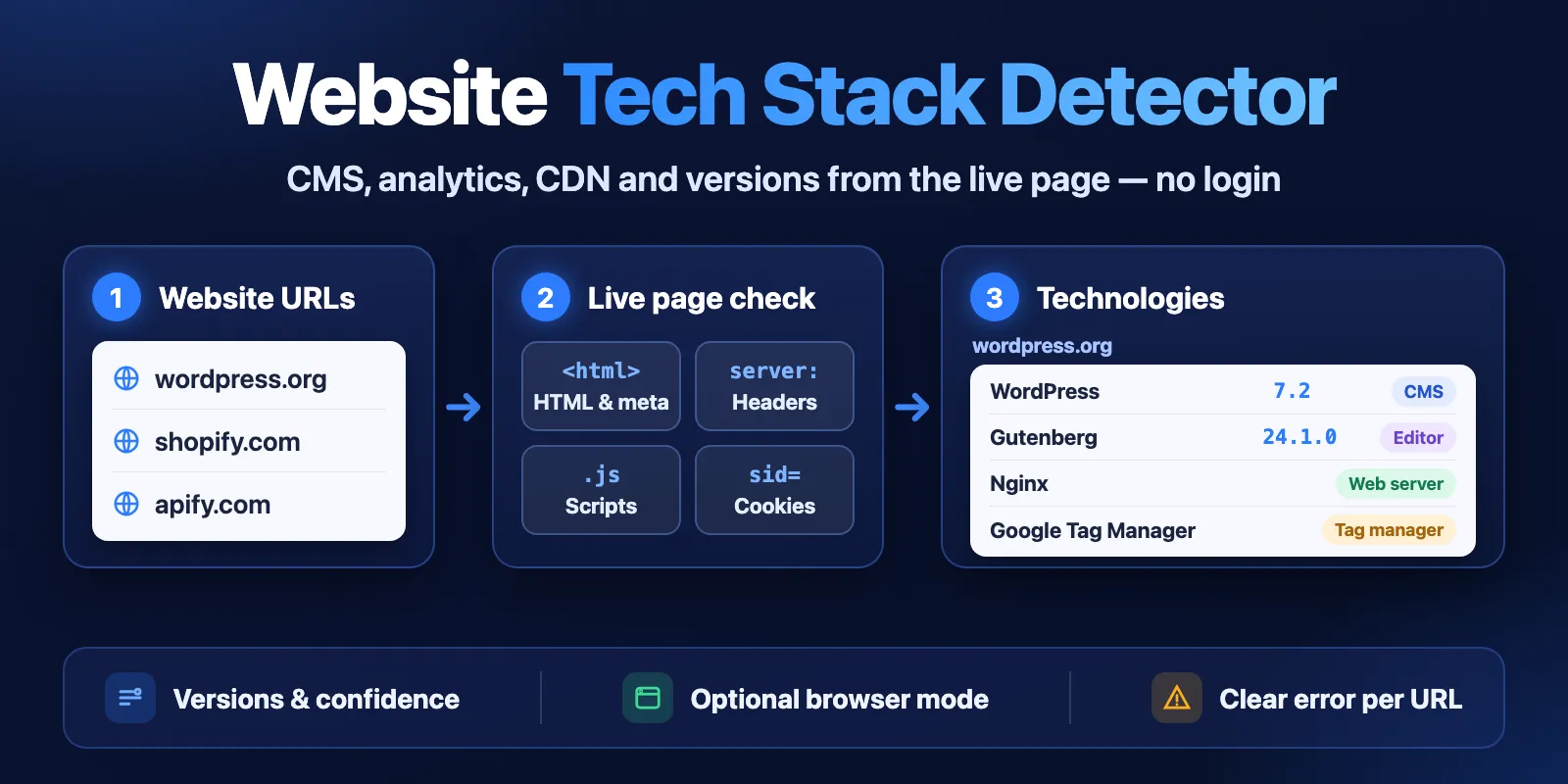
Table of contents
- What it does
- Quick start
- Use cases
- Input
- Output
- Pricing and limits
- API, export and integrations
- Troubleshooting
- FAQ
- Support
What it does
For each URL, the Actor downloads the live page and looks at what the site sends: HTML and meta tags, response headers, script URLs, cookie names and page structure. It matches these signals against the open Wappalyzer-style fingerprint set (7,600+ technologies in 109 categories) and writes one Dataset row per site.
- Technologies list. Each technology has a name, categories, a version (when the page shows one) and a confidence from 0 to 100.
- Ready columns.
cms,ecommerce,analytics,cdn,server,frameworkandpaymentare short lists of names, so you can filter a table without opening the full list. - Live result. The check happens during your run.
detectedAtsays when, andfinalUrlshows where redirects ended. - Optional browser mode. With
useBrowser: true, each page is opened in headless Chrome. This also finds technologies that appear only after JavaScript runs (JavaScript globals, background requests). It is slower and costs more. - Clear errors. A site that cannot be checked gets a row with
status: "error"and a code likeDNS_NOT_FOUND,BLOCKEDorTIMEOUT. An error is never shown as an empty stack.
Good fit
- Find leads that use a given platform: run your domain list and filter
ecommercefor Shopify orcmsfor WordPress. - Check a competitor's or a client's stack before a pitch or an audit: CMS version, analytics, tag manager, CDN.
- Enrich a CRM or spreadsheet with technographic columns for many domains in one run.
- Give an AI agent a quick way to answer "what is this site built with?".
Not a fit / limits
- One page per input URL. The Actor does not crawl the whole site. Technologies used only on other pages (checkout, blog, app) are found only if you add those URLs.
- No history. It shows what the page uses now, not what the site used in the past. It does not check DNS, mail (MX/SPF) or SSL records.
- No security or vulnerability scanning, and no logged-in pages. Only public pages are checked; local, private and internal addresses are refused.
- Detection is based on public signals. A technology that leaves no trace in the page, headers or scripts cannot be found. Sites behind strong bot protection may return
BLOCKED.
Quick start
- Open the Input tab. The Websites field is prefilled with
apify.com,shopify.comandwordpress.org. - Replace them with your own domains or URLs, one per line (up to 1,000; up to 500 in browser mode).
- Keep Render JavaScript in a browser off (the default) for a fast, cheap check.
- Click Start.
- Open the Output tab. The Overview view shows one row per site with
cms,ecommerce,analytics,cdnandserver. The Technologies view shows the full list.
Expected result: for the prefill, three complete rows. wordpress.org shows WordPress with its version and Nginx; shopify.com shows Shopify and Cloudflare; apify.com shows Amazon CloudFront and React. A run like this usually takes under 20 seconds.
Use cases
| Buyer job | Input path | Output entity | Key fields | Next integration |
|---|---|---|---|---|
| Build a lead list by platform | urls (domains from your CRM) | One row per site | url, ecommerce, cms, technologyCount | Export CSV, filter, import to CRM |
| Competitor or client audit | urls + useBrowser: true | Full technology list | technologies[].name, version, categories | Report or spreadsheet |
| Check one category only | urls + categories: ["Analytics"] | Filtered technology list | technologies, analytics | Google Sheets |
| Regular stack check | urls on a schedule | Row with date | detectedAt, cms, cdn | Compare runs over time |
| AI agent question | urls (MCP) | One row per site | cms, ecommerce, analytics, cdn, server | Agent answer |
Input
Input fields
| Field | Plain name | Type | Required | Default / prefill | Allowed values | Effect | Example | Recommendation |
|---|---|---|---|---|---|---|---|---|
urls | Websites | array of strings | yes | prefill ["apify.com", "shopify.com", "wordpress.org"] | 1–1,000 domains or http(s) URLs (500 in browser mode) | Each line is one page to check | ["shopify.com", "https://example.com/blog"] | Use the page that matters to you; a bare domain means its home page |
useBrowser | Render JavaScript in a browser | boolean | no | default false | true, false | Opens each page in headless Chrome to also find JavaScript-only technologies | true | Keep off for big lists; turn on for a detailed audit |
categories | Only these categories | array of strings | no | default [] (all) | names from the list in the Input tab, e.g. CMS, Ecommerce, Analytics, CDN | Keeps only these categories in technologies | ["CMS", "Ecommerce"] | Use when you need one kind of technology. The summary columns are always filled |
maxConcurrency | Parallel sites | integer | no | default 10 | 1–20 (browser mode: at most 5) | How many sites are checked at the same time | 20 | The default is fine for most runs |
How URLs are read:
- A bare domain such as
shopify.comis checked athttps://shopify.com/. A full URL is checked as given (the#fragmentis ignored). - Duplicates are checked once, even with different case, a trailing
/or an IDN vs punycode spelling. The count is in the status message and inRUN_SUMMARY.duplicatesSkipped. - Lines that cannot be a public website are not checked and do not get a Dataset row: text that is not a URL, schemes other than
http/https, ports other than 80 and 443, URLs with a user name or password,localhost, and private or local IP addresses. They are counted inRUN_SUMMARY.invalidSkipped, and up to 50 examples are listed inRUN_SUMMARY.invalidSamples(passwords are replaced with***). The other lines are still checked. - If no line is valid, or the list is empty, the run stops at once with a clear input error.
Interacting settings
| When | Input A | Input B | Effective behavior | Example | Cost/result effect |
|---|---|---|---|---|---|
| Browser mode | useBrowser: true | maxConcurrency | At most 5 pages at the same time | maxConcurrency: 20 → 5 | Browser price per site; more memory |
| Category filter | categories | summary columns | technologies is filtered; cms, ecommerce, analytics, cdn, server, framework, payment are always filled | ["Web servers"] | No price change |
| Big lists | urls > 20 (HTTP) or > 10 (browser) | default memory | The run gets more memory (1 GB for HTTP, 2 GB for browser) | 500 domains | See Pricing for the start charge per GB |
Input examples
Quick check of a domain list
Expected behavior: one HTTP request per site, 10 sites at a time.
Expected output: three rows with cms, ecommerce, analytics, cdn, server and the full technologies list.
Limit or cost note: one site-checked event per site plus the start charge.
Detailed audit with JavaScript
Expected behavior: each page is opened in headless Chrome.
Expected output: usually more technologies per site than HTTP mode, for example JavaScript frameworks and tag libraries.
Limit or cost note: one site-checked-browser event per site; about 3–4 seconds per site.
Only CMS and ecommerce
Expected behavior: the same check as usual.
Expected output: technologies has only CMS and Ecommerce entries.
Output
Results go to the default Dataset, one row per checked site. There are two views: Overview (summary columns) and Technologies (full list). The Key-value store has a RUN_SUMMARY record with counts, error codes, skipped lines and limits.
Output example
The wordpress.org row from the prefill run (the technologies list is shortened):
A row for a domain that does not exist:
An empty list ([]) on a complete row means the page was checked and nothing of that kind was found. On an error row the lists are empty because the page could not be checked; read error instead.
Output fields
| Field | Meaning | Type | Can be empty? | Example / enum | Source / notes |
|---|---|---|---|---|---|
url | Your input line | string | no | wordpress.org | As given |
finalUrl | Page URL after redirects | string or null | null if no page was received | https://wordpress.org/ | |
status | Row result | string | no | complete, error | |
httpStatus | HTTP status of the final page | integer or null | yes | 200, 404 | |
technologies | Technologies found | array of objects | [] if none | {name, categories, version, confidence, website} | Filtered by categories if set |
technologies[].version | Version, if the page shows it | string or null | often null | 7.2 | From meta tags, script URLs, headers |
technologies[].confidence | How sure the match is | integer | no | 100 | 0–100, from the fingerprint set |
technologyCount | Number of technologies in the list | integer | no | 13 | |
cms | CMS names | array of strings | [] if none | ["WordPress"] | Always from all categories |
ecommerce | Ecommerce platforms | array of strings | [] if none | ["Shopify"] | |
analytics | Analytics tools | array of strings | [] if none | ["Leadfeeder"] | |
cdn | CDNs | array of strings | [] if none | ["Cloudflare"] | |
server | Web servers and reverse proxies | array of strings | [] if none | ["Nginx"] | Frameworks are in framework |
framework | Web and JavaScript frameworks | array of strings | [] if none | ["Next.js"] | |
payment | Payment processors | array of strings | [] if none | ["Stripe"] | |
mode | How the page was loaded | string | no | http, browser | |
pageTitle | Page <title> | string or null | yes | ||
detectedAt | When the page was checked | string | no | ISO 8601 UTC | |
fingerprintsVersion | Fingerprint data used | string | no | enthec/webappanalyzer@eea872a | |
fingerprintsLicence | Licence of the fingerprint data | string | no | GPL-3.0-only | |
error | Why the site could not be checked | object or null | null on complete rows | { "code": "TIMEOUT", "message": "…" } | Codes below |
Error codes: DNS_NOT_FOUND (domain does not resolve), TIMEOUT, BLOCKED (the site answered 401, 403 or 429), HTTP_<status> (for example HTTP_404, HTTP_500), NOT_HTML (the URL is a file or JSON, not a web page), TLS_ERROR, TOO_MANY_REDIRECTS, NETWORK_ERROR, PRIVATE_ADDRESS and INVALID_URL (a redirect or DNS answer led to a private or invalid address), INTERNAL_ERROR (our side failed).
Output entities and surfaces
| Situation | Dataset/API/KVS | Result shape | User action |
|---|---|---|---|
| Normal item | Dataset | complete row with technologies and summary columns | Filter, sort, export |
| Page checked, nothing found | Dataset | complete row, technologies: [] | The page has no known signals; try another page of the site or browser mode |
| Site could not be checked | Dataset | error row with error.code | See Troubleshooting |
| Bad input lines | RUN_SUMMARY | invalidSkipped, invalidSamples | Fix those lines and run them again |
| Run stopped early | RUN_SUMMARY + status message | status: "partial", reason: "CHARGE_LIMIT" or "TIME_LIMIT" | Raise the limit or timeout, run the rest |
Moving from BuiltWith-style output
If you used an Actor with domain and techs[{name, tag, categories, link}], use this map: domain → url (or finalUrl), techs → technologies, techs[].link → technologies[].website. New here: version, confidence, detectedAt, status, error and the ready columns. The results differ by design: this Actor shows what the page uses now, not a history of the domain.
Pricing and limits
Pricing unit
This Actor uses pay-per-event pricing. Platform usage is included.
| Event | When | Free plan | Bronze | Silver | Gold and higher |
|---|---|---|---|---|---|
| Actor start | Once per run for each GB of memory (512 MB and 1 GB runs: once; 2 GB: twice) | $0.007 | $0.007 | $0.007 | $0.007 |
Site checked (site-checked) | Each site the Actor contacted in HTTP mode | $0.0018 | $0.0017 | $0.0016 | $0.0015 |
Site checked in a browser (site-checked-browser) | Each site the Actor contacted with useBrowser: true | $0.0035 | $0.0033 | $0.0031 | $0.003 |
A site is charged when the Actor actually contacted it: a complete row, and also an error that the site or network gave (BLOCKED, TIMEOUT, DNS_NOT_FOUND, HTTP_404 and so on), because the check was done. Free: duplicates, input lines rejected before any request (listed in RUN_SUMMARY), INTERNAL_ERROR rows and sites not started because the run was cancelled. A run with invalid input pays only the start charge.
You can set a maximum total charge for a run. The Actor stops at that limit, keeps the rows it paid for and marks RUN_SUMMARY with status: "partial" and reason: "CHARGE_LIMIT".
Cost examples
Prices on the Free plan, with the default memory.
| Scenario | Input scope | Charged sites | Start | Site charges | Total |
|---|---|---|---|---|---|
| Prefill | 3 domains, HTTP | 3 | $0.007 | $0.0054 | $0.0124 |
| 100 domains | HTTP, 1 GB | 100 | $0.007 | $0.18 | $0.187 |
| 1,000 domains | HTTP, 1 GB | 1,000 | $0.007 | $1.80 | $1.807 |
| Browser audit | 5 sites, browser, 1 GB | 5 | $0.007 | $0.0175 | $0.0245 |
| Browser list | 100 sites, browser, 2 GB | 100 | $0.014 | $0.35 | $0.364 |
| Invalid input | no valid line (2 GB browser runs: two starts, $0.014) | 0 | $0.007 | $0 | $0.007 |
On Gold and higher plans, 1,000 domains in HTTP mode cost $0.007 + $1.50 = $1.507.
Limits
- Up to 1,000 URLs per run in HTTP mode and up to 500 in browser mode. One page per URL.
- Each request has 15 seconds, and each site 30 seconds in total, with up to 3 attempts after network errors, timeouts, 429 and 5xx answers. Up to 5 redirects. Only the first 5 MB of a page are read.
- Speed: in HTTP mode, 1,000 domains took about 11 minutes in our test; in browser mode, about 3–4 seconds per site (100 sites in about 6 minutes), so 500 sites fit the default one-hour timeout. In browser mode each site has at most 45 seconds.
- If the run is near its timeout, the Actor stops starting new sites and saves what it has (
reason: "TIME_LIMIT"). - The fingerprint data is enthec/webappanalyzer (GPL-3.0), used unchanged. Technology names and trademarks belong to their owners.
API, export and integrations
- API: start a run with
POST https://api.apify.com/v2/acts/cliqtomedia~tech-stack-detector/runsand the input JSON, then read the default Dataset. The API tab has ready code. See the Apify API docs. - Export: download the Dataset as CSV, Excel, JSON or XML from the Output tab. The Overview view gives flat columns for spreadsheets.
- Scheduling: create an Apify schedule to check the same list every week or month. Each row has
detectedAt, so you can compare stacks over time. - No-code: connect the Actor in Make, Zapier or n8n with the Apify integration.
Use with AI agents (MCP)
- MCP server with only this Actor:
https://mcp.apify.com?tools=cliqtomedia/tech-stack-detector(see Apify MCP server). - Smallest useful input:
{"urls": ["apify.com", "shopify.com", "wordpress.org"]} - Key output fields:
cms,ecommerce,analytics,cdn,server(ready lists of names),technologies[].nameandversion,status(complete/error) anderror.code. - A run with a few domains usually finishes in under 20 seconds and costs $0.007 plus $0.0018 per site on the Free plan. Up to 1,000 URLs per run (500 in browser mode), one page per URL, public pages only.
Troubleshooting
Many BLOCKED rows
Symptom: rows with error.code: "BLOCKED".
Likely reason: the site answered 401, 403 or 429. Some sites block automated requests from cloud servers.
Check: open the URL in your browser; a login wall or a bot check page confirms it.
Action: try useBrowser: true for those sites. Some sites block both modes; the Actor does not try to bypass bot protection.
A complete row has few or no technologies
Symptom: status: "complete", but technologies is short or empty.
Likely reason: the page loads its tools with JavaScript, or it is a simple page.
Action: run it again with useBrowser: true, or add a more typical page of the site (for example a product page).
TIMEOUT or NETWORK_ERROR
Symptom: rows with TIMEOUT or NETWORK_ERROR.
Likely reason: the site is slow, down or does not answer cloud servers.
Action: run those URLs again later. Each attempt is limited to 15 seconds.
Some of my lines are missing from the Dataset
Symptom: fewer rows than input lines.
Likely reason: duplicates, or lines that are not a public website URL.
Check: RUN_SUMMARY.duplicatesSkipped, invalidSkipped and invalidSamples.
Action: fix the lines listed in invalidSamples and run them again.
FAQ
Do I need an account, cookies or an API key for the sites?
No. The Actor reads public pages like a visitor who is not logged in.
Why does it find fewer technologies than BuiltWith?
BuiltWith shows everything it has seen on a domain over the years, plus DNS and mail records. This Actor checks the live page now. You get fewer, but current entries, with versions and confidence.
Am I charged for sites that fail?
A site that the Actor contacted is charged even if it answers with an error, because the check was done and the error is the result. Duplicates, rejected input lines, our own internal errors and cancelled sites are free.
How accurate is the version?
The version comes from what the page shows: a meta generator tag, a script file name or a header. Many sites hide versions, so version is often null.
Support
For bugs, questions or feature requests, open an issue in the Issues tab. Include the run ID, the mode (HTTP or browser) and the URLs that look wrong. Do not send tokens or private data.


