
PDF & Image to Text OCR for AI Agents - No Login
Pricing
from $2.20 / 1,000 document (text layer)s
PDF & Image to Text OCR for AI Agents - No Login
Extract clean text or Markdown from PDF and image URLs. Uses the PDF text layer when present and Tesseract OCR for scanned pages, per page. 20 languages, page ranges, per-page rows. No login, no API key.
Pricing
from $2.20 / 1,000 document (text layer)s
Rating
0.0
(0)
Developer

Cliqto Media
Maintained by CommunityActor stats
0
Bookmarked
1
Total users
1
Monthly active users
11 days ago
Last modified
Categories
Security
Limited permissionsShare
Turn public PDF and image URLs into clean text or Markdown. The Actor reads the PDF text layer when a page has one, and runs Tesseract OCR on scanned pages and images, page by page. No login, no API key. A run with one text PDF costs about $0.0075; each OCR page adds $0.012.
Add one URL and click Start: a 6-page text PDF plus one image takes about 4 seconds and costs about $0.02. You get one row per document (or one row per page for RAG), with the reading method and OCR confidence for every page.
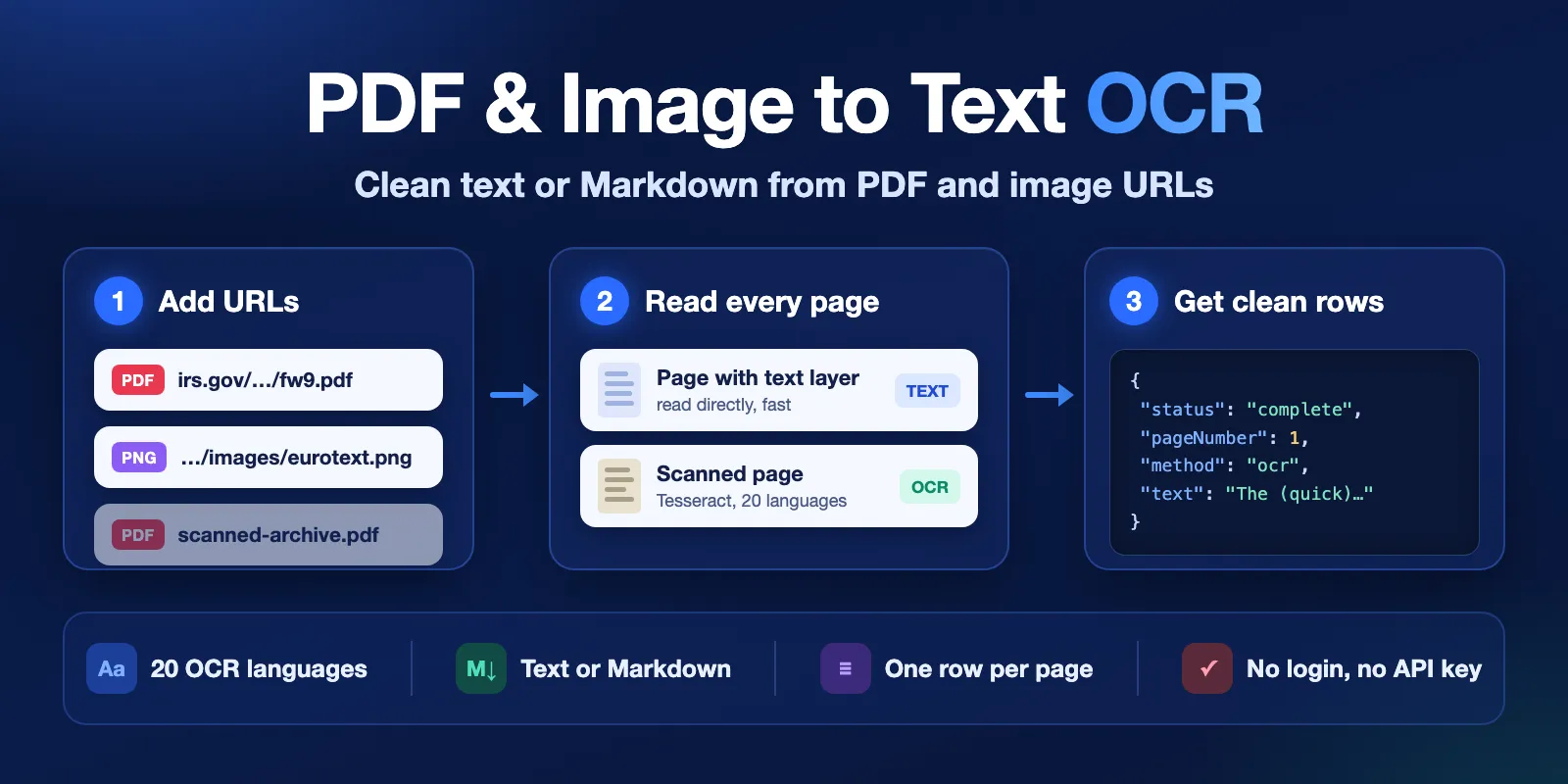
Table of contents
- What it does
- What data you get
- Quick start
- Input
- Output
- Pricing
- Use cases
- Scheduling and monitoring
- API, export and integrations
- Limitations and partial results
- Troubleshooting
- FAQ
- Related Actors
- Support
What it does
You give public http(s) URLs of PDF files or images. For each URL the Actor:
- Downloads the file and checks its real type from the file content (not from the URL).
- Reads every selected page of a PDF:
- Text layer: if the page has real text, it is read directly. This is fast and exact.
- OCR: if the page is a scan (no usable text), it is rendered at 300 DPI and read with Tesseract OCR.
- Reads images (PNG, JPG, TIFF, GIF, BMP, WEBP) with OCR.
- Saves the text as plain text or Markdown to the Dataset, with page numbers, method (
textorocr) and OCR confidence. - Deletes the downloaded file. Documents and page images are never stored.
Good fit
- AI agents and RAG pipelines: get clean text from a PDF link, one row per page, ready for chunking.
- Scanned archives and forms: read old scans that have no text layer.
- Mixed batches: text PDFs, scans and photos of documents in one run, with clear status per file.
What data you get
For each URL you get one row with the text, the page count, how many pages were read from the text layer and how many with OCR, the PDF title and metadata, and a clear status with an error code when something went wrong. In page mode you get one row per page instead. See Output for all fields.
Quick start
- Open the Input tab.
- Keep the two prefilled
urls(an IRS W-9 form and a small test image), or add your own PDF or image URL. - Keep OCR mode
autoand OCR languagesEnglish. - Click Start.
- Open the Documents view in the Output tab and check
status,textPages,ocrPagesandtext.
Expected result: two rows with status: complete. The W-9 has 6 text-layer pages; the image has 1 OCR page.
Input
Input fields
| Field | Plain name | Type | Required | Default / prefill | Allowed values | Effect | Example | Recommendation |
|---|---|---|---|---|---|---|---|---|
urls | PDF or image URLs | array of strings | yes | prefill: W-9 PDF + eurotext.png | 1–100 public http(s) URLs | Files to read. Duplicates are read once. Objects like {"url": "..."} are also accepted. | ["https://www.irs.gov/pub/irs-pdf/fw9.pdf"] | Use direct file links, not viewer pages. |
ocr | OCR mode | string | no | auto | auto, always, never | auto: OCR only pages without usable text. always: OCR every page. never: text layer only; images fail with OCR_DISABLED. | "auto" | Keep auto. Use always only when the text layer is broken. |
languages | OCR languages | array of strings | no | ["eng"] | up to 3 of: eng, deu, fra, spa, ita, por, nld, pol, ces, swe, dan, nor, fin, tur, rus, ukr, ara, hin, vie, ind | Languages for OCR. Each OCR page is charged once per language. | ["eng", "deu"] | Pick only the languages the document uses. |
pages | Pages | string | no | empty (all pages) | ranges like 1-3, 5, 10-, up to 50 ranges | Same page selection for every document. 10- means page 10 to the end. | "1-3" | Use it to skip covers or appendices. |
maxPages | Max pages per document | integer | no | 50 | 1–300 | Upper limit after the page selection. Extra pages are skipped, not charged, and listed in warnings. | 100 | Raise it for long text PDFs. |
outputFormat | Text format | string | no | text | text, markdown | markdown re-flows paragraphs, keeps bullet and numbered lists, makes short ALL-CAPS lines headings and adds page markers. | "markdown" | Use markdown for LLM input. |
outputMode | Rows | string | no | document | document, page | document: one row per document with a pages list. page: one row per page. | "page" | Use page for RAG chunking. |
preserveLayout | Keep column layout | boolean | no | false | true, false | Keeps the physical layout of text-layer pages (columns, spacing). No effect on OCR pages. | true | Use for forms and invoices with aligned columns. |
maxFileSizeMb | Max file size (MB) | integer | no | 50 | 1–100 | Larger files are not downloaded and get FILE_TOO_LARGE. | 100 | Raise only for big scanned books. |
Empty urls stops the run with INVALID_INPUT. An API call with {} does not use the prefill.
Interacting settings
| When | Input A | Input B | Effective behavior | Example | Cost/result effect |
|---|---|---|---|---|---|
| Page selection is long | pages | maxPages | pages is applied first, then maxPages cuts the rest | pages: "1-", maxPages: 10 → pages 1–10 | Skipped pages are not charged |
| Several languages | languages | ocr | Languages are used only on OCR pages | ["eng","fra"] on a text PDF | No OCR, no language charge |
| OCR is off | ocr: never | outputMode | A scan gives one row with no text: text: "" and pages with method: none in document mode, text: null and method: none in page mode | Scanned PDF | One document event: the PDF was opened and checked |
| Page rows | outputMode: page | text-layer pages | One document event per started 50 text-layer page rows | 300 text pages → 6 events | See Pricing |
Input examples
Read a text PDF and an image
Expected behavior: the W-9 is read from its text layer (6 pages); the image is read with English OCR.
Expected output: 2 document rows with status, textPages, ocrPages, text.
Cost: 1 document + 1 ocr-page + start ≈ $0.0195 on the Free plan.
Page rows in Markdown for RAG
Expected behavior: pages 1–3 are read and saved as 3 rows.
Expected output: pageNumber, method, charCount, text per row.
Output
Results go to the default Dataset (view Documents). The run summary goes to the key-value store record RUN_SUMMARY. You can export the Dataset as JSON, CSV, Excel or HTML.
Output example
Input: the first example above. Two rows; text and pages are trimmed.
OCR is not perfect: check ocrConfidence. Low values (below about 60) usually mean a blurry scan, the wrong language or handwriting.
Output fields
| Field | Meaning | Type | Can be empty? | Example / enum | Notes |
|---|---|---|---|---|---|
url | URL from your input | string | no | https://www.irs.gov/pub/irs-pdf/fw9.pdf | Kept exactly as given |
finalUrl | URL after redirects | string | yes, when not downloaded | same as url | |
status | Result of this row | string | no | complete, partial, not_found, error | See the table below |
fileType | Type found in the file content | string | yes | pdf, png, jpg, tiff, gif, bmp, webp | |
contentType | Content-Type sent by the server | string | yes | application/pdf | Document rows |
fileSizeBytes | Downloaded size | integer | yes | 140815 | Document rows |
pageCount | All pages in the file | integer | yes | 6 | 1 for single images |
pagesProcessed | Pages read with success | integer | no | 6 | Document rows |
pagesTruncated | maxPages cut the selection | boolean | no | false | Document rows |
textPages | Pages read from the text layer | integer | no | 6 | Document rows |
ocrPages | Pages read with OCR | integer | no | 0 | Document rows |
pageNumber | Page number, from 1 | integer | page rows only | 1 | Page rows |
method | How the page was read | string | page rows only | text, ocr, none | none = no text and OCR off |
ocrConfidence | Tesseract mean word confidence 0–100 | number | yes | 90.2 | null for text-layer pages |
format | Text format | string | no | text, markdown | |
ocrLanguages | OCR languages used | array | yes | ["eng"] | null when no page used OCR |
charCount | Characters in text | integer | no | 37820 | |
text | The extracted text | string | yes | "W-9\n\nForm\n(Rev. March 2024)…" | null on error; "" when a page has no text |
pages | Per page: pageNumber, method, charCount, ocrConfidence, text, error | array | no | see example | Document rows |
title | Title from PDF metadata | string | yes | Form W-9 (Rev. March 2024) | null when the PDF has none |
metadata | PDF metadata as in the file | object | yes | author, subject, creator, producer, creationDate, pdfVersion | Not verified. Document rows |
encrypted | PDF is encrypted | boolean | yes | false | It may still be readable |
error | Error of this row: code, message | object | yes | {"code": "NOT_FOUND", ...} | null when there is no error |
warnings | Notes | array | no | ["Only the first 50 of 120 pages were processed (maxPages)."] | Empty array when there is nothing to say |
fetchedAt | When the file was downloaded (ISO 8601) | string | yes | 2026-10-13T05:23:31.200Z | null when not downloaded |
processedAt | When the row was written (ISO 8601) | string | no | 2026-10-13T05:23:31.254Z |
null means "not known or not applicable". 0 is a real count. A page with no text after OCR is complete with text: ""; it is a result, not an error. complete means the file was read; it does not mean the text is long. A scan read with ocr: never is complete with a warning: in document mode text is "" and each entry in pages has method: none; in page mode the single row has text: null and method: none.
Output entities and surfaces
| Situation | Surface | Result shape | User action |
|---|---|---|---|
| Normal file | Dataset row | status: complete, text, pages | Use text |
| Some pages failed or the run stopped mid-document | Dataset row | Document mode: status: partial, pages[].error, warnings. Page mode: failed pages are rows with status: error; a stop is shown in warnings and RUN_SUMMARY | Check failed pages, run again for them |
| File not found (HTTP 404/410) | Dataset row | status: not_found, error.code: NOT_FOUND | Check the URL |
| Other problem | Dataset row | status: error, error.code, text: null | See Troubleshooting |
| Run totals | Key-value store RUN_SUMMARY | status, message, counts, errorCodes | Check chargedDocuments and ocrPageEvents |
RUN_SUMMARY.status is one of SUCCEEDED, PARTIAL, ERROR, INVALID_INPUT, CHARGE_LIMIT_REACHED, DEADLINE_REACHED, TOO_MANY_FAILURES, CANCELLED. The run ends as FAILED only for invalid input or a platform error; a bad URL is an error row, and the run still succeeds.
Pricing
Pricing unit
This Actor uses pay-per-event pricing. You pay only for these events:
| Event | When it is charged | Free | Bronze | Silver | Gold+ |
|---|---|---|---|---|---|
| Actor start | Once per run, per GB of memory (default 1 GB) | $0.005 | $0.005 | $0.005 | $0.005 |
document | A PDF read from the text layer (all its text-layer pages together), also when it has no text layer and OCR is off. In page mode: one per started 50 text-layer page rows. | $0.0025 | $0.0024 | $0.0023 | $0.0022 |
ocr-page | One page or image read with OCR, once per selected language | $0.012 | $0.0115 | $0.011 | $0.0105 |
Not charged: not_found and error rows, failed pages, pages skipped by pages or maxPages, and documents not processed because the run stopped. A run where every URL fails costs only the start event. Platform usage (compute) is included in the event prices.
The Actor checks your Maximum cost per run before every page. When the next page would go over it, the run stops, saves what it has, and marks the rest CHARGE_LIMIT_REACHED.
Cost examples (Free plan, 1 GB, English OCR)
| Scenario | Input scope | Events | Cost |
|---|---|---|---|
| Prefill | 1 text PDF + 1 image | 1 document + 1 ocr-page | $0.0195 |
| 10 text PDFs | 10 URLs | 10 document | $0.030 |
| 100 text PDFs | 100 URLs (one run) | 100 document | $0.255 |
| 1,000 text PDFs | 10 runs of 100 URLs | 1,000 document | $2.55 |
| 10 scanned pages | 1 scan, 10 pages | 10 ocr-page | $0.125 |
| 100 scanned pages | 1 run | 100 ocr-page | $1.205 |
| 1,000 scanned pages | about 7–10 runs (see speed below) | 1,000 ocr-page | about $12.04–12.05 |
| 10 scanned pages, 2 languages | languages: ["eng","deu"] | 20 ocr-page | $0.245 |
Use cases
| Buyer job | Input path | Output entity | Key fields | Next integration |
|---|---|---|---|---|
| Give an AI agent the text of a PDF link | urls | document row | text, pageCount, title | MCP tool call, LLM prompt |
| Split documents into pages for RAG | urls, outputMode: page | page row | pageNumber, text, method | Chunking, vector database |
| Read a scanned archive | urls, ocr: auto, languages | document row | ocrPages, pages[].ocrConfidence, text | Search index, review queue |
| Get headings and lists as Markdown | urls, outputFormat: markdown | document row | text, format | Notes, knowledge base |
| Read only part of long reports | urls, pages: "1-3" | document row | pagesProcessed, text | Summaries, alerts |
Scheduling and monitoring
The Actor reads the URLs you give it at run time; it does not watch for changes. To read the same documents again on a timer (for example, a price list PDF that is updated every week), create an Apify schedule with a fixed input and compare text or charCount with the last run in your own system. Each run is charged again.
API, export and integrations
- API: start the Actor with
POST https://api.apify.com/v2/acts/cliqtomedia~pdf-text-ocr/run-sync-get-dataset-itemsand the input JSON. You get the Dataset rows in the response. - Export: download the Dataset as JSON, CSV, Excel, XML or HTML from the Output tab or the API.
- Webhooks: use Apify webhooks to send rows to your system when a run finishes.
- No-code: use the Apify integrations for Make, Zapier or n8n to pass
textto the next step.
Use with AI agents (MCP)
-
MCP server URL with only this Actor:
https://mcp.apify.com?tools=cliqtomedia/pdf-text-ocr -
Smallest useful input:
{ "urls": ["https://www.irs.gov/pub/irs-pdf/fw9.pdf"] } -
Key output fields:
status(did it work),text(the content),pageCount,ocrPages(how many pages needed OCR),error.code(what to fix). -
A text PDF takes a few seconds and costs $0.0075 with the start event. Each OCR page adds about 10 seconds and $0.012 per language.
-
Limits: up to 100 URLs and 300 pages per document; public URLs only. For long scans, use
pagesormaxPagesso the call returns in time.
Limitations and partial results
What it does not do
- No handwriting. Tesseract reads printed text; handwritten text gives poor or empty results.
- Tables are not rebuilt. Table text comes out as lines, without columns.
- No Chinese, Japanese or Korean OCR. PDFs in these languages still work if they have a text layer.
- No files behind a login, cookies or a private network. No uploads: only URLs.
- No DOCX, HTML or EPUB. An HTML page gives the error
UNSUPPORTED_FILE_TYPE. - A multi-page TIFF is read with one OCR call, which must finish within the time limit of one OCR page (50 seconds at 1 GB). Use PDF for long scans.
Speed and limits
- Up to 100 URLs per run. 100 text PDFs took 31 seconds in our test.
- Up to 300 pages per document (
maxPages). A 300-page text PDF took about 17 seconds. - OCR takes about 10 seconds per normal scanned page at 1 GB and up to 30–40 seconds for very dense small print. Plan for about 100–150 OCR pages per 30-minute run at 1 GB. At 2 GB OCR is about twice as fast for the same price per page.
- Memory: 1–2 GB (default 1 GB). Default run timeout: 1,800 seconds. The Actor stops 25 seconds before the timeout and saves what it has (
DEADLINE_REACHED). - File size: up to 100 MB (
maxFileSizeMb, default 50). Images: up to 40 megapixels. - Slow or hanging servers: one URL may take up to 45 seconds, one OCR page up to 50 seconds (half at 2 GB). If failed downloads, unreadable documents and failed pages waste more than 100 seconds in one run, the run stops and the rest are marked
TOO_MANY_FAILURES, not charged.
Partial results
In document mode, a document gets status: partial when some pages were read and others failed (for example one OCR page timed out) or the run stopped in the middle of it (deadline or cost limit). Read pages keep their text; failed pages have pages[].error. Only read pages are charged. In page mode there is no partial status: each page row is complete or error, and a stop is listed in warnings and RUN_SUMMARY.
Troubleshooting
The row has UNSUPPORTED_FILE_TYPE
Symptom: status: error, error.code: UNSUPPORTED_FILE_TYPE.
Likely reason: the URL opens an HTML page (a viewer or a download page), not the file itself.
Check: open the URL in a private browser window. It should download or show the raw PDF or image.
Action: use the direct file link.
The text is empty or strange
Symptom: charCount is low or the text has wrong characters; ocrConfidence is low.
Likely reason: wrong OCR language, a blurry scan, handwriting, or a broken text layer.
Check: pages[].method and pages[].ocrConfidence.
Action: set the right languages. If method is text but the text is garbage, set ocr to always.
PDF_PASSWORD_REQUIRED or PDF_DAMAGED
The PDF needs a password or is broken. The Actor cannot open these files. Use a copy without a password.
DEADLINE_REACHED or TOO_MANY_FAILURES
DEADLINE_REACHED: the run was close to its timeout. Use a longer timeout, 2 GB memory, or fewer pages. TOO_MANY_FAILURES: too much time was lost on slow or failing URLs. Check those URLs and run the rest again. Unprocessed rows are not charged.
CHARGE_LIMIT_REACHED
The run reached your Maximum cost per run. Raise the limit or read fewer pages.
FAQ
Do I need a login or an API key for the documents?
No. The Actor reads public URLs only. It does not send cookies or passwords, and it does not open private network addresses.
Do you keep my documents?
No. Each file is downloaded to a temporary folder and deleted after it is read. Only the extracted text is saved to your Dataset. Make sure you have the right to process the documents you send.
Why did I pay for OCR on a PDF?
In auto mode, pages without usable text (scans, or pages with fewer than 25 visible characters or mostly broken glyphs) are read with OCR. Use ocr: never if you want the text layer only. With ocr: never a PDF is still charged as one document, also when it turns out to have no text layer.
Is OCR 100% correct?
No. Tesseract is good on clean printed text and weaker on low-quality scans, small print, handwriting and complex layouts. Check ocrConfidence.
Is the output the same as other PDF text extractors?
The text is similar, but field names are different (for example text and status). Map the fields when you switch.
Related Actors
- DOI Metadata & Bibliography Enrichment — get paper metadata by DOI, then read the open-access PDF here.
- YouTube Subtitles & Transcript Scraper API — text from videos for the same AI or RAG pipeline.
Support
For bugs, questions or feature requests, open an issue in the Issues tab of this Actor. Include the run ID, your input settings and the error.code. Do not send private documents, tokens or passwords.
OCR by Tesseract (Apache-2.0); PDF text by Poppler (GPL, run as a separate program).


