

SofaScore & Flashscore Sports Scores, No Login
Pricing
from $1.22 / 1,000 saved rows
SofaScore & Flashscore Sports Scores, No Login
Get match schedules, live scores and results from SofaScore and Flashscore for football, basketball, ice hockey and 16 more sports. No login. Optional statistics, lineups, heatmaps, league tables, top players and player profiles. Tennis is in a separate Actor.
Pricing
from $1.22 / 1,000 saved rows
Rating
0.0
(0)
Developer

Cliqto Media
Maintained by CommunityActor stats
0
Bookmarked
3
Total users
2
Monthly active users
6 days ago
Last modified
Categories
Features
Share
This Actor reads SofaScore and Flashscore and returns one table of matches: schedules, live scores and final results for football, basketball, ice hockey and 16 more sports. No login and no API key.
Use it for score widgets, betting and fantasy research, sports media and daily result feeds. The smallest run is one sport and one day: 20 football matches in about 5–20 seconds for about $0.037.
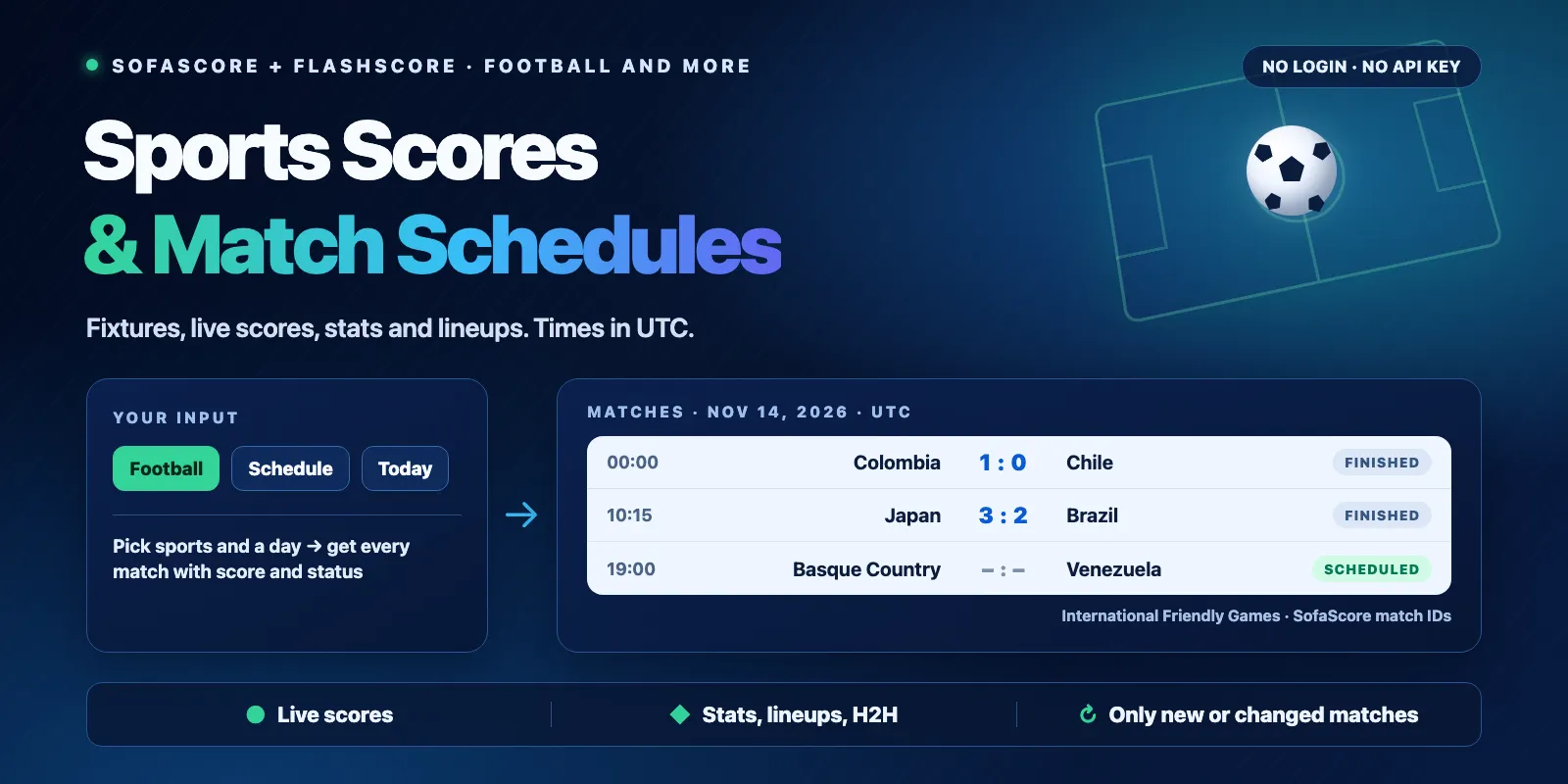
Table of contents
- What it does
- How it works
- Quick start
- Use cases
- Input
- Output
- Pricing
- Limits
- API, export and integrations
- Troubleshooting
- FAQ
- Related Actors
- Support
What it does
The Actor collects match rows from SofaScore (default) or Flashscore. Each row has the sport, tournament, start time in UTC, one normalized status, both teams and the score. You can add match details: statistics, lineups, incidents (goals, cards, substitutions), head to head, recent form, odds, fan votes, a shot map and player heatmaps. It also returns league tables, top players of a season, team squads, team and player season statistics and player profiles. Past seasons of a league work too.
Seven modes cover the common jobs:
| Mode | What you get |
|---|---|
schedule | Matches of a day or a date range (up to 31 days) |
live | Matches in play now |
match | Details for match links or SofaScore match IDs |
team | Last and next matches of teams |
tournament | Matches, the table and the top players of a league or cup, for the current or a past season |
player | Player profiles: team, position, market value, contract and season statistics |
search | Teams, tournaments and players found by name |
Sports: football, basketball, ice hockey, American football, baseball, handball, rugby, floorball, bandy, futsal, volleyball, cricket, darts, snooker, Aussie rules, badminton, table tennis, MMA and esports.
Tennis is not covered. Use the separate Actor Tennis Scraper: ATP & WTA Matches, Players & Rankings.
Good fit
- Fill a score or fixture widget with one stable table for many sports.
- Collect results and match statistics for betting, fantasy or model research.
- Run a scheduled job that saves only new or changed scores.
- Pull a league table, the top scorers and the latest matches of a team.
- Get a player's profile and season statistics, or a whole past season of a league.
How it works
- You choose a mode, sports and a date (or links, team names, tournaments).
- The Actor reads public match lists and, if you ask, match details from SofaScore or Flashscore. It filters by status or tournament when you set it.
- It saves one Dataset row per match, a free
RUN_SUMMARYrecord with totals and the stop reason, and aSUMMARYrecord with totals per tournament.
Quick start
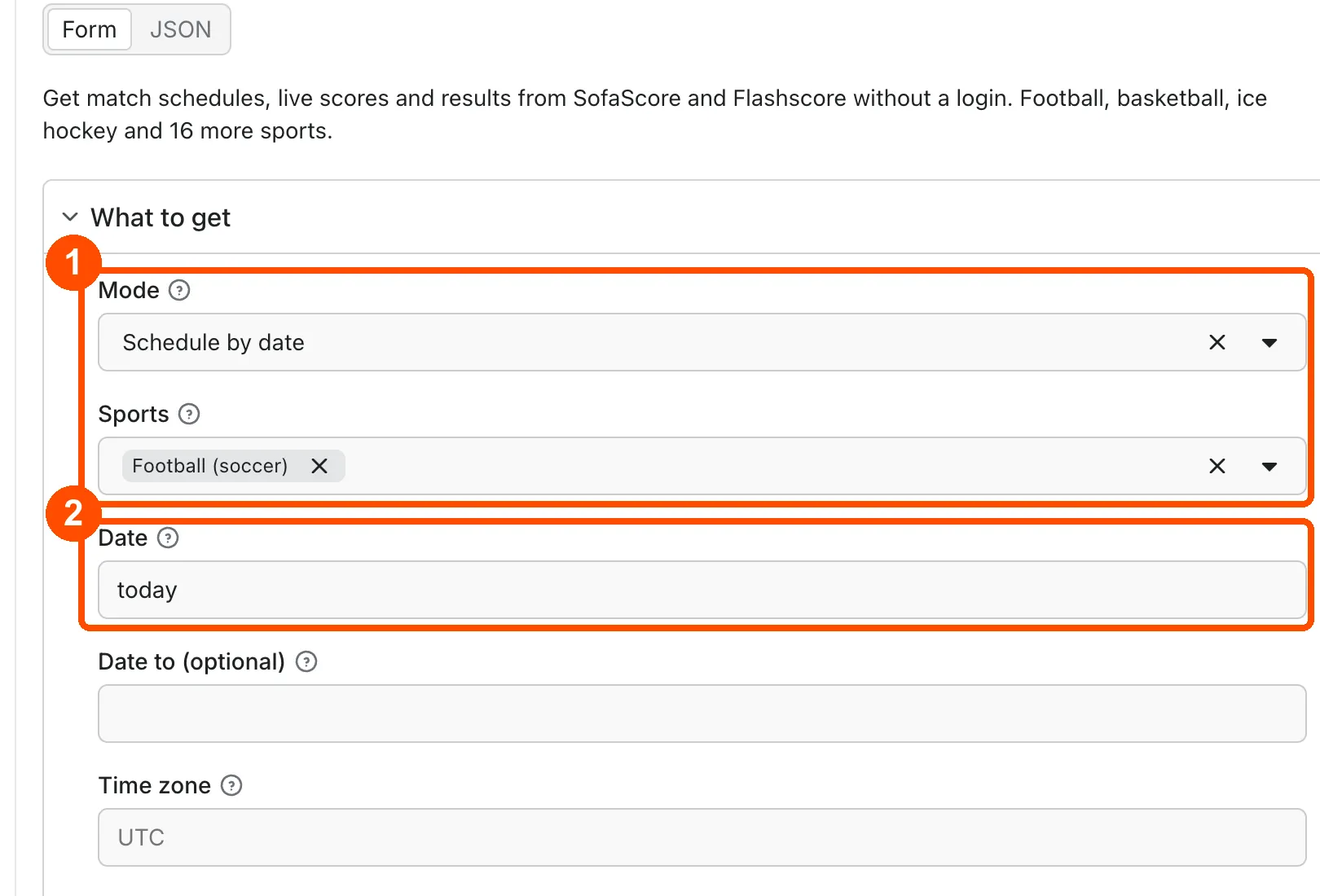
-
Open the Input tab. Mode is
scheduleand Sports isfootball(box 1 in the picture). -
Keep Date as
today(box 2). -
Keep Maximum rows at 20. It is under Updates and output. The field default is 100; 20 is the form prefill.
-
Click Start.
-
Open the Output tab or the Dataset and check the team and score columns.
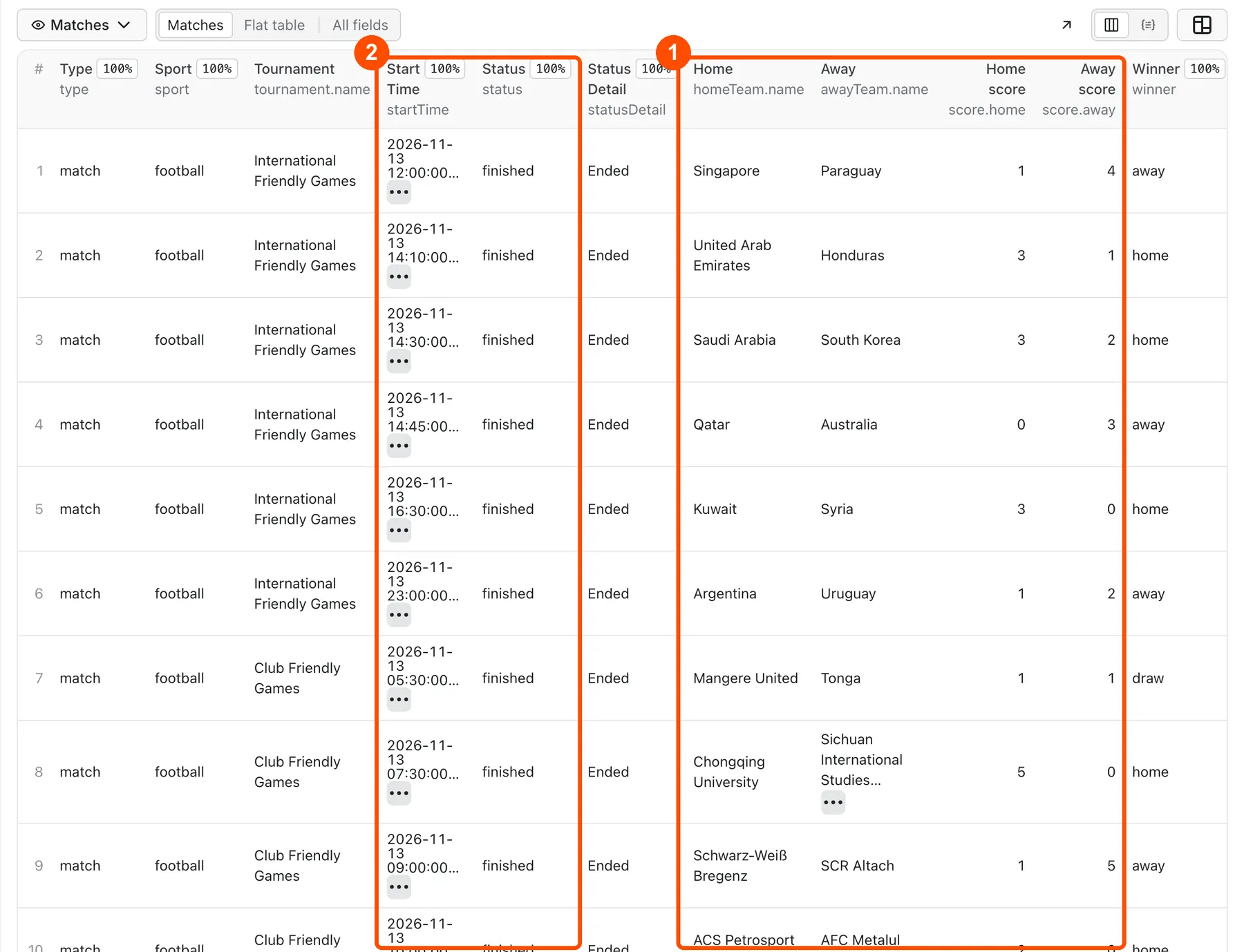
Expected result: 20 football matches of the day, one row each, in about 5–20 seconds. In the table, box 1 shows the Home, Away, Home score and Away score columns. Box 2 shows status and startTime.
Use cases
| Buyer job | Input path | Output entity | Key fields | Next integration |
|---|---|---|---|---|
| Daily fixtures and results for a widget | mode: schedule, sports, date | Match row | startTime, status, homeTeam, awayTeam, score | Google Sheets, API |
| Live score feed | mode: live, onlyChanges: true | Match row with changeType | status, minute, score, changeType | Schedule, webhook, Slack |
| Match statistics for research | mode: match or includeStatistics | Match row with details | statistics, incidents, lineups, h2h | API, CSV export |
| League table and fixtures | mode: tournament, includeStandings | Match rows and standings row | tournament, round, standings | Sheets, Notion |
| Team form and next games | mode: team, teams, includeForm | Match row | form, winner, startTime | API, Slack |
| Player scouting | mode: player, players, includePlayerStats | Player row | player.marketValue, player.seasonStatistics | Sheets, API |
| Season archive and top scorers | mode: tournament, season, includeTopPlayers | Match rows and top players row | score, topPlayers | CSV, API |
Input
Input fields
The main fields are below. Every field name is exact.
| Field | Plain name | Type | Required | Default / prefill | Allowed values | Effect | Example | Recommendation |
|---|---|---|---|---|---|---|---|---|
mode | Mode | string | no | default and prefill schedule | schedule, live, match, team, tournament, player, search | What to collect | live | Start with schedule |
sports | Sports | array | for schedule, live, search | prefill ["football"] | 19 sport slugs, for example football, ice-hockey, table-tennis | Which sports to read | ["basketball"] | Pick few sports for faster runs |
date | Date | string | no | prefill today; empty means today | today, tomorrow, yesterday or 2026-11-14 | Day to read | 2026-11-14 | Flashscore covers 7 days back and 7 ahead |
dateTo | Date to | string | no | none | date, up to 31 days after date | Last day of a range | 2026-11-20 | Leave empty for one day |
timezone | Time zone | string | no | UTC | IANA name | Day boundaries and localStartTime | Europe/London | startTime stays UTC |
source | Source | string | no | sofascore | sofascore, flashscore | Where to read | flashscore | Flashscore is a backup for schedule, live and match |
matchUrls | Match links or IDs | array | for match | none | SofaScore or Flashscore links, SofaScore numeric IDs | Matches to read | ["15534069"] | Duplicates are merged |
teams | Teams | array | for team | none | names, SofaScore links or IDs | Teams to read | ["Arsenal"] | SofaScore only |
tournaments | Tournaments | array | for tournament | none | names, SofaScore links or IDs | League or cup; in schedule it keeps only these tournaments | ["Premier League"] | Combine with schedule to filter a day |
searchQueries | Search text | array | for search | none | text | Names to look up | ["Real Madrid"] | SofaScore only |
players | Players | array | for player | none | names, SofaScore player links or IDs, up to 50 | Players to read | ["Bukayo Saka"] | SofaScore only; a link or ID is exact |
season | Season | string | no | empty means the current season | 2024/2025, 24/25, 2024 or a SofaScore season ID | Season for tournament mode and for team and player season statistics | 2024/2025 | An unknown season gives a not_found row with the seasons that exist |
teamMatches | Team matches | string | no | both | both, last, next | Which team matches | next | Use next for fixtures |
matchStatuses | Match statuses | array | no | empty keeps all | scheduled, live, finished, postponed, canceled, interrupted | Keeps these statuses only | ["finished"] | A filter still reads the whole day (see Pricing) |
includeStatistics, includeIncidents, includeLineups, includeH2H, includeForm, includeOdds, includeVotes, includeShotmap | Match details | boolean | no | false | true or false | Adds details to each played match; each such row is a paid match-details event | true | Turn on only what you use |
includeHeatmaps | Player heatmaps | boolean | no | false | true or false | Adds a heatmap (touch points) for each player who played, in played football matches; each such row is a paid player-heatmaps event | true | SofaScore only; slower, about 30 s per match (one request per player) |
formMatches | Form length | integer | no | 5 | 5 to 10 | Matches in form | 10 | Needs includeForm |
includeStandings | League tables | boolean | no | false | true or false | One standings row in tournament mode; tables go to the SUMMARY record in other modes | true | Use with tournament |
includeSquad | Team squad | boolean | no | false | true or false | One squad row per team in team mode | true | SofaScore only |
includeTeamStats | Team season statistics | boolean | no | false | true or false | One team_stats row per team in team and search modes (goals, shots, possession and more for the season) | true | Football; uses tournaments to pick the league |
includeTopPlayers | Top players | boolean | no | false | true or false | One top_players row in tournament mode: top 10 per category (goals, assists, rating and more) | true | Football leagues have the most categories |
includePlayerStats | Player season statistics | boolean | no | false | true or false | Adds player.seasonStatistics in player mode | true | The main league of the player's team by default |
onlyChanges | Only new or changed matches | boolean | no | false | true or false | Saves matches that are new or whose score or status changed | true | Use on a schedule; unchanged matches still count toward maxItems |
stateName | Update list name | string | no | default | letters, digits, dashes, 1–40 characters | Name of the remembered match list | live-football | One name for each job |
resumeFromRunId | Continue after run | string | no | none | an Apify run ID | Skips rows that run already saved, so they are not saved or charged again | 2xihGT7PQGyXrKf8I | Use after a partial run with the same input |
outputFormat | Output format | string | no | nested | nested, flat | Objects or one column per value | flat | flat for Excel and Sheets |
includeRaw | Include raw source data | boolean | no | false | true or false | Adds the source JSON in raw | false | Makes rows much bigger |
maxItems | Maximum rows | integer | no | default 100, prefill 20 | 1 to 10000 | Stops after this many rows across all inputs; with onlyChanges, unchanged matches count too | 500 | Memory is 512 MB above 1000 |
proxyConfiguration | Proxy | object | no | Apify Proxy RESIDENTIAL | proxy editor | SofaScore needs residential proxy; Flashscore does not use it | default | Keep the default |
deliveryConnector, deliveryTarget | Send results to | string | no | none | MCP connector, Notion page link or Slack channel ID | Posts a run summary | see Output | Optional |
Empty date means today. In team, tournament and search modes, today or an empty date gives the last and next matches; a real date keeps only that day. Fields for other modes are ignored and listed in ignoredInputFields of RUN_SUMMARY.
Interacting settings
| When | Input A | Input B | Effective behavior | Example | Cost/result effect |
|---|---|---|---|---|---|
| Filter a day | tournaments or matchStatuses | mode: schedule | The Actor reads the whole day list, then keeps matches that fit | ["finished"] | Source data is charged for the full read, rows only for saved matches |
| Scheduled updates | onlyChanges: true | stateName | Compares with the last run of the same name; unchanged matches are skipped | live-football | Skipped matches are not charged; the list read is |
| Details | includeStatistics and other include* | mode: match or any list mode | Adds details to played matches | includeLineups: true | Each row with details adds a match-details charge |
| Flat table | outputFormat: flat | any | Fields become homeTeamName, scoreHome and so on | flat | None |
| Flashscore | source: flashscore | team, tournament, player, search | These modes use SofaScore; Flashscore serves schedule, live and match | Flashscore link in matchUrls | Flashscore links always use Flashscore |
| Past season | season | mode: tournament | Reads all matches of that season, page by page (up to 40 pages of 30 matches each way); date keeps one day | 2024/2025 | Each list page is source data |
| Continue a run | resumeFromRunId | same input as that run | Rows already in that run's Dataset are skipped | partial run ID | Skipped rows are free; the lists are read again and charged as source data |
Input examples
Matches of a day
Expected behavior: reads today's football list from SofaScore.
Expected output: 20 match rows with startTime, status, homeTeam, awayTeam, score.
Limit or cost note: about $0.037 on the Free plan.
Live scores of two sports, only changes
Expected behavior: saves matches that are new or changed since the last run with this stateName.
Expected output: rows with changeType (new or changed), or one no_changes row.
Limit or cost note: you pay for the list read on every check.
One match with details
Expected behavior: reads the match and adds statistics, incidents and head to head.
Expected output: one row with statistics, incidents, h2h.
Limit or cost note: one row plus one match-details event.
Player profile with season statistics
Expected behavior: reads the player and the statistics of the current season in the main league of the player's team.
Expected output: one player row with player.team, player.marketValue and player.seasonStatistics.
Limit or cost note: one row, $0.00175 on the Free plan.
A past season with top players
Expected behavior: reads the table, the top players and all matches of the 2024/2025 season.
Expected output: one standings row, one top_players row and about 381 match rows (380 played matches plus any postponed fixture the source still lists).
Limit or cost note: rows plus the source data read (the top players list alone is about 2–3 MB).
Output
Output fields
| Field | Meaning | Type | Can be empty? | Example / enum | Source / notes |
|---|---|---|---|---|---|
type | Row type | string | no | match, team, tournament, player, standings, top_players, squad, team_stats, not_found, no_changes, invalid_input, partial, error | Status rows explain the result |
source | Where the row came from | string | no | sofascore | sofascore or flashscore |
matchId | Match ID at the source | string | no | 17485335 | IDs differ between sources |
sport | Sport slug | string | no | football | |
tournament | Tournament | object | conditional | {"name": "International Friendly Games", ...} | id, name, category, country |
startTime | Start time in UTC | string | no | 2026-11-14T00:00:00.000Z | ISO 8601 |
localStartTime | Start time in your timezone | string | no | 2026-11-14T00:00:00+00:00 | |
status | One normalized status | string | no | scheduled, live, finished, postponed, canceled, interrupted, unknown | statusDetail keeps the source text |
minute | Live minute | string or null | yes | null | Only for live matches when known |
homeTeam, awayTeam | Teams | object | no | {"id": "4820", "name": "Colombia", ...} | id, name, shortName, country, logo |
score | Score | object | conditional | {"home": 1, "away": 0, ...} | home, away, halftime, aggregate; numbers |
winner | Winner | string or null | yes | home | home, away or draw |
statistics, lineups, incidents, h2h, form, odds, votes, shotmap | Match details | object, array or null | yes | null | Filled only when the matching include* field is on and the source has data. Best effort: a detail that fails after retries is null, see Troubleshooting |
heatmaps | Player heatmaps | array or null | yes | [{"playerName": "Bukayo Saka", "side": "home", "points": [{"x": 62, "y": 18}]}] | With includeHeatmaps; x and y are 0–100 on the pitch |
player | Player profile | object or null | yes | {"name": "Bukayo Saka", "position": "F", "marketValue": 130000000, ...} | player rows; seasonStatistics with includePlayerStats |
topPlayers | Top players | array or null | yes | [{"category": "goals", "players": [{"rank": 1, "playerName": "...", "value": 29}]}] | top_players rows |
teamStatistics | Team season statistics | object or null | yes | {"goalsScored": 69, "averageBallPossession": 56.1, ...} | team_stats rows; the season is in season |
changeType | Change marker | string or null | yes | new, changed | Only with onlyChanges |
message | Explanation | string or null | yes | Filled in status rows | |
scrapedAt | When the row was saved (UTC) | string | no | 2026-11-14T14:20:53.801Z |
With outputFormat: flat the Dataset has one column per value, for example homeTeamName, awayTeamName, scoreHome, scoreAway and tournamentName. The Dataset Flat table view shows them.
Times are UTC. Fields differ from other sports Actors: matchId, a homeTeam object, ISO startTime and one status field. If you move from another Actor, map the fields once.
Output entities and surfaces
| Situation | Dataset/API/KVS/live view | Result shape | User action |
|---|---|---|---|
| Normal item | Dataset, Matches view | type: match row; also standings, top_players, squad, team_stats and player rows | Open, export or read fields |
| Domain-empty result | Dataset | not_found row with message; no_changes row when onlyChanges finds nothing new | Check the name, date or sport |
| Invalid input item | Dataset | invalid_input row with an example of the right format | Fix that input value |
| Partial result | Dataset and RUN_SUMMARY | Saved rows stay; status partial, stopReason and reason | Read stopReason, then raise the limit, split the run or continue with resumeFromRunId |
| Technical failure | RUN_SUMMARY | Run FAILED. status is error, or partial when rows were saved before the failure (they stay in the Dataset); stopReason SOURCE_BLOCKED or SOURCE_ERROR | See Troubleshooting |
Status rows and RUN_SUMMARY are free. RUN_SUMMARY holds status, stopReason, reason, savedMatches, notFound, invalidInputs and request counts. SUMMARY holds totals per tournament.
Output example
Real row from a prefill run (football, trimmed: periods, team logos and empty detail fields removed).
The example is trimmed and shows one row. null means the source gave no value or you did not ask for it (details are null unless an include* field is on). Venue, referee and attendance are often empty for small matches.
Send results to Slack or Notion
Pick your connector in the optional deliveryConnector field. After the run saves its data, the Actor posts a short summary (up to 25 rows and a link to the full dataset) there. Put a Notion page link or a Slack channel ID in deliveryTarget: in Notion every run is added on top of that one page, so your workspace does not fill up with new pages. Without a page link, Notion delivery is skipped and the log says so. A delivery error never fails the run and costs nothing extra. Connect a service once in Apify Console → MCP connectors.
Use case → fields
| Buyer job | Input path | Output entity | Key fields | Next integration |
|---|---|---|---|---|
| Fixtures widget | mode: schedule | Match row | startTime, homeTeam.name, awayTeam.name | API |
| Live updates | mode: live, onlyChanges | Match row | status, minute, score, changeType | Slack |
| Match research | includeStatistics, includeIncidents | Match row | statistics, incidents | CSV, API |
Pricing
Pricing unit
Pay per event. There is no start fee. Apify platform usage is paid by us, the developer. You pay only these events:
| Event | What is charged | Free plan | Bronze | Silver | Gold / Platinum / Diamond |
|---|---|---|---|---|---|
Match row (result) | Each saved match, standings, top players, squad, team statistics or player row | $1.75 per 1000 | $1.575 | $1.40 | $1.225 |
Source data (source-data) | Each started megabyte of match lists read from SofaScore or Flashscore (days, live lists, tournament seasons, tables, top players lists) | $0.002 per MB on all plans | |||
Match details (match-details) | Each row with statistics, lineups, incidents, H2H, form and so on added | $0.70 per 1000 | $0.63 | $0.56 | $0.49 |
Player heatmaps (player-heatmaps) | Each match row with heatmaps added | $4.00 per 1000 | $3.60 | $3.20 | $2.80 |
Lookup without result (empty-lookup) | Each match link, team, tournament, player, season or search text that finds nothing, and once for an empty run that read no list data | $1.75 per 1000 | $1.575 | $1.40 | $1.225 |
Status rows (not_found, no_changes, invalid_input) and RUN_SUMMARY are free. Match details and heatmap requests are not counted as source data. Rows skipped by onlyChanges or resumeFromRunId are not charged.
What a run costs in special cases:
- Zero results: a filter that matches nothing still pays for the lists it read. A handball day with no matching games cost $0.008 (3.9 MB read).
- Nothing found: a team that does not exist costs one lookup, $0.00175 on the Free plan.
- No changes: a scheduled
onlyChangescheck with nothing new cost $0.004 (1.4 MB read). A live football list check reads about 5 MB, so $0.01 per check plus changed rows. - Filters read the whole list: a status filter on a whole football day read about 44 MB, $0.088 plus the saved rows.
- Invalid input: a run with invalid input fails fast and is not charged.
- Spending limit: if your maximum charge is reached, the run saves rows first and then stops with status
partial,stopReason: CHARGE_LIMITand areason. A match-details or heatmaps charge is made only for a row that was saved.
Cost examples
Free plan, schedule mode. Only the first two rows are measured; the others are estimates from measured list sizes (a whole football day is about 44 MB).
| Scenario | Input scope | Expected item/event count | Base charge | Optional charge | Stop/cap behavior |
|---|---|---|---|---|---|
| Prefill (measured) | 20 football matches | 20 rows + 1 MB | $0.037 | none | Stops at maxItems |
| One row (measured) | maxItems: 1 | 1 row + 1 MB | $0.00375 | none | Stops at maxItems |
| 10 rows | one day, maxItems: 10 | 10 rows + 1 MB | about $0.02 | none | Stops at maxItems |
| 100 rows | one day, maxItems: 100 | 100 rows + about 1–3 MB | about $0.18 | none | Stops at maxItems |
| 1000 rows | one day, maxItems: 1000 | 1000 rows + about 10–25 MB | about $1.77–1.80 | none | Stops at maxItems |
| 10 basketball matches with statistics | includeStatistics: true | 10 rows + 10 details + 1 MB | rows and source data as above | 10 details at $0.70 per 1000 | Stops at maxItems or the spending limit |
| One football match with heatmaps | mode: match, includeHeatmaps: true | 1 row + 1 heatmaps event | $0.00175 | $0.004 | Stops at maxItems or the spending limit |
| One player with season statistics | mode: player, includePlayerStats: true | 1 row | $0.00175 | none | One row per player |
Limits
Run limits are 300 seconds, 256 MB memory (512 MB when maxItems is above 1000).
| Case | Proven limit |
|---|---|
| SofaScore match list | 2000 matches in one run (131 s). Up to about 8000 per run with status partial, stopReason: DEADLINE and a reason. More needs a longer run timeout |
| With match details | About 200 matches per run |
| Flashscore | A whole day of a sport in seconds. Only 7 days back and 7 days ahead |
| Date range | Up to 31 days from date |
| Rows per run | maxItems up to 10000 |
| Past season | Up to 40 pages of 30 matches of finished and 40 of next matches, enough for any league season |
| Heatmaps | Football only, played matches, players who played; about one request per player, so about 30 seconds per match (measured: 32 players in 28 s); about 8–10 matches with heatmaps fit in the default 300-second timeout. For more, raise the run timeout |
| Players | Up to 50 per run |
- Tennis is not covered. Use Tennis Scraper: ATP & WTA Matches, Players & Rankings.
- SofaScore needs Apify Proxy
RESIDENTIAL(the default). Datacenter proxy is blocked and the run stops with a clearSOURCE_BLOCKEDmessage. - Teams, tournaments, players, seasons, top players, team statistics, search, lineups, odds, votes, shot map and heatmaps come from SofaScore. Flashscore is a backup for schedule, live and match.
startTimeis always UTC.dateusestimezoneto set the day.- Live scores are as fresh as the moment of the run. The Actor does not stream.
- Not a drop-in replacement for other sports Actors: the field names differ (see Output).
- The data comes from public pages of the two sources. Odds, details and venue fields can be empty when the source shows nothing.
API, export and integrations
- API: start the run with the Apify API or an API client, then read the Dataset items. Use
?view=matchesfor the table view or?view=flatwithoutputFormat: flat. - Export: download the Dataset as JSON, CSV, Excel, XML or HTML. Use
outputFormat: flatfor spreadsheets. - Scheduling: run on an Apify schedule with
onlyChanges: trueand a fixedstateName. Each run saves only new or changed matches; readstatus,scoreandchangeType. - Webhooks / no-code: use an Apify webhook on run success, then read the Dataset in Make, Zapier or n8n. The next system reads
matchId,statusand the score fields. - Slack and Notion: see the delivery section in Output.
Use with AI agents (MCP)
- MCP server URL with only this Actor:
https://mcp.apify.com?tools=cliqtomedia/sports-scores-scraper. - Smallest useful input:
- Key output fields:
status(one normalized value, for examplefinished),startTime(UTC),homeTeam.nameandawayTeam.name,score.homeandscore.away,matchId. - Typical run: about 5–20 seconds and about $0.037 for the input above on the Free plan.
- Limits for an agent: keep
maxItemssmall, about 200 matches with details per run, tennis is not covered, and readRUN_SUMMARYforstatusandstopReason.
Troubleshooting
Run stops with SOURCE_BLOCKED
Symptom: status error with a message that SofaScore blocks datacenter IPs.
Likely reason: the proxy is a datacenter group or off.
Check: the Proxy field in the input.
Action: set Apify Proxy RESIDENTIAL. The Actor does not treat a block as an empty result.
Run fails with SOURCE_ERROR
Symptom: the run is FAILED and RUN_SUMMARY shows stopReason: SOURCE_ERROR.
Likely reason: SofaScore or Flashscore kept failing for a list after retries (a timeout or a server error).
Check: reason in RUN_SUMMARY and the log. If status is partial, the rows saved before the failure stay in the Dataset and are charged.
Action: run again later. To skip the rows you already have, set resumeFromRunId to the failed run ID.
A not_found row appears
Symptom: a not_found row with a message.
Likely reason: the team, tournament, link or ID is not at the source, or the name is spelled differently.
Check: the name with mode: search, or paste the match link.
Action: use the exact name, a SofaScore link or a numeric ID. One lookup is charged on a not found input.
Status is partial
Symptom: RUN_SUMMARY shows partial with stopReason.
Likely reason: DEADLINE (300 s run timeout), CHARGE_LIMIT (your maximum charge), CANCELLED, or a match detail that failed after retries (no stopReason; see the log warning).
Check: reason in RUN_SUMMARY. Saved rows stay in the Dataset.
Action: split the days or sports into several runs, lower maxItems, raise the timeout or the maximum charge. To continue without paying twice, start the same input with resumeFromRunId set to this run ID.
Fewer matches than another site shows
Symptom: a day has fewer matches than expected.
Likely reason: the Actor takes exactly one day in your timezone (UTC by default). Other tools may use a window around the date.
Check: timezone, date and matchStatuses.
Action: set timezone to your zone or use date and dateTo for a wider range.
Match details are empty
Symptom: statistics or lineups is null.
Likely reason: the include* field is off, the match is not played yet, or the source has no data. Lineups, odds, votes, shot map and heatmaps are SofaScore only. Details are best effort: if a detail request still fails after retries, the field is null, the run still SUCCEEDED with status: partial in RUN_SUMMARY, and the log names the detail.
Check: the field in the input and source.
Action: turn the field on and use source: sofascore.
Input fails at once
Symptom: the run fails in about a second with INVALID_INPUT in RUN_SUMMARY.
Likely reason: a wrong date format, for example 14/11/2026.
Check: the message in RUN_SUMMARY; it shows the right format.
Action: use 2026-11-14. No charge.
FAQ
Do I need a login or API key?
No. The Actor reads public data. You only need an Apify account. SofaScore needs the default residential proxy, which is already in the input.
Which source should I choose?
SofaScore is the default and covers all modes and details. Flashscore reads a whole day of a sport very fast and works for schedule, live and match, only 7 days back and 7 ahead.
Why did a run with no matches cost money?
Reading the match list is charged by size ($0.002 per started MB), also when the list has no new matches or a filter keeps none. Status rows are free. See Pricing for measured examples.
How do I get only new scores?
Turn on onlyChanges and keep the same stateName. Run it on an Apify schedule. Rows have changeType new or changed; an unchanged check gives one free no_changes row.
Is the data complete and fresh?
Rows show what the source had at the time of the run. Live scores change every minute, and some fields (venue, referee, odds, details) can be null. If a run is partial, RUN_SUMMARY says why.
Can I get tennis?
Not here. Use Tennis Scraper: ATP & WTA Matches, Players & Rankings.
Related Actors
- Tennis Scraper: ATP & WTA Matches, Players & Rankings: tennis matches, players and rankings, which this Actor does not cover.
Support
For a bug, question or feature request, open the Actor's Issues tab on Apify. Include the run ID, the mode and the non-sensitive error text from RUN_SUMMARY. Never send tokens, cookies, private source data or billing data.
⭐ Found it useful? Rate this Actor. Something wrong? Report a problem — we fix reported problems.


