

Spotify Scraper: Play Counts, Artists, Tracks & Playlists
Pricing
from $1.96 / 1,000 results
Spotify Scraper: Play Counts, Artists, Tracks & Playlists
Scrape Spotify artists, tracks, albums, playlists and search results with play counts, monthly listeners and followers. No login and no API key. Built for music marketers, labels and creators who track growth.
Pricing
from $1.96 / 1,000 results
Rating
0.0
(0)
Developer

Cliqto Media
Maintained by CommunityActor stats
0
Bookmarked
2
Total users
1
Monthly active users
a day ago
Last modified
Categories
Features
Share
Spotify Scraper reads public Spotify artist, track, album, playlist and podcast pages and search results, and returns one row per item with play counts, monthly listeners, followers and release dates. No login and no API key.
It is for music marketers, labels, managers and creators who track growth: the smallest run is one artist link, and it returns one artist row in about 2 seconds.
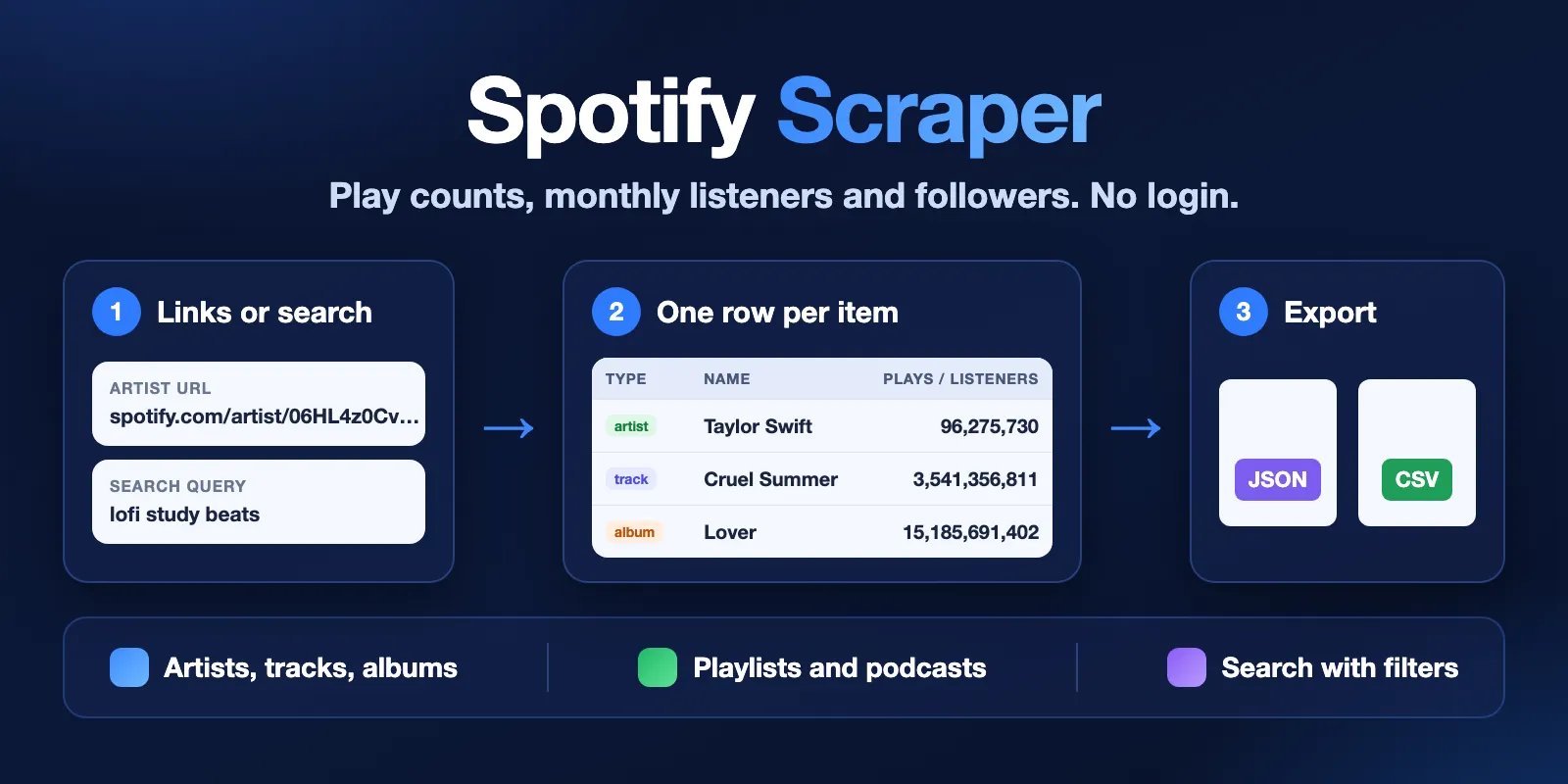
Table of contents
- What it does
- How it works
- Quick start
- Use cases
- Input
- Output
- Pricing
- Limits
- API, export and integrations
- Troubleshooting
- FAQ
- Related Actors
- Support
What it does
You give Spotify links, URIs, IDs or search words. The Actor reads the public data that the Spotify web player shows and saves one Dataset row for each artist, track, album, playlist, podcast show or episode.
- Artists: monthly listeners, followers, world rank, top cities, biography, social links, release counts and top tracks with play counts.
- Tracks: exact play count, duration, album, release date and explicit flag.
- Albums and playlists: one row for the album or playlist (label, followers, owner, track count) plus one row per track with its play count.
- Podcasts: show rows and episode rows with duration and release date (Spotify shows no play counts for episodes).
- Search: rows of tracks, artists, albums or playlists for each search query.
It does not download audio and does not need a Spotify account.
Good fit
- Track monthly listeners and followers of your artists or competitors over time.
- Collect play counts for every track of an album or playlist.
- Find playlists or artists for a keyword and keep only those with enough followers.
- Check catalogue data (release dates, labels, durations) for a list of tracks.
How it works
- The Actor reads each link or search query you add. Links can be full
open.spotify.comlinks,spotify:URIs or bare 22-character IDs. - It asks Spotify's public web player for the item. If that fails for one item, it reads Spotify's public embed page instead: you still get the name, artists, release date and duration, but no play count (the row is marked
partial). - It saves one Dataset row per item, with
status,source,inputandfetchedAtin every row. A short run summary goes to theRUN_SUMMARYrecord in the key-value store.
Each link that Spotify cannot find gets its own not_found row, so you can see exactly which input gave nothing.
Quick start
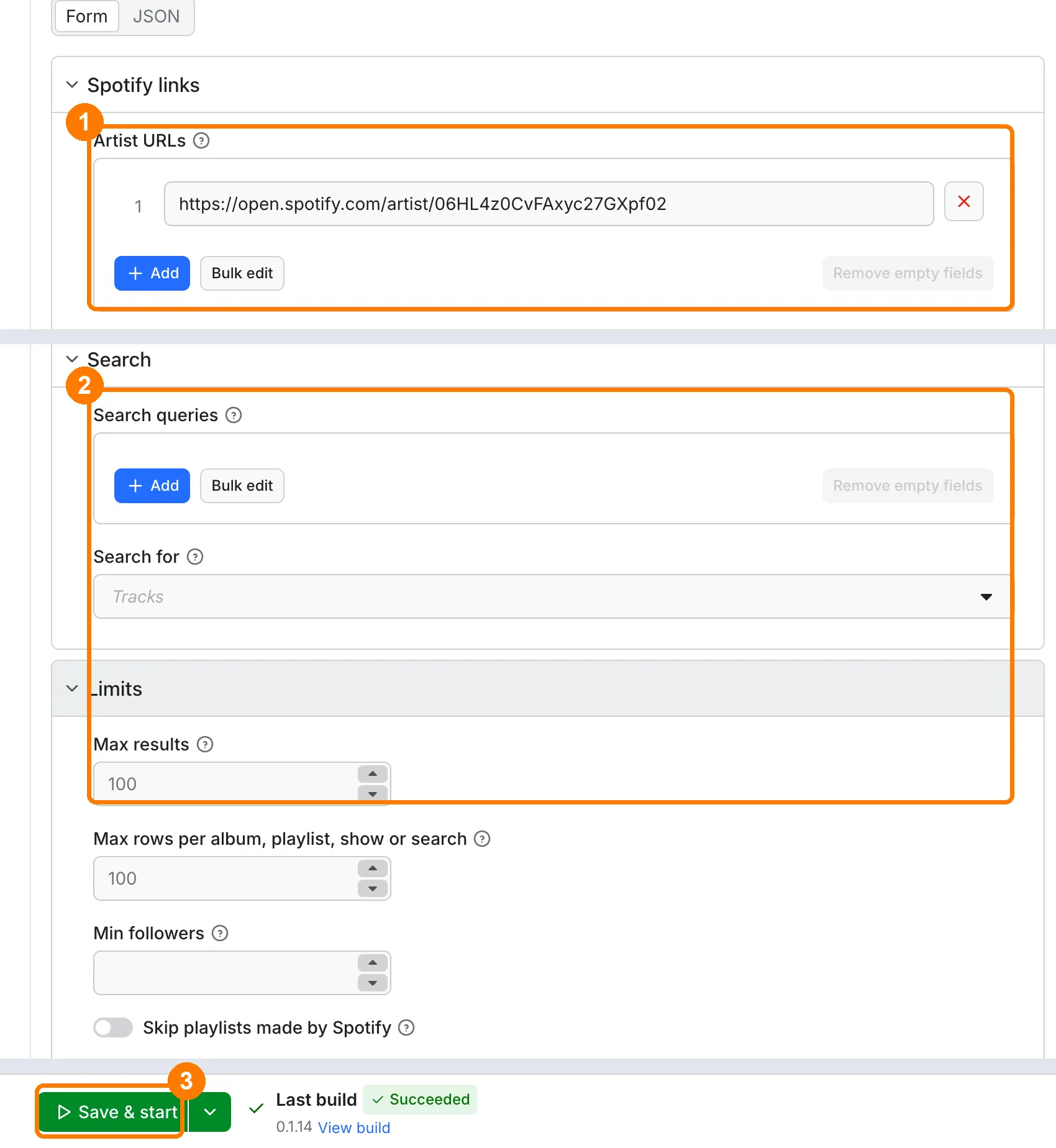
-
Open the Input tab. Artist URLs already has one artist link (box 1 in the picture). Replace it with your own links, or keep it for a test.
-
Optional: add words to Search queries or change Max results (box 2). The default Max results is 100.
-
Click Start at the bottom of the page (box 3; it reads Save & start if you changed the input).
-
When the run finishes, open the Output tab and choose a view: Overview, Track columns, Artist columns or All fields (box 4).
-
Read the Monthly Listeners and Followers columns for artists, or Play Count for tracks (box 5).
-
Click Export to download JSON, CSV or Excel (box 6).
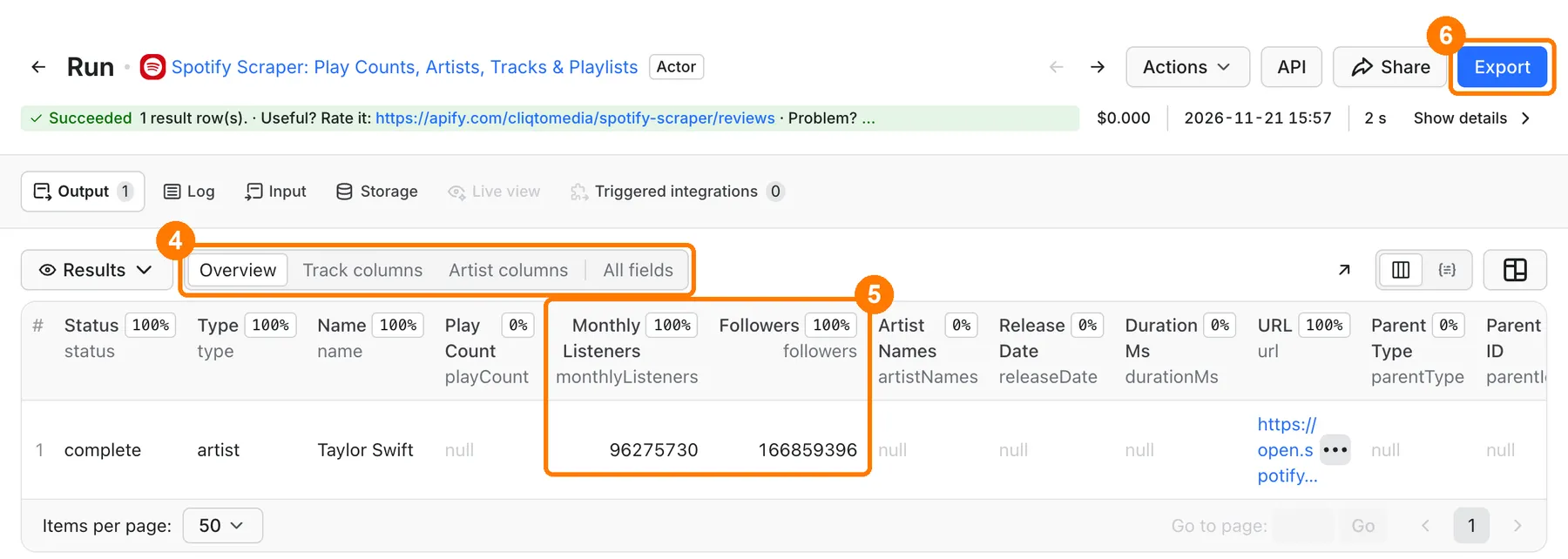
Expected result: one artist row with status complete, monthly listeners and followers. This test run took 2 seconds and cost $0.0033.
Use cases
| Buyer job | Input path | Output entity | Key fields | Next integration |
|---|---|---|---|---|
| Track artist growth | artistUrls | artist | monthlyListeners, followers, worldRank, fetchedAt | Schedule the run and compare rows by date |
| Play counts of an album or playlist | albumUrls, playlistUrls | album or playlist + tracks | playCount, name, position, parentId | Export CSV or Excel |
| Find playlists for pitching | searchQueries + searchType playlists + minFollowers | playlist | name, followers, ownerName, url | Send a summary to Slack or Notion |
| Catalogue check of tracks | trackUrls | track | playCount, releaseDate, durationMs, albumName | API or Google Sheets export |
| Podcast catalogue | showUrls, episodeUrls | show or episode | name, releaseDate, durationMs, publisher | Export JSON |
Input
No field is required, but add at least one link or search query. Links of all types can be mixed in one run. Each list accepts open.spotify.com links, spotify: URIs or bare IDs. The same item or search query given twice is read once.
Input fields
| Field | Plain name | Type | Required | Default / prefill | Allowed values | Effect | Example | Recommendation |
|---|---|---|---|---|---|---|---|---|
artistUrls | Artist URLs | array of strings | no | prefill: one Taylor Swift link | artist links, URIs, IDs | one artist row each | https://open.spotify.com/artist/06HL4z0CvFAxyc27GXpf02 | for listeners and followers |
trackUrls | Track URLs | array of strings | no | empty | track links, URIs, IDs | one track row each | spotify:track:<ID> | for exact play counts |
albumUrls | Album URLs | array of strings | no | empty | album links, URIs, IDs | album row + track rows | album link | for all track plays of a release |
playlistUrls | Playlist URLs | array of strings | no | empty | public playlist links, URIs, IDs | playlist row + track rows | playlist link | user playlists; some Spotify editorial ones are hidden, see Limits |
showUrls | Podcast show URLs | array of strings | no | empty | show links, URIs, IDs | show row + latest episodes | show link | for podcast catalogues |
episodeUrls | Podcast episode URLs | array of strings | no | empty | episode links, URIs, IDs | one episode row each | episode link | no play counts for episodes |
searchQueries | Search queries | array of strings | no | empty | any words | rows of the chosen type | lofi beats | for discovery |
searchType | Search for | string | no | tracks | tracks, artists, albums, playlists | type of search rows | playlists | same type for all queries |
maxItems | Max results | integer | no | 100 | 1–10000 | most result rows for the whole run | 100 | each result row is charged |
maxTracksPerCollection | Max rows per album, playlist, show or search | integer | no | 100 | 0–10000 | most child rows per album, playlist, show or query | 50 | 0 = only the album, playlist or show row |
minFollowers | Min followers | integer | no | empty (no filter) | 0 or more | skips artists and playlists with fewer followers | 10000 | skipped rows are not saved or charged |
excludeSpotifyOwned | Skip playlists made by Spotify | boolean | no | false | true / false | skips Spotify's own playlists | true | for pitching lists |
includeTopTracks | Add artist top tracks as rows | boolean | no | false | true / false | adds up to 10 track rows per artist | true | each added row is charged |
includeDiscography | Add artist discography | boolean | no | false | true / false | fills discography (up to 500 releases) | true | no extra rows |
includeRelatedArtists | Add related artists | boolean | no | false | true / false | fills relatedArtists | true | no extra rows |
includeRaw | Add raw source data | boolean | no | false | true / false | adds the raw Spotify object in raw | false | makes rows much bigger |
deliveryConnector | Send results to | MCP connector | no | empty | your Slack, Notion or other connector | posts a short summary after the run | Slack | optional |
deliveryTarget | Notion page or channel | string | no | empty | Notion page link or Slack channel ID | where the summary goes | Slack channel ID | Notion needs a page link |
useProxy | Use Apify Proxy from the start | boolean | no | false | true / false | uses Apify datacenter proxy from the first request | false | the Actor switches to the proxy by itself when blocked |
An input with no Spotify links at all stops with a clear Invalid input message. Text that is not a Spotify link gets an invalid_input row; at most 100 such rows are saved per run, the rest are counted in RUN_SUMMARY.
Interacting settings
| When | Input A | Input B | Effective behavior | Example | Cost/result effect |
|---|---|---|---|---|---|
| Many links or collections | maxItems | maxTracksPerCollection | the run stops at maxItems rows in total; each album, playlist, show or query adds at most maxTracksPerCollection child rows | 3 playlists, 50 + 100 | fewer rows, lower cost |
| Search with no per-query cap | searchQueries | maxTracksPerCollection = 0 | each search can fill up to maxItems | one query, 0, 500 | up to 500 rows |
| Filter on search | minFollowers | searchQueries | rows below the limit are skipped; a search stops after 3 pages in a row with no match | playlists, 100000 | skipped rows are free; a query with no match costs one empty-input fee |
| Artist top tracks | includeTopTracks | maxItems | top-track rows count toward maxItems | 1 artist → up to 11 rows | each top-track row is charged |
Input examples
One artist (the prefill)
Expected behavior: reads one artist.
Expected output: one artist row with monthlyListeners, followers, worldRank and topTracks.
Limit or cost note: start fee + one result = $0.0033 on the Free plan.
Playlists for a keyword
Expected behavior: searches Spotify and keeps playlists with at least 10,000 followers.
Expected output: up to 50 playlist rows with name, followers, ownerName and url.
Limit or cost note: you pay only for saved rows; if nothing matches, one empty-input fee.
Output
Every row has the same fields. Fields that do not apply to a row type are null. null means "Spotify does not show this value here", 0 is a real zero.
Output fields
| Field | Meaning | Type | Can be empty? | Example / enum | Source / notes |
|---|---|---|---|---|---|
type | Row type | string | only on invalid-input rows | artist, track, album, playlist, show, episode | |
id | Spotify ID | string | invalid-input rows | 06HL4z0CvFAxyc27GXpf02 | 22 characters |
name | Item name | string | not_found and error rows | Taylor Swift | |
artists, artistNames | Artists of a track or album | array / string | yes, for artists, playlists, podcasts | [{"id": "...", "name": "MJBeats"}] | |
playCount | Plays shown on Spotify | integer | yes | 1796046216 | tracks; album = sum over its tracks when all were read; null for artists, playlists, podcasts and embed rows |
monthlyListeners | Artist monthly listeners | integer | yes, for non-artists | 96275730 | |
followers | Artist or playlist followers | integer | yes | 166859396 | |
popularity | Spotify popularity index | null | always null | null | exists only in Spotify's developer API |
releaseDate | Release date | string | yes | 2023-07-24, 2023-07 or 2023 | precision as Spotify gives it |
durationMs | Duration in milliseconds | integer | yes | 102024 | tracks and episodes |
url | open.spotify.com link | string | invalid-input rows | https://open.spotify.com/artist/... | |
worldRank, topCities, topTracks | Artist rank, top cities, top tracks | integer / array | yes | 7 | artist rows |
parentType, parentId, position | Where a child row came from | string / integer | null for top-level rows | search, lofi beats, 1 | albums, playlists, shows, search, top tracks |
status | Row result | string | no | complete, partial, not_found, invalid_input, error | |
error | Plain-English reason | string | null when complete | track ... was not found on Spotify | |
source | Where the data came from | string | no | pathfinder (web player), embed (fallback, no play counts), input | |
input | Your link or query as given | string | no | lofi beats | |
fetchedAt | When the row was read | string | no | 2026-11-21T08:31:53.552Z | ISO time |
More fields (album, label, copyright, owner, publisher, social links, release counts and others) are in the All fields view.
Output entities and surfaces
| Situation | Dataset/API/KVS/live view | Result shape | User action |
|---|---|---|---|
| Normal item | Dataset | row with status complete | open a view or export |
| Domain-empty result | Dataset | row with status not_found and the reason in error | check the link |
| Partial result | Dataset | row with status partial, source embed, no play count | run that item again later |
| Technical failure or retry | Dataset + RUN_SUMMARY | row with status error; summary with stopReason | read error, rerun; turn on useProxy if Spotify blocked |
The run itself fails (red status) only when the input has no Spotify links, when every input ended with an error, or when Spotify blocked the requests. Rows saved before that stay in the Dataset.
Output example
This example is trimmed and contains one item from the prefill input. playCount is null because artists have no play count; their tracks do (see topTracks).
Send results to Slack or Notion
Pick your connector in the optional deliveryConnector field. After the run saves its data, the Actor posts a short summary (up to 25 rows and a link to the full dataset) there. Put a Notion page link or a Slack channel ID in deliveryTarget: in Notion every run is added on top of that one page, so your workspace does not fill up with new pages. Without a page link, Notion delivery is skipped and the log says so. A delivery error never fails the run and costs nothing extra. Connect a service once in Apify Console → MCP connectors.
Use case → fields
| Buyer job | Input path | Output entity | Key fields | Next integration |
|---|---|---|---|---|
| Artist growth | artistUrls | artist | monthlyListeners, followers | scheduled run + export |
| Track plays | trackUrls, albumUrls, playlistUrls | track | playCount, parentId | CSV, Excel, API |
| Playlist discovery | searchQueries | playlist | followers, ownerName | Slack or Notion summary |
Pricing
Pricing unit
You pay per event. Apify platform usage is included in these prices.
| Event | Free plan | Bronze | Silver | Gold and higher |
|---|---|---|---|---|
| Run start | $0.0005 | $0.0005 | $0.0005 | $0.0005 |
Result row (complete or partial) | $2.80 / 1,000 | $2.52 / 1,000 | $2.24 / 1,000 | $1.96 / 1,000 |
| Empty input (a link or query with no result row) | $0.20 / 1,000 | $0.18 / 1,000 | $0.16 / 1,000 | $0.14 / 1,000 |
- A run with no result rows still pays the start fee and one empty-input fee per link or query that Spotify was asked about (not found, all filtered out, empty search).
- Rows skipped by
minFollowersorexcludeSpotifyOwnedare not charged. invalid_inputanderrorrows are free.- A stopped, cancelled or partly blocked run pays only for the rows it saved.
- The start fee is charged per GB of run memory; the default 256 MB counts as one start.
- Set Max results or a maximum charge for the run to cap the cost.
Cost examples
Free plan prices, measured on real runs.
| Scenario | Input scope | Expected item/event count | Base charge | Optional charge | Stop/cap behavior |
|---|---|---|---|---|---|
| One artist (prefill) | 1 artist link | 1 start, 1 result | $0.0033 | none | about 2 s |
| Typical mixed run | 1 artist + 1 playlist search + 1 missing track | 1 start, 92 results, 1 empty input | $0.2583 | none | about 7 s |
| Nothing found | 2 missing links | 1 start, 2 empty inputs | $0.0009 | none | about 2 s |
| Artist with top tracks | 1 artist, includeTopTracks | 1 start, up to 11 results | up to $0.0313 | top-track rows | stops at maxItems |
Limits
- Podcast episodes have no play count. Spotify does not show it publicly.
- Some Spotify editorial playlists (IDs that start with
37i9dQZ, for example Top 50 Global) come back asnot_found: Spotify does not show them without a login. Others, such as Top 50 USA, work. popularityis alwaysnull. It exists only in Spotify's developer API, which needs a key.- Run size: tested up to 600 rows in one run (about 100 seconds). With the default 300-second timeout, larger runs may stop early and keep the rows they saved; give such runs a longer timeout.
- Search with a filter stops after 3 result pages in a row with no match.
- Invalid input: at most 100
invalid_inputrows are saved per run. - Embed fallback rows (
sourceembed) have no play counts, followers or listeners. - Freshness: values are what Spotify shows at
fetchedAt. The Actor does not keep history; schedule runs to build one. - Region:
isPlayableand some availability data reflect the region Spotify served.
API, export and integrations
- API: start a run with the input JSON from Input examples through the Apify API and read rows from the run's default Dataset.
- Export: JSON, CSV, Excel, XML or HTML from the Export button or the Dataset API.
- Scheduling: create an Apify schedule with your artist list to collect listeners and followers every day; use
fetchedAtto compare runs. - Webhooks / no-code: use Apify integrations (webhooks, Zapier, Make, Google Sheets) to send the Dataset after each run.
- SDK / MCP / agent: call the Actor from the Apify JavaScript or Python client, or from an AI agent through Apify MCP.
Use with AI agents (MCP)
- MCP server URL with only this Actor:
https://mcp.apify.com?tools=cliqtomedia/spotify-scraper. - Smallest useful input:
{"artistUrls": ["https://open.spotify.com/artist/06HL4z0CvFAxyc27GXpf02"], "maxItems": 100}. - Key output fields:
monthlyListeners: artist monthly listeners on Spotify;followers: artist or playlist followers;playCount: track plays (nullwhen Spotify shows none);status:complete,partial,not_found,invalid_inputorerror;fetchedAt: when the value was read.
- One artist takes about 2 seconds and costs $0.0033; 92 rows took about 7 seconds and cost $0.26 on the Free plan. Keep
maxItemsat the number of rows you need; runs above about 600 rows need a timeout longer than 300 seconds.
Troubleshooting
A playlist row says not_found
Symptom: a playlist row has status not_found.
Likely reason: it is one of the Spotify editorial playlists hidden without a login (ID starts with 37i9dQZ), or a private or deleted playlist.
Check: open the link in a browser while logged out.
Action: use public user playlists, or search playlists with searchType playlists.
Play count is empty
Symptom: playCount is null on a track row.
Likely reason: source is embed (the web player failed for that item, status partial), or Spotify shows no count for it.
Check: read the error column of that row.
Action: run that link again later.
The run failed with "Spotify blocked the requests"
Symptom: red run status and stopReason SOURCE_ERROR in RUN_SUMMARY.
Likely reason: Spotify blocked requests even through the proxy, 3 inputs in a row.
Check: the rows already saved stay in the Dataset; RUN_SUMMARY lists unprocessed inputs.
Action: wait and run again for the unprocessed inputs; you can turn on useProxy.
The run stopped before all rows were saved
Symptom: RUN_SUMMARY has stopReason DEADLINE or CHARGE_LIMIT.
Likely reason: the run timeout or your maximum charge was reached.
Check: unprocessedInputs in RUN_SUMMARY.
Action: give the run a longer timeout or a higher maximum charge, or split the input.
A row says invalid_input
Symptom: status invalid_input with a reason in error.
Likely reason: the text is not a Spotify link of that type (for example a track link in Artist URLs).
Check: the input column.
Action: put each link in the matching field.
FAQ
Do I need a Spotify account or API key?
No. The Actor reads only public data, with no login and no key.
Why is popularity always empty?
Spotify's popularity index is only in its developer API, which needs a key. This Actor does not use it, so popularity is always null. Use playCount, monthlyListeners and followers instead.
What do I pay when nothing is found?
The start fee ($0.0005) and $0.0002 for each link or query with no result row on the Free plan. invalid_input and error rows are free.
Is every field filled for every row?
No. Fields that do not apply to a row type are null, and fallback rows (source embed) have no play counts. An album's playCount is filled only when all its tracks were read.
How fresh is the data?
Each value is what Spotify showed at fetchedAt. Run the Actor again or on a schedule for newer numbers.
Related Actors
- SoundCloud Scraper - Tracks, Artists, Playlists & Plays — the same kind of data (tracks, artists, playlists and plays) from SoundCloud.
- YouTube Channel Videos Export - Views, Likes & Shorts — views and likes of an artist's YouTube videos.
- YouTube Video Stats & Metadata (Data API), No Login — stats for single music videos.
Support
For a bug, question or feature request, open the Actor's Issues tab on Apify. Include the run ID, the input fields you used and the text from the error column. Never send tokens, cookies or private data.
⭐ Found it useful? Rate this Actor. Something wrong? Report a problem — we fix reported problems.


