

SoundCloud Scraper - Tracks, Artists, Playlists & Plays
Pricing
from $1.80 / 1,000 track saveds
SoundCloud Scraper - Tracks, Artists, Playlists & Plays
Scrape SoundCloud tracks by search, artist, playlist or track URL: plays, likes, reposts, comments, duration, genre, tags, ISRC, label and release date. Full playlists, honest nulls, no login.
Pricing
from $1.80 / 1,000 track saveds
Rating
0.0
(0)
Developer

Cliqto Media
Maintained by CommunityActor stats
0
Bookmarked
2
Total users
1
Monthly active users
12 days ago
Last modified
Categories
Security
Limited permissionsShare
Scrape public SoundCloud tracks by keyword search, artist profile, playlist or track link, with no login, and get one clean row per track: plays, likes, reposts, comments, duration, genre, tags, ISRC, label, album and upload date.
Use it to find growing tracks in a genre, export an artist's catalog or check a playlist: the smallest run is one search, such as lofi, which returns 10 tracks in a few seconds for about $0.03 (100 tracks cost about $0.22 on the Free plan, less on paid plans).
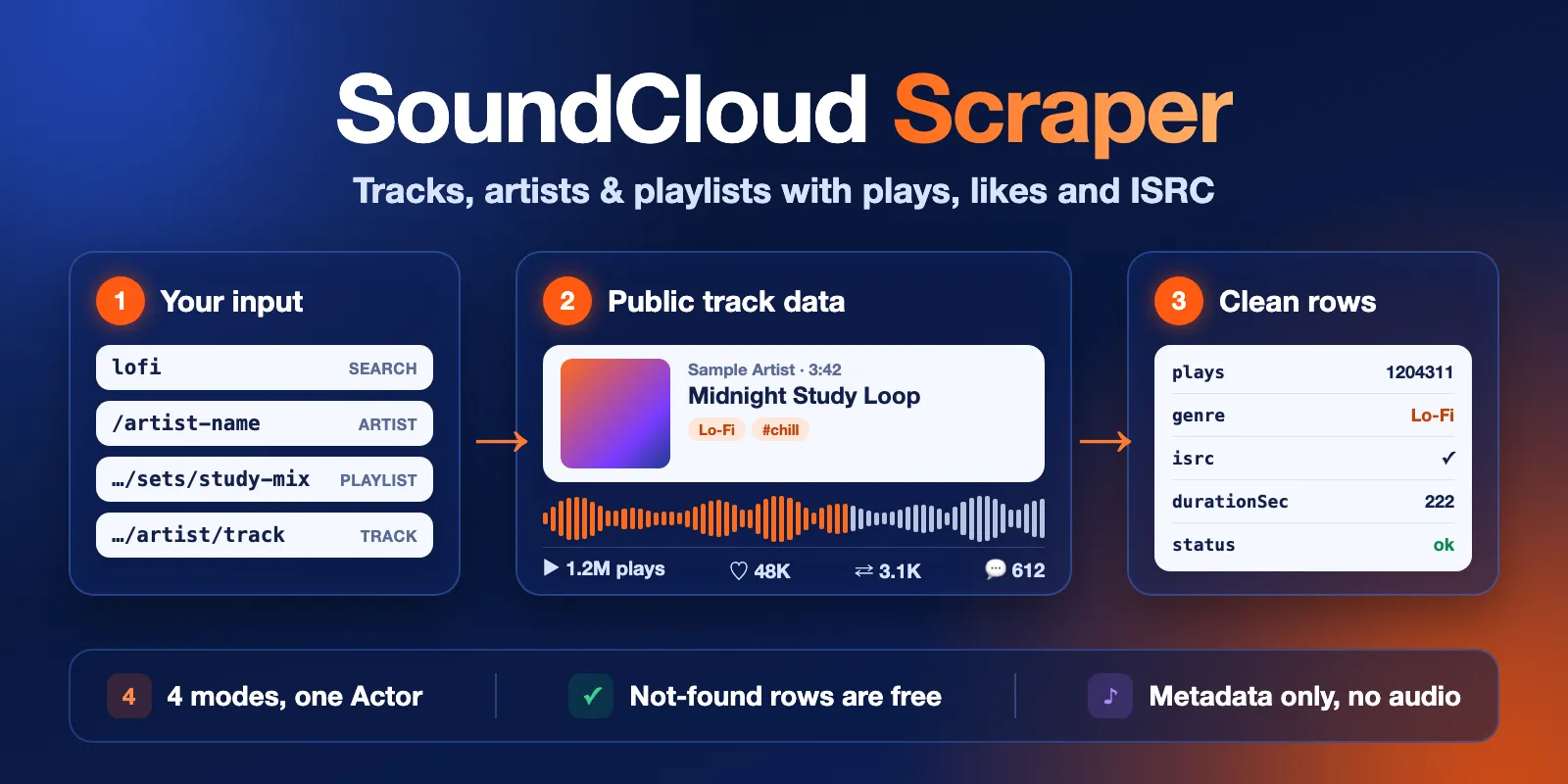
Table of contents
- What it does
- Quick start
- Use cases
- Input
- Output
- Pricing and limits
- Switching from another SoundCloud scraper
- API and integrations
- Troubleshooting
- FAQ
- Learn more
- Support
What it does
SoundCloud Scraper reads the same public data that the SoundCloud website shows to a logged-out visitor. You do not need an account, a password, cookies or an API key. It has four modes:
- Search — tracks that SoundCloud finds for your keywords, in SoundCloud's order.
- Artist — all tracks an artist uploaded, in profile order (usually newest first). Paste a profile link or just the username.
- Playlist — every track of a playlist or album, in playlist order, also for long playlists.
- Track — one row for each track link you paste.
Every row has the same columns, whatever the mode. Each row also says where it came from: the search query or input link, the playlist and the position (1 = first).
The Actor does not download audio and does not collect e-mails, real names or other personal profile data.
Good fit
- Music marketing and A&R: find tracks with many plays or likes for a genre keyword.
- Labels and managers: export an artist's catalog with ISRC, album, label and release date.
- Playlist research: get every track of a playlist with its stats and position.
- Trend reports: run the same searches every week and compare plays.
Not a fit / limits
- SoundCloud search shows at most about 300 tracks per query. Use several narrower queries for more.
- No audio files, no lyrics, no listener data, no private or unlisted content that needs a login.
- No search for playlists or users, no followers lists and no comments text.
- Counts are what SoundCloud shows at fetch time. When an uploader hides a count, the value is
null, not 0.
Quick start
- Open the Input tab.
- Keep What to scrape on Search results and type a keyword in Search queries, for example
lofi(this is the prefill). - Keep Max tracks per query or link at 10 (prefill) or set up to 5,000.
- Click Start.
- Open the Output tab. The Tracks view shows cover, title, artist, plays, likes, reposts, comments, duration and link.
Expected result: 10 rows for lofi in a few seconds, each with title, artist, plays, likes and url.
Use cases
| Buyer job | Input path | Output entity | Key fields | Next integration |
|---|---|---|---|---|
| Find popular tracks in a genre | mode: search, queries | Track | plays, likes, reposts, genre, createdAt | Google Sheets, BI tool |
| Export an artist catalog | mode: user, urls | Track | isrc, albumTitle, labelName, releaseDate, plays | Catalog database, royalty checks |
| Check a playlist | mode: playlist, urls | Track | position, playlistTitle, plays, artist | Playlist pitching reports |
| Track new uploads | mode: search or user, createdWithin | Track | createdAt, plays, url | Schedules + webhooks |
Input
Input fields
| Field | Plain name | Type | Required | Default / prefill | Allowed values | Effect | Example | Recommendation |
|---|---|---|---|---|---|---|---|---|
mode | What to scrape | string | no | default search | search, user (artist), playlist, track | Picks which list is read | "user" | Search for topics, Artist for one account, Playlist for sets and albums |
queries | Search queries | array of strings | in Search mode | prefill ["lofi"] | up to 100 queries, 200 characters each | One search per query | ["lofi", "deep house mix"] | Several narrow queries give more tracks than one broad query |
urls | SoundCloud links or usernames | array of strings | in Artist, Playlist and Track modes | none | up to 100 soundcloud.com links; in Artist mode also flume or @flume | One target per link | ["https://soundcloud.com/flume"] | Paste full links; m. and www. links and links with ?in= or ?si= work |
maxItems | Max tracks per query or link | integer | no | default 100, prefill 10 | 1–5,000 | Stops each search, artist or playlist after this many saved tracks | 500 | Each saved track is one paid event, so set what you need |
createdWithin | Uploaded within | string | no | default any | any, last_hour, last_day, last_week, last_month, last_year | Keeps only tracks uploaded in this period | "last_month" | For monitoring new uploads; skipped tracks are free |
- Duplicate queries (case does not matter) and duplicate links (the same page written another way) run once.
- In Search mode a track that an earlier query already saved is not saved again, so several related queries do not charge twice for one track.
- Short links (
on.soundcloud.com/…,snd.sc/…) are not supported: the run stops with a message. Open the short link in a browser and paste the full link. - An empty list in the active mode stops the run with an input error that says which field to fill.
Interacting settings
| When | Input A | Input B | Effective behavior | Example | Cost/result effect |
|---|---|---|---|---|---|
| Search mode | queries | urls | Only queries is used | urls ignored | none |
| Artist, Playlist, Track mode | urls | queries | Only urls is used | queries ignored | none |
| Search mode with a date | createdWithin | queries | SoundCloud filters the search by upload date | last_week | Fewer tracks, fewer charges |
| Artist with a date | createdWithin | maxItems | Older tracks are skipped and do not count toward maxItems | last_year, 50 | Skipped tracks are free |
| Playlist or Track mode | createdWithin | urls | Not applied: playlists and track links are returned in full, with a warning | — | none |
| Wrong link type | mode | urls | An artist link in Playlist or Track mode is read as an artist, with a warning | playlist + profile link | The artist's tracks are charged as usual |
Input examples
Search a genre
Expected behavior: two searches, up to 120 tracks each, in SoundCloud's order.
Expected output: 240 track rows with query, position, plays, likes, genre.
Limit or cost note: a run like this took about 6 seconds; about $0.51 on the Free plan.
An artist's latest uploads
Expected behavior: reads Flume's tracks in profile order and keeps those uploaded in the last 365 days.
Expected output: track rows with artist, isrc, albumTitle, releaseDate, plays.
A full playlist
Expected behavior: all tracks of the playlist in playlist order, up to 500.
Expected output: track rows with playlistTitle, position, title, artist.
Output
Results go to the run's default Dataset. A short run report goes to the Key-value store as RUN_SUMMARY.
Track fields (status: ok)
| Field | Meaning | Type | Can be empty? | Example |
|---|---|---|---|---|
status | ok for a track row | string | no | ok |
trackId | SoundCloud track id | integer | no | 2119863225 |
title | Track title | string | rarely | All Of The Worlds |
artist | Display name of the uploading account | string | rarely | Flume |
artistId | Uploader id | integer | rarely | 2976616 |
artistUrl | Uploader profile | string | rarely | https://soundcloud.com/flume |
artistFollowers | Uploader followers at fetch time | integer | yes | 2228502 |
artistVerified | Verified badge | boolean | yes | true |
url | Track page | string | rarely | https://soundcloud.com/flume/all-of-the-worlds |
plays | Play count | integer | yes, when hidden | 35963 |
likes | Like count | integer | yes, when hidden | 1071 |
reposts | Repost count | integer | yes, when hidden | 78 |
comments | Comment count | integer | yes, when hidden | 23 |
downloads | Download count | integer | yes, when hidden | 0 |
durationSec | Full length in seconds | number | rarely | 126 |
isPreviewOnly | true = a SoundCloud Go+ track: logged-out listeners hear a 30-second preview | boolean | no | false |
genre | Genre the uploader chose | string | yes | Electronic |
tags | Uploader tags; multi-word tags stay together | array | empty array | ["lofi", "study beats"] |
createdAt | Upload time (UTC) | string | rarely | 2025-06-26T13:01:21Z |
releaseDate | Release date set by the uploader | string | yes | 2025-08-22T00:00:00Z |
license | License the uploader chose | string | yes | all-rights-reserved, cc-by |
labelName | Record label | string | yes | Flume |
isrc | ISRC code | string | yes | US38Y2548239 |
albumTitle | Album title | string | yes | DUMB |
explicit | Explicit flag | boolean | yes | false |
artworkUrl | Cover image, 500×500 | string | yes | https://i1.sndcdn.com/…-t500x500.jpg |
downloadable | The uploader allows downloads on SoundCloud (the Actor never downloads audio) | boolean | yes | false |
commentable | Comments are open | boolean | yes | true |
mode | Mode that produced the row | string | no | user |
query | Search query (Search mode) | string | yes | lofi |
inputUrl | Link or username from the input (link modes) | string | yes | https://soundcloud.com/flume |
playlistId, playlistTitle | Playlist of the row (Playlist mode) | integer, string | yes | 765550887, Study |
position | 1-based rank in the search, artist list or playlist | integer | no | 1 |
source | Always soundcloud | string | no | soundcloud |
fetchedAt | When the row was fetched (UTC) | string | no | 2026-10-15T09:23:40.949Z |
null means SoundCloud did not show the value (for example the uploader hides play counts). The Actor never turns a hidden count into 0.
Status rows (free)
status | When | errorCode | message |
|---|---|---|---|
not_found | The link has no public track, artist or playlist, or it is a site page | NOT_FOUND, UNSUPPORTED_URL | What happened, in plain words |
no_results | A search query found no tracks | — | e.g. no tracks for this query |
error | SoundCloud failed for this input after retries | SOURCE_BLOCKED, SOURCE_UNAVAILABLE and similar | The reason, without links or keys |
Status rows have inputUrl or query set so you can see which input they belong to. They are not charged. A run writes at most 10 status rows to the dataset; the full list of inputs with their status is always in targets of RUN_SUMMARY, and a warning says how many rows were left out.
Run summary (RUN_SUMMARY)
| Field | Meaning |
|---|---|
status | COMPLETE, PARTIAL, NO_RESULTS, ERROR, INVALID_INPUT or CANCELLED |
reason | Why it stopped: MAX_ITEMS, SEARCH_CAP, CHARGE_LIMIT, TIME_LIMIT, PAGE_LIMIT, SOURCE_ERROR |
counts | Tracks saved, not found, duplicates, filtered, unavailable |
targets | One entry per query or link: status, tracks available, pages read, tracks saved |
warnings | Plain-language notes, e.g. the search cap or a link read as another type |
The run ends Succeeded when it stops at your limits (max tracks, spending limit, time). It ends Failed only when the input is invalid or SoundCloud failed; rows saved before a failure stay in the Dataset.
Output example
This is one full row from an Artist run for flume. Counts were taken on 2026-10-15 and change over time.
Pricing and limits
Pricing unit
You pay per event. Platform usage (compute, storage) is included in the price.
| Event | Free plan | Starter (Bronze) | Scale (Silver) | Business (Gold) and higher |
|---|---|---|---|---|
| Track saved | $0.0021 | $0.0020 | $0.0019 | $0.0018 |
| Actor start | $0.005 | $0.005 | $0.005 | $0.005 |
- Track saved: one per
okrow in the Dataset. - Actor start: charged by Apify once per run (per GB of memory; the default 256 MB counts as one).
- Free:
not_found,no_resultsanderrorrows, duplicate inputs and tracks skipped bycreatedWithin.
A search with no matches costs only the start fee. A run whose input is rejected (for example a short link) also costs only the start fee.
Cost examples (Free plan prices)
| Scenario | Input | Charged events | Cost |
|---|---|---|---|
| Prefill search | 1 query, 10 tracks | start + 10 tracks | about $0.026 |
| Genre research | 1 query, 100 tracks | start + 100 tracks | about $0.22 |
| Artist catalog | 1 artist, 1,000 tracks | start + 1,000 tracks | about $2.11 |
| Search with no matches | 1 query | start | $0.005 |
Spending limit
Set Maximum cost per run in the run options. The Actor checks the limit before saving each page of tracks. When the next tracks would go over it, the run stops with PARTIAL / CHARGE_LIMIT, ends Succeeded and keeps everything saved so far.
Limits
- Search: about 300 tracks per query (SoundCloud shows no more). The run summary warns when a query hits this cap.
- Artist and Playlist: up to 5,000 tracks per link (
maxItems). In tests one artist's 5,000 tracks took about 70 seconds at 256 MB, and 2,000 tracks about 30 seconds. - Up to 100 queries or links per run. Many links × 5,000 tracks need a longer run timeout than the default 300 s; a link cut by the timeout is marked
partial. - Tracks that SoundCloud removed or blocked in your playlist are skipped and counted in
skippedUnavailable.
Switching from another SoundCloud scraper
Field names differ from other SoundCloud Actors. Typical mapping:
| Other Actor | This Actor |
|---|---|
startUrls (objects or strings) | urls (both work) |
searchQueries, query | queries |
maxResults, maxItems | maxItems (1–5,000) |
playbackCount | plays |
likesCount | likes |
repostsCount | reposts |
commentCount | comments |
duration (milliseconds) | durationSec (seconds) |
userName, userId, userUrl, userFollowersCount | artist, artistId, artistUrl, artistFollowers |
tagList (one string) | tags (array) |
scrapedAt | fetchedAt |
separate user and playlist rows | artist and playlist fields in every track row |
Extra here: isPreviewOnly, labelName, albumTitle, explicit, position, the source query or link in every row, the createdWithin filter, and free not_found rows. Not here: track descriptions, waveform links and avatar images.
API and integrations
- API: start a run with
POST https://api.apify.com/v2/acts/cliqtomedia~soundcloud-scraper/runsand the JSON input above; read rows from the run's default Dataset. - Export: the Dataset downloads as JSON, CSV, Excel, XML or RSS from the Output tab or the API.
- Scheduling: use Apify Schedules, for example a weekly search with
createdWithin: last_week. - Integrations: Make, Zapier, n8n, Google Sheets and webhooks connect through the Apify integrations tab.
Use with AI agents (MCP)
- MCP server with only this Actor:
https://mcp.apify.com?tools=cliqtomedia/soundcloud-scraper. - Smallest useful input:
{"mode": "search", "queries": ["lofi"], "maxItems": 10}. - Key fields:
titleandartist(what and who),playsandlikes(popularity),createdAt(when uploaded),url(link to cite). - A small search finishes in a few seconds and costs about $0.03. At most about 300 tracks per search query;
not_foundandno_resultsrows explain missing data.
Troubleshooting
Search stops at about 300 tracks
SoundCloud shows no more than about 300 results per search. The run summary has reason: SEARCH_CAP and a warning. Split the topic into narrower queries, for example lofi jazz, lofi piano, lofi beats.
The run fails with "short link"
Links like on.soundcloud.com/… are share links that need a redirect. Open the link in a browser, copy the full soundcloud.com/… address and paste that.
A link returns a not_found row
The page is deleted, private, or not a track, artist or playlist page (for example a search page). Open the link in a logged-out browser window to check.
plays is empty
The uploader hides the count. The value is null on purpose, so you can tell hidden from zero.
A playlist has fewer rows than SoundCloud shows
Some tracks in the playlist were removed or blocked by the uploader. They are counted in skippedUnavailable in RUN_SUMMARY.
FAQ
Do I need a SoundCloud account?
No. The Actor reads only what a logged-out visitor sees.
Can it download MP3 or audio?
No. It collects track data only. downloadable only tells you whether the uploader allows downloads on SoundCloud.
Are the counts live?
They are what SoundCloud showed at fetchedAt. Run again to refresh them.
Is the data complete?
Search is limited to about 300 tracks per query by SoundCloud. Artist and playlist runs return every public track up to maxItems. Hidden counts are null.
Is scraping SoundCloud allowed?
The Actor reads public pages at a modest rate, one request at a time, without login, and it does not collect personal profile data or audio. SoundCloud's terms limit automated collection and reuse. You are responsible for how you store and use the data, including artists' rights; do not use it to train AI models or to republish catalogs.
Learn more
- SoundCloud Terms of Use: rules for using SoundCloud content.
- SoundCloud API Terms of Use: rules for data from SoundCloud's API.
- What is an ISRC?: the recording code in the
isrcfield.
Support
Use the Issues tab of this Actor for bugs, questions and feature requests. Include the run ID, the mode and the error text. Never post tokens, cookies or private data.


