

YouTube Channel Videos Export - Views, Likes & Shorts
Pricing
from $0.18 / 1,000 videos
YouTube Channel Videos Export - Views, Likes & Shorts
Export all videos of YouTube channels with the official YouTube Data API and your free API key: title, date, duration, views, likes, comments, tags and a Shorts flag. Channel URL, @handle or ID.
Pricing
from $0.18 / 1,000 videos
Rating
0.0
(0)
Developer

Cliqto Media
Maintained by CommunityActor stats
0
Bookmarked
2
Total users
1
Monthly active users
8 days ago
Last modified
Categories
Features
Share
YouTube Channel Videos Export gets all videos of one or more YouTube channels: title, publish date, duration, views, likes, comments, tags and a Shorts flag. You paste channel links, @handles or channel IDs and add your own free YouTube Data API v3 key. You get one clean table row per video, newest uploads first.
The Actor uses only the official YouTube Data API v3: no YouTube login, no cookies, no proxy and no page scraping. An API key is required. Without a key the run returns one api_key_required row and stops. A typical run, the 10 newest videos of one channel, cost $0.0052 on the Free plan in our test; 1,000 videos cost $0.25 plus the start fee. A channel export of 1,000 videos uses about 50 units of your free daily Google quota (10,000 units per day).
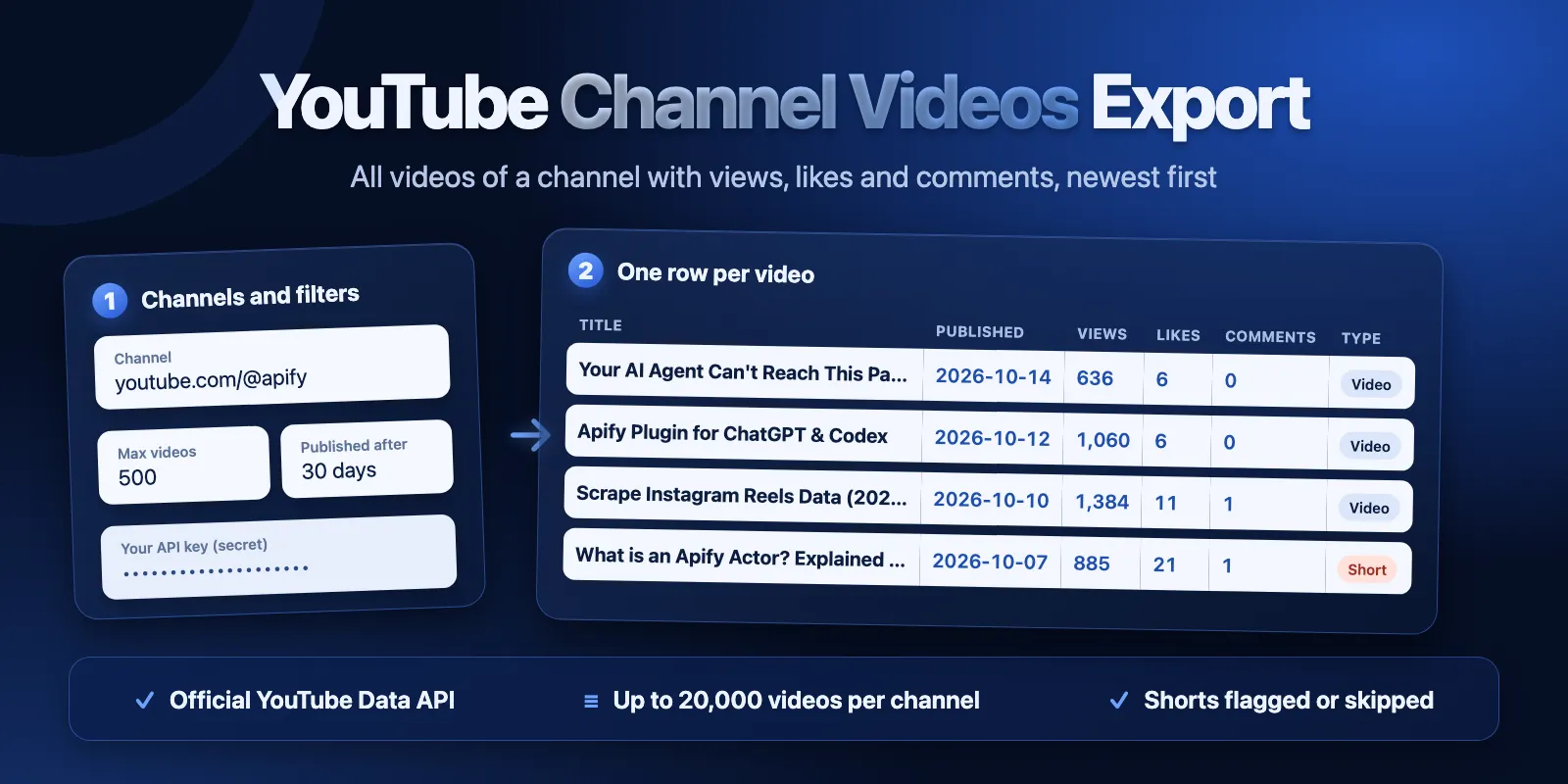
Table of contents
- What it does
- How it works
- Get your API key
- Quick start
- Use cases
- Input
- Output
- Pricing
- Limits
- Coming from a channel scraper
- Scheduling and monitoring
- API, export and AI agents
- Troubleshooting
- FAQ
- Related Actors
- Support
What it does
You give a list of YouTube channels. The Actor exports the public videos of each channel, one row per video, with the current numbers from YouTube. It stops at Max videos per channel or at the first video older than Published after, whatever comes first.
- Accepts
https://www.youtube.com/@handle,/channel/UC…,/user/nameand/c/namelinks, plain@handlesandUC…channel IDs. Up to 100 channels per run. - The same channel given twice is exported once.
- A channel that does not exist gets a free
not_foundrow with your original line. A video link or a non-YouTube link also gets anot_foundrow that says why. nullmeans "no value from YouTube" (for example, hidden likes). It is never written as0.
Good fit
- You need all videos of a channel, or its last N videos, in a table with real numbers.
- You compare several channels: what they post, how often, and which videos work.
- You want an official, stable data source with a clear quota, not a scraper that can break.
Not a fit
- You have no API key and do not want one. This Actor does not work without a key.
- You need comments, transcripts or search results. See Related Actors.
- You need private, unlisted or members-only videos. The Actor sees only public uploads.
- You need view history from the past. YouTube only gives the current numbers.
How it works
- The Actor finds each channel with the official YouTube Data API and your key, and reads its name, @handle, subscribers and video count.
- It reads the channel's public uploads, newest first, 50 at a time, gets the full numbers of each video and marks Shorts with the channel's own Shorts list. It skips Shorts if you turn them off and stops at your video limit or date.
- It saves one row per video in the dataset, plus a free status row for a channel with no matching videos or a channel it cannot find, and a
RUN_SUMMARYrecord with the quota units used.
Get your API key
The key is free. It takes about 5 minutes.
- Open the Google Cloud Console and make or pick a project.
- Go to APIs & Services → Library, find YouTube Data API v3 and click Enable.
- Go to APIs & Services → Credentials → Create credentials → API key.
- Copy the key into the YouTube Data API key field of this Actor.
Tip: in the key settings, limit the key to YouTube Data API v3 only.
Quota cost for you. Google gives each project 10,000 quota units per day for free. Every API request costs 1 unit. This Actor uses about 1 unit per 20 videos, plus 1–2 units per channel. These are numbers from our test runs:
| Run | Videos | Quota units used | Share of the free daily quota |
|---|---|---|---|
| 1 channel, 10 videos | 10 | 4 | 0.04% |
| 1 channel, 20 videos, Shorts skipped | 20 | 7 | 0.07% |
| 100 channels, no video matches the date filter | 0 | 200 | 2% |
| 1 large channel, 8,000 videos | 8,000 | 398 | 4% |
Shorts lists cost a little extra: about 1 unit per 50 Shorts in the exported time range. The quota resets at midnight Pacific Time. You can see your usage in Google Cloud Console → APIs & Services → YouTube Data API v3 → Quotas. Google does not charge money for this quota. See the Google quota page.
The key is a secret field: Apify stores it encrypted. The Actor sends it only to Google in a request header. It never writes the key to the dataset, the logs or the run summary.
Quick start
-
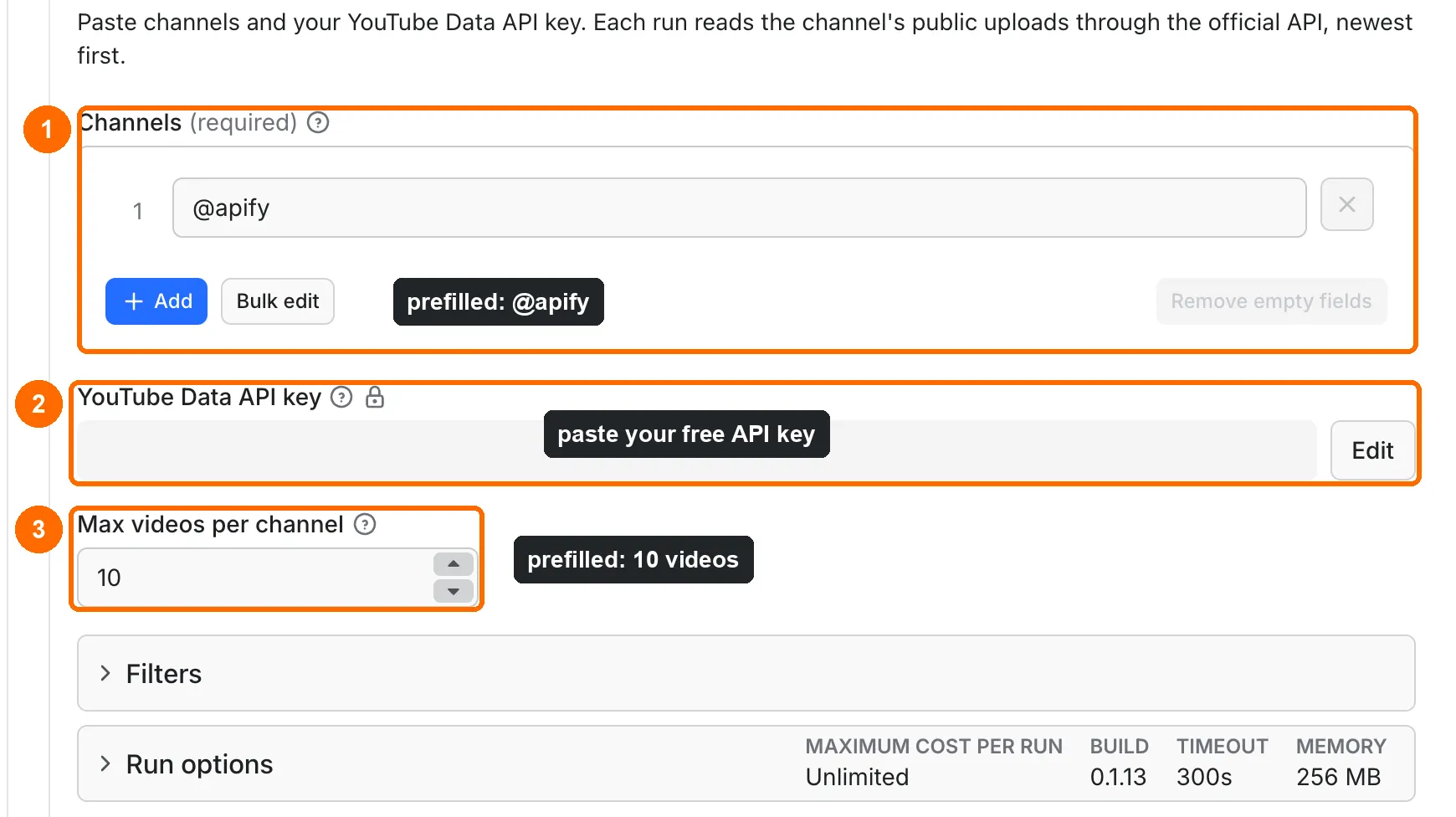
Open the Input tab. Channels already has
@apify(box 1 in the picture). -
Paste your key into YouTube Data API key (box 2). See Get your API key.
-
Keep Max videos per channel at the prefilled 10 (box 3), or set a higher number for a full export.
-
Click Start. 10 videos take a few seconds.
-
Open the Output tab with the Videos view and check
views,likes,commentsand the Short column (box 5). You can download the dataset as CSV, Excel or JSON.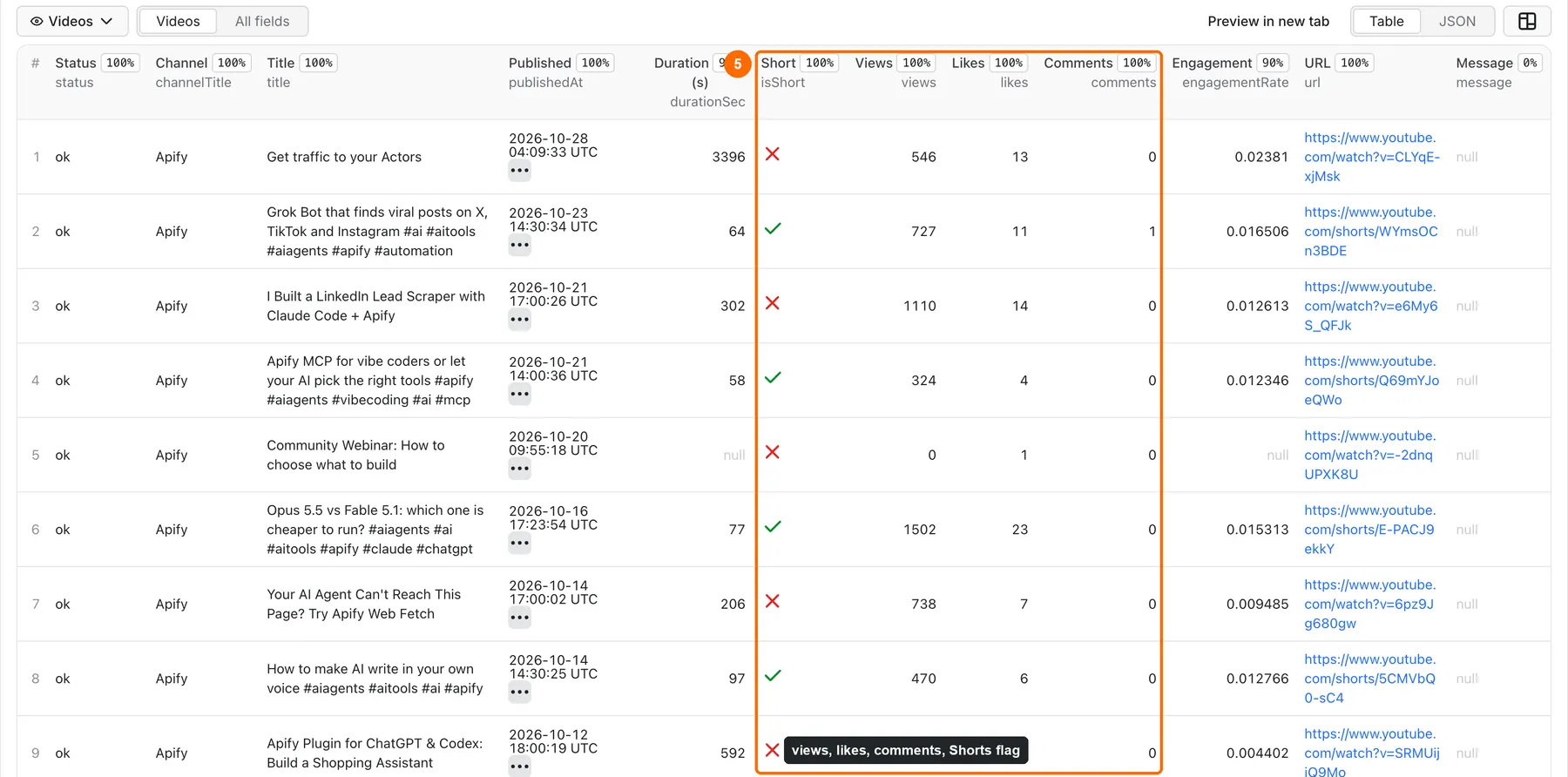
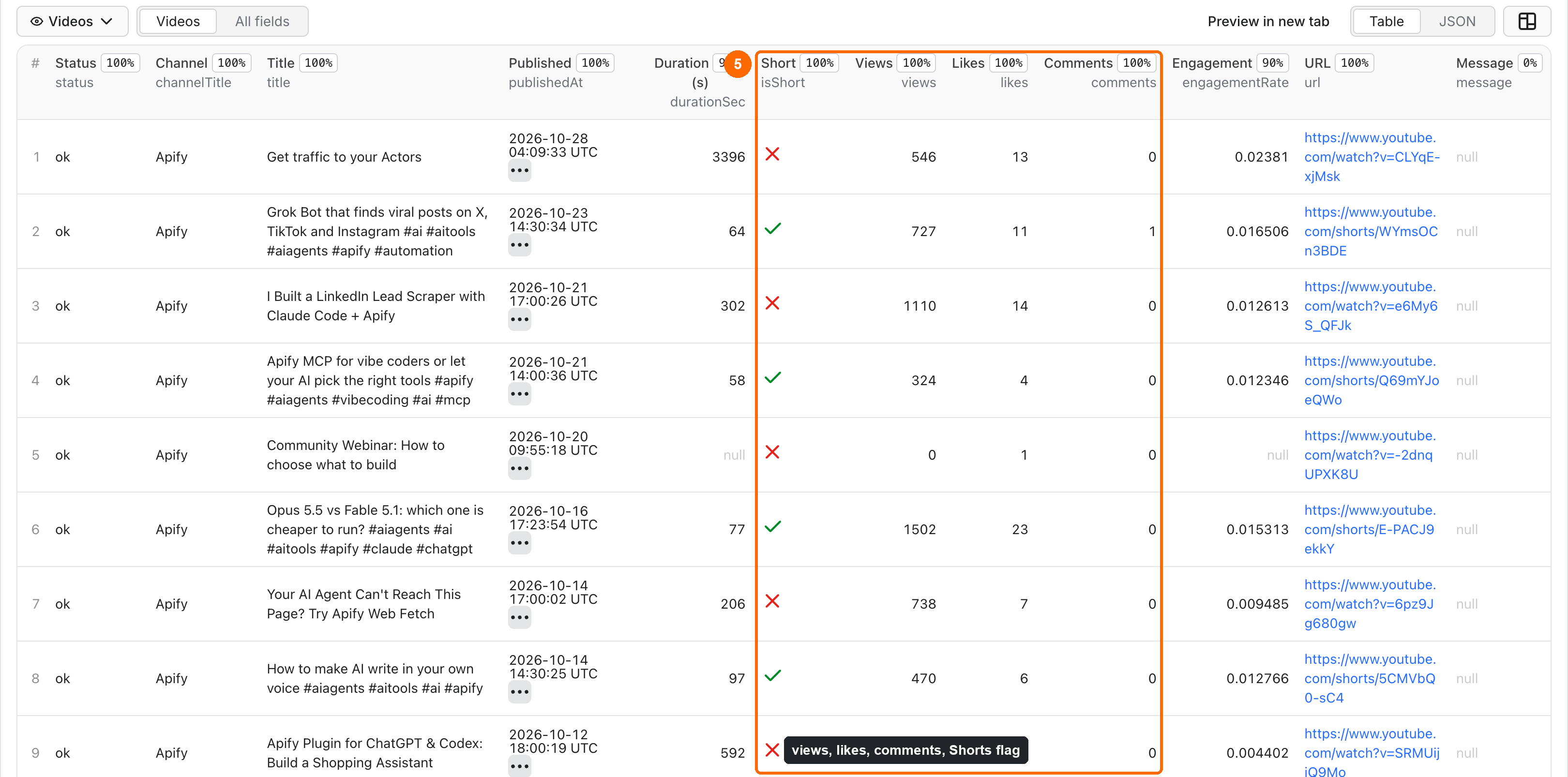
Expected result: 10 rows, the newest videos of the Apify channel, each with views, likes, comments, durationSec and isShort.
If you click Start without a key, the run still ends as SUCCEEDED, with one free api_key_required row that tells you how to get a key. No channel is looked up. Apify charges the Actor start fee for every run, including this one (see Pricing).
Use cases
| Buyer job | Input | Key fields | Next step |
|---|---|---|---|
| Audit a competitor channel | the channel, maxVideos 1,000+ | publishedAt, views, durationSec, isShort | Find posting rhythm and top formats |
| Compare creators before a deal | several channels, publishedAfter 90 days | views, likes, comments, engagementRate | Rank creators by recent engagement |
| Weekly report on your own channel | your channel, publishedAfter 7 days | title, views, likes, fetchedAt | Send to a sheet or dashboard |
| Shorts vs long videos | channel, includeShorts on | isShort, views, durationSec | Compare average views by format |
| Tag and topic research | channels in a niche | tags, categoryId, defaultLanguage | Find common tags and languages |
Input
| Field | Type | Required | Default | Range | What it does |
|---|---|---|---|---|---|
channels | array of strings | yes | prefill: @apify | 1–100 lines | Channel links, @handles or UC… IDs, one per line. Duplicates are exported once. |
apiKey | string, secret | yes, for real data | none | — | Your YouTube Data API v3 key. Without it you get one api_key_required row. |
maxVideos | integer | no | 100 (prefill 10) | 1–20,000 | Newest videos per channel. Use a high number for a full channel export. |
publishedAfter | date or period | no | none | e.g. 2025-01-31 or 30 days | Only videos published on or after this date. Reading stops at the first older video, which saves quota. |
includeShorts | boolean | no | true | — | Turn off to skip Shorts. Every row has isShort either way. |
How settings work together
| When | Effect |
|---|---|
maxVideos and publishedAfter are both set | The Actor stops at whatever comes first. |
includeShorts is off | Shorts are skipped and do not count toward maxVideos. The Actor reads further to fill maxVideos with regular videos and live streams. |
includeShorts is off and a channel posts almost only Shorts | The Actor stops that channel after 500 uploads in a row that are all Shorts and adds a free no_videos row. This keeps your quota and cost low. |
| A channel has no videos in the date range | One free no_videos row for that channel. |
Input examples
Last 10 videos of one channel (the prefill plus your key)
Last 30 days of several channels, no Shorts
The first two lines are the same channel, so it is exported once.
Full export of one large channel
Output
Output example
A real row (the description and tags are cut here):
A channel that does not exist:
(Other fields of this row are null too.)
Output fields
The Videos view shows the main columns. The full JSON has every field.
| Field | Type | Can be null | Example | Meaning |
|---|---|---|---|---|
status | string | no | ok | Row status, see the table below. |
inputChannel | string | yes | @apify | Your original line. |
channelId | string | yes | UCTgwcoeGGKmZ3zzCXN2qo_A | Channel ID. |
channelTitle | string | yes | Apify | Channel name. |
channelHandle | string | yes | @apify | Channel @handle. |
channelUrl | string | yes | https://www.youtube.com/channel/UC… | Channel link. |
channelSubscribers | integer | yes | 35200 | Subscribers, rounded by YouTube to 3 digits. null if the owner hides it. |
channelVideoCount | integer | yes | 300 | Public videos on the channel, as YouTube counts them. |
videoId | string | yes | e6My6S_QFJk | 11-character video ID. |
url | string | yes | https://www.youtube.com/watch?v=… | Video link. Shorts get a /shorts/ link. |
title | string | yes | Video title. | |
description | string | yes | Full description. | |
publishedAt | string, ISO date UTC | yes | 2026-10-21T17:00:26Z | Publish time. |
durationSec | integer | yes | 302 | Length in seconds. null for a live or upcoming stream. |
isShort | boolean | yes | false | The video is a Short. null if YouTube's Shorts list could not be read. |
liveStatus | string | yes | none | none, live, upcoming or was_live (a finished stream). |
views | integer | yes | 176 | View count. |
likes | integer | yes | 3 | Like count. null when the owner hides likes. |
comments | integer | yes | 0 | Comment count. null when comments are off. |
engagementRate | number | yes | 0.017045 | (likes + comments) / views. null when views are 0 or likes and comments are both hidden. |
tags | array of strings | yes | ["Apify"] | Video tags. [] = no tags. |
categoryId | string | yes | 28 | YouTube category ID. |
defaultLanguage | string | yes | en | Language of the title and description, if the owner set it. |
defaultAudioLanguage | string | yes | en | Spoken language, if the owner set it. |
definition | string | yes | hd | hd or sd. |
hasCaptions | boolean | yes | false | The video has captions. |
licensedContent | boolean | yes | false | The uploader claimed the video as licensed content on YouTube. |
madeForKids | boolean | yes | false | The video is marked as made for kids. |
thumbnailUrl | string | yes | https://i.ytimg.com/vi/…/maxresdefault.jpg | Biggest thumbnail link. |
message | string | yes | Reason, for rows that are not ok. | |
source | string | no | youtube-data-api-v3 | Data source. |
fetchedAt | string, ISO date UTC | no | 2026-10-22T05:23:02.678Z | When the row was read. |
Row statuses
status | When | Charged |
|---|---|---|
ok | One public video | video event |
no_videos | The channel was found but has no video that matches your filters | no row charge (the channel event applies) |
not_found | No channel for this line, or the line is not a channel | free |
api_key_required | No key in the input (one row per run) | free |
api_key_rejected | Google says the key is wrong, or the API is not enabled for it (one row per run) | free |
quota_exceeded | Your daily quota ran out during the run | free |
error | Google failed for this channel again and again | free |
Run summary
The run's key-value store has a RUN_SUMMARY record: run status (COMPLETE, PARTIAL, NO_KEY, KEY_REJECTED, INVALID_INPUT, ERROR), stop reason (QUOTA_LIMIT, CHARGE_LIMIT, TIMEOUT, SOURCE_ERROR), quota units used, and one line per channel with the number of videos, Shorts skipped and videos YouTube did not return. The run's status message says the same in one line, for example Saved 10 videos from 1 of 1 channel; 4 quota units of your key used.
Pricing
Pay per event. Apify platform usage is included in the price: you do not pay compute or memory on top. Google does not charge for the API quota.
| Event | When | Free | Bronze | Silver | Gold and above |
|---|---|---|---|---|---|
| Actor start | once per run, charged by Apify automatically | $0.0025 | $0.0025 | $0.0025 | $0.0025 |
| Channel | once per channel that YouTube finds | $0.0002 | $0.0002 | $0.0002 | $0.0002 |
| Video | per ok row | $0.00025 | $0.000225 | $0.0002 | $0.000175 |
That is $0.25 per 1,000 videos on the Free plan and $0.175 on Gold. Channels that are not found, and all status rows, are free.
The start fee is charged per GB of run memory, at least one fee per run. This Actor runs with 256 MB by default and allows at most 512 MB, so it is always one fee.
| Example run | Free | Bronze | Silver | Gold+ |
|---|---|---|---|---|
No key (one api_key_required row) | $0.0025 | $0.0025 | $0.0025 | $0.0025 |
| 1 channel, no video matches the filters | $0.0027 | $0.0027 | $0.0027 | $0.0027 |
| 1 channel, 1 video | $0.00295 | $0.002925 | $0.0029 | $0.002875 |
| 1 channel, 10 videos (the prefill) | $0.0052 | $0.00495 | $0.0047 | $0.00445 |
| 1 channel, 100 videos | $0.0277 | $0.0252 | $0.0227 | $0.0202 |
| 5 channels, 200 videos each | $0.2535 | $0.2285 | $0.2035 | $0.1785 |
| 1 channel, 20,000 videos | $5.0027 | $4.5027 | $4.0027 | $3.5027 |
| 100 lines, no channel found | $0.0025 | $0.0025 | $0.0025 | $0.0025 |
Every run pays the start fee, also a run without a key or with a wrong key. So a run with only 1 video costs more than at a scraper that charges only per video. Put many channels in one run instead of many small runs.
Set Maximum cost per run in the run options to cap a run. The Actor checks the limit before each channel and each batch of rows. It stops before a charge would go above it, keeps what it saved and ends as PARTIAL with reason CHARGE_LIMIT.
Limits
- Up to 100 channels and up to 20,000 videos per channel per run. With the default 300-second timeout and 256 MB memory, 8,000 videos of one channel took about 1 minute. A full test of 20,000 videos (October 2026) finished in about 3.5 minutes and used 919 quota units.
- For several large channels in one run, raise the run timeout. The Actor stops 15 seconds before the timeout, keeps all saved rows and ends as
PARTIALwith reasonTIMEOUT. The run still SUCCEEDED. - If your daily quota runs out during a run, the Actor keeps the rows it saved, adds a free
quota_exceededrow, ends asPARTIALwith reasonQUOTA_LIMIT, and the run SUCCEEDED. Run the rest after the quota resets. - If Google fails for 3 channels in a row, the run keeps saved rows and stops with reason
SOURCE_ERROR. - Rows come in the order of the channel's uploads list: newest uploads first. A video uploaded early but published later by schedule can appear a little out of date order.
- Private, deleted and members-only videos in the uploads list are skipped and are not charged. The run summary counts them.
- Numbers are live at
fetchedAtand change all the time. YouTube roundschannelSubscribers.
Data comes from the YouTube Data API v3 under your own key and Google project. Please follow the YouTube API Services Terms of Service. This Actor is not affiliated with or endorsed by YouTube or Google.
Coming from a channel scraper
If you used a scraper for channel videos, the same data is here under these names. You need to change the input and map the fields once:
| Typical scraper field | This Actor |
|---|---|
startUrls (input) | channels (input) |
title, url | title, url |
viewCount | views (exact number, not "1.2M") |
date | publishedAt |
duration like 12:34 | durationSec (seconds) |
type (video / short / stream) | isShort and liveStatus |
channelName, channelUrl | channelTitle, channelUrl |
numberOfSubscribers | channelSubscribers |
| — | likes, comments, engagementRate, tags, categoryId, hasCaptions, licensedContent, madeForKids |
Scheduling and monitoring
Use an Apify Schedule to run the same channels every day or week, for example with publishedAfter 7 days. Each run saves the current numbers with fetchedAt. Join rows of different runs on videoId to see how views grow. The Actor does not keep data between runs.
YouTube API terms say you should not keep this kind of data (views, likes and other statistics) for more than 30 days without refreshing it. Refresh the numbers with a new run, or delete old datasets. The Actor itself stores nothing after the run.
API, export and AI agents
- Export: download the dataset as JSON, CSV, Excel, XML or HTML.
- API: start a run with
POST https://api.apify.com/v2/acts/cliqtomedia~youtube-channel-videos/runsand the input JSON. Read rows from the run's default dataset. - Integrations: Make, Zapier, n8n, webhooks and Google Sheets work through the standard Apify integrations. Use
videoIdas a stable key.
Use with AI agents (MCP)
- MCP server with only this Actor:
https://mcp.apify.com?tools=cliqtomedia/youtube-channel-videos - Smallest useful input:
{"channels": ["@apify"], "apiKey": "<the user's key>", "maxVideos": 10} - Key output fields:
videoId,title,publishedAt,views,likes,comments,isShort,status. - 10 videos take a few seconds and cost $0.0052 on the Free plan. 8,000 videos of one channel took about 1 minute in our tests.
- The agent needs the user's own YouTube Data API key. Without it the run returns
api_key_required.
Troubleshooting
I got one api_key_required row
Symptom: the run SUCCEEDED with one row and status api_key_required. Reason: the YouTube Data API key field is empty. Action: get a key and run again.
I got one api_key_rejected row
Likely reasons: a typo in the key, the key was deleted, YouTube Data API v3 is not enabled in the key's project, or the key is limited to other APIs or websites. Check: in Google Cloud Console open APIs & Services → Enabled APIs. Action: enable the API, or make a new key.
The run ended with QUOTA_LIMIT
Your project used its 10,000 daily units. The rows saved before that are kept. Run again after midnight Pacific Time, or use a key from another project.
A channel is not_found
Likely reason: a typo in the @handle, or an old /c/name link that YouTube no longer maps. Check: open the channel in a browser and copy its @handle or /channel/UC… link.
A channel has a no_videos row
The channel exists, but no public video matches Published after or Include Shorts. Try a longer period, or turn Shorts on.
I got fewer videos than channelVideoCount
channelVideoCount is YouTube's own count. The uploads list can be shorter: private, deleted and members-only videos are not returned. With Include Shorts off, Shorts are skipped too.
likes or comments is empty
The video owner hid likes or turned comments off. The field is null, not 0, so you can tell "hidden" from "zero".
FAQ
Do I need a YouTube or Google account?
You need a Google account to make the free API key. The Actor does not log in to YouTube and does not use cookies.
Does it cost Google money?
No. The YouTube Data API is free within the daily quota. You pay only the Apify price above.
How do you know which videos are Shorts?
YouTube keeps a list of Shorts for each channel. The Actor reads that list for the same time range. This list is not a documented Google feature; if it cannot be read, isShort is null, not false.
Can I export live streams?
Yes. liveStatus says live, upcoming or was_live. For a live or upcoming stream durationSec is null; a finished stream has its real length.
Is personal data included?
Only public channel and video data that YouTube shows on the channel page. No viewer data and no comments.
Related Actors
- YouTube Search Results Scraper — find channels and videos by keyword, then export their channels here.
- YouTube Comments Scraper — get the comments and replies of a video from your export.
- YouTube Transcript Scraper — get the subtitles and text of a video from your export.
Support
For a bug, question or feature request, open an issue on the Actor's Issues tab on Apify. Add the run ID and your input, but never post your API key.


