

Bayut & Property Finder Listings (UAE) - No login
Pricing
from $0.57 / 1,000 listings
Bayut & Property Finder Listings (UAE) - No login
Get UAE apartments, villas and offices for rent or sale from Bayut and Property Finder in one table: price, beds, baths, size, location, agency, date listed and link. Track rents and new listings by area or search URL. No login.
Pricing
from $0.57 / 1,000 listings
Rating
0.0
(0)
Developer

Cliqto Media
Maintained by CommunityActor stats
0
Bookmarked
2
Total users
1
Monthly active users
6 days ago
Last modified
Categories
Features
Share
Get UAE property listings from Bayut and Property Finder in one table: rent and sale, apartments, villas, offices and more, by area, building or search link. You get one row per listing: price in AED, rent period, type, bedrooms, bathrooms, size in sqft and m², location, agency, photos, date listed and the listing link.
Use it for rent and price research, market reports, investor deal lists or a daily feed of new listings. The smallest run is one area with 20 listings, for example Dubai Marina: it usually takes 5–35 seconds and costs about $0.021. No login and no account on either site.
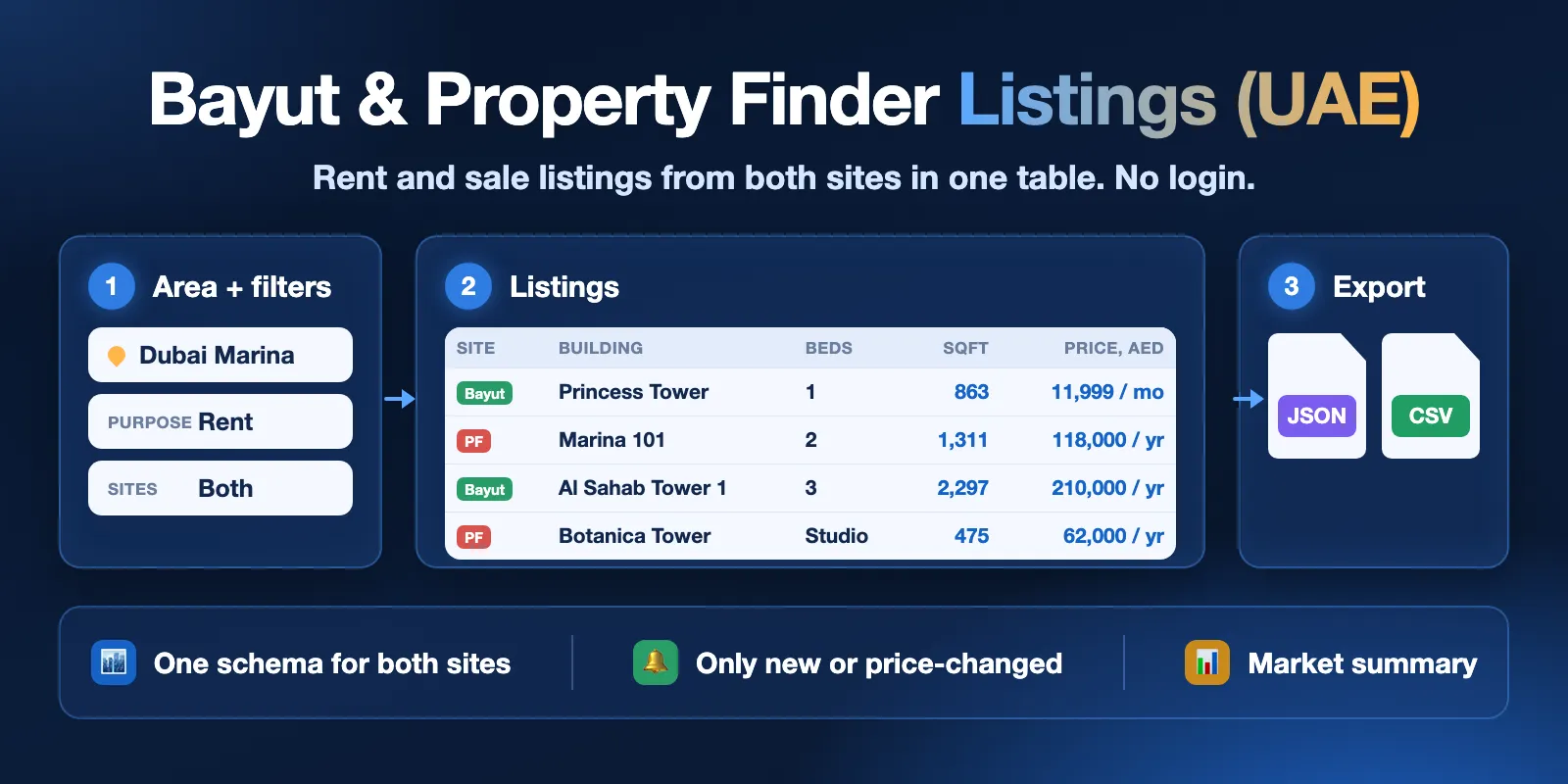
Table of contents
- What it does
- How it works
- Quick start
- Use cases
- Input
- Output
- Pricing
- Limits
- API, export and integrations
- Troubleshooting
- FAQ
- Related Actors
- Support
What it does
The Actor reads the public search results of Bayut and Property Finder, the two largest property portals in the United Arab Emirates. You give areas, communities, buildings or search links, and you choose rent or sale and the filters. You get one row per listing, with the same columns for both sites.
| You give | You get one row per listing with |
|---|---|
an area, community or building, for example Dubai Marina, JVC or Business Bay | title, price in AED, rent period, purpose, property type, beds, baths, size in sqft and m², location path, coordinates, agency, verified flag, photos, posted date, link |
| a Bayut or Property Finder search link with your filters | the same fields; the filters in the link are kept |
site: both | listings from both sites in one table, the site column says which |
It reads only what the sites show to a visitor who is not logged in. It does not save phone numbers or e-mails: they are removed from descriptions, and contact buttons are not read.
Good fit
- Compare rents or sale prices in an area or building, by beds, size or property type.
- Track new listings and price changes in an area with a daily or weekly schedule.
- Build an investor or broker list of off-plan or ready properties with price per sqft.
- See which agencies list the most in an area.
- Get both portals in one table, without merging two exports by hand.
How it works
- You choose the site (Bayut, Property Finder or both), rent or sale, and one or more places or search links.
- The Actor finds each place on each chosen site, adds your filters and reads the result pages one by one. Duplicates are saved once.
- It saves one row per listing in the Dataset, a
RUN_SUMMARYwith the result of each search, and aMARKET_SUMMARYwith median prices for the saved listings. - Optional: with change tracking on, it remembers the listings of each search in your storage and marks each row
new,price_changedorunchangedon the next run.
Quick start
-
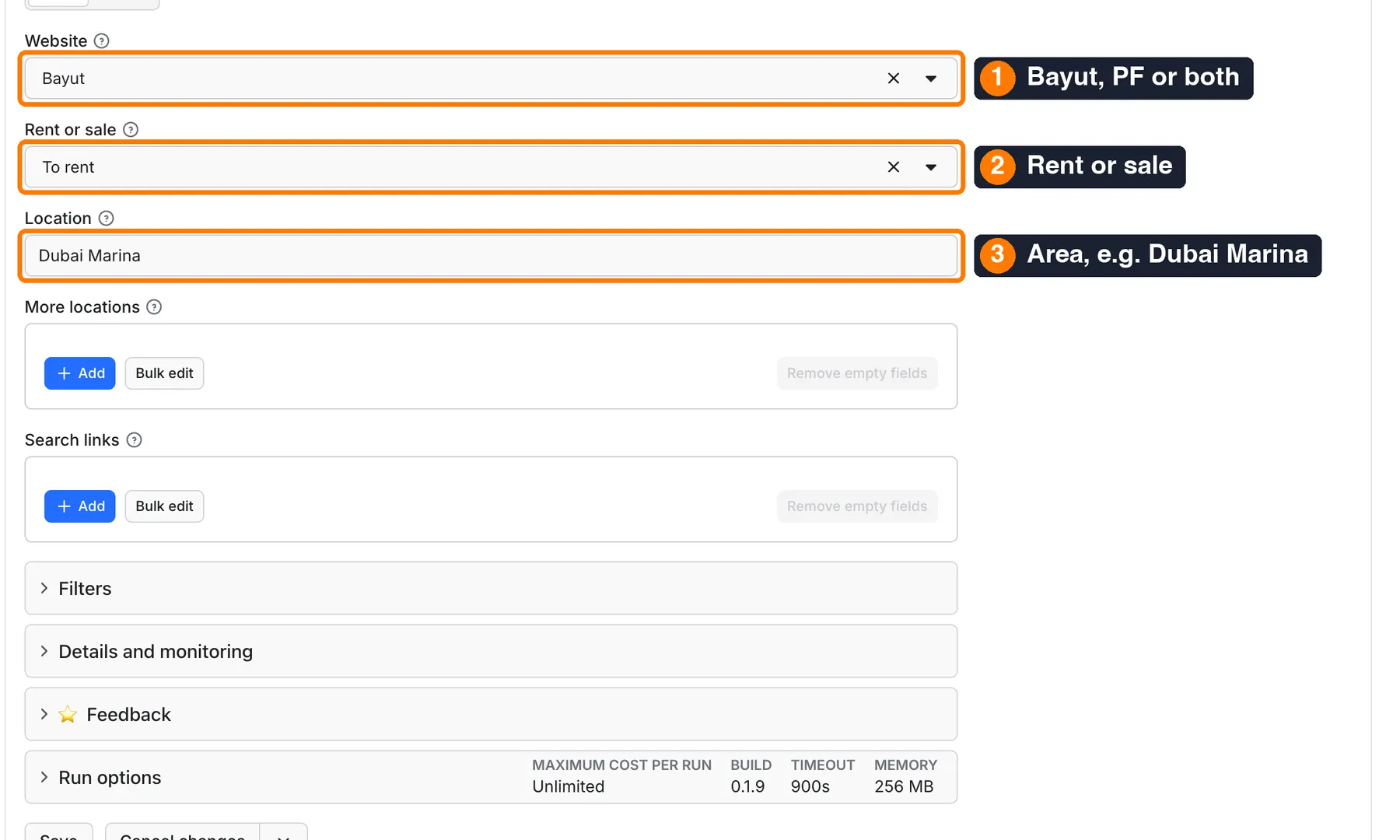
Open the Input tab. Keep Website at
Bayut, or chooseProperty FinderorBoth sites(box 1). -
Keep Rent or sale at
To rent, or chooseFor sale(box 2). -
Type an area in Location, for example
Dubai Marina(box 3). Keep Max listings at 20, the form's prefill. -
Click Start.
-
Open the Output tab. The Listings view shows price, rent period, type, beds, baths and size first (box 5). The More fields view shows the rest.
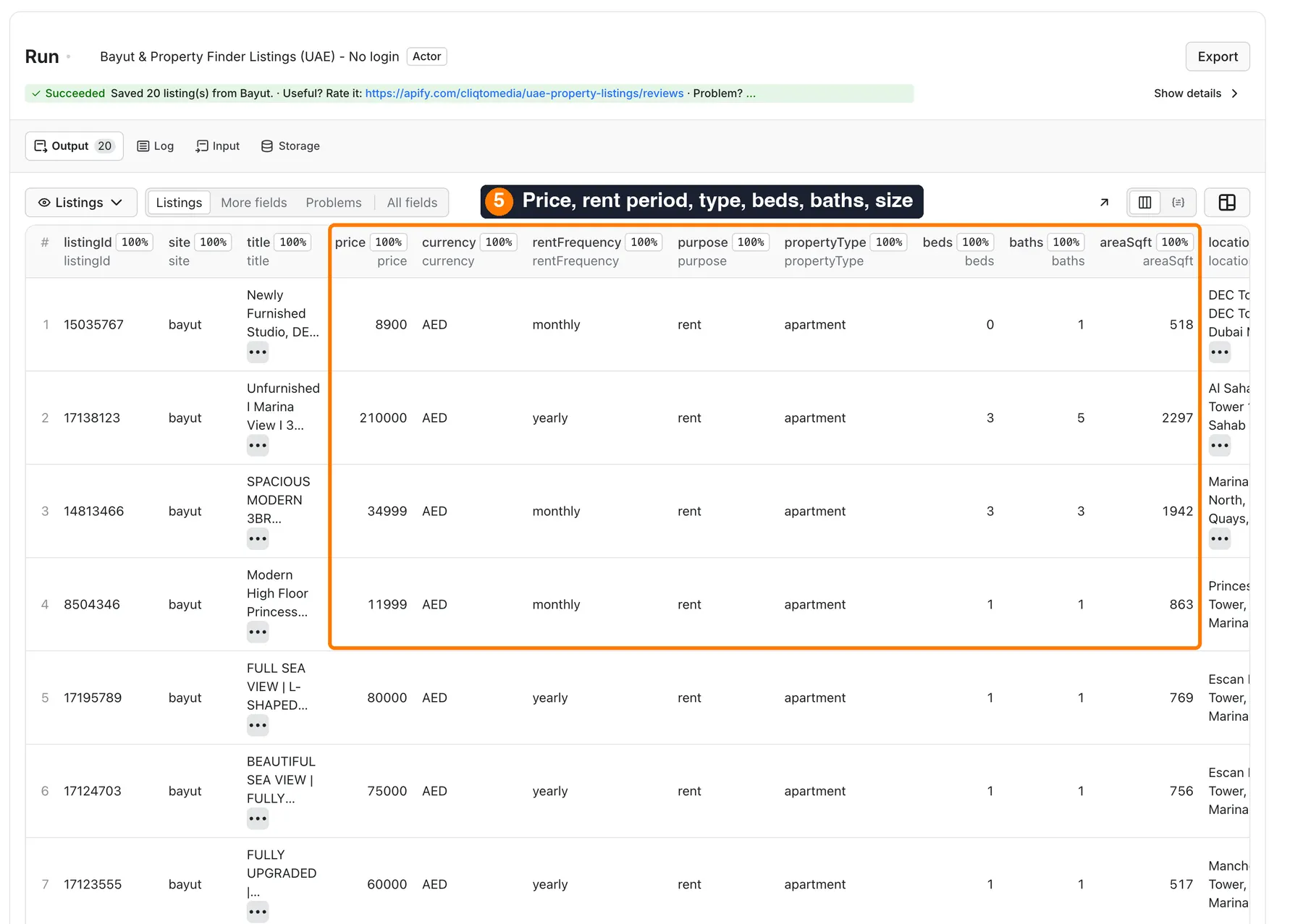
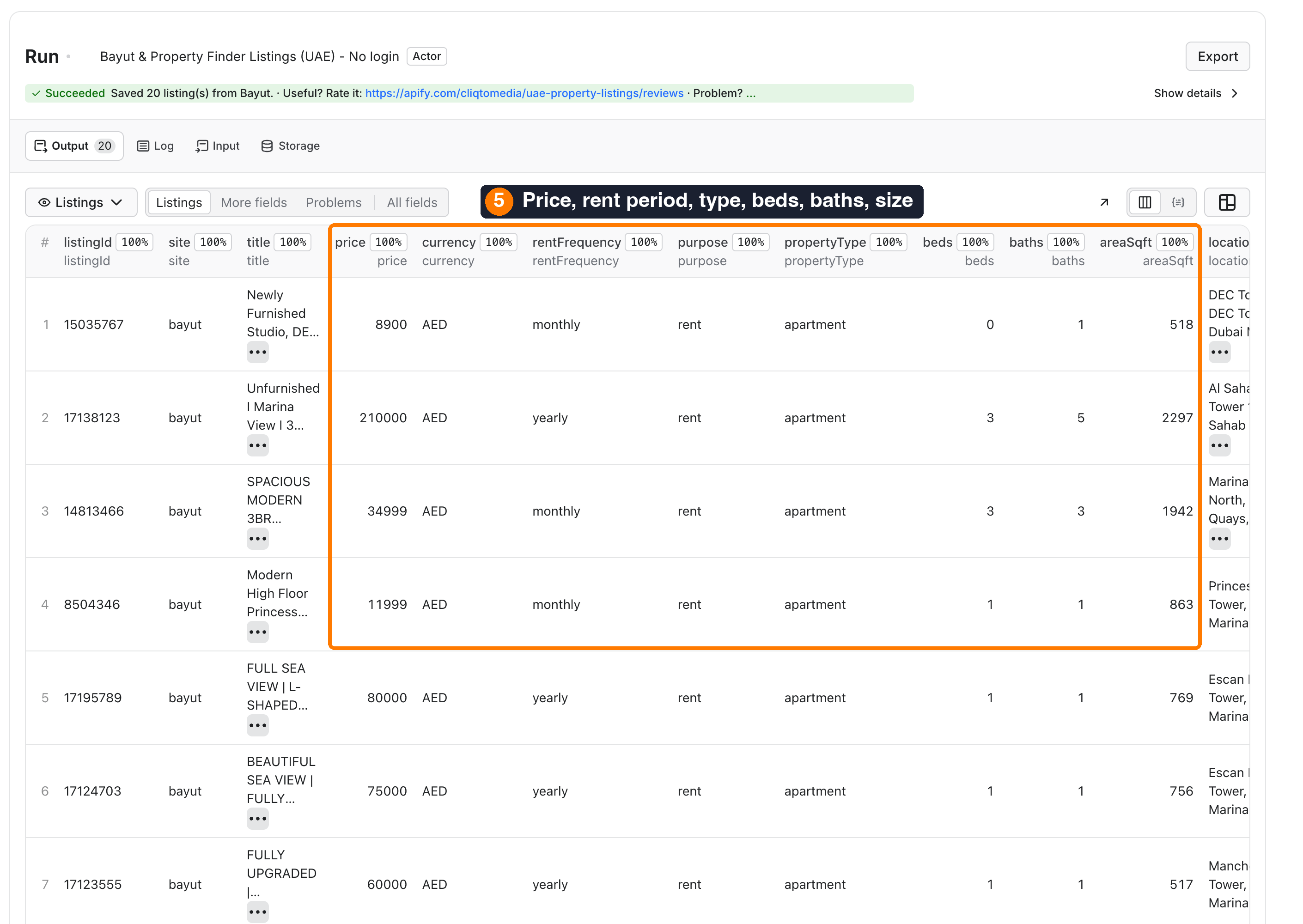
Expected result: 20 rent listings in Dubai Marina from Bayut, in the site's default order, usually in 5–35 seconds.
Use cases
| Buyer job | Input path | Output entity | Key fields | Next integration |
|---|---|---|---|---|
| Rent benchmark for an area | location, purpose: rent, site: both | listing | price, rentFrequency, beds, areaSqft, location | spreadsheet, MARKET_SUMMARY |
| Sale price per sqft | location, purpose: sale, propertyType | listing | price, areaSqft, completionStatus, handoverDate | BI tool |
| New listings and price cuts | onlyChanges: true, schedule | listing | changeType, previousPrice, price, url | Slack or Notion |
| Off-plan project list | completionStatus: off-plan, purpose: sale | listing | paymentPlan, handoverDate, agency, url | CRM import |
| Agency activity | location, maxItems: 1000 | listing | agency, agencyId, postedAt | spreadsheet |
Input
Input fields
| Field | Plain name | Type | Default / prefill | Allowed values | Effect |
|---|---|---|---|---|---|
site | Website | string | bayut | bayut, propertyfinder, both | Each place is searched on every chosen site |
purpose | Rent or sale | string | rent | rent, sale | Properties to rent or for sale |
location | Location | string | prefill Dubai Marina | area, community, building or city; or a search link | The main place to search |
locations | More locations | array of strings | empty | up to 20 places and links in total | More places in the same run |
startUrls | Search links | array of strings | empty | Bayut https://www.bayut.com/to-rent/... or /for-sale/..., Property Finder https://www.propertyfinder.ae/en/search?... | Your search pages with filters; single listing pages are not accepted |
propertyType | Property type | string | any | apartment, villa, townhouse, penthouse, hotel-apartment, land, villa-compound, commercial, office, shop, warehouse | Only this type |
minPrice, maxPrice | Min / max price (AED) | integer | empty | 0 – 10,000,000,000 | Price range as the site lists it (rents normally per year) |
beds | Bedrooms | array | empty (any) | 0 (studio), 1 – 6, 7 (7+) | Only these bedroom counts |
baths | Bathrooms | array | empty (any) | 1 – 6, 7 (7+) | Only these bathroom counts |
furnishing | Furnishing | string | any | furnished, unfurnished | Furnished or unfurnished only |
completionStatus | Completion status | string | any | ready, off-plan | Mostly for sales |
verifiedOnly | Verified listings only | boolean | false | Only listings the site marks as verified | |
sort | Sort | string | popular | newest, price-asc, price-desc, verified (Bayut) | Which listings come first; with a small limit this decides what you get |
maxItems | Max listings | integer | 100 (prefill 20) | 1 – 10,000 | Total across all places and sites |
includeDetails | Add listing-page details (Bayut) | boolean | false | Opens each Bayut listing page for the description; costs more (see Pricing) | |
trackChanges | Track changes between runs | boolean | false | Fills changeType and previousPrice from the last run of the same search | |
onlyChanges | Only new or price-changed listings | boolean | false | Saves only new and price-changed listings; turns on change tracking | |
monitorName | Monitor name | string | empty | letters, digits, dashes, up to 40 | Keeps the same memory when you change filters |
deliveryConnector | Send results to | string | empty | your MCP connector | Posts a short summary after the run |
deliveryTarget | Notion page or channel | string | empty | Notion page link or Slack channel ID | Where the summary goes |
A run needs at least one place or search link. Without it, or with a value outside the limits, it stops with INVALID_INPUT and a message that names the field and shows a valid example. A link to another site gives a free invalid_input row and the other searches still run.
Interacting settings
| When | Input A | Input B | Effective behavior |
|---|---|---|---|
| Both sites and several places | site: both | location, locations | Each place is searched on Bayut and on Property Finder: 3 places = 6 searches |
| Search link and form filters | startUrls | purpose, beds, minPrice, … | The filters in the link win; form filters are added only where the link has none. Rows always carry the listing's own purpose |
| Search link and site | startUrls | site | A link is searched on its own site, whatever site says |
| Shared limit | maxItems | several places and sites | The limit is shared: the run stops when this many listings are saved in total |
| Only changes | onlyChanges: true | maxItems | maxItems counts every listing checked, saved or not |
| Max listings in two places | maxItems | platform Max items option | The smaller of the two is used |
Input examples
Rentals in one area
Expected behavior: one Bayut search, one result page.
Expected output: 20 rent listings with price, rentFrequency, beds, areaSqft, url.
Two-bedroom apartments for sale on both sites
Expected behavior: 4 searches (2 places × 2 sites), up to 500 listings in total.
Expected output: listing rows with site and search that show where each row came from.
Weekly feed of new listings and price changes
Expected behavior: the first run saves all checked listings as new; later runs save only new listings and listings with a new price.
Expected output: rows with changeType and, for price changes, previousPrice.
Output
Output fields
The Output tab has three views: Listings (the main columns), More fields and Problems (rows for places or links that could not be searched). Every row has status, site, search and fetchedAt.
| Field | Meaning | Type | Can be empty? |
|---|---|---|---|
listingId | The site's own listing ID, stable: use it to remove duplicates across runs | string | only on problem rows |
site | bayut or propertyfinder | string | no |
status | ok for a listing; not_found, invalid_input or error for a free problem row | string | no |
title | Listing headline | string | rarely |
price, currency | Price in AED; for rentals the rent per rentFrequency period | number, string | yes, when the site hides the price |
rentFrequency | yearly, monthly, weekly or daily, as the site shows it | string | null for sales |
purpose | rent or sale | string | no |
propertyType | apartment, villa, townhouse, penthouse, office and similar | string | rarely |
beds, baths | Bedrooms (0 = studio) and bathrooms | integer | sometimes (for example land or offices) |
areaSqft, areaSqm | Size in square feet and square metres | number | sometimes |
location, locationPath, latitude, longitude | Place, deepest level first; levels from the city down; coordinates | string, array, number | coordinates sometimes |
agency, agencyId, agentName | Brokerage and the agent name on the card; no phones or e-mails | string | sometimes |
referenceNumber, dldBuildingId | Agency reference; Dubai Land Department building reference (Bayut) | string | often |
furnishing, completionStatus, isVerified | Furnished or not; ready or off-plan; verified by the site | string, boolean | sometimes |
amenities, coverPhotoUrl, photoUrls, photoCount | Features and photos | array, string, integer | sometimes |
description | Full text, phones and e-mails removed. Bayut: only with includeDetails; Property Finder: always | string | yes on Bayut without details |
handoverDate, paymentPlan | Off-plan handover date and payment plan percentages | string, object | only off-plan listings that state them |
postedAt, updatedAt | When the listing was published and last updated | ISO date | sometimes |
url | Listing page | string | only on problem rows |
changeType, previousPrice | new, price_changed or unchanged; the old price | string, number | only with change tracking |
message | What went wrong on a problem row and how to fix the input | string | null on listings |
null means the site did not show the value; it never means zero.
Output entities and surfaces
| Situation | Where | Result shape | What to do |
|---|---|---|---|
| Normal listing | Dataset | one row with status: ok | open the Output tab or export |
| Place not found on a site | Dataset + RUN_SUMMARY | one free row with status: not_found and message | use another spelling, a bigger area or a search link |
| Link that is not a Bayut or Property Finder search | Dataset + RUN_SUMMARY | one free row with status: invalid_input | fix the link |
| Site error for one search | Dataset + RUN_SUMMARY | one free row with status: error; other searches still run | run again later |
| Run stopped at a limit | RUN_SUMMARY | limitReached: MAX_ITEMS, or reason CHARGE_LIMIT / TIME_LIMIT | raise the limit |
| Prices of the saved listings | MARKET_SUMMARY | median, min and max price, median price per sqft, median days listed; by site, search, beds and type | read it from the key-value store |
RUN_SUMMARY in the key-value store has the run status (complete, partial, no_results, not_found, invalid_input, error), counts, and for each search the site's total, pages read, rows saved, duplicates and warnings. MARKET_SUMMARY uses only the listings saved by this run, asking prices in AED, and for rentals only yearly rents.
Output example
One row from the Quick start run, trimmed (amenities and photos shortened):
Coming from another Bayut or Property Finder scraper
The columns are not the same as the sites' own field names, so a pipeline built on other output needs a rename. The main ones:
| Site field | Here |
|---|---|
Bayut externalID, Property Finder id | listingId |
Bayut rooms, Property Finder bedrooms | beds |
Bayut baths, Property Finder bathrooms | baths |
Bayut area (m²) | areaSqm, and areaSqft in square feet |
| nested price objects | price + currency + rentFrequency |
Rent rows also include monthly, weekly and daily rents (with rentFrequency), not only yearly ones. Promotion flags of the sites (featured, premium, ranking score) are not saved.
Send results to Slack or Notion
Pick your connector in the optional deliveryConnector field. After the run saves its data, the Actor posts a short summary there with the top listings and a link to the full dataset. Put a Notion page link or a Slack channel ID in deliveryTarget: in Notion every run is added on top of that one page. Without a page link, Notion delivery is skipped and the run summary says so. A delivery error never fails the run and costs nothing extra. Connect a service once in Apify Console → MCP connectors.
Use case → fields
| Buyer job | Input path | Output entity | Key fields | Next integration |
|---|---|---|---|---|
| Rent benchmark | location, purpose: rent | listing | price, rentFrequency, beds, areaSqft | spreadsheet |
| Price changes | onlyChanges, schedule | listing | changeType, previousPrice | Slack or Notion |
| Area market report | site: both, maxItems: 1000 | MARKET_SUMMARY | medianPrice, medianPricePerSqft, byBeds | report |
Pricing
Pricing unit
You pay per saved listing, plus a start fee per run:
| Event | Free plan | Gold plan and above | When |
|---|---|---|---|
| Actor start | $0.005 | $0.005 | once per run |
| Listing | $0.00081 ($0.81 per 1,000) | $0.00057 | each saved listing row |
| Listing with full description | $0.00125 | $0.00088 | a Bayut listing saved with includeDetails on; charged instead of Listing, not on top |
| Unchanged listing checked | $0.0002 | $0.00014 | with onlyChanges on: a listing read and compared, with no change, so no row is saved |
Bronze and Silver plans pay between the two columns (Listing: $0.00073 and $0.00065). The start fee scales with run memory (one event per GB, at least one); the default 256 MB and the 512 MB used for runs over 4,000 listings both count as one event. Platform usage is included.
Rows with not_found, invalid_input or error are free. A valid search with no matching listings costs only the start fee. A run that fails because a site does not answer costs the start fee plus the listings saved before the error. The run stops at Max listings or at the maximum cost per run you set.
Cost examples
Free plan, calculated from the prices above:
| Scenario | Input scope | Listings | Total |
|---|---|---|---|
| Quick start | 1 area, maxItems: 20 | 20 | $0.021 |
| Default run | 1 area, maxItems: 100 | 100 | $0.086 |
| Bayut with full description | 1 area, includeDetails, maxItems: 100 | 100 | $0.130 |
| Weekly changes | 100 checked, 5 new or price-changed | 5 + 95 checks | $0.028 |
| Area report | both sites, maxItems: 1000 | 1,000 | $0.815 |
| 10,000 listings (maximum) | both sites, Dubai, maxItems: 10000 | 10,000 | $8.11 |
| No matching listings | 1 area, strict filters | 0 | $0.005 |
Limits
- Up to 10,000 listings per run and up to 20 places and search links in total.
- Property Finder serves at most 50 result pages per search, about 1,000–1,250 listings. A bigger search stops there, and
RUN_SUMMARYwarns with the site's real total. Split it by area, property type, beds or price range to get more. Bayut has no such limit in our tests (about 9,000 listings from one search). - The platform Max items option (run options) also limits paid rows; the run stops at the smaller of it and Max listings.
- Speed: 5–35 seconds for 20 Bayut listings, under 35 seconds for 500 Bayut listings, and 4–7 minutes for 10,000 from both sites. Property Finder is slower: about 3 minutes for 500 listings from two areas on both sites, and 4–6 minutes for 1,200 Property Finder listings.
includeDetailsopens one page per Bayut listing: about 1–2 minutes for 100. - The default run timeout is 15 minutes. At the timeout, the run stops early, keeps the listings saved so far and ends as
partialwithTIME_LIMIT. - Prices are asking prices from the listings, not sale or rent transactions. Some listings hide the price (
price: null). - Rents are listed as the site shows them; most UAE rents are yearly, but some are monthly, weekly or daily. Check
rentFrequencybefore you compare. - Change tracking keeps its memory in a key-value store named
uae-property-listings-monitorin your account (or-2if that name is taken). Deleting it starts tracking from zero. - Only public listings. No phone numbers, e-mails or contact forms; nothing behind a login.
API, export and integrations
- API: start a run with the input JSON above through the Apify API and read the Dataset items.
- Export: JSON, CSV, Excel, XML or HTML from the Output tab or the API.
- Scheduling: create a schedule in Apify Console with
onlyChanges: trueto get new listings and price changes every day or week. - Webhooks / no-code: use Apify integrations (Make, Zapier, n8n, webhooks) to send each finished run's Dataset to the next tool.
- Slack or Notion: set
deliveryConnector(see Output).
Use with AI agents (MCP)
- MCP server URL with only this Actor:
https://mcp.apify.com?tools=cliqtomedia/uae-property-listings. - Smallest useful input:
{"site": "bayut", "purpose": "rent", "location": "Dubai Marina", "maxItems": 20}. - Key output fields:
priceandrentFrequency(price and rent period),beds,baths,areaSqft(size),location(place),agency,url(link to the listing). - Typical run: 5–35 seconds and about $0.021 for 20 listings. Keep
maxItemsat 10,000 or less.
Troubleshooting
The run found no listings
Symptom: status no_results or not_found, and only rows in the Problems view.
Likely reason: the place name is not known to the site, or the filters are too strict.
Check: message in the row; resolvedLocation and alternatives for the search in RUN_SUMMARY.
Action: use the name as the site writes it (Jumeirah Village Circle or JVC), a bigger area, fewer filters, or paste a search link from the site.
I got fewer listings than Max listings
Symptom: status complete and fewer rows than maxItems.
Likely reason: the site has fewer listings for this search, or Property Finder stopped at its 50-page limit.
Check: totalOnSite, pagesFetched and warnings in RUN_SUMMARY.
Action: add more places, or split a big Property Finder search by area, type or price.
Some rents look much lower than others
Symptom: a few rent prices are about 12 times lower.
Likely reason: those are monthly rents (or weekly or daily).
Check: rentFrequency.
Action: filter by rentFrequency: yearly, or convert. MARKET_SUMMARY already uses yearly rents only.
The run failed with a site error
Symptom: the run is marked failed, status error or partial with SOURCE_ERROR.
Likely reason: a site did not answer after several retries.
Check: error rows and the searches in RUN_SUMMARY. Listings saved before the error stay in the Dataset and are charged; the error rows are free.
Action: run again later.
The run stopped with INVALID_INPUT
Symptom: status invalid_input, the run is marked failed.
Likely reason: no place and no search link, a value over the limits, or a wrong field type.
Check: the run message; it names the field and shows a valid example.
Action: fix the field and run again. Nothing is charged except the start fee.
FAQ
Do I need a Bayut or Property Finder account?
No. The Actor reads only the public search results and listing pages that the sites show without login.
Can I get the agent's phone number?
No. The Actor does not save phone numbers or e-mails. It keeps the agency name and the agent name shown on the card, and the listing link.
Which areas work?
Any area, community, building or city the site's own search knows: Dubai, Abu Dhabi, Sharjah, Ajman, Ras Al Khaimah and the rest of the UAE. If a name is not found, the row says so and RUN_SUMMARY lists close matches.
How fresh is the data?
Each run reads the sites at that moment. postedAt and updatedAt come from the site; fetchedAt is when the row was read.
Is it legal to scrape Bayut and Property Finder?
The Actor reads only public listings and does not collect personal contact data. The sites' terms restrict automated access. You are responsible for using the data in line with those terms and the laws that apply to you. This is an unofficial tool, not affiliated with Bayut or Property Finder.
Related Actors
- Redfin & Realtor Listings Scraper (US) — the same kind of table for US homes for sale, sold and rent
- 99acres & MagicBricks India Property Scraper — property listings from India's two big portals
- LoopNet & Crexi Commercial Real Estate Scraper — commercial property for sale and lease
Support
For a bug, question or feature request, open the Actor's Issues tab on Apify. Include the run ID, your input and the error text. Never send tokens, cookies or private data.
⭐ Found it useful? Rate this Actor. Something wrong? Report a problem — we fix reported problems.


