

99acres & MagicBricks India Property Scraper - No Login
Pricing
from $1.20 / 1,000 saved listings
99acres & MagicBricks India Property Scraper - No Login
Get rent and sale listings from MagicBricks and 99acres in one table: price, price per sq ft, area, BHK, locality, project, builder, amenities as names, all photos and who listed it. Filter by city, type, BHK and budget. No login.
Pricing
from $1.20 / 1,000 saved listings
Rating
0.0
(0)
Developer

Cliqto Media
Maintained by CommunityActor stats
0
Bookmarked
3
Total users
2
Monthly active users
4 days ago
Last modified
Categories
Share
India Property Listings Scraper reads public rent and sale listings from MagicBricks and 99acres for one Indian city and returns one row per listing with price, area, BHK, locality, project, builder, amenities, photos and who listed it.
It is for brokers, property investors, rental analysts and proptech teams who compare prices in a city. The smallest run is one city: Bangalore + rent + 20 listings finishes in about 10–25 seconds.
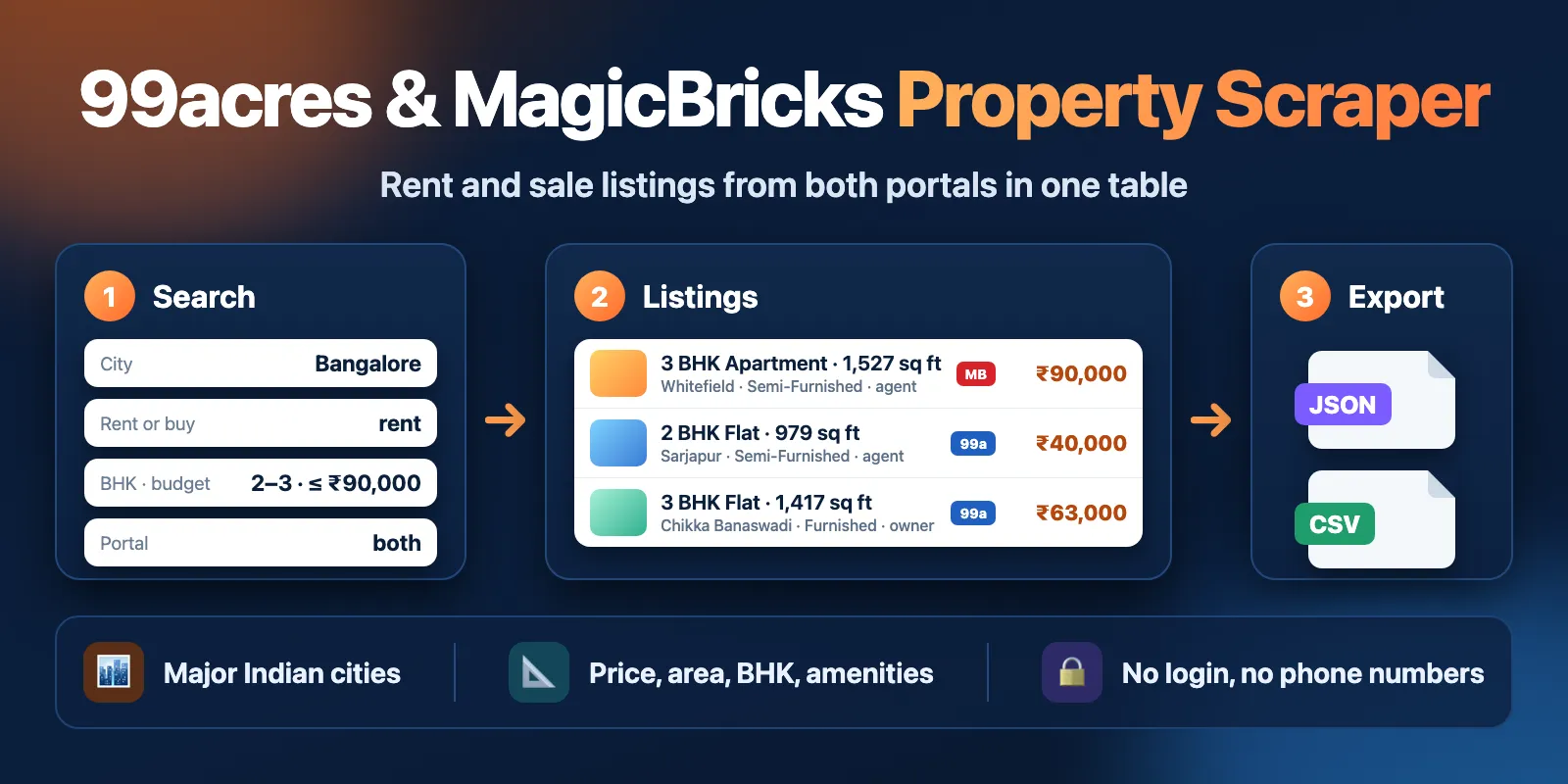
Table of contents
- What it does
- Quick start
- Input
- Output
- Pricing and limits
- Use cases
- API and integrations
- Use with AI agents (MCP)
- Limits and partial results
- Troubleshooting
- FAQ
- Support
What it does
The Actor opens the search results of MagicBricks, 99acres or both for the city you choose, page by page, and saves each listing to a Dataset. You choose:
- City (
city): for example Bangalore, Mumbai, Pune, New Delhi, Gurgaon, Noida, Hyderabad, Chennai, Kolkata or Ahmedabad. Bengaluru and Gurugram work too. - Rent or buy (
listingType): rental listings (price per month) or homes for sale (full price). - Portal (
site): both portals (default), only MagicBricks or only 99acres. - Filters: property type, BHK and budget in INR.
Both portals use the same output fields, so you get one table. Each row has the price and the price per sq ft, carpet, built-up and super built-up area, BHK, bathrooms, furnishing, floor, locality, coordinates, project and builder, amenities as names (for example Lift, Swimming Pool), all photo URLs from the search result, and who listed it: owner, agent or builder.
Good fit
- Compare rents or sale prices in one city across MagicBricks and 99acres.
- Build a list of 2–3 BHK flats under a budget with area, locality and amenities.
- Track new projects and builders in a city with RERA numbers and price per sq ft.
Not a fit / limits
- Residential homes only: apartments, builder floors, houses, villas, penthouses and studios. No plots, offices, shops or PG.
- No phone numbers, e-mails or names of private owners. The Actor does not log in and does not open single listing pages.
- One city per run and at most 1,000 listings per run. For more, run the Actor again with another city, BHK or budget.
- Other portals (Housing.com, NoBroker, Square Yards) are not supported.
Quick start
- Open the Input tab.
- Keep City =
Bangalore(prefill) or type your city. - Keep Rent or buy =
rentand Max listings =20(prefill) for a first test. - Click Start.
- Open the Output tab → Listings and check
title,price,areaSqftandlocality.
Expected result: 20 listings, 10 from MagicBricks and 10 from 99acres, in about 10–25 seconds.
Input
Input fields
| Field | Plain name | Type | Required | Default / prefill | Allowed values | Effect | Example | Recommendation |
|---|---|---|---|---|---|---|---|---|
city | City | string | yes | prefill Bangalore | 2–40 letters, spaces or hyphens, in English | City to search on the portals. | Pune | Use the English name. Bengaluru and Gurugram are accepted. |
listingType | Rent or buy | string | no | default rent | rent, buy | Rental listings or homes for sale. | buy | For rent, all prices are per month. |
site | Portal | string | no | default both | both, magicbricks, 99acres | Which portal to read. | 99acres | Keep both to compare portals in one table. |
maxItems | Max listings | integer | no | default 100, prefill 20 | 1–1000 | Total listings to save across both portals. | 200 | You pay per listing and per page, so set what you need. |
propertyType | Property type | array of strings | no | empty = all homes | apartment, builderFloor, house, villa, penthouse, studio | Keeps only these types. | ["apartment", "builderFloor"] | 99acres has no separate penthouse type. |
bhk | Bedrooms (BHK) | array of strings | no | empty = any | 1, 2, 3, 4, 5 (5 = 5 or more) | Keeps only these BHK numbers. | ["2", "3"] | Listings without a BHK number (some studios) are left out when set. |
budgetMin | Min price (INR) | integer | no | empty | 0 – 10,000,000,000 | Lowest price in rupees. | 20000 | For buy, use the full price: 5000000 = 50 lakh. |
budgetMax | Max price (INR) | integer | no | empty | 1 – 10,000,000,000 | Highest price in rupees. | 60000 | Listings without a price are left out when a budget is set. |
Empty input: city is required. Without it, or with a city in another script (for example बेंगलुरु), the run fails at once with an input error and only the start event is charged. A listing that appears twice in the results is saved and charged once.
Interacting settings
| When | Input A | Input B | Effective behavior | Example | Cost/result effect |
|---|---|---|---|---|---|
| Both portals | site: both | maxItems | The limit is split between portals (MagicBricks gets the odd one). If one portal runs out, the other fills the rest. | maxItems: 20 | 10 + 10 rows. |
| Penthouse only on 99acres | propertyType: ["penthouse"] | site: 99acres | 99acres has no penthouse filter, so nothing is searched. | Run ends no_results, only the start event. | |
| Budget set | budgetMin / budgetMax | listingType | Rent budget is per month; buy budget is the full price. | rent, budgetMax: 60000 | Fewer rows per page, so more pages per listing. |
budgetMin > budgetMax | budgetMin | budgetMax | Input error, the run stops before any request. | 90000 / 10000 | Only the start event. |
| Very narrow filter | bhk, budget* | maxItems | A portal stops after 5 pages in a row with no matching listing. | budgetMax: 500 | No rows; about 11 pages charged. |
Input examples
Rent: 2–3 BHK flats under ₹90,000 in Bangalore
Expected behavior: both portals are searched, 50 listings each.
Expected output: flats with price, areaSqft, bhk, locality, furnishing, deposit.
Limit or cost note: you pay for each saved listing and each page read.
Buy: homes for sale in Mumbai on MagicBricks only
Expected behavior: MagicBricks sale listings in the portal's own order.
Expected output: listings with price, priceText (for example 1.25 Cr), carpetAreaSqft, projectName, builderName, reraId.
Limit or cost note: one MagicBricks page gives about 30 listings, so 200 rows need about 7 pages.
Output
Each row is one listing from one portal. The default view Listings shows the main columns; the view All fields shows every field, including area types, floor, amenities and dates. Export the Dataset as JSON, CSV, Excel or other Apify formats.
Output example
A real row from the prefill run (Bangalore, rent, 20 listings), trimmed: only one photo is shown and the description is shortened.
null means the portal did not show this value on the search result. It never means zero. The Actor does not compute missing values itself: for example, pricePerSqft stays null when the portal does not give it.
Output fields
| Field | Meaning | Type | Can be empty? | Example / enum | Source / notes |
|---|---|---|---|---|---|
id | Unique row ID: portal + listing ID | string | no | 99acres:93377100 | Actor |
site | Portal of the row | string | no | magicbricks, 99acres | Actor |
listingId | Portal's own listing ID | string | no | 93377100 | portal |
url | Listing page on the portal | string | no | portal | |
title | Listing headline | string | yes | 2 BHK Flat for rent in Sarjapur, Bangalore | portal |
listingType | Rent or buy | string | no | rent, buy | input |
price | Price in INR; for rent, per month | number | yes: "Price on request" | 40000 | portal |
priceText | Price as the portal writes it | string | yes | 40,000, 1.25 Cr | portal |
pricePerSqft | INR per sq ft | number | yes | 40 | portal, not computed |
areaSqft, areaType | Area shown on the card and which area it is | number, string | yes | 979, Super Built-up Area | portal; on MagicBricks areaType is set only when the card has only the carpet area |
carpetAreaSqft, builtUpAreaSqft, superAreaSqft | Area types in sq ft | number | yes | 645, null, 979 | portal |
bhk | Bedrooms | integer | yes: some studios | 2 | portal |
bathrooms, balconies | Counts | integer | yes | 2, 1 | portal |
propertyType | Type as the portal names it | string | yes | Apartment, Independent House | portal |
furnishing | Furnishing | string | yes | Furnished, Semi-Furnished, Unfurnished | portal |
floor, totalFloors | Floor of the unit, floors in the building | string, integer | yes | 10, 28; Ground | portal |
facing | Direction | string | yes | East | portal |
locality, city | Neighbourhood and city | string | yes | Sarjapur, Bangalore | portal |
latitude, longitude | Point of the listing | number | yes | 12.8776, 77.7737 | portal |
projectName | Housing project or society | string | yes | Eden Park at The Prestige City | portal |
builderName | Builder or developer | string | yes | SOBHA Limited | MagicBricks only |
amenities | Amenity names | array | no, can be [] | ["Lift", "Swimming Pool"] | portal codes turned into names |
images | Photo URLs | array | no, can be [] | portal CDN | |
listedBy | Who posted it | string | yes | owner, agent, builder | portal |
agencyName | Agency or builder company | string | yes: null for owners and for names that look like a person | G R Enterprises | privacy rule |
availability | Possession or availability | string | yes | Ready to Move, Immediately, 2026-08-09 | portal |
tenantPreference | Rent only: preferred tenants | string | yes | Family | portal |
deposit | Rent only: security deposit, INR | number | yes | 150000 | portal |
maintenance, maintenancePeriod | Maintenance charge and period | number, string | yes | 3500, Monthly | MagicBricks only |
reraId | RERA registration number | string | yes | PRM/KA/RERA/1251/446/PR/210219/003939 | portal |
description | Listing text, up to 2,000 characters | string | yes | phone numbers and e-mails hidden | |
postedAt, updatedAt | Posted and last updated (ISO 8601) | string | yes | 2026-08-09T08:40:01.000Z | portal |
position | Order in the portal results in this run | integer | no | 1 | Actor |
searchUrl | Portal search page the row came from | string | no | Actor | |
fetchedAt | When the row was collected (UTC) | string | no | 2026-10-14T15:01:56.707Z | Actor |
Output entities and surfaces
| Situation | Where | Result shape | User action |
|---|---|---|---|
| Normal listing | Dataset, views Listings and All fields | one row per listing | open, export or use by API |
| Filters match nothing | Dataset is empty; RUN_SUMMARY.status = no_results | run SUCCEEDED | widen BHK or budget |
| Unknown city | RUN_SUMMARY.status = not_found | run SUCCEEDED, no rows | check the spelling, for example New Delhi, Gurgaon |
| Stopped early (cost limit, time limit) | Dataset has the saved rows; RUN_SUMMARY.status = partial, reason = CHARGE_LIMIT or TIME_LIMIT | run SUCCEEDED | raise the limit and run again |
| One portal blocked, the other worked | rows from the working portal; status = partial, reason = SITE_ERROR | run SUCCEEDED | run again later for the missing portal |
| Portal error with no rows | status = error, reason = SOURCE_ERROR | run FAILED | run again later |
| Input error | status = invalid_input | run FAILED, no requests | fix the input |
RUN_SUMMARY (in the run's key-value store) has the run status, reason, message, counts (items, pages, bySite) and one entry per portal with status (complete, partial, no_results, not_found, skipped, error), items, totalOnSite, pagesFetched, filteredOut, searchUrl and error.
Pricing and limits
Pricing unit
This Actor uses pay-per-event pricing. You pay for:
| Event | Price | When |
|---|---|---|
| Actor start | $0.001 | once per run |
| Page read | $0.005 | for each portal page the Actor reads: a search results page or the 99acres city page |
| Saved listing | $0.0018 (Free plan), $0.0017 (Bronze), $0.0015 (Silver), $0.0012 (Gold and higher) | for each listing saved to the Dataset |
One results page gives about 25–30 listings, so on the Free plan 1,000 listings cost about $2.00 all in, and on Gold about $1.40. Residential proxy and platform usage are included; you do not pay them separately.
- A run with no listings still pays for the pages it read: an unknown city is about 2 pages ($0.011), a filter with no match stops after 5 empty pages per portal (about $0.056).
- An input error costs only the start event: $0.001.
- Listings that are filtered out or repeated are not charged. Retries after a portal block are not charged as pages.
- If you set a maximum cost for the run, the Actor stops before a page or a listing that does not fit. The run still ends
SUCCEEDED, withRUN_SUMMARY.status=partialandreason=CHARGE_LIMIT. Saved listings stay.
Cost examples
Free plan prices. Pages and times are from real test runs.
| Scenario | Input scope | Listings | Pages | Total (Free) | Time |
|---|---|---|---|---|---|
| First test | Bangalore, rent, maxItems: 20 | 20 | 3 | $0.052 | 9–18 s |
| One listing | Kolkata, rent, studio, maxItems: 1 | 1 | 1 | $0.008 | ~6 s |
| City overview | Chennai, buy, maxItems: 200 | 200 | 9 | $0.41 | ~40 s |
| Large | Hyderabad, rent, maxItems: 500 | 500 | 20 | $1.00 | ~84 s |
| Maximum | Mumbai, rent, maxItems: 1000 | 1,000 | 38 | $1.99 | ~142 s |
| Filter with no match | budgetMax: 500 | 0 | 11 | $0.056 | ~30 s |
| Unknown city | Atlantis | 0 | 2 | $0.011 | ~5 s |
Use cases
| Buyer job | Input path | Output entity | Key fields | Next integration |
|---|---|---|---|---|
| Rent price check by locality | city, listingType: rent, bhk | listing | price, locality, areaSqft, furnishing | Google Sheets or CSV |
| Sale price per sq ft in a city | listingType: buy | listing | price, pricePerSqft, carpetAreaSqft, locality | BI tool via API |
| New projects and builders | listingType: buy, site: magicbricks | listing | projectName, builderName, reraId, availability | CRM or spreadsheet |
| Compare portals | site: both | listing | site, price, locality, listedBy | Dataset export |
| Owner vs agent listings | any | listing | listedBy, agencyName, deposit | filter in a spreadsheet |
API and integrations
- API: start the Actor with the same JSON input as in the examples, then read the Dataset items. Use
?view=overviewfor the Listings columns. - Export: JSON, CSV, Excel, XML and other formats from the Dataset.
- Scheduling: create an Apify schedule to collect the same city every day or week.
- Webhooks / no-code: use Apify integrations (Make, Zapier, Google Sheets, Slack) to send rows when the run finishes.
Use with AI agents (MCP)
- MCP server URL with only this Actor:
https://mcp.apify.com?tools=cliqtomedia/india-property-listings - Smallest useful input:
- Key output fields:
price(INR; per month for rent;null= price on request),areaSqft(area on the card,areaTypesays which),bhk(bedrooms),locality(neighbourhood),siteandurl(portal and listing page). - A run with 20 listings takes about 10–25 seconds and costs $0.052 on the Free plan. One city per run, at most 1,000 listings.
Limits and partial results
- At most 1,000 listings per run and 60 pages per portal. The test run with 1,000 listings finished in 142 s.
- The default timeout is 300 s. Before the timeout the Actor stops new requests and keeps saved rows (
partial,TIME_LIMIT). For 1,000 listings with narrow filters or withsite: 99acresonly (about 40 pages at a slower pace), give the run more time, for example 600 s. - With very narrow filters, a portal stops after 5 pages in a row with no matching listing, so a small number of matches can be missed deep in the results.
- Values come from the search result cards. Fields that appear only on the listing page (full description, phone numbers) are not collected.
- 99acres sometimes shows a check page to fast visitors. The Actor slows down and retries through another Indian IP; if a portal still does not answer, its status is
errorand the other portal's rows stay.
Troubleshooting
The run returns 0 listings
Symptom: the Dataset is empty, RUN_SUMMARY.status = no_results.
Likely reason: the BHK, type or budget filters match nothing, or a budget is set for the wrong mode (rent is per month, buy is the full price).
Check: open the searchUrl from RUN_SUMMARY.sites in a browser.
Action: widen the budget or remove a filter.
Status not_found
Symptom: the run message says the city was not found.
Likely reason: the city name is misspelled or not in English.
Action: use the English name, for example New Delhi, Gurgaon, Bangalore.
Run is partial with reason SITE_ERROR
Symptom: rows only from one portal.
Likely reason: the other portal blocked or did not answer this time. This is not an empty result.
Action: run again later, or run only the missing portal with site.
Run is partial with reason CHARGE_LIMIT or TIME_LIMIT
Symptom: fewer rows than maxItems.
Action: raise the maximum cost or the timeout in run options, or lower maxItems.
FAQ
Do I need a MagicBricks or 99acres account?
No. The Actor reads public search results without login. Indian residential proxy is included in the price.
Why are some fields null?
The portal did not show this value on the search result. For example, MagicBricks often gives only the carpet area, and 99acres does not give the builder name. The Actor does not guess missing values.
Does it collect phone numbers or owner names?
No. Phone numbers and e-mails in descriptions are hidden, agencyName is always null for owners, and also null when the portal shows a person's name instead of a company. Only agency and builder company names are kept.
Are the results complete and fresh?
Each row is what the portal showed at fetchedAt. The portals order and limit their own results; RUN_SUMMARY.sites[].totalOnSite shows how many listings the portal reported. Each listing is saved once per run.
Can I search several cities in one run?
No, one city per run. Start one run per city, or call the Actor from a schedule or the API for each city.
Support
For a bug, question or feature request, open an issue on the Issues tab of this Actor. Include the run ID, the input (city, rent or buy, portal, filters) and the status message. Never send tokens or account data.


